Js的组成
- ECMAscript:Javascript语法
- DOM:页面文档对象模型
- BOM浏览器对象模型
Js输入输出语句
| alert(msg) | 浏览器弹出警示框 | | —- | —- | | console.log(msg) | 浏览器控制台打印输出信息 | | prompt(info) | 浏览器弹出输入框,用户可以输入 |
变量
var
使用 var 声明的变量存在于最近的函数或全局作用域中,没有块级作用域的机制。
没有块作用域很容易污染全局,下面函数中的变量污染了全局环境。
function run() {web = "houdunren";}run();console.log(web); //houdunren
没有块作用作用域时var也会污染全局。
for (var i = 0; i < 10; i++) {console.log(i);}console.log(i);
使用let有块作用域时则不会
let i = 100;for (let i = 0; i < 6; i++) {console.log(i);}console.log(i);
下例中体验到 var 没有块作用域概念, do/while 定义的变量可以在块外部访问到
var num = 0;function show() {var step = 10;do {var res = 0;console.log(num = step++);res = num;} while (step < 20);console.log(`结果是${res}`);}show();
var 全局声明的变量也存在于 window对象中
var hd = "houdunren";console.log(window.hd); //houdunren
以往没有块任用时使用立即执行函数模拟块作用域
(function() {var $ = this.$ = {};$.web = "后盾人";}.bind(window)());console.log($.web);
有了块作用域后实现就变得简单多了
{let $ = (window.$ = {});$.web = "后盾人";}console.log($.web);
let
与 var 声明的区别是 let/const 拥有块作用域,下面代码演示了块外部是无法访问到let声明的变量。
建议将let在代码块前声明。
用逗号分隔定义多个。let存在块作用域特性,变量只在块域中有效。
if (true) {let web = 'hdcms',url = 'houdunren.com';console.log(web); //hdcms}console.log(web); //web is not defined
块内部是可以访问到上层作用域的变量。
if (true) {let user = "向军大叔";(function() {if (true) {console.log(`这是块内访问:${user}`);}})();}console.log(user);
每一层都是独立作用域,里层作用域可以声明外层作用域同名变量,但不会改变外层变量
function run() {hd = "houdunren";if (true) {let hd = "hdcms";console.log(hd); //hdcms}console.log(hd); //houdunren}run();
const
使用 const 用来声明常量,这与其他语言差别不大,比如可以用来声明后台接口的URI地址。
- 常量名建议全部大写
- 只能声明一次变量
- 声明时必须同时赋值
- 不允许再次全新赋值
- 可以修改引用类型变量的值
- 拥有块、函数、全局作用域
常量不允许全新赋值举例。
try {const URL = "https://www.houdunren.com";URL = "https://www.hdcms.com"; //产生错误} catch (error) {throw new Error(error);}
改变常量的引用类型值。
const INFO = {url: 'https://www.houdunren.com',port: '8080'};INFO.port = '443';console.log(INFO);
下面演示了在不同作用域中可以重名定义常量
const NAME = '后盾人';function show() {const NAME = '向军大叔';return NAME;}console.log(show()); //输出向军大叔console.log(NAME); //输出后盾人
重复定义
使用 var 可能造成不小心定义了同名变量
//优惠价var price = 90;//商品价格var price = 100;console.log(`商品优惠价格是:${price}`);
使用let 可以避免上面的问题,因为let声明后的变量不允许在同一作用域中重新声明
let web = 'houdunren.com';let web = '后盾人'; //Identifier 'web' has already been declared
不同作用域可以重新声明
let web = 'houdunren.com';if (true) {let web = '后盾人'; //Identifier 'web' has already been declared}
但可以改变值这是与const不同点
let price = 90;price = 88;console.log(`商品价格是:${price}`);
let 全局声明的变量不存在于 window对象中,这与var声明不同
let hd = "hdcms";console.log(window.hd); //undefined
TDZ
TDZ 又称暂时性死区,指变量在作用域内已经存在,但必须在let/const声明后才可以使用。
TDZ可以让程序保持先声明后使用的习惯,让程序更稳定。
变量要先声明后使用。
建议使用let/const 而少使用var。
使用let/const 声明的变量在声明前存在临时性死区(TDZ)使用会发生错误
console.log(x); // Cannot access 'x' before initializationlet x = 1;
在run函数作用域中产生TDZ,不允许变量在未声明前使用。
hd = "houdunren";function run() {console.log(hd);let hd = "hdcms";}run();
下面代码b没有声明赋值不允许直接使用
function hd(a = b, b = 3) {}hd(); //Cannot access 'b' before initialization
因为a已经赋值,所以b可以使用a变量,下面代码访问正常
function hd(a = 2, b = a) {}hd();
锁死变量不允许修改的方法
<script>const HOST = {url:"http://www.houdunren.com/api",port:443};Object.freeze(HOST); //用了这个方法之后 7行语句就修改不了端口了HOST.port = 80;console.log(HOST);</script>
传值和传址
<script>//传值 两个变量独立储存let a = 1;let b = a;//传址 两个变量存同一个地址let e = {};let f = e;</script>
或与非
逻辑与
用&&表示。
举例:a&&b(其中a、b都代表一个条件)
如果a和b都为真,则结果为真,如果a和b中有一来个条件为假,则结果为假。
逻辑或
用||表示。
举例:a||b(其中a、b都代表一个条件)
如果a和b有一个或以上为真,则结果为真,二者都为假知时,结果为假。
逻辑非
用!表示。
举例:!a(a代表一个条件)
如果a为假,则!a为真,如果a为真,则!a为假。
filter函数
filter函数的使用
let lessons = [{title:'媒体查询响应式布局',category:'css'},{title:'FLEX弹性盒模型',category:'css'},{title:'MYSQL多表查询随意操作',category:'mysql'}];const csslessons = lessons.filter(function(lesson){return lesson['category'] == 'css';});console.table(csslessons);
原理
let hd = [1,2,3,4,5];function filter(array,callback){let newArray = [];for (const value of array) {if(callback(value) === true){newArray.push(value);}}return newArray;}console.table(filter(hd,function(value){return value > 2;})); //3,4,5
箭头函数
箭头函数表达式没有自己的this,arguments,super或new.target。
- 引入箭头函数的作用:更简短的函数并且不绑定this
不绑定thislet sum = (x,y,z) => { return x+y+z; } //不绑定this
在箭头函数出现之前,每个新定义的函数都有他自己的this值。(在构造函数的情况下是一个新对象,在严格模式的函数调用中为 undefined,如果该函数被作为“对象方法”调用则为基础对象等)。
通过call、apply调用箭头函数
由于箭头函数没有自己的this指针,通过call()、apply()方法调用时,第一个参数会被忽略。(箭头函数中若用了this,这个this指向包裹箭头函数的第一个普通函数的 this。)
不绑定arguments
大多数情况下,使用剩余参数是相较于arguments对象的更好选择。
箭头函数不能使用new操作符
箭头函数不能用作构造器,和 new一起用会抛出错误。
箭头函数没有prototype属性var Foo = () => {};var foo = new Foo(); // TypeError: Foo is not a constructor
箭头函数不能用作生成器
yield 关键字通常不能在箭头函数中使用(除非是嵌套在允许使用的函数内)。因此,箭头函数不能用作生成器。
返回对象字面量时
箭头函数返回简单值时可以简写成:
but返回对象字面量时不口以这样var func = () => {foo: 1},需要用圆括号括起来let sum = ( x, y ) => x + y
var func = () => ({foo: 1});
字符类型
弱类型
在JS中变量类型由所引用的值决定。var web = "hdcms";console.log(typeof web); //stringweb = 99;console.log(typeof web); //numberweb = {};console.log(typeof web); //object
undefined和null的用法
null表示”没有对象”,即该处不应该有值。典型用法是:**
- 作为函数的参数,表示该函数的参数不是对象。
作为对象原型链的终点。
Object.getPrototypeOf(Object.prototype)// null
undefined表示”缺少值”,就是此处应该有一个值,但是还没有定义。典型用法是:
变量被声明了,但没有赋值时,就等于undefined。
- 调用函数时,应该提供的参数没有提供,该参数等于undefined。
- 对象没有赋值的属性,该属性的值为undefined。
- 函数没有返回值时,默认返回undefined。
var i;i // undefinedfunction f(x){console.log(x)}f() // undefinedvar o = new Object();o.p // undefinedvar x = f();x // undefined
语句
label
标签(label) 为程序定义位置,可以使用continue/break跳到该位置。
下面取i+n 大于15时退出循环houdunren: for (let i = 1; i <= 10; i++) {hdcms: for (let n = 1; n <= 10; n++) {if (n % 2 != 0) {continue hdcms;}console.log(i, n);if (i + n > 15) {break houdunren;}}}
for/in
用于遍历对象的所有属性,for/in主要用于遍历对象,不建议用来遍历数组。
遍历数组操作
遍历对象操作let hd = [{ title: "第一章 走进JAVASCRIPT黑洞", lesson: 3 },{ title: "ubuntu19.10 配置好用的编程工作站", lesson: 5 },{ title: "媒体查询响应式布局", lesson: 8 }];document.write(`<table border="1" width="100%"><thead><tr><th>标题</th><th>课程数</th></tr></thead>`);for (let key in hd) {document.write(`<tr><td>${hd[key].title}</td><td>${hd[key].lesson}</td></tr>`);}document.write("</table>");
遍历window对象的所有属性let info = {name: "后盾人",url: "houdunren.com"};for (const key in info) {if (info.hasOwnProperty(key)) {console.log(info[key]);}}
for (name in window) {console.log(window[name]);}
for/of
用来遍历 Arrays(数组), Strings(字符串), Maps(映射), Sets(集合)等可迭代的数据结构。
与for/in不同的是for/of每次循环取其中的值而不是索引。
遍历字符串let arr = [1, 2, 3];for (const iterator of arr) {console.log(iterator);}
使用迭代特性遍历数组(后面章节会介绍迭代器)let str = 'houdunren';for (const iterator of str) {console.log(iterator);}
使用const hd = ["hdcms", "houdunren"];for (const [key, value] of hd.entries()) {console.log(key, value); //这样就可以遍历了}
for/of也可以用来遍历DOM元素<body><ul><li></li><li></li></ul></body><script>let lis = document.querySelectorAll("li");for (const li of lis) {li.addEventListener("click", function() {this.style.backgroundColor = "red";});}</script>
类型检测
JS提供了非常丰富的数据类型,开发者要学会使用最适合的数据类型处理业务 。
typeof
typeof 用于返回以下原始类型
- 基本类型:number/string/boolean
- function
- object
- undefined
可以使用typeof用于判断数据的类型
let a = 1;console.log(typeof a); //numberlet b = "1";console.log(typeof b); //string//未赋值或不存在的变量返回undefinedvar hd;console.log(typeof hd);function run() {}console.log(typeof run); //functionlet c = [1, 2, 3];console.log(typeof c); //objectlet d = { name: "houdunren.com" };console.log(typeof d); //object
instanceof
instanceof 运算符用于检测构造函数的 prototype 属性是否出现在某个实例对象的原型链上。
也可以理解为是否为某个对象的实例,typeof不能区分数组,但instanceof则可以。
后面章节会详细介绍原型链
let hd = [];let houdunren = {};console.log(hd instanceof Array); //trueconsole.log(houdunren instanceof Array); //falselet c = [1, 2, 3];console.log(c instanceof Array); //truelet d = { name: "houdunren.com" };console.log(d instanceof Object); //truefunction User() {}let hd = new User();console.log(hd instanceof User); //true
值类型与对象
下面是使用字面量与对象方法创建字符串,返回的是不同类型。
let hd = "houdunren";let cms = new String("hdcms");console.log(typeof hd, typeof cms); //string object
只有对象才有方法使用,但在JS中也可以使用值类型调用方法,因为它会在执行时将值类型转为对象。
let hd = "houdunren";let cms = new String("hdcms");console.log(hd.length); //9console.log(cms.length); //5
模板字面量
使用 ... 符号包裹的字符串中可以写入引入变量与表达式
let url = 'houdunren.com';console.log(`后盾人网址是${url}`); //后盾人网址是houdunren.com
支持换行操作不会产生错误
let url = 'houdunren.com';document.write(`后盾人网址是${url}大家可以在网站上学习到很多技术知识`);
使用表达式
function show(title) {return `后盾人`;}console.log(`${show()}`)
模板字面量支持嵌套使用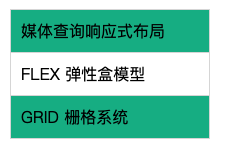
let lessons = [{title: '媒体查询响应式布局'},{title: 'FLEX 弹性盒模型'},{title: 'GRID 栅格系统'}];function template() {return `<ul>${lessons.map((item)=>`<li>${item.title}</li>`).join('')}</ul>`;}document.body.innerHTML = template();
标签模板
标签模板是提取出普通字符串与变量,交由标签函数处理
let lesson = 'css';let web = '后盾人';tag `访问${web}学习${lesson}前端知识`;function tag(strings, ...values) {console.log(strings); //["访问", "学习", "前端知识"]console.log(values); // ["后盾人", "css"]}
下面例子将标题中有后盾人的使用标签模板加上链接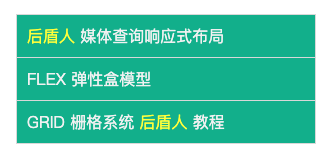
let lessons = [{ title: "后盾人媒体查询响应式布局", author: "后盾人向军" },{ title: "FLEX 弹性盒模型", author: "后盾人" },{ title: "GRID 栅格系统后盾人教程", author: "古老师" }];function links(strings, ...vars) {return strings.map((str, key) => {return (str +(vars[key]? vars[key].replace("后盾人",`<a href="https://www.houdunren.com">后盾人</a>`): ""));}).join("");}function template() {return `<ul>${lessons.map(item => links`<li>${item.author}:${item.title}</li>`).join("")}</ul>`;}document.body.innerHTML += template();
字符串
获取长度
使用length属性可以获取字符串长度
console.log("houdunren.com".length)
大小写转换
将字符转换成大写格式
console.log('houdunren.com'.toUpperCase()); //HOUDUNREN.COM
转字符为小写格式
console.log('houdunren.com'.toLowerCase()); //houdunren.com
移除空白
使用trim删除字符串左右的空白字符
let str = ' houdunren.com ';console.log(str.length);console.log(str.trim().length);
使用trimLeft删除左边空白,使用trimRight删除右边空白
let name = " houdunren ";console.log(name);console.log(name.trimLeft());console.log(name.trimRight());
获取单字符
根据从0开始的位置获取字符
console.log('houdunren'.charAt(3))
使用数字索引获取字符串
console.log('houdunren'[3])
截取字符串
使用 slice、substr、substring 函数都可以截取字符串。
- slice、substring 第二个参数为截取的结束位置
substr 第二个参数指定获取字符数量
let hd = 'houdunren.com';console.log(hd.slice(3)); //dunren.comconsole.log(hd.substr(3)); //dunren.comconsole.log(hd.substring(3)); //dunren.comconsole.log(hd.slice(3, 6)); //dunconsole.log(hd.substring(3, 6)); //dunconsole.log(hd.substring(3, 0)); //hou 较小的做为起始位置console.log(hd.substr(3, 6)); //dunrenconsole.log(hd.slice(3, -1)); //dunren.co 第二个为负数表示从后面算的字符console.log(hd.slice(-2));//om 从末尾取console.log(hd.substring(3, -9)); //hou 负数转为0console.log(hd.substr(-3, 2)); //co 从后面第三个开始取两个
查找字符串
从开始获取字符串位置,检测不到时返回
-1console.log('houdunren.com'.indexOf('o')); //1console.log('houdunren.com'.indexOf('o', 3)); //11 从第3个字符向后搜索
从结尾来搜索字符串位置
console.log('houdunren.com'.lastIndexOf('o')); //11console.log('houdunren.com'.lastIndexOf('o', 7)); //1 从第7个字符向前搜索
search() 方法用于检索字符串中指定的子字符串,也可以使用正则表达式搜索
let str = "houdunren.com";console.log(str.search("com"));console.log(str.search(/\.com/i));
includes字符串中是否包含指定的值,第二个参数指查找开始位置console.log('houdunren.com'.includes('o')); //trueconsole.log('houdunren.com'.includes('h', 11)); //true
startsWith是否是指定位置开始,第二个参数为查找的开始位置。console.log('houdunren.com'.startsWith('h')); //trueconsole.log('houdunren.com'.startsWith('o', 1)); //true
endsWith是否是指定位置结束,第二个参数为查找的结束位置。console.log('houdunren.com'.endsWith('com')); //trueconsole.log('houdunren.com'.endsWith('o', 2)); //true
下面是查找关键词的示例
const words = ["php", "css"];const title = "我爱在后盾人学习php与css知识";const status = words.some(word => {return title.includes(word);});console.log(status);
替换字符串
replace方法用于字符串的替换操作let name = "houdunren.com";web = name.replace("houdunren", "hdcms");console.log(web);
默认只替换一次,如果全局替换需要使用正则(更强大的使用会在正则表达式章节介绍)
let str = "2023/02/12";console.log(str.replace(/\//g, "-"));
使用字符串替换来生成关键词链接
const word = ["php", "css"];const string = "我喜欢在后盾人学习php与css知识";const title = word.reduce((pre, word) => {return pre.replace(word, `<a href="?w=${word}">${word}</a>`);}, string);document.body.innerHTML += title;
使用正则表达式完成替换
let res = "houdunren.com".replace(/u/g, str => {return "@";});console.log(res);
Symbol
用Symbol解决字符串耦合的问题
let user1 = {name:'李四',key:Symbol()};let user2 = {name:'李四',key:Symbol()};let grade = {[user1.key] : { js : 99,css : 98},[user2.key] : { js : 11,css : 32}};console.log(grade);
set
获取判断删除查看清空元素
let set = new Set(['hdcms','houdunren']);let set = new Set(['hdcms']); //'h','d','c','m','s'console.log(set.size); //获取元素数量console.log(set.has('hdcms')); //判断是否有此元素set.delete('hdcms'); //删除元素set.values(); //查看元素的值set.clear(); //彻底清空
使用set处理网站关键词
<!DOCTYPE html><html lang="en"><head><meta charset="UTF-8"><meta name="viewport" content="width=device-width, initial-scale=1.0"><title>Document</title></head><body><input type="text" name="hd" id=""><ul></ul><script>let obj = {data:new Set(),set keyword(word){this.data.add(word);},show(){let ul = document.querySelector('ul');ul.innerHTML = '';this.data.forEach(function(value){ul.innerHTML += `<li>${value}</li>`;});}};let input = document.querySelector("[name= 'hd']");input.addEventListener('blur',function(){obj.keyword = this.value;obj.show();});</script></body></html>
用set实现并集交集差集
<script>let set1 = new Set([1,2,3,4,5,6]);let set2 = new Set([2,4,5,7,8,9]);//并集console.log(new Set([...set1,...set2]));//差集console.log(new Set([...set1].filter(function(item){return !set2.has(item);})));//交集console.log(new Set([...set1].filter(function(item){return set2.has(item);})));</script>
WeakSet
添加删除判断元素
<script>// let set = new WeakSet('hdcms'); 报错 只能加引用值// let set = new WeakSet(['hdcms','houdunren']); 报错 只能加引用值// set.add(['hdcms','houdunren']); 不报错let nodes = new WeakSet();let divs = document.querySelectorAll('div');divs.forEach(function(item){nodes.add(item);});console.log(nodes);nodes.delete(divs[0]); // 移除元素console.log(nodes.has('hdcms')); //判断元素</script>
方法
splice和splice的增删改查
let arr = [1,2,3,4,5];let hd = arr.splice(1,2); //截取2,3let hd = arr.splice(1); //截取2,3,4,5 原数组不变let hd = arr.splice(0,2); //截取1,2 原数组改变let hd = arr.splice(0,2,'aaa','bbb'); //aaa,bbb,1,2let hd = arr.splice(1,1,'后盾人'); //1,后盾人,3,4,5let hd = arr.splice(2,0,'后盾人'); //1,2,后盾人,3,4,5let hd = arr.splice(arr.length,0,'后盾人1','后盾人2'); //1,2,3,4,5,后盾人1,后盾人2let hd = arr.splice(0,0,'后盾人1','后盾人2'); //后盾人1,后盾人2,1,2,3,4,5console.log(hd);
Array.from()方法
Array.from()方法就是将一个类数组对象或者可遍历对象转换成一个真正的数组。
那么什么是类数组对象呢?所谓类数组对象,最基本的要求就是具有length属性的对象。将类数组对象转换为真正数组:
let arrayLike = {0: 'tom',1: '65',2: '男',3: ['jane','john','Mary'],'length': 4}let arr = Array.from(arrayLike)console.log(arr) // ['tom','65','男',['jane','john','Mary']]
那么,如果将上面代码中length属性去掉呢?实践证明,答案会是一个长度为0的空数组。
这里将代码再改一下,就是具有length属性,但是对象的属性名不再是数字类型的,而是其他字符串型的,代码如下:let arrayLike = {'name': 'tom','age': '65','sex': '男','friends': ['jane','john','Mary'],length: 4}let arr = Array.from(arrayLike)console.log(arr) // [ undefined, undefined, undefined, undefined ]
会发现结果是长度为4,元素均为undefined的数组。
由此可见,要将一个类数组对象转换为一个真正的数组,必须具备以下条件:
- 该类数组对象必须具有length属性,用于指定数组的长度。如果没有length属性,那么转换后的数组是一个空数组。
- 该类数组对象的属性名必须为数值型或字符串型的数字。ps: 该类数组对象的属性名可以加引号,也可以不加引号
将Set结构的数据转换为真正的数组:
let arr = [12,45,97,9797,564,134,45642]let set = new Set(arr)console.log(Array.from(set)) // [ 12, 45, 97, 9797, 564, 134, 45642 ]
Array.from还可以接受第二个参数,作用类似于数组的map方法,用来对每个元素进行处理,将处理后的值放入返回的数组。如下:
let arr = [12,45,97,9797,564,134,45642]let set = new Set(arr)console.log(Array.from(set, item => item + 1)) // [ 13, 46, 98, 9798, 565, 135, 45643 ]
将字符串转换为数组:
let str = 'hello world!';console.log(Array.from(str)) // ["h", "e", "l", "l", "o", " ", "w", "o", "r", "l", "d", "!"]
Array.from参数是一个真正的数组:
console.log(Array.from([12,45,47,56,213,4654,154]))
像这种情况,Array.from会返回一个一模一样的新数组。
map()的使用
概念
map()方法定义在JavaScript的Array中,它返回一个新的数组,数组中的元素为原始数组调用函数处理后的值。
注意:map()不会对空数组进行检测。
map()不会改变原始数组。语法
array.map(function(currentValue, index, arr), thisIndex)
参数说明:
| currentValue | 必须 | 当前元素的的值。 |
|---|---|---|
| index | 可选 | 当前元素的索引。 |
| arr | 可选 | 当前元素属于的数组对象。 |
| thisValue | 可选 | 对象作为该执行回调时使用,传递给函数,用作”this”的值。 |
实例
//返回由原数组中每个元素的平方组成的新数组:let array = [1, 2, 3, 4, 5];let newArray = array.map((item) => {return item * item;})console.log(newArray) // [1, 4, 9, 16, 25]
find和findIndex
find
let arr = [1,2,3,4,5];let res = arr.find(function(item){//只要return true 就就近原则返回元素return true; //1return item == 2; //2return item == 200; //undefined});console.log(res);
findIndex
let lessons = [{name:'js'},{name:'css'},{name:'mysql'}];let index = lessons.findIndex(function(item){return item.name == 'css';});console.log(index);
findIndex原理
function find(array,callback){for(const value of array){if(callback(value)) return value;}return undefined;}let arr = [1,2,3,4,5];console.log(find(arr,function(item){return item == 2;}));
排序sort
let arr = [1,2434,346,87,3523];arr = arr.sort(function(a,b){//-1 从小到大排 1从大到小排return a-b;});console.log(arr); //1, 87, 346, 2434, 3523
实例
重复生成
下例是根据参数重复生成星号
function star(num = 3) {return '*'.repeat(num);}console.log(star());
下面是模糊后三位电话号码
let phone = "98765432101";console.log(phone.slice(0, -3) + "*".repeat(3));
取随机数
function arrayRandomValue(array,start = 1,end){end = end ? end :array.length;start --;const index = start + Math.floor(Math.random() * (end - start));return array[index];}console.log(arrayRandomValue([1123,123,123,42,324,234]));
计算脚本时间
const start = Date.now();for(let i = 0 ;i < 20000; i ++){}const end = Date.now();console.log(end - start);
向数组末尾再追加一个数组
//迭代的方法const hd = ['1','2','3'];const hdd = ['4','5'];for(const value of hdd){hd.push(value);}console.log(hd);//点语法const hd = ['1','2','3'];const hdd = ['4','5'];hd = [...hd,...hdd];//...是展开数组的意思console.log(hd);
数组移动函数实例
function move(array,from,to){if(from < 0 ||to > array.length){console.error('参数错误');return;}else{const newArray = [...array];let item = newArray.splice(from,1);newArray.splice(to,0,...item);return newArray;}}let array = [1,2,3,4];console.log(move(array,-1,3));
购物车排序
let cart = [{name:'ipone',price:12000},{name:'imac',price:10000},{name:'ipad',price:1232},{name:'xiaomi',price:1111}];cart = cart.sort(function(a,b){return b.price - a.price;});console.table(cart);
reduce
统计元素出现次数
let arr = [1,2,3,1,1];function arrayCount(array,item){return array.reduce(function(total,cur){total += item == cur?1:0;return total;},0);}console.log(arrayCount(arr,1));
求价格最大的商品
let carts = [{name:'iphone',price:10000},{name:'ipad',price:20000},{name:'ipod',price:30000},];function cartMax(cart){return cart.reduce(function(pre,cur){return pre.price > cur.price ? pre : cur;});}console.table(cartMax(carts));
求购物车总价
let carts = [{name:'iphone',price:10000},{name:'ipad',price:20000},{name:'ipod',price:30000},];function sum(cart){return cart.reduce(function(total,cur){return (total += cur['price']);},0);}console.log(sum(carts));
获取价格超过10000元的商品名称
let carts = [{name:'iphone',price:1232},{name:'ipad',price:23432},{name:'ipod',price:12312},];function getNameByPrice(goods,price){return goods.reduce(function(arr,cur){if(cur.price > price){arr.push(cur);}return arr;},[]).map(item => item.name);}console.table(getNameByPrice(carts,10000));
去重
let arr = [1,2,3,4,1,2,5];let newArr = arr.reduce(function(arr,cur){if(arr.includes(cur) === false){arr.push(cur);}return arr;},[]);console.table(newArr);
购物车去重
let carts = [{name:'iphone',price:100000},{name:'iphone',price:100000},{name:'iphone',price:100000},{name:'iphone',price:100000},{name:'iphone',price:100000},{name:'iphone',price:100000}];function filterGoods(goods){return goods.reduce(function(arr,cur){let find = arr.find(function(v){return v.name == cur.name;});if(!find) arr.push(cur);return arr;},[]);}console.log(filterGoods(carts));
LOGO动画效果 css与js结合
<!DOCTYPE html><html lang="en"><head><meta charset="UTF-8"><meta name="viewport" content="width=device-width, initial-scale=1.0"><title>Document</title></head><style>*{margin:0;padding: 0;}body{width: 100vh;height: 100vh;display: flex;justify-content: center;align-items: center;background-color: #34495e;}div{font-size: 3em;font-weight: bold;text-transform: uppercase;color: #9b59b6;}div > span{position: relative;display: inline-block;}.color{animation-name: color;animation-duration: 1s;animation-iteration-count: 2;animation-timing-function: linear;animation-direction: alternate;}@keyframes color{50%{color: #f1c40f;transform: scale(2);}to{color: #e74c3c;transform: scale(0.5);}}</style><body><div>houdunren.com</div><script>const div = document.querySelector('div');[...div.textContent].reduce(function(pre,cur,index){pre == index && (div.innerHTML = '');let span = document.createElement('span');span.innerHTML = cur;div.appendChild(span);span.addEventListener('mouseover',function(){this.classList.add('color');});span.addEventListener('animationend',function(){this.classList.remove('color');})},0);</script></body></html>

tab选项卡
1.页面布局
分别设置五个标签,给五个标签写序号,移到标签上获取标签序号显示对应的div
1)设置一个整个的div包含所有的标签和所有内容
2)标签
<ul><li style="background: blanchedalmond;">快餐</li><li style="background: burlywood;">面食</li><li style="background: cyan;">甜点</li></ul>
3)内容
<div class="main" style="background: blanchedalmond;"></div><div class="main" style="background: burlywood;"></div><div class="main" style="background: cyan;"></div>
2.页面样式
1)设置整个tab的大小边框
#tab{width: 400px;height: 300px;border: blue 1px solid;margin: 30px auto;}
2)标签浮动\清除标签原点
#tab ul li{float: left;width: 133px;height: 30px;list-style: none;text-align: center;line-height: 30px;}
3)设置内容部分,加绝对定位避免出现三个内容框,设置内容部分隐藏
.main{width: 390px;height: 250px;margin-left: 5px;margin-top: 40px;display: none;position: absolute;}
3.给标签加移入事件,实现tab切换
1)获取id进行 定义
2)利用循环给li分别加序号
for(var i=0;i<list.length;i++){list[i].xuhao=i;}
3)鼠标移入事件:获取li的序号,显示对应序号的div
list[i].onmouseover=function(){var c=this.xuhao;cn[c].style.display="block"}
4)保证tab可以循环使用,每执行一次都先让其他都隐藏在显示对应的
for(var i=0;i<3;i++){cn[i].style.display="none";}
4.源码
<!DOCTYPE html><html><head><meta charset="UTF-8"><title></title><style>*{padding: 0;margin: 0;}#tab{width: 400px;height: 300px;border: blue 1px solid;margin: 30px auto;}/*标签浮动\清除原点*/#tab ul li{float: left;width: 133px;height: 30px;list-style: none;text-align: center;line-height: 30px;}/*设置内容部分,加绝对定位避免出现三个内容框*/.main{width: 390px;height: 250px;margin-left: 5px;margin-top: 40px;display: none;position: absolute;}</style></head><body><div id="tab"><!--标签--><ul><li style="background: blanchedalmond;">快餐</li><li style="background: burlywood;">面食</li><li style="background: cyan;">甜点</li></ul><!--内容--><div class="main" style="background: blanchedalmond;display: block;"></div><div class="main" style="background: burlywood;"></div><div class="main" style="background: cyan;"></div></div><script>var tab=document.getElementById("tab");var list=tab.getElementsByTagName("li");var cn=tab.getElementsByClassName("main");// 加序号for(var i=0;i<list.length;i++){list[i].xuhao=i;// 鼠标移入事件list[i].onmouseover=function(){// 获得当前移入的li序号var c=this.xuhao;for(var i=0;i<3;i++){cn[i].style.display="none";}// 对应序号的内容显示cn[c].style.display="block"}}</script></body></html>
class类的语法
通过class关键字,可以定义类
ES6 的类,可以看作构造函数的另一种写法
class Constructor {// ...}typeof Constructor // "function"Constructor === Constructor.prototype.constructor // true 原型内存指针
上面代码表明,类的数据类型就是函数,类本身就指向构造函数
使用的时候,也是直接对类使用new命令,跟构造函数的用法完全一致。
class App {method() {console.log('Alaing');}}var m = new App();m.method() // "Alaing"m.constructor === App.prototype.constructor // true
在类的实例上调用方法,就是调用原型上的方法。
m 是 App 的实例,它的constructor方法就是B类原型的constructor方法。
由于类的方法都定义在prototype对象上面,所以类的新方法可以添加在prototype对象上面。Object.assign 方法可以很方便地一次向类添加多个方法。
class App {constructor(){// ...}}Object.assign(App.prototype, {toString(){},toValue(){},});
Object.assign()
基本用法
Object.assign()//方法用于对象的合并,将源对象(option)的所有可枚举属性,复制到目标对象(root)const option1 = { b: 2 }const option2 = { c: 3 }Object.assign(root, source1, source2);root // {a:1, b:2, c:3}Object.keys()// 返回对象自身的所有可枚举的属性的键名。
constructor 方法
constructor方法是类的默认方法,通过new命令生成对象实例时,自动调用该方法。一个类必须有constructor方法,如果没有定义,constructor方法会被默认添加。
static “静态方法”
类相当于实例的原型,所有在类中定义的方法,都会被实例继承。如果在一个方法前,加上static关键字,就表示该方法不会被实例继承,而是直接通过类来调用,这就称为“静态方法”。
class KInd {static classMethod() {return 'Aliang';}}KInd.classMethod() // 'Aliang'var kind = new KInd();kind.classMethod()// TypeError: kind.classMethod is not a function
KInd类的 classMethod 方法前有static关键字,表明该方法是一个静态方法,可以直接在KInd类上调用(KInd.classMethod()),而不是在KInd类的实例上调用。如果在实例上调用静态方法,会抛出一个错误,表示不存在该方法。
注意:如果静态方法包含this关键字,这个this指的是类,而不是实例。
父类的静态方法,可以被子类继承。
class Parent {static classMethod() {return 'Aliang';}}class Bar extends Parent {}Bar.classMethod() // 'Aliang'
上面代码中,父类Parent有一个静态方法,子类Bar可以调用这个方法
静态方法也是可以从super对象上调用。
class Parent {static classMethod() {return 'This is Parent method';}}class Son extends Parent {static classMethod() {return super.classMethod() + ', This is Son method';}}Son.classMethod() // "This is Parent method, This is Son method"
class 继承
Class 可以通过 extends 关键字实现继承,这比 ES5 的通过修改原型链实现继承要清晰和方便。
class Parent {}class Son extends Parent {}
上面代码定义了一个Son类,该类通过extends关键字,继承了Parent类的所有属性和方法。但是由于没有部署任何代码,所以这两个类完全一样,等于复制了一个Parent类。
super 关键字
super 这个关键字,既可以当作函数使用,也可以当作对象使用。在这两种情况下,它的用法完全不同。
第一种情况,super作为函数调用时,代表父类的构造函数。ES6 要求,子类的构造函数必须执行一次super函数
class Panent {}class Son extends Panent {constructor() {super();}}const m = new Son()m //Panent {}proto: Son constructor: class B
上面代码中,子类Son的构造函数之中的super(),代表调用父类的构造函数。这是必须的,否则 JavaScript 引擎会报错。
注意:super虽然代表了父类Panent的构造函数,但是返回的是子类Son的实例,即super内部的this指的是B的实例,因此super()在这里相当于Panent.prototype.constructor.call(this)。
作为函数时,super()只能用在子类的构造函数之中,用在其他地方就会报错。
第二种情况,super作为对象时,在普通方法中,指向父类的原型对象;在静态方法中,指向父类。
class Panent {method() {return 'Aliang';}}class Son extends Panent {constructor() {super();console.log(super.method()); // 'Aliang'}}let son = new Son();
上面代码中,子类Son当中的 super.p(),就是将super当作一个对象使用。这时,super 在普通方法之中,指向 Panent.prototype,所以super.p()就相当于 Panent.prototype.p()。
这里需要注意,由于super指向父类的原型对象,所以定义在父类实例上的方法或属性,是无法通过super调用的。
只有定义在原型对象上,super 就可以取到。
class Panent {constructor() {this.x = 'This is my Panent'Panent.prototype.x1 = 'This is my Panent'}method() {return 'Alinag'}}class Child extends Panent {constructor() {super();console.log(super.x) //undefinedconsole.log(super.method()) // 'Alinag'console.log(super.x1) //This is my Panent}}const m = new Child()
ES6 规定,在子类普通方法中通过 super 调用父类的方法时,方法内部的this指向当前的子类实例。
如果super作为对象,用在静态方法之中,这时super将指向父类,而不是父类的原型对象。
class Parent {static myMethod(msg) {console.log('static', msg);}//普通方法myMethod(msg) {console.log('instance', msg);}}class Child extends Parent {static myMethod(msg) {super.myMethod(msg);}myMethod(msg) {super.myMethod(msg);}}const child = new Child();Child.myMethod(1); // static 1child.myMethod(2); // instance 2
上面代码中,super在静态方法之中指向父类,在普通方法之中指向父类的原型对象。
另外,在子类的静态方法中通过super调用父类的方法时,方法内部的this指向当前的子类,而不是子类的实例。
class A {}class B extends A {constructor() {super();console.log(super); // 报错}}
上面代码中,console.log(super) 当中的super,无法看出是作为函数使用,还是作为对象使用,所以 JavaScript 引擎解析代码的时候就会报错。这时,如果能清晰地表明 super 的数据类型,就不会报错。
class A {}class B extends A {constructor() {super();console.log(super.valueOf() instanceof B); // true}}let b = new B();
上面代码中,super.valueOf() 表明super是一个对象,因此就不会报错。同时,由于super使得this指向B 的实例,所以super.valueOf() 返回的是一个B的实例。

若有收获,就点个赞吧
0 人点赞


