Prometheus 告警简介
下图展示Prometheus的基本架构: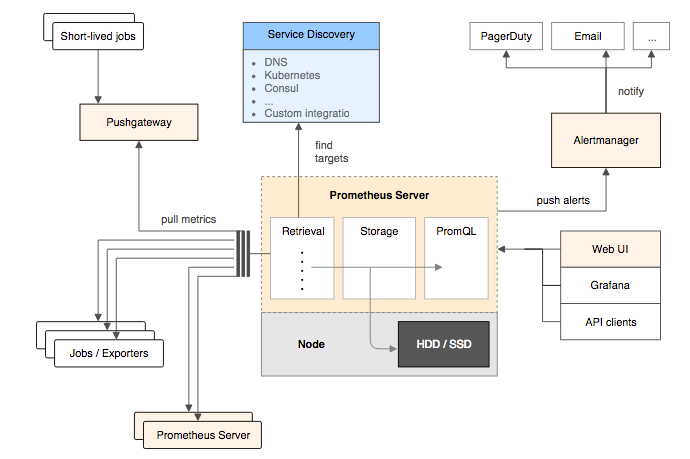
Prometheus架构
各组件说明见 Prometheus 核心组件
如上图所示,告警能力在 Prometheus 的架构种被划分为两个独立的部分。通过在 Prometheus 中定义 AlertRule(告警规则),Prometheus 会周期性的对告警规则进行计算,如果满足告警触发条件,就会向 AlertManager push 告警信息,再由 AlertManager 通过邮件或其他方式通知告警接收方。
AlertManager 作为一个独立组件,负责接收并处理来自 Prometheus Server(也可以是其他客户端程序)的告警信息。AlertManager 处理提供基本的告警能力以外,还主要提供了分组、抑制、静默等告警特性:
- 分组:
- 分组机制可以将详细的告警信息合并成一个通知。在某些情况下,如节点宕机,导致大量的告警被同时触发,而分组机制可以将这些被触发的告警信息合并成一个告警通知,避免一次性接收大量的告警通知而无法快速对问题进行定位。
- 告警分组、告警时间以及告警的接收方式可以通过 AlertManager 的配置文件进行配置
- 抑制:
- 抑制是指当某一告警触发后,可以停止重复发送由此告警引发的其他告警的机制
- 抑制机制同样通过 AlertManager 的配置文件进行配置
静默:
- 静默机制可以快速地根据标签对告警做静默处理,如果告警符合静默配置,则 AlertManager 不会发送告警通知
- 静默配置需要在 AlertManger 的 Web 页面上进行设置
Prometheus 告警规则定义
Prometheus 中的告警规则允许基于 PromQL 表达式定义告警触发条件,Prometheus 后端对这些告警规则进行周期性计算,满足触发条件后触发告警通知。默认情况,用户可以通过 Prometheus 的 Web 界面查看告警规则及告警触发状态,当 Prometheus 与 AlertManager 关联后,则可以蒋告警发送到 AlertManager 中处理。定义告警规则
这是一条典型的告警规则例子:
在告警规则文件中,我们可以将一组相关的规则设置定义在一个group下。在每一个group中我们可以定义多个告警规则(rule)。一条告警规则主要由以下几部分组成:groups:- name: examplerules:- alert: HighErrorRateexpr: job:request_latency_seconds:mean5m{job="myjob"} > 0.5for: 10mlabels:severity: pageannotations:summary: High request latencydescription: description info
alert:
- expr:
- for:[
| default = 0s ] 评估等待时间,可选参数。用于表示只有当触发条件持续一段时间后才发送告警。在等待期间新产生告警的状态为pending - labels:[
: ] 自定义标签,允许用户指定要附加到告警上的一组附加标签,任何存在冲突的标签都会被自定义的标签覆盖 - annotations:[
: ] 用于指定一组附加信息,比如用于描述告警详细信息的文字等,annotations的内容在告警产生时会一同作为参数发送到Alertmanager
Prometheus 的全局配置文件中,允许通过 rule_files 指定一组告警规则文件的访问路径。
rule_files:[ - <filepath_glob> ... ]# example:# rule_files:# - /etc/prometheus/rules/*.rules
关于这些规则的计算周期,通过 evaluation_interval 来覆盖默认的计算周期。
global:[ evaluation_interval: <duration> | default = 1m ]
附:Prometheus 的全局配置文件可以通过启动参数 —config.file 指定,默认 prometheus.yml
a.Flag("config.file", "Prometheus configuration file path.").Default("prometheus.yml").StringVar(&cfg.configFile)
告警规则模板化
告警规则的 annotations 中支持使用 summary 描述告警的概要信息,使用 description 描述告警的详细信息,AlertManager 也会根据这两个标签值,显示告警信息。
为了让告警信息具有更好的可读性,Prometheus支持模板化label和annotations的中标签的值(类似字符串的 format 函数),例如:
groups:- name: examplerules:# Alert for any instance that is unreachable for >5 minutes.- alert: InstanceDownexpr: up == 0for: 5mlabels:severity: pageannotations:summary: "Instance {{ $labels.instance }} down"description: "{{ $labels.instance }} of job {{ $labels.job }} has been down for more than 5 minutes."# Alert for any instance that has a median request latency >1s.- alert: APIHighRequestLatencyexpr: api_http_request_latencies_second{quantile="0.5"} > 1for: 10mannotations:summary: "High request latency on {{ $labels.instance }}"description: "{{ $labels.instance }} has a median request latency above 1s (current value: {{ $value }}s)"
其中,
- $labels.
:获取当前告警实例中指定标签的值 - $value:获取当前 PromQL 表达式计算的样本值
告警状态查看
用户可在 Prometheus WEB 界面中的 Alert 菜单中查看当前 Prometheus 所有的告警规则及其活动状态,如下图
告警活动状态
对于 active 状态(pending 或 firing)的告警,Prometheus 也会将其存储到时间序列 ALERTS{} 中,格式为 ```go ALERTS{alertname=”“, alertstate=” “, }
值为 1 表示处于活动状态,0 表示非活动状态。<a name="SV9oJ"></a># AlertManager<a name="I3iN0"></a>## 关联 AlertMnanager 与 Prometheus再 Prometheus 的架构中,Prometheus Server 与 AlertManager 被划分为两部分,Prometheus Server 负责产生告警,AlertManager 负责告警产生后的后续处理,因此 AlertManager 部署完成后,要在 Prometheus 的配置中设置 AlertManager 的相关信息:```yamlalerting:alertmanagers:- static_configs:- targets: ['localhost:9093']
AlertManager 配置概述
与 Prometheus 的启动类似,可以通过启动参数 —config.file 指定 AlertManager 的全局配置文件路径,默认 alertmanager.yml
configFile = kingpin.Flag("config.file", "Alertmanager configuration file name.").Default("alertmanager.yml").String()
配置中一般会包含一下几个主要部分:
- global:全局配置,指定全局配置上下文有效的参数,同时为其他配置节提供默认值
- templates:用户自定义通知模板,如html、邮件模板等。最新的组件支持使用通配符,如:’templates/*.tmpl’
- route:告警路由根节点,其下可定义多个子节点。根据标签匹配分组,确定当前告警如何处理
- receivers:接收人,可以是邮箱、slack、企业微信等。
- inhibit_rules:抑制规则,当某一告警(source match)触发后,可以停止重复发送由此告警引发(有相同的标签列表,且值对应相等)的其他告警(target_matcher)
全局配置中需要注意 resolve_timeout 参数,该参数定义了当 AlertManager 持续多长时间未收到警告后,标记警告状态未 resolved(已解决),应根据实际场景自定义,默认值 5 分钟。
—— 基于标签的告警路由
route 配置项是一个基于标签匹配规则的告警路由树,主要定义了告警的路由匹配规则,以及 AlertManager 需要将匹配到个告警发送给哪一个receiver,这是一个最简单的route定义:
route:group_by: ['alertname']receiver: 'web.hook'receivers:- name: 'web.hook'webhook_configs:- url: 'http://127.0.0.1:5001/'
如上所示,此配置表示所有产生的告警到 AlertManager 之后都会通过名为 web.hook 的 receiver 接收
route 的完整定义如下:
[ receiver: <string> ][ group_by: '[' <labelname>, ... ']' ][ continue: <boolean> | default = false ]match:[ <labelname>: <labelvalue>, ... ]match_re:[ <labelname>: <regex>, ... ]matchers:[ - <matcher> ... ][ group_wait: <duration> | default = 30s ][ group_interval: <duration> | default = 5m ][ repeat_interval: <duration> | default = 4h ]mute_time_intervals:[ - <string> ...]routes:[ - <route> ... ]
route 下的各项配置解释:
- receiver:接收人名字,对应 receivers 里的 name 字段
- group_by:告警分组规则,
- continue:警报是否应继续匹配后续同级节点。
- match:告警标签匹配
- match_re:告警标签正则匹配
- group_wait:等待时间,等待时间内,当前group收到的告警会合并为一个通知,发送给receiver
- group_interval:相同group之间,发送告警通知的时间间隔
- repeat_interval:告警通知发送成功后,再次发送的时间间隔
- mute_time_intervals:静默时间间隔,必须与mute_time_interval中的name相匹配(根节点不能有静默配置)
- routes:子节点
Receiver 接收来自 AlertManager 的告警
AlertManager 的配置中,有一个 receivers 的配置项,定义告警通知的(0个或多个)接收方。
receivers 配置当前支持 Email、OpsGenie、PagerDuty 、Pushover 、Slack 、VictorOps、webhook、WeChat等多种接收者
receivers 的配置定义如下: ```yamlThe unique name of the receiver.
name:
Configurations for several notification integrations.
email_configs:
[ -
下面主要介绍一下Email、WeChat、webhook这几种方式。<a name="IGJxo"></a>### SMTP 邮件集成 -- <email_config>```yaml# 是否通知已解决(resolved)的告警.[ send_resolved: <boolean> | default = false ]# 告警发送的目标邮箱地址.to: <tmpl_string># 告警发送的源邮箱地址[ from: <tmpl_string> | default = global.smtp_from ]# 发送邮件使用的 SMTP 地址.[ smarthost: <string> | default = global.smtp_smarthost ]# 要向 SMTP 服务器标识的主机名.[ hello: <string> | default = global.smtp_hello ]# SMTP 认证信息.[ auth_username: <string> | default = global.smtp_auth_username ][ auth_password: <secret> | default = global.smtp_auth_password ][ auth_secret: <secret> | default = global.smtp_auth_secret ][ auth_identity: <string> | default = global.smtp_auth_identity ]# The SMTP TLS requirement.# 注意,Go 不支持到远程 SMTP 端点的未加密连接.[ require_tls: <bool> | default = global.smtp_require_tls ]# TLS configuration.tls_config:[ <tls_config> ]# 两种格式的邮件通知消息体# The HTML body of the email notification.[ html: <tmpl_string> | default = '{{ template "email.default.html" . }}' ]# The text body of the email notification.[ text: <tmpl_string> ]# 邮件头信息# 覆盖之前由通知实现设置的任何标头[ headers: { <string>: <tmpl_string>, ... } ]
其中 tls_config 配置定义如下:
# CA certificate to validate the server certificate with.[ ca_file: <filepath> ]# Certificate and key files for client cert authentication to the server.[ cert_file: <filepath> ][ key_file: <filepath> ]# ServerName 扩展名来指示服务器的名称.# http://tools.ietf.org/html/rfc4366#section-3.1[ server_name: <string> ]# Disable validation of the server certificate.[ insecure_skip_verify: <boolean> | default = false]
企业微信集成 —
企业微信通知是通过 WeChat API 来发送的
# 是否通知已解决(resolved)的告警.[ send_resolved: <boolean> | default = false ]# secret是企业应用里面用于保障数据安全的“钥匙”,每一个应用都有一个独立的访问密钥.[ api_secret: <secret> | default = global.wechat_api_secret ]# The WeChat API URL.[ api_url: <string> | default = global.wechat_api_url ]# corp id 用于认证,每个企业唯一标识.[ corp_id: <string> | default = global.wechat_api_corp_id ]# API request data as defined by the WeChat API.[ message: <tmpl_string> | default = '{{ template "wechat.default.message" . }}' ]# Type of the message type, supported values are `text` and `markdown`.[ message_type: <string> | default = 'text' ]# 企业应用的ID[ agent_id: <string> | default = '{{ template "wechat.default.agent_id" . }}' ]# 成员ID列表(消息接收者,最多支持1000个)[ to_user: <string> | default = '{{ template "wechat.default.to_user" . }}' ]# 部门ID列表,最多支持100个[ to_party: <string> | default = '{{ template "wechat.default.to_party" . }}' ]# 本企业的标签ID列表,最多支持100个[ to_tag: <string> | default = '{{ template "wechat.default.to_tag" . }}' ]
example:
global:resolve_timeout: 10mwechat_api_url: 'https://qyapi.weixin.qq.com/cgi-bin/'wechat_api_secret: '应用的secret,在应用的配置页面可以看到'wechat_api_corp_id: '企业id,在企业的配置页面可以看到'templates:- '/etc/alertmanager/config/*.tmpl'route:group_by: ['alertname']group_wait: 30sgroup_interval: 5mrepeat_interval: 12hroutes:- receiver: 'wechat'continue: trueinhibit_rules:- source_match:receivers:- name: 'wechat'wechat_configs:- send_resolved: falsecorp_id: '企业id,在企业的配置页面可以看到'to_user: '@all'to_party: ' PartyID1 | PartyID2 'message: '{{ template "wechat.default.message" . }}'agent_id: '应用的AgentId,在应用的配置页面可以看到'api_secret: '应用的secret,在应用的配置页面可以看到'
webhook 集成 —
webhook 接收器允许配置通用接收器。
# Whether to notify about resolved alerts.[ send_resolved: <boolean> | default = true ]# 用于接收webhook请求的地址.url: <string># The HTTP client's configuration.# 在需要对请求进行SSL配置时使用[ http_config: <http_config> | default = global.http_config ]# 单个 Webhook 消息中包含的最大警报数。# 高于此阈值的警报将被截断。# 将此值保留为默认值 0 时,将包括所有警报.[ max_alerts: <int> | default = 0 ]
AlertManager 将会以如下 Json 格式发送请求到指定的 url:
{"version": "4","groupKey": <string>, // key identifying the group of alerts (e.g. to deduplicate)"truncatedAlerts": <int>, // how many alerts have been truncated due to "max_alerts""status": "<resolved|firing>","receiver": <string>,"groupLabels": <object>,"commonLabels": <object>,"commonAnnotations": <object>,"externalURL": <string>, // backlink to the Alertmanager."alerts": [{"status": "<resolved|firing>","labels": <object>,"annotations": <object>,"startsAt": "<rfc3339>","endsAt": "<rfc3339>","generatorURL": <string>, // identifies the entity that caused the alert"fingerprint": <string> // fingerprint to identify the alert},...]}
这里通过扩展webhook服务,可以支持将 AlertManager 的告警通知转发到其他平台,比如 基于 webhook 与钉钉集成

若有收获,就点个赞吧
0 人点赞


