ps:
1、ntko需要使用官方生成的授权工具包,然后按下面的集成开发方案处理;
2、客户端需要安装插件,并且插件调用的是ie浏览器,修改代码调试时,需要同时清理ie浏览器缓存;
表单设计页面
表单设计页面增加设置ntko在线编辑权限字段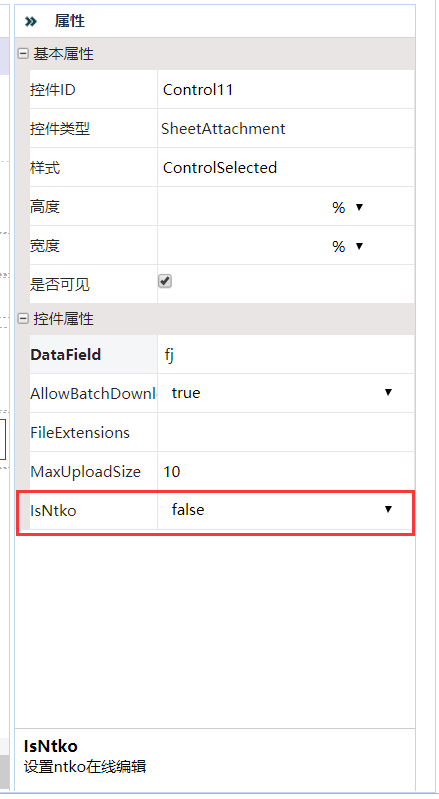
修改代码:
SheetControls.js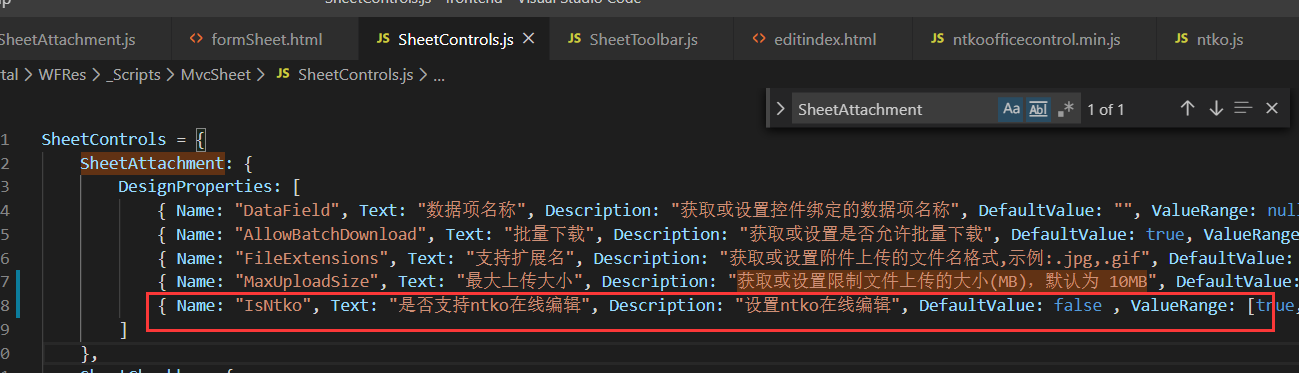
SheetAttachment: {DesignProperties: [{ Name: "DataField", Text: "数据项名称", Description: "获取或设置控件绑定的数据项名称", DefaultValue: "", ValueRange: null },{ Name: "AllowBatchDownload", Text: "批量下载", Description: "获取或设置是否允许批量下载", DefaultValue: true, ValueRange: [true, false] },{ Name: "FileExtensions", Text: "支持扩展名", Description: "获取或设置附件上传的文件名格式,示例:.jpg,.gif", DefaultValue: "", ValueRange: null },{ Name: "MaxUploadSize", Text: "最大上传大小", Description: "获取或设置限制文件上传的大小(MB),默认为 10MB", DefaultValue: 10, ValueRange: null },{ Name: "IsNtko", Text: "是否支持ntko在线编辑", Description: "设置ntko在线编辑", DefaultValue: false , ValueRange: [true, false] }]},
SheetAttachment.js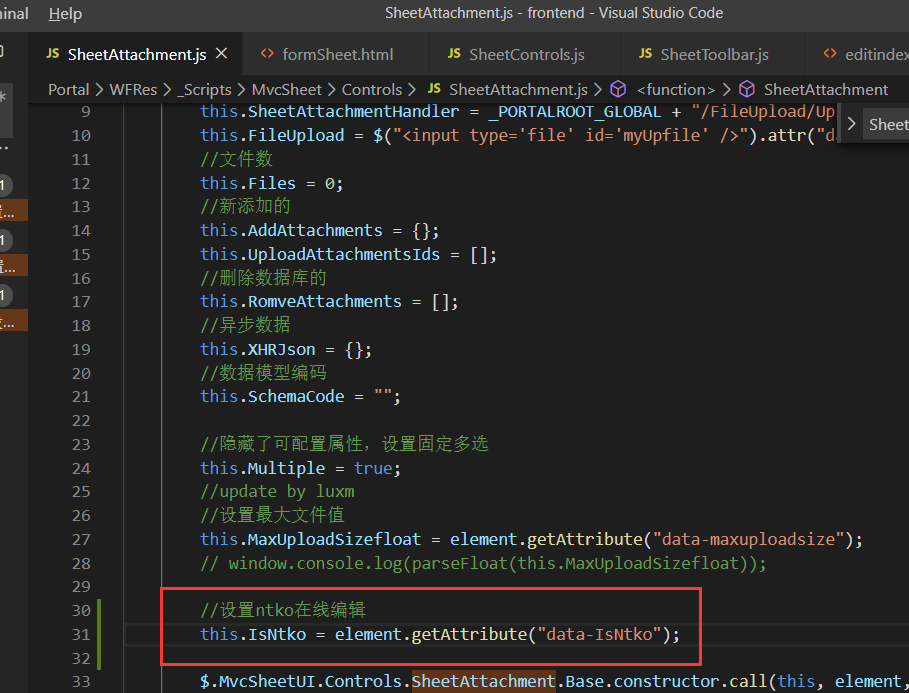
//设置ntko在线编辑this.IsNtko = element.getAttribute("data-IsNtko");
附件上传前端修改
效果图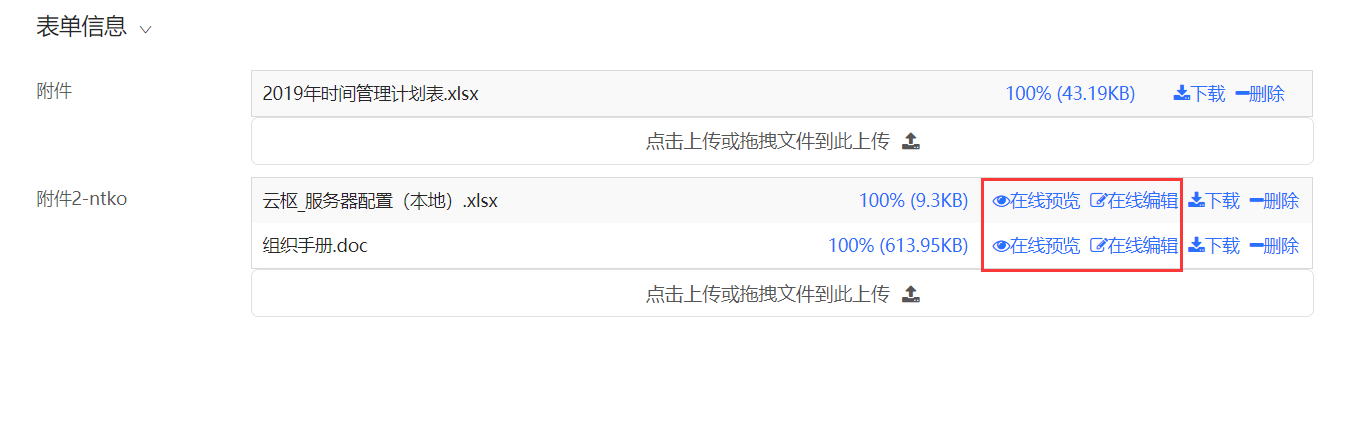
1、修改SheetAttachment.js,
第1处改动: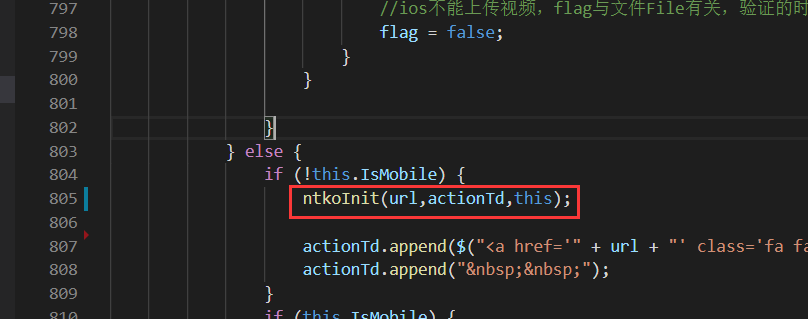
ntkoInit(url,actionTd,this);
第2处改动: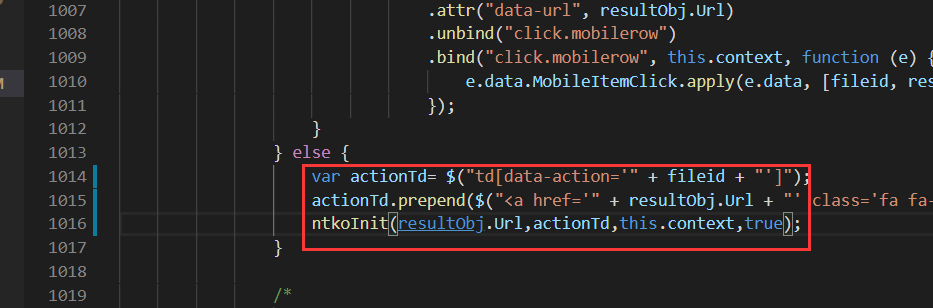
var actionTd= $("td[data-action='" + fileid + "']");actionTd.prepend($("<a href='" + resultObj.Url + "' class='fa fa-download' target='_blank' UC=true>" + SheetLanguages.Current.Download + "</a>"));ntkoInit(resultObj.Url,actionTd,this.context,true);
2、在formSheet.html的body里面加入下面代码,注意getAttachmentPath是获取文件路径的接口
<script src="/Portal/kunyue/ntko/officecontrol/ntkobackground.min.js"></script><script type="text/javascript" charset="utf-8">function ntkoInit(url,actionTd,that,isPre){//是否启用 ntko 插件if ( that.IsNtko ) {var fileurl = url;var urlParam = new Object();var i = fileurl.indexOf('?');if (i != -1) {var querystr = fileurl.substr(i + 1);var arr1 = querystr.split('&');for (i in arr1) {if(typeof(arr1[i])=='string'){var ta = arr1[i].split('=');urlParam[ta[0]] = ta[1];}}//在线编辑var bizObjectID = urlParam["BizObjectID"];var schemaCode = urlParam["BizObjectSchemaCode"];// if(!bizObjectID){// resultObj.Url = resultObj.Url.replace("&BizObjectID=", "&BizObjectID=" + $.MvcSheetUI.SheetInfo.BizObjectID);// console.log(resultObj.Url);// }var attachmentId = url.substr(url.lastIndexOf('&') - 36, 36);var Parms = "&pageId=" + attachmentId + "&BizObjectID=" + bizObjectID + "&BizObjectSchemaCode=" + schemaCode + "&DataField=" + that.DataField + "&UserID=" + $.MvcSheetUI.SheetInfo.UserID + "&WorkFlowCode=" + $.MvcSheetUI.SheetInfo.WorkflowCode + "&SequenceNo=" + $.MvcSheetUI.GetControlValue("SequenceNo") + "&UserName=" + $.MvcSheetUI.SheetInfo.UserName;console.log(Parms);var $arr = [];//添加在线预览var clickStr = "getAttachmentPath(1,\"" + Parms + "\",\"" + attachmentId + "\");return false;";$arr.push($("<a class='fa fa-eye' onclick='" + clickStr + "' >" + "在线预览" + "</a>"));//添加在线编辑if (($.MvcSheetUI.SheetInfo.SheetMode == $.MvcSheetUI.SheetMode.Work || $.MvcSheetUI.SheetInfo.SheetMode == $.MvcSheetUI.SheetMode.Originate) && that.Editable ) {clickStr = "getAttachmentPath(2,\"" + Parms + "\",\"" + attachmentId + "\");return false;";$arr.push($("<a class='fa fa-edit' onclick='" + clickStr + "' >" + "在线编辑" + "</a>"));}if(isPre){$arr = $arr.reverse();}$arr.forEach(ac => appendNtko(actionTd,ac,isPre) );}}}function appendNtko(actionTd,a,isPre){if(isPre){actionTd.prepend(" ");actionTd.prepend(a);}else{actionTd.append(a);actionTd.append(" ");}}function getQueryString(urlParam, name) {var reg = new RegExp("(^|&)" + name + "=([^&]*)(&|$)", "i");var r = urlParam.substr(1).match(reg);if (r != null) return unescape(r[2]);return null;}function getAttachmentPath(cmd, parms, attachmentId) {$.ajax({type: "get",contentType: "application/json",url: "/Portal/ntko/file/getAttachmentUrl",data:{'attachmentId': attachmentId,'BizObjectSchemaCode':getQueryString(parms, "BizObjectSchemaCode"),'BizObjectID':getQueryString(parms, "BizObjectID")},async: false,dataType: "json",success: function (result) {if(result.success){var attachmentPath = result.url;parms = parms + "&fileName=" + result.filename;if (cmd == 2) {SaveEditHtml(cmd, parms, attachmentPath);}else {openEditHtml(cmd, parms, attachmentPath);}}}});}function openEditHtml(cmd, Parms, urlPath) {//判断插件是否安装var ntkoed = ntkoBrowser.ExtensionInstalled();var domain = window.location.host;if (ntkoed) {ntkoBrowser.openWindow("http://" + domain + "/Portal/kunyue/ntko/editindex.html?cmd=" + cmd + "&urlPath=" + urlPath + Parms);} else {var iTop = ntkoBrowser.NtkoiTop(); //获得窗口的垂直位置;var iLeft = ntkoBrowser.NtkoiLeft(); //获得窗口的水平位置;window.open("http://" + domain + "/Portal/kunyue/ntko/editindex.html?cmd=" + cmd + "&urlPath=" + urlPath + Parms, "", "height=200px,width=500px,top=" + iTop + "px,left=" + iLeft + "px,titlebar=no,toolbar=no,menubar=no,scrollbars=auto,resizeable=no,location=no,status=no");}}function SaveEditHtml(cmd, Parms, urlPath) {//判断插件是否安装var ntkoed = ntkoBrowser.ExtensionInstalled();var domain = window.location.host;if (ntkoed) {ntkoBrowser.openWindow("http://" + domain + "/Portal/kunyue/ntko/editindex.html?cmd=" + cmd + "&urlPath=" + urlPath + Parms);} else {var iTop = ntkoBrowser.NtkoiTop(); //获得窗口的垂直位置;var iLeft = ntkoBrowser.NtkoiLeft(); //获得窗口的水平位置;window.open("http://" + domain + "/Portal/kunyue/ntko/editindex.html?cmd=" + cmd + "&urlPath=" + urlPath + Parms, "", "height=800px,width=1000px,top=" + iTop + "px,left=" + iLeft + "px,titlebar=no,toolbar=no,menubar=no,scrollbars=auto,resizeable=no,location=no,status=no");}}</script>
3、修改ntko工具包里面的editindex.html文件,注意保存和删除文件的接口地址
<html><head><meta content="IE=10" http-equiv="X-UA-Compatible" /><meta http-equiv="content-type" content="text/html;charset=utf-8" /><title>首页 - OFFICE文档控件演示示例</title><link href="officecontrol/ntkoStyle.css" rel="stylesheet" type="text/css" /><script type="text/javascript" charset="utf-8" src="/Portal/WFRes/_Scripts/jquery/jquery.js"></script><script type="text/javascript" src="officecontrol/ntko.js"></script><script type="text/javascript">var cmd; //命令类型function getQueryString(name) {var reg = new RegExp("(^|&)" + name + "=([^&]*)(&|$)", "i");var r = window.location.search.substr(1).match(reg);if (r != null) return unescape(r[2]);return null;}//附件在线编辑,保存后重新加载function saveDoc() {var ntko = document.getElementById("TANGER_OCX");//获得控件对象var AttachmentID = getQueryString('pageId');var BizObjectID = getQueryString('BizObjectID');var BizObjectSchemaCode = getQueryString('BizObjectSchemaCode');var DataField = getQueryString('DataField');var fileName = getQueryString('fileName');var UserID = getQueryString('UserID');var WorkFlowCode = getQueryString('WorkFlowCode');//传递参数var CPARA = "bizObjectSchemaCode="+ BizObjectSchemaCode +"&bizObjectId="+ BizObjectID +"&attachmentID=" + AttachmentID;//保存接口var domain = window.location.host;var FilePath = "http://" + domain + "/Portal/ntko/file/updateFile?attachmentID=" + AttachmentID + "&bizObjectId=" + BizObjectID + "&bizObjectSchemaCode=" + BizObjectSchemaCode;// ntko.SaveToURL("http://" + domain + "/Portal/kunyue/ntko/SaveToServerDir.jsp", "fileToUpload", CPARA, "", "", false);ntko.SaveToURL(FilePath, "fileToUpload", "", "", "", false);ntko.TrackRevisions(true);//保留痕迹alert("保存成功!");if (window.opener) { window.opener.location.href = window.opener.location.href; } window.opener = null; window.open('', '_self'); window.close();}function deleteFile(fileName) {$.ajax({type: "get",contentType: "application/json",url: "/Portal/ntko/file/deleteFile",data: {'fileName': fileName},async: false,dataType: "json",success: function (result) {}});}</script></head><body onload=" AttachmentID = getQueryString('pageId'); SequenceNo = getQueryString('SequenceNo'); fileName = getQueryString('fileName'); urlPath = getQueryString('urlPath'); cmd = getQueryString('cmd'); init(AttachmentID, cmd, urlPath, SequenceNo, fileName);" ><ul class="nav navbar-nav SheetToolBar" id="divTopBars" style="display:block; height:50px; width:auto; padding-top:25px;"><li class="button" style="float:right; margin-right:150px"><a href="#" onclick="javascript: deleteFile(fileName); if (window.opener) { window.opener.location.href = window.opener.location.href; } window.opener = null; window.open('', '_self'); window.close();"><i class="panel-title-icon fa fa-times toolImage"></i><span class="toolText">返回流程</span></a></li><li id="libtnSave" class="button" style="float:right; margin-right:100px;"><a href="#" onclick="saveDoc();"><i class="panel-title-icon fa fa-save toolImage"></i><span class="toolText">保存</span></a></li></ul><div id="DataToChild" class="divBody" style="color:red;text-align:left; "></div><div class="divBody"><script type="text/javascript" src="officecontrol/ntkoofficecontrol.min.js"></script></div></body></html>
4、ntkoofficecontrol.min.js文件需要用ntko提供的工具包里面的,这里只是增加了下载链接,需要根据实际插件的位置,替换地址:
if (browser=="IE"){if(window.navigator.platform=="Win32"){document.write('<!-- 用来产生编辑状态的ActiveX控件的JS脚本--> ');document.write('<!-- 因为微软的ActiveX新机制,需要一个外部引入的js--> ');document.write('<object id="TANGER_OCX" classid="clsid:'+classid+'"');document.write('codebase="'+codebase+'" width="'+width+'" height="'+height+'"> ');document.write('<param name="MakerCaption" value="'+MakerCaption+'"> ');document.write('<param name="MakerKey" value="'+MakerKey+'"> ');document.write('<param name="ProductCaption" value="'+ProductCaption+'"> ');document.write('<param name="ProductKey" value="'+ProductKey+'"> ');document.write('<param name="NoExpireKey" value="'+NoExpireKey+'"> ');document.write('<param name="IsUseUTF8URL" value="-1"> ');document.write('<param name="IsUseUTF8Data" value="-1"> ');document.write('<param name="Caption" value="NTKO OFFICE文档控件示例演示 http://www.ntko.com"> ');document.write('<SPAN STYLE="color:red">尚未安装NTKO浏览器插件,<a href="/Portal/kunyue/ntko/officecontrol/NTKO控件安装程序-昆岳互联环境技术(江苏)有限公司.exe">下载插件</a></SPAN> ');document.write('</object> ');}if(window.navigator.platform=="Win64"){document.write('<!-- 用来产生编辑状态的ActiveX控件的JS脚本--> ');document.write('<!-- 因为微软的ActiveX新机制,需要一个外部引入的js--> ');document.write('<object id="TANGER_OCX" classid="clsid:'+classidx64+'"');document.write('codebase="'+codebase64+'" width="'+width+'" height="'+height+'"> ');document.write('<param name="MakerCaption" value="'+MakerCaption+'"> ');document.write('<param name="MakerKey" value="'+MakerKey+'"> ');document.write('<param name="ProductCaption" value="'+ProductCaption+'"> ');document.write('<param name="ProductKey" value="'+ProductKey+'"> ');document.write('<param name="NoExpireKey" value="'+NoExpireKey+'"> ');document.write('<param name="IsUseUTF8URL" value="-1"> ');document.write('<param name="IsUseUTF8Data" value="-1"> ');document.write('<param name="Caption" value="NTKO OFFICE文档控件示例演示 http://www.ntko.com"> ');document.write('<SPAN STYLE="color:red">尚未安装NTKO浏览器插件,<a href="/Portal/kunyue/ntko/officecontrol/NTKO控件安装程序-昆岳互联环境技术(江苏)有限公司.exe">下载插件</a></SPAN> ');document.write('</object> ');}}else if (browser=="firefox"){document.write('<object id="TANGER_OCX" type="application/ntko-plug" codebase="'+codebase+'" width="'+width+'" height="'+height+'" ForOnSaveToURL="ntkosavetourl" ForOndocumentopened="ntkoondocumentopened"');document.write('ForOnpublishAshtmltourl="ntkopublishashtml"');document.write('ForOnpublishAspdftourl="ntkopublishaspdf"');document.write('ForOnSaveAsOtherFormatToUrl="ntkosaveasotherurl"');document.write('_MakerCaption="'+MakerCaption+'" ');document.write('_MakerKey="'+MakerKey+'" ');document.write('_ProductCaption="'+ProductCaption+'" ');document.write('_ProductKey="'+ProductKey+'" ');document.write('_NoExpireKey="'+NoExpireKey+'" ');document.write('clsid="{'+classid+'}" >');document.write('<SPAN STYLE="color:red">尚未安装NTKO Web FireFox跨浏览器插件,<a href="/Portal/kunyue/ntko/officecontrol/NTKO控件安装程序-昆岳互联环境技术(江苏)有限公司.exe">下载插件</a></SPAN> ');document.write('</object> ');}else if(browser=="chrome"){document.write('<object id="TANGER_OCX" clsid="{'+classid+'}" ForOnSaveToURL="ntkosavetourl" ForOndocumentopened="ntkoondocumentopened"');document.write('ForOnpublishAshtmltourl="ntkopublishashtml"');document.write('ForOnpublishAspdftourl="ntkopublishaspdf"');document.write('ForOnSaveAsOtherFormatToUrl="ntkosaveasotherurl"');document.write('_IsUseUTF8URL="-1" ');document.write('_IsUseUTF8Data="-1" ');document.write('_MakerCaption="'+MakerCaption+'" ');document.write('_MakerKey="'+MakerKey+'" ');document.write('_ProductCaption="'+ProductCaption+'" ');document.write('_NoExpireKey="'+NoExpireKey+'" ');document.write('_ProductKey="'+ProductKey+'" ');document.write('codebase="'+codebase+'" width="'+width+'" height="'+height+'" type="application/ntko-plug" ');document.write('<SPAN STYLE="color:red">尚未安装NTKO Web Chrome跨浏览器插件,<a href="/Portal/kunyue/ntko/officecontrol/NTKO控件安装程序-昆岳互联环境技术(江苏)有限公司.exe">下载插件</a></SPAN> ');document.write('</object>');}else if (Sys.opera){alert("sorry,ntko web印章暂时不支持opera!");}else if (Sys.safari){alert("sorry,ntko web印章暂时不支持safari!");}window.onunload =function(){var ntkojb= ntkoBrowser.NtkoJudgingBrowsers();if(ntkojb){window.opener.ntkoCloseEvent();}}
5、增加ntko.js,和ntkoofficecontrol.min.js同级目录
var ntko;//控件对象//初始化去打开文档function init(AttachmentID, cmd, urlPath, SequenceNo, fileName) {//var urlPath = getAttachmentPath(attachmentId);OFFICE_CONTROL_OBJ = document.getElementById("TANGER_OCX");ntko = document.getElementById("TANGER_OCX");if (window.navigator.platform == "Win64") {//alert("平台版文档控件,请使用32位浏览器如IE");//TANGER_OCX_OBJ.AddDocTypePlugin(".tif","tif.NtkoDocument","4.0.1.0","officecontrol/ntkooledocallx64.cab",51,true);ntko.AddDocTypePlugin(".pdf", "PDF.NtkoDocument", "4.0.2.0", "officecontrol/ntkooledocallx64.cab", 51, true);} else {ntko.AddDocTypePlugin(".pdf", "PDF.NtkoDocument", "4.0.2.0", "officecontrol/ntkooledocall.cab", 51, true);//版增加对于PDF文件的支持//TANGER_OCX_OBJ.AddDocTypePlugin(".tif","tif.NtkoDocument","4.0.1.0","officecontrol/ntkooledocallx64.cab",51,true);}//在线预览if (cmd == 1) {$("#libtnSave").hide();ntko.OpenFromURL(urlPath, false);ntko.FileSave = false;ntko.FileNew = false;ntko.FileOpen = false;ntko.FileClose = false;ntko.FilePrintPreview = false;ntko.FileSaveAs = false;ntko.FilePrint = false;ntko.SetReadOnly(true, "Abcdef",1,3);}//编辑文件else if (cmd == 2) {ntko.FileSave = true;ntko.FileNew = false;ntko.FileOpen = false;ntko.FileClose = false;ntko.OpenFromURL(urlPath, false);ntko.TrackRevisions(true);//保留痕迹ntko.EnterRevisionMode(true);ntko.FilePrintPreview = false;ntko.FilePrint = false;//生成二维码// var flag = $.trim(IsExistRWM(AttachmentID));// var pageCount = ntko.ActiveDocument.Application.Selection.Information(4);// if (flag == "") {// for (var i = 1; i <= pageCount; i++) {// ntko.ActiveDocument.Application.Selection.PageSetup.DifferentFirstPageHeaderFooter = true;// ntko.ActiveDocument.ActiveWindow.ActivePane.View.SeekView = 9;// ntko.ActiveDocument.Application.Selection.Goto(1, 1, i);;//定位到第二页// ntko.ActiveDocument.Application.Selection.ParagraphFormat.Alignment = 2;//靠右显示;// add2DGBcode(SequenceNo);// ntko.ActiveDocument.ActiveWindow.ActivePane.View.SeekView = 0;// }// }// ntko.ActiveDocument.Application.Selection.Goto(1, 1, 1);;//定位到首页}//打印else if (cmd == 3) {$("#libtnSave").hide();ntko.OpenFromURL(urlPath, false);ntko.FileSave = false;ntko.FileNew = false;ntko.FileOpen = false;ntko.FileClose = false;ntko.FilePrintPreview = true;ntko.FilePrint = true;ntko.FileSaveAs = false;ntko.SetReadOnly(true, "Abcdef", 1, 3);//Abcdef为附件修改密码}deleteFile(fileName);}
后台接口
1、增加NtkoController.java,实现3个接口:
获取附件访问地址接口:getAttachmentUrl
删除临时存储的附件:deleteFile
附件更新接口:updateFile
package com.h3bpm.controller;import OThinker.Common.Organization.Models.User;import OThinker.Common.charset.H3Charset;import OThinker.H3.Controller.ControllerBase;import OThinker.H3.Entity.Data.Attachment.Attachment;import OThinker.H3.Entity.IEngine;import OThinker.H3.Entity.Tracking.UserLog;import OThinker.H3.Entity.Tracking.UserLogType;import com.h3bpm.base.user.UserValidator;import com.h3bpm.base.util.CharsetUtil;import com.h3bpm.base.util.SheetUtility;import net.sf.json.JSONObject;import org.slf4j.Logger;import org.slf4j.LoggerFactory;import org.springframework.stereotype.Controller;import org.springframework.web.bind.annotation.RequestMapping;import org.springframework.web.bind.annotation.RequestMethod;import org.springframework.web.bind.annotation.RequestParam;import org.springframework.web.bind.annotation.ResponseBody;import org.springframework.web.multipart.MultipartFile;import java.io.*;/*** @author zhengyj* @date 2019/10/11* @description NTKO有关文件类控制器*/@Controller@RequestMapping("/Portal/ntko/file")public class NtkoController extends ControllerBase {private static final Logger LOGGER = LoggerFactory.getLogger(ControllerBase.class);public final String folderPath = "/Portal/TempImages/storage/";@Overridepublic String getFunctionCode() {return null;}@RequestMapping(value = "/getAttachmentUrl",method={RequestMethod.GET,RequestMethod.POST})@ResponseBodypublic final Object Read(String BizObjectSchemaCode, String BizObjectID, String attachmentId) throws Exception {System.out.println("..........Read1");UserLog log = null;Attachment attachment = this.getEngine().getBizObjectManager().GetAttachment(this.getUserValidator().getUserID(), BizObjectSchemaCode, BizObjectID, attachmentId);log = new UserLog(UserLogType.OpenAttachment, this.getUserValidator().getUserID(), attachment.getBizObjectSchemaCode(), attachment.getBizObjectId(), attachment.getBizObjectId(), "", attachment.getFileName(), null, SheetUtility.GetClientIP(this.request), SheetUtility.GetClientPlatform(this.request), SheetUtility.GetClientBrowser(this.request));this.getEngine().getUserLogWriter().Write(log);String fileName = System.currentTimeMillis() + attachment.getFileName();System.out.println("....read...write...fileName:" + fileName);//update by luwei : appString realPath = request.getSession().getServletContext().getRealPath("/");// 20190508 add by ousf 判断临时文件夹是否存在,不存在则创建 ------String dirPath = realPath + folderPath;File dir = new File(dirPath);if(!dir.exists()&&!dir.isDirectory()){System.out.println("....read...write...create directory:" + dir);dir.mkdirs();}String savePath = dirPath + fileName;String viewUrl = folderPath + fileName;File f = new File(savePath);FileOutputStream fs = new FileOutputStream(f);fs.write(attachment.getContent());fs.close();JSONObject jsonObject = new JSONObject();jsonObject.put("url", viewUrl);jsonObject.put("filename", fileName);jsonObject.put("extension", fileName.substring(fileName.lastIndexOf(".") + 1));jsonObject.put("success", true);return jsonObject;}@RequestMapping(value = "/deleteFile",method={RequestMethod.GET,RequestMethod.POST})@ResponseBodypublic final String deleteFile(String fileName) {String realPath = request.getSession().getServletContext().getRealPath("/");//删除临时文件String dirPath = realPath + folderPath;File file = new File(dirPath + fileName);if(file != null){file.delete();}return "success";}@RequestMapping(value = "/updateFile", method = RequestMethod.POST)@ResponseBodypublic String updateFile(String bizObjectSchemaCode, String bizObjectId, String attachmentID,@RequestParam("fileToUpload") MultipartFile fileToUpload) throws Exception {LOGGER.info(">>>开始保存文档,{},{},{}", bizObjectSchemaCode, bizObjectId, attachmentID);ByteArrayOutputStream baout = new ByteArrayOutputStream();byte[] b_array = new byte[1024];InputStream stream = fileToUpload.getInputStream();String charset = CharsetUtil.getCharset(stream);int i=0;while((i=stream.read(b_array, 0, 1024))>0){baout.write(b_array, 0, i);}byte[] contents = baout.toByteArray();if (fileToUpload.getOriginalFilename().endsWith(".txt")) {contents = new String(contents, charset).getBytes(H3Charset.DEFAULT_CHARSET);}//文件流if(contents != null){IEngine engine = this.getEngine();User user = engine.getOrganization().GetUserByCode("Administrator");Attachment attachment = engine.getBizObjectManager().GetAttachment(user.getObjectID(), bizObjectSchemaCode, bizObjectId, attachmentID);if(attachment != null){attachment.setContent(contents);UserValidator uv = this.getUserValidator();String modifiedBy = uv == null ? user.getObjectID() : uv.getUserID();//更新文件engine.getBizObjectManager().UpdateAttachment(bizObjectSchemaCode, bizObjectId, attachmentID, modifiedBy, attachment.getFileName(), attachment.getContentType(), contents, attachment.getFileFlag());LOGGER.info(">>>完成保存文档");}}return "文档保存成功";}public byte[] toByteArray(InputStream input) throws IOException {ByteArrayOutputStream output = new ByteArrayOutputStream();byte[] buffer = new byte[1024*4];int n = 0;while (-1 != (n = input.read(buffer))) {output.write(buffer, 0, n);}return output.toByteArray();}private String GetFileName(String filepath) {String filename = null;if (filepath != "") {String[] names = filepath.split("\\\\");filename = names[names.length - 1];}return filename;}}

若有收获,就点个赞吧
0 人点赞


