在vuepress或者vdoing主题项目中,其实已经内置了一些第三方插件,比如百度统计,第三方搜索,代码块一件复制,评论区等等。
想看用了什么插件,看package.json就可以。
以下是我的安装的一些依赖
"devDependencies": {"dayjs": "^1.9.7","inquirer": "^7.1.0","json2yaml": "^1.1.0","vuepress": "1.8.0","vuepress-plugin-baidu-autopush": "^1.0.1","vuepress-plugin-baidu-tongji": "^1.0.1","vuepress-plugin-demo-block": "^0.7.2","vuepress-plugin-one-click-copy": "^1.0.2","vuepress-plugin-thirdparty-search": "^1.0.2","vuepress-plugin-zooming": "^1.1.7","vuepress-theme-vdoing": "^1.8.1","yamljs": "^0.3.0"},"dependencies": {"busuanzi.pure.js": "^1.0.3","valine": "^1.4.14","vuepress-plugin-comment": "^0.7.3"}
我的博客:https://wggz.top
不蒜子 - 页脚统计
VuePress添加不蒜子插件(一个网页计数器)
☞ 官方文档
1. 添加依赖
yarn安装
yarn add busuanzi.pure.js
npm安装
npm install busuanzi.pure.js --save
2. 修改meta
在
head.js中添加,写法如下:['meta', {name: 'referrer', content: 'no-referrer-when-downgrade'}],
在 Chrome 85 版本中,为了保护用户的隐私,默认的 Referrer Policy 则变成了
strict-origin-when-cross-origin
所以必须加入此部分代码,否则文章统计访问量的数据则不正确3. 代码
在本地主题的Components文件夹中,新建Busuanzi.vue文件 ```javascript
<a name="JkkNL"></a>### 4. 修改Footer.vue文件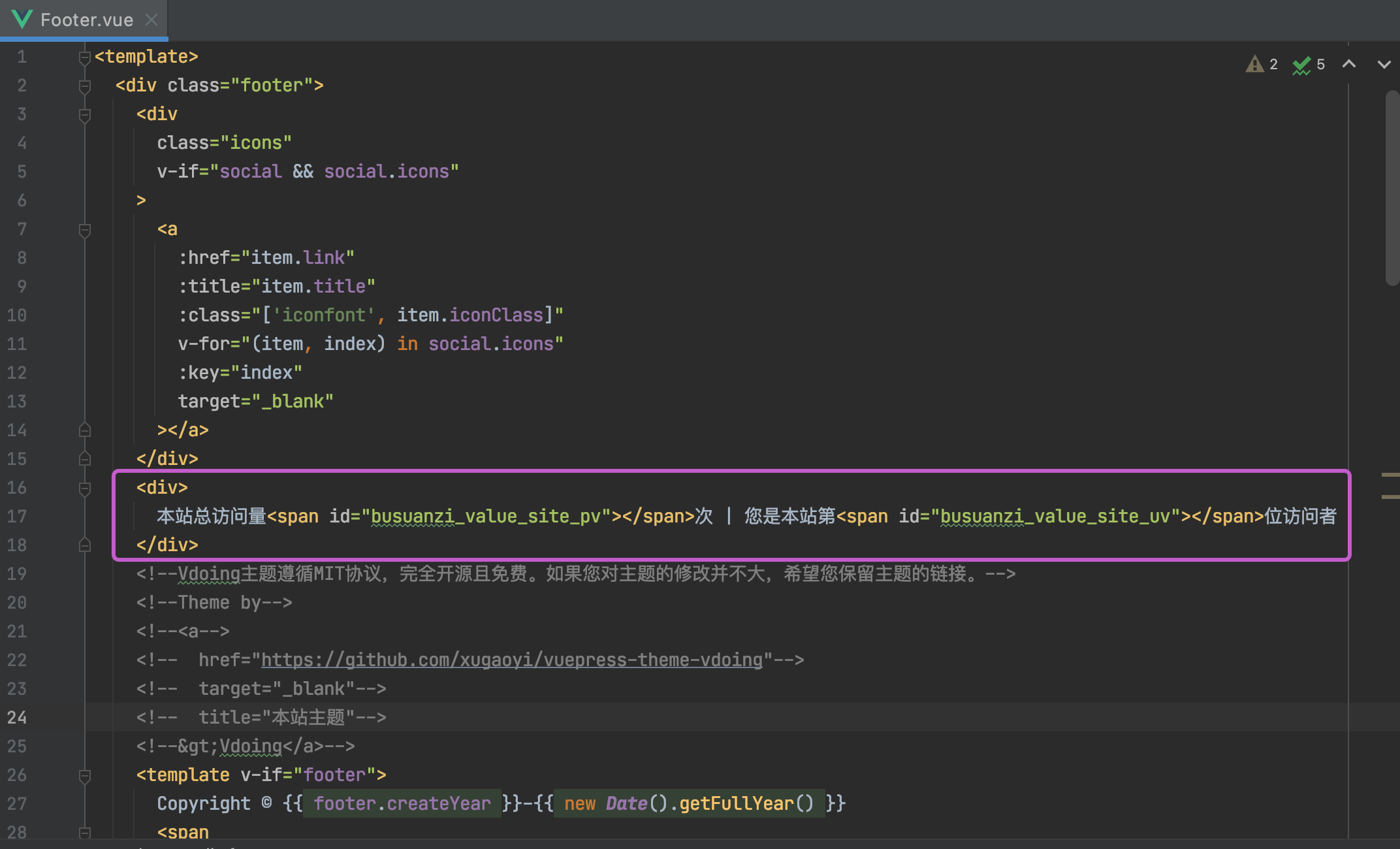<br />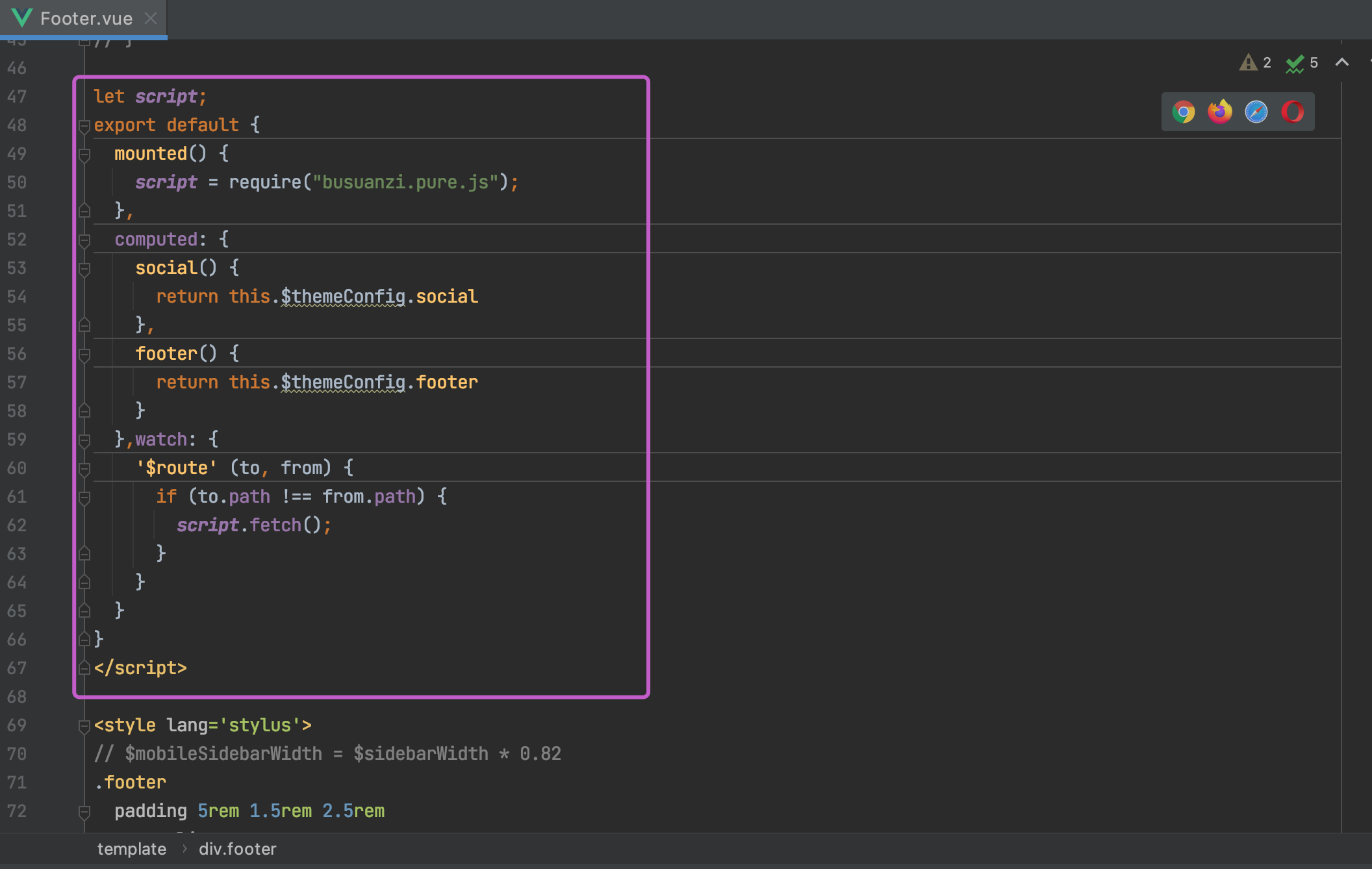<br />完事儿~<br />**效果**<br /><a name="BxQTD"></a>## 不蒜子 - 页面pv统计ArticleInfo.vue添加如下代码,替换掉原先的阅读量统计代码```javascript<divid="busuanzi_container_site_pv"class="icon iconfont icon-eye"title="浏览量"><span id="busuanzi_value_page_pv"></span></div>
在.vuepress中的themeConfig.js中,配置
isShowReadTime: true, // 是否展示阅读时间// wordsPerMinute: 100, // 每分钟阅读的字数 默认是 300// isShowReadCount: true, // 是否开启阅读量统计
效果
鼠标点击爱心
基本上,下载vdoing这个主题,都会自带这个插件,不过作者没有开启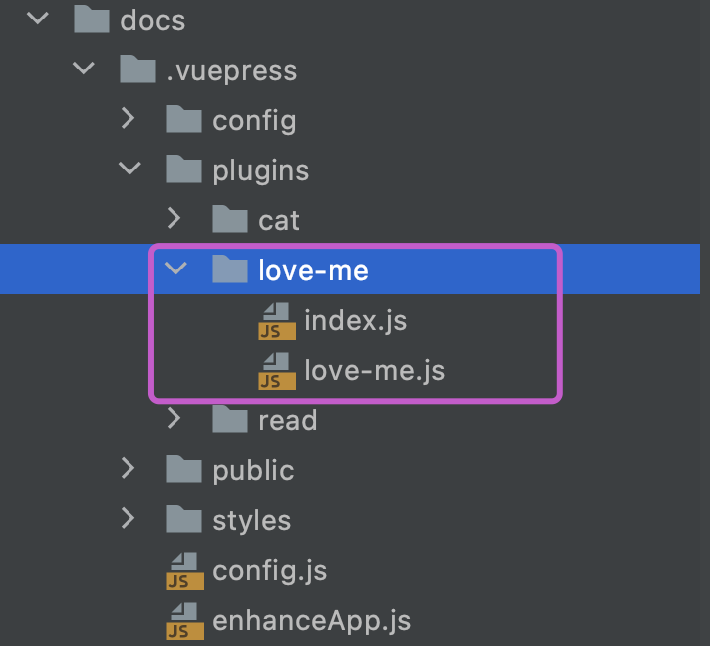
我们把它开启即可,很简单
plugins.js中,添加如下代码
[require('../plugins/love-me'), { // 鼠标点击爱心特效color: '#fb7299', // 爱心颜色,默认随机色excludeClassName: 'theme-vdoing-content' // 要排除元素的class, 默认空''}],
阅读时间/阅读量
创建如下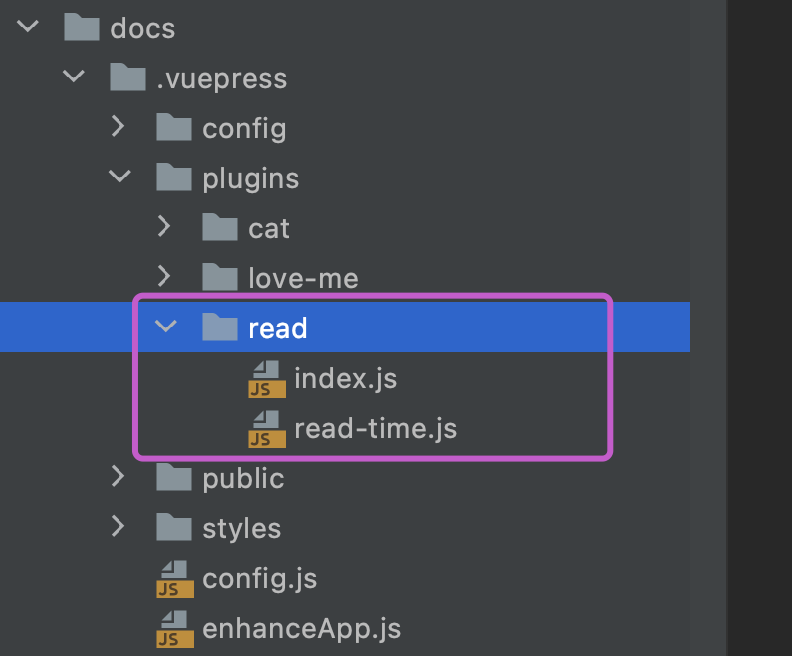
index.js
const readingTime = require('./read-time')const readingTimePlugin = (options, context) => {return {name: "reading-time",extendPageData($page){$page.readingTime = readingTime($page._strippedContent,options.wordsPerMinute || context.themeConfig.wordsPerMinute || 300);},};};module.exports = readingTimePlugin;
read-time.js
// see:https://github.com/vuepress-theme-hope/vuepress-theme-hope/tree/v1/packages/reading-time// 匹配所有的英文单词const getWords = (data) =>data.match(/[\w\d\s\u00C0-\u024F]+/giu) || [];// 匹配中文const getChinese = (data) =>data.match(/[\u4E00-\u9FA5]/gu) || [];const getWordNumber = (data) =>getWords(data).reduce((accumulator, word) =>accumulator + (word.trim() === "" ? 0 : word.trim().split(/\s+/u).length),0) + getChinese(data).length;// data -> 插件函数上下文提供的页面的元数据// wordsPerMinute 配置项 每分钟读取多少字 默认是300const readingTime = (data,wordsPerMinute = 300) => {debuggerconst words = getWordNumber(data || "");return {minutes: Math.round(words / wordsPerMinute ),words,};};module.exports = readingTime
plugins.js中添加
[require('../plugins/read')], // 阅读时间插件
themeConfig.js中添加
isShowReadTime: true, // 是否展示阅读时间// wordsPerMinute: 100, // 每分钟阅读的字数 默认是 300isShowReadCount: true, // 是否开启阅读量统计
效果
Gitalk评论插件
Gitalk实现静态博客无后台评论系统
Gitalk demo | Gitalk github | 官方文档
使用一个别人已经开发好的 vuepress-plugin-comment插件来帮助我们把Gitalk应用到vuepress搭建的静态博客。
如果下载的是vdoing主题项目,那么就不用操心了。只需要去Github申请到Client ID 和 Client Secret。替换到原先作者的Client ID,Client Secret,仓库名称等信息就可以了
1. 安装
npm install --save vuepress-plugin-comment
2. 使用
options的配置和Gitalk的配置相同
module.exports = {plugins: [['vuepress-plugin-comment',{choosen: 'gitalk',options: {clientID: 'GitHub Application Client ID',clientSecret: 'GitHub Application Client Secret',repo: 'GitHub repo',owner: 'GitHub repo owner',admin: ['GitHub repo owner and collaborators, only these guys can initialize github issues'],distractionFreeMode: false}}]]}
需要 GitHub Application,如果没有 点击这里申请,Authorization callback URL 填写当前使用插件页面的域名。
申请完成就会得 Client ID 和 Client Secret。然后把对应参数填写到配置中,例:
module.exports = {plugins: [['vuepress-plugin-comment',{choosen: 'gitalk',options: {clientID: 'a6e*******4709b88b',clientSecret: 'f0e***************beb8b2d54d7241',repo: 'blog', // GitHub 仓库owner: 'xugaoyi', // GitHub仓库所有者admin: ['xugaoyi'], // 对仓库有写权限的人distractionFreeMode: false}}]]}
配置好之后重启项目就发现页面上多了一个评论区,说明评论功能实现啦。但还是有一些bug,继续完善它~
3. BUG修复
评论区与博客样式不匹配
解决办法:新增全局样式文件.vuepress/styles/index.styl,写入样式
#vuepress-plugin-commentmax-width $contentWidthmargin 0 autopadding 2rem 2.5rem@media (max-width: $MQNarrow)padding 2rem@media (max-width: $MQMobileNarrow)padding 1.5rem
评论区出现 Error: Validation Failed.
问题分析:当页面 链接过长 或 存在中文链接,导致整个链接字符串长度超过50时,会造成请求issues接口失败,出现422状态码。(中文链接会自动转码,变得很长,id参数默认取的是链接,长度不能超过50)
解决办法:手动设置id取值,限制长度不超过50。
{choosen: 'gitalk',options: {...id: "<%- (window.location.origin + (frontmatter.to.path || window.location.pathname)).slice(-50) %>", // 页面的唯一标识,长度不能超过50title: "「评论」<%- document.title %>", // GitHub issue 的标题labels: ["Gitalk", "Comment"], // GitHub issue 的标签body:"<%- document.title %>:<%- window.location.origin + (frontmatter.to.path || window.location.pathname) %>" // GitHub issue 的内容}}
访问变量时,如
$frontmatter或window等,请使用 EJS 语法。因为在配置中不能使用回调函数,会被vuepress过滤,因此使用 EJS 语法。 ——插件作者文档说明
切换页面后评论区内容还是上一个页面的评论
解决:id在获取path时使用 frontmatter.to.path,插件内置了 `frontmatter.from、frontmatter.to。
{choosen: 'gitalk',options: {...id: "<%- (window.location.origin + (frontmatter.to.path || window.location.pathname)).slice(-50) %>", // 页面的唯一标识,长度不能超过50title: "「评论」<%- document.title %>", // GitHub issue 的标题labels: ["Gitalk", "Comment"], // GitHub issue 的标签body:"<%- document.title %>:<%- window.location.origin + (frontmatter.to.path || window.location.pathname) %>" // GitHub issue 的内容}}
百度统计
在.vuepress中找到plugins.js
其中会自带百度统计的插件
['vuepress-plugin-baidu-tongji', // 百度统计{hm: 'eb72710daa92c************',},],
- 访问百度统计,添加你的网站
- 完成验证。复制此处的hm码替换到上述plugins.js中的代码

完成验证后,即可在百度统计页面看到你的网站的pvuv情况

若有收获,就点个赞吧
0 人点赞


