1. 简介
Redis是一个基于内存的数据结构存储系统,它可以用作数据库或者缓存。它支持多种类型的数据
结构,这些数据结构类型分别为String(字符串)、List(列表)、Set(集合)、Hash(散列)和
Zset(有序集合)。
配置连接工厂 -> 配置模板 -> 使用接口
SpringDataRedis 提供的连接工厂:
- JedisConnectionFactory
- JredisConnectionFactory
- LettuceConnectionFactory
- SrpConnectionFactory
与其他的Spring Data项目类似,Spring Data Redis以模板的形式提供了较高等级的数据访问方案。实际上,Spring Data Redis提供了两个模板:
- RedisTemplate
- StringRedisTemplate
SpringData Redis的作用是通过一段简单的配置即可访问redis服务,它的底层是对java提供的
redis开发包(比如jedis等)进行了高度封装,主要提供了如下功能:
- 连接池自动管理,提供了一个高度封装的RedisTemplate类,基于这个类的对象可以对redis进行各
种操作 - 针对jedis客户端中大量api进行了归类封装,将同一类型操作封装为operation接口
- ValueOperations:简单字符串类型数据操作
- SetOperations:set类型数据操作
- ZSetOperations:zset类型数据操作
- HashOperations:map类型的数据操作
- ListOperations:list类型的数据操作
RedisTemplate的很多功能是以子API的形式提供的,它们区分了单个值和集合值的场景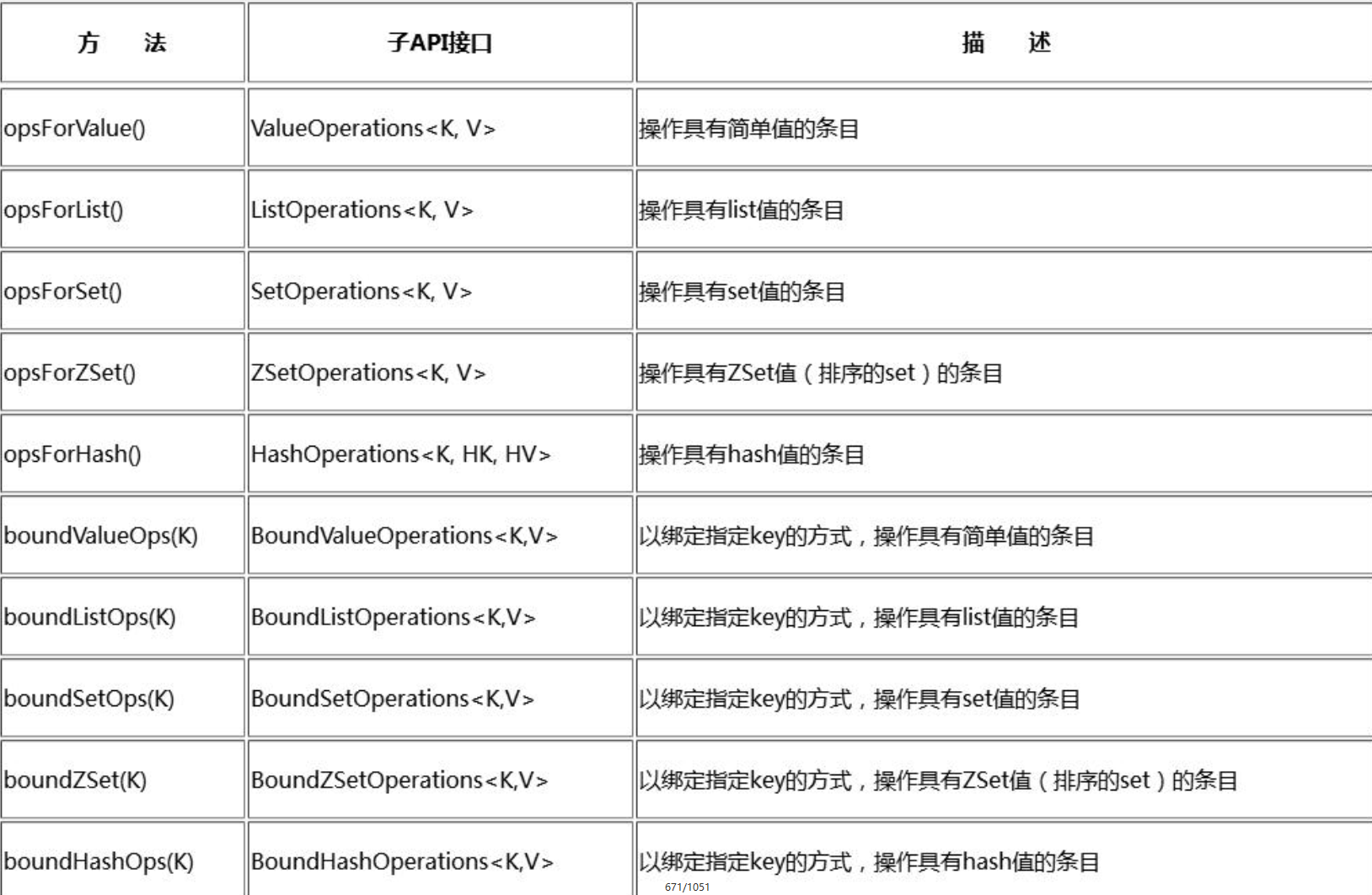
2. 入门案例
2.1 引入坐标
pom.xml 文件中引入
<dependency><groupId>org.springframework.data</groupId><artifactId>spring-data-redis</artifactId></dependency><dependency><groupId>redis.clients</groupId><artifactId>jedis</artifactId></dependency>
2.2 配置文件(注解方式)
tips:
- JedisConnectionFactory 要配置 RedisStandaloneConfiguration 对象和 JedisClientConfiguration
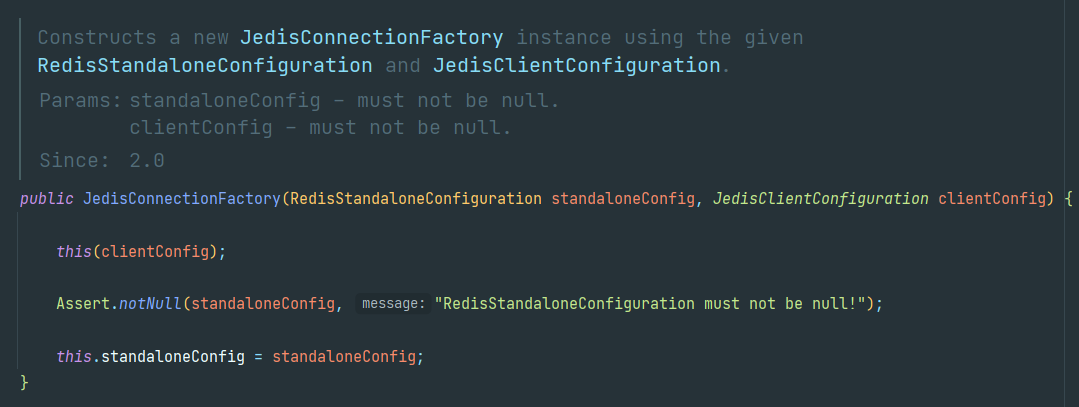
RedisConfig.java
@Configurationpublic class RedisConfig {@Value("${spring.redis.host}")private String host;@Value("${spring.redis.port}")private int port;@Value("${spring.redis.password}")private String password;@Beanpublic JedisPoolConfig jedisPoolConfig() {JedisPoolConfig jedisPoolConfig = new JedisPoolConfig();// 最大空闲数jedisPoolConfig.setMaxIdle(300);// 在提取一个jedis实例时,是否提前进行验证操作;如果为true,则得到的jedis实例均是可用的jedisPoolConfig.setTestOnBorrow(false);return jedisPoolConfig;}@Beanpublic RedisStandaloneConfiguration redisStandaloneConfiguration() {RedisStandaloneConfiguration configuration = new RedisStandaloneConfiguration();configuration.setHostName(host);configuration.setPassword(password);configuration.setPort(port);return configuration;}@Beanpublic JedisClientConfiguration clientConfiguration() {JedisClientConfiguration.JedisClientConfigurationBuilder builder = JedisClientConfiguration.builder();return builder.usePooling().poolConfig(jedisPoolConfig()).build();}@Beanpublic JedisConnectionFactory jedisConnectionFactory() {return new JedisConnectionFactory(redisStandaloneConfiguration(), clientConfiguration());}@Beanpublic RedisTemplate redisTemplate() {// 注意这里使用的是StringRedisTempalteStringRedisTemplate template = new StringRedisTemplate(jedisConnectionFactory());GenericJackson2JsonRedisSerializer jackson2JsonRedisSerializer = new GenericJackson2JsonRedisSerializer();// 设置值的序列化器template.setValueSerializer(jackson2JsonRedisSerializer);return template;}}
application.yml
spring:redis:port: 6379password: qazwsx123!@#host: 1.117.30.61
2.3 常见操作
在Redis中有五种常见类型,SpringData Redis对每一种数据类型都提供了一个xxxOperations的API,他们
分别是:
- ValueOperations
- ListOperations
- SetOperations
- ZSetOperations
- HashOperations
2.3.1 ValueOperations
@SpringBootTestpublic class RedisStringTest {@Autowiredprivate RedisTemplate redisTemplate;ValueOperations<String, String> operations = null;@Beforepublic void init() {redisTemplate.setKeySerializer(new StringRedisSerializer());redisTemplate.setValueSerializer(new StringRedisSerializer());operations = redisTemplate.opsForValue();}@Testpublic void testSet() {//向数据库中保存name--heima//operations.set("name","heima");//相关数据库保存name1--heima1 有效时间为10s//operations.set("name1", "heima1", 10, TimeUnit.SECONDS);//替换 heima ---> heXXa offset 索引位置是从0开始//operations.set("name", "XX", 2);//当key不存在的时候,执行保存操作;当key存在的时候,什么都不做//operations.setIfAbsent("name1","heima");//批量保存// Map map = new HashMap();// map.put("name2", "heima2");// map.put("name3", "heima3");// map.put("name4", "heima4");//// operations.multiSet(map);//追加 当key存在时,会执行追加操作;当key不存在时,会执行保存操作operations.append("name5", "Heima");}@Testpublic void testGet() {//根据key获取value/* String value = operations.get("name");System.out.println(value);//heXXaHeima*///首先根据key获取value,然后再根据value进行截取,从start位置截取到end位置[包含start和end]/* String value2 = operations.get("name", 5, 7);System.out.println(value2);//heXXaHeima-->Hei*///批量获取// List<String> keys = new ArrayList<>();// keys.add("name2");// keys.add("name3");// keys.add("name4");// List<String> values = operations.multiGet(keys);// for (String s : values) {// System.out.println(s);// }//根据key获取value的长度Long size = operations.size("name");System.out.println(size);}//自增@Testpublic void testIncrement() {operations.set("age", "18");operations.increment("age");//自增1--->19System.out.println(operations.get("age"));operations.increment("age", 5);//自增5System.out.println(operations.get("age"));//---->24//自减//operations.decrement("age")}//删除@Testpublic void testDelete() {//单个删除redisTemplate.delete("name");List<String> keys = new ArrayList<>();keys.add("name2");keys.add("name3");keys.add("name4");//批量删除redisTemplate.delete(keys);}}
2.3.2 ListOperations
public class RedisListTest {@Autowiredprivate RedisTemplate redisTemplate;ListOperations<String, String> operations = null;@Beforepublic void init() {redisTemplate.setKeySerializer(new StringRedisSerializer());redisTemplate.setValueSerializer(new StringRedisSerializer());operations = redisTemplate.opsForList();}//增加@Testpublic void testAdd() {//从左边添加一个元素operations.leftPush("students", "zhangsan");//从左边添加多个元素operations.leftPushAll("students", "lisi", "wangwu", "zhaoliu");//从右边添加一个元素operations.rightPush("students", "zhangsan1");//从右边添加多个元素operations.rightPushAll("students", "lisi", "wangwu", "zhaoliu");}//查询@Testpublic void testFind() {//根据key和索引进行查询//0和正数代表从左边开始 0 1 2//负数代表从右边开始 -1 -2 -3String student = operations.index("students", 1);System.out.println(student);String student1 = operations.index("students", -2);System.out.println(student1);//范围查询//根据key [start,end] 包括首尾List<String> students = operations.range("students", 0, 2);for (String s : students) {System.out.println(s);}}//删除@Testpublic void testRemove(){//从左边删除第一个元素//String s = operations.leftPop("students");//从右边删除第一个元素//operations.rightPop("students");// count > 0:删除左边起第几个等于指定值的元素// count < 0:删除右边起第几个等于指定值的元素// count = 0:删除所有等于value的元素。//删除左边起第二个wangwuoperations.remove("students",2,"wangwu");}}
2.3.3 SetOperations
public class RedisSetTest {@Autowiredprivate RedisTemplate redisTemplate;SetOperations<String, String> operations = null;@Beforepublic void init() {redisTemplate.setKeySerializer(new StringRedisSerializer());redisTemplate.setValueSerializer(new StringRedisSerializer());operations = redisTemplate.opsForSet();}//增加@Testpublic void testAdd() {operations.add("students","zhangsan","lisi","wangwu","zhangsan");}//查询@Testpublic void testFind() {//查询所有元素/* Set<String> students = operations.members("students");for (String student : students) {System.out.println(student);}*///随机获取一个元素/* String student = operations.randomMember("students");System.out.println(student);*///随机多个元素[可能会重复]List<String> stus = operations.randomMembers("students", 2);for (String stu : stus) {System.out.println(stu);}}//删除@Testpublic void testRemove() {//移除元素,并返回移除成功个数Long count = operations.remove("students", "zhangsan", "wangwu","sunliu");System.out.println(count);//随机移除指定集合中的多少个元素List<String> students = operations.pop("students", 2);for (String student : students) {System.out.println(student);}}//多集合操作@Testpublic void testMoreSet(){operations.add("names1", "zhangsan", "li", "wangwu");operations.add("names2", "zhangsan", "li", "zhaoliu");//取交集/* Set<String> sets1 = operations.intersect("names1", "names2");for (String s : sets1) {System.out.println(s);}*///取并集/* Set<String> sets2 = operations.union("names1", "names2");for (String s : sets2) {System.out.println(s);}*///取差集[第一个集合中存在,但是在第二个集合中不存在的元素]Set<String> sets3 = operations.difference("names2", "names1");for (String s : sets3) {System.out.println(s);}}}
2.3.4 ZSetOperations
public class RedisZSetTest {@Autowiredprivate RedisTemplate redisTemplate;ZSetOperations<String, String> operations = null;@Beforepublic void init() {redisTemplate.setKeySerializer(new StringRedisSerializer());redisTemplate.setValueSerializer(new StringRedisSerializer());operations = redisTemplate.opsForZSet();}//增加@Testpublic void testAdd() {operations.add("students", "zhangsan", 100);operations.add("students", "lisi", 60);operations.add("students", "wangwu", 80);}//分数的增减@Testpublic void testScore() {//incrementScore 可以用来增减分数 增加就用正数 减少用负数//增加分数operations.incrementScore("students", "wangwu", 30);//减少分数operations.incrementScore("students", "wangwu", -70);}//查询一个元素的信息@Testpublic void testFindOne() {//查询一个元素的分数Double score = operations.score("students", "wangwu");System.out.println(score);//查询一个元素在集合中的排名 排名从0开始Long rank = operations.rank("students", "zhangsan");System.out.println(rank);}//根据一个区间获得一个列表@Testpublic void testFindList() {//根据排名区间来获取元素列表Set<String> students = operations.range("students", 0, 2);for (String student : students) {System.out.println(student);}System.out.println("=============");Set<ZSetOperations.TypedTuple<String>> set = operations.rangeWithScores("students", 0, 2);for (ZSetOperations.TypedTuple<String> tuple : set) {System.out.println(tuple.getValue() + "同学,得了" + tuple.getScore() + "分");}System.out.println("---------------------------------");//根据分数区间来获取列表Set<String> students2 = operations.rangeByScore("students", 60, 90);for (String student : students2) {System.out.println(student);}System.out.println("=============");Set<ZSetOperations.TypedTuple<String>> set2 = operations.rangeByScoreWithScores("students", 60, 90);for (ZSetOperations.TypedTuple<String> tuple : set2) {System.out.println(tuple.getValue() + "同学,得了" + tuple.getScore() + "分");}}//统计@Testpublic void testCount() {//统计一个集合中元素Long zCard = operations.zCard("students");System.out.println(zCard);//根据一个分数区间统计元素数量Long count = operations.count("students", 50, 100);System.out.println(count);}//删除@Testpublic void testRemove() {//根据key-value删除 value允许传入多个//operations.remove("students","zhangsan","lisi");//根据排名区间删除//operations.removeRange("students", 0, 1);//根据分数区间删除operations.removeRangeByScore("students", 70, 100);}}
2.3.5 HashOperations
public class RedisHashTest {@Autowiredprivate RedisTemplate redisTemplate;HashOperations<String, String, Article> operations = null;@Beforepublic void init() {redisTemplate.setKeySerializer(new StringRedisSerializer());redisTemplate.setHashKeySerializer(new StringRedisSerializer());redisTemplate.setHashValueSerializer(new JdkSerializationRedisSerializer());operations = redisTemplate.opsForHash();}//保存@Testpublic void testPut() {Article article = new Article();article.setTitle("黑马");article.setAuthor("黑马程序员");article.setCreateTime(new Date());operations.put("article", "3", article);}//获取@Testpublic void testGet() {//判断hashkey是否存在Boolean flag = operations.hasKey("article", "3");System.out.println(flag);//根据key和hashkay获取操作Article article = operations.get("article", "2");System.out.println(article);//根据key获取所有的hashkeySet<String> set = operations.keys("article");for (String s : set) {System.out.println(s);}List<Article> articles = operations.values("article");for (Article art : articles) {System.out.println(art);}Map<String, Article> map = operations.entries("article");for (Map.Entry<String, Article> entry : map.entrySet()) {System.out.println(entry.getKey() + ":" + entry.getValue());}}//删除@Testpublic void testDelete() {//当hash中的数据全部被删除后,整个hash就没了operations.delete("article", "2", "3");}}
参考

若有收获,就点个赞吧
0 人点赞


