Ajax的应用场景
1.页面上拉加载更多数据
2.列表数据无刷新分页
3.表单项离开焦点数据验证
4.搜索框提示文字下拉列表
Ajax的运行环境
Ajax技术需要运行在网站环境中才能生效,当前课程会使用Node创建的服务器作为网站服务器。
ajax
Web数据交互方式
实现了客户端与服务端之间的数据交互
我们使用js里边的ajax来实现前后台的数据交互
特点: 异步数据请求
体积小 请求速度快 加载速度
原理:
前台使用js调用原生ajax请求 调用后台接口对后台发起数据请求(Get/Post) 后台获取到前台发起的请求
使用对应的mysql数据库语句对数据库进行增删改查操作 将得到的数据库数据返回给前台页面 前台拿到数据进行页面渲染
//原生ajaxvar xhr=new XMLHttpRequest()xhr.onreadystatechange=function() {if(xhr.readyState==4 && xhr.status==200) {var data=xhr.responseText; // 后台接口返回的后台数据}}xhr.open("get", url, true) // true表示异步请求 false表示同步请求xhr.send()
var xhr=new XMLHttpRequest()var str=""var ul=document.querySelector("ul")var reg=/(w.h){1,}/xhr.onreadystatechange=function() {if(xhr.readyState==4 && xhr.status==200) {var res=JSON.parse(xhr.responseText); // 后台接口返回的后台数据console.log(res.data.hot)for(var i=0; i<res.data.hot.length; i++) {str+=`<li><img src="${res.data.hot[i].img.replace(reg, '128.180')}" alt=""><div class="text"><p class="title">${res.data.hot[i].nm}</p><p class="rating">观众评<span>${res.data.hot[i].sc}<span></p><p class="players">主演: ${res.data.hot[i].star}</p></div></li>`}ul.innerHTML=str}}xhr.open("get", "https://i.maoyan.com/api/mmdb/movie/v3/list/hot.json?ct=荥阳&ci=557&channelId=4", true) // true表示异步请求 false表示同步请求xhr.send()
跨域
| 产生原因 | 1 同端口 www.demo.com:8080 // 8080端口号 2 同域名 www.demo.com/index.html www.demo.com/detail 接口 3 同协议 https http 以上三个条件有任何不满足就会产生跨域 请求接口的网页 例如 https://www.test.com:3000/mine.html 被请求接口 例如 https://www.test.com:3000/list |
|---|---|
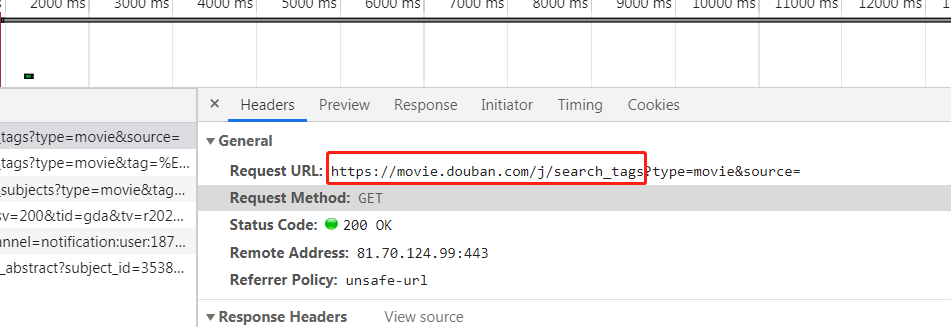
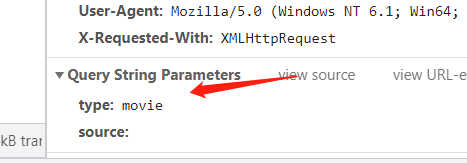
| 解决跨域办法 | 1 客户端(前端) 1 传统的解决跨域使用jsonp 2 nginx反向代理 3 proxy域名代理 如果没有上线 在本地进行项目测试时候 想要解决跨域 我们可以使用浏览器自带插件 你也可以使用nginx在本地进行配置 在谷歌浏览器属性中 目标位置添加 后缀 在末尾添加 —disable-web-security —user-data-dir=C:\MyChromeDevUserData 2 服务端(后台) 只需要给后台代码添加一个header头文件就可以处理 |

jquery ajax
| jquery ajax常用的三种方式 | ||
|---|---|---|
| $.ajax() | 既可以post get delete put 格式: $.ajax({ url: “请求的接口地址”, type: “请求接口的方式post get put delete”, data: { 后台要求传递的参数 }, success: function(res) { // res就是后台给你返回的数据 }, fail: function(err) { // err就是请求失败后台返回的数据 } }) |
|
| $.get() | // 只适用于get请求 格式: $.get(url, data, function() {}, type) 一般情况下 我们只去用前三个参数 url表示请求的接口地址 data表示后台接口所需要的字段参数 function成功回调函数 type就是后台返回过来的数据类型格式 text html json等等 例如 $.get(“https://www.xxx.com”, { 参数名1: 参数值1, 参数名2: 参数值2 … }, function(形参) { console.log(形参) // 形参就表示后台返回的数据 }, “json”) |
|
| $.post() | // 只适用于post请求 格式: $.post(url, data, function() {}, type) 一般情况下 我们只去用前三个参数 url表示请求的接口地址 data表示后台接口所需要的字段参数 function成功回调函数 type就是后台返回过来的数据类型格式 text html json等等 例如 $.post(“https://www.xxx.com”, { 参数名1: 参数值1, 参数名2: 参数值2 … }, function(形参) { console.log(形参) // 形参就表示后台返回的数据 }, “json”) |
原生ajax请求
| 原生ajax发起ajax请求 | ||
|---|---|---|
| fetch promise异步回调 可以执行任意类型的请求post get | ||
| get请求 | 格式: // get请求 fetch(“url”).then(function(response) { return response.json() // 首先将后台的数据进行json格式化 然后在返回给浏览器 }).then(function(res) { // console.log(res) 成功回调 返回后台数据 }).catch(function(err) { console.log(err) 失败捕获 返回接口错误信息 }) |
|
| post请求 | 格式: fetch(“url”, { method: “POST”, headers: { ‘Content-Type’: ‘application/json’ }, body: JSON.stringfy({ // 请求的字段 发送给后台接口的 属性名1: 属性值1, 属性名2: 属性值2 }) }).then(function(response) { return response.json() // 首先将后台的数据进行json格式化 然后在返回给浏览器 }).then(function(res) { // console.log(res) 成功回调 返回后台数据 }).catch(function(err) { console.log(err) 失败捕获 返回接口错误信息 }) |
原生js发起ajax请求fetch("https://cnodejs.org/api/v1/topics").then(function(response) {return response.json()}).then(function(res) {console.log(res)}).catch(function(err) {console.log(err)})
var obj={admin: 'zhangsan',password: "123456"}$("button").click(function() {fetch("http://localhost:3000/register", {method: 'POST',headers: {'Content-Type': 'application/json',},body: JSON.stringify(obj)}).then(response=> response.json()).then(res=> {console.log(res)})// $.post("http://localhost:3000/register", {// admin: "xcr007",// password: "124568"// },function(res) {// console.log(res)// })})
$.get("https://cnodejs.org/api/v1/topics", {page: 1,limit: 50}, function(res) {console.log(res)for(var i=0; i<res.data.length; i++) {str+=`<li>${res.data[i].title}</li>`}$("ul").html(str)})
$.ajax({url: "https://cnodejs.org/api/v1/topics",type: "GET",data: {page: 1,limit: 40},success: function(res) {console.log(res)for(var i=0; i<res.data.length; i++) {str+=`<li>${res.data[i].title}</li>`}$("ul").html(str)},fail: function(err) {console.log(err)}})
fetch请求
<script>fetch("http://1ocalhost:3000/list").then(res => {return res.json()}).then(res1 => {console.log(res1)}).catch(err=>{console.log(err)})</script>
使用ajax请求接口渲染数据
if(localStorage.getItem("user")) {var str=''fetch("http://localhost:3000/restaurant").then(function(res){return res.json()}).then(function(res1) {console.log(res1)for(var i=0; i<res1.data.length; i++) {str+=`<li><img src="${res1.data[i].avatar}" alt=""><p>${res1.data[i].restaurant_name}</p><p>${res1.data[i].address}</p></li>`}document.querySelector("ul").innerHTML=str}).catch(function(err) {console.log(err)})}else {window.location.href="./login.html"}
ajax异步请求
post get put delete
post和get区别
1.使用Get请求时,参数在URL中显示,而使用Post方式,则不会显示出来
2.使用Get请求发送数据量小,Post请求发送数据量大
3.get请求需注意缓存问题,post请求不需担心这个问题
4.post传输数据乜有限制 get传输时候1kb
5.get比post传输更快 POST比GET更稳定也更可靠
例如:
进行网站注册登录操作时候 一般使用post
获取一些信息的时候 一般使用get请求
修改网站一些信息的时候 我们可以使用put
删除网站一些信息的时候 我们可以使用delete
AJAX-express框架
| 1.安装node.js | //1.引入express constexpress=require(‘express’); // 2.创建应用对象 constapp=express(); // 3.创建路由规则 //request是对请求报文的封装 //response 是对响应报文的封装 app.get(‘/‘, (request, response) => { //设置响应 response.send(‘HELLO EXPRESS’); }); //4.监听端口启动服务 app.listen(8000, () => { console.log(“服务已经启动,8000 端口监听中……”); }) |
|---|---|
| 2.新建英文文件夹,vscode右键以管理员打开,右键在集成终端中打开 | |
| 3.安装这个包,终端输入npm init —yes回车初始化 | |
| 4.安装express框架,npm i express回车 | |
| 5. node demo.html 打印端口 |

若有收获,就点个赞吧
0 人点赞


