移动端加载数据时,由于数据太多,不会一次性全部加载出来。有些会采用pc端那样用分页码的形式,但是更多的确实滑动滚动条到内容最后,加载更多内容出来。一般引入了三方的前端框架和插件,基本都会有此功能。偶尔会需要采用原生js实现,故而此处就介绍下原生js的实现方式。另外附上jquery的实现方式。
原生js实现思路
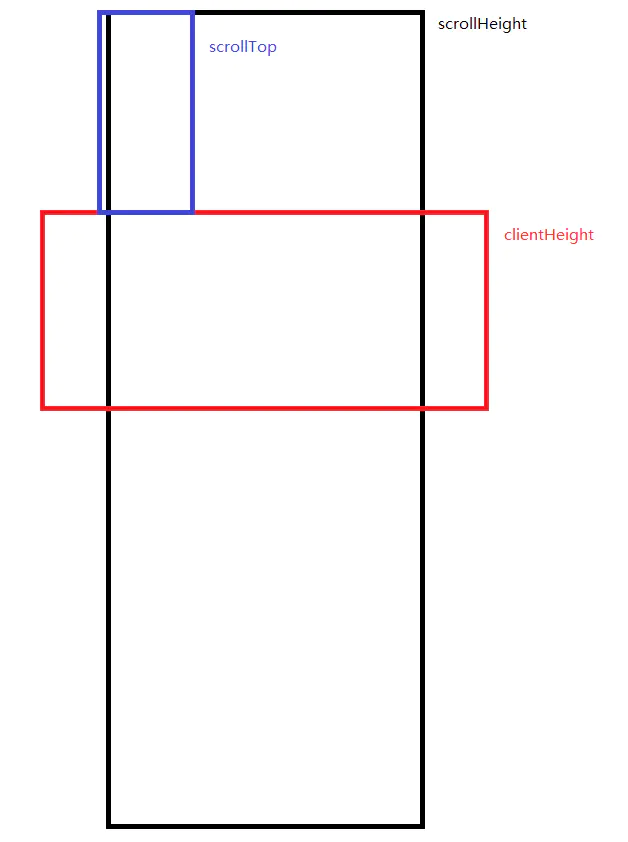
需要三个高度:
scrollHeight(文档内容实际高度,包括超出视窗的溢出部分)
scrollTop(滚动条滚动距离)、
clientHeight:窗口可视范围高度 = CSS height + CSS padding + 水平滚动条的高度
当 clientHeight + scrollTop >= scrollHeight 时,表示已经抵达内容的底部了,可以加载更多内容。
- scrollHeight:可以通过
document.documentElement.scrollHeight、document.body.scrollHeight获取; - clientHeight:可以通过
window.innerHeight、document.documentElement.clientHeight获取; - scrollTop:可以通过
window.pageYOffset、document.documentElement.scrollTop获取;
下面附上三者之间的关系:
原生实现方式:
<!DOCTYPE html><html lang="en"><head><meta charset="UTF-8"><title>scroll</title><meta name="viewport" content="width=device-width,initial-scale=1,minimum-scale=1,maximum-scale=1,user-scalable=no" /><style>* {margin: 0;padding: 0;}.scroll{margin-top: 0px;border: 2px solid #00f;height: 2000px;}#js_con {position: fixed;top: 50px;}</style></head><body><div class="scroll"><div id="js_con"></div></div></body><script>window.onscroll = function() {var str = ``;str += `scrollHeight:(${document.documentElement.scrollHeight}, ${document.body.scrollHeight})<br />`;str += `clientHeight/innerHeight:(${document.documentElement.clientHeight}, ${window.innerHeight})<br />`;str += `scrollTop/pageYOffset:(${document.documentElement.scrollTop}, ${window.pageYOffset})`;document.getElementById('js_con').innerHTML = str;console.log(str);}</script></html>
jquery实现方式:
<script>
    $(window).on("resize scroll",function() {
        var windowHeight = $(window).height();//当前窗口的高度
        var scrollTop = $(window).scrollTop();//当前滚动条从上往下滚动的距离
        var docHeight = $(document).height(); //当前文档的高度
        console.log(scrollTop, windowHeight, docHeight);
        // 触底公式:(滚动条滚动的高度 + 可视窗口的高度 = 文档的高度)  这个是基本的公式
        if (scrollTop + windowHeight >= docHeight) {
            console.log("===加载更多数据===");
        }
    });
</script>


JQuery 获取三个高度 和 原生获取三个高度的方式:
$(document).height();  ==  document.documentElement.scrollHeight;    // 文档内容的实际高度
$(window).scrollTop(); == document.documentElement.scrollTop;        // 滚动条滚动高度
$(window).height(); == document.documentElement.clientHeight;        // 可视窗口高度

若有收获,就点个赞吧
0 人点赞


