二十一、GUI设计
21.1创建GUI


双击任一区域,可以进行相关设置;
21.2 回调函数
案例一:实现按键后数据在静态框内显示指定文本
- 首先我们需要先找到对应控件的命名;
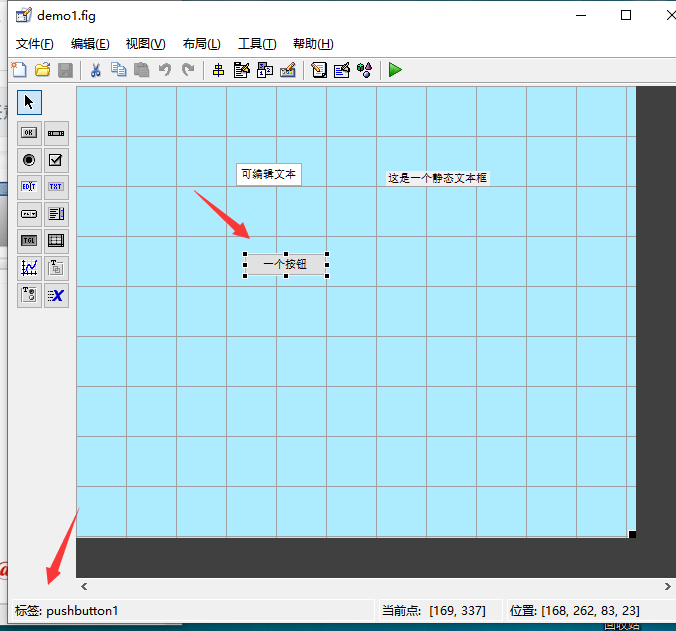
- 通过贯穿全局的handles来调用其他内容,来完成按键时数据显示再静态文本框内。
```matlab %这个函数表示界面一经显示就会调用 function demo1_OpeningFcn(hObject, eventdata, handles, varargin)function pushbutton1_Callback(hObject, eventdata, handles)% hObject handle to pushbutton1 (see GCBO)% eventdata reserved - to be defined in a future version of MATLAB% handles structure with handles and user data (see GUIDATA)disp([hObject.String]);%handles可以理解为图像界面的所有信息.set(handles.text2,'String','训练完成')
% This function has no output args, see OutputFcn. % hObject handle to figure % eventdata reserved - to be defined in a future version of MATLAB % handles structure with handles and user data (see GUIDATA) % varargin command line arguments to demo1 (see VARARGIN)
% Choose default command line output for demo1 handles.output = hObject;
disp([‘hello’]);
% Update handles structure guidata(hObject, handles);
% UIWAIT makes demo1 wait for user response (see UIRESUME) % uiwait(handles.figure1);
**案例二:再静态文本框内显示按按键的次数;**1. 编辑OpeningFcn:handles.count = 0;定义一个全局变量<br />%把handles当前的数据保存到gcf当中;<br />guidata(gcf,handles);```matlabfunction demo1_OpeningFcn(hObject, eventdata, handles, varargin)% This function has no output args, see OutputFcn.% hObject handle to figure% eventdata reserved - to be defined in a future version of MATLAB% handles structure with handles and user data (see GUIDATA)% varargin command line arguments to demo1 (see VARARGIN)% Choose default command line output for demo1handles.output = hObject;handles.count = 0;disp(['hello']);% Update handles structureguidata(hObject, handles);%gcf是图形的句柄;%把handles当前的数据保存到gcf当中;guidata(gcf,handles);
设置显示数据set(handles.text2,’String’,num2str(handles.count));
保存数据;
function pushbutton1_Callback(hObject, eventdata, handles)% hObject handle to pushbutton1 (see GCBO)% eventdata reserved - to be defined in a future version of MATLAB% handles structure with handles and user data (see GUIDATA)handles.count = handles.count+1;%注意此处handles.count是过滤型变量,输出需要转换格式;%handles可以理解为图像界面的所有信息.%set(handles.text2,'String','训练完成')set(handles.text2,'String',num2str(handles.count));%注意对handles进行保存guidata(gcf,handles);
案例三;根据下拉菜单来显示图像
function pushbutton1_Callback(hObject, eventdata, handles)% hObject handle to pushbutton1 (see GCBO)% eventdata reserved - to be defined in a future version of MATLAB% handles structure with handles and user data (see GUIDATA)%用str接受handles下的下拉菜单popupmenu1对应的所有字符str = handles.popupmenu1.String;%获取哪个值val = handles.popupmenu1.Value;%由于ezplot显示必须要显示函数句柄或者字符串类型%而val此时为cell类型所以要完成转换;fcn = str{val};ezplot(fcn);

案例四:
function start_Callback(hObject, eventdata, handles)% hObject handle to start (see GCBO)% eventdata reserved - to be defined in a future version of MATLAB% handles structure with handles and user data (see GUIDATA)% --------------------------------------------------------------------function open_Callback(hObject, eventdata, handles)% hObject handle to open (see GCBO)% eventdata reserved - to be defined in a future version of MATLAB% handles structure with handles and user data (see GUIDATA)msgbox('你打开了')demo2;% --------------------------------------------------------------------function close_Callback(hObject, eventdata, handles)% hObject handle to close (see GCBO)% eventdata reserved - to be defined in a future version of MATLAB% handles structure with handles and user data (see GUIDATA)msgbox('你关闭了')%questdlg返回一个所选择的值,后面的属性按照顺序来选。r = questdlg('你要关闭吗?','关闭请求','是','否','否');%相对于r=='是'来做判断,strcmp更加规范一些。if strcmp(r,'是')close all;end

若有收获,就点个赞吧
0 人点赞


