引言
参考 Bash Shell中命令行选项/参数处理
在shell中处理参数的方式粗略分可以分3种:
- 手工处理
- getopts
- getopt
例如:
./configure.sh -u www -g www -f --with-change-source
上例中的-u就是一个选项,www就是-u这个选项的选项值,-f是一个没有选项值的选项,--with-change-source是一个长选项
在处理之前,我们先要了解几个参数
$0: ./configure.sh,即命令本身,相当于C/C++中的argv[0]$1,$2…..: $1是-u,第一个参数,$2是www第二个参数,以此类推$#:参数的个数,不包括命令本身,上例中$#的值为6$@:参数本身的列表,也不包括命令本身,如上例为-u www -g www -f --with-change-source(是一个数组)$*:和$@相同,但”$“ 和 “$@”(加引号)并不同,”$“将所有的参数解释成一个字符串,而”$@”是一个参数数组。
手工处理
手工处理能解决大多数的简单需求,就直接对上述的参数进行处理即可。
#!/bin/bashif [ x$1 != x ]then#...有参数elsethen#...没有参数fi
getopts
getopts和getopt功能相似但又不完全相同,其中getopt是独立的可执行文件,而getopts是由Bash内置的
可以使用man getopts和man getopt查看相关文档
getopts不支持长选项,只能使用短选项
使用getopts很简单:
#configure.sh#! /bin/bashwhile getopt "u:g:h" optdocase $opt inu)nginx_fpm_user=${OPTARG};;g)nginx_fpm_group=${OPTARG};;h)echo "params:"echo "-h display this help and exit"echo "-u the user of nginx and php-fpm,default:_www"echo "-g the group of nginx and php-fpm,default:_www"exit 0;;esacdone
在上述例子中,opt变量就是用户输入的选项,如果getopt函数的第一个参数就是用户可以输入的选项,选项后面多一个:表示这个选项需要一个参数,每一个选项的参数存在$OPTARG中,这里还有另外一个特殊变量$OPTIND(ption index),会逐个递增,初始值为1.
现在就可以使用
./configure.sh -u _www -g _www
来调用shell脚本了。
getopt
其实重点是在这个方法,有很多细节可以说的,我上网查这个方法用了比较长的时间才勉强搞明白。
先放例子,configure2.sh如下:
set -- `getopt -o hu:g: -l with-change-source,with-user:,with-group,help -- $*`while [ ! -z $1 ]docase $1 in-u|--with-user)nginx_fpm_user=$2shiftshift;;g|--with-group)nginx_fpm_group=$2shiftshift;;--with-change-source)change_source=1shift;;h|--help)echo "params:"echo "--with-change-source set up your apt-get resource to Chinese resource"echo "-h, --help display this help and exit"echo "-u, --with-user the user of nginx and php-fpm,default:_www"echo "-g, --with-group the group of nginx and php-fpm,default:_www"exit 0;;--)shiftbreak;;esacdone
一条一条来说
首先命令
getopt -o hu:g: -l with-change-source,with-user:,with-group,help -- $*
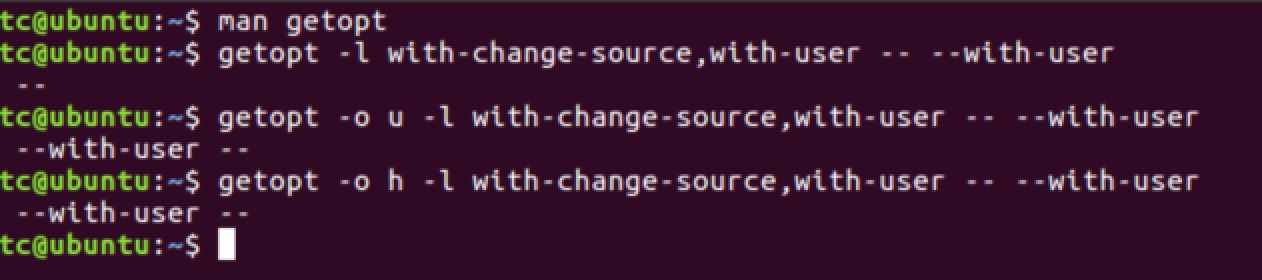
getopt的-o参数是短选项(或者也可以使用—options),和getopts很像,有一个:表示这个参数必须有参数值,两个’::’表示这个参数有可选的参数值。但是在使用的时候必须带-,比如./configure2.sh -u root-l选项(或者—long或者—longoptions)表示可以使用长选项,-l参数的参数值是一个用逗号分割的长选项组,这里是没有double dash(--)的,但是在使用的时候要加上--,例如:./configure2.sh --help- 值得注意的是,如果不使用
-o参数,-l参数是无法使用的,如下图(具体原因我用man getopt也没有查出来,知道的童鞋一定要告诉我) - 以上命令help后面的那个
--是为了让getopt知道--后面的就是需要处理的参数列表(或者可以说是参数列表的字符串),而不是getopt自己的参数。(man bash查看)
-- A -- signals the end of options and disables further option pro-cessing. Any arguments after the -- are treated as filenamesand arguments. An argument of - is equivalent to --.
然后
set -- `getopt -o hu:g: -l with-change-source,with-user:,with-group,help -- $*`
把getopt命令的返回值使用·set·命令重新赋值给命令行参数(因为getopt重新排序了参数列表).getopt命令会把参数重新排序,将getopt能识别的放在--前面,把其他参数放在 --后面,所以看上面的代码在--的case当中使用了shift将参数$1出栈,后续的参数向前移位。
在上面的代码中有些地方连续调用了两次shift,是因为此时(比如使用选项-u)$1是-u,$2是-u的值,shift一次$2变成$1,所以需要shift两次
在mac OS X上getopt和Ubuntu和CentOS上的行为可不一样呢。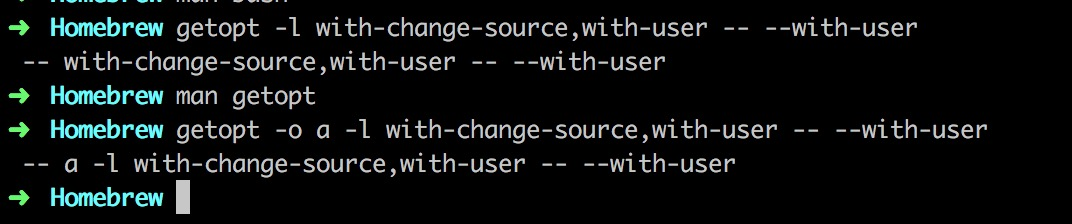

若有收获,就点个赞吧
0 人点赞


