roughjs
github上面有个手绘的library: roughjs ,绘制效果大致如下:
个人比较喜欢这种风格,想用到自己的react项目之中。
react-rough
还有一个库叫react-rough,使用roughjs来绘制部分形状。
<ReactRoughheight={500}width={700}><Polygonfill="red"points={[[490,130],[590,120],[550,160],[490,200]]}/></ReactRough>
实现上,外层的ReactRough是一个canvas画布,children为各种roughjs支持的图形。
问题还是使用canvas,不能使用浏览器原生能力,事件等都要自行模拟,工作量非常大,放弃。
rough-paint
rough-paint这个库思路比较奇特。使用的是CSS Paint API(详见附录一),然后桥接roughjs的内部render。结构大致如下:
效果还是很理想的,直接可以在div里面渲染想要的roughjs效果,如下图: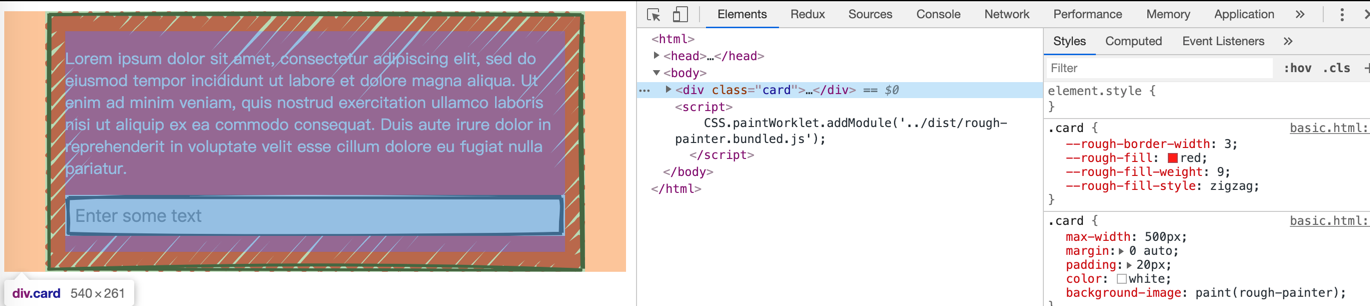
但是项目必须要有注册custom paint的一份代码
CSS.paintWorklet.addModule('../dist/rough-painter.bundled.js');
这里的问题来了,addModule这个api只能支持资源类url,不支持es module(详见附录二)。所以在构建自己内部仓库会非常麻烦。忍痛放弃。
css-paint-polyfill
找了一圈,发现了谷歌实验室针对 css paint api 做了一套polyfill能力。实现原理基于 MutationObserver 监听元素更改来实时渲染。
步骤一:获取所有的样式,检查是否定义了paint(custom-painter),并存储下来
let sheets = [].slice.call(document.styleSheets),context = {toProcess: [],toRemove: [],counters: {},isNew: false,sheetId: null};for (let i=0; i<sheets.length; i++) {let node = sheets[i].ownerNode;if (node.$$isPaint) continue;// Check that we can access the sheet.// The rules binding is required in order to prevent Terser from removing the block.// eslint-disable-next-line no-unused-varslet rules;try { rules = node.sheet.cssRules; }catch (e) { continue; }context.sheetId = node.$$paintid;context.isNew = context.sheetId == null;if (context.isNew) {context.sheetId = node.$$paintid = ++styleSheetCounter;// allow processing to defer parseif (processNewSheet(node)===false) {continue;}}walkStyles(node.sheet, paintRuleWalker, context);}
步骤二:监听MutationObserver变动,然后检查变动是否需要处理css paint api
new MutationObserver(records => {if (lock===true) return;lock = true;for (let i = 0; i < records.length; i++) {let record = records[i], added;if (record.type === 'childList' && (added = record.addedNodes)) {for (let j = 0; j < added.length; j++) {if (added[j].nodeType === 1) {queueUpdate(added[j]);}}}else if (record.type==='attributes' && record.target.nodeType === 1) {if (record.target === a) {supportsStyleMutations = true;}else {walk(record.target, queueUpdate);}}}lock = false;}).observe(document.body, {childList: true,attributes: true,subtree: true});
步骤三:正则检查元素的css样式,命中则调用已注册的paint module来进行绘制
while ((token = reg.exec(value))) {if (hasPaints === false) {paintId = ensurePaintId(element);}hasPaints = true;newValue += value.substring(0, token.index);let painterName = token[4] || token[5];let currentUri = token[3];let painter = getPainter(painterName);let contextOptions = painter && painter.Painter.contextOptions || {};let equivalentDpr = contextOptions.scaling === false ? 1 : dpr;let inst;if (painter) {if (painter.Painter.inputProperties) {observedProperties.push.apply(observedProperties, painter.Painter.inputProperties);}inst = getPainterInstance(painter);}if (contextOptions.nativePixels===true) {geom.width *= dpr;geom.height *= dpr;equivalentDpr = 1;}let actualWidth = equivalentDpr * geom.width,actualHeight = equivalentDpr * geom.height;let ctx = element.$$paintContext,cssContextId = `paint-${paintId}-${painterName}`;if (!ctx || !ctx.canvas || ctx.canvas.width!=actualWidth || ctx.canvas.height!=actualHeight) {if (USE_CSS_CANVAS_CONTEXT===true) {ctx = document.getCSSCanvasContext('2d', cssContextId, actualWidth, actualHeight);}else {let canvas = document.createElement('canvas');canvas.id = cssContextId;canvas.width = actualWidth;canvas.height = actualHeight;if (USE_CSS_ELEMENT===true) {canvas.style.display = 'none';root.appendChild(canvas);}ctx = canvas.getContext('2d');}element.$$paintContext = ctx;ctx.imageSmoothingEnabled = false;if (equivalentDpr!==1) ctx.scale(equivalentDpr, equivalentDpr);}else {ctx.clearRect(0, 0, actualWidth, actualHeight);}if (inst) {ctx.save();ctx.beginPath();inst.paint(ctx, geom, propertiesContainer);// Close any open path so clearRect() can dump everythingctx.closePath();// ctx.stroke(); // useful to verify that the polyfill painted rather than native paint().ctx.restore();// -webkit-canvas() is scaled based on DPI by default, we don't want to reset that.if (USE_CSS_CANVAS_CONTEXT===false && 'resetTransform' in ctx) {ctx.resetTransform();}}
步骤四:替换更新元素相应样式
整个过程还算比较顺利,至于这种方式的性能,官方宣称没什么问题
Performance is particularly good in Firefox and Safari, where this polyfill leverages -webkit-canvas() and -moz-element() for optimized rendering. For other browsers, framerate is governed by Canvas toDataURL() / toBlob() speed.
css-paint-es
css-paint-es = css-paint-polyfill + es module
我们通过更改css-paint-polyfill源码的入口,让它来适配 es module 。至此解决掉了 css paint api 不支持 es module 的问题。
详细的代码实现可参考: https://github.com/YouHan26/css-paint-polyfill
css-rough
我们再使用css-paint-es来改造rough-paint,便有了css-rough
详见: https://github.com/YouHan26/react-rough
附录一:CSS Paint API
介绍地址:https://developers.google.com/web/updates/2018/01/paintapi
CSS Paint API 也被成为”CSS Custom Paint”、“Houdini’s paint worklet”。简单来讲,它可以让开发者更自主的控制浏览器绘画底层来画出来各种图片。可以用在css 样式中的 background-image 、 border-image 等之中。当然,同样的绘画能力直接用canvas也是可以的。CSS Paint API的主要优势有两个:
- 可以通过css来选择性的进行绘画
canvas就比较受限,你不可能在保持原生浏览器tag(div、input)的各种浏览器支持能力(浏览器事件、默认组件行为)同时,还能去自定义绘制一些自定义background image等。 - 性能
由于CSS Paint API是浏览器提供的基础api,使用此API画出来的性能肯定是比较高效。同时因为css选择器的方式来使用,整个绘制是跟着浏览器重绘来自动更新,相较于canvas手动各种清除、重画显得特别高效。这里的高效不仅在于执行效率,更在于开发效率。
具体API相关的使用,看相应的网站就可以了,这里就不仔细介绍
- https://www.w3.org/TR/css-paint-api-1/
- https://css-houdini.rocks/
- https://developers.google.com/web/updates/2018/01/paintapi
- https://developer.mozilla.org/en-US/docs/Web/API/CSS_Painting_API
- https://www.zhangxinxu.com/wordpress/2018/11/css-paint-api-canvas/
附录二:V8 modules
es module
随着前端发展,模块化变成了一个命题。commonjs、AMD、UMD等不再详细介绍。值得注意的是Ecma262 2015规范中新增的模块化支持:es module。
但是在CSS Paint API中,添加worklet必须是一个url路径类型的文件。是不支持es module。
data-url
浏览器还支持一种url方式就是 URL.createObjectURL() 生成的data-url。这种方式就是比较粗暴,需要把源代码当作字符串,转成 Blob类型,然后来生成data-uri。
这种方式在遇到依赖npm包的情况下又会特别难搞。毕竟不可能把所有的依赖文件都丢到一个地方,反而又和现有的模块化背道而行。
参考链接:
- https://v8.dev/features/modules#worklets-workers
- https://developer.mozilla.org/en-US/docs/Web/API/URL/createObjectURL
- https://stackoverflow.com/questions/10343913/how-to-create-a-web-worker-from-a-string

若有收获,就点个赞吧
0 人点赞


