Others
.run
使用run进行一个简单的rootScope绑定。
angular.module('myApp', []).run(function($rootScope) {$rootScope.name = "World";});
$parse
eg1
<div ng-app="MyApp"><div ng-controller="MyController"><input type="text" ng-model="expression" /><div>{{ParsedValue}}</div></div></div>
angular.module("MyApp",[]).controller("MyController", function($scope, $parse){$scope.$watch("expression", function(newValue, oldValue, context){if(newValue !== oldValue){var parseFunc = $parse(newValue);$scope.ParsedValue = parseFunc(context);}});});//输入1+1,ParseValue显示2
eg2
<div ng-app="MyApp"><div ng-controller="MyController"><div>{{ParsedValue}}</div></div></div>
angular.module("MyApp",[]).controller("MyController", function($scope, $parse){$scope.context = {add: function(a, b){return a + b;},mul: function(a, b){return a * b}}$scope.expression = "mul(a, add(b, c))";$scope.data = {a: 3,b: 6,c: 9};var parseFunc = $parse($scope.expression);$scope.ParsedValue = parseFunc($scope.context, $scope.data);});//结果为45
$parse服务根据$scope.context中提供的上下文解析$scope.expression语句,然后使用$scope.data数据填充表达式中的变量注意,如果把$scope.expression中的c换成4,那么结果就是30,所以得到45结果。
**
$interpolate
<body ng-app="myApp"><div ng-controller="MyController"><input ng-model="to" type="email" placeholder="Recipient" /><textarea ng-model="emailBody"></textarea><pre>{{ previewText }}</pre></div></body>
angular.module('myApp', []).controller('MyController',function ($scope, $interpolate) {$scope.to = 'ari@fullstack.io';$scope.emailBody = 'Hello {{ to }},\n\nMy name is Ari too!';// Set up a watch$scope.$watch('emailBody', function (body) {if (body) {var template = $interpolate(body);$scope.previewText =template({ to: $scope.to });}});});
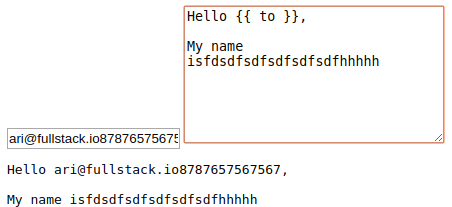
当textarea变化时,previewText才能依据二者变化;只变email,此时previewText不被触发。
使用config/factory来完成更方便的写法
angular.module('emailParser', []).config(['$interpolateProvider', function($interpolateProvider) {$interpolateProvider.startSymbol('__');$interpolateProvider.endSymbol('__');}]).factory('EmailParser', ['$interpolate', function($interpolate) {return {parse: function(text, context) {var template = $interpolate(text);return template(context);}};}]);使用:angular.module('myApp', ['emailParser']).controller('MyController', ['$scope', 'EmailParser',function($scope, EmailParser) {// 设置监听$scope.$watch('emailBody', function(body) {if (body) {$scope.previewText = EmailParser.parse(body, {to: $scope.to});}});}]);
由于我们将表达式开始和结束的符号都设置成了__,因此需要将HTML修改成用这个符号取代{{ }}的版本<div id="emailEditor"><input ng-model="to"type="email"placeholder="Recipient" /><textarea ng-model="emailBody"></textarea></div><div id="emailPreview"><pre>__ previewText __</pre></div>
过滤器
调用过滤器
{{ name | uppercase }}
app.controller('demo',[$scope,$filter,function($scope,$filter){$scope.name = $filter('lowercase')('ARI');}])
自定义过滤器
注意input在哪作为参数传入。
app.controller('demo',[ ]).filter('price',function(){return function(input) {price = Number(input).toFixed(2);return price;}}){{ '123' | price }}// 123.00
内置过滤器
currency
用{{ 123 | currency }}来将123转化成货币格式。
date
{{ today | date:'medium' }} <!-- Aug 09, 2013 12:09:02 PM -->
date后为过滤器参数,不同参数可以格式化成不同的格式。
filter
filter过滤器可以从给定数组中选择一个子集,并将其生成一个新数组返。{{ ['Ari','Lerner','Likes','To','Eat','Pizza'] | filter:'e' }}
{{ [{'name': 'Ari','City': 'San Francisco','favorite food': 'Pizza'},{'name': 'Nate','City': 'San Francisco','favorite food': 'indian food'}] | filter:{'favorite food': 'Pizza'} }}<!-- [{"name":"Ari","City":"SanFrancisco","favoritefood":"Pizza"}] -->
{{ ['Ari','likes','to','travel'] | filter:isCapitalized }}<!-- ["Ari"] -->$scope.isCapitalized = function(str) {return str[0] == str[0].toUpperCase();}; //isCapitalized函数的功能是根据首字母是否为大写返回true或false,filter过滤出返回true的情况。
json
{{ {'name': 'Ari', 'City': 'SanFrancisco'} | json }}
orderBy
{{ [{'name': 'Ari','status': 'awake'},{'name': 'Q','status': 'sleeping'},{'name': 'Nate','status': 'awake'}] | orderBy:'name' }}<!--[{"name":"Ari","status":"awake"},{"name":"Nate","status":"awake"},{"name":"Q","status":"sleeping"}]-->
可连续过滤
{{ 'ginger loves dog treats' | lowercase | capitalize }}
先全转换为小写,再首字母大写。
表单验证
P30
1. 必填项
验证某个表单输入是否已填写,只要在输入字段元素上添加HTML5标记required即可:<input type="text" required />
2. 最小长度
验证表单输入的文本长度是否大于某个最小值,ng-minleng= “{number}”:<input type="text" ng-minlength="5" />
3. 最大长度
验证表单输入的文本长度是否小于或等于某个最大值,ng-maxlength=”{number}”:<input type="text" ng-maxlength="20" />
4. 模式匹配
使用ng-pattern=”/PATTERN/“来确保输入能够匹配指定的正则表达式:<input type="text" ng-pattern="/^([a-zA-Z0-9_-]+)$/" />
5. 电子邮件
验证输入内容是否是电子邮件,只要像下面这样将input的type设置为email即可:<input type="email" name="email" ng-model="user.email" />
6. 数字
验证输入内容是否是数字,将input的类型设置为number:<input type="number" name="age" ng-model="user.age" />
7. URL
验证输入内容是否是URL,将input的类型设置为 url:<input type="url" name="homepage" ng-model="user.facebook_url" />
8. 自定义验证
9. 在表单中控制变量
表单的属性可以在其所属的$scope对象中访问到,而我们又可以访问$scope对象,因此
JavaScript可以间接地访问DOM中的表单属性。借助这些属性,我们可以对表单做出实时(和
AngularJS中其他东西一样)响应。
(注意,可以使用下面的格式访问这些属性。)formName.inputFieldName.propertyng-show = "form.start_at.$dirty"
未修改的表单
这是一个布尔属性,用来判断用户是否修改了表单。
如果未修改,值为true,如果修改过值为false:form.$pristine
修改过的表单
只要用户修改过表单,无论输入是否通过验证,该值都返回true:form.$dirty
合法的表单
这个布尔型的属性用来判断表单的内容是否合法。
如果当前表单内容是合法的,下面属性的值就是true:form.$valid
不合法的表单
这个布尔属性用来判断表单的内容是否不合法。
如果当前表单内容是不合法的,下面属性的值为true:form.$invalid
错误
这是AngularJS提供的另外一个非常有用的属性:$error对象。
它包含当前表单的所有验证内容,以及它们是否合法的信息。用下面的语法访问这个属性:formName.inputfieldName.$errorng-show="form.description.$error.maxlength"
如果验证失败,这个属性的值为true;如果值为false,说明输入字段的值通过了验证。
10. 一些有用的CSS样式
.ng-pristine {}.ng-dirty {}.ng-valid {}.ng-invalid {}
它们对应着表单输入字段的特定状态。
当某个字段中的输入非法时,.ng-invlid类会被添加到这个字段上。
当前例子中的站点将对应的CSS样式设置为:
input.ng-invalid {border: 1px solid red;}input.ng-valid {border: 1px solid green;}
自定义验证
<form name="signup_form" novalidateng-submit="signupForm()"><fieldset><input type="text"placeholder="Desired username"name="username"ng-model="signup.username"ng-minlength="3"ng-maxlength="20"ensure-unique="username" required /><small class="error"ng-show="signup_form.username.$error.maxlength">Your username cannot be longer than 20 characters</small><small class="error"ng-show="signup_form.username.$error.unique">That username is taken, please try another</small><button type="submit" class="button radius">Submit</button></fieldset></form>
app.directive('ensureUnique',function($http){return {require: 'ngModel',link: function(scope, ele, attrs, c){$scope.$watch(attrs.ngModel,function(n) {if(!n) return;$http({method: 'POST',url: '/api/check/' + attrs.ensureUnique,data: {field: attrs.ensureUnique,value: scope.ngModel}}).success(function(data){c.$setValidity('unique', data.isUnique);//'unique'用于"signup_form.username.$error.unique"//ng-maxlength同理为"signup_form.username.$error.maxlength"}).error(function(data){c.$setValidity('unique', false);});});}};});
ngMessages
<div class="error" ng-messages="signup_form.name.$error" ng-messages-multiple>// 加上ng-messages-multiple后可以同时显示多个错误<div ng-message="required">Make sure you enter your name</div><div ng-message="minlength">Your name must be at least 3 characters</div><div ng-message="maxlength">Your name cannot be longer than 20 characters</div></div>
指令
<my-directive></my-directive><div my-directive></div><div class="my-directive"></div><!--directive:my-directive-->
restrict
scope
在构造自定义指令时也可以创建新的子作用域。
template: '<a href="{{ myUrl }}">{{ myLinkText }}</a>'
<div my-directivemy-url="http://google.com"my-link-text="Click me to go to Google"></div>//给指令添加两个属性,这两个参数会成为指令内部作用域的属性。
想普通控制器一样写controller?controller: function($scope) {// => 错误!!!$scope.someProperty === "needs to be set";}像下面一样直接赋值?scope: {// 这样也行不通someProperty: 'needs to be set'}
@
**这个绑定策略告诉AngularJS****将DOM中some-property属性的值复制给新作用域对象中的someProperty属性。**
scope: {someProperty: '@' //默认情况下映射是some-property属性。}scope: {someProperty: '@someAttr' //此时被绑定的属性名是some-attr而不是some-property。}
Attention
<input type="text" ng-model="myUrl" /><div my-directivesome-attr="{{ myUrl }}"my-link-text="Click me to go to Google"></div>//这种myUrl绑定可以正常工作。
<div my-directivesome-attr="{{ myUrl }}"my-link-text="Click me to go to Google"></div>还有下面这段代码:template: '<div>\<input type="text" ng-model="myUrl" />\<a href="{{myUrl}}">{{myLinkText}}</a>\</div>'//myUrl写在指令内部无法正常工作
=
双向数据绑定
<label>Their URL field:</label><input type="text" ng-model="theirUrl"><div my-directivesome-attr="theirUrl"my-link-text="Click me to go to Google"></div>
angular.module('myApp', []).directive('myDirective', function() {return {restrict: 'A',replace: true,scope: {myUrl: '=someAttr', // 经过了修改myLinkText: '@'},template: '<div><label>My Url Field:</label><input type="text" \ ng-model="myUrl" /> \<a href="{{myUrl}}">{{myLinkText}}</a></div>'};});//修改外面的input或者template里的input都一起变化。
父子控制器
修改父级对象中的someBareValue会同时修改子对象中的值,但反之则不行。
子控制器是复制而非引用someBareValue。当子中有``someBareValue,且someBareValue的值不为引用类型时,``父的``someBareValue改变时子的显示不变化,子的改变也不影响父。但如果子中没有``someBareValue的话,子的显示会和父一起改变。
<div ng-controller="SomeController">{{ someModel.someValue }}<button ng-click="someAction()">Communicate to child</button><div ng-controller="ChildController">{{ someModel.someValue }}<button ng-click="childAction()">Communicate to parent</button></div></div>angular.module('myApp', []).controller('SomeController', function($scope) {// 最佳实践,永远使用一个模式$scope.someModel = {someValue: 'hello computer'}$scope.someAction = function() {$scope.someModel.someValue = 'hello human, from parent';};}).controller('ChildController', function($scope) {$scope.childAction = function() {$scope.someModel.someValue = 'hello human, from child';};});
上述情况,子$scope中修改属性也会修改父$scope中的这个属性。
ng-repeat作用域
$index:遍历的进度(0...length-1)。 $first:当元素是遍历的第一个时值为true。 $middle:当元素处于第一个和最后元素之间时值为true。 $last:当元素是遍历的最后一个时值为true。 $even:当$index值是偶数时值为true。 $odd:当$index值是奇数时值为true。
<li ng-repeat="person in people track by $index" ng-class="{even: !$even, odd: !$odd}">{{person.name}} lives in {{person.city}}</li>//调换顺序or删除插入时,$index容易出bug
指令详解
angular.module('myApp', []).directive('myDirective', function() {return {restrict: String, //以什么形式声明EACMpriority: Number, //优先级,在同一元素上,是否先被调用,默认0(ngRepeat是内置指令优先级最高的)terminal: Boolean, //如果为true,则同一个元素上的其他指令的优先级高于本指令的将停止。template: String or Template Function: function(tElement, tAttrs) (...},templateUrl: String,replace: Boolean or String,scope: Boolean or Object,transclude: Boolean,controller: String orfunction(scope, element, attrs, transclude, otherInjectables) { ... },controllerAs: String,require: String,link: function(scope, iElement, iAttrs) { ... },compile: // 返回一个对象或连接函数,如下所示:function(tElement, tAttrs, transclude) {return {pre: function(scope, iElement, iAttrs, controller) { ... },post: function(scope, iElement, iAttrs, controller) { ... }}// 或者return function postLink(...) { ... }}};});
scope参数
scope:true;
当scope设置为true时(默认情设置为true),会从父作用域继承并创建一个新的作用域对象。
scope:{ };
scope设置为一个空对象{},如果这样做了,指令的模板就无法访问外部作用域了
绑定策略
@ (or @attr)
本地作用域属性:使用@符号将本地作用域同DOM属性的值进行绑定。
指令内部作用域可以使用外部作用域的变量。= (or =attr)
双向绑定:通过=可以将本地作用域上的属性同父级作用域上的属性进行双向的数据绑定。
就像普通的数据绑定一样,本地属性会反映出父数据模型中所发生的改变。& (or &attr)
父级作用域绑定:通过&符号可以对父级作用域进行绑定,以便在其中运行函数。
意味着对这个值进行设置时会生成一个指向父级作用域的包装函数。
要使调用带有一个参数的父方法,我们需要传递一个对象,这个对象的键是参数的名称,值
是要传递给参数的内容。
oneVal: '@oneVal', // 相当于“值复制”twoVal: '=twoVal', // 相当于“引用复制”threeVal: '&threeVal' // 绑定父作用域中的方法

若有收获,就点个赞吧
0 人点赞


