Linux系统环境
Linux系统一般有4个主要部分:内核、shell、文件系统和应用程序。
我们用的命令是shell语言
ps -ef| grep May21 查看自己提交的任务
jobs查找当前登陆提交的任务
变量
变量: 环境变量、状态变量、位置参数变量、自定义变量,
调用变量时,要在变量前面加一个 $ 符号
• 环境变量: 用于存储有关shell会话和工作环境的系统变量
• 状态变量: 用于记录命令的运行结果
• 位置参数变量: 用于用于向命令或程序脚本中传递信息
• 自定义变量: 由用户自行定义的变量,可用于用户编写的
脚本,多个命令间的值传递等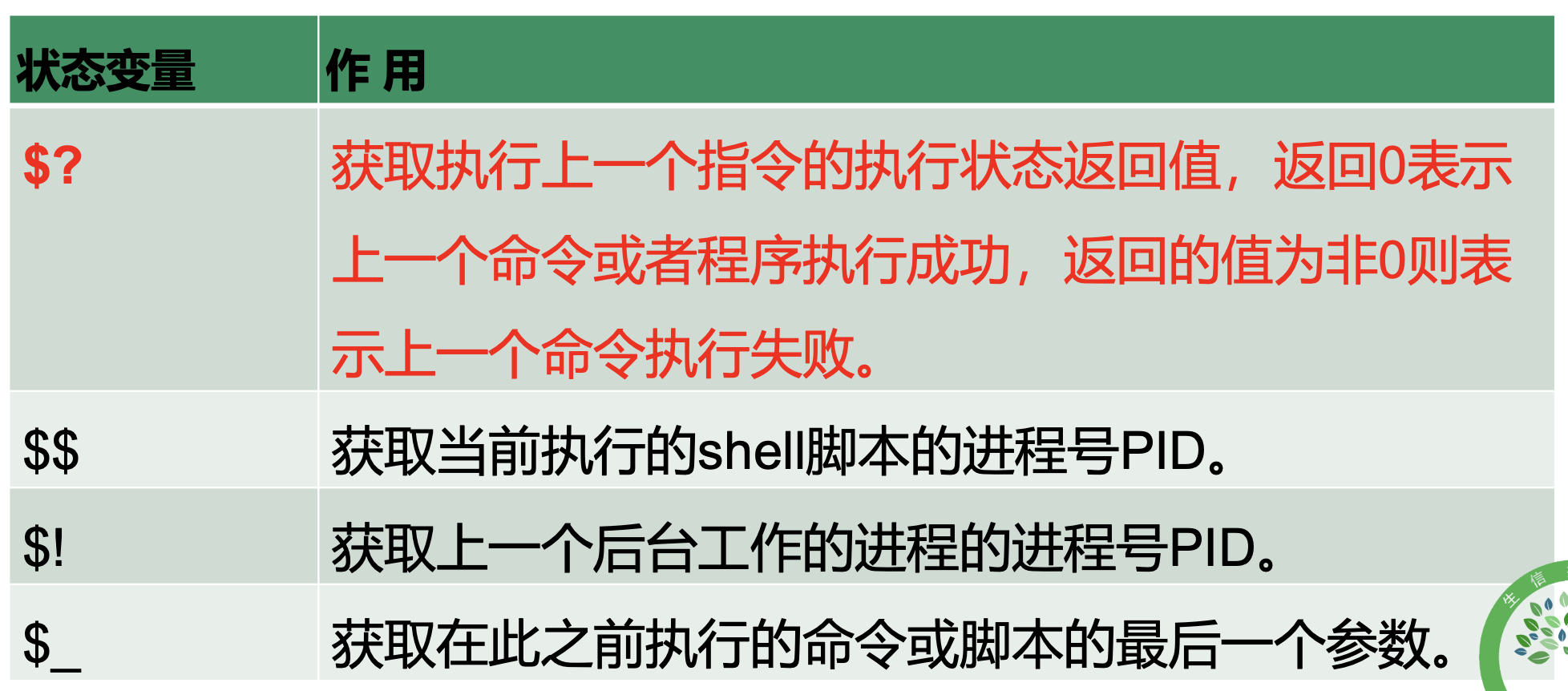

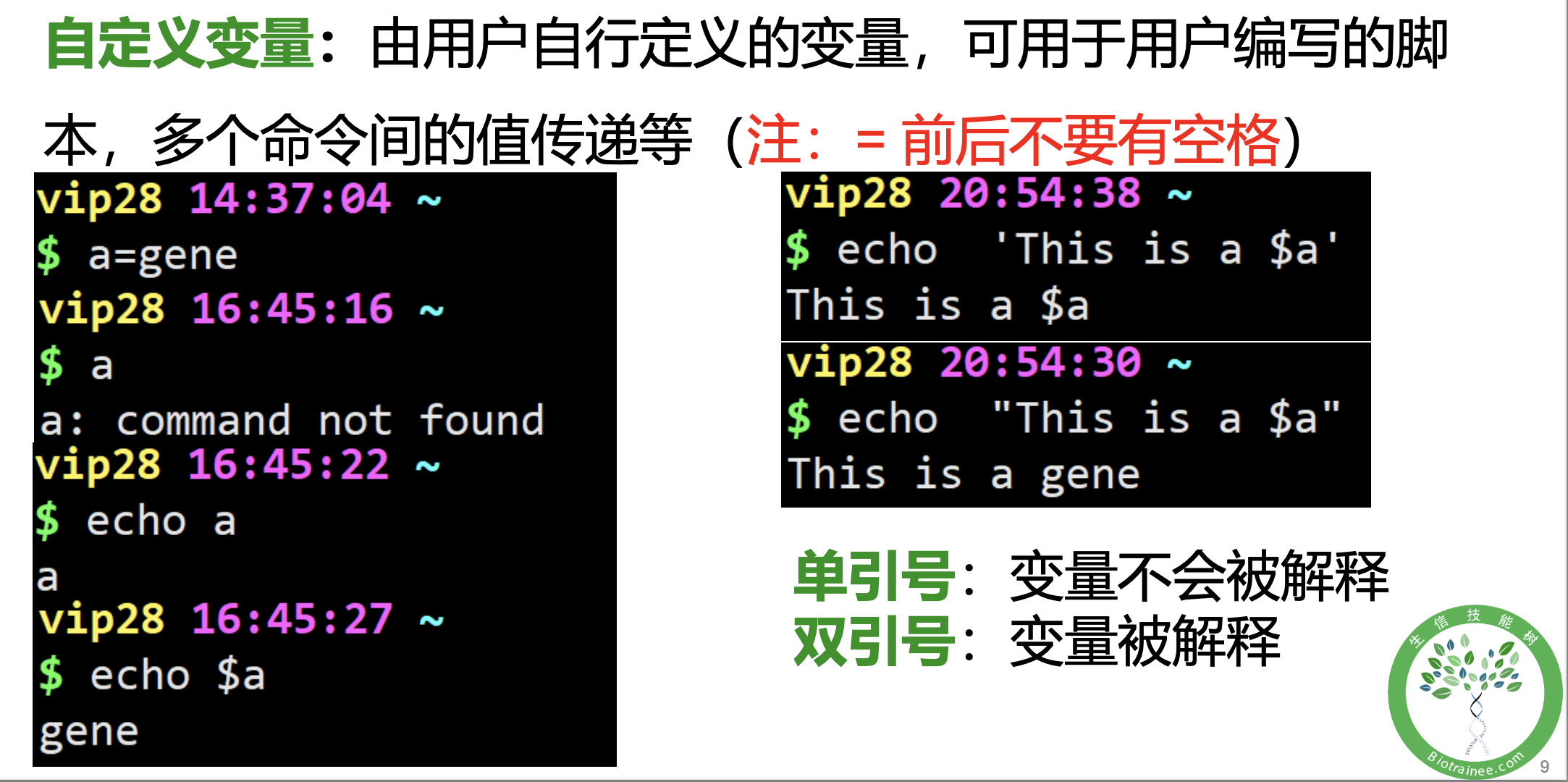
通配符与参数扩展
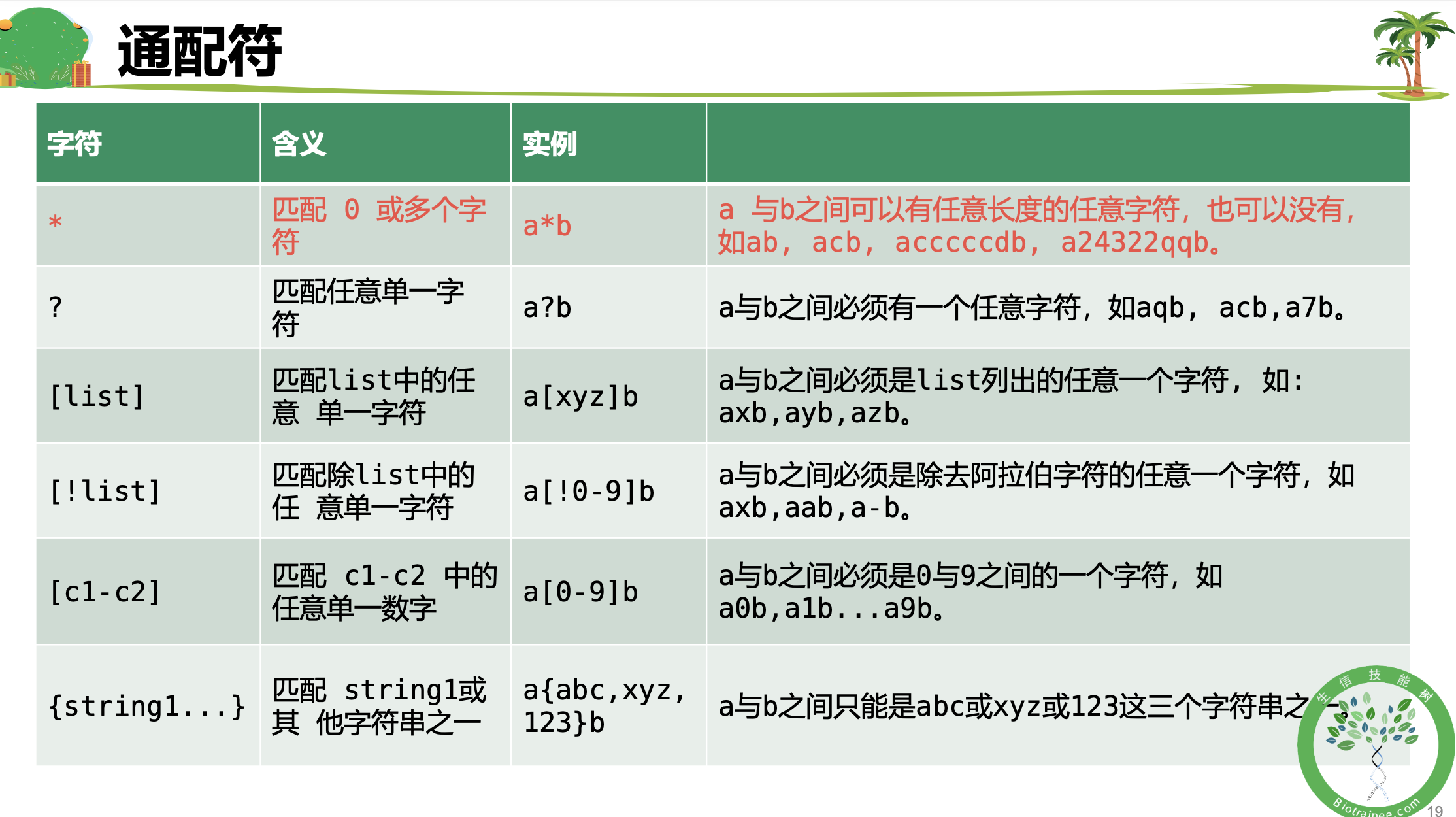

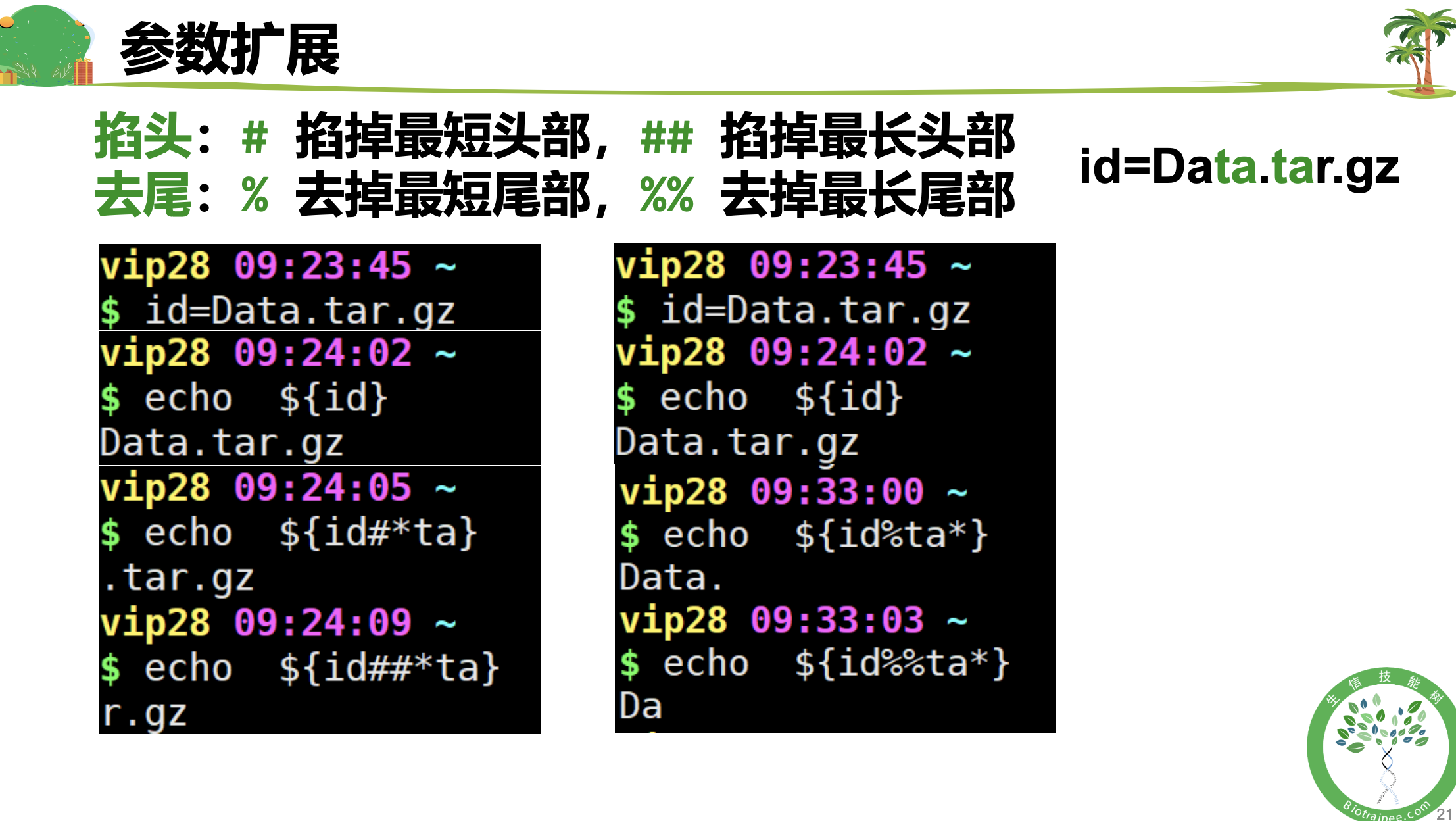
参数扩展练习
$ id=abcdcdcba1(base) May21 21:26:08 ~$ echo $idabcdcdcba1(base) May21 21:26:23 ~$ echo ${id#*cd}cdcba1(base) May21 21:27:59 ~$ echo ${id##*cd}cba1(base) May21 21:28:22 ~$ echo ${id%*cd}abcdcdcba1(base) May21 21:28:35 ~$ echo ${id%cd*}abcd(base) May21 21:28:57 ~$ echo ${id%%cd*}ab(base) May21 21:29:08 ~$ echo ${id/cd/x}abxcdcba1(base) May21 21:29:45 ~$ echo ${id//cd/x}abxxcba1(base) May21 21:29:54 ~$ echo ${#id}10(base) May21 21:30:35 ~$ echo ${#id:2}-bash: ${#id:2}: bad substitution # 报错啦,多写了#(base) May21 21:30:43 ~$ echo ${id:2}cdcdcba1(base) May21 21:30:58 ~$ echo ${id:2:4}cdcd(base) May21 21:31:34 ~$ echo ${id:2:-2}cdcdcb
结构化语句
条件语句 if
有头有尾,一个if 就要对应一个 fi 。有三种结构:
# 1if [ condition ] #条件放在中括号里,内容与括号需要有空格thencommandsfi #结束语,固定搭配
# 2if [ condition ]thencommandselsecommandsfi
# 3if [ condition ]thencommandselseif [ condition ]thencommandsfi #一个if需要对应一个fifi# (else if 可以缩写为 elif )if [ condition ]thencommandselif [ condition ]thencommandsfifi
if 条件语句的常见条件: 数值判断、字符串判断、文件判断
循环语句
for 循环
for i in 1 2 3 4 5doecho ${i} "Welcome to Biotrainee() !"donefor i in {1..10}dotouch file${i}donelist="CDS exon gene start_codon stop_codon transcript UTR"for i in ${list}doecho "This feature is ${i}"done
while 循环
结构化语句练习
(base) May21 21:31:47 ~$ id=example(base) May21 22:25:24 ~$ fastqc ~/Data/${id}.fqStarted analysis of example.fqApprox 100% complete for example.fqAnalysis complete for example.fq(base) May21 22:26:09 ~$ if [ $? -eq 0 ]> then> echo 'yes'> else> echo 'no'> fiyes(base) May21 22:27:38 ~$ touch file{1..10}(base) May21 22:28:02 ~$ lsbin fa1.txt file2 file5 file8 Miniconda3-latest-Linux-x86_64.shbiosoft file1 file3 file6 file9 R4.yamlData file10 file4 file7 miniconda3 readme.txt(base) May21 22:28:10 ~$ ls file* | while read id> do> echo mv ${id} ${id}.txt> donemv file1 file1.txtmv file10 file10.txtmv file2 file2.txtmv file3 file3.txtmv file4 file4.txtmv file5 file5.txtmv file6 file6.txtmv file7 file7.txtmv file8 file8.txtmv file9 file9.txt(base) May21 22:31:24 ~$ ls file* | while read id; do mv ${id} ${id}.txt; done(base) May21 22:31:43 ~$ lsbin fa1.txt file2.txt file5.txt file8.txt Miniconda3-latest-Linux-x86_64.shbiosoft file10.txt file3.txt file6.txt file9.txt R4.yamlData file1.txt file4.txt file7.txt miniconda3 readme.txt
shell脚本编程
Vim编辑器
Vim 编辑器:是从 vi 发展出来的一个文本编辑器。代码补全、编译及错误跳转等方便编程的功能特别丰富,在程序员中被广泛使用。
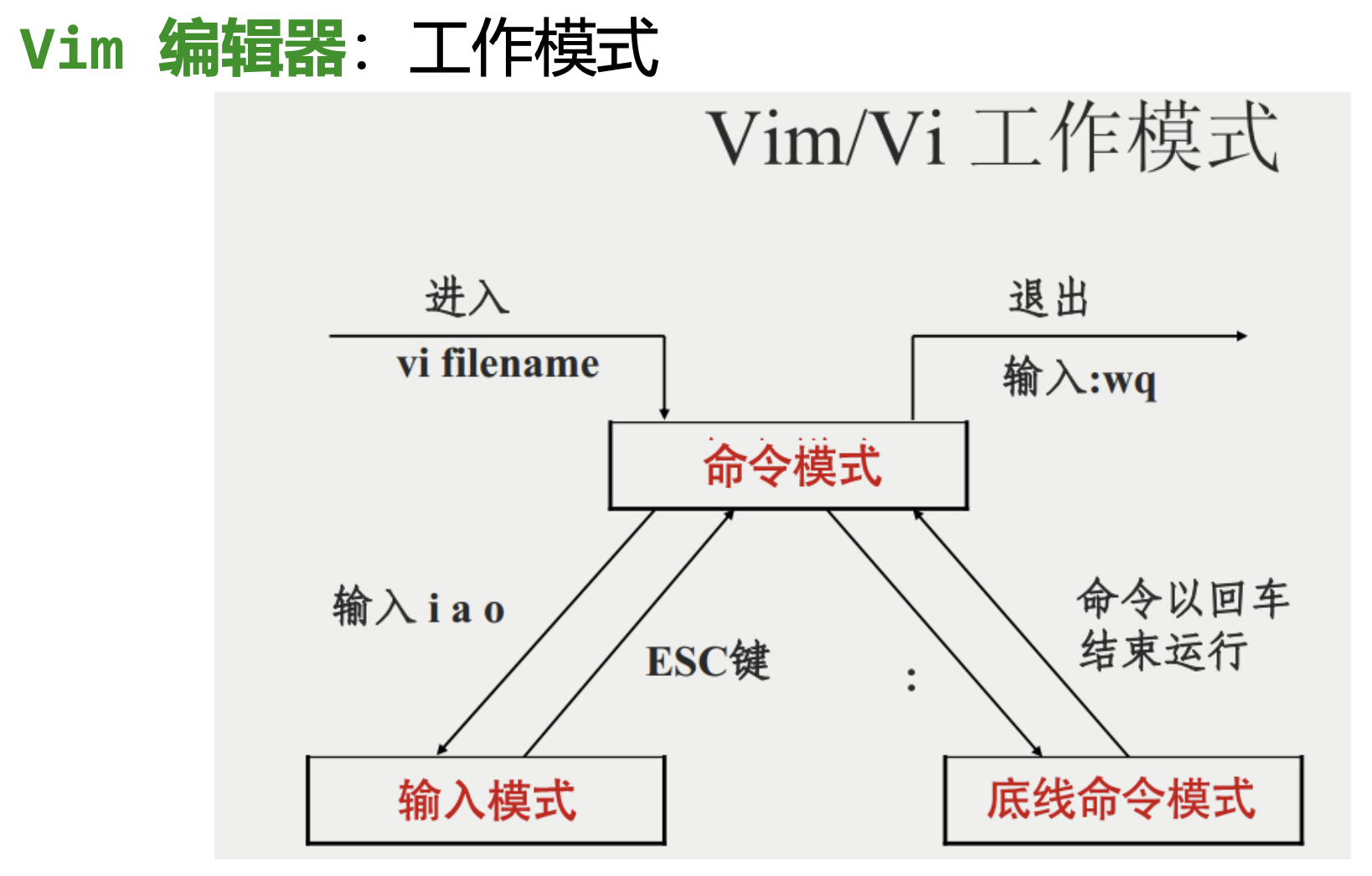
shell 脚本:为了和普通文本文件区分开,通常shell脚本都 会以 .sh 为后缀名
R 语言脚本:.R 为后缀名
Python 脚本:.py 为后缀名
脚本首行的 #! 是Linux的 Shebang 符号,指定解释
1: 标准输出流 2:标准误输出流

若有收获,就点个赞吧
0 人点赞


