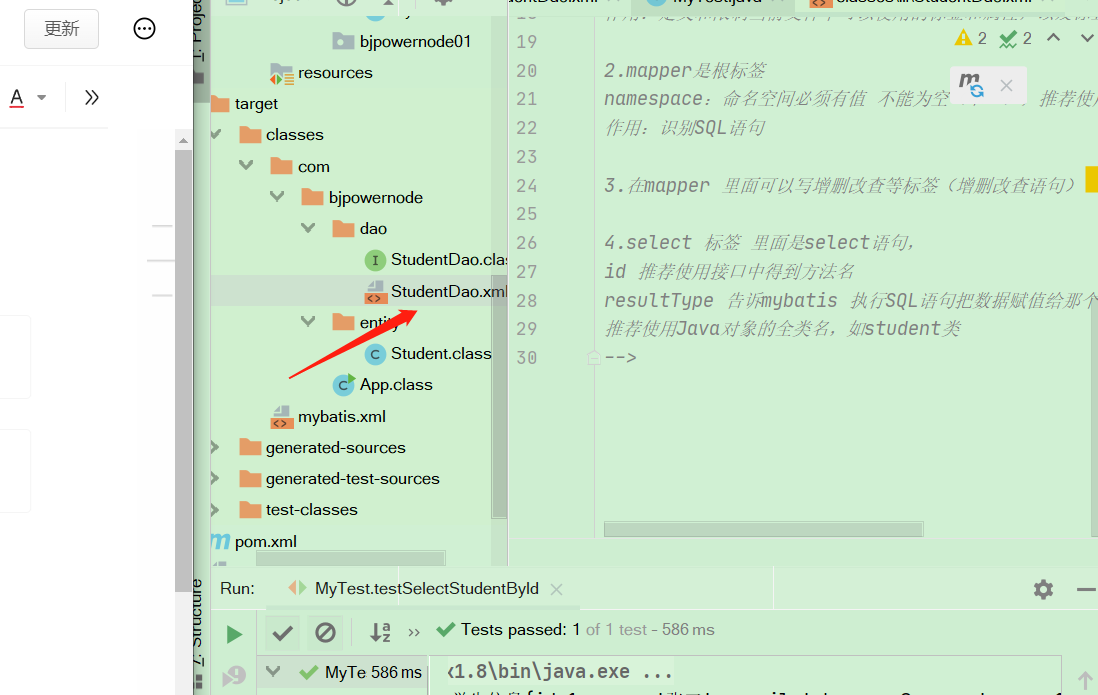
这里要有xml文件 不然测试会报错! 一定要注意这里编译文件
各个文件例子
1.mybatis.xml
version="1.0" encoding="UTF-8" ?><!DOCTYPE configurationPUBLIC "-//mybatis.org//DTD Config 3.0//EN""http://mybatis.org/dtd/mybatis-3-config.dtd"><configuration><environments default="mysql"><environment id="mysql"><transactionManager type="JDBC"/><!--配置数据源:创建connection 对象--><dataSource type="POOLED"><!-- 驱动内容--><property name="driver" value="com.mysql.jdbc.Driver"/><!-- 链接数据的url--><property name="url" value="jdbc:mysql://localhost:3306/ssm?useUnicode=true&characterEncoding=utf-8"/><property name="username" value="root"/><property name="password" value="1234"/></dataSource></environment></environments><!--制定其他mapper文件的位置 (找到其他SQL语句)--><mappers><!-- 指定mapper文件的路径resourse="mapper 文件的路径 用/分来分割一个mapper resource 制定一个mapper文件--><mapper resource="com/bjpowernode/dao/StudentDao.xml"/></mappers></configuration>
2.studentDao.xml(在dao包)
<?xml version="1.0" encoding="UTF-8" ?><!DOCTYPE mapperPUBLIC "-//mybatis.org//DTD Mapper 3.0//EN""http://mybatis.org/dtd/mybatis-3-mapper.dtd"><mapper namespace="com.bjpowernode.dao.StudentDao"><select id="selectStudentById"resultType="com.bjpowernode.entity.Student">select id,name,email,age from student</select></mapper><!--1.约束文件:"http://mybatis.org/dtd/mybatis-3-mapper.dtd"作用:定义和限制当前文件中可以使用的标签和属性,以及标签出现的顺序2.mapper是根标签(一个表一个mapper)namespace:命名空间必须有值 不能为空(唯一),推荐使用dao接口的全限定名称作用:识别SQL语句3.在mapper 里面可以写增删改查等标签(增删改查语句)4.select 标签 里面是select语句,id 推荐使用接口中得到方法名resultType(只在select标签 中使用)0 告诉mybatis 执行SQL语句把数据赋值给那个类型的Java对象推荐使用Java对象的全类名,如student类-->
3.实体类student(提供gettier和setter 还有toString 方法)
private Integer id;private String name;private String email;private Integer age;
4.dao接口
public interface StudentDao {//查询一个学生Student selectStudentById(Integer id);}
5.StudentTest 类(在下面的java包中)
public class MyTest {//测试mybatis 执行SQL语句@Testpublic void testSelectStudentById() throws IOException {//调用mybatis某个对象的方法,执行mapper文件的sql语句//定义mybatis住配置文件的位置,从类路径开始的相对路径String config = "mybatis.xml";//使用mybatis的resources类 读取配置文件InputStream inputStream = Resources.getResourceAsStream(config);//使用SqlSessionFactoryBuilder类,创建factory对象SqlSessionFactory factory = new SqlSessionFactoryBuilder().build(inputStream);//获取SqlSession对象SqlSession session = factory.openSession();//指定要执行的sql语句的id//sql语句的id =namespace+"."+增删改查的id属性值String sqlId = "com.bjpowernode.dao.StudentDao"+"."+"selectStudentById";//通过SqlSession方法执行sql语句Student student = session.selectOne(sqlId);System.out.println("使用mybatis查询一个学生:"+student);//关闭sqlsession对象session.close();}}
Expected one result (or null) to be returned by selectOne(), but found: 2

1.l另外一定要注意student.xml里面 语句有没有发生变化
设置日志(可以查看sql语句及变化)
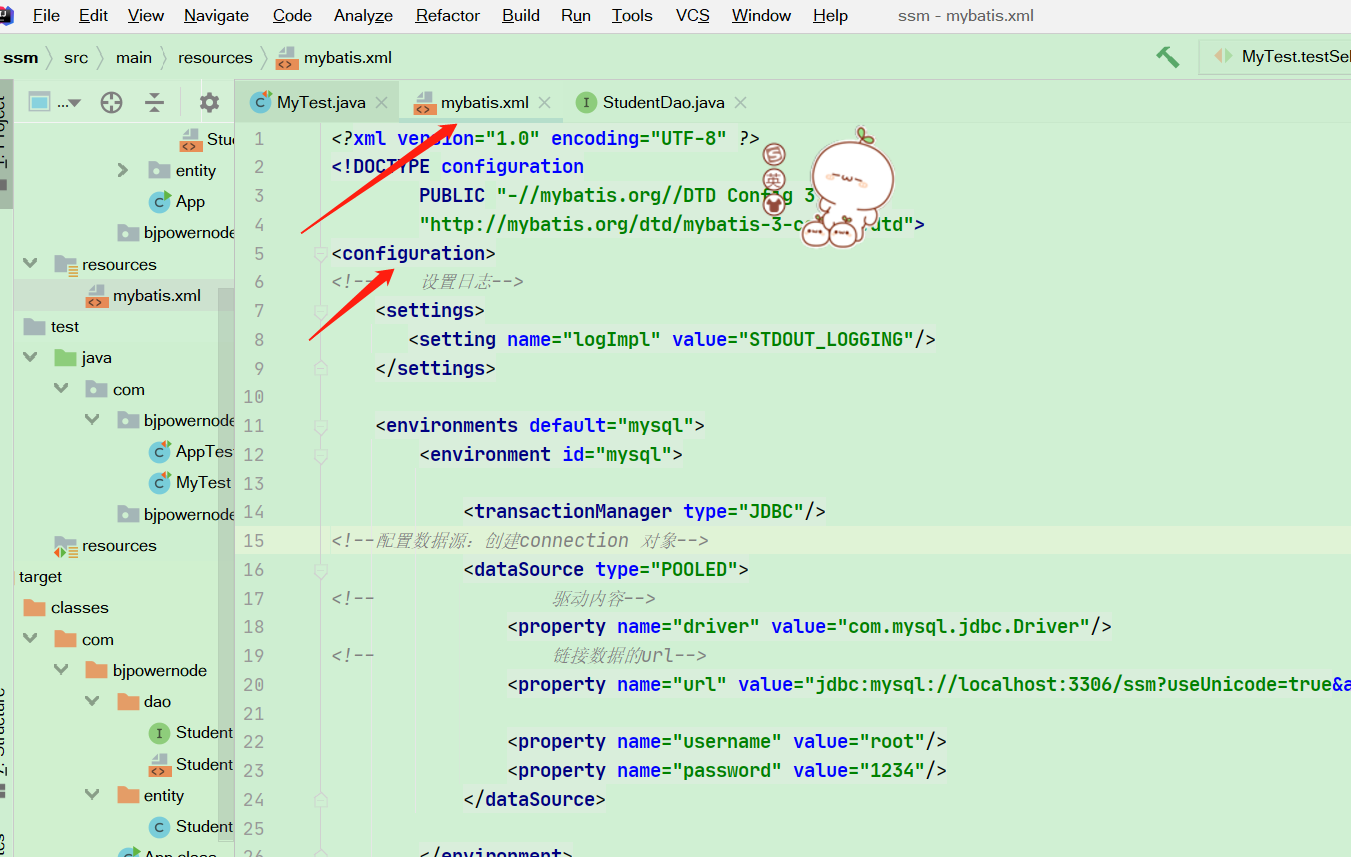
<settings><setting name="logImpl" value="STDOUT_LOGGING"/></settings>
插入insert 但是数据库中表单信息没有变化
//mybatis 默认执行sql语句 手工提交,在执行update,insert delete 要提交事务
session.commit();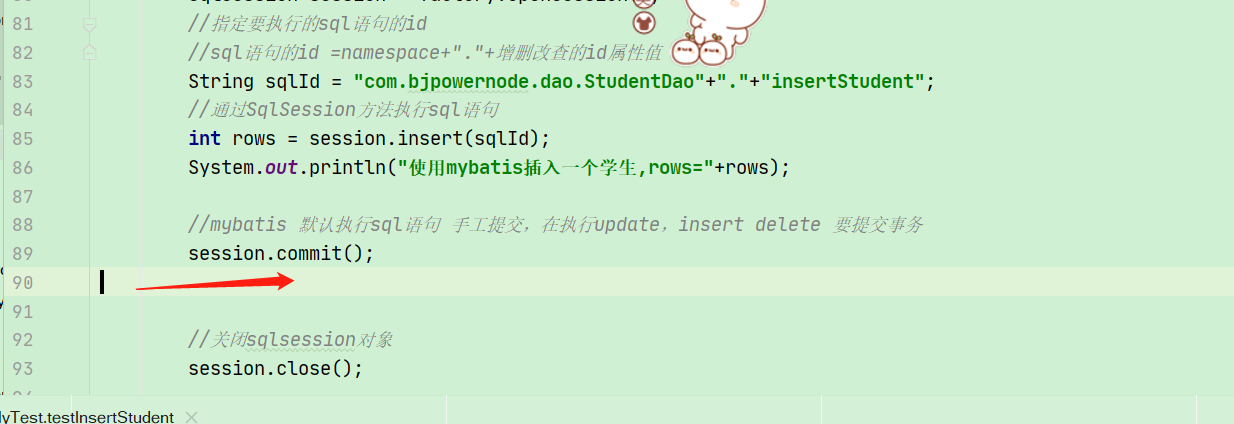

namespace+id(可以不用dao接口)
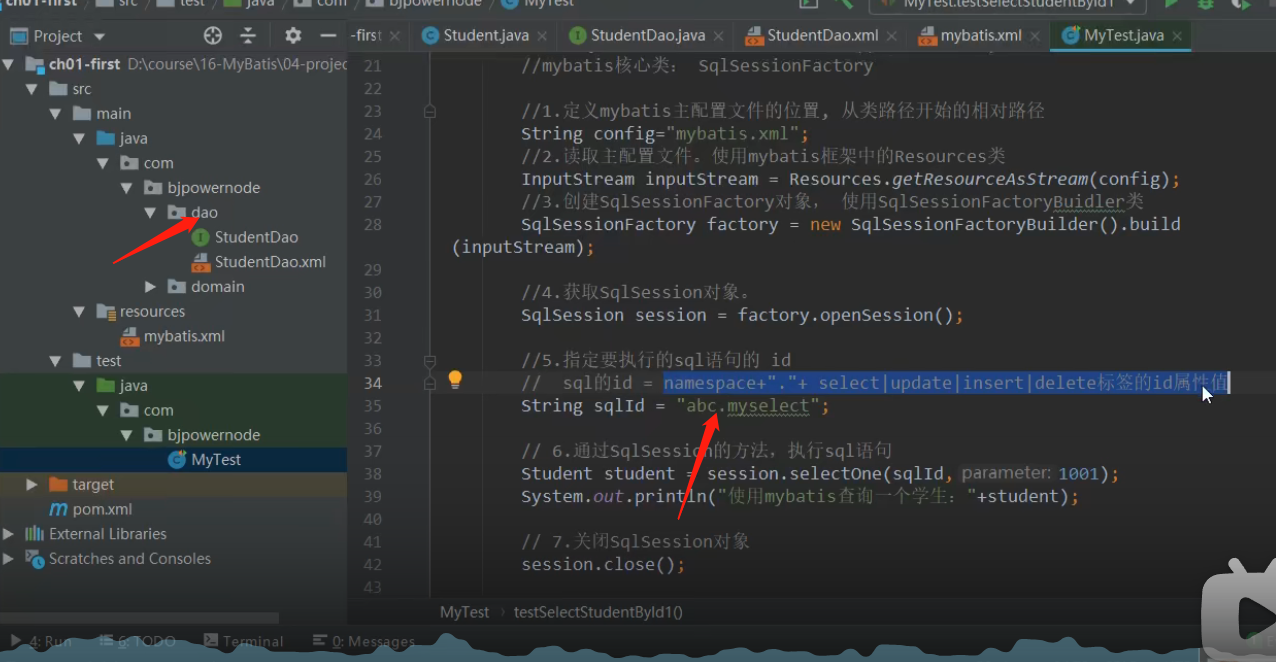
自定义(StudentDao)mapper.xml文件模板

mapper文件模板:<?xml version="1.0" encoding="UTF-8" ?><!DOCTYPE mapperPUBLIC "-//mybatis.org//DTD Mapper 3.0//EN""http://mybatis.org/dtd/mybatis-3-mapper.dtd"><mapper namespace="dao的全类名"><!--增删改查标签,sql语句--></mapper>
自定义mybatis.xml 文件的模板
mybatis文件模板:<?xml version="1.0" encoding="UTF-8" ?><!DOCTYPE configurationPUBLIC "-//mybatis.org//DTD Config 3.0//EN""http://mybatis.org/dtd/mybatis-3-config.dtd"><configuration><!-- 设置日志--><settings><setting name="logImpl" value="STDOUT_LOGGING"/></settings><environments default="mysql"><environment id="mysql"><transactionManager type="JDBC"/><dataSource type="POOLED"><property name="driver" value="com.mysql.jdbc.Driver"/><property name="url" value="jdbc:mysql://localhost:3306/ssm?useUnicode=true&characterEncoding=utf-8"/><property name="username" value="root"/><property name="password" value="1234"/></dataSource></environment></environments><mappers><!-- 指定mapper文件的路径resourse="mapper 文件的路径 用/分来分割一个mapper resource 制定一个mapper文件--><mapper resource="com/bjpowernode/dao/StudentDao.xml"/></mappers></configuration>
创建mybatis 工具类
public class MyBatisUtils {private static SqlSessionFactory factory=null;static {String config = "mybatis.xml";try {InputStream inputStream = Resources.getResourceAsStream(config);factory = new SqlSessionFactoryBuilder().build(inputStream);} catch (IOException e) {e.printStackTrace();}}//创建方法获取SqlSession 对象public static SqlSession getSqlSession(){SqlSession session = null;if (factory!=null){session = factory.openSession();}return session;}}
#{}和${}占位符
dao接口
  //${}占位符
    List<Student> select(@Param("name")String name );


 //${}占位符
    List<Student> select(@Param("name")String name,
                         @Param("colName")String colName);
studentdao.xml
<select id="select"   resultType="com.bjpowernod.entity.Student">
  select id,name,email,age from student where name=${name}
</select>


<select id="select"   resultType="com.bjpowernod.entity.Student">
  select id,name,email,age from student where name=#{name} order by ${colName} desc
    </select>
test测试类(存在SQL注入)
@Test
    public void selectByNameOrAge() {
        SqlSession session = MyBatisUtils.getSqlSession();
        StudentDao dao = session.getMapper(StudentDao.class);
        List<Student> students = dao.select("'张三'or id>0");
        students.forEach(student -> System.out.println("student=" + student));
        session.close();
    }


    @Test
    public void selectByNameOrAge() {
        SqlSession session = MyBatisUtils.getSqlSession();
        StudentDao dao = session.getMapper(StudentDao.class);
        List<Student> students = dao.select("张三","id");
        students.forEach(student -> System.out.println("student=" + student));
        session.close();
    }
resultType
resultType 自定义别名(推荐使用全限定名称)
1.第一种
- 在settings 后面 (mybatis.xml文件中)
- type :java类型的全限定名称(例如student 的)
- alias :自定义名称
```xml
mybatis.xml
studentDao.xml
优点:可以自定义<br />缺点:每个类都要单独自定义(类多可能比较繁琐)

2.第二种方式<br />同样在setting之后<br />name:包名,mybatis 会把这个包中的类作为别名
xml
优点:一次性可以给多个类定义别名<br />缺点:别名不能自定义只能是类名(一个包中有同名 的类可能发生冲突)
<a name="vRkM3"></a>
## resultType返回对象 (同名列同名属性)
1.resultType 完全可以自定义<br />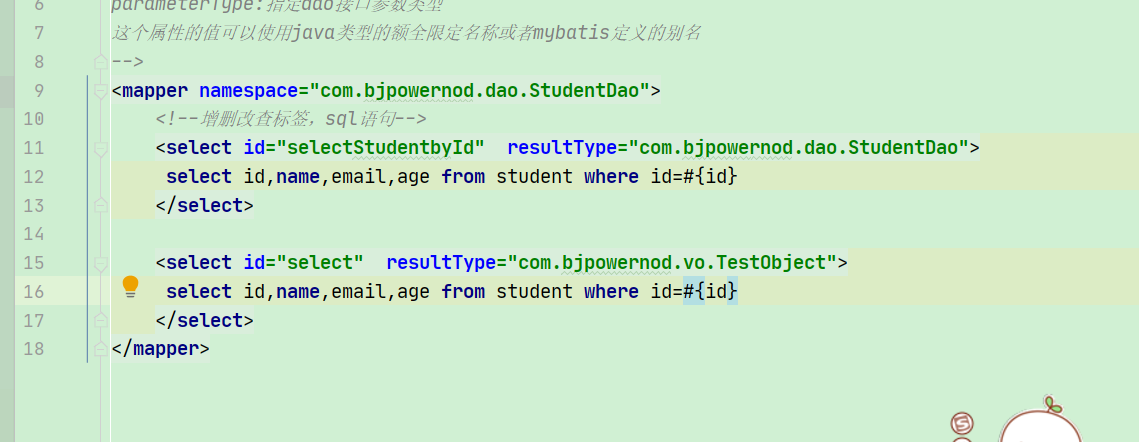<br />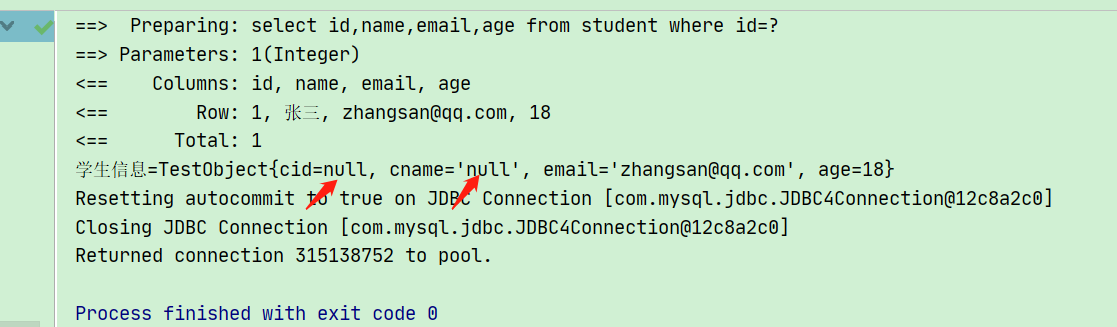
<a name="xAQS1"></a>
## resultType 返回简单类型
1.查询总数(查询平均数也以此类推)<br />2.studentDao.xmlxml
3.myTestjava
@Test
public void countStudent() {
//获取SqlSession 对象
SqlSession session = MyBatisUtils.getSqlSession();
StudentDao dao = session.getMapper(StudentDao.class);
long result = dao.countStudent();
System.out.println(“学生信息=” + result);
session.close();
}
4.studentDaojava
long countStudent();
<a name="dt6pt"></a>
## resultType 查询返回map
1.dao接口
java
// 用map作为查询结果返回类型
Map2.studentDao.xmlxml
<br />3.Test类
```java
@Test
public void selectAsMap() {
//获取SqlSession 对象
SqlSession session = MyBatisUtils.getSqlSession();
StudentDao dao = session.getMapper(StudentDao.class);
Map<Object,Object> map = dao.selectAsMap(3);
System.out.println("学生信息=" + map);
session.close();
}
resultMap(解决列名和属性名不一致)
用法
1.dao接口
TestObject select(Integer id);
2.studentDao.xml
<!--    resultMap 的用法
        id:给resultMap映射关系起别名
        type:Java类型的全限定名称-->
<resultMap id="customMap" type="com.bjpowernod.vo.TestObject">
  <!--        定义列名和属性名对应-->
  <!--        主键类型使用id标签-->
  <id column="id" property="cid"/>
  <!--        非主键类型使用result标签-->
  <result column="name" property="cname"/>
  <!--        列名和属性名相同就可以不用定义-->
  <!--        <result column="email" property="email"/>-->
  <!--        <result column="age" property="age"/>-->
</resultMap>

<!--    使用resultMap属性指定映射关系的id
        resultMap和resultType  不能同时使用只能二选一-->
<select id="select" resultMap="customMap">
  select id,name,email,age from student where id=#{id}
</select>
3.test类
    @Test
    public void select() {
        //获取SqlSession 对象
        SqlSession session = MyBatisUtils.getSqlSession();
        StudentDao dao = session.getMapper(StudentDao.class);
         TestObject object = dao.select(1);
        System.out.println("学生信息=" + object);
        session.close();

cid和cname 被赋值了 之前是null
2.也可以使用resultType 在sql语句中给列 起别名 让列名和属性名一致(还是推荐使用resultMap)
select id cid,name cname,email,age from student where id=#{id}
模糊查询like
1.第一种like模糊查询方式
dao
List<Student> selectLikeOne(@Param("name") String name);
studentDao.xml
<!--    模糊查询like第一种方式-->
<select id="selectLikeOne" resultType="com.bjpowernod.entity.Student">
  select * from student where name like #{name}
    </select>
myTest
    @Test
    public void selectLikeOne(){
        SqlSession sqlSession = MyBatisUtils.getSqlSession();
        StudentDao dao = sqlSession.getMapper(StudentDao.class);
//        String name = "%李%";
        List<Student> students = dao.selectLikeOne("%李%");
        students.forEach(student -> System.out.println("学生信息="+student));
        sqlSession.close();
    }
2.第二种like模糊查询方式 在SQL语句里面写
studentDao.xml
<select id="selectLikeTwo" resultType="com.bjpowernod.entity.Student">
  select * from student where name like "%" #{name} "%"
</select>
    //空格是必须要的
动态SQL(mybatis的特色)
多条件查询时用动态SQL
1.if结构
studentDao.xml
<!--可以在name前面添加or  在where 后面添加id=-1 等保证SQL语句正确-->
 <select id="selectIf" resultType="com.bjpowernod.entity.Student">
     select * from student where
    <if test="name!=null and name!= ''">

     name=#{name}
    </if>
    <if test="age>0">
        or age=#{age}
    </if>
 </select>

   //里面的if判断结构 先判断再 然后再把 语句拼接上去 age就是属性
myTest
    @Test
    public void selectIf(){
        SqlSession session = MyBatisUtils.getSqlSession();
        StudentDao dao = session.getMapper(StudentDao.class);
        Student student = new Student();
        student.setAge(18);
        student.setName("张三");
        List<Student> students = dao.selectIf(student);
        students.forEach(student1 -> System.out.println("学生信息="+student1));
        session.close();
    }

2.where 结构
studentDao.xml
<!-- 判断条件成立 就会加上where关键字,后面的or 在条件成立的情况上会去掉保证语句语法正确
要是if条件都不成立 就不会加上where关键字 直接查询表单数据
前提:setname =null 不是不设置name属性-->
<select id="selectWhere" resultType="com.bjpowernod.entity.Student">
select * from student
<where>
<if test="name!=null and name!= ''">
or name=#{name}
</if>
<if test="age>0">
or age < #{age}
</if>
</where>
</select>
test类
   @Test
    public void selectWhere(){
        SqlSession session = MyBatisUtils.getSqlSession();
        StudentDao dao = session.getMapper(StudentDao.class);
        Student student = new Student();
        student.setAge(0);
        student.setName("张三");
//        student.setName("张三");
        List<Student> students = dao.selectIf(student);
        students.forEach(student1 -> System.out.println("学生信息="+student1));
        session.close();
    }
3.foreach
使用foreach可以循环数组,list集合 ,一般使用在in语句中
<foreach collection="集合类型" open="开始的字符" close="结束的字符"
         item="集合中的成员" separator="集合成员之间的分隔符">
        #{item 的值}
</foreach>

标签属性:
collection: 表示,循环的对象是 数组, 还是list集合。  如果dao接口方法的形参是 数组,
             collection="array" ,如果dao接口形参是List, collection="list"

open:循环开始时的字符。  sql.append("(");
close:循环结束时字符。  sql.append(")");
item:集合成员, 自定义的变量。   Integer item  = idlist.get(i);// item是集合成员
separator:集合成员之间的分隔符。  sql.append(","); //集合成员之间的分隔符
#{item 的值}:获取集合成员的值。
1.foreach 第一种方式简单类型(id )
studentDao.xml
<!--    foreach 简单类型
        为了保证sal语句在各中情况下语法正确,要注意条件判断-->
    <select id="selectForeachOne" resultType="com.bjpowernod.entity.Student">
        select * from student
        <if test="list!=null and list.size>0">
            where id in
            <foreach collection="list" open="(" close=")" separator="," item="myid">
                #{myid}
            </foreach>
        </if>
    </select>
dao接口
    //foreach 简单类型
    List<Student> selectForeachOne(List<Integer> idlist);
test
    @Test
    public void selectForeachOne(){
        SqlSession session = MyBatisUtils.getSqlSession();
        StudentDao dao = session.getMapper(StudentDao.class);
        List<Integer> id = new ArrayList();
        id.add(1);
        id.add(2);
        id.add(3);
        List<Student> students = dao.selectForeachOne(id);
        students.forEach(student -> System.out.println(student));
        session.close();
    }
2.foreach 对象类型
studentDao.xml
<!--    foreach 对象类型   对象类型传参可以调用对象的属性-->
    <select id="selectForeachTwo" resultType="com.bjpowernod.entity.Student">
        select * from student
       <if test="list!=null and list.size>0">
           where id in
           <foreach collection="list" open="(" close=")" separator="," item="student">
               #{student.id}
           </foreach>
       </if>
    </select>
StudentDao
 //foreach 对象类型
    List<Student> selectForeachTwo(List<Student> studentList);
test
//    foreach  对象类型
    @Test
    public void selectForeachTwo(){
        SqlSession session = MyBatisUtils.getSqlSession();
        StudentDao dao = session.getMapper(StudentDao.class);
        List<Student> list = new ArrayList<>();
        Student student1 = new Student();
        student1.setId(2);
       Student student2 = new Student();
        student2.setId(5);
       list.add(student1);
       list.add(student2);
        List<Student> students = dao.selectForeachTwo(list);
        students.forEach(student -> System.out.println(student));
    }
3.代码片段
studentDao.xml
<!-- 定义代码片段-->
<sql id="selectStudent">
select * from student
</sql>
<sql id="studentID">
id,name,email,age
</sql>
<!-- 判断条件成立 就会加上where关键字,后面的or 在条件成立的情况上会去掉保证语句语法正确
要是if条件都不成立 就不会加上where关键字 直接查询表单数据
前提:setname =null 不是不设置name属性-->
<select id="selectWhere" resultType="com.bjpowernod.entity.Student">
<include refid="selectStudent"/>
<where>
<if test="name!=null and name!= ''">
or name=#{name}
</if>
<if test="age>0">
or age < #{age}
</if>
</where>
</select>
<!-- foreach 简单类型
为了保证sal语句在各中情况下语法正确,要注意条件判断-->
<select id="selectForeachOne" resultType="com.bjpowernod.entity.Student">
select <include refid="studentID"/> from student
<if test="list!=null and list.size>0">
where id in
<foreach collection="list" open="(" close=")" separator="," item="myid">
#{myid}
</foreach>
</if>
</select>
笔记

若有收获,就点个赞吧
0 人点赞


