1.基本配置
1.创建数据库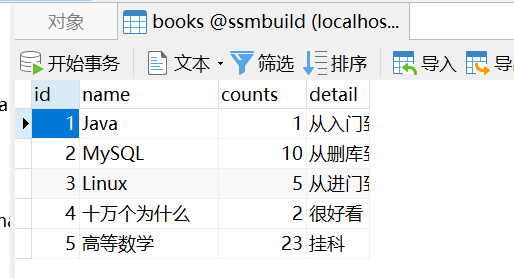
2.创建pojo类
@Data@AllArgsConstructor@NoArgsConstructorpublic class Books {private int id;private String name;private int counts;private String detail;}
3导入依赖/创建项目时勾选mybatisplus-framework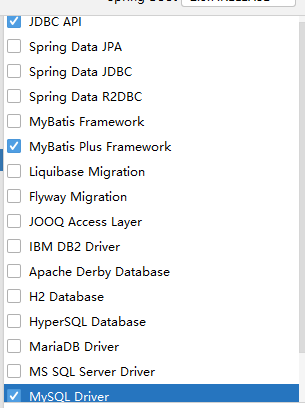
4.配置yaml中的数据库链接池和日志打印
spring:datasource:username: rootpassword: root#?serverTimezone=UTC解决时区的报错url: jdbc:mysql://localhost:3306/ssmbuild?useUnicode=true&characterEncoding=utf-8&useSSL=false&serverTimezone=Asia/Shanghai&allowPublicKeyRetrieval=truedriver-class-name: com.mysql.cj.jdbc.Drivertype: com.alibaba.druid.pool.DruidDataSource#Spring Boot 默认是不注入这些属性值的,需要自己绑定#druid 数据源专有配置initialSize: 5minIdle: 5maxActive: 20maxWait: 60000timeBetweenEvictionRunsMillis: 60000minEvictableIdleTimeMillis: 300000validationQuery: SELECT 1 FROM DUALtestWhileIdle: truetestOnBorrow: falsetestOnReturn: falsepoolPreparedStatements: true#配置监控统计拦截的filters,stat:监控统计、log4j:日志记录、wall:防御sql注入#如果允许时报错 java.lang.ClassNotFoundException: org.apache.log4j.Priority#则导入 log4j 依赖即可,Maven 地址:https://mvnrepository.com/artifact/log4j/log4jfilters: stat,wall,log4jmaxPoolPreparedStatementPerConnectionSize: 20useGlobalDataSourceStat: trueconnectionProperties: druid.stat.mergeSql=true;druid.stat.slowSqlMillis=500#日志打印:打印具体执行的sql语句只需要添加以下配置即可mybatis-plus:configuration:log-impl: org.apache.ibatis.logging.stdout.StdOutImpl
5.mapper包下写BaseMapper的子类去继承他
@Repositorypublic interface BooksMapper extends BaseMapper<Books> {}
6.主启动类上增加扫描路径注解
@MapperScan("com.yuan.mybatisplus.mapper")
7.测试类中测试
@SpringBootTestclass MybatisPlusApplicationTests {@AutowiredBooksMapper booksMapper;@AutowiredDataSource dataSource;@Testvoid contextLoads() {DruidDataSource dataSource = (DruidDataSource) this.dataSource;System.out.println("最大连接数是:"+dataSource.getMaxActive());List<Books> books = booksMapper.selectList(null);books.forEach(System.out::println);}}
2.雪花算法
由于在Java中64bit的整数是long类型,所以在Java中SnowFlake算法生成的id就是long来存储的。
SnowFlake可以保证:
- 所有生成的id按时间趋势递增
- 整个分布式系统内不会产生重复id(因为有datacenterId和workerId来做区分)
3.主键自增
我们需要配置主键自增:
1、实体类字段上 @TableId(type = IdType.AUTO)
2、数据库字段一定要是自增!
3、再次测试插入即可!
public enum IdType {AUTO(0), // 数据库id自增NONE(1), // 未设置主键INPUT(2), // 手动输入ID_WORKER(3), // 默认的全局唯一idUUID(4), // 全局唯一id uuidID_WORKER_STR(5); //ID_WORKER 字符串表示法}
4.自动填充
4.1 删除数据库的默认值、更新操作!
4.2 实体类字段属性上需要增加注解
// 字段添加填充内容@TableField(fill = FieldFill.INSERT)private Date createTime;@TableField(fill = FieldFill.INSERT_UPDATE)private Date updateTime;
4.3 编写处理器来处理这个注解即可!
package com.kuang.handler;import com.baomidou.mybatisplus.core.handlers.MetaObjectHandler;import lombok.extern.slf4j.Slf4j;import org.apache.ibatis.reflection.MetaObject;import org.springframework.stereotype.Component;import java.util.Date;@Slf4j@Component // 一定不要忘记把处理器加到IOC容器中!public class MyMetaObjectHandler implements MetaObjectHandler {// 插入时的填充策略@Overridepublic void insertFill(MetaObject metaObject) {log.info("start insert fill.....");// setFieldValByName(String fieldName, Object fieldVal, MetaObjectmetaObjectthis.setFieldValByName("createTime",new Date(),metaObject);this.setFieldValByName("updateTime",new Date(),metaObject);}// 更新时的填充策略@Overridepublic void updateFill(MetaObject metaObject) {log.info("start update fill.....");this.setFieldValByName("updateTime",new Date(),metaObject);}}
5.乐观锁(版本号version)
5.1 给数据库中增加version字段
5.2 实体类增加对应字段
@Version //乐观锁Version注解private Integer version;
5.3 注册组件
// 扫描我们的 mapper 文件夹@MapperScan("com.kuang.mapper")@EnableTransactionManagement@Configuration // 配置类public class MyBatisPlusConfig {// 注册乐观锁插件@Beanpublic OptimisticLockerInterceptor optimisticLockerInterceptor() {return new OptimisticLockerInterceptor();}}
5.4 测试
// 测试乐观锁成功!@Testpublic void testOptimisticLocker(){// 1、查询用户信息User user = userMapper.selectById(1L);// 2、修改用户信息user.setName("kuangshen");user.setEmail("24736743@qq.com");// 3、执行更新操作userMapper.updateById(user);}
6.分页查询
6.1 配置拦截器
@MapperScan("com.yuan.mybatis.mapper")@EnableTransactionManagement@Componentpublic class MyBatisPlusConfig {/* 旧版本配置@Beanpublic PaginationInterceptor paginationInterceptor(){return new PaginationInterceptor();}*//*** 新的分页插件*/@Beanpublic MybatisPlusInterceptor mybatisPlusInterceptor() {MybatisPlusInterceptor interceptor = new MybatisPlusInterceptor();interceptor.addInnerInterceptor(new PaginationInnerInterceptor(DbType.H2));return interceptor;}}
6.2 直接使用Page对象
// 测试分页查询@Testpublic void testPage(){// 参数一:当前页// 参数二:页面大小// 使用了分页插件之后,所有的分页操作也变得简单的!Page<User> page = new Page<>(2,5);userMapper.selectPage(page,null);page.getRecords().forEach(System.out::println);System.out.println(page.getTotal());}
7. 逻辑删除
7.1 what is 逻辑删除
逻辑删除的本质是修改操作,所谓的逻辑删除其实并不是真正的删除,而是在表中将对应的是否删除标识(deleted)或者说是状态字段(status)做修改操作。比如0是未删除,1是删除。在逻辑上数据是被删除的,但数据本身依然存在库中。
此时的delete其实是update
update user set deleted=1 where id =1 and deleted=0
逻辑删除后的查找自动加入deleted字段的判断:
select * from user where deleted=0
7.2 如何使用
7.2.1 application.yaml加入配置
mybatis-plus:global-config:db-config:logic-delete-field: flag #全局逻辑删除字段值 3.3.0开始支持,详情看下面。logic-delete-value: 1 # 逻辑已删除值(默认为 1)logic-not-delete-value: 0 # 逻辑未删除值(默认为 0)
7.2.2 实体类字段加上@TableLogic注解&数据库添加字段deleted
@TableLogicprivate Integer deleted;
7.2.3 测试
int i = booksMapper.deleteById(1);System.out.println(i);Books books = booksMapper.selectById(1);System.out.println(books);
此时再查询id为1便为null了
8.条件构造器
8.1 常用函数名
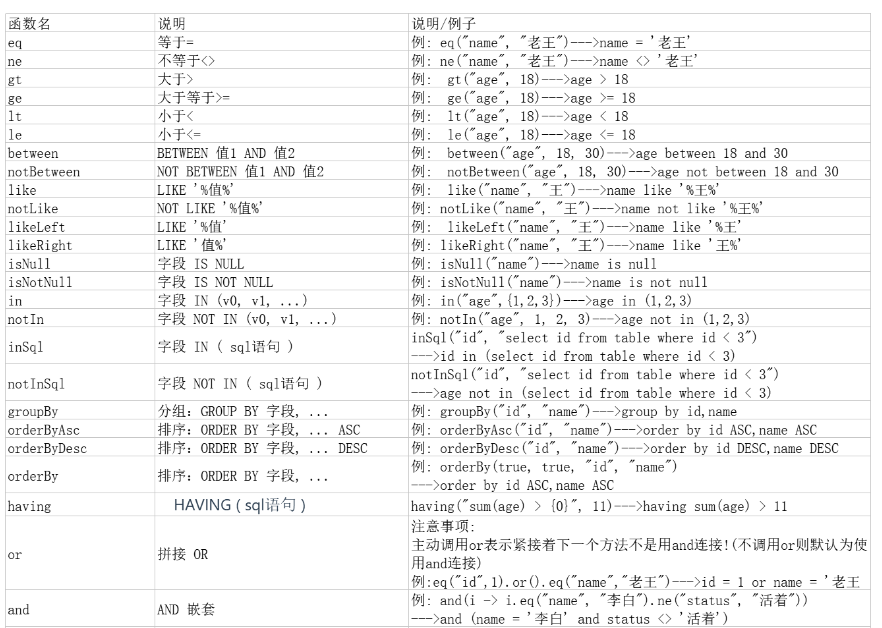
8.2 具体使用操作
1. ge、gt、le、lt、isNull、isNotNull
@Testpublic void testDelete() {QueryWrapper<User> queryWrapper = new QueryWrapper<>();queryWrapper.isNull("name").ge("age", 12).isNotNull("email");int result = userMapper.delete(queryWrapper);System.out.println("delete return count = " + result);}
SQL:
UPDATE user SET deleted=1 WHERE deleted=0 AND name IS NULL AND age >= ? AND email IS NOT NULL
2. eq、ne
注意:seletOne返回的是一条实体记录,当出现多条时会报错
@Testpublic void testSelectOne() {QueryWrapper<User> queryWrapper = new QueryWrapper<>();queryWrapper.eq("name", "Tom");User user = userMapper.selectOne(queryWrapper);System.out.println(user);}
3.between、notBetween
包含大小边界
@Testpublic void testSelectCount() {QueryWrapper<User> queryWrapper = new QueryWrapper<>();queryWrapper.between("age", 20, 30);Integer count = userMapper.selectCount(queryWrapper);System.out.println(count);}
4.allEq
@Testpublic void testSelectList() {QueryWrapper<User> queryWrapper = new QueryWrapper<>();Map<String, Object> map = new HashMap<>();map.put("id", 2);map.put("name", "Jack");map.put("age", 20);9queryWrapper.allEq(map);List<User> users = userMapper.selectList(queryWrapper);users.forEach(System.out::println);}
SELECT id,name,age,email,create_time,update_time,deleted,version FROM user WHERE deleted=0 AND name = ? AND id = ? AND age = ?
5. like、notLike、likeLeft、likeRight
selectMaps返回Map集合列表
@Testpublic void testSelectMaps() {QueryWrapper<User> queryWrapper = new QueryWrapper<>();queryWrapper.notLike("name", "e").likeRight("email", "t");List<Map<String, Object>> maps = userMapper.selectMaps(queryWrapper);//返回值是Map列表maps.forEach(System.out::println);}
SELECT id,name,age,email,create_time,update_time,deleted,version FROM user WHERE deleted=0 AND name NOT LIKE ? AND email LIKE ?
6. in、notIn、inSql、notinSql、exists、notExists
in notIn
notIn("age",{1,2,3})--->age not in (1,2,3)notIn("age", 1, 2, 3)--->age not in (1,2,3)
inSql,notInSql
例: inSql("age", "1,2,3,4,5,6")--->age in (1,2,3,4,5,6)例: inSql("id", "select id from table where id < 3")--->id in (select id from table where id < 3)
SELECT id,name,age,email,create_time,update_time,deleted,version FROM user WHERE deleted=0 AND id IN (select id from user where id < 3)
7. or、and
注意:这里使用的是 UpdateWrapper 不调用or则默认为使用 and 连
@Testpublic void testUpdate1() {//修改值User user = new User();user.setAge(99);user.setName("Andy");//修改条件UpdateWrapper<User> userUpdateWrapper = new UpdateWrapper<>();userUpdateWrapper.like("name", "h").or().between("age", 20, 30);int result = userMapper.update(user, userUpdateWrapper);System.out.println(result);}
UPDATE user SET name=?, age=?, update_time=? WHERE deleted=0 AND name LIKE ? OR age BETWEEN ? AND ?
8. 嵌套or、嵌套and
这里使用了lambda表达式,or中的表达式最后翻译成sql时会被加上圆括号
@Testpublic void testUpdate2() {//修改值User user = new User();user.setAge(99);user.setName("Andy");//修改条件UpdateWrapper<User> userUpdateWrapper = new UpdateWrapper<>();userUpdateWrapper.like("name", "h").or(i -> i.eq("name", "李白").ne("age", 20));int result = userMapper.update(user, userUpdateWrapper);System.out.println(result);}
UPDATE user SET name=?, age=?, update_time=?
WHERE deleted=0 AND name LIKE ?
OR ( name = ? AND age <> ? )
9. orderBy、orderByDesc、orderByAsc
@Testpublic void testSelectListOrderBy() {QueryWrapper<User> queryWrapper = new QueryWrapper<>();queryWrapper.orderByDesc("id");List<User> users = userMapper.selectList(queryWrapper);users.forEach(System.out::println);}
SELECT id,name,age,email,create_time,update_time,deleted,version
FROM user WHERE deleted=0 ORDER BY id DESC
10. last
直接拼接到 sql 的最后
注意:只能调用一次,多次调用以最后一次为准 有sql注入的风险,请谨慎使用
@Testpublic void testSelectListLast() {QueryWrapper<User> queryWrapper = new QueryWrapper<>();queryWrapper.last("limit 1");List<User> users = userMapper.selectList(queryWrapper);users.forEach(System.out::println);}
11. 指定要查询的列
@Testpublic void testSelectListColumn() {QueryWrapper<User> queryWrapper = new QueryWrapper<>();queryWrapper.select("id", "name", "age");List<User> users = userMapper.selectList(queryWrapper);users.forEach(System.out::println);}
SELECT id,name,age FROM user WHERE deleted=0
12. set、setSql
最终的sql会合并 user.setAge(),以及 userUpdateWrapper.set() 和 setSql() 中 的字段
@Testpublic void testUpdateSet() {//修改值User user = new User();user.setAge(99);//修改条件UpdateWrapper<User> userUpdateWrapper = new UpdateWrapper<>();userUpdateWrapper.like("name", "h").set("name", "老李头")//除了可以查询还可以使用set设置修改的字段.setSql(" email = '123@qq.com'");//可以有子查询int result = userMapper.update(user, userUpdateWrapper);}
UPDATE user SET age=?, update_time=?, name=?, email = ‘123@qq.com’ WHERE deleted=0 AND name LIKE ?

若有收获,就点个赞吧
0 人点赞


