JDBC基本介绍

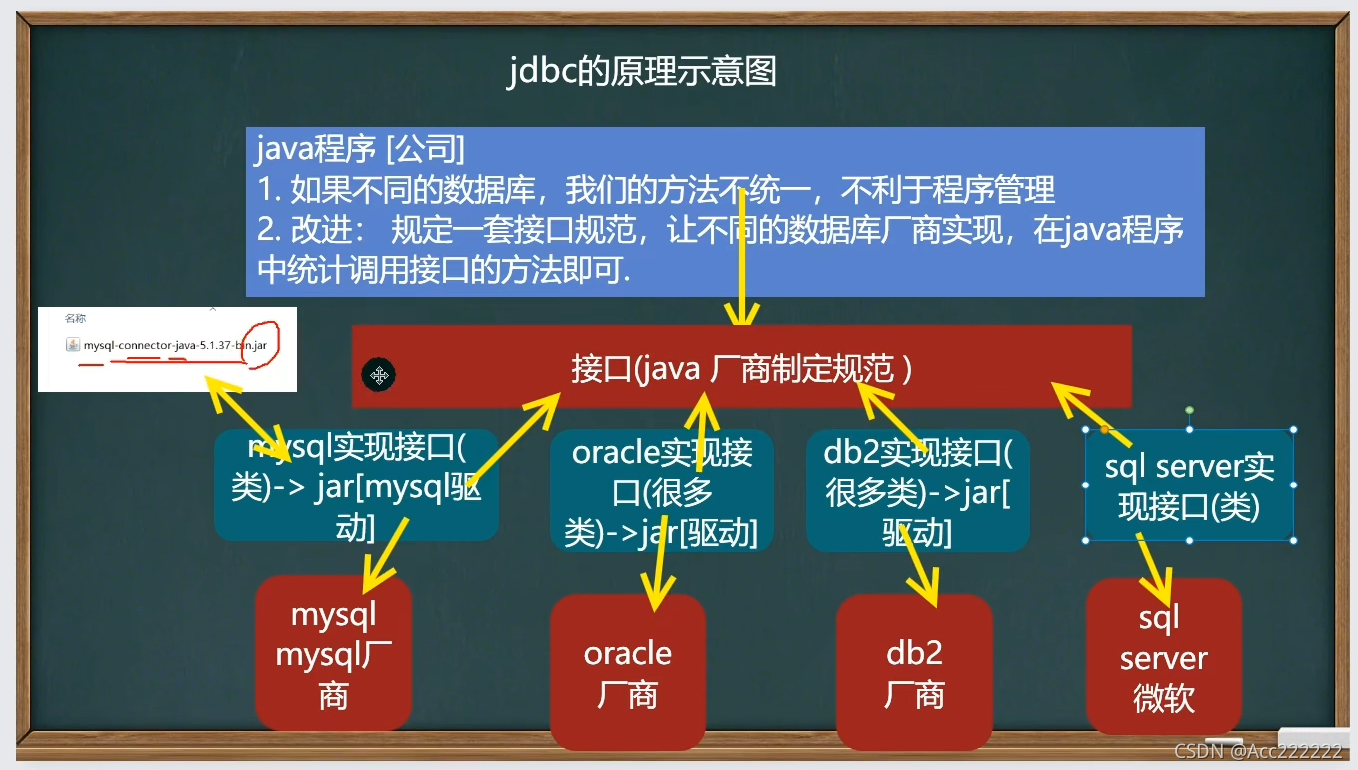

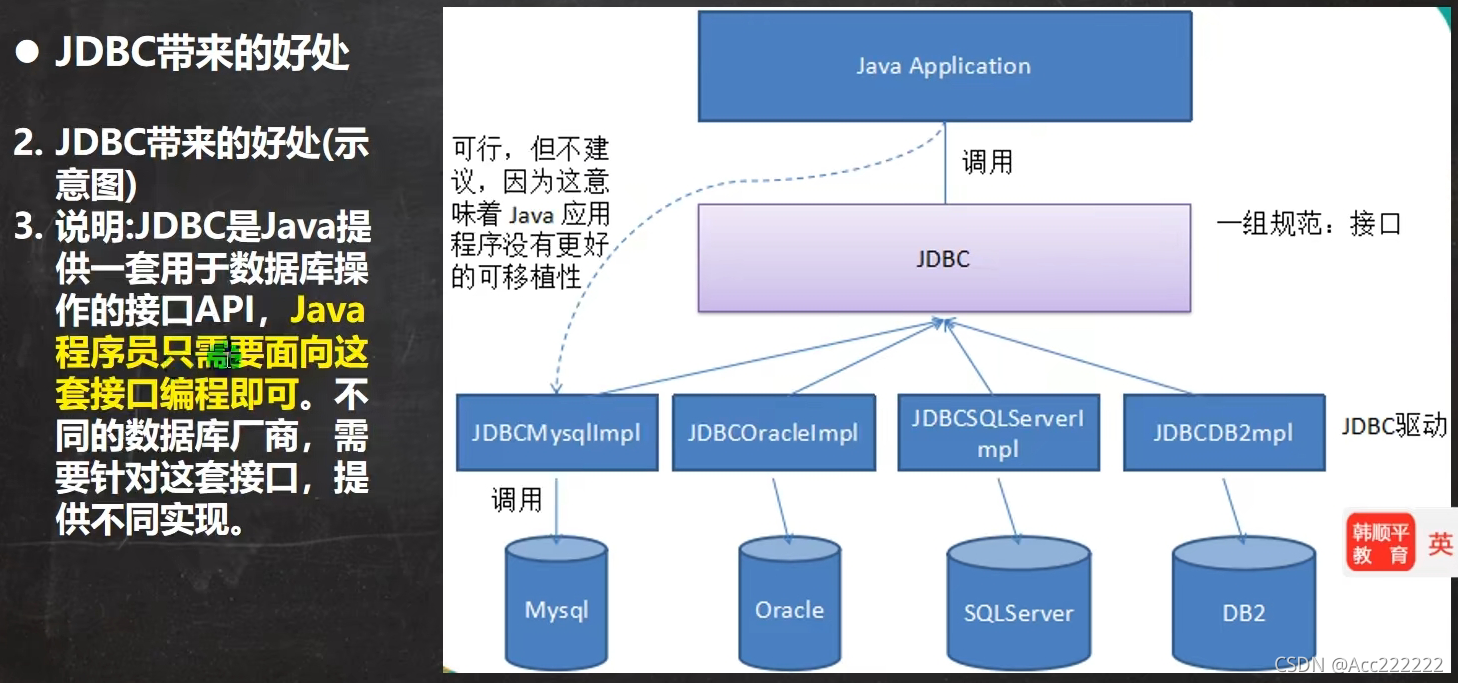
获取connection的方式

 TIP:把这个选中取消可以让文件夹分层
前置工作:在项目下创建一个文件夹比如libs, 将 mysql.jar 拷贝到该目录下,点击 add as library
在mysql官网上下载连接的jar包_18你磊哥的博客-CSDN博客 mysql.jar包下载教程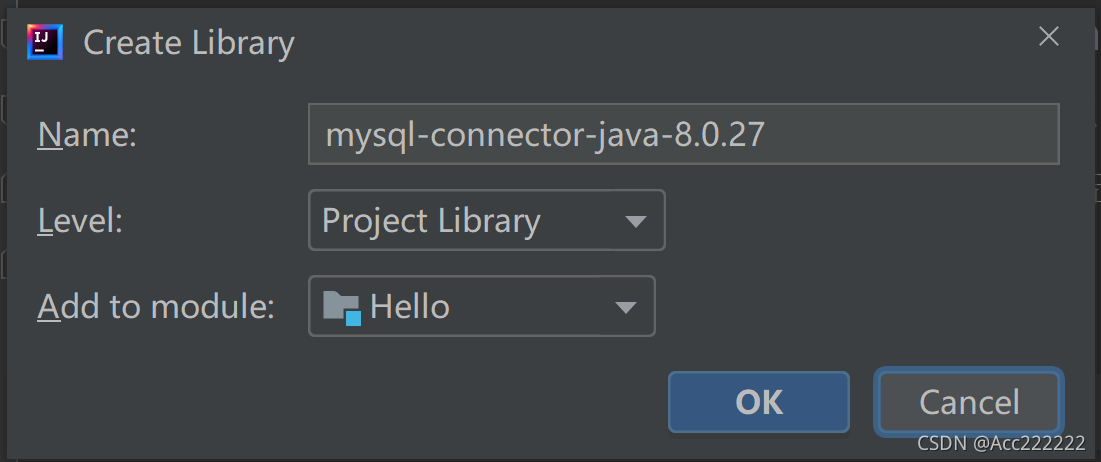
第一种(操作完整版)
import java.sql.*;import java.util.Properties;import com.mysql.cj.jdbc.Driver; //注意引这个 新版有cjpublic class Jdbc01{public static void main(String[] args) throws Exception{//1.注册驱动Driver driver = new Driver();//2.得到连接 (mysql的连接本质就是socket连接)String url = "jdbc:mysql://localhost:3306/shang_02";// jdbc:mysql:// 规定好表示协议,通过jdbc的方式连接mysql// localhost 主机,可以是ip地址// 3306 表示mysql监听的端口号// shang_02 连接到mysql的哪个数据库//3.将用户名和密码放入到Properties对象,用url和properties得到连接Properties properties = new Properties();properties.setProperty("user","root"); //用户properties.setProperty("password","shang"); //密码Connection connection = driver.connect(url,properties);//4.执行sql (用statement)String sql = "insert into t01 values('张三',21)";Statement statement = connection.createStatement();int rows = statement.executeUpdate(sql);//如果是dml语句,返回的就是影响行数System.out.println(rows>0?"成功":"失败");//5.关闭连接资源statement.close();connection.close();}}
第二种
public void connect02() throws Exception{//使用反射加载Driver类,动态加载,更加灵活,减少依赖性Class<?> aClass = Class.forName("com.mysql.cj.jdbc.Driver");Driver dirver = (Driver)aClass.newInstance();...//后面就一样了}
第三种
public void connect03() throws Exception{//用DriverManager替代DriverClass<?> aClass = Class.forName("com.mysql.cj.jdbc.Driver");Driver driver = (Driver) aClass.newInstance();//创建url,user和passwordString url = "jdbc:mysql://localhost:3306/shang_02";String user = "root";String password = "shang";//注册Driver驱动DriverManager.registerDriver(driver);Connection connection = DriverManager.getConnection(url,user,password);}
第四种(第三种的极简版本)
自动完成注册,简化代码
public void connect04() throws Exception{//Class.forName("import com.mysql.cj.jdbc.Driver");//创建url,user和passwordString url = "jdbc:mysql://localhost:3306/shang_02";String user = "root";String password = "shang";Connection connection = DriverManager.getConnection(url,user,password);System.out.println(connection);}
注:
1. 调用DriverManager的getConnection方法,直接获取连接,不用生成Driver。
2. 并且mysql驱动5.1.6可以无需Class.forName(“…”),但还是建议写上,更加明确。
3. register那句代码省略,因为Driver类在加载时,它源码的静态代码块已经注册过DriverManager了
第五种
增加配置文件,让连接mysql更加灵活
注意:都不加双引号!
public void connect05() throws Exception{//通过Properties对象获取配置文件的信息Properties properties = new Properties();properties.load(new FileInputStream("D:\\JavaProject\\Hello\\src\\mysql.properties"));//获取相关的值String user = properties.getProperty("user");String password = properties.getProperty("password");String url = properties.getProperty("url");String driver = properties.getProperty("driver");Class.forName(driver); //建议写上Connection connection = DriverManager.getConnection(url,user,password);System.out.println(connection);}

ResultSet 结果集
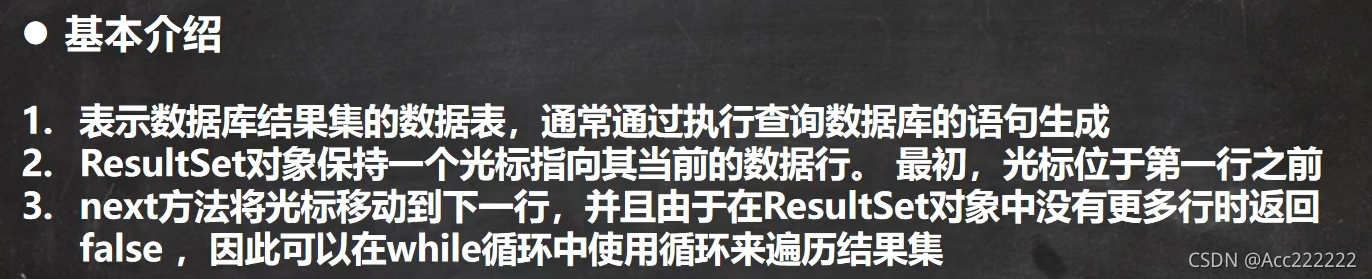
...//获取connection的五种方法//得到statementStatement statement = connection.createStatement();//sql指令String sql = "select * from t01";//获取resultSetResultSet resultSet = statement.executeQuery(sql);//使用while取出数据while(resultSet.next()) { //让光标向后移动,如果没有更多行,则返回falseString name = resultSet.getString(1); //获取该行第一列int age = resultSet.getInt(2); //获取该行第二列System.out.println(name + "\t" + age);}//关闭连接connection.close();statement.close();resultSet.close();


Statement

SQL注入
输入用户名为 1’ OR
输入密码为 OR ‘1’ = ‘1
SELECT *FROM adminWHERE NAME = '1' OR ' AND pwd = ' OR '1' = '1'
最终机器会执行为 : WHERE NAME = ‘1’ OR ‘ AND pwd = ‘ OR ‘1’ = ‘1’ 也即中间有两个OR
但是 ‘1’ = ‘1’ 是绝对正确的,因此会恶意攻击数据库。
PreparedStatement
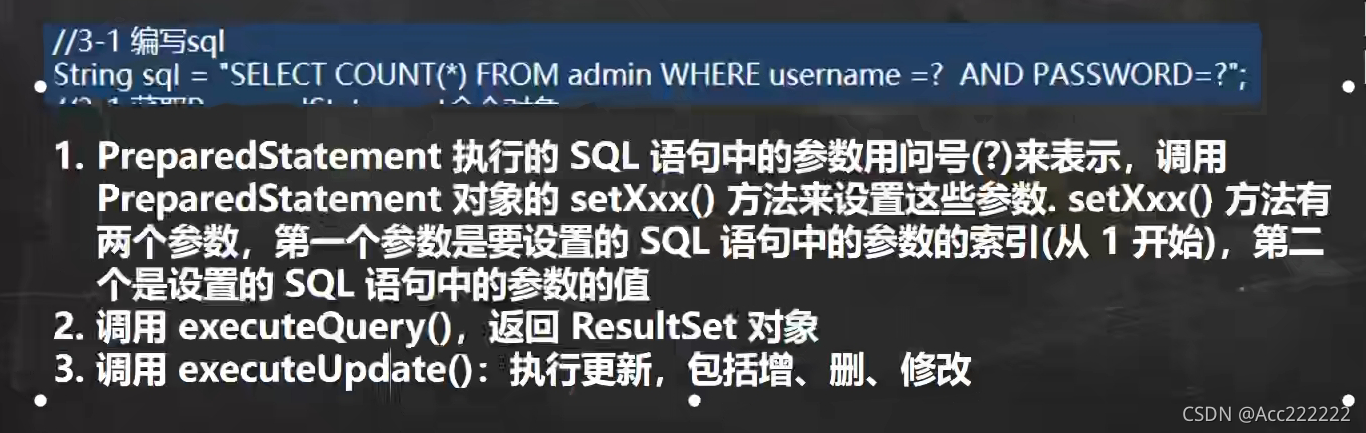
public static void main(String[] args) throws Exception{Scanner scanner = new Scanner(System.in);System.out.print("请输入管理员的名字:");String admin_name = scanner.nextLine(); //next遇到空格会结束System.out.println("请输入管理员的密码:");String admin_pwd = scanner.nextLine();...//获取connection//得到PreparedStatement//1. 组织SQL,?相当于占位符String sql = "select name,pwd from admin where name =? and pwd =?";//2. 获取对象PreparedStatement preparedStatement = connection.prepareStatement(sql);//3. 给?赋值preparedStatement.setString(1,admin_name);//第一个问号preparedStatement.setString(2,admin_pwd);//4. 执行select语句使用 executeQuery dml语句用 executeUpdateResultSet resultSet = preparedStatement.executeQuery(sql);...//while循环查看}

JDBC API


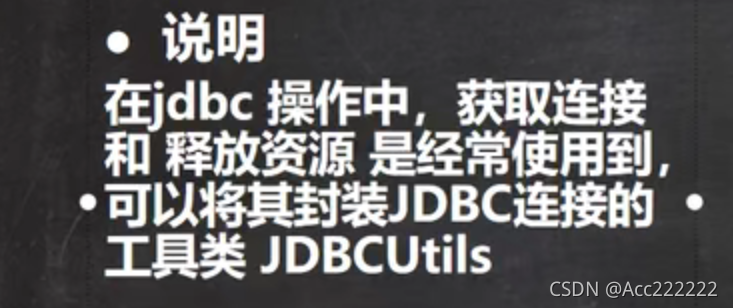
JDBC工具类

属性
private static String user;private static String password;private static String url;private static String driver;
初始化
//在static代码块中初始化static {try {Properties properties = new Properties();properties.load(new FileInputStream("D://JavaProject//Hello//src//mysql.properties"));user = properties.getProperty("user");password = properties.getProperty("password");url = properties.getProperty("url");driver = properties.getProperty("driver");} catch (IOException e) {//在实际开发中,我们经常把编译异常转换成运行异常//这样调用者可以选择捕获该异常,也可以选择默认处理该异常throw new RuntimeException(e);}}
获取Connection方法
//连接数据库,返回Connectionpublic static Connection getConnection(){try {return DriverManager.getConnection(url,user,password);} catch (SQLException e) {throw new RuntimeException(e);}}
关闭资源方法
//关闭相关资源/*1.ResultSet结果集2.Statement 或者 PreparedStatement3.Connection4.如果需要关闭资源,就传入对象,否则传入null*/public static void close(ResultSet set, Statement statement,Connection connection){try {if(set!=null){set.close();}if(statement!=null){statement.close();}if(connection!=null){connection.close();}} catch (SQLException e) {throw new RuntimeException(e);}}
工具类的使用
DML语句
public class JDBCUtils_DML {public static void main(String[] args) {//1.得到连接Connection connection = null;//2.组织一个sqlString sql = "update t01 set age = ? where name = ?";//3.创建PreparedStatement对象PreparedStatement preparedStatement = null;try {connection = JDBCUtils.getConnection();preparedStatement = connection.prepareStatement(sql);//给占位符赋值preparedStatement.setInt(1,18);preparedStatement.setString(2,"张三");//把"张三"修改为18岁,执行preparedStatement.executeUpdate();} catch (SQLException e) {e.printStackTrace();} finally {JDBCUtils.close(null,preparedStatement,connection);}}}
Select语句
public static void main(String[] args) {//1.得到连接Connection connection = null;//2.组织一个sqlString sql = "select * from t01";//3.创建PreparedStatement对象PreparedStatement preparedStatement = null;//4.创建ResultSet对象ResultSet resultSet = null;try {connection = JDBCUtils.getConnection();preparedStatement = connection.prepareStatement(sql);resultSet = preparedStatement.executeQuery();while(resultSet.next()){ //while循环读取String name = resultSet.getString("name");int age = resultSet.getInt("age");System.out.println(name + "\t" + age);}} catch (SQLException e) {e.printStackTrace();} finally {JDBCUtils.close(resultSet,preparedStatement,connection);}}
事务
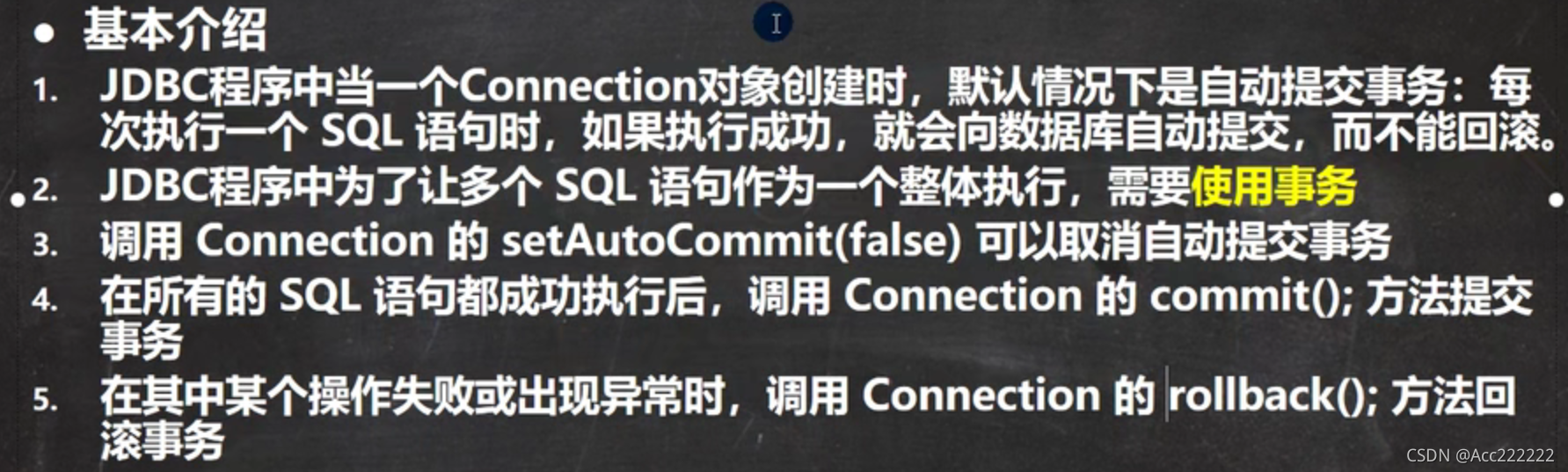
setAutoCommit相当于开启一个事务,rollback默认返回开启事务的地方。
批处理
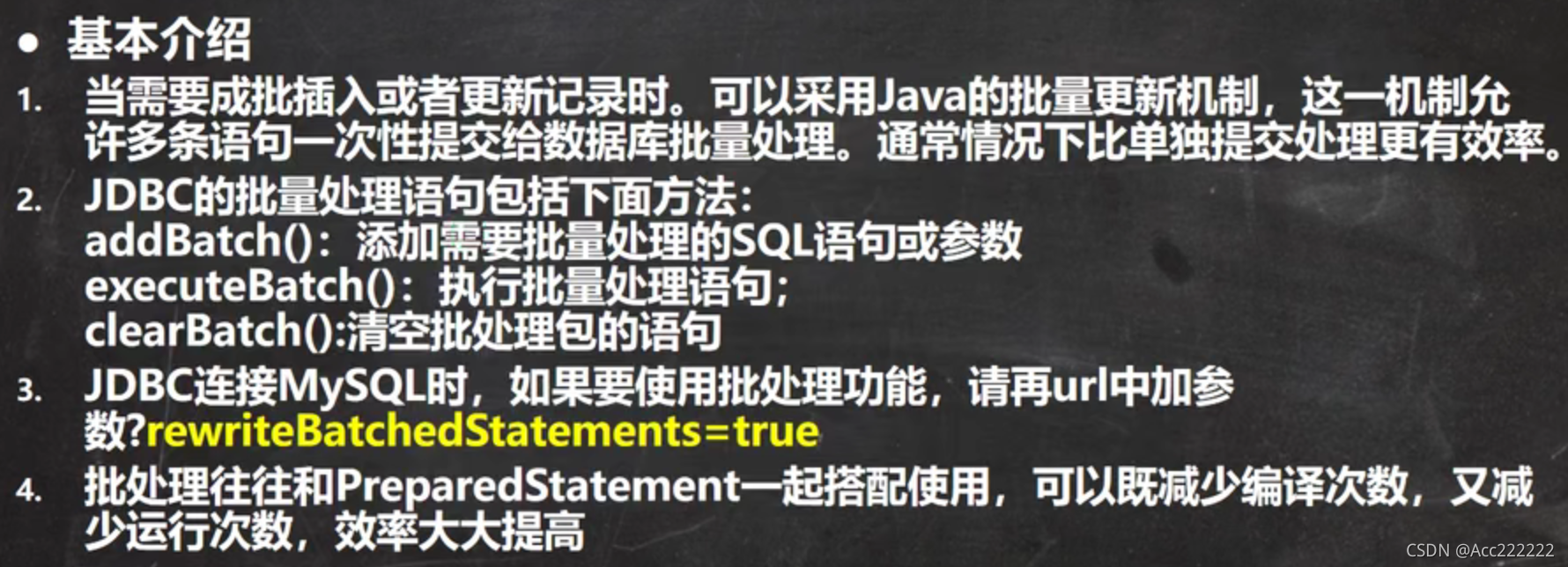
public void batch() throws Exception{Connection connection = JDBCUtils.getConnection(); //获取链接String sql = "insert into t01 values(?,?)"; //sql语句PreparedStatement preparedStatement = connection.prepareStatement(sql);for(int i = 0;i<5000;i++){preparedStatement.setString(1,"jack"+i);preparedStatement.setInt(2,18+i);//将sql语句加入到批处理包中preparedStatement.addBatch();//当有1000条记录时,批量执行if((i+1)%1000==0){preparedStatement.executeBatch(); //执行//清空preparedStatement.clearBatch();}}JDBCUtils.close(null,preparedStatement,connection);}
如果想成功使用批处理,url需要加上?后面的语句:
url=jdbc:mysql://localhost:3306/shang_02?rewriteBatchedStatements=true
1. 底层创建了 ArrayList,名字为elementData,是Object数组,存放我们预处理的sql语句。
2. 当elementData满后,就按照1.5倍扩容。
3. 批量处理会减少我们发送sql语句的网络开销,而且减少编译次数,因此效率提高。
数据库连接池
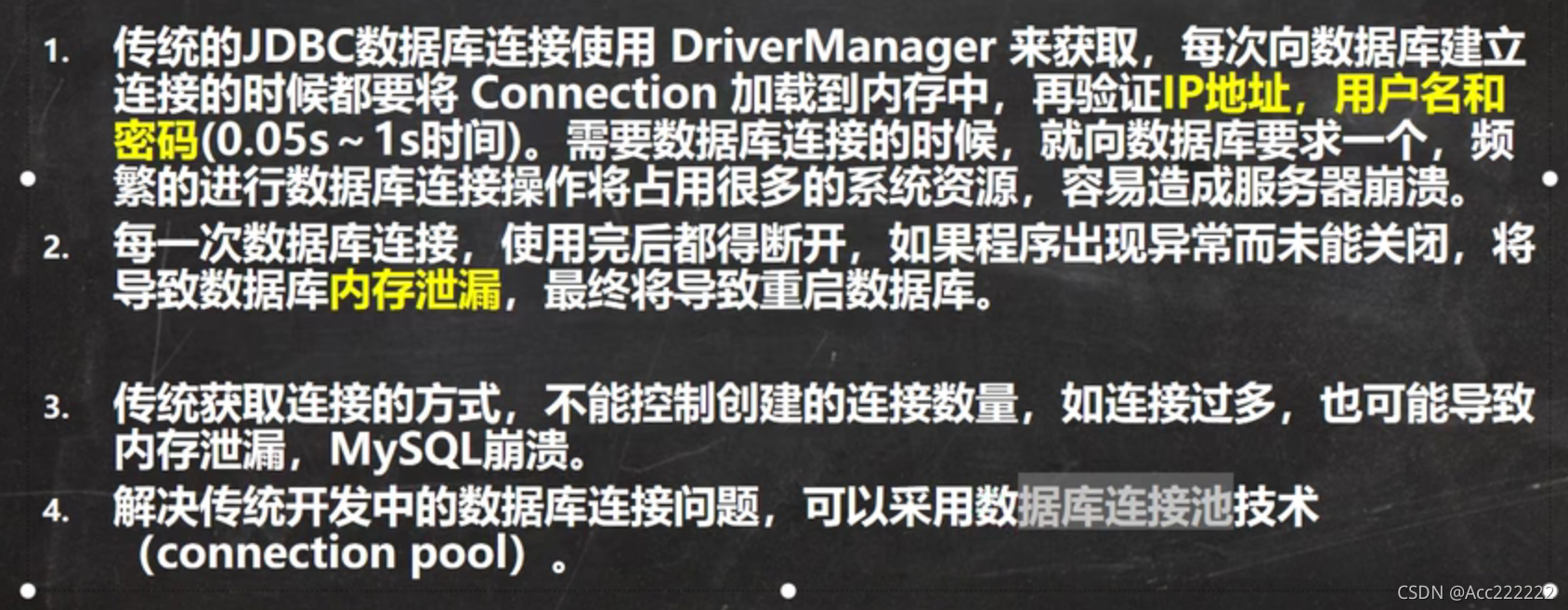
传统获取Connection问题分析
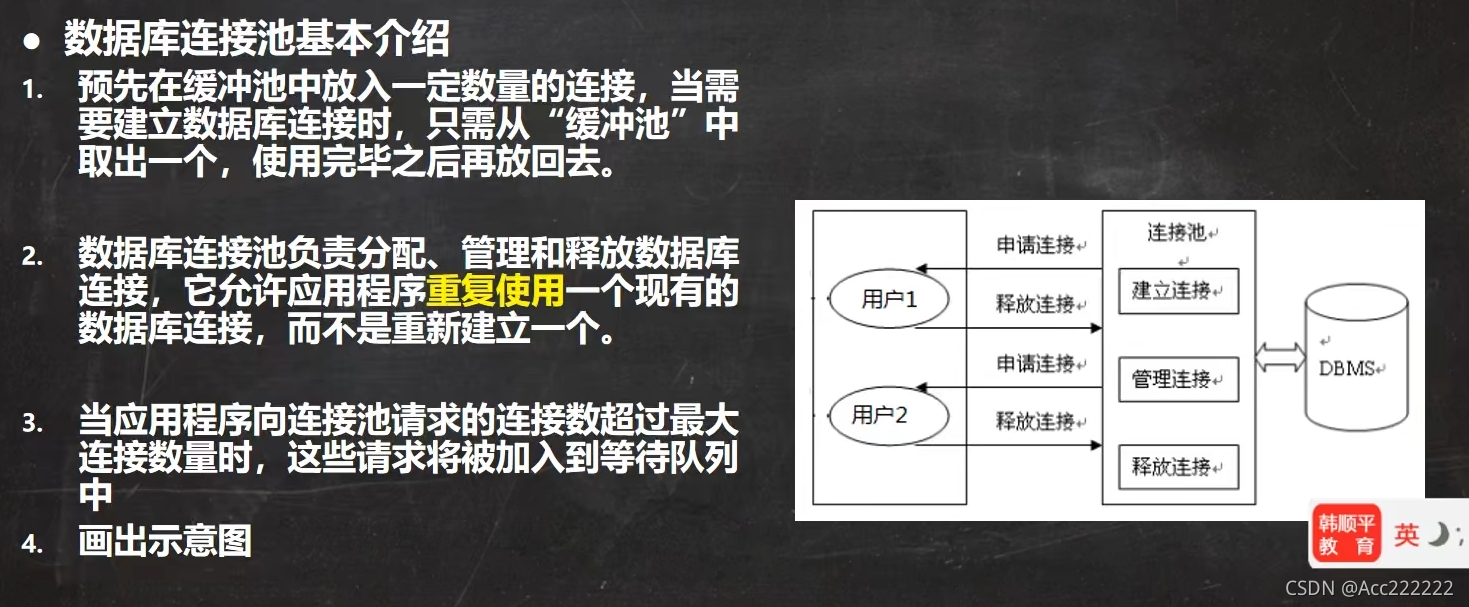
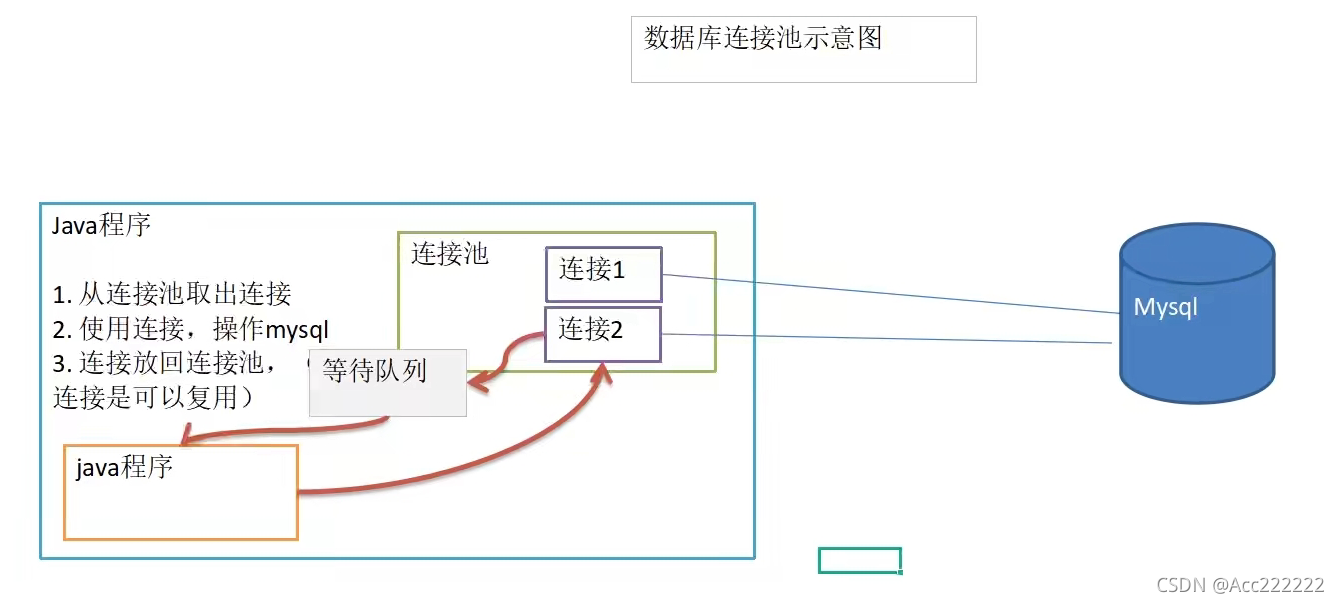
数据库连接池介绍

数据库连接池种类
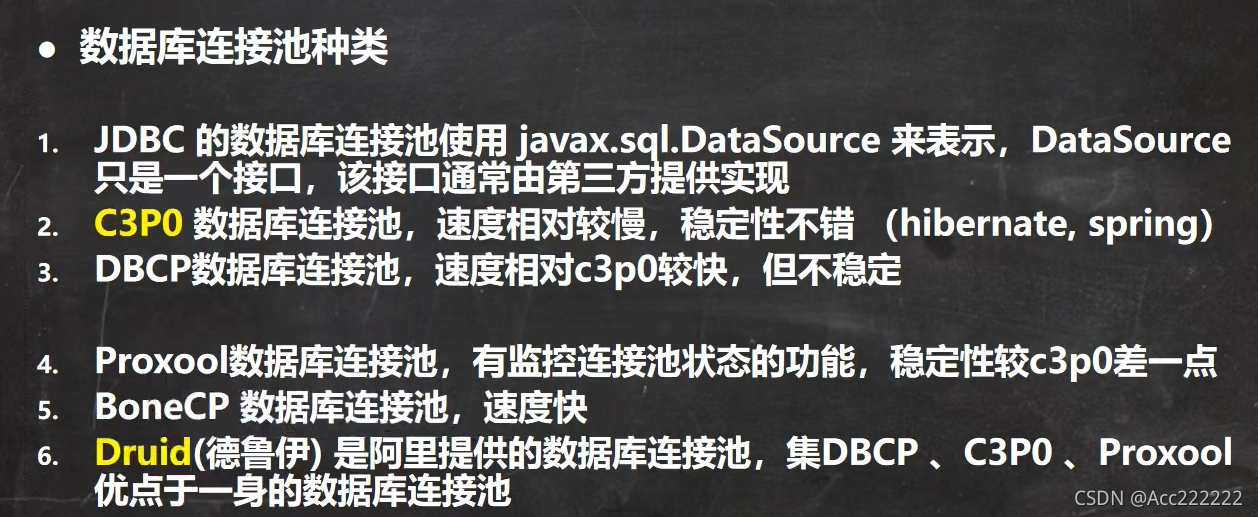
C3P0
前期准备
下载参考:C3P0jar包下载方法_小猪的日常Java-CSDN博客_c3p0jar包下载 类似connector,我们需要把 c3p0-0.9.5.5.jar(可以变化) 加入到项目中(add to library),如果最后连接失败,一直提示 java.lang.NoClassDefFoundError: com/mchange/v2/ser/Indirector
解决方法:把 mchange-commons-java-0.2.19.jar 也导入项目中
另外还需要在src目录下导入 c3p0-config.xml,注意这个文件是自己写的,详细可以看这个博客
c3p0详细配置(c3p0-config.xml)及使用_caychen的博客-CSDN博客_c3p0-config.xml 最后差不多是这样,jar和xml是必须导入的
实例代码
第一种方式:不使用 c3p0-config.xml (不推荐,代码太多了)
public static void main(String[] args) throws Exception{//1.创建一个数据源对象ComboPooledDataSource comboPooledDataSource = new ComboPooledDataSource();//2.通过配置文件properties获取相关连接的信息Properties properties = new Properties();properties.load(new FileInputStream("D://JavaProject//Hello//src//mysql.properties"));//3.读取相关属性值String user = properties.getProperty("user");String password = properties.getProperty("password");String url = properties.getProperty("url");String driver = properties.getProperty("driver");//4.给数据源 comboPooledDataSource 设置相关的参数comboPooledDataSource.setDriverClass(driver);comboPooledDataSource.setJdbcUrl(url);comboPooledDataSource.setUser(user);comboPooledDataSource.setPassword(password);//设置初始化连接数comboPooledDataSource.setInitialPoolSize(10);//设置最大连接数comboPooledDataSource.setMaxPoolSize(50);//5.连接Connection connection = comboPooledDataSource.getConnection();System.out.println("连接OK");}
第二种方式:使用 c3p0.config.xml ,该文件指定了连接数据库和连接池的相关参数
注意需要写上
public static void main(String[] args) throws Exception{ComboPooledDataSource comboPooledDataSource = new ComboPooledDataSource("SHANG");Connection connection = comboPooledDataSource.getConnection();System.out.println("连接OK");}
Druid
前期准备
下载druid.jar和druid.properties,加入到项目中。 druid.jar加入到libs文件夹,然后add to library,properties文件直接放在src根目录下。 至于怎么设置上网看就行了。
连接代码
public static void main(String[] args) throws Exception{//1.加入 druid.jar 包//2.加入配置文件 druid.properties,将该文件拷贝到项目的src目录//3.创建Properties对象,读取配置文件Properties properties = new Properties();properties.load(new FileInputStream("D:\\JavaProject\\Hello\\src\\druid.properties"));//4.创建一个指定参数的数据库连接池DataSource dataSource =DruidDataSourceFactory.createDataSource(properties);//5.连接Connection connection = dataSource.getConnection();}
注:不管是哪个properties,里面的 driverClassName 必须写成 com.mysql.cj.jdbc.Driver (老版本是没有 cj 的)
基于Druid连接池的工具类
public class JDBCUtilsByDruid{private static DataSource ds;//在静态代码块完成ds初始化static{Properties properties = new Properties();try {properties.load(new FileInputStream("D:\\JavaProject\\Hello\\src\\druid.properties"));ds = DruidDataSourceFactory.createDataSource(properties);} catch (Exception e) {e.printStackTrace();}}//getConnection方法public static Connection getConnection() throws SQLException {return ds.getConnection();}//关闭连接方法 (注意在连接池技术中,close不是断掉连接,而是把Connection对象放回连接池)public static void close(ResultSet set, Statement statement,Connection connection) throws SQLException {if(set!=null){set.close();}if(statement!=null){statement.close();}if(connection!=null){connection.close();}}}
Apache-DBUtils
由于关闭connection后,resultSet结果集就无法使用了,因此不利于数据的管理。但如果把表中的内容(一行)看作对象,把行放入一个ArrayList,就不用管resultSet能不能使用了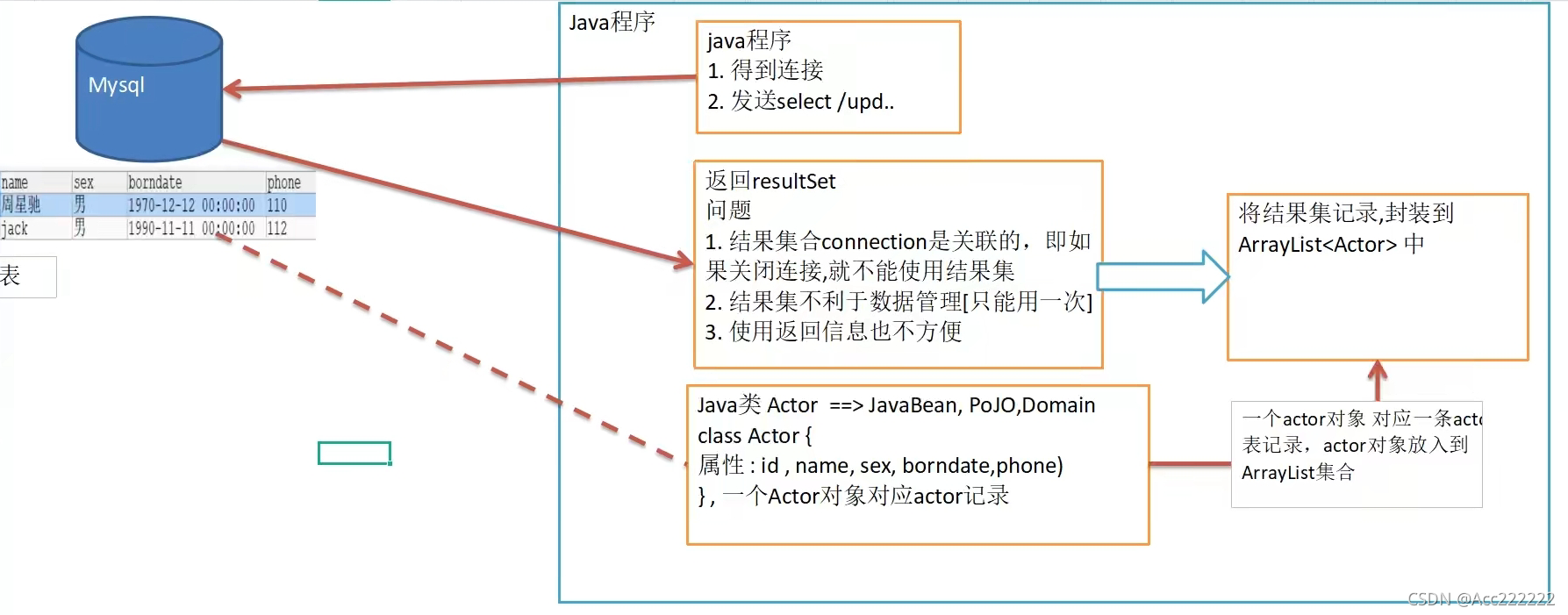

Select使用
DBUtils相关的jar下载地址:
DbUtils jar包下载_小猪的日常Java-CSDN博客_dbutils jar包
public class Person {private String name;private int age;} //内容与表保持一致
public static void main(String[] args) throws Exception{//1.得到连接Connection connection = JDBCUtilsByDruid.getConnection();//2.使用DBUtils类和接口,需要引入DBUtils相关的jar//3.创建 QueryRunnerQueryRunner queryRunner = new QueryRunner();String sql = "select * from t01 where name = ?";//用相关方法返回ArrayList结果集List<Person> list =queryRunner.query(connection,sql,new BeanListHandler<>(Person.class),"张三");for (Person person : list) {System.out.println(person);}JDBCUtilsByDruid.close(null,null,connection);}
注:
1. query方法就是执行sql语句,得到resultSet,然后封装到 ArrayList集合中。
2. connection 连接,sql 执行的sql语句,new BeanListHandler<>(Person.class):底层使用反射机制去获取Person类的属性,将resultSet封装到ArrayList中(用于多行多列输出)。
3. 调用完方法后面的就是写入?的参数。
如果返回的是单个Person对象(不用使用集合),这时使用的是 BeanHandler方法。
Person person =queryRunner.query(connection,sql,new BeanHandler<>(Person.class),"...");
如果返回的是单行单列(返回一个Object),这时使用的是 ScalarHandler方法。
Object obj = queryRunner.query(connection,sql,new ScalarHandler<>(),"...");
DML使用
public static void main(String[] args) throws Exception {//1.得到连接Connection connection = JDBCUtilsByDruid.getConnection();//2.创建QueryRunnerQueryRunner queryRunner = new QueryRunner();//4.组织sqlString sql = "update t01 set name = ? where age = ?";//String sql = "insert into t01 values(?,?)";//String sql = "delect from t01 where name = ?";int affectRows = queryRunner.update(connection, sql, "王五", 22);JDBCUtilsByDruid.close(null, null, connection);}
注:执行dml操作的是 queryRunner.update(),返回的值是受影响的行数。
DAO

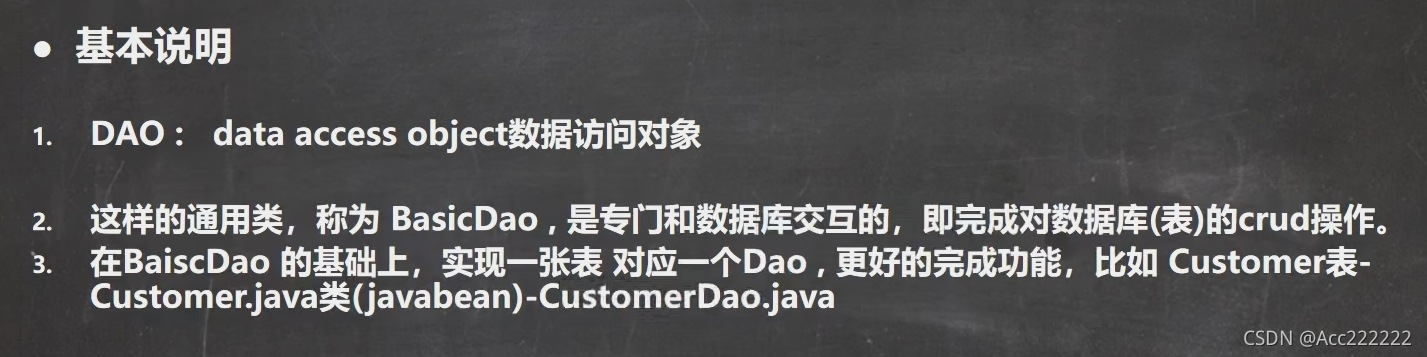
DAO的一些结构
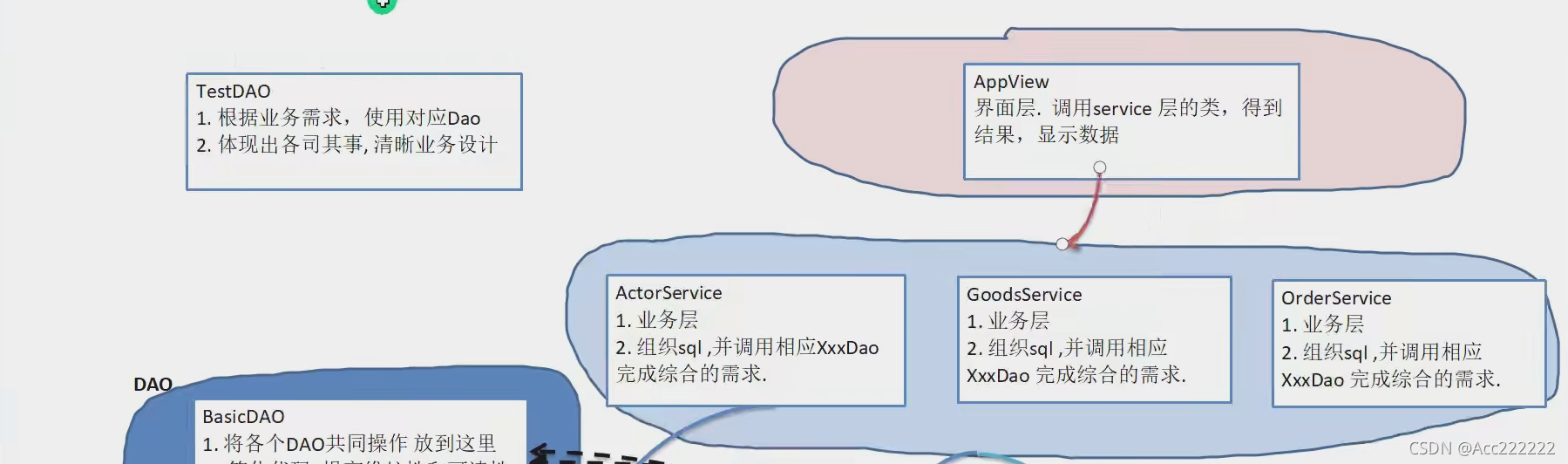
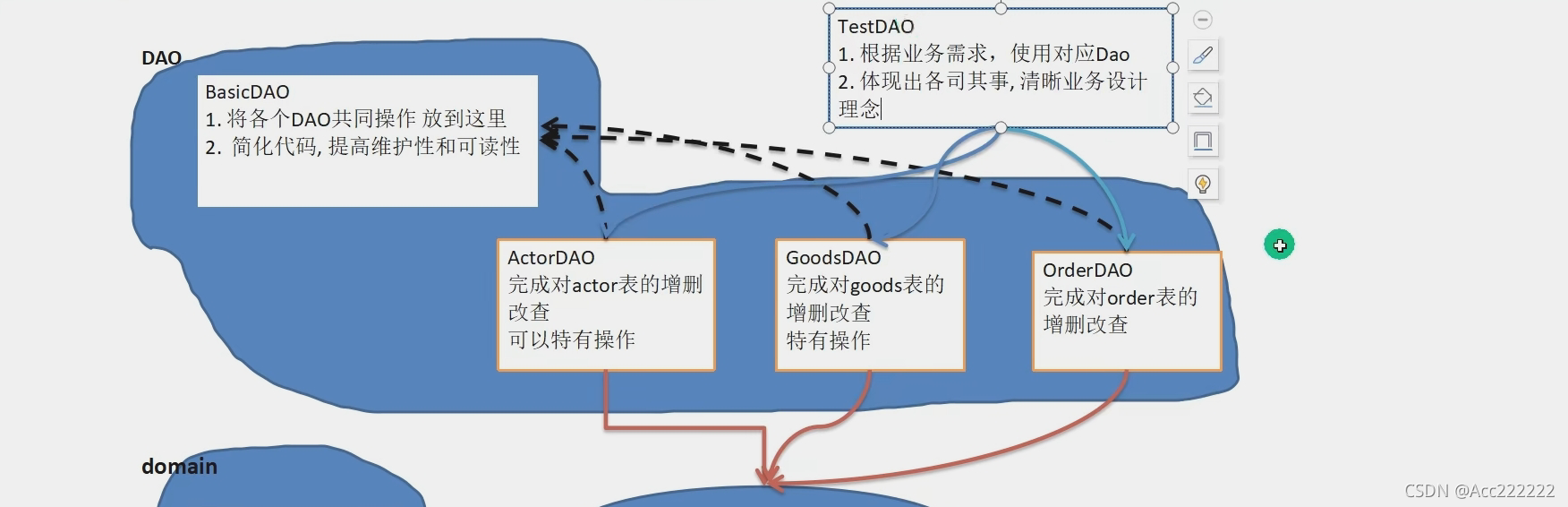
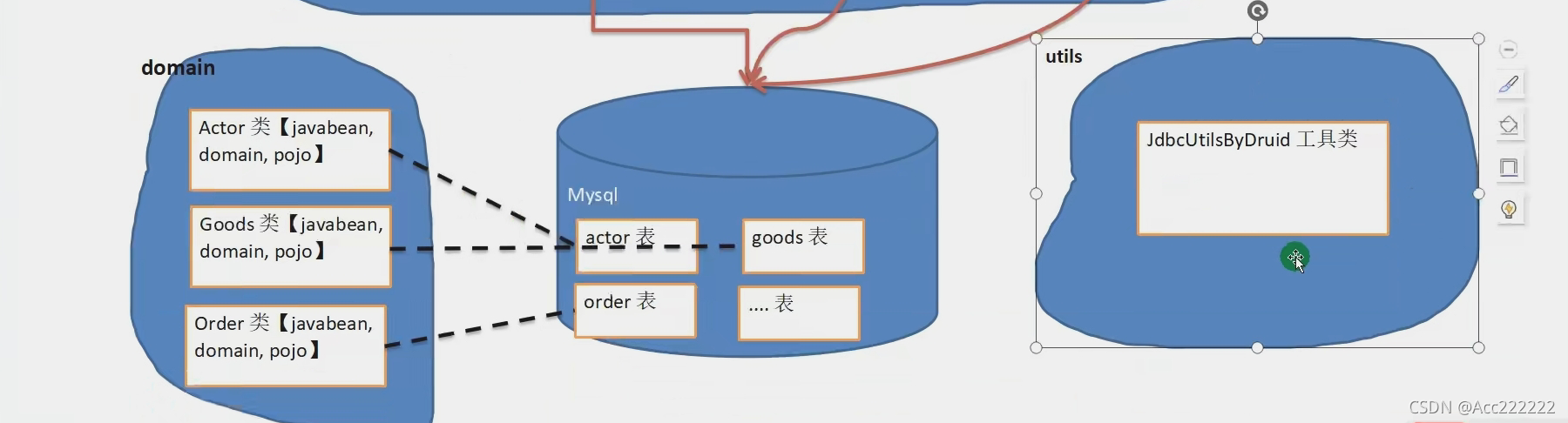

BasicDAO
public class BasicDAO<T> { //泛型指定具体类型private QueryRunner qr = new QueryRunner(); //属性
开发通用的dml方法
针对任意的表
//开发通用的dml方法,针对任意的表public int update(String sql,Object... parameters) throws SQLException {Connection connection = null;try {connection = JDBCUtilsByDruid.getConnection(); //得到连接int update = qr.update(connection,sql,parameters); //得到修改的行数return update;} catch (SQLException e) {throw new RuntimeException();} finally {JDBCUtilsByDruid.close(null,null,connection); //关闭连接}}
查询方法(返回多行多列)
public List<T> queryMulti(String sql,Class<T> clazz,Object... parameters) throws SQLException {Connection connection = null;List<T> query = null;try {connection = JDBCUtilsByDruid.getConnection();query = qr.query(connection,sql,new BeanListHandler<T>(clazz),parameters);} catch (SQLException e) {throw new RuntimeException();} finally {JDBCUtilsByDruid.close(null,null,connection);}return query;}
对形参的解释:
sql:sql语句,可以有?
clazz:传入一个类的Class对象,比如Person.class
parameters:给?赋值
查询(返回一行)
//查询单行结果的通用方法public T querySingle(String sql,Class<T> clazz,Object... parameters) throws SQLException {Connection connection = null;try {connection = JDBCUtils.getConnection();return qr.query(connection,sql,new BeanHandler<T>(clazz),parameters);//使用 BeanHandler方法} catch (SQLException e) {throw new RuntimeException();} finally {JDBCUtilsByDruid.close(null,null,connection);}}
查询(返回单行单列)
//查询单行单列的方法,即返回单值的方法public Object queryScalar(String sql,Object... parameters) throws SQLException {Connection connection = null;try {connection = JDBCUtilsByDruid.getConnection();return qr.query(connection,sql,new ScalarHandler(),parameters);//使用ScalarHandler方法} catch (SQLException e) {throw new RuntimeException();} finally {JDBCUtilsByDruid.close(null,null,connection);}}
PersonDAO
Person是映射表内容的类,PersonDAO需要继承BasicDAO,然后在里面写入自己的独特内容。
public class PersonDAO extends BasicDAO{//继承BasicDAO,在这里面写独特的内容private String name;private int age;}
TestDAO
测试PersonDAO对t01表的查找操作
public void testPersonDAO() throws SQLException {PersonDAO personDAO = new PersonDAO();List<Person> list = personDAO.queryMulti("select * from t01 where age=?",Person.class,18);System.out.println("查询结果为");for (Person person : list) {System.out.println(person);}}
testWhileIdle is true, validationQuery not set解决方法 :
严重: testWhileIdle is true, validationQuery not set 使用Druid连接池报错处理【无Spring框架,使用的JDK9,MYSQL8版本】_Syntacticsugar’s blog-CSDN博客_test-while-idle
dml操作
public void testPersonDAO() throws SQLException {PersonDAO personDAO = new PersonDAO();personDAO.update("insert into t01 values(?,?)","Hans",22);}

若有收获,就点个赞吧
0 人点赞


