嵌套类型表格API
表格样式
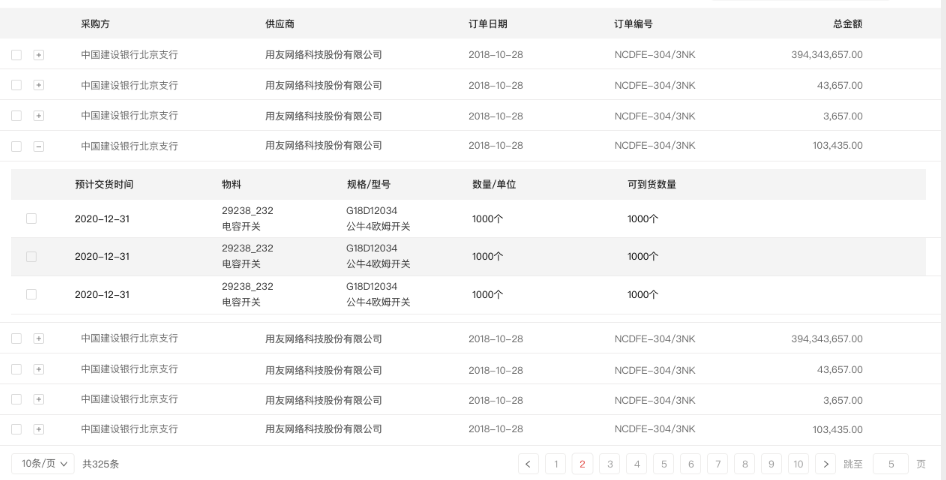
使用说明
import React, {Component} from 'react';import {createPage} from 'nc-lightapp-front';class IcInsertTable extends Component {constructor(props) {super(props);let {form, button, table, insertTable, search} = this.props;let {getInsertTableValue, setInsertTableValue} = insertTable;this.getInsertTableValue = getInsertTableValue;//获取嵌套表格当前所有数据this.setInsertTableValue = setInsertTableValue;//设置表格数据}componentWillMount() {//查询外层表格数据// Ajax({// url:'',// data:'',// success:function (res) {//// }// });let data = {data: [{a: "令狐冲", b: "男", c: 41, dd: "操作", key: "1"},{a: "杨过", b: "男", c: 67, dd: "操作", key: "2"},{a: "郭靖", b: "男", c: 25, dd: "操作", key: "3"},{a: "令狐冲", b: "男", c: 41, dd: "操作", key: "4"},{a: "杨过", b: "男", c: 67, dd: "操作", key: "5"},{a: "郭靖", b: "男", c: 25, dd: "操作", key: "6"},{a: "令狐冲", b: "男", c: 41, dd: "操作", key: "7"},{a: "杨过", b: "男", c: 67, dd: "操作", key: "8"},{a: "郭靖", b: "男", c: 25, dd: "操作", key: "9"}],pageInfo:{pageIndex:1,pageSize:5,totalDataNum:9}};this.setInsertTableValue('insertTable1', data);}//保存,获取表格当前数据saveData = () => {let val = this.getInsertTableValue('insertTable1');console.log(val)};// react:界面渲染函数render() {let {form, button, table, insertTable, search} = this.props;let {createButton} = button;let {createInsertTable, getInsertTableValue} = insertTable;return (<div className="insertTablePage" style={{"margin": "30px"}}><div>嵌套类型表格</div><div className="btnArea"><NCButton className="saveBtn" colors="primary" onClick={ this.saveData.bind(this) }>保存</NCButton></div>{ createInsertTable('insertTable1', //表格id,支持一个页面多表格setTableBodyData.bind(this), //点击加号展开,设置表格数据pageIndexChange.bind(this), //点击分页时,设置表格数据(不用分页,可不传)pageSizeChange.bind(this) //切换显示条数,重新请求数据(不用切换pageSize,可不传))}</div>);}}export default createPage({initTemplate:addOperationColumn//添加页面模板信息})(IcInsertTable);//添加页面模板信息export default function addOperationColumn(meta) {let metas = {searchArea: {moduleType: 'search',items: [{key: 'bankname',label: '银行',itemType: 'refer',initialValue: null},{key: 'investtype',label: '存款类型',itemType: 'select',initialValue: null,options: [{display: '活期',value: 0},{display: '三个月',value: 1},{display: '半年',value: 2},{display: '三年',value: 3},{display: '五年',value: 4}]},{key: 'beginmny',label: '起始理财金额',itemType: 'input',initialValue: null},{key: 'endmny',label: '截止理财金额',itemType: 'input',initialValue: null},{key: 'begindate',label: '起始购买日期',itemType: 'datepicker',initialValue: null},{key: 'enddate',label: '截止购买日期',itemType: 'datepicker',initialValue: null}]},insertTable: {insertTable1: {// pagination: false,columns: [{title: '用户名',dataIndex: 'a',key: 'a',width: 100},{id: '123',title: '性别',dataIndex: 'b',key: 'b',width: 100},{title: '年龄',dataIndex: 'c',key: 'c',width: 200},{title: "操作",dataIndex: "d",key: "d",render(text, record, index) {if(record.a == "令狐冲"){return (<spanonClick={() => {alert("这是第" + index + "列,内容为:" + JSON.stringify(record));}}>新增</span>);}else{return (<spanonClick={() => {alert("这是第" + index + "列,内容为:" + JSON.stringify(record));}}>修改</span>);}}}]}},}return metas}//点击加号展开内嵌表格时,业务组请求表格数据,并且返回该数据export default function setTableBodyData(record) { //record为点击的当前行信息//发送ajax请求内嵌表格数据,并return该数据let insertTableInfo = {};//内嵌表格列信息insertTableInfo.columns = [{title: "用户名", dataIndex: "a", key: "a", width: 100},{id: "123", title: "性别", dataIndex: "b", key: "b", width: 100},{title: "年龄", dataIndex: "c", key: "c", width: 200},];//内嵌表格数据信息if (record.a == "杨过") {//假数据insertTableInfo.data = [{a: "麻花藤", b: "男", c: 41, d: "操作", key: "1"}]} else {insertTableInfo.data =[{a: "麻花藤", b: "男", c: 41, d: "操作", key: "1"},{a: "麻花藤", b: "男", c: 41, d: "操作", key: "2"}]}return insertTableInfo};//点击分页按钮时,请求下一页数据,并且返回该数据export default function pageIndexChange(index) {let data = {pageIndex:index};let setInsertTableValue = this.setInsertTableValue;Ajax({url:'',data:data,success:function (res) {if(res.state){setInsertTableValue('insertTable1',res.data)}}})}//切换每页显示条数时,重新请求数据,并且返回export default function pageSizeChange(pageSize){}同上
| API | 参数 | 说明 |
|---|---|---|
| createInsertTable(id,setTableBodyData,pageIndexChange,pageSizeChange) | 1、id(表格自定义id) 2、setTableBodyData(点击加号展开内嵌表格时,回调函数) 3、pageIndexChange(切换分页时,回调函数) 4、pageSizeChange(切换显示条数,回调函数) |
创建嵌套类表格 |
| setInsertTableValue(id,newData) | 1、id(表格id) 2、newData(新数据) |
| 设置嵌套类表格数据 | | getInsertTableValue(id) | 1、id(表格id)
| 获取当前表格所有数据 |

若有收获,就点个赞吧
0 人点赞


