核心概念
Entry| 代码的入口,打包的入口。Output| 打包文件的(bundle)所在的目录Loader| 可以处理非js文件Plugins| 可以参与打包的整个过程,打包优化压缩mode| development/production
目录结构
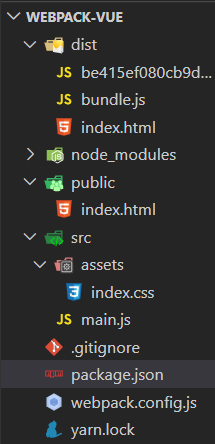
初始化
yarn init -y //生产package.json的文件
//配置package.json{"name": "webpack-vue","version": "1.0.0","license": "MIT","private": true //让项目私有化}
//安装依赖yarn add webpack webpack-cli
新建webpack.config.js文件,并写入const webpack = require("webpack");const path = require("path");const config = {entry:path.resolve(__dirname,'src/main.js'), //入口文件output:{ //出口文件path:path.resolve(__dirname,'dist'),filename:'bundle.js'},mode:'development' //模式}module.exports = config;
//配置package.json文件"scripts": {"build": "webpack"}
npm run build //自动生成dist文件夹,生成打包文件
loader
wepack自身只能处理js和json文件,加上loader后,能让wepack去处理非js(css)的文件。loader可以将所有类型的文件转换为webpack能够处理的有效模块。
//安装依赖yarn add style-loader css-loader
const webpack = require("webpack");const path = require("path");const config = {entry:path.resolve(__dirname,'src/main.js'), //入口文件output:{ //出口文件path:path.resolve(__dirname,'dist'),filename:'bundle.js'},+ module:{+ rules:[+ {+ test:/\.css$/i,+ use:['style-loader','css-loader']+ }+ ]+ },mode:'development' //模式}module.exports = config;
plugin
yarn add html-webpack-plugin//自动生成index.html文件
const HtmlWebpackPlugin = require('html-webpack-plugin');const config = {....plugins:[new HtmlWebpackPlugin({title:"webpack-vue",template:path.resolve(__dirname,"public/index.html")})],mode:'development' //模式}module.exports = config;
//index.html 模板文件plugins:[new HtmlWebpackPlugin({title:"vue-webpack",template:path.resolve(__dirname,"public/index.html")//以这个路径下的html为模板})],
清除dist文件夹
yarn add clean-webpack-plugin
const {CleanWebpackPlugin} = require("clean-webpack-plugin");const config = {...plugins:[...new CleanWebpackPlugin()],mode:'development' //模式}
配置webpack-server
目的:为了查看代码运行时的效果。
yarn add webpack-dev-server
devServer:{contentBase:"./dist",port:8000, //改变端口overlay:{errors:true} //可以将报道显示到页面上}
//配置package.json"scripts": {..."serve":"webpack serve --open"}
npm run serve
实现错误跟踪
module.exports = {devtool: 'inline-source-map'}
安装vue-loader
yarn add vue vue-loader vue-template-compiler
const {VueLoaderPlugin} = require("vue-loader")module.exports = {module:{rules:[...{test:/\.vue$/,loader:'vue-loader'}]},plugins:[new VueLoaderPlugin()]}
//main.jsimport App from './App.vue';import Vue from 'vue';new Vue({render:h=>h(App)}).$mount("#app");
配置图片
module.exports = {module:{rules:[{test:/\.(png|jpg|svg|gif|jpeg)$/i,type:'asset/resource'}]}}

若有收获,就点个赞吧
0 人点赞


