1、基本环境配置
1、关闭selinux和防火墙
#在每一台节点上都执行systemctl stop firewalld #关闭防火墙systemctl disable firewalldsed -i -e "s/^SELINUX=.*/SELINUX=disabled/g" /etc/selinux/configsetenforce 0
2、配置MySQL yum源
#在每一台节点上都执行vim /etc/yum.repos.d/mysql.repo #添加MySQL yum源#添加以下内容[mysql57-community]name=MySQL 5.7 Community Serverbaseurl=https://mirrors.cloud.tencent.com/mysql/yum/mysql-5.7-community-el7-x86_64/enabled=1gpgcheck=0yum clean all #清除YUM缓存
2、安装
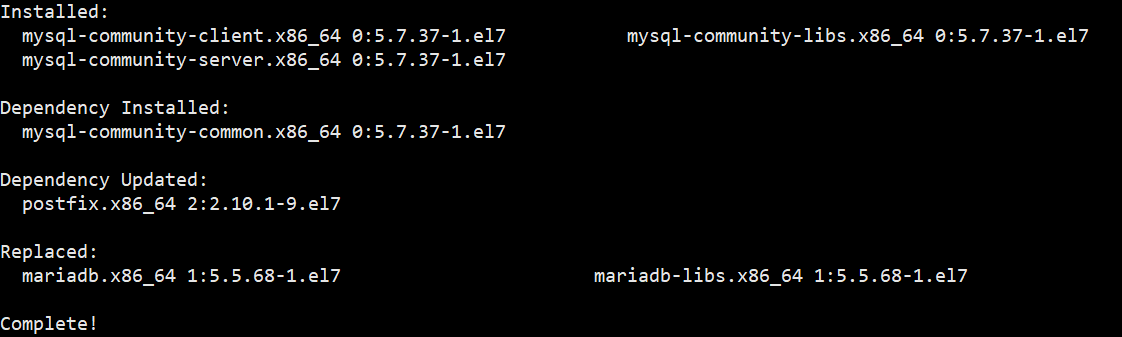
1、安装MySQL
#在每一台节点上都执行yum install mysql-community-server -y
2、启动MySQL
#在每一台节点上都执行systemctl start mysqld.servicesystemctl enable mysqld.service

3、查找MySQL初始化密码
#在每一台节点上都执行grep "temporary password is generated" /var/log/mysqld.log
初始化密码
4、初始化数据库
#在每一台节点上都执行mysql_secure_installation
5、进行数据库密码和安全设置:
Securing the MySQL server deployment.Enter password for user root: #输入第四步获取的密码The existing password for the user account root has expired. Please set a new password.New password: #设置新密码Re-enter new password: #再输入一遍Estimated strength of the password: 100Do you wish to continue with the password provided?(Press y|Y for Yes, any other key for No) : yesBy default, a MySQL installation has an anonymous user,allowing anyone to log into MySQL without having to havea user account created for them. This is intended only fortesting, and to make the installation go a bit smoother.You should remove them before moving into a productionenvironment.Remove anonymous users? (Press y|Y for Yes, any other key for No) : #是否删除匿名用户?按y | y表示是,按任何其他键表示否,这里我直接跳过... skipping.Normally, root should only be allowed to connect from'localhost'. This ensures that someone cannot guess atthe root password from the network.Disallow root login remotely? (Press y|Y for Yes, any other key for No) : #是否禁用root用户远程登录,根据自己的需求选择Y/n并回车,我这里选择允许所以直接跳过... skipping.By default, MySQL comes with a database named 'test' thatanyone can access. This is also intended only for testing,and should be removed before moving into a productionenvironment.Remove test database and access to it? (Press y|Y for Yes, any other key for No) : #是否删除test数据库,直接回车... skipping.Reloading the privilege tables will ensure that all changesmade so far will take effect immediately.Reload privilege tables now? (Press y|Y for Yes, any other key for No) : #是否重新加载权限表,直接回车... skipping.All done!
3、配置MySQL
1、主节点配置
vim /etc/my.cnf在[mysqld]添加以下内容log-bin=mysql-bin #开启二进制文件server-id=1 # 唯一值auto_increment_increment=2 #主键自动增长步长auto_increment_offset=1 #主键起始位log-slave-updates=1 #互为主从的时候两台都需要写入自己从对方取到的数据到binlog里面sync_binlog=1 #每提交一次事务同步一次二进制文件
2、备节点配置
vim /etc/my.cnf在[mysqld]添加以下内容log-bin=mysql-bin #开启二进制文件server-id=2 # 唯一值auto_increment_increment=2 #主键自动增长步长auto_increment_offset=2#主键起始位log-slave-updates=1 #互为主从的时候两台都需要写入自己从对方取到的数据到binlog里面sync_binlog=1 #每提交一次事务同步一次二进制文件
3、从节点配置
vim /etc/my.cnf在[mysqld]添加以下内容log-bin=mysql-bin #开启二进制文件server-id=3 # 唯一值
4、重启服务
#在每一台节点上都执行systemctl restart mysqld
4、配置主主、主从
1、创建用户并授权
主节点和备节点执行:mysql -uroot -pEnter password: #输入你设置的密码mysql> SHOW MASTER STATUS; #看一下Master状态

mysql> CREATE USER 'backup'@'%' IDENTIFIED BY 'Backup1!';GRANT REPLICATION SLAVE ON *.* TO 'backup'@'%';flush privileges;

2、主备互为主从、设置从库
主节点:#查看备机内网IP地址mysql> CHANGE MASTER TOMASTER_HOST='172.17.53.79',MASTER_USER='backup',MASTER_PASSWORD='Backup1!',MASTER_LOG_FILE='mysql-bin.000001',MASTER_LOG_POS=154;mysql> START SLAVE;mysql> SHOW SLAVE STATUS\G;备节点:mysql> CHANGE MASTER TOMASTER_HOST='172.17.244.34',MASTER_USER='backup',MASTER_PASSWORD='Backup1!',MASTER_LOG_FILE='mysql-bin.000001',MASTER_LOG_POS=154;mysql> START SLAVE;mysql> SHOW SLAVE STATUS\G;从节点:mysql> CHANGE MASTER TOMASTER_HOST='172.17.244.34',MASTER_USER='backup',MASTER_PASSWORD='Backup1!',MASTER_LOG_FILE='mysql-bin.000001',MASTER_LOG_POS=154;mysql> START SLAVE;mysql> SHOW SLAVE STATUS\G;
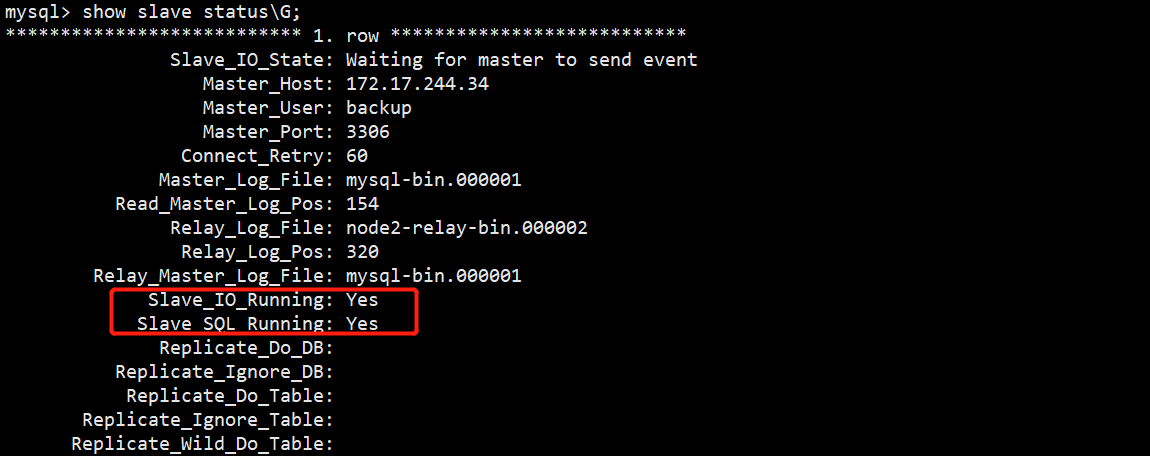
自行测试下主库上面写数据备库和从库能否同步,然后再测试备库写数据主库和从库能否同步,我做了很多次测试都是可以的。

若有收获,就点个赞吧
0 人点赞


