原文:Living with Kubernetes: Debug Clusters in 8 Commands - The New Stack
这篇文章专注于kubernetes集群之上,而不是某个kubernetes集群中运行的组件。关于更细节的内容,我们将在下一个文章中进行讨论。
首先这篇文章假设你对于操作kubernetes集群具有管理员的权限。
文章中代码演示的是基于1.23.2
下面是这8个命令的清单:
kubectl version —short
kubectl cluster-info
kubectl get componentstatus
kubectl api-resources -o wide —sort-by name
kubectl get events -A
kubectl get nodes -o wide
kubectl get pods -A -o wide
kubectl run a —image alpine —command — /bin/sleep 1d
下面我们挨个对上面这8个命令进行详细的解释。
1. kubectl version —short
$ kubectl version —short Client Version: v1.23.3 Server Version: v1.23.2
使用这个命令我们可以看出api server运行的kubernetes版本号是多少。这对于之后我们处理指定的错误有很大的帮助,比如有些版本的break changes,比如1.16
知道版本号也有利于我们处理错误并且阅读changelog。有一些问题需要升级版本。此外,某些组件也可能由版本兼容问题,处理以上问题时,我们第一个需要知道的就是当前集群的版本。
2. kubectl cluster-info
$ kubectl cluster-info Kubernetes control plane is running at https://192.168.199.100:6443 CoreDNS is running at https://192.168.199.100:6443/api/v1/namespaces/kube-system/services/kube-dns:dns/proxy To further debug and diagnose cluster problems, use ‘kubectl cluster-info dump’.
接下来,我们应该了解集群在哪里运行,以及CoreDNS是否在运行。 你可以解析控制平面URL,以了解你正在处理的是托管集群还是内部部署的集群。
在这个示例输出中,我们可以看出我们正在本地 https://192.168.199.100:6443运行一个集群。
如果是在云上托管一个集群,当你的提供商当前出现了宕机,此信息也可以用于查找。 你可以查看你的提供商的服务运行状况指示板,以了解当前的问题是与你的集群有关还是与集群之外的其他问题有关。
这还可以为集群是否需要额外的身份验证提供线索。 具体根据输出来确定吧。
3. kubectl get componentstatus
$ kubectl get componentstatus Warning: v1 ComponentStatus is deprecated in v1.19+ NAME STATUS MESSAGE ERROR controller-manager Healthy ok scheduler Healthy ok etcd-0 Healthy {“health”:”true”,”reason”:””}
这个命令是查看controller-manager、scheduler以及etcd是否健康的最简单的方式了。这些都是运行pod的关键控制平面组件。 你应该查找没有显示“ok”状态的任何组件,并查找任何错误。
如果你正在使用一个带有托管控制平面的集群(例如Amazon EKS),你可能无法直接访问调度器(scheduler)或控制器管理器(controller-manager)。 能够从这个输出中看到它们的状态可能是了解etcd或其他组件是否出了问题的最简单方法。
这个命令目前已经是被弃用状态,但至少还没有删除,并且没有任何关于这个命令的替代。。目前来说还是可以使用的。取决于你的集群,可能需要多个命令组合来得到和kubectl get componentstatus相似的结果。这个命令存在一些设计上的限制,这是它被弃用的根本原因。
有一个可以查看包括etcd在内的端点健康的指令:
$ kubectl get —raw ‘/healthz?verbose’ [+]ping ok [+]log ok [+]etcd ok [+]poststarthook/start-kube-apiserver-admission-initializer ok [+]poststarthook/generic-apiserver-start-informers ok [+]poststarthook/priority-and-fairness-config-consumer ok [+]poststarthook/priority-and-fairness-filter ok [+]poststarthook/start-apiextensions-informers ok [+]poststarthook/start-apiextensions-controllers ok [+]poststarthook/crd-informer-synced ok [+]poststarthook/bootstrap-controller ok [+]poststarthook/rbac/bootstrap-roles ok [+]poststarthook/scheduling/bootstrap-system-priority-classes ok [+]poststarthook/priority-and-fairness-config-producer ok [+]poststarthook/start-cluster-authentication-info-controller ok [+]poststarthook/aggregator-reload-proxy-client-cert ok [+]poststarthook/start-kube-aggregator-informers ok [+]poststarthook/apiservice-registration-controller ok [+]poststarthook/apiservice-status-available-controller ok [+]poststarthook/kube-apiserver-autoregistration ok [+]autoregister-completion ok [+]poststarthook/apiservice-openapi-controller ok healthz check passed
虽然这里没有显示controller-manager和scheduler的相关信息,但是它额外显示了一些其他的有用信息。
4. kubectl api-resources -o wide –sort-by name
$ kubectl api-resources -o wide —sort-by name NAME SHORTNAMES APIVERSION NAMESPACED KIND VERBS apiservices apiregistration.k8s.io/v1 false APIService [create delete deletecollection get list patch update watch] bgpconfigurations crd.projectcalico.org/v1 false BGPConfiguration [delete deletecollection get list patch create update watch] bgppeers crd.projectcalico.org/v1 false BGPPeer [delete deletecollection get list patch create update watch] bindings v1 true Binding [create] blockaffinities crd.projectcalico.org/v1 false BlockAffinity [delete deletecollection get list patch create update watch] caliconodestatuses crd.projectcalico.org/v1 false CalicoNodeStatus [delete deletecollection get list patch create update watch] certificatesigningrequests csr certificates.k8s.io/v1 false CertificateSigningRequest [create delete deletecollection get list patch update watch] clusterinformations crd.projectcalico.org/v1 false ClusterInformation [delete deletecollection get list patch create update watch] clusterrolebindings rbac.authorization.k8s.io/v1 false ClusterRoleBinding [create delete deletecollection get list patch update watch] clusterroles rbac.authorization.k8s.io/v1 false ClusterRole [create delete deletecollection get list patch update watch] components dapr.io/v1alpha1 true Component [delete deletecollection get list patch create update watch] componentstatuses cs v1 false ComponentStatus [get list] configmaps cm v1 true ConfigMap [create delete deletecollection get list patch update watch] configurations dapr.io/v1alpha1 true Configuration [delete deletecollection get list patch create update watch] controllerrevisions apps/v1 true ControllerRevision [create delete deletecollection get list patch update watch] cronjobs cj batch/v1 true CronJob [create delete deletecollection get list patch update watch] csidrivers storage.k8s.io/v1 false CSIDriver [create delete deletecollection get list patch update watch] csinodes storage.k8s.io/v1 false CSINode [create delete deletecollection get list patch update watch] csistoragecapacities storage.k8s.io/v1beta1 true CSIStorageCapacity [create delete deletecollection get list patch update watch] customresourcedefinitions crd,crds apiextensions.k8s.io/v1 false CustomResourceDefinition [create delete deletecollection get list patch update watch] daemonsets ds apps/v1 true DaemonSet [create delete deletecollection get list patch update watch] deployments deploy apps/v1 true Deployment [create delete deletecollection get list patch update watch] endpoints ep v1 true Endpoints [create delete deletecollection get list patch update watch] endpointslices discovery.k8s.io/v1 true EndpointSlice [create delete deletecollection get list patch update watch] events ev v1 true Event [create delete deletecollection get list patch update watch] events ev events.k8s.io/v1 true Event [create delete deletecollection get list patch update watch] felixconfigurations crd.projectcalico.org/v1 false FelixConfiguration [delete deletecollection get list patch create update watch] flowschemas flowcontrol.apiserver.k8s.io/v1beta2 false FlowSchema [create delete deletecollection get list patch update watch] globalnetworkpolicies crd.projectcalico.org/v1 false GlobalNetworkPolicy [delete deletecollection get list patch create update watch] globalnetworksets crd.projectcalico.org/v1 false GlobalNetworkSet [delete deletecollection get list patch create update watch] horizontalpodautoscalers hpa autoscaling/v2 true HorizontalPodAutoscaler [create delete deletecollection get list patch update watch] hostendpoints crd.projectcalico.org/v1 false HostEndpoint [delete deletecollection get list patch create update watch] ingressclasses networking.k8s.io/v1 false IngressClass [create delete deletecollection get list patch update watch] ingresses ing networking.k8s.io/v1 true Ingress [create delete deletecollection get list patch update watch] ipamblocks crd.projectcalico.org/v1 false IPAMBlock [delete deletecollection get list patch create update watch] ipamconfigs crd.projectcalico.org/v1 false IPAMConfig [delete deletecollection get list patch create update watch] ipamhandles crd.projectcalico.org/v1 false IPAMHandle [delete deletecollection get list patch create update watch] ippools crd.projectcalico.org/v1 false IPPool [delete deletecollection get list patch create update watch] ipreservations crd.projectcalico.org/v1 false IPReservation [delete deletecollection get list patch create update watch] jobs batch/v1 true Job [create delete deletecollection get list patch update watch] kubecontrollersconfigurations crd.projectcalico.org/v1 false KubeControllersConfiguration [delete deletecollection get list patch create update watch] leases coordination.k8s.io/v1 true Lease [create delete deletecollection get list patch update watch] limitranges limits v1 true LimitRange [create delete deletecollection get list patch update watch] localsubjectaccessreviews authorization.k8s.io/v1 true LocalSubjectAccessReview [create] mutatingwebhookconfigurations admissionregistration.k8s.io/v1 false MutatingWebhookConfiguration [create delete deletecollection get list patch update watch] namespaces ns v1 false Namespace [create delete get list patch update watch] networkpolicies netpol networking.k8s.io/v1 true NetworkPolicy [create delete deletecollection get list patch update watch] networkpolicies crd.projectcalico.org/v1 true NetworkPolicy [delete deletecollection get list patch create update watch] networksets crd.projectcalico.org/v1 true NetworkSet [delete deletecollection get list patch create update watch] nodes no v1 false Node [create delete deletecollection get list patch update watch] persistentvolumeclaims pvc v1 true PersistentVolumeClaim [create delete deletecollection get list patch update watch] persistentvolumes pv v1 false PersistentVolume [create delete deletecollection get list patch update watch] poddisruptionbudgets pdb policy/v1 true PodDisruptionBudget [create delete deletecollection get list patch update watch] pods po v1 true Pod [create delete deletecollection get list patch update watch] podsecuritypolicies psp policy/v1beta1 false PodSecurityPolicy [create delete deletecollection get list patch update watch] podtemplates v1 true PodTemplate [create delete deletecollection get list patch update watch] priorityclasses pc scheduling.k8s.io/v1 false PriorityClass [create delete deletecollection get list patch update watch] prioritylevelconfigurations flowcontrol.apiserver.k8s.io/v1beta2 false PriorityLevelConfiguration [create delete deletecollection get list patch update watch] replicasets rs apps/v1 true ReplicaSet [create delete deletecollection get list patch update watch] replicationcontrollers rc v1 true ReplicationController [create delete deletecollection get list patch update watch] resourcequotas quota v1 true ResourceQuota [create delete deletecollection get list patch update watch] rolebindings rbac.authorization.k8s.io/v1 true RoleBinding [create delete deletecollection get list patch update watch] roles rbac.authorization.k8s.io/v1 true Role [create delete deletecollection get list patch update watch] runtimeclasses node.k8s.io/v1 false RuntimeClass [create delete deletecollection get list patch update watch] secrets v1 true Secret [create delete deletecollection get list patch update watch] selfsubjectaccessreviews authorization.k8s.io/v1 false SelfSubjectAccessReview [create] selfsubjectrulesreviews authorization.k8s.io/v1 false SelfSubjectRulesReview [create] serviceaccounts sa v1 true ServiceAccount [create delete deletecollection get list patch update watch] services svc v1 true Service [create delete deletecollection get list patch update watch] statefulsets sts apps/v1 true StatefulSet [create delete deletecollection get list patch update watch] storageclasses sc storage.k8s.io/v1 false StorageClass [create delete deletecollection get list patch update watch] subjectaccessreviews authorization.k8s.io/v1 false SubjectAccessReview [create] subscriptions dapr.io/v2alpha1 true Subscription [delete deletecollection get list patch create update watch] tokenreviews authentication.k8s.io/v1 false TokenReview [create] validatingwebhookconfigurations admissionregistration.k8s.io/v1 false ValidatingWebhookConfiguration [create delete deletecollection get list patch update watch] volumeattachments storage.k8s.io/v1 false VolumeAttachment [create delete deletecollection get list patch update watch]
通过前面的命令,我们已经知道了集群的版本信息和集群运行位置,对于这一点,我们需要确定的是集群运行是否健康,接下来,我们需要知道集群里面的资源信息了。
为了保持一致性,我喜欢按名称列出所有资源。 对我来说,按字母顺序浏览这些资源更容易。 添加-o wide 将显示每个资源上可用的谓词(get,list、watch等等)。 这可能很重要,因为有些资源比其他资源做得更多。 知道哪些动词可用或不可用,将有助于缩小查找错误的范围。
使用这个命令你会知道集群上已经安装的CRDs (custom resource definitions)有哪些,并且每一个资源所处的apiVersion
这可以帮助你了解如何查看控制器(controller)或工作负载定义(workload definition)上的日志。 你的工作负载可能使用旧的alpha或beta API版本,但集群可能只使用v1或apps/v1。
5. kubectl get events -A
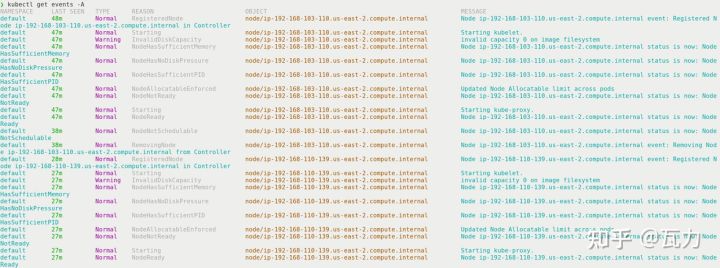
我的机器上这个命令没有输出,借了一张图
现在我们已经了解了集群中正在运行的内容,接下来应该看看正在发生什么。 如果最近有什么东西坏了,你可以看看群集事件,看看在它坏之前和之后发生了什么。 如果您知道只在特定的名称空间中存在问题,则可以将事件过滤到该名称空间,并屏蔽来自健康服务的一些额外干扰。
有了这个输出,你应该关注输出的类型(上图中的TYPE列)、原因(上图中的REASON列)和对象(上图中的OBJECT列)。 有了这三条信息,你就可以缩小你要查找的错误以及可能配置错误的组件的范围。
6. kubectl get nodes -o wide
$ kubectl get node -o wide NAME STATUS ROLES AGE VERSION INTERNAL-IP EXTERNAL-IP OS-IMAGE KERNEL-VERSION CONTAINER-RUNTIME k8s-master Ready control-plane,master 35d v1.23.2 192.168.199.100
node是kubernetes中的一级资源,并且是运行pod的基础。使用-o wide参数可以知道一些额外信息比如操作系统、内核版本、IP信息以及容器运行时的信息。你第一个需要关注的是status信息。通常情况下如果status字段的值不是“Ready”,就表示你有可能有麻烦了。
查看节点的age,看看status和age之间是否有任何关联。 可能只有新节点有问题,因为节点映像中发生了一些变化。 version字段将帮助你快速知道你是否在kubelet上有版本冲突,并且可能已经知道由于kubelet和API服务器之间的不同版本而产生的bug。
下面这句我没看懂,有懂的朋友留个言
The internal IP can be useful if you see IP addresses outside of the subnet。 可能一个节点用一个不正确的静态IP地址启动,你的CNI插件无法将流量路由到工作负载。
OS-IMAGE、KERNEL-VERSION和CONTAINER-RUNTIME都是可能导致问题的差异的良好指示器。 你可能只会在特定的操作系统或运行时遇到问题。 这些信息将帮助你快速锁定潜在的问题,并知道从哪里更深入地查看日志。
7. kubectl get pods -A -o wide
$ kubectl get pods -o wide NAME READY STATUS RESTARTS AGE IP NODE NOMINATED NODE READINESS GATES redis-649c84fc8d-w98gv 1/1 Running 0 33d 172.16.36.112 k8s-node1
最后是收集信息的命令。 与列出节点一样,你应该首先查看状态列并查找错误。 就绪列将显示需要多少个pod和正在运行的pod。
使用-A将列出所有命名空间中的pod,而-o wide将显示IP地址、节点和指定pod的位置。 使用列出节点的信息,你可以查看哪些pod在哪些节点上失败了。 将这些信息与操作系统、内核和容器运行时等细节联系起来,可能会让你了解修复集群所需的信息。
8. kubectl run a –image alpine –command — /bin/sleep 1d
有时,调试的最佳方法是从最简单的示例开始。 这个命令没有任何直接输出,但是您应该可以从中看到一个名为“a”的运行荚果。
如果是我单独调试的话,我喜欢单一字母作为名字来调试容器,因为它很容易迭代(如b, c, d)。在调试的时候我经常喜欢把旧的容器(a相对于b来说)留下,因为可以看出b和a之间的运行的区别,然后,通过日志查看它们的不同情况。
通过kubectl descript pod a这样的命令来查看一些已经停止运行的pod,然后通过查看events来看看这个pod发生了什么。
总结
使用这些命令,你应该能够开始使用任何集群,并了解它是否足够健康,可以运行工作负载。 还有其他需要考虑的事情,比如CoreDNS伸缩性、负载平衡、卷、中央日志记录和度量。 这里的命令应该在云中或预置环境(on-premise)中工作。
如果你需要排除节点或外部资源(例如负载均衡器)的故障,那么你应该查看你的控制器和API server的错误日志。 根据问题的不同,你可能需要查看kube-proxy、CNI插件或service mesh sidecar容器日志。

若有收获,就点个赞吧
0 人点赞


