0x01 入门
主要学习了url访问,参数注入,隐藏index.php, 定义路由,完整匹配,闭包定义,设置url分隔符,路由参数,变量规则,路由分组,复杂路由,生成url地址。
0x02 URL访问
thinkphp采用单一入口模式访问应用,对所有请求都定向到应用的入口文件,系统会从url参数中解析当前请求的模块,控制器和操作,下面是一个标准的url访问格式:http://serverName/index.php/模块/控制器/操作
模块在thinkphp中的概念其实就是应用目录下的子目录,官方规定是目录小写,因此模块全部用小写命名,无论url是否开启大小写转换,模块名都会强制小写。
应用的index模块的index控制器如下:
<?phpnamespace app\index\controller;use think\Controller;class Index extends Controller{public function index(){return "Hello World";}public function hello($name = 'think'){return 'hello ' . $name;}}
如果直接访问入口文件,由于url中没有模块,控制器,操作,系统就会访问默认模块(Index)下的默认控制器(Index)的默认操作(index),因此下面的操作访问是等效的:http://localhost/index.phphttp://localhost/index.php/index/index/index
如果要访问控制器的hello方法,则需要使用完整的url地址http://localhost/index.php/index/index/hello/name/nihao
访问url地址后页面结果:
由于name是可选参数,因此也可以使用urlhttp://localhost/index.php/index/index/hello
默认情况下url地址中的控制器和操作名是不区分大小写的,因此下面的访问其实是等效的
http://127.0.0.1/public/index.php/index/index/hello
http://127.0.0.1/public/index.php/index/INDEX/HELLO
如果你的控制器是驼峰的,例如定义个HelloWorld控制器
<?phpnamespace app\index\controller;class HelloWorld{public function index($name='world'){return 'Hello' . $name;}}
正确的URL访问地址(该地址可以使用url方法生成)应该是:http://localhost/index.php/index/hello_world/index
系统会自动定位到HelloWorld控制器类去操作
如果使用http://localhost/index.php/index/HelloWorld/index
将会报错,并且提示HelloWorld控制器不存在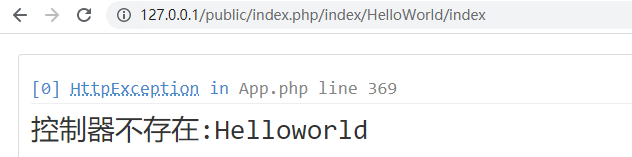
如果希望严格区分大小写访问(或者支持驼峰法进行控制器访问),可以在应用文件中配置
关闭url自动转换后必须用下面的url地址访问(控制器名称必须严格使用控制器类的名称,不包含控制器后缀)
http://127.0.0.1/public/index.php/index/HelloWorld/index
ps: 操作方法的访问本身是不会受到url自动转换的影响的,但会影响默认的模板渲染输出
如果你的服务器不支持pathinfo方式的url访问,可以使用兼容方式
http://127.0.0.1/public/index.php?s=/index/HelloWorld/index
其中变量名s是可以配置的。
0x03 参数传入
通过操作方法的参数绑定功能,可以实现自动获取url的参数
控制器代码如下:
<?phpnamespace app\index\controller;class HelloWorld{public function index($name='world', $pass= ''){return 'Hello' . $name . " pass: " . $pass;}}
index方法会自动获取url中的同名参数作为方法的参数值,而且这个参数的传入顺序不受url参数顺序的影响。
例如下面的url地址输出结果是一样的:
http://127.0.0.1/public/index.php/index/HelloWorld/index/name/admin/pass/123123
http://127.0.0.1/public/index.php/index/HelloWorld/index/pass/123123/name/admin/
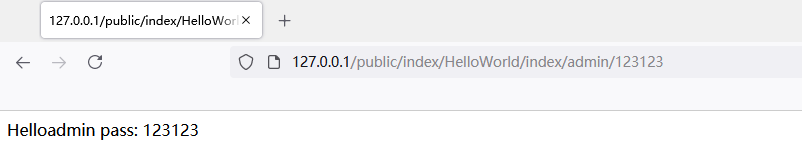
还可以对url地址进一步简化,前提是保证参数代表的顺序。也就是说我们必须使用下面的url地址参能正确传入,
http://127.0.0.1/public/index.php/index/HelloWorld/index/admin/123123
注意: 按顺序绑定参数的话,操作方法的参数只能通过urlpathinfo变量,不能使用get或者post变量
0x04 隐藏index.php
可以去掉url地址里面的入口文件index.php,但是需要额外配置web服务器规则
以apache为例,需要在入口文件的同级添加.htaccess文件。内容如下:
phpstudy配置如下
<IfModule mod_rewrite.c>Options +FollowSymlinks -MultiviewsRewriteEngine onRewriteCond %{REQUEST_FILENAME} !-dRewriteCond %{REQUEST_FILENAME} !-fRewriteRule ^(.*)$ index.php [L,E=PATH_INFO:$1]</IfModule>
0x05 路由定义
url地址里面的index模块是可以省略的。
现在定义路由配置文件route.php。 向里面添加一些规则
// 添加路由规则, 路由到index控制器hello方法'hello/:name' => 'index/index/hello',
该路由规则表示所有hello开头的并且带擦拭你的访问都会路由到index共之前的hello操作方法。
路由之前的url访问地址为:http://localhost/public/index/index/hello/name/pass
定义路由后就只能访问下面的url地址http://localhost/public/hello/xxx
定义路由后原来的url地址会失效,变成非法请求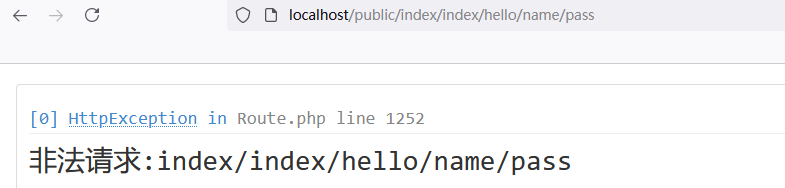
这里有个小问题,如果只是访问
http://localhost/public/hello/
将会发生错误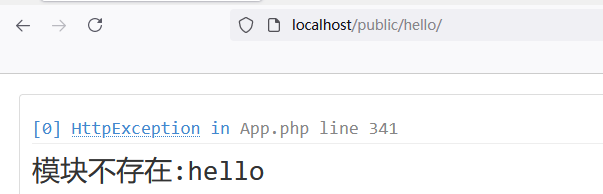
事实上这时由于路由没有正确匹配到,修改路由规则如下:
// 对比上面路由参数name为可选参数'hello/[:name]' => 'index/hello',
使用[] 把路由规则中的变量包起来,就表示该变量为可选,接下来就可以正常访问了。
除了路由配置文件中的定义外,可以采用动态定义路由规则的方式定义,例如在路由配置文件(applocation/route)的开头直接添加下面的方法:
use think\Route;Route::rule('hello/[:name]', 'index/hello');
完成的效果和使用配置方式定义是一样的。
无论是配置方式还是通过Route类的方法定义路由,都统一发到路由配置文件application/route.php文件中。
注意路由不支持在配置文件中设置
0x06 完整匹配
前面定义的路由是只要以hello开头就能进行匹配,如果需要完整匹配,可以使用以下定义:
Route::rule('hello/[:name]$', 'index/hello');
当路由规则以$结尾的时候就表示当前路由规则需要完整匹配。
当我们访问下列url的时候
http://localhost/public/hello/bane/aaa 不匹配
http://localhost/public/hello/bane/ 匹配
http://localhost/public/hello/ 匹配
0x07 闭包定义
还支持通过定义闭包为某些特殊的场 景定义路由规则:
route.php文件下配置
use think\Route;// 闭包函数的参数就是路由规则中定义的变量// 访问路由匹配的规则就是访问这个闭包函数Route::rule('hello/[:name]', function ($name){return 'Hello,' . $name . '!';});
请求http://localhost/public/hello/aaaa
0x08 设置URL分隔符
如果需要改变url地址中的pathinfo参数分隔符,只需要在应用配置文件application/config.php中设置
路由规则定义无需修改,就可以访问下面地址
http://localhost/public/hello-aaaa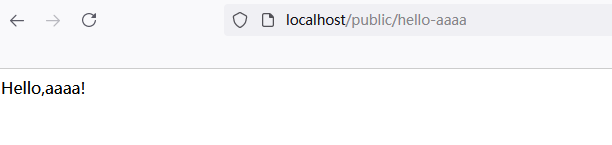
0x09 路由参数
还可以约束路由的请求类型或者URL后缀
'hello/[:name]' => ['index/hello', ['method' =>'get'], ['ext' =>'html']],
上面定义的路由规则限制了必须是get请求,而且后缀是html,所以下main的url[http://localhost/public/hello/aaaa.html](http://localhost/public/hello/aaaa.html) 有效[http://localhost/public/hello/aaaa](http://localhost/public/hello/aaaa) 无效[http://localhost/public/hello.html](http://localhost/public/hello.html) 有效[http://localhost/public/hello](http://localhost/public/hello.html) 无效
0x0A 变量规则
接下来尝试一些复杂的路由规则满足不同的路由变量。在此之前,首先增加一个控制器类
<?phpnamespace app\index\controller;class Blog{public function get($id){return '查看ID=' . $id . '的内容';}public function read($name){return '查看Name=' . $name . '的内容';}public function archive($year, $month){return '查看' . $year . '/' . $month . '的归档内容';}}
添加路由规则:
'hello/[:name]' => ['helloworld/hello', ['method' => 'get', 'ext' => 'html']],'blog/:year/:month' => ['blog/archive', ['method' => 'get'], ['year' => '\d{4}', 'month' => '\d{2}']],'blog/:id' => ['blog/get', ['method' => 'get'], ['id' => '\d+']],'blog/:name' => ['blog/read', ['method' => 'get'], ['name' => '\w+']],
然后访问url
http://localhost/public/blog/2222 访问id为2222的内容
http://localhost/public/blog/2020/01 访问2020/01的归档内容
http://localhost/public/blog/aaa 访问name为aaa的内容
0X0B 路由分组
上面三个路由规则都是blog打头,所以我们可以做如下的简化:
'[blog]' =>[':year/:month' => ['blog/archive', ['method'=>'get'], ['year'=>'\d{4}', 'month'=>'\d{2}']],':id' => ['blog/get', ['method'=>'get'],['id'=>'\d+']],':name' => ['blog/read', ['method'=>'get'], ['name' => '\w+']]],
0X0C 复杂路由
有时还需要对url做一些特殊的定制, 例如要同时支持下面的访问地址http://localhost/blog/thinkphphttp://localhost/blog-2021-01
只需要稍加改变自定义规则即可
'blog-<year>-<month>' => ['blog/archive', ['method'=>'get'], ['year'=>'\d{4}', 'month'=>'\d{2}']],
对于year-month这样的非常规范例,需要使用<变量名> 这样的变量定义方式,而不是:变量名方式。
简单起见,还可以把变量规则统一定义,如:
// 全局变量定义规则'__pattern__' => ['name' => '\w+','id' => '\d+','year' => '\d{4}','month' => '\d{2}',],// 路由规则定义'blog/:id' => 'blog/get','blog/:name' => 'blog/read','blog-<year>-<month>' => 'blog/archive',
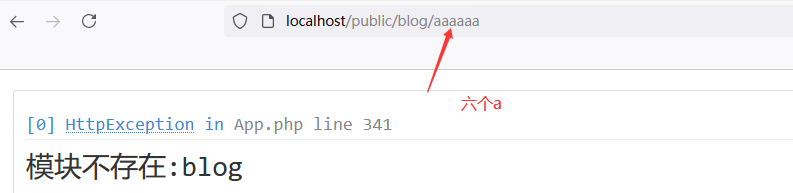
在pattern中定义的变量规则我们称为全局变量规则。在路由规则里定义的变量规则我们称为局部变量规则。如果同一变量同时定义了全局和局部的话,当前的局部规则会覆盖掉全局规则
如:
'blog/:id' => 'blog/get',// 'blog/:name' => 'blog/read','blog/:name' => ['blog/read', ['method'=>'get'], ['name'=>'\w{5}']],'blog-<year>-<month>' => 'blog/archive',

0X0D 生成URL地址
路由规则定义后,可以通过Url类来方便的生成实际的url地址,针对上面的路由规则,可以使用下面的方式生成URL地址。
// 输出blog/thinkphp
echo Url::build('blog/read', ['name' => 'thinkphp']);

还可以使用系统提供的助手函数URL来简化
url('blog/read', 'name=thinkphp');
等效于
Url::build('blog/read', ['name' => 'thinkphp']);
如果路由规则发生了调整,生成的url地址会自动变量。
如果你配置url_html_suffix参数,生成的url地址会带上后缀。
生成的地址如图上2
如果url地址全部采用路由方式定义,也可以直接使用路由规则定义url生成
如:url('/blog/thinkphp');Url::build('/blog/8');Url::build('/blog/archive/2015/05');
生成的方法第一个参数要和路由地址保持一致,如果你路由地址特殊,使用闭包函数则需要手动给路由指定标识
// 添加hello路由标识
Route::rule(['hello','hello/:name'], function($name){
return 'Hello,'.$name;
});
// 根据路由标识快速生成URL
Url::build('hello', 'name=thinkphp');
// 或者使用
Url::build('hello', ['name' => 'thinkphp']);

若有收获,就点个赞吧
0 人点赞


