before all
seldon core
Artifact
deploy
# user kubeflow manifestskubectl create ns kubeflow# kubectl label ns kubeflow istio-injection=enabledkubectl apply -k base
https://github.com/SeldonIO/seldon-core/tree/v1.4.0-release/operatormake deploy-local
validate
knative serving
Artifact
deploy
cat << EOF > ./istio-minimal-operator.yamlapiVersion: install.istio.io/v1alpha1kind: IstioOperatorspec:values:global:proxy:autoInject: disableduseMCP: false# The third-party-jwt is not enabled on all k8s.# See: https://istio.io/docs/ops/best-practices/security/#configure-third-party-service-account-tokensjwtPolicy: first-party-jwtaddonComponents:pilot:enabled: truecomponents:ingressGateways:- name: istio-ingressgatewayenabled: trueEOFistioctl install -f istio-minimal-operator.yaml# ./istioctl x uninstall --purge
kubectl create ns knative-servingkubectl label namespace knative-serving istio-injection=enabled# install knative serving V0.19.0kubectl apply --filename https://github.com/knative/serving/releases/download/v0.19.0/serving-crds.yamlkubectl apply --filename https://github.com/knative/serving/releases/download/v0.19.0/serving-core.yaml# install controller for istiokubectl apply --filename https://github.com/knative/net-istio/releases/download/v0.19.0/release.yaml# validatekubectl get pods --namespace knative-serving
kubectl edit cm config-domain --namespace knative-serving

apiVersion: v1
data:
  svc.transwarp.local: ""
kind: ConfigMap
metadata:
  XX
# todo
kubectl apply -f cert-manager.yaml
# install kfserving
wget https://raw.githubusercontent.com/kubeflow/kfserving/master/install/v0.4.1/kfserving.yaml
kubectl apply -f kfserving.yaml
export INGRESS_HOST=$(kubectl get po -l istio=ingressgateway -n istio-system -o jsonpath='{.items[0].status.hostIP}')
export INGRESS_PORT=$(kubectl -n istio-system get service istio-ingressgateway -o jsonpath='{.spec.ports[?(@.name=="http2")].nodePort}')

echo $INGRESS_HOST
echo $INGRESS_PORT
Pipeline
archi
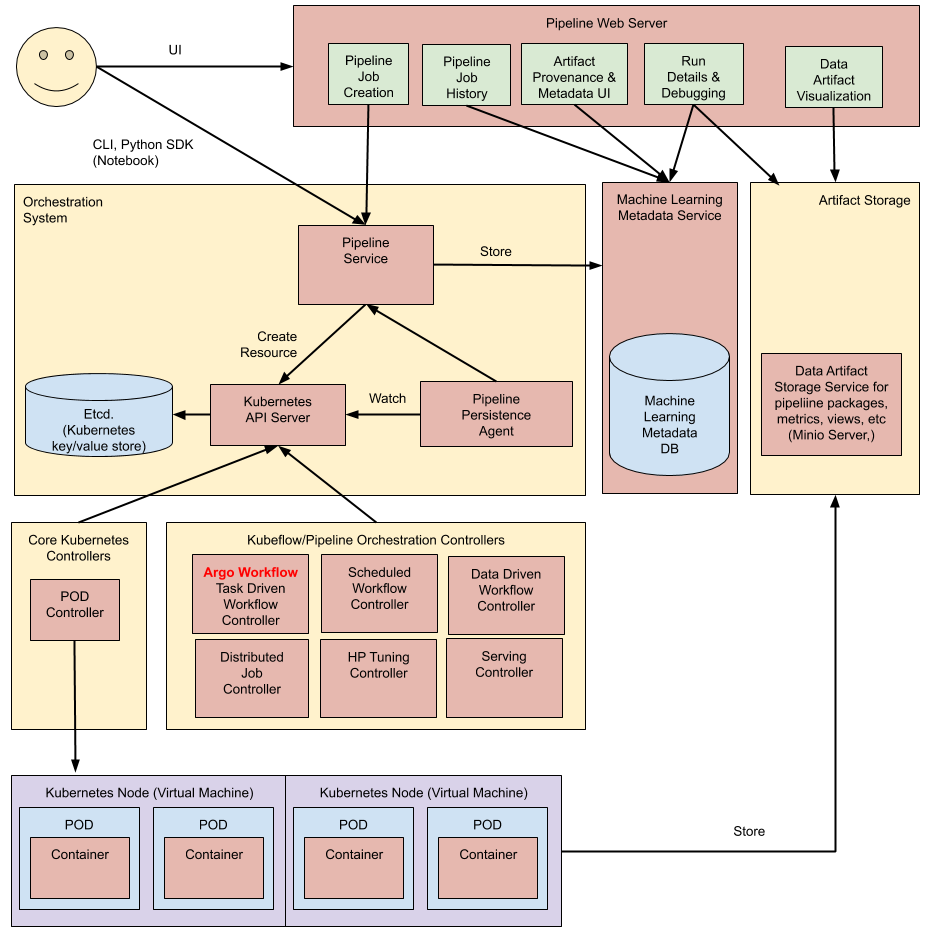
deploy
# git url: https://github.com/kubeflow/pipelines/tree/1.2.0/manifests/kustomize
# pipeline 默认安装在kubeflow namespace中
kubectl create ns kubeflow

gunzip pipelines-1.2.0.zip
cd pipelines-1.2.0/manifests/kustomize
# 安装pipeline自定义资源
kubectl apply -k cluster-scoped-resources/
kubectl wait crd/applications.app.k8s.io --for condition=established --timeout=60s

# 安装pipeline应用
kubectl apply -k env/platform-agnostic/
kubectl wait applications/pipeline -n kubeflow --for condition=Ready --timeout=1800s

# 确认安装进度
kubectl get po -nkubeflow
# 可以使用pipeline-ui的svc访问界面
kubectl get svc ml-pipeline-ui -nkubeflow

kubectl port-forward --address localhost -n kubeflow svc/ml-pipeline-ui 8080:80



validatea

若有收获,就点个赞吧
0 人点赞


