DQL
**Daete Query LANGUAGE**: 数据查询语言
select完整语法

查询基本语法:
select 字段1,字段2 …from 表名
1 | --查询全部学生 select 字段 from 表select * from sutdent2 | --查询指定字段select `studentna`,`studentname` from student3 | --查询指定字段,并且起别名(给结果起一个名字) AS 可以给字段起别名,也可以给表起别名select 字段名 as 别名 from 表名 as 别名select `studentno` as 学号 , `studentname` as 名字 from student as s4 | --函数 concat(a,b)select concat(姓名,student) as 新名字 from student
🍇去重 distinct
作用:去除SELECT 查询出来的结果中重复的数据,重复的数据只显示一条
语法select distinct 去重的字段名 from 表名
1 | 例子:查询那些同学参加了考试,成绩

   --查询全部的考试成绩
   select * from result

   --查询有哪些同学参加了考试
   select `studentNo` from result

   --发现重复数据,去重
   select distinct `student` from result
数据库的列 (表达式)
数据库中的表达式:文本值,列,null ,函数,计算表达式,系统变量….
语法:select 表达式 from 表
1 | 函数:查询系统版本
    select version ()

2 | 计算表达式:用来计算
select 100*3-1 as 计算结果

3 | 变量:查询自增的步长
select @@auto_increment_increment

4 | 查询学员考试成绩+1分查看
    select `studentNo`,`studentresult`+1 as "提分后" from result
where条件子句
作用:检索数据中符合条 的值
搜索的条件由一个或多个表达式组成!结果为布尔值
运算符 id等于某个值,大于某个值,在某个区间内修改
| 操作符 | 语法 | 描述 |
|---|---|---|
| = | a=b | 等于 |
| <>或!= | a<>b a != b |
不等于 |
| > | a > b | 大于 |
| < | a< b | 小于 |
| <= | a <=b | 大于等于 |
| >= | a>= b | 小于等于 |
| between..and.. | between a and b | 在某个范围 |
| and && | a and b a&&b |
逻辑与,两个都为真,结果为真 |
| or | | | a or b a | | b |
逻辑或,其中一个为真,则结果为真 |
| not ! | not a ! a |
逻辑非,真为假,假为真! |
注意:尽量使用英文字母
在where 后面使用 and 和 &&
举例:查询考试成绩在95~100分之间
1 | 方式一:使用and
    select `studentno`,`studentresult` from result where studentresult>=95 and studentresult<=100

2 | 方式二:使用&&
    select `studentno`,`studentresult` from result where studentresult>=95 && studentresult<=100
在where 后面使用 not 和 !=
举例:除了1000号学生之外的同学成绩
1 | 方式一:使用 !=
    select `studentno`,`studentresult` from result where studentno !=1000

2 | 方式二:使用 not
    select `studentno`,`studentresult` from result where not studentno !=1000
模糊查询:比较运算符
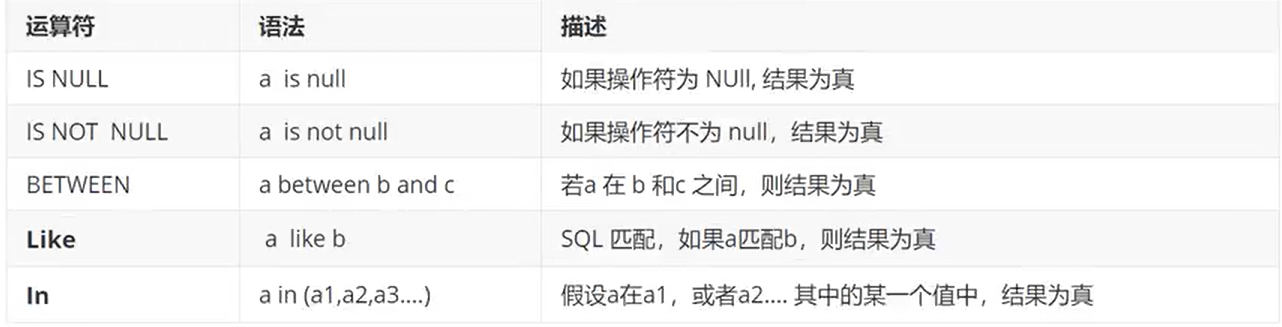
在where 条件后面使用 like 模糊查询
like一般结合 %(0到任意个字符 ) 和 _(任意单个字符)
应用场景:查询某个字符串包含某个字
1 | 例1,查询name字段中包含有“明”字的。
    select * from table1 where name like '%明%'

2 | 例2,查询name字段中以“李”字开头。
    select * from table1 where name like '李*'

3 | 例3,查询name字段中含有数字的。
    select * from table1 where name like '%[0-9]%'

4 | 例4,查询name字段中含有小写字母的。
    select * from table1 where name like '%[a-z]%'

5 | 例5,查询name字段中不含有数字的。
    select * from table1 where name like '%[!0-9]%'

6 | 例5,找出名字中有下划线的?
    select name from t_user where name like '%\_%';

7 | 找出名字中最后一个字母是T的?
    select ename from emp where ename like '%T';
在where 条件后面使用 in( 具体的一个或者多个值 )
应用场景: 在多条结果之间查询某个值时
1 | 举例:查询1001,1002,1003号的学员
select studentNo, studentname from student where studentNo in (1001,1002,1003)
在where 条件后面使用 is null 和 is not null
1 | null:查询地址为空的学生
    select studentNo, studentname from student where address=" " or address is null

2 | not null :查询有出生日期的同学
   select studentNo, studentname from student where borndate is not null
在where 条件后面使用 between and (区间)
1 | 举例:查询考试成绩在95~100分之间
    select `studentno`,`studentresult` from result where `studentresult`  between 95 and 100

若有收获,就点个赞吧
0 人点赞


