1、环境要求
- Java 8 & 兼容java14 .
- Maven 3.3+
- idea 2019.1.2
1.1、maven设置
<mirrors><mirror><id>nexus-aliyun</id><mirrorOf>central</mirrorOf><name>Nexus aliyun</name><url>http://maven.aliyun.com/nexus/content/groups/public</url></mirror></mirrors><profiles><profile><id>jdk-1.8</id><activation><activeByDefault>true</activeByDefault><jdk>1.8</jdk></activation><properties><maven.compiler.source>1.8</maven.compiler.source><maven.compiler.target>1.8</maven.compiler.target><maven.compiler.compilerVersion>1.8</maven.compiler.compilerVersion></properties></profile></profiles>

2、helloword
需求:浏览发送/hello请求,响应 Hello,Spring Boot 2
2.1、引入依赖
<parent><groupId>org.springframework.boot</groupId><artifactId>spring-boot-starter-parent</artifactId><version>2.3.4.RELEASE</version></parent><dependencies><dependency><groupId>org.springframework.boot</groupId><artifactId>spring-boot-starter-web</artifactId></dependency></dependencies>

2.2、创建主程序
/*** 主程序类 @SpringBootApplication:这是一个SpringBoot应用*/@SpringBootApplicationpublic class MainApplication {public static void main(String[] args) {SpringApplication.run(MainApplication.class,args);}}

2.3、编写业务
/*** 组合注解:@RestController = @ResponseBody + @Controller*/@RestControllerpublic class HelloController {@RequestMapping("/hello")public String hello01(){return "Hello, Spring Boot 2!";}}
2.4、启动项目并测试
直接运行main方法,并在浏览器中输入地址:http://localhost:8080/hello,访问后出现以下页面表示访问成功,注意:默认访问地址的端口号为8080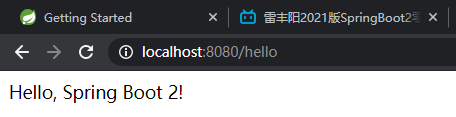

2.5、编写配置文件简化配置application.properties
#修改默认端口号server.port=8080

2.6、简化部署
<build><plugins><plugin><groupId>org.springframework.boot</groupId><artifactId>spring-boot-maven-plugin</artifactId></plugin></plugins></build>

把项目打成jar包,直接在目标服务器执行即可。

若有收获,就点个赞吧
0 人点赞


