.dockerignore文件
从构建环境的上下文中排除不必要的文件,文件名以换行符分割,可以使用*和?通配符
镜像层
创建新镜像的主要方法是通过Dockerfile和docker build命令
Dockerfile中每个指令执行后都会产生一个新的镜像层
一个新的镜像层的建立都是,用上一层的镜像启动容器
中间使用过的容器都会被删除
举个🌰
FROM busybox:latestRUN echo "This should work"RUN /bin/bash/ -c echo "This won't"
执行结果
dropann@dropann:~/tedo$ docker build -t echotest .Sending build context to Docker daemon 2.048kBStep 1/3 : FROM busybox:latest---> 388056c9a683 临时容器Step 2/3 : RUN echo "This should work"---> Using cache---> f33e1bfb4a99 由上个容器创建的镜像Step 3/3 : RUN /bin/bash/ -c echo "This wont" 上面有一步没有显示出来把临时容器388056c9a683删除---> Running in ccbe791d7cd6 容器/bin/sh: /bin/bash/: not foundThe command '/bin/sh -c /bin/bash/ -c echo "This wont"' returned a non-zero code: 127
仍然可以利用最后成功生成的镜像层创建一个镜像来执行它 使用镜像的ID(f33e1bfb4a99),而不是最后容器的ID(ccbe791d7cd6)
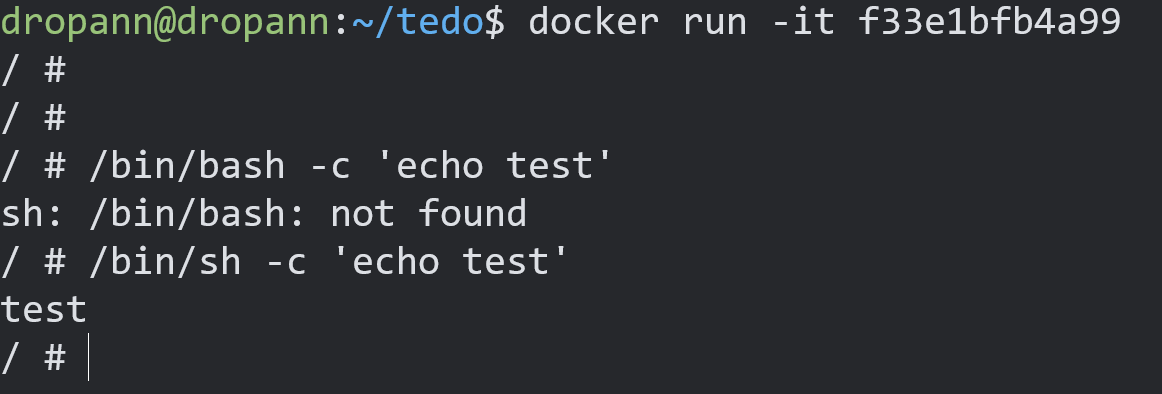
结论和之前报错一样,busybox镜像中没有包含bash shell
常用命令
查看镜像docker imagesdocker images -a #查看所有镜像docker images php #查看名为php镜像搜索镜像docker search redis拉取镜像docker pull redis:3.2删除镜像docker rmi 9b9cb95443b5docker rmi -f 镜像名A:tag 镜像名B:tag #删除多个镜像docker rmi `docker images -q` #删除所有镜像导出镜像docker save #例如:docker image save centos > docker-centos7.4.tar.gz导入镜像docker load #例如:docker image load -i docker-centos7.4.tar.gz查找相关镜像docker build -t 账号名/镜像名:标签docker search xx #例如:docker search redisdocker search -s 30 redis #查找start大于30的redis镜像docker pull name:标签 #从查找的镜像中下载下来,标签默认是latest 例如:docker pull redis 等价于 docker pull redis:latest
使用Dockerfile构建镜像
exec和shell格式的对比
一些指令(RUN CMD ENTRYPOINT) 能够接受exec和shell两种格式,exec需要用到一个JSON数组RUN ["apt-get", "install", "-y", "nginx"],第一个元素是可执行文件,其他是执行时所使用参数。shell使用是自由形式的字符串,字符串会传给/bin/sh -c执行exec适用于规避shell对字符串做出的错误解析,或者不支持shell平台(镜像没有包含/bin/sh)
Dockerfileke可用指令
# Version: 0.0.1FROM ubuntu:14.04MAINTAINER test_user "test@example.com"RUN apt-get update && apt-get install -y nginxRUN echo 'Hi, i am your container' \>/usr/share/nginx/html/index.htmlEXPOSE 80
默认情况下RUN指令会在shell里使用命令包装器/bin/sh -c来执行,如果是一个不支持shell的平台或者不希望在shell中运行(避免shell字符串篡改),也可以使用exec格式的RUN指令
RUN ["apt-get", "install", "-y", "nginx"]
缓存
满足条件
上一个指令能够在缓存中找得到
缓存中存在一个镜像层,而他的指令与你的指令一摸一样,父层也完全相同
构建缓存
忽略Dockerfile的构建缓存 --no-cache
使用Dockerfile的构建缓存
FROM ubuntu:14.04MAINTAINER test_user "test@example.com"ENV REFRESHED_AT 2021-04-03RUN apt-get -qq update
镜像分发
镜像库和镜像命名方式
cd identidock
- 构建镜像时
docker build -t "identidock:0.1" .
- docker tag
docker tag "identidock:0.1" "username/identidock:0.1"
把镜像推送到dockerhub
docker logindocker push username/identidock:0.1
自动构建

报错了
好像是因为路径问题
https://developer.aliyun.com/article/693777

若有收获,就点个赞吧
0 人点赞


