目录
数据爬取方法
# requests模块库使用html = requests.get(url, headers=headers).text
数据提取方式
re—-> 正则表达式, C语言编写而成,性能优势
lxml—> xpath表达式, C语言编写而成,性能优势
beautifulsoup—> css选择器, 纯Python编写而成
信息校验型
HTTP协议
请求头参数: user_agent, cookies等
cookies: 存储用户身份信息或状态保持等
代码示例: https://www.yuque.com/tshuangteng/spider/xxjyx
WebSocket协议
客户端身份信息验证, 相对于HTTP协议的爬虫,新增数据推送,数据仓库以及握手状态等.
代码示例:https://juejin.cn/post/6844903792962437134
动态渲染型 (被动型)
_ 常见案例: 利用渲染工具(splash, pyppeteer, selenium), 模拟用户真实请求
splash: 部署到云服务器, 并行处理渲染页面负载均衡器.
推荐异步渲染库pyppeteer, 调用BOM浏览器对象模型的api接口较多,而selenium接口稍少.网页下拉获取更多信息, 伪代码示例
# pyppeteer下通过异步 js控制浏览器对象模型BOMwhile True:now_height = await page.evaluate('document.body.scrollHeight')await page.evaluate(f'window.scrollTo(0,{now_height + 800})')await asyncio.sleep(2)after_height = await page.evaluate('document.body.scrollHeight')if after_height == now_height:break
文本混淆 (主动型)
css特征来混淆: 图文混淆, 自定义字体, css偏移, svg坐标和映射解决方案:<br /> ocr获取等<br /> 分析所用字体, 对比字体文件(woff: web open font format格式等)得出结果<br /> 使用css选择器对网页信息进行偏移校正即可.<br /> 分析爬取网站前后端, 获取 文字 与 其对应svg矢量图的映射关系代码示例:[https://www.ituring.com.cn/book/tupubarticle/33310](https://www.ituring.com.cn/book/tupubarticle/33310)
特征识别
常见案例: webdrive识别, 请求并发限制, cookie或token等, 隐藏链接<br /> 解决方案:<br /> 菜鸟天地或者淘宝登录<br /> 请求频率降低, 高匿名ip代理池<br /> 反向破解token,不推荐<br /> 抓包分析请求
示例
详细代码: https://www.yuque.com/tshuangteng/spider/tzsb
分析cainiao天地网页, 只能通过点击网页中的查询来获取,如下图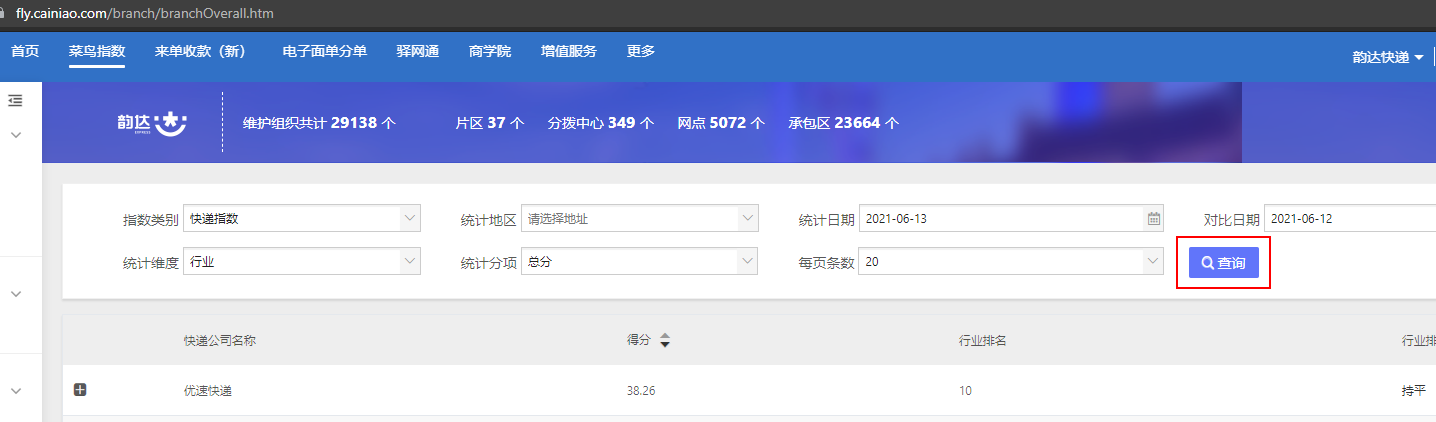
利用pyppeteer库中的api模拟人类操作, 获取到的cookie和对应的token, 保存到消费队列或者任意存储库<br /> <br /> 如下:
async def intercept_request(req, cookies, stat_date):# if req.resourceType in ["image", "media", "eventsource", "websocket", "stylesheet", "font"]:# await req.abort()# else:req_url = req.url # 此次请求的完整链接token = re.match(r'(.*tb_token_=)(\w+)(&.*)', req_url).group(2) # 正则获取token字符# do something : save cookies and token# ....await req.continue_()# 在点击查询时控制后台的js获取隐蔽的链接cookies = await get_cookies(page)await asyncio.sleep(2)await page.setRequestInterception(True)page.on('request', lambda req: asyncio.ensure_future(intercept_request(req, cookies, stat_date)))try:await page.click('#J_SearchBtn', {'delay': 30})except Exception as e:logger.error(e)
APP爬取
常见案例: APP抓包; apk文件反编译; 代码混淆; app应用加固; 自动化测试工具解决方案:<br /> 设置代理, 抓包分析网络传输中的数据.<br /> 逆向分析, 查找源码中的关键字(签名验证),获取所需内容<br /> 类名,变量名函数名等用无意义名称代替<br /> 防止反编译,无解<br /> appium等,用webdrive驱动iOS, Android应用<br /> <br /> 代码示例: [https://zhuanlan.zhihu.com/p/109313699](https://zhuanlan.zhihu.com/p/109313699)
验证码
解决方案:
滑块验证码: webdrive下通过操作浏览器对象模型 模拟人类的行为
简单字符验证码: OCR
其他或者复杂验证码: 接 打码平台人工验证等
# 淘宝登陆滑动的操作 示例from retrying import retry@retry(retry_on_result=retry_if_result_none, stop_max_attempt_number=8)async def mouse_slider(page=None):""":param page::return: (flag, page)-->(成功的标志,网页)"""await asyncio.sleep(1)# 尽量模拟人工滑动的速度try:# 淘宝滑块框300*30,滑块40*30,需要滑动的距离是260*30stage1 = 200stage2 = 75btn_position = await page.evaluate('''() =>{return {x: document.querySelector('#nc_1_n1z').getBoundingClientRect().x,y: document.querySelector('#nc_1_n1z').getBoundingClientRect().y,width: document.querySelector('#nc_1_n1z').getBoundingClientRect().width,height: document.querySelector('#nc_1_n1z').getBoundingClientRect().height}}''')x = btn_position['x'] + btn_position['width'] / 2 + 15y = btn_position['y'] + btn_position['height'] / 2 + 15await page.hover('#nc_1_n1z')await page.mouse.down()await page.mouse.move(x + stage1, y, {'steps': 30})await page.waitFor(150)await page.mouse.move(x + stage1 + stage2, y, {'steps': 4})await page.waitFor(1500)await page.mouse.up()await asyncio.sleep(2)except Exception:pass# 滑动之后,可能需要刷新之后重新滑动滑块fresh = ''try:fresh = await page.Jeval('.errloading', 'node => node.textContent')if fresh:logger.info(f'需要刷新后重新滑动: {fresh}')await page.hover('a[href="javascript:noCaptcha.reset(1)"]')await page.mouse.down()await page.mouse.up()await asyncio.sleep(2)except Exception:pass# 最后返回的提示信息finally:slider_info = await page.Jeval('.nc-lang-cnt', 'node => node.textContent')if slider_info != '验证通过':return None, Noneelse:return 1, page

若有收获,就点个赞吧
0 人点赞


