- spring cloud 介绍
- spring cloud 技术组成
- Spring Cloud 对比 Dubbo
- 一、service - 服务
- 二、commons 通用项目
- 三、item service 商品服务
- 四、user service 用户服务
- 五、order service 订单服务
- 六、service 访问测试汇总
- 七、eureka 注册与发现
- 八、service provider 服务提供者
- 九、eureka 和 “服务提供者”的高可用
- 十、ribbon 服务消费者
- 十一、ribbon 负载均衡和重试
- 十二、Hystrix 断路器
- 十四、feign 声明式客户端接口
- 十五、feign + ribbon 负载均衡和重试
- 十七、feign + hystrix 监控和熔断测试
- 十八、order service 调用商品库存服务和用户服务
- 二十、zuul API网关
- routes:
- item-service: /item-service/**
- user-service: /user-service/**
- order-service: /order-service/**
- zuul + hystrix 数据监控
- 访问测试
- 二十二、zuul Cookie过滤
- 二十三、config 配置中心
- 二十四、config bus + rabbitmq 消息总线配置刷新
- 二十五、sleuth 链路跟踪
- 二十六、sleuth + zipkin 链路分析
- 二十七、向eureka注册正确的ip地址
spring cloud 介绍
spring cloud 是一系列框架的集合。它利用 spring boot 的开发便利性巧妙地简化了分布式系统基础设施的开发,如服务发现注册、配置中心、消息总线、负载均衡、断路器、数据监控等,都可以用 spring boot 的开发风格做到一键启动和部署。spring cloud 并没有重复制造轮子,它只是将目前各家公司开发的比较成熟、经得起实际考验的服务框架组合起来,通过 spring boot 风格进行再封装屏蔽掉了复杂的配置和实现原理,最终给开发者留出了一套简单易懂、易部署和易维护的分布式系统开发工具包。
spring cloud 对于中小型互联网公司来说是一种福音,因为这类公司往往没有实力或者没有足够的资金投入去开发自己的分布式系统基础设施,使用 spring cloud 一站式解决方案能在从容应对业务发展的同时大大减少开发成本。同时,随着近几年微服务架构和 docker 容器概念的火爆,也会让 spring cloud 在未来越来越“云”化的软件开发风格中立有一席之地,尤其是在目前五花八门的分布式解决方案中提供了标准化的、一站式的技术方案,意义可能会堪比当年 servlet 规范的诞生,有效推进服务端软件系统技术水平的进步。
spring cloud 技术组成

- eureka
微服务治理,服务注册和发现 - ribbon
负载均衡、请求重试 - hystrix
断路器,服务降级、熔断 - feign
ribbon + hystrix 集成,并提供声明式客户端 - hystrix dashboard 和 turbine
hystrix 数据监控 - zuul
API 网关,提供微服务的统一入口,并提供统一的权限验证 - config
配置中心 - bus
消息总线, 配置刷新 -
Spring Cloud 对比 Dubbo

Dubbo
- Dubbo只是一个远程调用(RPC)框架
- 默认基于长连接,支持多种序列化格式
- Spring Cloud
- 框架集
- 提供了一整套微服务解决方案(全家桶)
- 基于http调用, Rest API

一、service - 服务

- 商品服务 item service,端口 8001
- 用户服务 user service,端口 8101
- 订单服务 order service,端口 8201
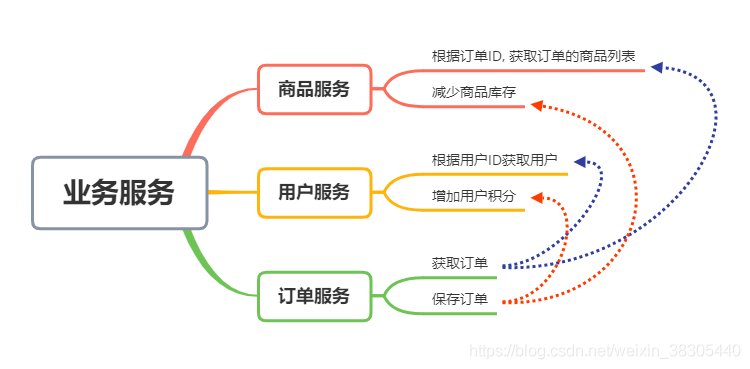

二、commons 通用项目
新建 maven 项目
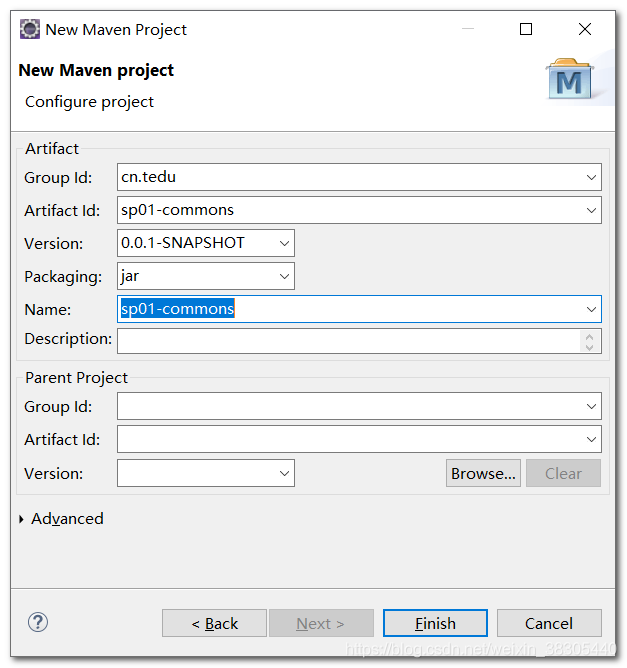
pom.xml
<project xmlns="http://maven.apache.org/POM/4.0.0"xmlns:xsi="http://www.w3.org/2001/XMLSchema-instance"xsi:schemaLocation="http://maven.apache.org/POM/4.0.0 http://maven.apache.org/xsd/maven-4.0.0.xsd"><modelVersion>4.0.0</modelVersion><groupId>cn.tedu</groupId><artifactId>sp01-commons</artifactId><version>0.0.1-SNAPSHOT</version><name>sp01-commons</name><dependencies><dependency><groupId>com.fasterxml.jackson.module</groupId><artifactId>jackson-module-parameter-names</artifactId><version>2.9.8</version></dependency><dependency><groupId>com.fasterxml.jackson.datatype</groupId><artifactId>jackson-datatype-jdk8</artifactId><version>2.9.8</version></dependency><dependency><groupId>com.fasterxml.jackson.datatype</groupId><artifactId>jackson-datatype-jsr310</artifactId><version>2.9.8</version></dependency><dependency><groupId>com.fasterxml.jackson.datatype</groupId><artifactId>jackson-datatype-guava</artifactId><version>2.9.8</version></dependency><dependency><groupId>org.projectlombok</groupId><artifactId>lombok</artifactId><version>1.18.6</version></dependency><dependency><groupId>javax.servlet</groupId><artifactId>javax.servlet-api</artifactId><version>3.1.0</version></dependency><dependency><groupId>org.slf4j</groupId><artifactId>slf4j-api</artifactId><version>1.7.26</version></dependency><dependency><groupId>org.apache.commons</groupId><artifactId>commons-lang3</artifactId><version>3.9</version></dependency></dependencies><build><plugins><plugin><groupId>org.apache.maven.plugins</groupId><artifactId>maven-compiler-plugin</artifactId><version>3.8.0</version><configuration><source>1.8</source><target>1.8</target></configuration></plugin></plugins></build></project>
java 源文件
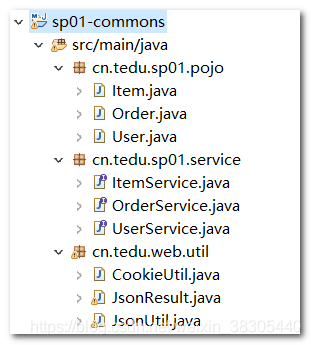
pojo
Item
package cn.tedu.sp01.pojo;import lombok.AllArgsConstructor;import lombok.Data;import lombok.NoArgsConstructor;@Data@NoArgsConstructor@AllArgsConstructorpublic class Item {private Integer id;private String name;private Integer number;}
User
package cn.tedu.sp01.pojo;
import lombok.AllArgsConstructor;
import lombok.Data;
import lombok.NoArgsConstructor;
@Data
@NoArgsConstructor
@AllArgsConstructor
public class User {
    private Integer id;
    private String username;
    private String password;
}
Order
package cn.tedu.sp01.pojo;
import java.util.List;
import lombok.AllArgsConstructor;
import lombok.Data;
import lombok.NoArgsConstructor;
@Data
@NoArgsConstructor
@AllArgsConstructor
public class Order {
    private String id;
    private User user;
    private List<Item> items;
}
service
ItemService
package cn.tedu.sp01.service;
import java.util.List;
import cn.tedu.sp01.pojo.Item;
public interface ItemService {
    List<Item> getItems(String orderId);
    void decreaseNumbers(List<Item> list);
}
UserService
package cn.tedu.sp01.service;
import cn.tedu.sp01.pojo.User;
public interface UserService {
    User getUser(Integer id);
    void addScore(Integer id, Integer score);
}
OrderService
package cn.tedu.sp01.service;
import cn.tedu.sp01.pojo.Order;
public interface OrderService {
    Order getOrder(String orderId);
    void addOrder(Order order);
}
util
CookieUtil
package cn.tedu.web.util;
import javax.servlet.http.Cookie;
import javax.servlet.http.HttpServletRequest;
import javax.servlet.http.HttpServletResponse;
public class CookieUtil {
    /**
     * @param response
     * @param name
     * @param value
     * @param maxAge
     */
    public static void setCookie(HttpServletResponse response,
            String name, String value, String domain, String path, int maxAge) {
        Cookie cookie = new Cookie(name, value);
        if(domain != null) {
            cookie.setDomain(domain);
        }
        cookie.setPath(path);
        cookie.setMaxAge(maxAge);
        response.addCookie(cookie);
    }
    public static void setCookie(HttpServletResponse response, String name, String value, int maxAge) {
        setCookie(response, name, value, null, "/", maxAge);
    }
    public static void setCookie(HttpServletResponse response, String name, String value) {
        setCookie(response, name, value, null, "/", 3600);
    }
    public static void setCookie(HttpServletResponse response, String name) {
        setCookie(response, name, "", null, "/", 3600);
    }
    /**
     * @param request
     * @param name
     * @return
     */
    public static String getCookie(HttpServletRequest request, String name) {
        String value = null;
        Cookie[] cookies = request.getCookies();
        if (null != cookies) {
            for (Cookie cookie : cookies) {
                if (cookie.getName().equals(name)) {
                    value = cookie.getValue();
                }
            }
        }
        return value;
    }
    /**
     * @param response
     * @param name
     * @return
     */
    public static void removeCookie(HttpServletResponse response, String name, String domain, String path) {
        setCookie(response, name, "", domain, path, 0);
    }
}
JsonUtil
package cn.tedu.web.util;
import java.io.File;
import java.io.FileWriter;
import java.io.IOException;
import java.io.InputStream;
import java.io.InputStreamReader;
import java.io.Writer;
import java.math.BigDecimal;
import java.math.BigInteger;
import java.net.URL;
import java.nio.charset.StandardCharsets;
import java.text.SimpleDateFormat;
import java.util.ArrayList;
import java.util.List;
import org.apache.commons.lang3.StringUtils;
import com.fasterxml.jackson.annotation.JsonInclude;
import com.fasterxml.jackson.core.JsonGenerator;
import com.fasterxml.jackson.core.JsonParser;
import com.fasterxml.jackson.core.JsonProcessingException;
import com.fasterxml.jackson.core.type.TypeReference;
import com.fasterxml.jackson.databind.DeserializationFeature;
import com.fasterxml.jackson.databind.JsonNode;
import com.fasterxml.jackson.databind.ObjectMapper;
import com.fasterxml.jackson.databind.SerializationFeature;
import com.fasterxml.jackson.databind.node.ObjectNode;
import com.fasterxml.jackson.datatype.guava.GuavaModule;
import com.fasterxml.jackson.datatype.jdk8.Jdk8Module;
import com.fasterxml.jackson.datatype.jsr310.JavaTimeModule;
import com.fasterxml.jackson.module.paramnames.ParameterNamesModule;
import lombok.extern.slf4j.Slf4j;
@Slf4j
public class JsonUtil {
    private static ObjectMapper mapper;
    private static JsonInclude.Include DEFAULT_PROPERTY_INCLUSION = JsonInclude.Include.NON_DEFAULT;
    private static boolean IS_ENABLE_INDENT_OUTPUT = false;
    private static String CSV_DEFAULT_COLUMN_SEPARATOR = ",";
    static {
        try {
            initMapper();
            configPropertyInclusion();
            configIndentOutput();
            configCommon();
        } catch (Exception e) {
            log.error("jackson config error", e);
        }
    }
    private static void initMapper() {
        mapper = new ObjectMapper();
    }
    private static void configCommon() {
        config(mapper);
    }
    private static void configPropertyInclusion() {
        mapper.setSerializationInclusion(DEFAULT_PROPERTY_INCLUSION);
    }
    private static void configIndentOutput() {
        mapper.configure(SerializationFeature.INDENT_OUTPUT, IS_ENABLE_INDENT_OUTPUT);
    }
    private static void config(ObjectMapper objectMapper) {
        objectMapper.enable(JsonGenerator.Feature.WRITE_BIGDECIMAL_AS_PLAIN);
        objectMapper.enable(DeserializationFeature.ACCEPT_EMPTY_STRING_AS_NULL_OBJECT);
        objectMapper.enable(DeserializationFeature.ACCEPT_SINGLE_VALUE_AS_ARRAY);
        objectMapper.enable(DeserializationFeature.FAIL_ON_READING_DUP_TREE_KEY);
        objectMapper.enable(DeserializationFeature.FAIL_ON_NUMBERS_FOR_ENUMS);
        objectMapper.disable(DeserializationFeature.FAIL_ON_UNKNOWN_PROPERTIES);
        objectMapper.disable(DeserializationFeature.FAIL_ON_NULL_FOR_PRIMITIVES);
        objectMapper.disable(SerializationFeature.FAIL_ON_EMPTY_BEANS);
        objectMapper.enable(JsonParser.Feature.ALLOW_COMMENTS);
        objectMapper.disable(JsonGenerator.Feature.ESCAPE_NON_ASCII);
        objectMapper.enable(JsonGenerator.Feature.IGNORE_UNKNOWN);
        objectMapper.enable(JsonParser.Feature.ALLOW_UNQUOTED_FIELD_NAMES);
        objectMapper.disable(SerializationFeature.WRITE_DATES_AS_TIMESTAMPS);
        objectMapper.setDateFormat(new SimpleDateFormat("yyyy-MM-dd HH:mm:ss"));
        objectMapper.enable(JsonParser.Feature.ALLOW_SINGLE_QUOTES);
        objectMapper.registerModule(new ParameterNamesModule());
        objectMapper.registerModule(new Jdk8Module());
        objectMapper.registerModule(new JavaTimeModule());
        objectMapper.registerModule(new GuavaModule());
    }
    public static void setSerializationInclusion(JsonInclude.Include inclusion) {
        DEFAULT_PROPERTY_INCLUSION = inclusion;
        configPropertyInclusion();
    }
    public static void setIndentOutput(boolean isEnable) {
        IS_ENABLE_INDENT_OUTPUT = isEnable;
        configIndentOutput();
    }
    public static <V> V from(URL url, Class<V> c) {
        try {
            return mapper.readValue(url, c);
        } catch (IOException e) {
            log.error("jackson from error, url: {}, type: {}", url.getPath(), c, e);
            return null;
        }
    }
    public static <V> V from(InputStream inputStream, Class<V> c) {
        try {
            return mapper.readValue(inputStream, c);
        } catch (IOException e) {
            log.error("jackson from error, type: {}", c, e);
            return null;
        }
    }
    public static <V> V from(File file, Class<V> c) {
        try {
            return mapper.readValue(file, c);
        } catch (IOException e) {
            log.error("jackson from error, file path: {}, type: {}", file.getPath(), c, e);
            return null;
        }
    }
    public static <V> V from(Object jsonObj, Class<V> c) {
        try {
            return mapper.readValue(jsonObj.toString(), c);
        } catch (IOException e) {
            log.error("jackson from error, json: {}, type: {}", jsonObj.toString(), c, e);
            return null;
        }
    }
    public static <V> V from(String json, Class<V> c) {
        try {
            return mapper.readValue(json, c);
        } catch (IOException e) {
            log.error("jackson from error, json: {}, type: {}", json, c, e);
            return null;
        }
    }
    public static <V> V from(URL url, TypeReference<V> type) {
        try {
            return mapper.readValue(url, type);
        } catch (IOException e) {
            log.error("jackson from error, url: {}, type: {}", url.getPath(), type, e);
            return null;
        }
    }
    public static <V> V from(InputStream inputStream, TypeReference<V> type) {
        try {
            return mapper.readValue(inputStream, type);
        } catch (IOException e) {
            log.error("jackson from error, type: {}", type, e);
            return null;
        }
    }
    public static <V> V from(File file, TypeReference<V> type) {
        try {
            return mapper.readValue(file, type);
        } catch (IOException e) {
            log.error("jackson from error, file path: {}, type: {}", file.getPath(), type, e);
            return null;
        }
    }
    public static <V> V from(Object jsonObj, TypeReference<V> type) {
        try {
            return mapper.readValue(jsonObj.toString(), type);
        } catch (IOException e) {
            log.error("jackson from error, json: {}, type: {}", jsonObj.toString(), type, e);
            return null;
        }
    }
    public static <V> V from(String json, TypeReference<V> type) {
        try {
            return mapper.readValue(json, type);
        } catch (IOException e) {
            log.error("jackson from error, json: {}, type: {}", json, type, e);
            return null;
        }
    }
    public static <V> String to(List<V> list) {
        try {
            return mapper.writeValueAsString(list);
        } catch (JsonProcessingException e) {
            log.error("jackson to error, obj: {}", list, e);
            return null;
        }
    }
    public static <V> String to(V v) {
        try {
            return mapper.writeValueAsString(v);
        } catch (JsonProcessingException e) {
            log.error("jackson to error, obj: {}", v, e);
            return null;
        }
    }
    public static <V> void toFile(String path, List<V> list) {
        try (Writer writer = new FileWriter(new File(path), true)) {
            mapper.writer().writeValues(writer).writeAll(list);
            writer.flush();
        } catch (Exception e) {
            log.error("jackson to file error, path: {}, list: {}", path, list, e);
        }
    }
    public static <V> void toFile(String path, V v) {
        try (Writer writer = new FileWriter(new File(path), true)) {
            mapper.writer().writeValues(writer).write(v);
            writer.flush();
        } catch (Exception e) {
            log.error("jackson to file error, path: {}, obj: {}", path, v, e);
        }
    }
    public static String getString(String json, String key) {
        if (StringUtils.isEmpty(json)) {
            return null;
        }
        try {
            JsonNode node = mapper.readTree(json);
            if (null != node) {
                return node.get(key).toString();
            } else {
                return null;
            }
        } catch (IOException e) {
            log.error("jackson get string error, json: {}, key: {}", json, key, e);
            return null;
        }
    }
    public static Integer getInt(String json, String key) {
        if (StringUtils.isEmpty(json)) {
            return null;
        }
        try {
            JsonNode node = mapper.readTree(json);
            if (null != node) {
                return node.get(key).intValue();
            } else {
                return null;
            }
        } catch (IOException e) {
            log.error("jackson get int error, json: {}, key: {}", json, key, e);
            return null;
        }
    }
    public static Long getLong(String json, String key) {
        if (StringUtils.isEmpty(json)) {
            return null;
        }
        try {
            JsonNode node = mapper.readTree(json);
            if (null != node) {
                return node.get(key).longValue();
            } else {
                return null;
            }
        } catch (IOException e) {
            log.error("jackson get long error, json: {}, key: {}", json, key, e);
            return null;
        }
    }
    public static Double getDouble(String json, String key) {
        if (StringUtils.isEmpty(json)) {
            return null;
        }
        try {
            JsonNode node = mapper.readTree(json);
            if (null != node) {
                return node.get(key).doubleValue();
            } else {
                return null;
            }
        } catch (IOException e) {
            log.error("jackson get double error, json: {}, key: {}", json, key, e);
            return null;
        }
    }
    public static BigInteger getBigInteger(String json, String key) {
        if (StringUtils.isEmpty(json)) {
            return new BigInteger(String.valueOf(0.00));
        }
        try {
            JsonNode node = mapper.readTree(json);
            if (null != node) {
                return node.get(key).bigIntegerValue();
            } else {
                return null;
            }
        } catch (IOException e) {
            log.error("jackson get biginteger error, json: {}, key: {}", json, key, e);
            return null;
        }
    }
    public static BigDecimal getBigDecimal(String json, String key) {
        if (StringUtils.isEmpty(json)) {
            return null;
        }
        try {
            JsonNode node = mapper.readTree(json);
            if (null != node) {
                return node.get(key).decimalValue();
            } else {
                return null;
            }
        } catch (IOException e) {
            log.error("jackson get bigdecimal error, json: {}, key: {}", json, key, e);
            return null;
        }
    }
    public static boolean getBoolean(String json, String key) {
        if (StringUtils.isEmpty(json)) {
            return false;
        }
        try {
            JsonNode node = mapper.readTree(json);
            if (null != node) {
                return node.get(key).booleanValue();
            } else {
                return false;
            }
        } catch (IOException e) {
            log.error("jackson get boolean error, json: {}, key: {}", json, key, e);
            return false;
        }
    }
    public static byte[] getByte(String json, String key) {
        if (StringUtils.isEmpty(json)) {
            return null;
        }
        try {
            JsonNode node = mapper.readTree(json);
            if (null != node) {
                return node.get(key).binaryValue();
            } else {
                return null;
            }
        } catch (IOException e) {
            log.error("jackson get byte error, json: {}, key: {}", json, key, e);
            return null;
        }
    }
    public static <T> ArrayList<T> getList(String json, String key) {
        if (StringUtils.isEmpty(json)) {
            return null;
        }
        String string = getString(json, key);
        return from(string, new TypeReference<ArrayList<T>>() {});
    }
    public static <T> String add(String json, String key, T value) {
        try {
            JsonNode node = mapper.readTree(json);
            add(node, key, value);
            return node.toString();
        } catch (IOException e) {
            log.error("jackson add error, json: {}, key: {}, value: {}", json, key, value, e);
            return json;
        }
    }
    private static <T> void add(JsonNode jsonNode, String key, T value) {
        if (value instanceof String) {
            ((ObjectNode) jsonNode).put(key, (String) value);
        } else if (value instanceof Short) {
            ((ObjectNode) jsonNode).put(key, (Short) value);
        } else if (value instanceof Integer) {
            ((ObjectNode) jsonNode).put(key, (Integer) value);
        } else if (value instanceof Long) {
            ((ObjectNode) jsonNode).put(key, (Long) value);
        } else if (value instanceof Float) {
            ((ObjectNode) jsonNode).put(key, (Float) value);
        } else if (value instanceof Double) {
            ((ObjectNode) jsonNode).put(key, (Double) value);
        } else if (value instanceof BigDecimal) {
            ((ObjectNode) jsonNode).put(key, (BigDecimal) value);
        } else if (value instanceof BigInteger) {
            ((ObjectNode) jsonNode).put(key, (BigInteger) value);
        } else if (value instanceof Boolean) {
            ((ObjectNode) jsonNode).put(key, (Boolean) value);
        } else if (value instanceof byte[]) {
            ((ObjectNode) jsonNode).put(key, (byte[]) value);
        } else {
            ((ObjectNode) jsonNode).put(key, to(value));
        }
    }
    public static String remove(String json, String key) {
        try {
            JsonNode node = mapper.readTree(json);
            ((ObjectNode) node).remove(key);
            return node.toString();
        } catch (IOException e) {
            log.error("jackson remove error, json: {}, key: {}", json, key, e);
            return json;
        }
    }
    public static <T> String update(String json, String key, T value) {
        try {
            JsonNode node = mapper.readTree(json);
            ((ObjectNode) node).remove(key);
            add(node, key, value);
            return node.toString();
        } catch (IOException e) {
            log.error("jackson update error, json: {}, key: {}, value: {}", json, key, value, e);
            return json;
        }
    }
    public static String format(String json) {
        try {
            JsonNode node = mapper.readTree(json);
            return mapper.writerWithDefaultPrettyPrinter().writeValueAsString(node);
        } catch (IOException e) {
            log.error("jackson format json error, json: {}", json, e);
            return json;
        }
    }
    public static boolean isJson(String json) {
        try {
            mapper.readTree(json);
            return true;
        } catch (Exception e) {
            log.error("jackson check json error, json: {}", json, e);
            return false;
        }
    }
    private static InputStream getResourceStream(String name) {
        return JsonUtil.class.getClassLoader().getResourceAsStream(name);
    }
    private static InputStreamReader getResourceReader(InputStream inputStream) {
        if (null == inputStream) {
            return null;
        }
        return new InputStreamReader(inputStream, StandardCharsets.UTF_8);
    }
}
JsonResult
package cn.tedu.web.util;
import lombok.Getter;
import lombok.Setter;
@Getter
@Setter
public class JsonResult<T> {
    /** 成功 */
    public static final int SUCCESS = 200;
    /** 没有登录 */
    public static final int NOT_LOGIN = 400;
    /** 发生异常 */
    public static final int EXCEPTION = 401;
    /** 系统错误 */
    public static final int SYS_ERROR = 402;
    /** 参数错误 */
    public static final int PARAMS_ERROR = 403;
    /** 不支持或已经废弃 */
    public static final int NOT_SUPPORTED = 410;
    /** AuthCode错误 */
    public static final int INVALID_AUTHCODE = 444;
    /** 太频繁的调用 */
    public static final int TOO_FREQUENT = 445;
    /** 未知的错误 */
    public static final int UNKNOWN_ERROR = 499;

    private int code;
    private String msg;
    private T data;


    public static JsonResult build() {
        return new JsonResult();
    }
    public static JsonResult build(int code) {
        return new JsonResult().code(code);
    }
    public static JsonResult build(int code, String msg) {
        return new JsonResult<String>().code(code).msg(msg);
    }
    public static <T> JsonResult<T> build(int code, T data) {
        return new JsonResult<T>().code(code).data(data);
    }
    public static <T> JsonResult<T> build(int code, String msg, T data) {
        return new JsonResult<T>().code(code).msg(msg).data(data);
    }

    public JsonResult<T> code(int code) {
        this.code = code;
        return this;
    }
    public JsonResult<T> msg(String msg) {
        this.msg = msg;
        return this;
    }
    public JsonResult<T> data(T data) {
        this.data = data;
        return this;
    }


    public static JsonResult ok() {
        return build(SUCCESS);
    }
    public static JsonResult ok(String msg) {
        return build(SUCCESS, msg);
    }
    public static <T> JsonResult<T> ok(T data) {
        return build(SUCCESS, data);
    }
    public static JsonResult err() {
        return build(EXCEPTION);
    }
    public static JsonResult err(String msg) {
        return build(EXCEPTION, msg);
    }

    @Override
    public String toString() {
        return JsonUtil.to(this);
    }
}

三、item service 商品服务

- 只选择 web

pom.xml
- 要填加 sp01-commons 项目依赖
<?xml version="1.0" encoding="UTF-8"?>
<project xmlns="http://maven.apache.org/POM/4.0.0" xmlns:xsi="http://www.w3.org/2001/XMLSchema-instance"
  xsi:schemaLocation="http://maven.apache.org/POM/4.0.0 https://maven.apache.org/xsd/maven-4.0.0.xsd">
  <modelVersion>4.0.0</modelVersion>
  <parent>
      <groupId>org.springframework.boot</groupId>
      <artifactId>spring-boot-starter-parent</artifactId>
      <version>2.2.1.RELEASE</version>
      <relativePath/> <!-- lookup parent from repository -->
  </parent>
  <groupId>cn.tedu</groupId>
  <artifactId>sp02-itemservice</artifactId>
  <version>0.0.1-SNAPSHOT</version>
  <name>sp02-itemservice</name>
  <description>Demo project for Spring Boot</description>
  <properties>
      <java.version>1.8</java.version>
  </properties>
  <dependencies>
      <dependency>
          <groupId>org.springframework.boot</groupId>
          <artifactId>spring-boot-starter-web</artifactId>
      </dependency>
      <dependency>
          <groupId>org.springframework.boot</groupId>
          <artifactId>spring-boot-starter-test</artifactId>
          <scope>test</scope>
          <exclusions>
              <exclusion>
                  <groupId>org.junit.vintage</groupId>
                  <artifactId>junit-vintage-engine</artifactId>
              </exclusion>
          </exclusions>
      </dependency>
      <dependency>
          <groupId>cn.tedu</groupId>
          <artifactId>sp01-commons</artifactId>
          <version>0.0.1-SNAPSHOT</version>
      </dependency>
  </dependencies>
  <build>
      <plugins>
          <plugin>
              <groupId>org.springframework.boot</groupId>
              <artifactId>spring-boot-maven-plugin</artifactId>
          </plugin>
      </plugins>
  </build>
</project>
application.yml
 ```yaml
spring:
application:
name: item-service
```yaml
spring:
application:
name: item-service
server: port: 8001
<a name="NTge9"></a>
## 主程序

- 默认代码,不需要修改
```java
package cn.tedu.sp02;
import org.springframework.boot.SpringApplication;
import org.springframework.boot.autoconfigure.SpringBootApplication;
@SpringBootApplication
public class Sp02ItemserviceApplication {
    public static void main(String[] args) {
        SpringApplication.run(Sp02ItemserviceApplication.class, args);
    }
}
java 源文件
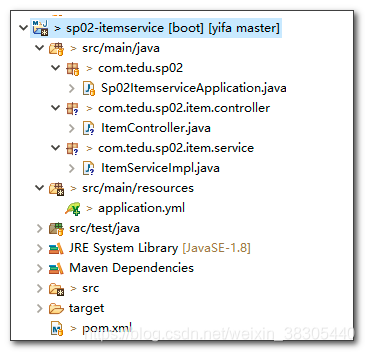
ItemServiceImpl
package cn.tedu.sp02.item.service;
import java.util.ArrayList;
import java.util.List;
import org.springframework.stereotype.Service;
import cn.tedu.sp01.pojo.Item;
import cn.tedu.sp01.service.ItemService;
import lombok.extern.slf4j.Slf4j;
@Slf4j
@Service
public class ItemServiceImpl implements ItemService {
    @Override
    public List<Item> getItems(String orderId) {
        ArrayList<Item> list = new ArrayList<Item>();
        list.add(new Item(1, "商品 1",1));
        list.add(new Item(2, "商品 2",2));
        list.add(new Item(3, "商品 3",3));
        list.add(new Item(4, "商品 4",4));
        list.add(new Item(5, "商品 5",5));
        return list;
    }
    @Override
    public void decreaseNumbers(List<Item> list) {
        for(Item item : list) {
            log.info("减少库存 - "+item);
        }
    }
}
ItemController
package cn.tedu.sp02.item.controller;
import java.util.List;
import org.springframework.beans.factory.annotation.Autowired;
import org.springframework.beans.factory.annotation.Value;
import org.springframework.web.bind.annotation.GetMapping;
import org.springframework.web.bind.annotation.PathVariable;
import org.springframework.web.bind.annotation.PostMapping;
import org.springframework.web.bind.annotation.RequestBody;
import org.springframework.web.bind.annotation.RestController;
import cn.tedu.sp01.pojo.Item;
import cn.tedu.sp01.service.ItemService;
import cn.tedu.web.util.JsonResult;
import lombok.extern.slf4j.Slf4j;
@Slf4j
@RestController
public class ItemController {
    @Autowired
    private ItemService itemService;

    @Value("${server.port}")
    private int port;

    @GetMapping("/{orderId}")
    public JsonResult<List<Item>> getItems(@PathVariable String orderId) {
        log.info("server.port="+port+", orderId="+orderId);

        List<Item> items = itemService.getItems(orderId);
        return JsonResult.ok(items).msg("port="+port);
    }

    @PostMapping("/decreaseNumber")
    public JsonResult decreaseNumber(@RequestBody List<Item> items) {
        itemService.decreaseNumbers(items);
        return JsonResult.ok();
    }
}
Spring MVC 接收参数的几个注解

访问测试
根据orderid,查询商品
http://localhost:8001/35
减少商品库存http://localhost:8001/decreaseNumber
使用postman,POST发送以下格式数据:[{"id":1, "name":"abc", "number":23},{"id":2, "name":"def", "number":11}]

四、user service 用户服务

- 只选择 web

pom.xml
要填加 sp01-commons 项目依赖
<?xml version="1.0" encoding="UTF-8"?>
<project xmlns="http://maven.apache.org/POM/4.0.0" xmlns:xsi="http://www.w3.org/2001/XMLSchema-instance"
  xsi:schemaLocation="http://maven.apache.org/POM/4.0.0 https://maven.apache.org/xsd/maven-4.0.0.xsd">
  <modelVersion>4.0.0</modelVersion>
  <parent>
      <groupId>org.springframework.boot</groupId>
      <artifactId>spring-boot-starter-parent</artifactId>
      <version>2.2.1.RELEASE</version>
      <relativePath/> <!-- lookup parent from repository -->
  </parent>
  <groupId>cn.tedu</groupId>
  <artifactId>sp03-userservice</artifactId>
  <version>0.0.1-SNAPSHOT</version>
  <name>sp03-userservice</name>
  <description>Demo project for Spring Boot</description>
  <properties>
      <java.version>1.8</java.version>
  </properties>
  <dependencies>
      <dependency>
          <groupId>org.springframework.boot</groupId>
          <artifactId>spring-boot-starter-web</artifactId>
      </dependency>
      <dependency>
          <groupId>org.springframework.boot</groupId>
          <artifactId>spring-boot-starter-test</artifactId>
          <scope>test</scope>
          <exclusions>
              <exclusion>
                  <groupId>org.junit.vintage</groupId>
                  <artifactId>junit-vintage-engine</artifactId>
              </exclusion>
          </exclusions>
      </dependency>
      <dependency>
          <groupId>cn.tedu</groupId>
          <artifactId>sp01-commons</artifactId>
          <version>0.0.1-SNAPSHOT</version>
      </dependency>
  </dependencies>
  <build>
      <plugins>
          <plugin>
              <groupId>org.springframework.boot</groupId>
              <artifactId>spring-boot-maven-plugin</artifactId>
          </plugin>
      </plugins>
  </build>
</project>
application.yml
其中
sp.user-service.users属性为自定义属性,提供用于测试的用户数据 ```yaml sp: user-service: users: “[{\”id\”:7, \”username\”:\”abc\”,\”password\”:\”123\”},{\”id\”:8, \”username\”:\”def\”,\”password\”:\”456\”},{\”id\”:9, \”username\”:\”ghi\”,\”password\”:\”789\”}]” spring: application: name: user-service
server: port: 8101
<a name="d1yEz"></a>
## 主程序

- 默认代码,不需要修改
```java
package cn.tedu.sp03;
import org.springframework.boot.SpringApplication;
import org.springframework.boot.autoconfigure.SpringBootApplication;
@SpringBootApplication
public class Sp03UserserviceApplication {
    public static void main(String[] args) {
        SpringApplication.run(Sp03UserserviceApplication.class, args);
    }
}
java源文件

UserServiceImpl
package cn.tedu.sp03.user.service;
import java.util.List;
import org.springframework.beans.factory.annotation.Value;
import org.springframework.stereotype.Service;
import com.fasterxml.jackson.core.type.TypeReference;
import cn.tedu.sp01.pojo.User;
import cn.tedu.sp01.service.UserService;
import cn.tedu.web.util.JsonUtil;
import lombok.extern.slf4j.Slf4j;
@Slf4j
@Service
public class UserServiceImpl implements UserService {
    @Value("${sp.user-service.users}")
    private String userJson;

    @Override
    public User getUser(Integer id) {
        log.info("users json string : "+userJson);
        List<User> list = JsonUtil.from(userJson, new TypeReference<List<User>>() {});
        for (User u : list) {
            if (u.getId().equals(id)) {
                return u;
            }
        }

        return new User(id, "name-"+id, "pwd-"+id);
    }
    @Override
    public void addScore(Integer id, Integer score) {
        // 这里增加积分
        log.info("user "+id+" - 增加积分 "+score);
    }
}
UserController
package cn.tedu.sp03.user.controller;
import org.springframework.beans.factory.annotation.Autowired;
import org.springframework.web.bind.annotation.GetMapping;
import org.springframework.web.bind.annotation.PathVariable;
import org.springframework.web.bind.annotation.RestController;
import cn.tedu.sp01.pojo.User;
import cn.tedu.sp01.service.UserService;
import cn.tedu.web.util.JsonResult;
import lombok.extern.slf4j.Slf4j;
@Slf4j
@RestController
public class UserController {

    @Autowired
    private UserService userService;

    @GetMapping("/{userId}")
    public JsonResult<User> getUser(@PathVariable Integer userId) {
        log.info("get user, userId="+userId);
        User u = userService.getUser(userId);
        return JsonResult.ok(u);
    }

    @GetMapping("/{userId}/score")
    public JsonResult addScore(
            @PathVariable Integer userId, Integer score) {
        userService.addScore(userId, score);
        return JsonResult.ok();
    }
}
访问测试
根据userid查询用户信息
http://localhost:8101/7
根据userid,为用户增加积分
http://localhost:8101/7/score?score=100

五、order service 订单服务

- 只选择 web

pom.xml
- 要填加 sp01-commons 项目依赖
<?xml version="1.0" encoding="UTF-8"?>
<project xmlns="http://maven.apache.org/POM/4.0.0" xmlns:xsi="http://www.w3.org/2001/XMLSchema-instance"
  xsi:schemaLocation="http://maven.apache.org/POM/4.0.0 https://maven.apache.org/xsd/maven-4.0.0.xsd">
  <modelVersion>4.0.0</modelVersion>
  <parent>
      <groupId>org.springframework.boot</groupId>
      <artifactId>spring-boot-starter-parent</artifactId>
      <version>2.2.1.RELEASE</version>
      <relativePath/> <!-- lookup parent from repository -->
  </parent>
  <groupId>cn.tedu</groupId>
  <artifactId>sp04-orderservice</artifactId>
  <version>0.0.1-SNAPSHOT</version>
  <name>sp04-orderservice</name>
  <description>Demo project for Spring Boot</description>
  <properties>
      <java.version>1.8</java.version>
  </properties>
  <dependencies>
      <dependency>
          <groupId>org.springframework.boot</groupId>
          <artifactId>spring-boot-starter-web</artifactId>
      </dependency>
      <dependency>
          <groupId>org.springframework.boot</groupId>
          <artifactId>spring-boot-starter-test</artifactId>
          <scope>test</scope>
          <exclusions>
              <exclusion>
                  <groupId>org.junit.vintage</groupId>
                  <artifactId>junit-vintage-engine</artifactId>
              </exclusion>
          </exclusions>
      </dependency>
      <dependency>
          <groupId>cn.tedu</groupId>
          <artifactId>sp01-commons</artifactId>
          <version>0.0.1-SNAPSHOT</version>
      </dependency>
  </dependencies>
  <build>
      <plugins>
          <plugin>
              <groupId>org.springframework.boot</groupId>
              <artifactId>spring-boot-maven-plugin</artifactId>
          </plugin>
      </plugins>
  </build>
</project>
application.yml
```yaml spring: application: name: order-service
server: port: 8201
<a name="Pukig"></a>
## 主程序

- 默认代码,不需要修改
```java
package cn.tedu.sp04;
import org.springframework.boot.SpringApplication;
import org.springframework.boot.autoconfigure.SpringBootApplication;
@SpringBootApplication
public class Sp04OrderserviceApplication {
    public static void main(String[] args) {
        SpringApplication.run(Sp04OrderserviceApplication.class, args);
    }
}
java 源文件

OrderServiceImpl
package cn.tedu.sp04.order.service;
import org.springframework.stereotype.Service;
import cn.tedu.sp01.pojo.Order;
import cn.tedu.sp01.service.OrderService;
import lombok.extern.slf4j.Slf4j;
@Slf4j
@Service
public class OrderServiceImpl implements OrderService {
    @Override
    public Order getOrder(String orderId) {
        //TODO: 调用user-service获取用户信息
        //TODO: 调用item-service获取商品信息
        Order order = new Order();
        order.setId(orderId);
        return order;
    }
    @Override
    public void addOrder(Order order) {
        //TODO: 调用item-service减少商品库存
        //TODO: 调用user-service增加用户积分
        log.info("保存订单:"+order);
    }
}
OrderController
package cn.tedu.sp04.order.controller;
import java.util.Arrays;
import org.springframework.beans.factory.annotation.Autowired;
import org.springframework.web.bind.annotation.GetMapping;
import org.springframework.web.bind.annotation.PathVariable;
import org.springframework.web.bind.annotation.RestController;
import cn.tedu.sp01.pojo.Item;
import cn.tedu.sp01.pojo.Order;
import cn.tedu.sp01.pojo.User;
import cn.tedu.sp01.service.OrderService;
import cn.tedu.web.util.JsonResult;
import lombok.extern.slf4j.Slf4j;
@Slf4j
@RestController
public class OrderController {
    @Autowired
    private OrderService orderService;

    @GetMapping("/{orderId}")
    public JsonResult<Order> getOrder(@PathVariable String orderId) {
        log.info("get order, id="+orderId);

        Order order = orderService.getOrder(orderId);
        return JsonResult.ok(order);
    }

    @GetMapping("/")
    public JsonResult addOrder() {
        //模拟post提交的数据
        Order order = new Order();
        order.setId("123abc");
        order.setUser(new User(7,null,null));
        order.setItems(Arrays.asList(new Item[] {
                new Item(1,"aaa",2),
                new Item(2,"bbb",1),
                new Item(3,"ccc",3),
                new Item(4,"ddd",1),
                new Item(5,"eee",5),
        }));
        orderService.addOrder(order);
        return JsonResult.ok();
    }
}
访问测试
根据orderid,获取订单
http://localhost:8201/123abc
保存订单,观察控制台日志输出
http://localhost:8201/

六、service 访问测试汇总
- item-service
根据orderid,查询商品
http://localhost:8001/35
减少商品库存http://localhost:8001/decreaseNumber
使用postman,POST发送以下格式数据:[{"id":1, "name":"abc", "number":23},{"id":2, "name":"def", "number":11}]
- user-service
根据userid查询用户信息
http://localhost:8101/7
根据userid,为用户增加积分
http://localhost:8101/7/score?score=100
- order-service
根据orderid,获取订单
http://localhost:8201/123abc
保存订单,观察控制台日志输出
http://localhost:8201/

七、eureka 注册与发现

- 创建eureka项目
- 配置依赖 pom.xml
- 配置 application.yml
- 主程序启用 eureka 服务器
- 启动,访问测试
创建 eureka server 项目:sp05-eureka


pom.xml
<?xml version="1.0" encoding="UTF-8"?>
<project xmlns="http://maven.apache.org/POM/4.0.0" xmlns:xsi="http://www.w3.org/2001/XMLSchema-instance"
 xsi:schemaLocation="http://maven.apache.org/POM/4.0.0 https://maven.apache.org/xsd/maven-4.0.0.xsd">
 <modelVersion>4.0.0</modelVersion>
 <parent>
     <groupId>org.springframework.boot</groupId>
     <artifactId>spring-boot-starter-parent</artifactId>
     <version>2.2.1.RELEASE</version>
     <relativePath/> <!-- lookup parent from repository -->
 </parent>
 <groupId>cn.tedu</groupId>
 <artifactId>sp05-eureka</artifactId>
 <version>0.0.1-SNAPSHOT</version>
 <name>sp05-eureka</name>
 <description>Demo project for Spring Boot</description>
 <properties>
     <java.version>1.8</java.version>
     <spring-cloud.version>Hoxton.RELEASE</spring-cloud.version>
 </properties>
 <dependencies>
     <dependency>
         <groupId>org.springframework.cloud</groupId>
         <artifactId>spring-cloud-starter-netflix-eureka-server</artifactId>
     </dependency>
     <dependency>
         <groupId>org.springframework.boot</groupId>
         <artifactId>spring-boot-starter-test</artifactId>
         <scope>test</scope>
         <exclusions>
             <exclusion>
                 <groupId>org.junit.vintage</groupId>
                 <artifactId>junit-vintage-engine</artifactId>
             </exclusion>
         </exclusions>
     </dependency>
 </dependencies>
 <dependencyManagement>
     <dependencies>
         <dependency>
             <groupId>org.springframework.cloud</groupId>
             <artifactId>spring-cloud-dependencies</artifactId>
             <version>${spring-cloud.version}</version>
             <type>pom</type>
             <scope>import</scope>
         </dependency>
     </dependencies>
 </dependencyManagement>
 <build>
     <plugins>
         <plugin>
             <groupId>org.springframework.boot</groupId>
             <artifactId>spring-boot-maven-plugin</artifactId>
         </plugin>
     </plugins>
 </build>
</project>
application.yml
```yaml spring: application: name: eureka-server
server: port: 2001
eureka: server: enable-self-preservation: false instance: hostname: eureka1 client: register-with-eureka: false fetch-registry: false
- eureka 集群服务器之间,通过 `hostname` 来区分<br />
- `eureka.server.enable-self-preservation`

eureka 的自我保护状态:心跳失败的比例,在15分钟内是否超过85%,如果出现了超过的情况,Eureka Server会将当前的实例注册信息保护起来,同时提示一个警告,一旦进入保护模式,Eureka Server将会尝试保护其服务注册表中的信息,不再删除服务注册表中的数据。也就是不会注销任何微服务<br />
- `eureka.client.register-with-eureka=false`

不向自身注册<br />
- `eureka.client.fetch-registry=false`

不从自身拉取注册信息<br />
- `eureka.instance.lease-expiration-duration-in-seconds`

最后一次心跳后,间隔多久认定微服务不可用,默认90<br />
<a name="V7CDJ"></a>
## 主程序

- 添加 `@EnableEurekaServer`
```java
package cn.tedu.sp05;
import org.springframework.boot.SpringApplication;
import org.springframework.boot.autoconfigure.SpringBootApplication;
import org.springframework.cloud.netflix.eureka.server.EnableEurekaServer;
@EnableEurekaServer
@SpringBootApplication
public class Sp05EurekaApplication {
    public static void main(String[] args) {
        SpringApplication.run(Sp05EurekaApplication.class, args);
    }
}
修改 hosts 文件,添加 eureka 域名映射
C:\Windows\System32\drivers\etc\hosts
添加内容:
127.0.0.1       eureka1
127.0.0.1       eureka2
启动,并访问测试
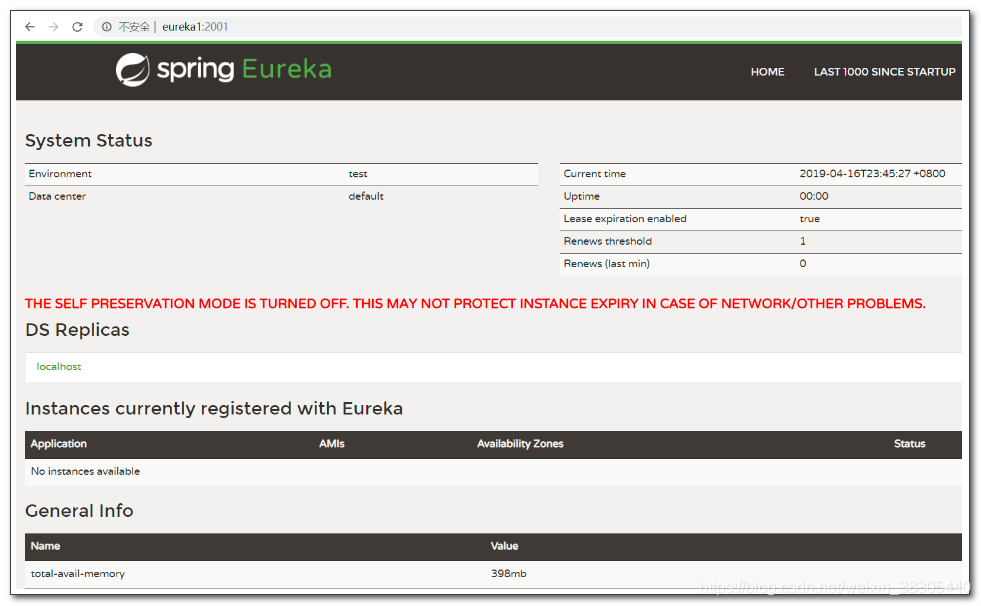

八、service provider 服务提供者

- 修改 item-service、user-service、order-service,把微服务注册到 eureka 服务器
- pom.xml 添加eureka依赖
- application.yml 添加eureka注册配置
- 主程序启用eureka客户端
- 启动服务,在eureka中查看注册信息
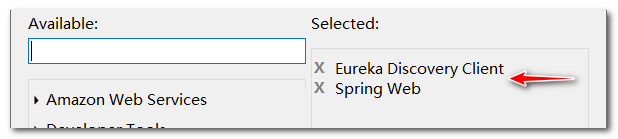
pom.xml 添加 eureka 客户端依赖
右键点击项目,或点击pom.xml,用 STS 工具编辑起步依赖

上面的操作会在pom.xml中添加以下依赖<dependency> <groupId>org.springframework.cloud</groupId> <artifactId>spring-cloud-starter-netflix-eureka-client</artifactId> </dependency>application.yml 添加 eureka注册配置
eureka: client: service-url: defaultZone: http://eureka1:2001/eureka
eureka.instance.lease-renewal-interval-in-seconds
心跳间隔时间,默认 30 秒- defaultZone,默认位置,可以修改为具体地理位置,比如:beiJing, shangHai, shenZhen 等,表示 eureka 服务器的部署位置, 需要云服务器提供
eureka.client.registry-fetch-interval-seconds
拉取注册信息间隔时间,默认 30 秒
主程序启用服务注册发现客户端
修改 item-service、user-service 和 order-service,
主程序添加@EnableDiscoveryClient注解启动,并访问 eureka 查看注册信息


九、eureka 和 “服务提供者”的高可用

item-service 高可用
启动参数 --server.port 可以覆盖yml中的端口配置
配置启动参数
item-service-8001
--server.port=8001


item-service-8002
--server.port=8002启动测试
访问 eureka 查看 item-service 注册信息


访问两个端口测试
http://localhost:8001/35
http://localhost:8002/35eureka 高可用
application-eureka1.yml
eureka: instance: hostname: eureka1 client: register-with-eureka: true #profile的配置会覆盖公用配置 fetch-registry: true #profile的配置会覆盖公用配置 service-url: defaultZone: http://eureka2:2002/eureka #eureka1启动时向eureka2注册application-eureka2.yml
eureka: instance: hostname: eureka2 client: register-with-eureka: true #profile的配置会覆盖公用配置 fetch-registry: true #profile的配置会覆盖公用配置 service-url: defaultZone: http://eureka1:2001/eureka #eureka2启动时向eureka1注册配置启动参数
--spring.profiles.active和--server.porteureka1 启动参数:
--spring.profiles.active=eureka1 --server.port=2001

eureka2 启动参数:
--spring.profiles.active=eureka2 --server.port=2002 • 1
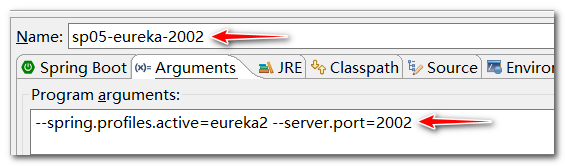

如果在命令行运行,可以在命令行中添加参数:
java -jar xxx.jar --spring.profiles.active=eureka1 --server.port=2001
访问 eureka 服务器,查看注册信息


eureka客户端注册时,向两个服务器注册
修改以下微服务
- sp02-itemservice
- sp03-userservice
- sp04-orderservice
eureka: client: service-url: defaultZone: http://eureka1:2001/eureka, http://eureka2:2002/eureka当一个 eureka 服务宕机时,仍可以连接另一个 eureka 服务 源码: https://github.com/benwang6/spring-cloud-repo

十、ribbon 服务消费者

ribbon 提供了负载均衡和重试功能, 它底层是使用 RestTemplate 进行 Rest api 调用
RestTemplate
RestTemplate 是SpringBoot提供的一个Rest远程调用工具
它的常用方法:
- getForObject() - 执行get请求
- postForObject() - 执行post请求
之前的系统结构是浏览器直接访问后台服务
后面我们通过一个Demo项目演示 Spring Cloud 远程调用
下面我们先不使用ribbon, 单独使用RestTemplate来执行远程调用

- eureka-client 中已经包含 ribbon 依赖
- 需要添加 sp01-commons 依赖
<?xml version="1.0" encoding="UTF-8"?> <project xmlns="http://maven.apache.org/POM/4.0.0" xmlns:xsi="http://www.w3.org/2001/XMLSchema-instance" xsi:schemaLocation="http://maven.apache.org/POM/4.0.0 https://maven.apache.org/xsd/maven-4.0.0.xsd"> <modelVersion>4.0.0</modelVersion> <parent> <groupId>org.springframework.boot</groupId> <artifactId>spring-boot-starter-parent</artifactId> <version>2.2.1.RELEASE</version> <relativePath/> <!-- lookup parent from repository --> </parent> <groupId>cn.tedu</groupId> <artifactId>sp06-ribbon</artifactId> <version>0.0.1-SNAPSHOT</version> <name>sp06-ribbon</name> <description>Demo project for Spring Boot</description> <properties> <java.version>1.8</java.version> <spring-cloud.version>Hoxton.RELEASE</spring-cloud.version> </properties> <dependencies> <dependency> <groupId>org.springframework.boot</groupId> <artifactId>spring-boot-starter-web</artifactId> </dependency> <dependency> <groupId>org.springframework.cloud</groupId> <artifactId>spring-cloud-starter-netflix-eureka-client</artifactId> </dependency> <dependency> <groupId>org.springframework.boot</groupId> <artifactId>spring-boot-starter-test</artifactId> <scope>test</scope> <exclusions> <exclusion> <groupId>org.junit.vintage</groupId> <artifactId>junit-vintage-engine</artifactId> </exclusion> </exclusions> </dependency> <dependency> <groupId>cn.tedu</groupId> <artifactId>sp01-commons</artifactId> <version>0.0.1-SNAPSHOT</version> </dependency> </dependencies> <dependencyManagement> <dependencies> <dependency> <groupId>org.springframework.cloud</groupId> <artifactId>spring-cloud-dependencies</artifactId> <version>${spring-cloud.version}</version> <type>pom</type> <scope>import</scope> </dependency> </dependencies> </dependencyManagement> <build> <plugins> <plugin> <groupId>org.springframework.boot</groupId> <artifactId>spring-boot-maven-plugin</artifactId> </plugin> </plugins> </build> </project>application.yml
```yaml spring: application: name: ribbon
server: port: 3001
eureka: client: service-url: defaultZone: http://eureka1:2001/eureka, http://eureka2:2002/eureka
<a name="iom8L"></a>
## 主程序
- 创建 `RestTemplate` 实例
`RestTemplate` 是用来调用其他微服务的工具类,封装了远程调用代码,提供了一组用于远程调用的模板方法,例如:`getForObject()`、`postForObject()` 等
```java
package cn.tedu.sp06;
import org.springframework.boot.SpringApplication;
import org.springframework.boot.autoconfigure.SpringBootApplication;
import org.springframework.cloud.client.discovery.EnableDiscoveryClient;
import org.springframework.context.annotation.Bean;
import org.springframework.web.client.RestTemplate;
@EnableDiscoveryClient
@SpringBootApplication
public class Sp06RibbonApplication {
//创建 RestTemplate 实例,并存入 spring 容器
@Bean
public RestTemplate getRestTemplate() {
return new RestTemplate();
}
public static void main(String[] args) {
SpringApplication.run(Sp06RibbonApplication.class, args);
}
}
RibbonController
package cn.tedu.sp06.controller;
import java.util.List;
import org.springframework.beans.factory.annotation.Autowired;
import org.springframework.web.bind.annotation.GetMapping;
import org.springframework.web.bind.annotation.PathVariable;
import org.springframework.web.bind.annotation.PostMapping;
import org.springframework.web.bind.annotation.RequestBody;
import org.springframework.web.bind.annotation.RestController;
import org.springframework.web.client.RestTemplate;
import cn.tedu.sp01.pojo.Item;
import cn.tedu.sp01.pojo.Order;
import cn.tedu.sp01.pojo.User;
import cn.tedu.web.util.JsonResult;
@RestController
public class RibbonController {
@Autowired
private RestTemplate rt;
@GetMapping("/item-service/{orderId}")
public JsonResult<List<Item>> getItems(@PathVariable String orderId) {
//向指定微服务地址发送 get 请求,并获得该服务的返回结果
//{1} 占位符,用 orderId 填充
return rt.getForObject("http://localhost:8001/{1}", JsonResult.class, orderId);
}
@PostMapping("/item-service/decreaseNumber")
public JsonResult decreaseNumber(@RequestBody List<Item> items) {
//发送 post 请求
return rt.postForObject("http://localhost:8001/decreaseNumber", items, JsonResult.class);
}
////////////////////////////////////
@GetMapping("/user-service/{userId}")
public JsonResult<User> getUser(@PathVariable Integer userId) {
return rt.getForObject("http://localhost:8101/{1}", JsonResult.class, userId);
}
@GetMapping("/user-service/{userId}/score")
public JsonResult addScore(
@PathVariable Integer userId, Integer score) {
return rt.getForObject("http://localhost:8101/{1}/score?score={2}", JsonResult.class, userId, score);
}
////////////////////////////////////
@GetMapping("/order-service/{orderId}")
public JsonResult<Order> getOrder(@PathVariable String orderId) {
return rt.getForObject("http://localhost:8201/{1}", JsonResult.class, orderId);
}
@GetMapping("/order-service")
public JsonResult addOrder() {
return rt.getForObject("http://localhost:8201/", JsonResult.class);
}
}
启动服务,并访问测试
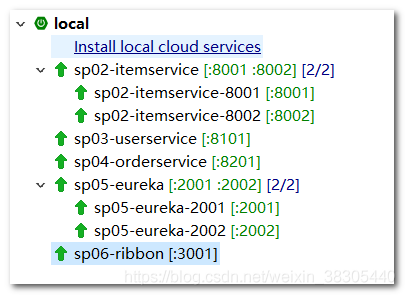
http://eureka1:2001
http://localhost:3001/item-service/35http://localhost:3001/item-service/decreaseNumber
使用postman,POST发送以下格式数据:[{"id":1, "name":"abc", "number":23},{"id":2, "name":"def", "number":11}]
http://localhost:3001/user-service/7
http://localhost:3001/user-service/7/score?score=100
http://localhost:3001/order-service/123abc
http://localhost:3001/order-service/

十一、ribbon 负载均衡和重试


Ribbon 负载均衡

- 修改 sp06-ribbon 项目
eureka 依赖中已经包含了 ribbon
<dependency> <groupId>org.springframework.cloud</groupId> <artifactId>spring-cloud-starter-netflix-ribbon</artifactId> </dependency>RestTemplate 设置
@LoadBalanced@LoadBalanced负载均衡注解,会对RestTemplate实例进行封装,创建动态代理对象,并切入(AOP)负载均衡代码,把请求分发到集群中的服务器package cn.tedu.sp06; import org.springframework.boot.SpringApplication; import org.springframework.boot.autoconfigure.SpringBootApplication; import org.springframework.cloud.client.discovery.EnableDiscoveryClient; import org.springframework.cloud.client.loadbalancer.LoadBalanced; import org.springframework.context.annotation.Bean; import org.springframework.web.client.RestTemplate; @EnableDiscoveryClient @SpringBootApplication public class Sp06RibbonApplication { @LoadBalanced //负载均衡注解 @Bean public RestTemplate getRestTemplate() { return new RestTemplate(); } public static void main(String[] args) { SpringApplication.run(Sp06RibbonApplication.class, args); } }访问路径设置为服务id
package cn.tedu.sp06.controller; import java.util.List; import org.springframework.beans.factory.annotation.Autowired; import org.springframework.web.bind.annotation.GetMapping; import org.springframework.web.bind.annotation.PathVariable; import org.springframework.web.bind.annotation.PostMapping; import org.springframework.web.bind.annotation.RequestBody; import org.springframework.web.bind.annotation.RestController; import org.springframework.web.client.RestTemplate; import cn.tedu.sp01.pojo.Item; import cn.tedu.sp01.pojo.Order; import cn.tedu.sp01.pojo.User; import cn.tedu.web.util.JsonResult; @RestController public class RibbonController { @Autowired private RestTemplate rt; @GetMapping("/item-service/{orderId}") public JsonResult<List<Item>> getItems(@PathVariable String orderId) { //这里服务器路径用 service-id 代替,ribbon 会向服务的多台集群服务器分发请求 return rt.getForObject("http://item-service/{1}", JsonResult.class, orderId); } @PostMapping("/item-service/decreaseNumber") public JsonResult decreaseNumber(@RequestBody List<Item> items) { return rt.postForObject("http://item-service/decreaseNumber", items, JsonResult.class); } / @GetMapping("/user-service/{userId}") public JsonResult<User> getUser(@PathVariable Integer userId) { return rt.getForObject("http://user-service/{1}", JsonResult.class, userId); } @GetMapping("/user-service/{userId}/score") public JsonResult addScore( @PathVariable Integer userId, Integer score) { return rt.getForObject("http://user-service/{1}/score?score={2}", JsonResult.class, userId, score); } / @GetMapping("/order-service/{orderId}") public JsonResult<Order> getOrder(@PathVariable String orderId) { return rt.getForObject("http://order-service/{1}", JsonResult.class, orderId); } @GetMapping("/order-service") public JsonResult addOrder() { return rt.getForObject("http://order-service/", JsonResult.class); } }访问测试
访问测试,ribbon 会把请求分发到 8001 和 8002 两个服务端口上
http://localhost:3001/item-service/34


ribbon 重试
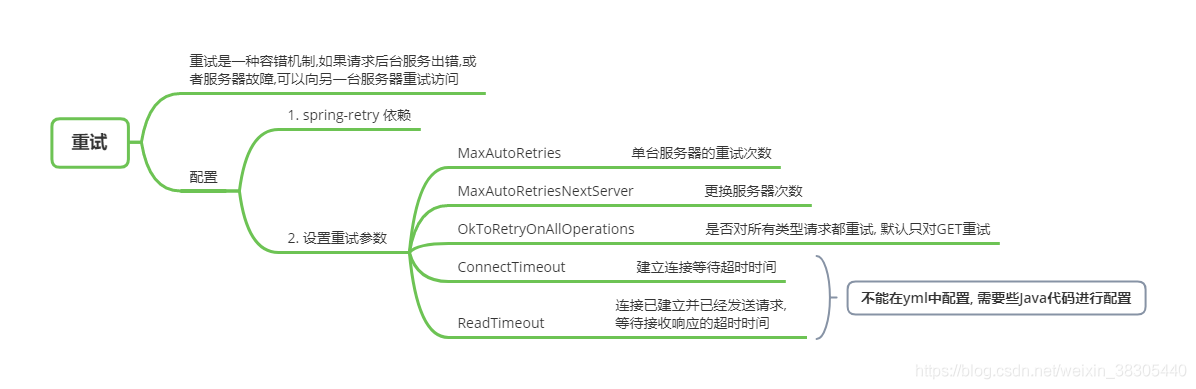
pom.xml 添加 spring-retry 依赖
复制代码到 pom.xml
<dependency>
<groupId>org.springframework.retry</groupId>
<artifactId>spring-retry</artifactId>
</dependency>
application.yml 配置 ribbon 重试
spring:
application:
name: ribbon
server:
port: 3001
eureka:
client:
service-url:
defaultZone: http://eureka1:2001/eureka, http://eureka2:2002/eureka
ribbon:
MaxAutoRetriesNextServer: 2
MaxAutoRetries: 1
OkToRetryOnAllOperations: true
ConnectionTimeoutReadTimeoutOkToRetryOnAllOperations=true
默认只对GET请求重试, 当设置为true时, 对POST等所有类型请求都重试MaxAutoRetriesNextServer
更换实例的次数MaxAutoRetries
当前实例重试次数,尝试失败会更换下一个实例主程序设置 RestTemplate 的请求工厂的超时属性
package cn.tedu.sp06; import org.springframework.boot.SpringApplication; import org.springframework.boot.autoconfigure.SpringBootApplication; import org.springframework.cloud.client.discovery.EnableDiscoveryClient; import org.springframework.cloud.client.loadbalancer.LoadBalanced; import org.springframework.context.annotation.Bean; import org.springframework.http.client.SimpleClientHttpRequestFactory; import org.springframework.web.client.RestTemplate; @EnableDiscoveryClient @SpringBootApplication public class Sp06RibbonApplication { @LoadBalanced @Bean public RestTemplate getRestTemplate() { SimpleClientHttpRequestFactory f = new SimpleClientHttpRequestFactory(); f.setConnectTimeout(1000); f.setReadTimeout(1000); return new RestTemplate(f); //RestTemplate 中默认的 Factory 实例中,两个超时属性默认是 -1, //未启用超时,也不会触发重试 //return new RestTemplate(); } public static void main(String[] args) { SpringApplication.run(Sp06RibbonApplication.class, args); } }item-service 的 ItemController 添加延迟代码,以便测试 ribbon 的重试机制
package cn.tedu.sp02.item.controller; import java.util.List; import java.util.Random; import org.springframework.beans.factory.annotation.Autowired; import org.springframework.beans.factory.annotation.Value; import org.springframework.web.bind.annotation.GetMapping; import org.springframework.web.bind.annotation.PathVariable; import org.springframework.web.bind.annotation.PostMapping; import org.springframework.web.bind.annotation.RequestBody; import org.springframework.web.bind.annotation.RestController; import cn.tedu.sp01.pojo.Item; import cn.tedu.sp01.service.ItemService; import cn.tedu.web.util.JsonResult; import lombok.extern.slf4j.Slf4j; @Slf4j @RestController public class ItemController { @Autowired private ItemService itemService; @Value("${server.port}") private int port; @GetMapping("/{orderId}") public JsonResult<List<Item>> getItems(@PathVariable String orderId) throws Exception { log.info("server.port="+port+", orderId="+orderId); ///--设置随机延迟 if(Math.random()<0.6) { long t = new Random().nextInt(5000); log.info("item-service-"+port+" - 暂停 "+t); Thread.sleep(t); } ///~~ List<Item> items = itemService.getItems(orderId); return JsonResult.ok(items).msg("port="+port); } @PostMapping("/decreaseNumber") public JsonResult decreaseNumber(@RequestBody List<Item> items) { itemService.decreaseNumbers(items); return JsonResult.ok(); } }访问,测试 ribbon 重试机制
通过 ribbon 访问 item-service,当超时,ribbon 会重试请求集群中其他服务器
http://localhost:3001/item-service/35


- ribbon的重试机制,在 feign 和 zuul 中进一步进行了封装,后续可以使用feign或zuul的重试机制

十二、Hystrix 断路器


微服务宕机时,ribbon 无法转发请求
- 关闭 user-service 和 order-service


复制 sp06-ribbon 项目,命名为sp07-hystrix
- 选择 sp06-ribbon 项目,ctrl-c,ctrl-v,复制为sp07-hystrix
- 关闭 sp06-ribbon 项目,后续测试使用 sp07-hystrix 项目

修改 pom.xml

添加 hystrix 起步依赖
<dependency>
<groupId>org.springframework.cloud</groupId>
<artifactId>spring-cloud-starter-netflix-hystrix</artifactId>
</dependency>
修改 application.yml

spring:
application:
name: hystrix
server:
port: 3001
eureka:
client:
service-url:
defaultZone: http://eureka1:2001/eureka, http://eureka2:2002/eureka
ribbon:
MaxAutoRetries: 1
MaxAutoRetriesNextServer: 2
OkToRetryOnAllOperations: true
主程序添加 @EnableCircuitBreaker 启用 hystrix 断路器
启动断路器,断路器提供两个核心功能:
- 降级,超时、出错、不可到达时,对服务降级,返回错误信息或者是缓存数据
- 熔断,当服务压力过大,错误比例过多时,熔断所有请求,所有请求直接降级
可以使用
@SpringCloudApplication注解代替三个注解package cn.tedu.sp06; import org.springframework.boot.SpringApplication; import org.springframework.cloud.client.SpringCloudApplication; import org.springframework.cloud.client.loadbalancer.LoadBalanced; import org.springframework.context.annotation.Bean; import org.springframework.http.client.SimpleClientHttpRequestFactory; import org.springframework.web.client.RestTemplate; //@EnableCircuitBreaker //@EnableDiscoveryClient //@SpringBootApplication @SpringCloudApplication public class Sp06RibbonApplication { @LoadBalanced @Bean public RestTemplate getRestTemplate() { SimpleClientHttpRequestFactory f = new SimpleClientHttpRequestFactory(); f.setConnectTimeout(1000); f.setReadTimeout(1000); return new RestTemplate(f); //RestTemplate 中默认的 Factory 实例中,两个超时属性默认是 -1, //未启用超时,也不会触发重试 //return new RestTemplate(); } public static void main(String[] args) { SpringApplication.run(Sp06RibbonApplication.class, args); } }RibbonController 中添加降级方法
为每个方法添加降级方法,例如
getItems()添加降级方法getItemsFB()添加
@HystrixCommand注解,指定降级方法名package cn.tedu.sp06.controller; import java.util.List; import org.springframework.beans.factory.annotation.Autowired; import org.springframework.web.bind.annotation.GetMapping; import org.springframework.web.bind.annotation.PathVariable; import org.springframework.web.bind.annotation.PostMapping; import org.springframework.web.bind.annotation.RequestBody; import org.springframework.web.bind.annotation.RestController; import org.springframework.web.client.RestTemplate; import com.netflix.hystrix.contrib.javanica.annotation.HystrixCommand; import cn.tedu.sp01.pojo.Item; import cn.tedu.sp01.pojo.Order; import cn.tedu.sp01.pojo.User; import cn.tedu.web.util.JsonResult; @RestController public class RibbonController { @Autowired private RestTemplate rt; @GetMapping("/item-service/{orderId}") @HystrixCommand(fallbackMethod = "getItemsFB") //指定降级方法的方法名 public JsonResult<List<Item>> getItems(@PathVariable String orderId) { return rt.getForObject("http://item-service/{1}", JsonResult.class, orderId); } @PostMapping("/item-service/decreaseNumber") @HystrixCommand(fallbackMethod = "decreaseNumberFB") public JsonResult decreaseNumber(@RequestBody List<Item> items) { return rt.postForObject("http://item-service/decreaseNumber", items, JsonResult.class); } / @GetMapping("/user-service/{userId}") @HystrixCommand(fallbackMethod = "getUserFB") public JsonResult<User> getUser(@PathVariable Integer userId) { return rt.getForObject("http://user-service/{1}", JsonResult.class, userId); } @GetMapping("/user-service/{userId}/score") @HystrixCommand(fallbackMethod = "addScoreFB") public JsonResult addScore(@PathVariable Integer userId, Integer score) { return rt.getForObject("http://user-service/{1}/score?score={2}", JsonResult.class, userId, score); } / @GetMapping("/order-service/{orderId}") @HystrixCommand(fallbackMethod = "getOrderFB") public JsonResult<Order> getOrder(@PathVariable String orderId) { return rt.getForObject("http://order-service/{1}", JsonResult.class, orderId); } @GetMapping("/order-service") @HystrixCommand(fallbackMethod = "addOrderFB") public JsonResult addOrder() { return rt.getForObject("http://order-service/", JsonResult.class); } / //降级方法的参数和返回值,需要和原始方法一致,方法名任意 public JsonResult<List<Item>> getItemsFB(String orderId) { return JsonResult.err("获取订单商品列表失败"); } public JsonResult decreaseNumberFB(List<Item> items) { return JsonResult.err("更新商品库存失败"); } public JsonResult<User> getUserFB(Integer userId) { return JsonResult.err("获取用户信息失败"); } public JsonResult addScoreFB(Integer userId, Integer score) { return JsonResult.err("增加用户积分失败"); } public JsonResult<Order> getOrderFB(String orderId) { return JsonResult.err("获取订单失败"); } public JsonResult addOrderFB() { return JsonResult.err("添加订单失败"); } }hystrix 超时设置
hystrix.command.default.execution.isolation.thread.timeoutInMilliseconds
hystrix等待超时后, 会执行降级代码, 快速向客户端返回降级结果, 默认超时时间是1000毫秒
为了测试 hystrix 降级,我们把 hystrix 等待超时设置得非常小(500毫秒)
此设置一般应大于 ribbon 的重试超时时长,例如 10 秒 ```yaml spring: application: name: hystrix
server: port: 3001
eureka: client: service-url: defaultZone: http://eureka1:2001/eureka, http://eureka2:2002/eureka
ribbon: MaxAutoRetriesNextServer: 2 MaxAutoRetries: 1 OkToRetryOnAllOperations: true
hystrix: command: default: execution: isolation: thread: timeoutInMilliseconds: 500
<a name="B9LNN"></a>
## 启动项目进行测试
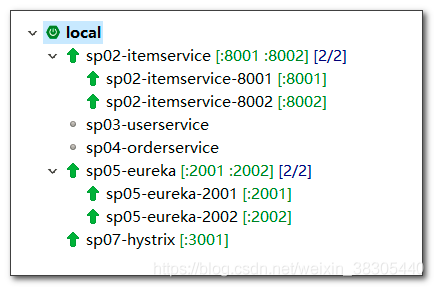
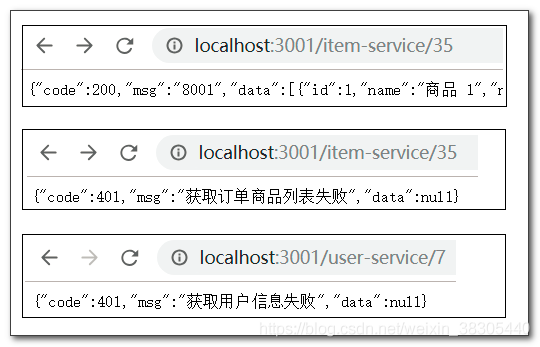
- 通过 hystrix 服务,访问可能超时失败的 item-service<br />[http://localhost:3001/item-service/35](http://localhost:3001/item-service/35)<br />
- 通过 hystrix 服务,访问未启动的 user-service<br />[http://localhost:3001/user-service/7](http://localhost:3001/user-service/7)<br />
- 可以看到,如果 item-service 请求超时,hystrix 会立即执行降级方法<br />
- 访问 user-service,由于该服务未启动,hystrix也会立即执行降级方法<br />
> 源码: [https://github.com/benwang6/spring-cloud-repo](https://github.com/benwang6/spring-cloud-repo)

<a name="gUifE"></a>
# 十三、hystrix dashboard 断路器仪表盘
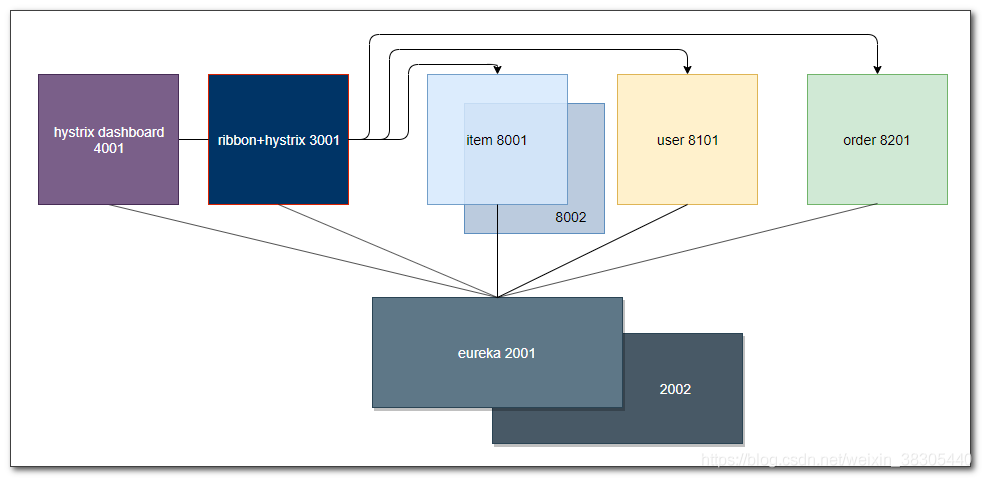<br />hystrix 对请求的降级和熔断,可以产生监控信息,hystrix dashboard可以实时的进行监控
<a name="saUlL"></a>
## sp07-hystrix 项目添加 actuator,并暴露 hystrix 监控端点
actuator 是 spring boot 提供的服务监控工具,提供了各种监控信息的监控端点<br />`management.endpoints.web.exposure.include` 配置选项,<br />可以指定端点名,来暴露监控端点<br />如果要暴露所有端点,可以用 “*”<br />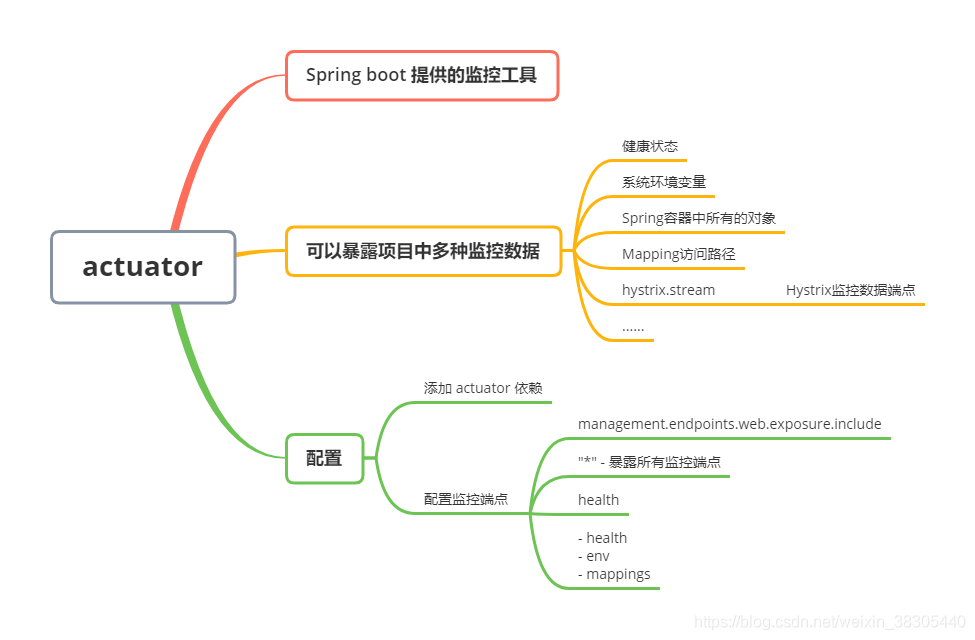
<a name="Yxc5c"></a>
### pom.xml 添加 actuator 依赖
右键点击项目或pom.xml, 编辑起步依赖, 添加 actuator 依赖<br />
```xml
<dependency>
<groupId>org.springframework.boot</groupId>
<artifactId>spring-boot-starter-actuator</artifactId>
</dependency>
调整 application.yml 配置,并暴露 hystrix.stream 监控端点
spring:
application:
name: hystrix
server:
port: 3001
eureka:
client:
service-url:
defaultZone: http://eureka1:2001/eureka, http://eureka2:2002/eureka
ribbon:
MaxAutoRetriesNextServer: 1
MaxAutoRetries: 1
OkToRetryOnAllOperations: true
hystrix:
command:
default:
execution:
isolation:
thread:
timeoutInMilliseconds: 500
management:
endpoints:
web:
exposure:
include: hystrix.stream
访问 actuator 路径,查看监控端点

Hystrix dashboard 仪表盘
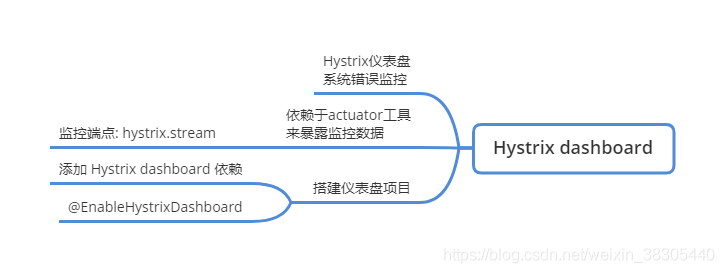


pom.xml
<?xml version="1.0" encoding="UTF-8"?>
<project xmlns="http://maven.apache.org/POM/4.0.0" xmlns:xsi="http://www.w3.org/2001/XMLSchema-instance"
xsi:schemaLocation="http://maven.apache.org/POM/4.0.0 https://maven.apache.org/xsd/maven-4.0.0.xsd">
<modelVersion>4.0.0</modelVersion>
<parent>
<groupId>org.springframework.boot</groupId>
<artifactId>spring-boot-starter-parent</artifactId>
<version>2.2.1.RELEASE</version>
<relativePath/> <!-- lookup parent from repository -->
</parent>
<groupId>cn.tedu</groupId>
<artifactId>sp08-hystrix-dashboard</artifactId>
<version>0.0.1-SNAPSHOT</version>
<name>sp08-hystrix-dashboard</name>
<description>Demo project for Spring Boot</description>
<properties>
<java.version>1.8</java.version>
<spring-cloud.version>Hoxton.RELEASE</spring-cloud.version>
</properties>
<dependencies>
<dependency>
 <groupId>org.springframework.cloud</groupId>
 <artifactId>spring-cloud-starter-netflix-eureka-client</artifactId>
</dependency>
<dependency>
<groupId>org.springframework.cloud</groupId>
<artifactId>spring-cloud-starter-netflix-hystrix-dashboard</artifactId>
</dependency>
<dependency>
<groupId>org.springframework.boot</groupId>
<artifactId>spring-boot-starter-test</artifactId>
<scope>test</scope>
<exclusions>
<exclusion>
<groupId>org.junit.vintage</groupId>
<artifactId>junit-vintage-engine</artifactId>
</exclusion>
</exclusions>
</dependency>
</dependencies>
<dependencyManagement>
<dependencies>
<dependency>
<groupId>org.springframework.cloud</groupId>
<artifactId>spring-cloud-dependencies</artifactId>
<version>${spring-cloud.version}</version>
<type>pom</type>
<scope>import</scope>
</dependency>
</dependencies>
</dependencyManagement>
<build>
<plugins>
<plugin>
<groupId>org.springframework.boot</groupId>
<artifactId>spring-boot-maven-plugin</artifactId>
</plugin>
</plugins>
</build>
</project>
application.yml
spring:
application:
name: hystrix-dashboard
server:
port: 4001
eureka:
client:
 service-url:
defaultZone: http://eureka1:2001/eureka, http://eureka2:2002/eureka
hystrix:
dashboard:
proxy-stream-allow-list: localhost
主程序添加 @EnableHystrixDashboard 和 @EnableDiscoveryClient
package cn.tedu.sp08;
import org.springframework.boot.SpringApplication;
import org.springframework.boot.autoconfigure.SpringBootApplication;
import org.springframework.cloud.client.discovery.EnableDiscoveryClient;
import org.springframework.cloud.netflix.hystrix.dashboard.EnableHystrixDashboard;
@EnableDiscoveryClient
@EnableHystrixDashboard
@SpringBootApplication
public class Sp08HystrixDashboardApplication {
public static void main(String[] args) {
SpringApplication.run(Sp08HystrixDashboardApplication.class, args);
}
}
启动,并访问测试

访问 hystrix dashboard

填入 hystrix 的监控端点,开启监控

- 通过 hystrix 访问服务多次,观察监控信息
http://localhost:3001/item-service/35
http://localhost:3001/user-service/7
http://localhost:3001/user-service/7/score?score=100
http://localhost:3001/order-service/123abc
http://localhost:3001/order-service/
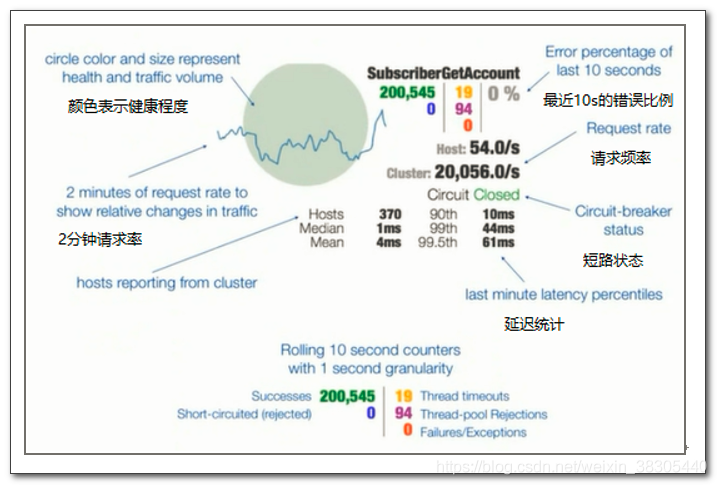
hystrix 熔断
整个链路达到一定的阈值,默认情况下,10秒内产生超过20次请求,则符合第一个条件。
满足第一个条件的情况下,如果请求的错误百分比大于阈值,则会打开断路器,默认为50%。
Hystrix的逻辑,先判断是否满足第一个条件,再判断第二个条件,如果两个条件都满足,则会开启断路器
断路器打开 5 秒后,会处于半开状态,会尝试转发请求,如果仍然失败,保持打开状态,如果成功,则关闭断路器
使用 apache 的并发访问测试工具 ab
http://httpd.apache.org/docs/current/platform/windows.html#down
用 ab 工具,以并发50次,来发送20000个请求
ab -n 20000 -c 50 http://localhost:3001/item-service/35断路器状态为 Open,所有请求会被短路,直接降级执行 fallback 方法

hystrix 配置
https://github.com/Netflix/Hystrix/wiki/Configuration
hystrix.command.default.execution.isolation.thread.timeoutInMilliseconds
请求超时时间,超时后触发失败降级hystrix.command.default.circuitBreaker.requestVolumeThreshold
10秒内请求数量,默认20,如果没有达到该数量,即使请求全部失败,也不会触发断路器打开hystrix.command.default.circuitBreaker.errorThresholdPercentage
失败请求百分比,达到该比例则触发断路器打开hystrix.command.default.circuitBreaker.sleepWindowInMilliseconds
断路器打开多长时间后,再次允许尝试访问(半开),仍失败则继续保持打开状态,如成功访问则关闭断路器,默认 5000

十四、feign 声明式客户端接口
微服务应用中,ribbon 和 hystrix 总是同时出现,feign 整合了两者,并提供了声明式消费者客户端
- 用 feign 代替 hystrix+ribbon
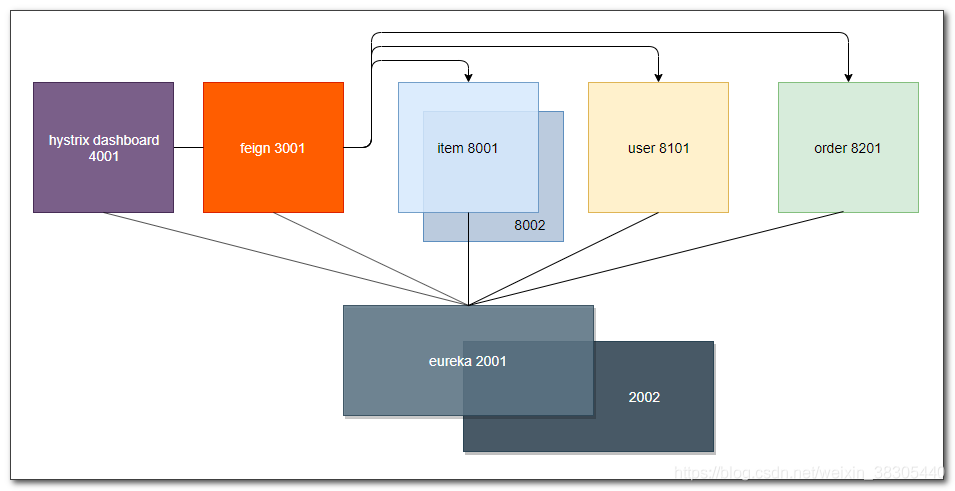
新建 sp09-feign 项目

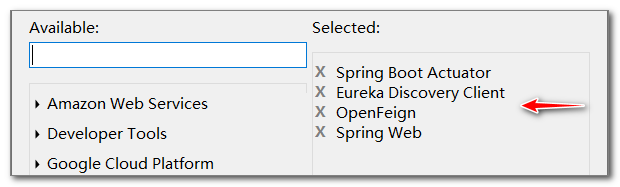
pom.xml
- 需要添加 sp01-commons 依赖
<?xml version="1.0" encoding="UTF-8"?> <project xmlns="http://maven.apache.org/POM/4.0.0" xmlns:xsi="http://www.w3.org/2001/XMLSchema-instance" xsi:schemaLocation="http://maven.apache.org/POM/4.0.0 https://maven.apache.org/xsd/maven-4.0.0.xsd"> <modelVersion>4.0.0</modelVersion> <parent> <groupId>org.springframework.boot</groupId> <artifactId>spring-boot-starter-parent</artifactId> <version>2.2.1.RELEASE</version> <relativePath/> <!-- lookup parent from repository --> </parent> <groupId>cn.tedu</groupId> <artifactId>sp09-feign</artifactId> <version>0.0.1-SNAPSHOT</version> <name>sp09-feign</name> <description>Demo project for Spring Boot</description> <properties> <java.version>1.8</java.version> <spring-cloud.version>Hoxton.RELEASE</spring-cloud.version> </properties> <dependencies> <dependency> <groupId>org.springframework.boot</groupId> <artifactId>spring-boot-starter-actuator</artifactId> </dependency> <dependency> <groupId>org.springframework.boot</groupId> <artifactId>spring-boot-starter-web</artifactId> </dependency> <dependency> <groupId>org.springframework.cloud</groupId> <artifactId>spring-cloud-starter-netflix-eureka-client</artifactId> </dependency> <dependency> <groupId>org.springframework.cloud</groupId> <artifactId>spring-cloud-starter-openfeign</artifactId> </dependency> <dependency> <groupId>org.springframework.boot</groupId> <artifactId>spring-boot-starter-test</artifactId> <scope>test</scope> <exclusions> <exclusion> <groupId>org.junit.vintage</groupId> <artifactId>junit-vintage-engine</artifactId> </exclusion> </exclusions> </dependency> </dependencies> <dependencyManagement> <dependencies> <dependency> <groupId>org.springframework.cloud</groupId> <artifactId>spring-cloud-dependencies</artifactId> <version>${spring-cloud.version}</version> <type>pom</type> <scope>import</scope> </dependency> </dependencies> </dependencyManagement> <build> <plugins> <plugin> <groupId>org.springframework.boot</groupId> <artifactId>spring-boot-maven-plugin</artifactId> </plugin> </plugins> </build> </project>application.yml
```yaml spring: application: name: feign
server: port: 3001
eureka:
client:
  service-url:
    defaultZone: http://eureka1:2001/eureka, http://eureka2:2002/eureka
<a name="HvWcx"></a>
## 主程序添加 `@EnableDiscoveryClient` 和 `@EnableFeignClients`
```java
package cn.tedu.sp09;
import org.springframework.boot.SpringApplication;
import org.springframework.boot.autoconfigure.SpringBootApplication;
import org.springframework.cloud.client.discovery.EnableDiscoveryClient;
import org.springframework.cloud.openfeign.EnableFeignClients;
@EnableFeignClients
@EnableDiscoveryClient
@SpringBootApplication
public class Sp09FeignApplication {
public static void main(String[] args) {
SpringApplication.run(Sp09FeignApplication.class, args);
}
}
java 源文件

feign 声明式客户端
feign 利用了我们熟悉的 spring mvc 注解来对接口方法进行设置,降低了我们的学习成本。 通过这些设置,feign可以拼接后台服务的访问路径和提交的参数 例如:
@GetMapping("/{userId}/score")
JsonResult addScore(@PathVariable Integer userId, @RequestParam Integer score);
当这样调用该方法:
service.addScore(7, 100);
那么 feign 会向服务器发送请求:
http://用户微服务/7/score?score=100
- 注意:如果 score 参数名与变量名不同,需要添加参数名设置:
@GetMapping("/{userId}/score")
JsonResult addScore(@PathVariable Integer userId, @RequestParam("score") Integer s);
ItemFeignService
package cn.tedu.sp09.service;
import java.util.List;
import org.springframework.cloud.openfeign.FeignClient;
import org.springframework.web.bind.annotation.GetMapping;
import org.springframework.web.bind.annotation.PathVariable;
import org.springframework.web.bind.annotation.PostMapping;
import org.springframework.web.bind.annotation.RequestBody;
import cn.tedu.sp01.pojo.Item;
import cn.tedu.web.util.JsonResult;
@FeignClient("item-service")
public interface ItemFeignService {
@GetMapping("/{orderId}")
JsonResult<List<Item>> getItems(@PathVariable String orderId);
@PostMapping("/decreaseNumber")
JsonResult decreaseNumber(@RequestBody List<Item> items);
}
UserFeignService
注意,如果请求参数名与方法参数名不同,
@RequestParam不能省略,并且要指定请求参数名:@RequestParam("score") Integer spackage cn.tedu.sp09.service; import org.springframework.cloud.openfeign.FeignClient; import org.springframework.web.bind.annotation.GetMapping; import org.springframework.web.bind.annotation.PathVariable; import org.springframework.web.bind.annotation.RequestParam; import cn.tedu.sp01.pojo.User; import cn.tedu.web.util.JsonResult; @FeignClient("user-service") public interface UserFeignService { @GetMapping("/{userId}") JsonResult<User> getUser(@PathVariable Integer userId); // 拼接路径 /{userId}/score?score=新增积分 @GetMapping("/{userId}/score") JsonResult addScore(@PathVariable Integer userId, @RequestParam Integer score); }OrderFeignService
package cn.tedu.sp09.service; import org.springframework.cloud.openfeign.FeignClient; import org.springframework.web.bind.annotation.GetMapping; import org.springframework.web.bind.annotation.PathVariable; import cn.tedu.sp01.pojo.Order; import cn.tedu.web.util.JsonResult; @FeignClient("order-service") public interface OrderFeignService { @GetMapping("/{orderId}") JsonResult<Order> getOrder(@PathVariable String orderId); @GetMapping("/") JsonResult addOrder(); }FeignController
package cn.tedu.sp09.controller; import java.util.List; import org.springframework.beans.factory.annotation.Autowired; import org.springframework.web.bind.annotation.GetMapping; import org.springframework.web.bind.annotation.PathVariable; import org.springframework.web.bind.annotation.PostMapping; import org.springframework.web.bind.annotation.RequestBody; import org.springframework.web.bind.annotation.RestController; import cn.tedu.sp01.pojo.Item; import cn.tedu.sp01.pojo.Order; import cn.tedu.sp01.pojo.User; import cn.tedu.sp09.service.ItemFeignService; import cn.tedu.sp09.service.OrderFeignService; import cn.tedu.sp09.service.UserFeignService; import cn.tedu.web.util.JsonResult; @RestController public class FeignController { @Autowired private ItemFeignService itemService; @Autowired private UserFeignService userService; @Autowired private OrderFeignService orderService; @GetMapping("/item-service/{orderId}") public JsonResult<List<Item>> getItems(@PathVariable String orderId) { return itemService.getItems(orderId); } @PostMapping("/item-service/decreaseNumber") public JsonResult decreaseNumber(@RequestBody List<Item> items) { return itemService.decreaseNumber(items); } /////////////////////// @GetMapping("/user-service/{userId}") public JsonResult<User> getUser(@PathVariable Integer userId) { return userService.getUser(userId); } @GetMapping("/user-service/{userId}/score") public JsonResult addScore(@PathVariable Integer userId, Integer score) { return userService.addScore(userId, score); } //////////////////////// @GetMapping("/order-service/{orderId}") public JsonResult<Order> getOrder(@PathVariable String orderId) { return orderService.getOrder(orderId); } @GetMapping("/order-service") public JsonResult addOrder() { return orderService.addOrder(); } }调用流程
启动服务,并访问测试

- http://localhost:3001/item-service/35
http://localhost:3001/item-service/decreaseNumber
使用postman,POST发送以下格式数据:[{"id":1, "name":"abc", "number":23},{"id":2, "name":"def", "number":11}]- http://localhost:3001/user-service/7
- http://localhost:3001/user-service/7/score?score=100
- http://localhost:3001/order-service/123abc
- http://localhost:3001/order-service/


十五、feign + ribbon 负载均衡和重试
- 无需额外配置,feign 默认已启用了 ribbon 负载均衡和重试机制。可以通过配置对参数进行调整
重试的默认配置参数:
ConnectTimeout=1000
ReadTimeout=1000
MaxAutoRetries=0
MaxAutoRetriesNextServer=1
application.yml 配置 ribbon 超时和重试
ribbon.xxx全局配置item-service.ribbon.xxx对特定服务实例的配置 ```yaml spring: application: name: feign
server: port: 3001
eureka: client: service-url: defaultZone: http://eureka1:2001/eureka, http://eureka2:2002/eureka
ribbon: ConnectTimeout: 1000 ReadTimeout: 1000
item-service: ribbon: MaxAutoRetries: 1 MaxAutoRetriesNextServer: 2 ConnectTimeout: 1000 ReadTimeout: 500
<a name="36236"></a>
## 启动服务,访问测试
[http://localhost:3001/item-service/35](http://localhost:3001/item-service/35)
> 源码: [https://github.com/benwang6/spring-cloud-repo](https://github.com/benwang6/spring-cloud-repo)

<a name="gFoND"></a>
# 十六、feign + hystrix 降级
<a name="mmLi3"></a>
## feign 启用 hystrix
feign 默认没有启用 hystrix,添加配置,启用 hystrix
- `feign.hystrix.enabled=true`
<a name="8RDF4"></a>
### application.yml 添加配置
```yaml
feign:
hystrix:
enabled: true
启用 hystrix 后,访问服务
http://localhost:3001/item-service/35
默认1秒会快速失败,没有降级方法时,会显示白板页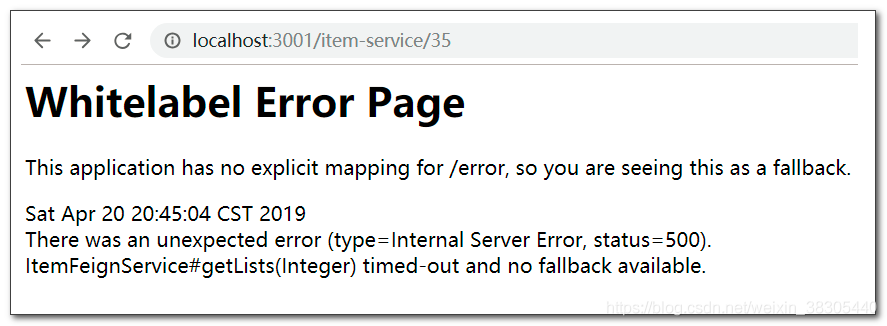
可以添加配置,暂时减小降级超时时间,以便后续对降级进行测试
feign:
hystrix:
enabled: true
hystrix:
command:
default:
execution:
isolation:
thread:
timeoutInMilliseconds: 500
feign + hystrix 降级
feign 远程接口中指定降级类
ItemFeignService
@FeignClient(name="item-service", fallback = ItemFeignServiceFB.class)
public interface ItemFeignService {
UserFeignService
@FeignClient(name="user-service", fallback = UserFeignServiceFB.class)
public interface UserFeignService {java
j
OrderFeignService
@FeignClient(name="order-service",fallback = OrderFeignServiceFB.class)
public interface OrderFeignService {
降级类
ItemFeignServiceFB
package cn.tedu.sp09.service;
import java.util.List;
import org.springframework.stereotype.Component;
import cn.tedu.sp01.pojo.Item;
import cn.tedu.web.util.JsonResult;
@Component
public class ItemFeignServiceFB implements ItemFeignService {
@Override
public JsonResult<List<Item>> getItems(String orderId) {
return JsonResult.err("无法获取订单商品列表");
}
@Override
public JsonResult decreaseNumber(List<Item> items) {
return JsonResult.err("无法修改商品库存");
}
}
UserFeignServiceFB
package cn.tedu.sp09.service;
import org.springframework.stereotype.Component;
import cn.tedu.sp01.pojo.User;
import cn.tedu.web.util.JsonResult;
@Component
public class UserFeignServiceFB implements UserFeignService {
@Override
public JsonResult<User> getUser(Integer userId) {
return JsonResult.err("无法获取用户信息");
}
@Override
public JsonResult addScore(Integer userId, Integer score) {
return JsonResult.err("无法增加用户积分");
}
}
OrderFeignServiceFB
package cn.tedu.sp09.service;
import org.springframework.stereotype.Component;
import cn.tedu.sp01.pojo.Order;
import cn.tedu.web.util.JsonResult;
@Component
public class OrderFeignServiceFB implements OrderFeignService {
@Override
public JsonResult<Order> getOrder(String orderId) {
return JsonResult.err("无法获取商品订单");
}
@Override
public JsonResult addOrder() {
return JsonResult.err("无法保存订单");
}
}
启动服务,访问测试
http://localhost:3001/item-service/35

十七、feign + hystrix 监控和熔断测试

修改sp09-feign项目
pom.xml 添加 hystrix 起步依赖
feign 没有包含完整的 hystrix 依赖
右键点击项目,编辑起步依赖,添加hystrix依赖
<dependency> <groupId>org.springframework.cloud</groupId> <artifactId>spring-cloud-starter-netflix-hystrix</artifactId> </dependency>主程序添加
@EnableCircuitBreakerpackage cn.tedu.sp09; import org.springframework.boot.SpringApplication; import org.springframework.boot.autoconfigure.SpringBootApplication; import org.springframework.cloud.client.circuitbreaker.EnableCircuitBreaker; import org.springframework.cloud.client.discovery.EnableDiscoveryClient; import org.springframework.cloud.openfeign.EnableFeignClients; @EnableCircuitBreaker @EnableFeignClients @EnableDiscoveryClient @SpringBootApplication public class Sp09FeignApplication { public static void main(String[] args) { SpringApplication.run(Sp09FeignApplication.class, args); } }sp09-feign 配置 actuator,暴露
hystrix.stream监控端点actuator 依赖
查看pom.xml, 确认已经添加了
actuator依赖<dependency> <groupId>org.springframework.boot</groupId> <artifactId>spring-boot-starter-actuator</artifactId> </dependency>application.yml 暴露
hystrix.stream端点management: endpoints: web: exposure: include: hystrix.stream启动服务,查看监控端点
http://localhost:3001/actuator

hystrix dashboard
启动 hystrix dashboard 服务,填入 feign 监控路径,开启监控
访问 http://localhost:4001/hystrix填入 feign 监控路径:
http://localhost:3001/actuator/hystrix.stream- 访问微服务,以产生监控数据
http://localhost:3001/item-service/35
http://localhost:3001/user-service/7
http://localhost:3001/user-service/7/score?score=100
http://localhost:3001/order-service/123abc
http://localhost:3001/order-service/
熔断测试
用 ab 工具,以并发50次,来发送20000个请求
ab -n 20000 -c 50 http://localhost:3001/item-service/35断路器状态为 Open,所有请求会被短路,直接降级执行 fallback 方法


十八、order service 调用商品库存服务和用户服务

sp09-feign项目关闭,不再使用
修改 sp04-orderservice 项目,添加 feign,调用 item service 和 user service
- pom.xml
- application.yml
- 主程序
- ItemFeignService
- UserFeignService
- ItemFeignServiceFB
- UserFeignServiceFB
- OrderServiceImpl
pom.xml

- 右键点击项目编辑起步依赖,添加以下依赖:
- actuator
- feign
hystrix
<?xml version="1.0" encoding="UTF-8"?> <project xmlns="http://maven.apache.org/POM/4.0.0" xmlns:xsi="http://www.w3.org/2001/XMLSchema-instance" xsi:schemaLocation="http://maven.apache.org/POM/4.0.0 https://maven.apache.org/xsd/maven-4.0.0.xsd"> <modelVersion>4.0.0</modelVersion> <parent> <groupId>org.springframework.boot</groupId> <artifactId>spring-boot-starter-parent</artifactId> <version>2.2.1.RELEASE</version> <relativePath/> <!-- lookup parent from repository --> </parent> <groupId>cn.tedu</groupId> <artifactId>sp04-orderservice</artifactId> <version>0.0.1-SNAPSHOT</version> <name>sp04-orderservice</name> <description>Demo project for Spring Boot</description> <properties> <java.version>1.8</java.version> </properties> <dependencies> <dependency> <groupId>org.springframework.boot</groupId> <artifactId>spring-boot-starter-web</artifactId> </dependency> <dependency> <groupId>org.springframework.boot</groupId> <artifactId>spring-boot-starter-test</artifactId> <scope>test</scope> <exclusions> <exclusion> <groupId>org.junit.vintage</groupId> <artifactId>junit-vintage-engine</artifactId> </exclusion> </exclusions> </dependency> <dependency> <groupId>cn.tedu</groupId> <artifactId>sp01-commons</artifactId> <version>0.0.1-SNAPSHOT</version> </dependency> <dependency> <groupId>org.springframework.cloud</groupId> <artifactId> spring-cloud-starter-netflix-eureka-client </artifactId> </dependency> <dependency> <groupId>org.springframework.boot</groupId> <artifactId>spring-boot-starter-actuator</artifactId> </dependency> <dependency> <groupId>org.springframework.cloud</groupId> <artifactId> spring-cloud-starter-netflix-hystrix </artifactId> </dependency> <dependency> <groupId>org.springframework.cloud</groupId> <artifactId>spring-cloud-starter-openfeign</artifactId> </dependency> </dependencies> <build> <plugins> <plugin> <groupId>org.springframework.boot</groupId> <artifactId>spring-boot-maven-plugin</artifactId> </plugin> </plugins> </build> <dependencyManagement> <dependencies> <dependency> <groupId>org.springframework.cloud</groupId> <artifactId>spring-cloud-dependencies</artifactId> <version>Hoxton.RELEASE</version> <type>pom</type> <scope>import</scope> </dependency> </dependencies> </dependencyManagement> </project>application.yml
ribbon 重试和 hystrix 超时这里没有设置,采用了默认值 ```yaml spring: application: name: order-service
server: port: 8201
eureka: client: service-url: defaultZone: http://eureka1:2001/eureka, http://eureka2:2002/eureka
feign: hystrix: enabled: true
management: endpoints: web: exposure: include: hystrix.stream
<a name="NUbjZ"></a>
## 主程序
```java
package cn.tedu.sp04;
import org.springframework.boot.SpringApplication;
import org.springframework.cloud.client.SpringCloudApplication;
import org.springframework.cloud.openfeign.EnableFeignClients;
//@EnableDiscoveryClient
//@SpringBootApplication
@EnableFeignClients
@SpringCloudApplication
public class Sp04OrderserviceApplication {
public static void main(String[] args) {
SpringApplication.run(Sp04OrderserviceApplication.class, args);
}
}
ItemFeignService
package cn.tedu.sp04.order.feignclient;
import java.util.List;
import org.springframework.cloud.openfeign.FeignClient;
import org.springframework.web.bind.annotation.GetMapping;
import org.springframework.web.bind.annotation.PathVariable;
import org.springframework.web.bind.annotation.PostMapping;
import org.springframework.web.bind.annotation.RequestBody;
import cn.tedu.sp01.pojo.Item;
import cn.tedu.web.util.JsonResult;
@FeignClient(name="item-service", fallback = ItemFeignServiceFB.class)
public interface ItemFeignService {
@GetMapping("/{orderId}")
JsonResult<List<Item>> getItems(@PathVariable String orderId);
@PostMapping("/decreaseNumber")
JsonResult decreaseNumber(@RequestBody List<Item> items);
}
UserFeignService
package cn.tedu.sp04.order.feignclient;
import org.springframework.cloud.openfeign.FeignClient;
import org.springframework.web.bind.annotation.GetMapping;
import org.springframework.web.bind.annotation.PathVariable;
import org.springframework.web.bind.annotation.RequestParam;
import cn.tedu.sp01.pojo.User;
import cn.tedu.web.util.JsonResult;
@FeignClient(name="user-service", fallback = UserFeignServiceFB.class)
public interface UserFeignService {
@GetMapping("/{userId}")
JsonResult<User> getUser(@PathVariable Integer userId);
@GetMapping("/{userId}/score")
JsonResult addScore(@PathVariable Integer userId, @RequestParam Integer score);
}
ItemFeignServiceFB
获取商品列表的降级方法,模拟使用缓存数据
package cn.tedu.sp04.order.feignclient; import java.util.Arrays; import java.util.List; import org.springframework.stereotype.Component; import cn.tedu.sp01.pojo.Item; import cn.tedu.web.util.JsonResult; @Component public class ItemFeignServiceFB implements ItemFeignService { @Override public JsonResult<List<Item>> getItems(String orderId) { if(Math.random()<0.5) { return JsonResult.ok().data( Arrays.asList(new Item[] { new Item(1,"缓存aaa",2), new Item(2,"缓存bbb",1), new Item(3,"缓存ccc",3), new Item(4,"缓存ddd",1), new Item(5,"缓存eee",5) }) ); } return JsonResult.err("无法获取订单商品列表"); } @Override public JsonResult decreaseNumber(List<Item> items) { return JsonResult.err("无法修改商品库存"); } }UserFeignServiceFB
获取用户信息的降级方法,模拟使用缓存数据
package cn.tedu.sp04.order.feignclient; import org.springframework.stereotype.Component; import cn.tedu.sp01.pojo.User; import cn.tedu.web.util.JsonResult; @Component public class UserFeignServiceFB implements UserFeignService { @Override public JsonResult<User> getUser(Integer userId) { if(Math.random()<0.4) { return JsonResult.ok(new User(userId, "缓存name"+userId, "缓存pwd"+userId)); } return JsonResult.err("无法获取用户信息"); } @Override public JsonResult addScore(Integer userId, Integer score) { return JsonResult.err("无法增加用户积分"); } }OrderServiceImpl
```java package cn.tedu.sp04.order.service; import java.util.List; import org.springframework.beans.factory.annotation.Autowired; import org.springframework.stereotype.Service; import cn.tedu.sp01.pojo.Item; import cn.tedu.sp01.pojo.Order; import cn.tedu.sp01.pojo.User; import cn.tedu.sp01.service.OrderService; import cn.tedu.sp04.order.feignclient.ItemFeignService; import cn.tedu.sp04.order.feignclient.UserFeignService; import cn.tedu.web.util.JsonResult; import lombok.extern.slf4j.Slf4j; @Slf4j @Service public class OrderServiceImpl implements OrderService {
@Autowired private ItemFeignService itemService; @Autowired private UserFeignService userService; @Override public Order getOrder(String orderId) {
//调用user-service获取用户信息 JsonResult<User> user = userService.getUser(7); //调用item-service获取商品信息 JsonResult<List<Item>> items = itemService.getItems(orderId);
Order order = new Order();
order.setId(orderId);
order.setUser(user.getData());
order.setItems(items.getData());
return order;
}
@Override
public void addOrder(Order order) {
//调用item-service减少商品库存
itemService.decreaseNumber(order.getItems());
//TODO: 调用user-service增加用户积分
userService.addScore(7, 100);
log.info("保存订单:"+order);
}
}
<a name="HGBs4"></a>
## order-service 配置启动参数,启动两台服务器
- `--server.port=8201`
- `--server.port=8202`<br />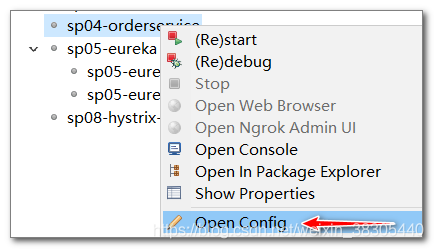<br />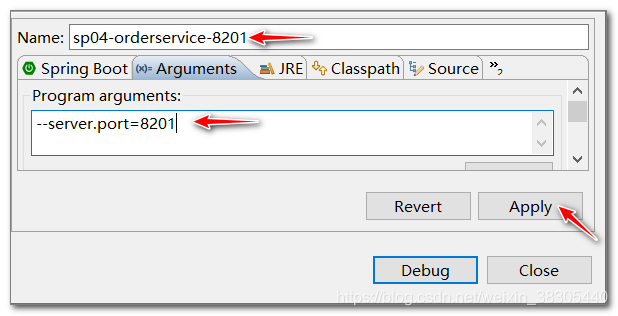<br />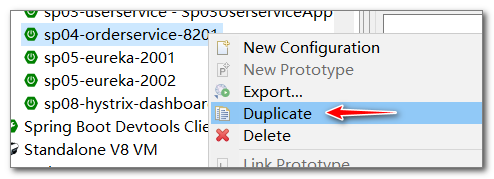<br />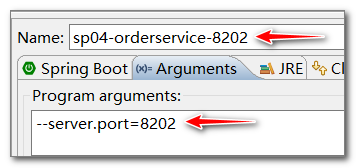<br />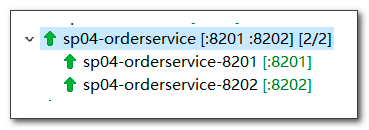
<a name="Na1Ro"></a>
## 启动服务,访问测试
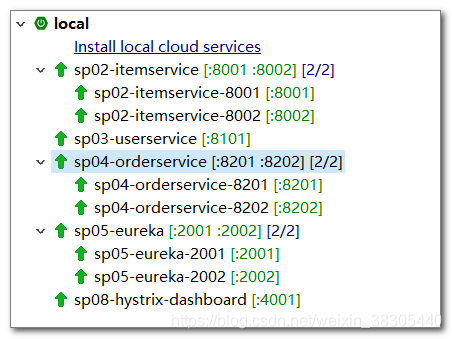
- 根据orderid,获取订单<br />[http://localhost:8201/123abc](http://localhost:8201/123abc)<br />[http://localhost:8202/123abc](http://localhost:8202/123abc)<br />
- 保存订单<br />[http://localhost:8201/](http://localhost:8201/)<br />[http://localhost:8202/](http://localhost:8202/)<br />
<a name="fdy5m"></a>
## hystrix dashboard 监控 order service 断路器
- 访问 [http://localhost:4001/hystrix](http://localhost:4001/hystrix) ,填入 order service 的断路器监控路径,启动监控
- [http://localhost:8201/actuator/hystrix.stream](http://localhost:8201/actuator/hystrix.stream)
- [http://localhost:8202/actuator/hystrix.stream](http://localhost:8202/actuator/hystrix.stream)
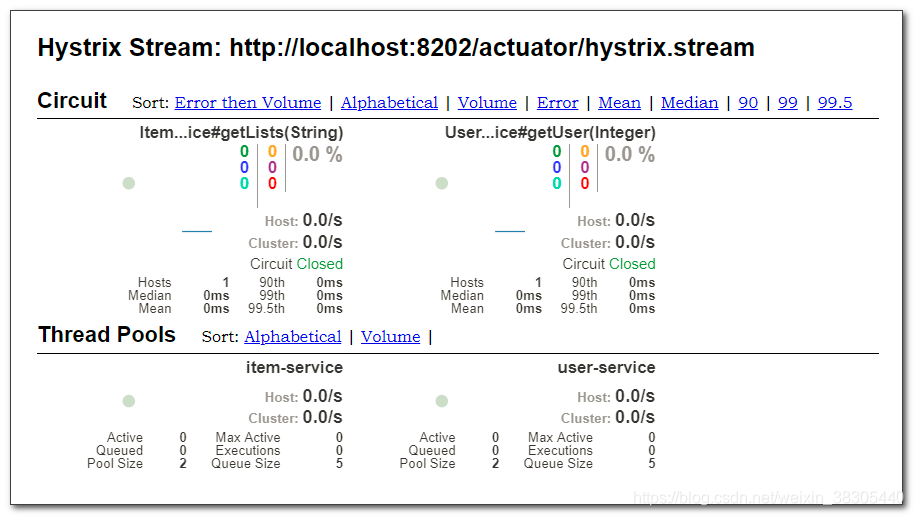
> 源码: [https://github.com/benwang6/spring-cloud-repo](https://github.com/benwang6/spring-cloud-repo)

<a name="t6c8W"></a>
# 十九、hystrix + turbine 集群聚合监控
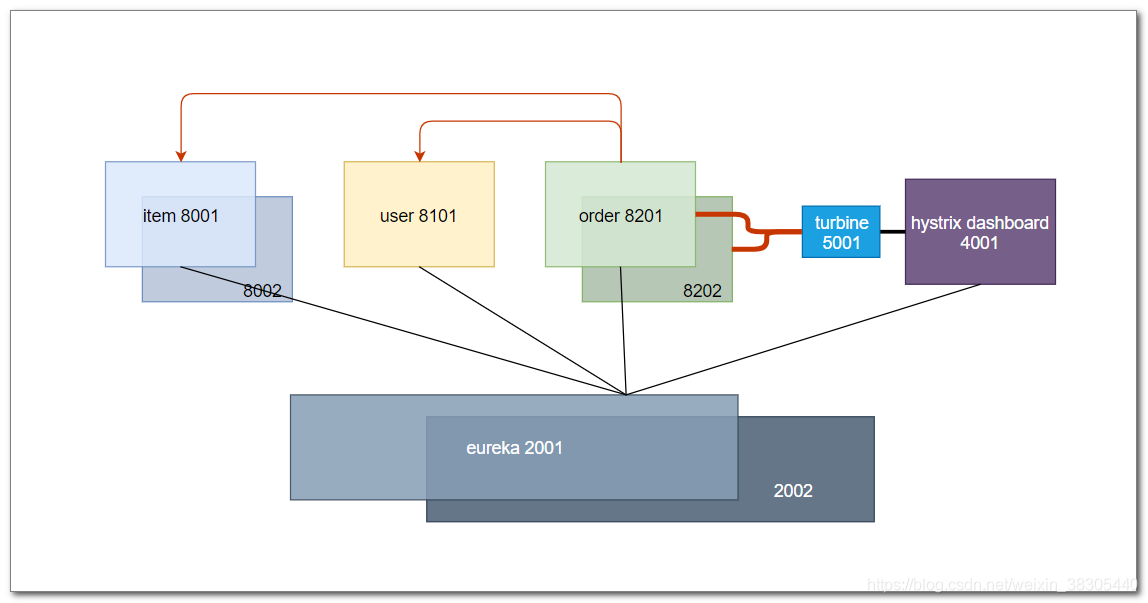<br />hystrix dashboard 一次只能监控一个服务实例,使用 turbine 可以汇集监控信息,将聚合后的信息提供给 hystrix dashboard 来集中展示和监控
<a name="F8Ts2"></a>
## 新建 sp10-turbine 项目
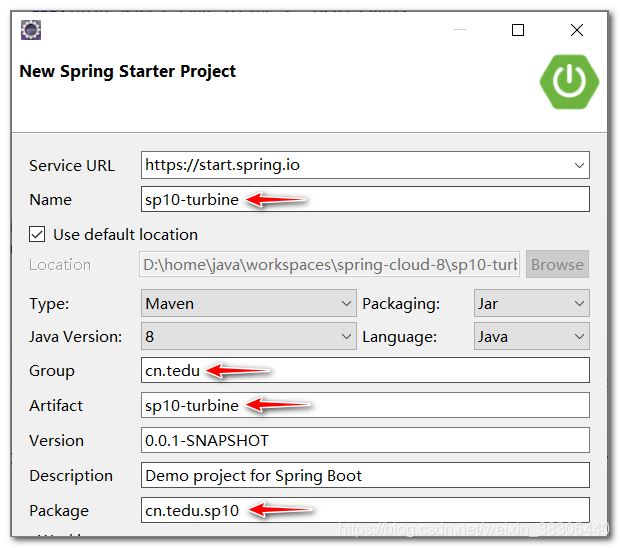<br />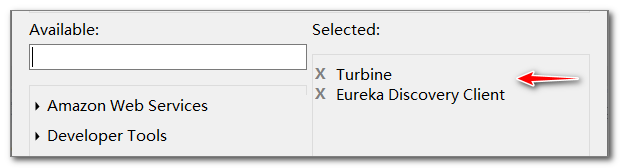
<a name="ruYLE"></a>
## pom.xml
```xml
<?xml version="1.0" encoding="UTF-8"?>
<project xmlns="http://maven.apache.org/POM/4.0.0" xmlns:xsi="http://www.w3.org/2001/XMLSchema-instance"
xsi:schemaLocation="http://maven.apache.org/POM/4.0.0 https://maven.apache.org/xsd/maven-4.0.0.xsd">
<modelVersion>4.0.0</modelVersion>
<parent>
<groupId>org.springframework.boot</groupId>
<artifactId>spring-boot-starter-parent</artifactId>
<version>2.2.1.RELEASE</version>
<relativePath/> <!-- lookup parent from repository -->
</parent>
<groupId>cn.tedu</groupId>
<artifactId>sp10-turbine</artifactId>
<version>0.0.1-SNAPSHOT</version>
<name>sp10-turbine</name>
<description>Demo project for Spring Boot</description>
<properties>
<java.version>1.8</java.version>
<spring-cloud.version>Hoxton.RELEASE</spring-cloud.version>
</properties>
<dependencies>
<dependency>
<groupId>org.springframework.cloud</groupId>
<artifactId>spring-cloud-starter-netflix-eureka-client</artifactId>
</dependency>
<dependency>
<groupId>org.springframework.cloud</groupId>
<artifactId>spring-cloud-starter-netflix-turbine</artifactId>
</dependency>
<dependency>
<groupId>org.springframework.boot</groupId>
<artifactId>spring-boot-starter-test</artifactId>
<scope>test</scope>
<exclusions>
<exclusion>
<groupId>org.junit.vintage</groupId>
<artifactId>junit-vintage-engine</artifactId>
</exclusion>
</exclusions>
</dependency>
</dependencies>
<dependencyManagement>
<dependencies>
<dependency>
<groupId>org.springframework.cloud</groupId>
<artifactId>spring-cloud-dependencies</artifactId>
<version>${spring-cloud.version}</version>
<type>pom</type>
<scope>import</scope>
</dependency>
</dependencies>
</dependencyManagement>
<build>
<plugins>
<plugin>
<groupId>org.springframework.boot</groupId>
<artifactId>spring-boot-maven-plugin</artifactId>
</plugin>
</plugins>
</build>
</project>
application.yml
spring:
application:
name: turbin
server:
port: 5001
eureka:
client:
service-url:
defaultZone: http://eureka1:2001/eureka, http://eureka2:2002/eureka
turbine:
app-config: order-service
cluster-name-expression: new String("default")
主程序
添加 @EnableTurbine 和 @EnableDiscoveryClient 注解
package cn.tedu.sp10;
import org.springframework.boot.SpringApplication;
import org.springframework.boot.autoconfigure.SpringBootApplication;
import org.springframework.cloud.client.discovery.EnableDiscoveryClient;
import org.springframework.cloud.netflix.turbine.EnableTurbine;
@EnableTurbine
@EnableDiscoveryClient
@SpringBootApplication
public class Sp10TurbineApplication {
public static void main(String[] args) {
SpringApplication.run(Sp10TurbineApplication.class, args);
}
}
访问测试
- 8201服务器产生监控数据:
http://localhost:8201/abc123
http://localhost:8201/ - 8202服务器产生监控数据:
http://localhost:8202/abc123
http://localhost:8202/ - turbine 监控路径
http://localhost:5001/turbine.stream - 在 hystrix dashboard 中填入turbine 监控路径,开启监控
http://localhost:4001/hystrix - turbine聚合了order-service两台服务器的hystrix监控信息


二十、zuul API网关

zuul API 网关,为微服务应用提供统一的对外访问接口。
zuul 还提供过滤器,对所有微服务提供统一的请求校验。
新建 sp11-zuul 项目


pom.xml
需要添加 sp01-commons 依赖
<?xml version="1.0" encoding="UTF-8"?> <project xmlns="http://maven.apache.org/POM/4.0.0" xmlns:xsi="http://www.w3.org/2001/XMLSchema-instance" xsi:schemaLocation="http://maven.apache.org/POM/4.0.0 https://maven.apache.org/xsd/maven-4.0.0.xsd"> <modelVersion>4.0.0</modelVersion> <parent> <groupId>org.springframework.boot</groupId> <artifactId>spring-boot-starter-parent</artifactId> <version>2.2.1.RELEASE</version> <relativePath/> <!-- lookup parent from repository --> </parent> <groupId>cn.tedu</groupId> <artifactId>sp11-zuul</artifactId> <version>0.0.1-SNAPSHOT</version> <name>sp11-zuul</name> <description>Demo project for Spring Boot</description> <properties> <java.version>1.8</java.version> <spring-cloud.version>Hoxton.RELEASE</spring-cloud.version> </properties> <dependencies> <dependency> <groupId>org.springframework.cloud</groupId> <artifactId>spring-cloud-starter-netflix-eureka-client</artifactId> </dependency> <dependency> <groupId>org.springframework.cloud</groupId> <artifactId>spring-cloud-starter-netflix-zuul</artifactId> </dependency> <dependency> <groupId>org.springframework.boot</groupId> <artifactId>spring-boot-starter-test</artifactId> <scope>test</scope> <exclusions> <exclusion> <groupId>org.junit.vintage</groupId> <artifactId>junit-vintage-engine</artifactId> </exclusion> </exclusions> </dependency> <dependency> <groupId>cn.tedu</groupId> <artifactId>sp01-commons</artifactId> <version>0.0.1-SNAPSHOT</version> </dependency> </dependencies> <dependencyManagement> <dependencies> <dependency> <groupId>org.springframework.cloud</groupId> <artifactId>spring-cloud-dependencies</artifactId> <version>${spring-cloud.version}</version> <type>pom</type> <scope>import</scope> </dependency> </dependencies> </dependencyManagement> <build> <plugins> <plugin> <groupId>org.springframework.boot</groupId> <artifactId>spring-boot-maven-plugin</artifactId> </plugin> </plugins> </build> </project>application.yml
zuul 路由配置可以省略,缺省以服务 id 作为访问路径 ```yaml spring: application: name: zuul
server: port: 3001
eureka: client: service-url: defaultZone: http://eureka1:2001/eureka, http://eureka2:2002/eureka zuul: routes: item-service: /item-service/ user-service: /user-service/ order-service: /order-service/**
<a name="K5JPp"></a>
## 主程序
添加 `@EnableZuulProxy` 和 `@EnableDiscoveryClient` 注解
```java
package cn.tedu.sp11;
import org.springframework.boot.SpringApplication;
import org.springframework.boot.autoconfigure.SpringBootApplication;
import org.springframework.cloud.client.discovery.EnableDiscoveryClient;
import org.springframework.cloud.netflix.zuul.EnableZuulProxy;
@EnableZuulProxy
@EnableDiscoveryClient
@SpringBootApplication
public class Sp11ZuulApplication {
public static void main(String[] args) {
SpringApplication.run(Sp11ZuulApplication.class, args);
}
}
启动服务,访问测试

- http://eureka1:2001
- http://localhost:3001/item-service/35
http://localhost:3001/item-service/decreaseNumber
使用postman,POST发送以下格式数据:[{"id":1, "name":"abc", "number":23},{"id":2, "name":"def", "number":11}]- http://localhost:3001/user-service/7
- http://localhost:3001/user-service/7/score?score=100
- http://localhost:3001/order-service/123abc
http://localhost:3001/order-service/
zuul + ribbon 负载均衡
zuul + ribbon 重试
pom.xml 添加 spring-retry 依赖
需要 spring-retry 依赖
<dependency> <groupId>org.springframework.retry</groupId> <artifactId>spring-retry</artifactId> </dependency>配置 zuul 开启重试,并配置 ribbon 重试参数
需要开启重试,默认不开启 ```yaml spring: application: name: zuul
server: port: 3001
eureka: client: service-url: defaultZone: http://eureka1:2001/eureka, http://eureka2:2002/eureka zuul: retryable: true
routes:
item-service: /item-service/**
user-service: /user-service/**
order-service: /order-service/**
ribbon: ConnectTimeout: 1000 ReadTimeout: 1000 MaxAutoRetriesNextServer: 1 MaxAutoRetries: 1
<a name="SRTfv"></a>
## zuul + hystrix 降级
<a name="phQnQ"></a>
### 创建降级类
- getRoute() 方法中指定应用此降级类的服务id,星号或null值可以通配所有服务
<a name="zcpxb"></a>
### ItemServiceFallback
```java
package cn.tedu.sp11.fallback;
import java.io.ByteArrayInputStream;
import java.io.IOException;
import java.io.InputStream;
import org.springframework.cloud.netflix.zuul.filters.route.FallbackProvider;
import org.springframework.http.HttpHeaders;
import org.springframework.http.HttpStatus;
import org.springframework.http.MediaType;
import org.springframework.http.client.ClientHttpResponse;
import org.springframework.stereotype.Component;
import cn.tedu.web.util.JsonResult;
import lombok.extern.slf4j.Slf4j;
@Slf4j
@Component
public class ItemServiceFallback implements FallbackProvider {
@Override
public String getRoute() {
//当执行item-service失败,
//应用当前这个降级类
return "item-service";
//星号和null都表示所有微服务失败都应用当前降级类
//"*"; //null;
}
//该方法返回封装降级响应的对象
//ClientHttpResponse中封装降级响应
@Override
public ClientHttpResponse fallbackResponse(String route, Throwable cause) {
return response();
}
private ClientHttpResponse response() {
return new ClientHttpResponse() {
//下面三个方法都是协议号
@Override
public HttpStatus getStatusCode() throws IOException {
return HttpStatus.OK;
}
@Override
public int getRawStatusCode() throws IOException {
return HttpStatus.OK.value();
}
@Override
public String getStatusText() throws IOException {
return HttpStatus.OK.getReasonPhrase();
}
@Override
public void close() {
}
@Override
public InputStream getBody() throws IOException {
log.info("fallback body");
String s = JsonResult.err().msg("后台服务错误").toString();
return new ByteArrayInputStream(s.getBytes("UTF-8"));
}
@Override
public HttpHeaders getHeaders() {
HttpHeaders headers = new HttpHeaders();
headers.setContentType(MediaType.APPLICATION_JSON);
return headers;
}
};
}
}
OrderServiceFallback
package cn.tedu.sp11.fallback;
import java.io.ByteArrayInputStream;
import java.io.IOException;
import java.io.InputStream;
import org.springframework.cloud.netflix.zuul.filters.route.FallbackProvider;
import org.springframework.http.HttpHeaders;
import org.springframework.http.HttpStatus;
import org.springframework.http.MediaType;
import org.springframework.http.client.ClientHttpResponse;
import org.springframework.stereotype.Component;
import cn.tedu.web.util.JsonResult;
import lombok.extern.slf4j.Slf4j;
@Slf4j
@Component
public class OrderServiceFallback implements FallbackProvider {
@Override
public String getRoute() {
return "order-service"; //"*"; //null;
}
@Override
public ClientHttpResponse fallbackResponse(String route, Throwable cause) {
return response();
}
private ClientHttpResponse response() {
return new ClientHttpResponse() {
@Override
public HttpStatus getStatusCode() throws IOException {
return HttpStatus.OK;
}
@Override
public int getRawStatusCode() throws IOException {
return HttpStatus.OK.value();
}
@Override
public String getStatusText() throws IOException {
return HttpStatus.OK.getReasonPhrase();
}
@Override
public void close() {
}
@Override
public InputStream getBody() throws IOException {
log.info("fallback body");
String s = JsonResult.err().msg("后台服务错误").toString();
return new ByteArrayInputStream(s.getBytes("UTF-8"));
}
@Override
public HttpHeaders getHeaders() {
HttpHeaders headers = new HttpHeaders();
headers.setContentType(MediaType.APPLICATION_JSON);
return headers;
}
};
}
}
降低 hystrix 超时时间,以便测试降级
spring:
application:
name: zuul
server:
port: 3001
eureka:
client:
service-url:
defaultZone: http://eureka1:2001/eureka, http://eureka2:2002/eureka
zuul:
retryable: true
ribbon:
ConnectTimeout: 1000
ReadTimeout: 2000
MaxAutoRetriesNextServer: 1
MaxAutoRetries: 1
hystrix:
command:
default:
execution:
isolation:
thread:
timeoutInMilliseconds: 500
启动服务,测试降级
http://localhost:3001/item-service/35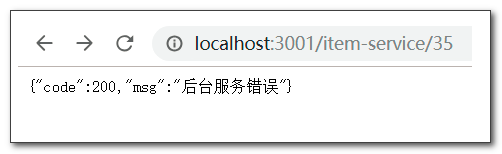
zuul + hystrix 数据监控
暴露 hystrix.stream 监控端点
zuul 已经包含 actuator 依赖
management: endpoints: web: exposure: include: hystrix.stream启动服务,查看暴露的监控端点
http://localhost:3001/actuator
http://localhost:3001/actuator/hystrix.stream开启监控
启动 sp08-hystrix-dashboard,填入 zuul 的监控端点路径,开启监控
http://localhost:4001/hystrix
填入监控端点:
http://localhost:3001/actuator/hystrix.stream
必须通过zuul网关访问后台服务才会长生监控数据http://localhost:3001/item-service/decreaseNumber
使用postman,POST发送以下格式数据:[{"id":1, "name":"abc", "number":23},{"id":2, "name":"def", "number":11}]- http://localhost:3001/user-service/7
- http://localhost:3001/user-service/7/score?score=100
- http://localhost:3001/order-service/123abc
- http://localhost:3001/order-service/
zuul + turbine 聚合监控
修改 turbine 项目,聚合 zuul 服务实例 ```yaml spring: application: name: turbin
server: port: 5001
eureka: client: service-url: defaultZone: http://eureka1:2001/eureka, http://eureka2:2002/eureka
turbine: app-config: order-service, zuul cluster-name-expression: new String(“default”)
- 使用hystrix仪表盘, 对 turbine 监控端点进行监控, 此端点聚合了订单服务和zull网关服务的监控数据<br />[http://localhost:5001/turbine.stream](http://localhost:5001/turbine.stream)
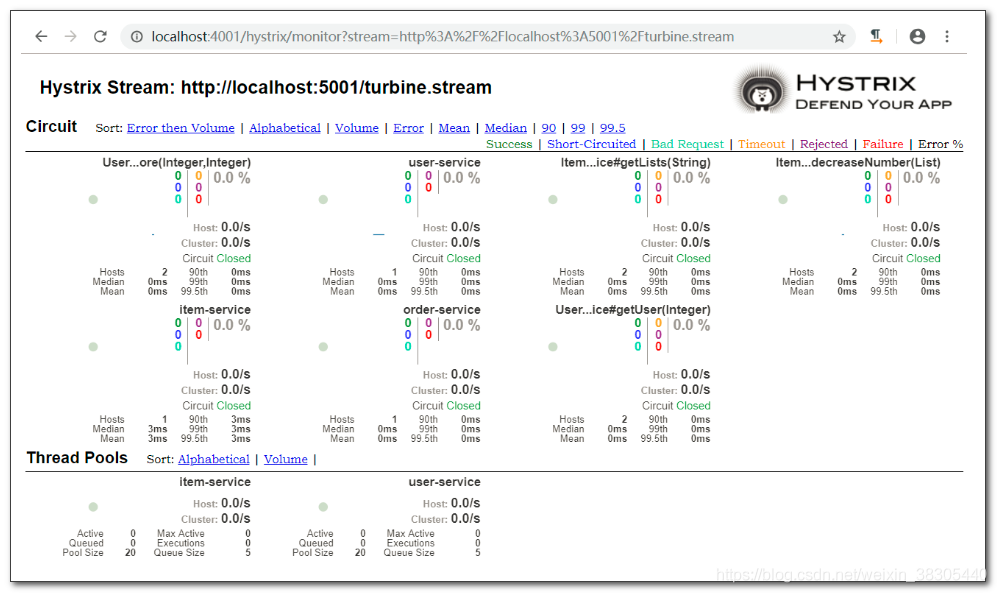
<a name="x0KxS"></a>
## 熔断测试
ab -n 20000 -c 50 http://localhost:3001/order-service/123abc
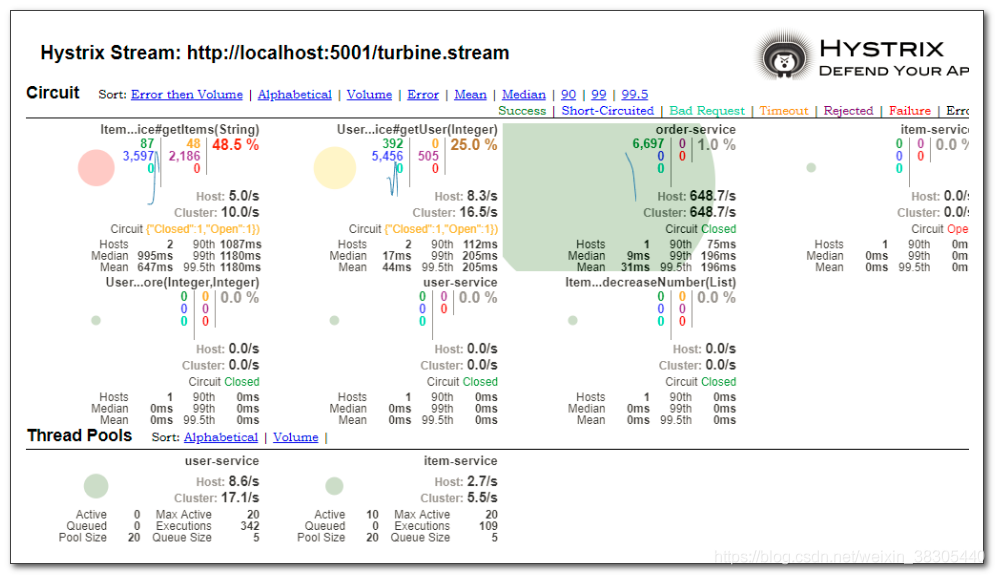
> 源码: [https://github.com/benwang6/spring-cloud-repo](https://github.com/benwang6/spring-cloud-repo)

<a name="qMRfq"></a>
# 二十一、zuul 请求过滤
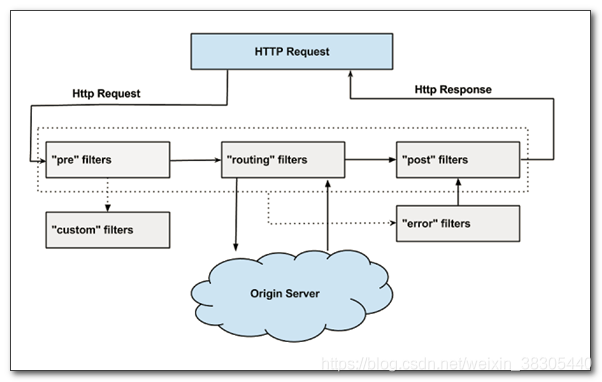
<a name="fnsFr"></a>
## 定义过滤器,继承 ZuulFilter
在 sp11-zuul 项目中新建过滤器类
```java
package cn.tedu.sp11.filter;
import javax.servlet.http.HttpServletRequest;
import org.springframework.cloud.netflix.zuul.filters.support.FilterConstants;
import org.springframework.stereotype.Component;
import com.netflix.zuul.ZuulFilter;
import com.netflix.zuul.context.RequestContext;
import com.netflix.zuul.exception.ZuulException;
import cn.tedu.web.util.JsonResult;
@Component
public class AccessFilter extends ZuulFilter{
@Override
public boolean shouldFilter() {
//对指定的serviceid过滤,如果要过滤所有服务,直接返回 true
RequestContext ctx = RequestContext.getCurrentContext();
String serviceId = (String) ctx.get(FilterConstants.SERVICE_ID_KEY);
if(serviceId.equals("item-service")) {
return true;
}
return false;
}
@Override
public Object run() throws ZuulException {
RequestContext ctx = RequestContext.getCurrentContext();
HttpServletRequest req = ctx.getRequest();
String token = req.getParameter("token");
if (token == null) {
//此设置会阻止请求被路由到后台微服务
ctx.setSendZuulResponse(false);
//向客户端的响应
ctx.setResponseStatusCode(200);
ctx.setResponseBody(JsonResult.err().code(JsonResult.NOT_LOGIN).toString());
}
//zuul过滤器返回的数据设计为以后扩展使用,
//目前该返回值没有被使用
return null;
}
@Override
public String filterType() {
return FilterConstants.PRE_TYPE;
}
@Override
public int filterOrder() {
//该过滤器顺序要 > 5,才能得到 serviceid
return FilterConstants.PRE_DECORATION_FILTER_ORDER+1;
}
}
访问测试
- 没有token参数不允许访问
http://localhost:3001/item-service/35 - 有token参数可以访问
http://localhost:3001/item-service/35?token=1234

二十二、zuul Cookie过滤
zuul 会过滤敏感 http 协议头,默认过滤以下协议头:
- Cookie
- Set-Cookie
- Authorization
可以设置 zuul 不过滤这些协议头
zuul:
sensitive-headers:

二十三、config 配置中心

yml 配置文件保存到 git 服务器,例如 github.com 或 gitee.com
微服务启动时,从服务器获取配置文件
github 上存放配置文件
新建 “Project”,命名为 config

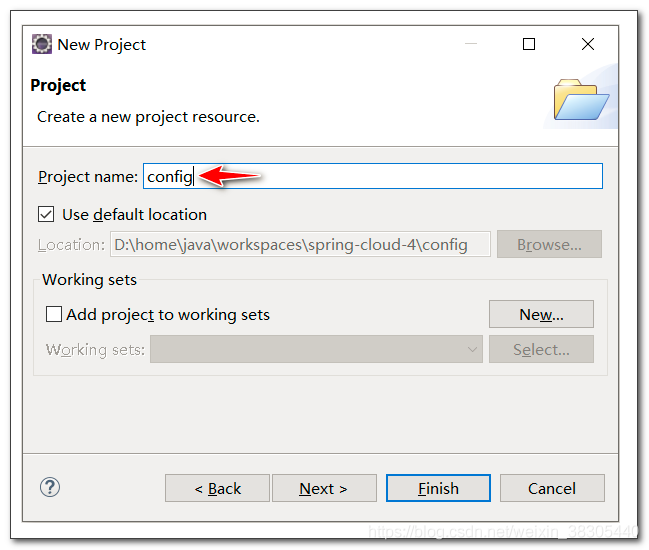
将sp02,sp03,sp04,sp11四个项目的yml配置文件,复制到config项目,并改名
- item-service-dev.yml
- user-service-dev.yml
- order-service-dev.yml
- zuul-dev.yml

禁止配置中心的配置信息覆盖客户端配置
默认配置中心配置优先级高,配置中心配置会覆盖客户端的所有配置,包括命令行参数配置,这样我们在item-service和order-service中配置的端口号启动参数会无效
item-service 启动参数:
--service.port=8001--service.port=8002order-service 启动参数
--service.port=8201--service.port=8202
我们可以设置禁止配置中心的配置将客户端配置覆盖掉
在四个配置文件中添加下面的配置
spring:
......
cloud:
config:
override-none: true
将 config 项目上传到 github
- 新建仓库

- 仓库命名

- 将项目分享到仓库

- 选择新建本地仓库
- 仓库目录选择工作空间目录下一个新目录:
sp-config

- 提交项目

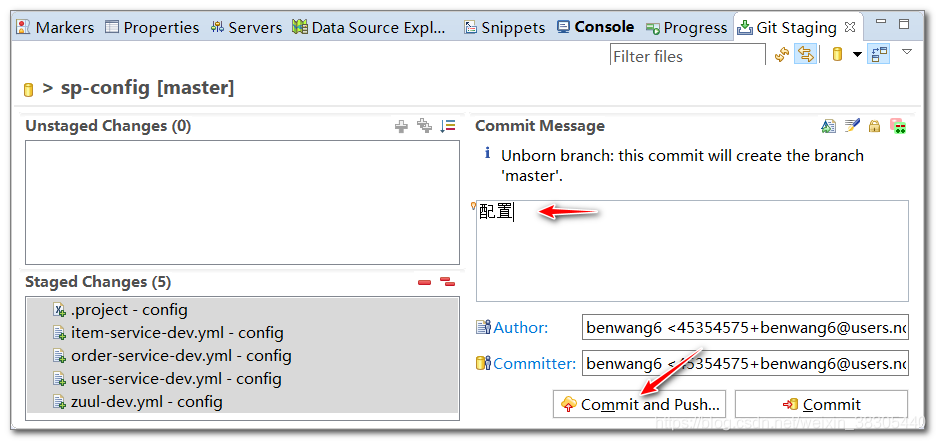
- 填写sp-config仓库地址

- 查看远程仓库文件

config 服务器
config 配置中心从 git 下载所有配置文件。
而其他微服务启动时从 config 配置中心获取配置信息。
新建 sp12-config 项目
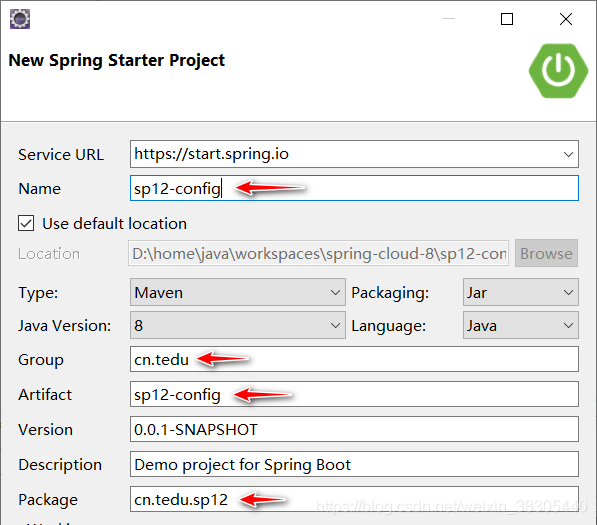

pom.xml
<?xml version="1.0" encoding="UTF-8"?>
<project xmlns="http://maven.apache.org/POM/4.0.0" xmlns:xsi="http://www.w3.org/2001/XMLSchema-instance"
xsi:schemaLocation="http://maven.apache.org/POM/4.0.0 https://maven.apache.org/xsd/maven-4.0.0.xsd">
<modelVersion>4.0.0</modelVersion>
<parent>
<groupId>org.springframework.boot</groupId>
<artifactId>spring-boot-starter-parent</artifactId>
<version>2.2.1.RELEASE</version>
<relativePath/> <!-- lookup parent from repository -->
</parent>
<groupId>cn.tedu</groupId>
<artifactId>sp12-config</artifactId>
<version>0.0.1-SNAPSHOT</version>
<name>sp12-config</name>
<description>Demo project for Spring Boot</description>
<properties>
<java.version>1.8</java.version>
<spring-cloud.version>Hoxton.RELEASE</spring-cloud.version>
</properties>
<dependencies>
<dependency>
<groupId>org.springframework.cloud</groupId>
<artifactId>spring-cloud-config-server</artifactId>
</dependency>
<dependency>
<groupId>org.springframework.cloud</groupId>
<artifactId>spring-cloud-starter-netflix-eureka-client</artifactId>
</dependency>
<dependency>
<groupId>org.springframework.boot</groupId>
<artifactId>spring-boot-starter-test</artifactId>
<scope>test</scope>
<exclusions>
<exclusion>
<groupId>org.junit.vintage</groupId>
<artifactId>junit-vintage-engine</artifactId>
</exclusion>
</exclusions>
</dependency>
</dependencies>
<dependencyManagement>
<dependencies>
<dependency>
<groupId>org.springframework.cloud</groupId>
<artifactId>spring-cloud-dependencies</artifactId>
<version>${spring-cloud.version}</version>
<type>pom</type>
<scope>import</scope>
</dependency>
</dependencies>
</dependencyManagement>
<build>
<plugins>
<plugin>
<groupId>org.springframework.boot</groupId>
<artifactId>spring-boot-maven-plugin</artifactId>
</plugin>
</plugins>
</build>
</project>
application.yml
spring:
application:
name: config-server
cloud:
config:
server:
git:
uri: https://github.com/你的个人路径/sp-config
searchPaths: config
#username: your-username
#password: your-password
server:
port: 6001
eureka:
client:
service-url:
defaultZone: http://eureka1:2001/eureka, http://eureka2:2002/eureka
主程序添加 @EnableConfigServer 和 @EnableDiscoveryClient
package cn.tedu.sp12;
import org.springframework.boot.SpringApplication;
import org.springframework.boot.autoconfigure.SpringBootApplication;
import org.springframework.cloud.client.discovery.EnableDiscoveryClient;
import org.springframework.cloud.config.server.EnableConfigServer;
@EnableConfigServer
@EnableDiscoveryClient
@SpringBootApplication
public class Sp12ConfigApplication {
public static void main(String[] args) {
SpringApplication.run(Sp12ConfigApplication.class, args);
}
}
启动,访问测试
访问 item-service-dev.yml 可以使用以下形式:
http://localhost:6001/item-service-dev.yml
http://localhost:6001/item-service/dev
测试其他文件
http://localhost:6001/user-service/dev
http://localhost:6001/zuul/dev
…
config 客户端
修改以下项目,从配置中心获取配置信息
- sp02-itemservice
- sp03-userservice
- sp04-orderservice
-
pom.xml 添加 config 客户端依赖
右键点击项目,编辑起步依赖,添加 config client 依赖

<dependency> <groupId>org.springframework.cloud</groupId> <artifactId>spring-cloud-starter-config</artifactId> </dependency>在四个项目中添加 bootstrap.yml
bootstrap.yml,引导配置文件,先于 application.yml 加载 item-service ```yaml spring: cloud: config:
discovery: enabled: true service-id: config-server name: item-service profile: dev
eureka: client: service-url: defaultZone: http://eureka1:2001/eureka, http://eureka2:2002/eureka
- user-service
```yaml
spring:
cloud:
config:
discovery:
enabled: true
service-id: config-server
name: user-service
profile: dev
eureka:
client:
service-url:
defaultZone: http://eureka1:2001/eureka, http://eureka2:2002/eureka
- order-service
```yaml
spring:
cloud:
config:
discovery: enabled: true service-id: config-server name: order-service profile: dev
eureka: client: service-url: defaultZone: http://eureka1:2001/eureka, http://eureka2:2002/eureka
- zuul
```yaml
spring:
cloud:
config:
discovery:
enabled: true
service-id: config-server
name: zuul
profile: dev
eureka:
client:
service-url:
defaultZone: http://eureka1:2001/eureka, http://eureka2:2002/eureka
启动服务,观察从配置中心获取配置信息的日志


配置刷新
spring cloud 允许运行时动态刷新配置,可以重新从配置中心获取新的配置信息
以 user-service 为例演示配置刷新
pom.xml
user-service 的 pom.xml 中添加 actuator 依赖
右键点击sp03-user-service项目,编辑起步依赖,添加 actuator 依赖
<dependency>
  <groupId>org.springframework.boot</groupId>
  <artifactId>spring-boot-starter-actuator</artifactId>
</dependency>
yml 配置文件中暴露 refresh 端点
- 修改 config 项目中的
user-service-dev.yml,并提交推送到远程仓库 ```yaml sp: user-service: users: “[{\”id\”:7, \”username\”:\”abc\”,\”password\”:\”123\”},{\”id\”:8, \”username\”:\”def\”,\”password\”:\”456\”},{\”id\”:9, \”username\”:\”ghi\”,\”password\”:\”789\”}]” spring: application: name: user-service cloud: config:override-none: true
server: port: 8101
eureka:
client:
service-url:
defaultZone: http://eureka1:2001/eureka, http://eureka2:2002/eureka
management:
endpoints:
web:
exposure:
include: refresh
<a name="A7LgS"></a>
### UserServiceImpl 添加 `@RefreshScope` 注解

- 只允许对添加了 `@RefreshScope` 或 `@ConfigurationProperties` 注解的 Bean 刷新配置,可以将更新的配置数据注入到 Bean 中
```java
package cn.tedu.sp03.user.service;
import java.util.List;
import org.springframework.beans.factory.annotation.Value;
import org.springframework.cloud.context.config.annotation.RefreshScope;
import org.springframework.stereotype.Service;
import com.fasterxml.jackson.core.type.TypeReference;
import cn.tedu.sp01.pojo.User;
import cn.tedu.sp01.service.UserService;
import cn.tedu.web.util.JsonUtil;
import lombok.extern.slf4j.Slf4j;
@RefreshScope
@Slf4j
@Service
public class UserServiceImpl implements UserService {
    @Value("${sp.user-service.users}")
    private String userJson;

    @Override
    public User getUser(Integer id) {
        log.info("users json string : "+userJson);
        List<User> list = JsonUtil.from(userJson, new TypeReference<List<User>>() {});
        for (User u : list) {
            if (u.getId().equals(id)) {
                return u;
            }
        }

        return new User(id, "name-"+id, "pwd-"+id);
    }
    @Override
    public void addScore(Integer id, Integer score) {
        // 这里增加积分
        log.info("user "+id+" - 增加积分 "+score);
    }
}
重启配置中心, 再重启sp03, 查看暴露的刷新端点
- 查看暴露的刷新端点
http://localhost:8101/actuator

修改config项目的user-service-dev.yml文件并提交
现在的配置数据中只有7,8,9三个测试用户的数据,没有99这个用户的数据
- http://localhost:8101/7
- http://localhost:8101/8
- http://localhost:8101/9
- http://localhost:8101/99
在
user-service-dev.yml文件添加99用户的数据sp: user-service: users: "[{\"id\":7, \"username\":\"abc\",\"password\":\"123\"},{\"id\":8, \"username\":\"def\",\"password\":\"456\"},{\"id\":9, \"username\":\"ghi\",\"password\":\"789\"},{\"id\":99, \"username\":\"aaa\",\"password\":\"111\"}]"用postman访问刷新端点, 刷新配置
- 使用 postman 向刷新端点发送 post 请求

访问 user-service,查看动态更新的新用户数据
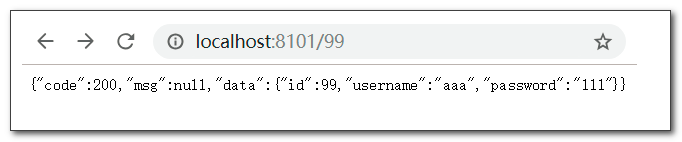

二十四、config bus + rabbitmq 消息总线配置刷新

post 请求消息总线刷新端点,服务器会向 rabbitmq 发布刷新消息,接收到消息的微服务会向配置服务器请求刷新配置信息
rabbitmq 安装笔记
https://blog.csdn.net/weixin_38305440/article/details/102810522
需要动态更新配置的微服务,添加 spring cloud bus 依赖,并添加 rabbitmq 连接信息
修改以下微服务
sp02-item-service
- sp03-user-service
- sp04-order-service
- sp11-zuul
-
pom.xml 添加 spring cloud bus 依赖
使用 STS 编辑起步依赖,分别添加
bus、rabbitmq依赖
修改5个项目
<dependency>
          <groupId>org.springframework.boot</groupId>
          <artifactId>spring-boot-starter-amqp</artifactId>
      </dependency>
      <dependency>
          <groupId>org.springframework.cloud</groupId>
          <artifactId>spring-cloud-bus</artifactId>
      </dependency>
      <dependency>
          <groupId>org.springframework.cloud</groupId>
          <artifactId>spring-cloud-stream-binder-rabbit</artifactId>
      </dependency>
      <dependency>
          <groupId>org.springframework.amqp</groupId>
          <artifactId>spring-rabbit-test</artifactId>
          <scope>test</scope>
      </dependency>
配置文件中添加 rabbitmq 连接信息
在以下配置文件中修改:
config中的4个配置文件
- sp12-config项目的application.yml
注意:
- 连接信息请修改成你的连接信息
config项目需要提交
spring:
......
rabbitmq:
  host: 192.168.64.140
  port: 5672
  username: admin
  password: admin
config-server 暴露 bus-refresh 刷新端点
修改 sp12-config 项目的 application.yml, 暴露
bus-refresh端点management: endpoints: web: exposure: include: bus-refresh

启动服务,请求刷新端点发布刷新消息
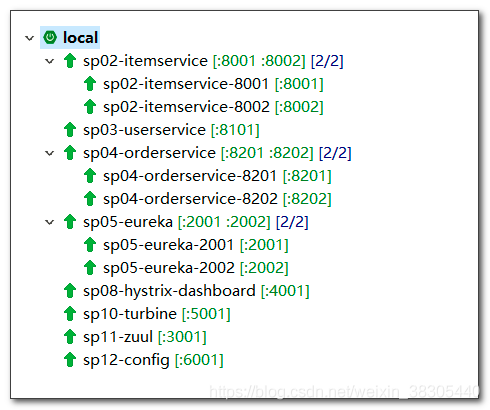
- postman 向 bus-refresh 刷新端点发送 post 请求
http://localhost:6001/actuator/bus-refresh
注意:
- 在新标签中测试
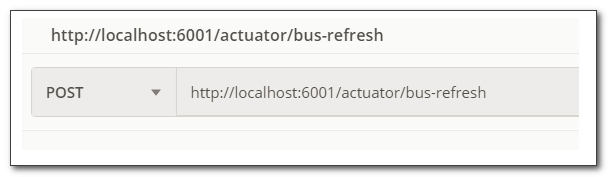
- 如果刷新指定的微服务,可按下面格式访问:
http://localhost:6001/actuator/bus-refresh/user-service:8101config 本地文系统
可以把配置文件保存在配置中心服务的 resources 目录下,直接访问本地文件
把配置文件保存到 sp12-config 项目的 resources/config 目录下
修改 application.yml 激活 native profile,并指定配置文件目录
- 必须配置
spring.profiles.active=native来激活本地文件系统 - 本地路径默认:
[classpath:/, classpath:/config, file:./, file:./config]
- 必须配置
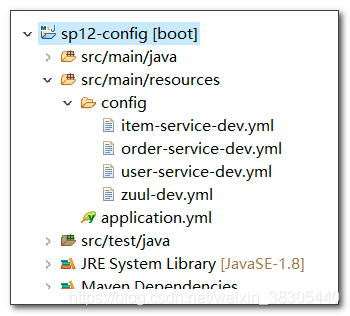
spring:
application:
name: config-server
profiles:
active: native
cloud:
config:
server:
native:
search-locations: classpath:/config
# git:
# uri: https://github.com/你的用户路径/sp-config
# searchPaths: config
# username: your-username
# password: your-password
rabbitmq:
host: 192.168.64.140
port: 5672
username: admin
password: admin
server:
port: 6001
eureka:
client:
service-url:
defaultZone: http://eureka1:2001/eureka, http://eureka2:2002/eureka
management:
endpoints:
  web:
    exposure:
      include: bus-refresh

二十五、sleuth 链路跟踪
随着系统规模越来越大,微服务之间调用关系变得错综复杂,一条调用链路中可能调用多个微服务,任何一个微服务不可用都可能造整个调用过程失败
spring cloud sleuth 可以跟踪调用链路,分析链路中每个节点的执行情况
微服务中添加 spring cloud sleuth 依赖
修改以下微服务的 pom.xml,添加 sleuth 依赖
- sp02-item-service
- sp03-user-service
- sp04-order-service
- sp11-zuul
编辑起步依赖,分别 sleuth 依赖
<dependency>
    <groupId>org.springframework.cloud</groupId>
    <artifactId>spring-cloud-starter-sleuth</artifactId>
</dependency>
在控制台查看链路跟踪日志
- 通过 zuul 网关,访问 order-service
http://localhost:3001/order-service/112233
四个微服务的控制台日志中,可以看到以下信息:[服务id,请求id,span id,是否发送到zipkin]
- 请求id:请求到达第一个微服务时生成一个请求id,该id在调用链路中会一直向后面的微服务传递
- span id:链路中每一步微服务调用,都生成一个新的id
[zuul,6c24c0a7a8e7281a,6c24c0a7a8e7281a,false]
[order-service,6c24c0a7a8e7281a,993f53408ab7b6e3,false]
[item-service,6c24c0a7a8e7281a,ce0c820204dbaae1,false]
[user-service,6c24c0a7a8e7281a,fdd1e177f72d667b,false]
二十六、sleuth + zipkin 链路分析
链路数据抽样比例
默认 10% 的链路数据会被发送到 zipkin 服务。可以配置修改抽样比例
spring:
  sleuth:
    sampler:
      probability: 0.1
zipkin 服务
下载 zipkin 服务器

启动 zipkin 时,连接到 rabbitmq
java -jar zipkin-server-2.12.9-exec.jar --zipkin.collector.rabbitmq.uri=amqp://admin:admin@192.168.64.140:5672
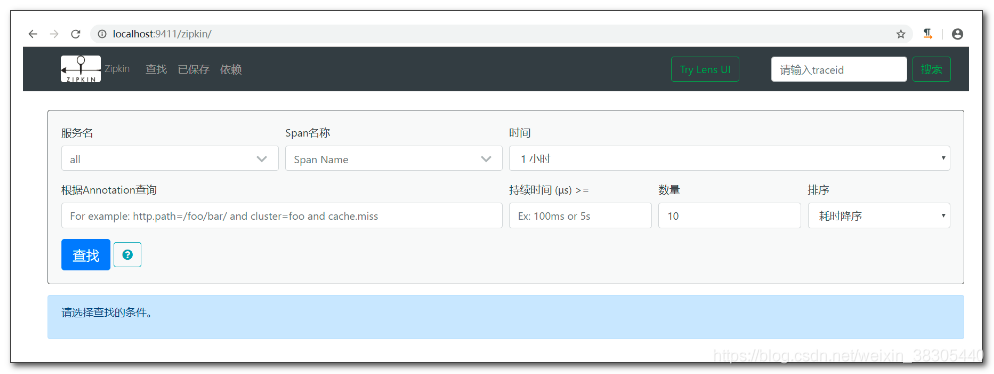
微服务添加 zipkin 起步依赖
修改以下微服务
- sp02-item-service
- sp03-user-service
- sp04-order-service
sp11-zuul
<dependency>
  <groupId>org.springframework.cloud</groupId>
  <artifactId>spring-cloud-starter-zipkin</artifactId>
</dependency>
如果没有配置过 spring cloud bus,还需要添加
rabbitmq依赖和连接信息启动并访问服务,访问 zipkin 查看链路分析
http://localhost:3001/order-service/112233
刷新访问多次,链路跟踪数据中,默认只有 10% 会被收集到zipkin- 访问 zipkin
http://localhost:9411/zipkin


二十七、向eureka注册正确的ip地址
eureka客户端向eureka注册时, 会自动选择网卡, 并可能注册主机名而不是ip地址.
下面配置可以选择正确网卡的ip向eureka进行注册.
选择正确网卡
服务器有多块网卡,要选择正确网卡的ip地址向eureka进行注册
修改 bootstrap.yml
spring:
  cloud:
    inetutils:
      ignored-interfaces: # 忽略的网卡
        - VM.*
      preferred-networks: # 要是用的网卡的网段
        - 192.168.0
注册ip地址,而不是主机名
注册时,有可能自动选择主机名进行注册,而不使用ip地址. 主机名在局域网内有可能不会被正确的解析
最好使用ip地址进行注册,而不注册主机名
在应用配置application.yml中配置:
eureka:
  instance:
    prefer-ip-address: true # 使用ip进行注册
    instance-id: ${spring.cloud.client.ip-address}:${spring.application.name}:${server.port} # 界面列表中显示的格式也显示ip

若有收获,就点个赞吧
0 人点赞


