OAuth2.0
OAuth(Open Authorization)是一个关于授权(authorization)的开放网络标准,允许用户授权第三方应用访问他们存储在另外的服务提供者上的信息,而不需要将用户名和密码提供给第三方移动应用或分享他们数据的所有内容。OAuth在全世界得到广泛应用,目前的版本是2.0版。
OAuth协议:https://tools.ietf.org/html/rfc6749
特点:
- 简单:OAuth服务提供还是应用开发者都易理解使用
- 安全:没有涉及到用户密钥等信息
开放:任何服务商都可以实现OAuth,任何软件开发商都可以使用OAuth
应用场景
原生app授权:app登录请求后台接口,为了安全认证,所有请求需要有token信息。
- 前后端分离单页面应用:前后端分离框架。
- 第三方应用授权:QQ、微信等。
基本概念
- Third-party application:第三方应用程序,又称“客户端”。
- HTTP service:HTTP服务提供商,简称“服务提供商”。
- Resource Owner:资源所有者,又称“用户”。
- User Agent:用户代理,比如浏览器。
- Authorization server:授权服务器,即服务提供商专门用来处理认证授权的服务器。
- Resource server:资源服务器,即服务提供商存放用户生成的资源的服务器。它与授权服务器,可以是同一台服务器,也可以是不同的服务器。
OAuth的作用就是让“客户端”安全可控的获取“用户”的授权,与“服务提供商”进行交互。
优缺点
优点:
- 安全
- 广泛采用
- 短寿命封装token
- 资源服务器和授权服务器解耦
- 集中式授权
- 易于请求传递token
- 考虑多种客户端场景
- 客户可以有不同的新人级别
缺点:
- 用户打开客户端后,客户端要求用户授权
- 用户同意给客户端授权
- 客户端使用获得授权,像授权服务器申请令牌
- 授权服务器对客户端进行认证后,确认无误,同意发放令牌
- 客户端使用令牌,想资源服务器申请获取资源
- 资源服务器确认令牌无误,同意发放资源
客户端授权模式
- 授权码模式
- 用户访问客户端,后者将前者导向授权客户端
- 用户选择是否给与客户端授权
- 假设用户同意授权,授权服务器将用户导向客户端事先指定的重定向URI,同时附上一个授权码
- 客户端收到授权码,附上重定向URI,向授权服务器申请令牌。(在客户端的后台服务器完成)
- 授权服务器核对授权码,并重定向URI。确认无误后,向客户端发送访问令牌和更新令牌
- 密码模式
- 简化模式
-
快速开始
配置
pom
<dependency><groupId>org.springframework.cloud</groupId><artifactId>spring-cloud-starter-oauth2</artifactId></dependency>
security配置
@Configuration
public class WebSecurityConfig extends WebSecurityConfigurerAdapter {

  @Autowired
  private UserService userService;

  @Bean
  public PasswordEncoder passwordEncoder() {
      return new BCryptPasswordEncoder();
  }

  @Override
  public void configure(AuthenticationManagerBuilder auth) throws Exception {
      //获取用户信息
      auth.userDetailsService(userService);
  }

  @Override
  protected void configure(HttpSecurity http) throws Exception {
      http.formLogin().permitAll()
              .and().authorizeRequests()
              .antMatchers("/oauth/**").permitAll()
              .anyRequest().authenticated()
              .and().logout().permitAll()
              .and().csrf().disable();
  }

  //@Bean
  //public UserDetailsService userDetailsService() {
  //    InMemoryUserDetailsManager inMemoryUserDetailsManager = new InMemoryUserDetailsManager(
  //            User.withUsername("tong").password(passwordEncoder().encode("1234565")).authorities("admin").build()
  //    );
  //    return inMemoryUserDetailsManager;
  //}
}
授权服务器
@Configuration
@EnableAuthorizationServer
public class AuthorizationServerConfig extends AuthorizationServerConfigurerAdapter {
  @Autowired
  private PasswordEncoder passwordEncoder;

  @Override
  public void configure(ClientDetailsServiceConfigurer clients) throws Exception {
      /**
       *授权码模式
       *http://localhost:8080/oauth/authorize?response_type=code&client_id=client&redirect_uri=http://www.baidu.com&scope=all
       *http://localhost:8080/oauth/authorize?response_type=code&client_id=client
       *
       * implicit: 简化模式
       *http://localhost:8080/oauth/authorize?client_id=client&response_type=token&scope=all&redirect_uri=http://www.baidu.com
       *
       * password模式
       *  http://localhost:8080/oauth/token?username=fox&password=123456&grant_type=password&client_id=client&client_secret=123123&scope=all
       *
       *  客户端模式
       *  http://localhost:8080/oauth/token?grant_type=client_credentials&scope=all&client_id=client&client_secret=123123
       *
       *  刷新令牌
       *  http://localhost:8080/oauth/token?grant_type=refresh_token&client_id=client&client_secret=123123&refresh_token=[refresh_token值]
       */
      clients.inMemory()
              //配置client_id
              .withClient("client")
              //配置client_secret
              .secret(passwordEncoder.encode("123456"))
              //配置token有效期
              .accessTokenValiditySeconds(3600)
              //配置刷新token的有效期
              .refreshTokenValiditySeconds(864000)
              //配置redirect_uri,用于授权成功后跳转
              .redirectUris("http://www.baidu.com")
              //配置申请范围
              .scopes("all")
              //配置grant_type,表示授权类型
              .authorizedGrantTypes("authorization_code", "implicit");
  }
}
资源服务器
@Configuration
@EnableResourceServer
public class ResourceServiceConfig extends ResourceServerConfigurerAdapter {
  @Override
  public void configure(HttpSecurity http) throws Exception {
      http.authorizeRequests()
              .anyRequest().authenticated()
              .and()
              .requestMatchers().antMatchers("/user/**");
  }
}
测试
授权码模式
获取授权码
http://localhost:8080/oauth/authorize?response_type=code&client_id=client&redirect_uri=http://www.baidu.com&scope=all
登录

点击获取
获取令牌
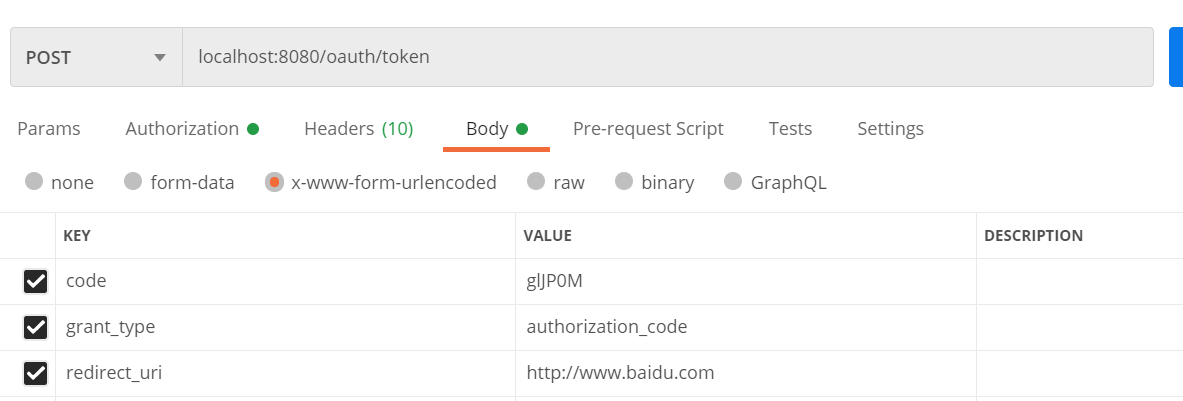

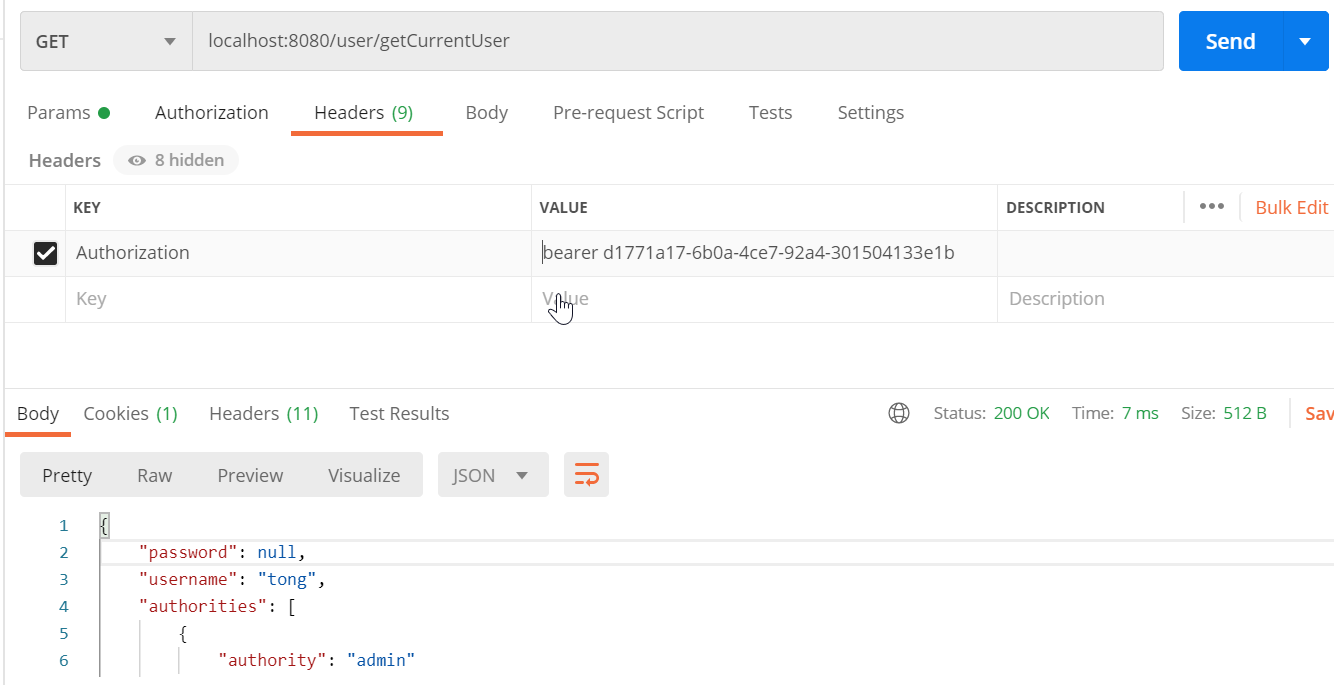
调用方法
- 请求方法获取,方法头
-
密码模式
WebSecurityConfig添加Bean注入
 @Bean
 @Override
 public AuthenticationManager authenticationManagerBean() throws Exception {
     return super.authenticationManagerBean();
 }
授权服务器
@Configuration
@EnableAuthorizationServer
public class AuthorizationServerConfig2 extends AuthorizationServerConfigurerAdapter {
 @Autowired
 private UserService userService;

 //@Autowired
 //private TokenStore tokenStore;

 @Autowired
 private AuthenticationManager authenticationManager;
 @Autowired
 private PasswordEncoder passwordEncoder;

 @Override
 public void configure(AuthorizationServerEndpointsConfigurer endpoints) throws Exception {
     endpoints.authenticationManager(authenticationManager)
             //.tokenStore(tokenStore)
             //refresh_token是否重复使用
             .reuseRefreshTokens(false)
             //刷新令牌包括对用户信息的检查
             .userDetailsService(userService)
             //支持GET,POST请求
             .allowedTokenEndpointRequestMethods(HttpMethod.GET, HttpMethod.POST);
 }

 @Override
 public void configure(AuthorizationServerSecurityConfigurer security) throws Exception {
     //允许表单认证
     security.allowFormAuthenticationForClients();
 }

 @Override
 public void configure(ClientDetailsServiceConfigurer clients) throws Exception {
     /**
      *授权码模式
      *http://localhost:8080/oauth/authorize?response_type=code&client_id=client&redirect_uri=http://www.baidu.com&scope=all
      *http://localhost:8080/oauth/authorize?response_type=code&client_id=client
      *
      * implicit: 简化模式
      *http://localhost:8080/oauth/authorize?client_id=client&response_type=token&scope=all&redirect_uri=http://www.baidu.com
      *
      * password模式
      *  http://localhost:8080/oauth/token?username=tong&password=123456&grant_type=password&client_id=client&client_secret=123123&scope=all
      *
      *  客户端模式
      *  http://localhost:8080/oauth/token?grant_type=client_credentials&scope=all&client_id=client&client_secret=123123
      *
      *  刷新令牌
      *  http://localhost:8080/oauth/token?grant_type=refresh_token&client_id=client&client_secret=123123&refresh_token=[refresh_token值]
      */
     clients.inMemory()
             //配置client_id
             .withClient("client")
             //配置client-secret
             .secret(passwordEncoder.encode("123123"))
             //配置访问token的有效期
             .accessTokenValiditySeconds(3600)
             //配置刷新token的有效期
             .refreshTokenValiditySeconds(864000)
             //配置redirect_uri,用于授权成功后跳转
             .redirectUris("http://www.baidu.com")
             //配置申请的权限范围
             .scopes("all")
             /**
              * 配置grant_type,表示授权类型
              * authorization_code: 授权码模式
              * implicit: 简化模式
              * password: 密码模式
              * client_credentials: 客户端模式
              * refresh_token: 更新令牌
              */
             .authorizedGrantTypes("authorization_code", "implicit", "password", "client_credentials", "refresh_token");
 }
}
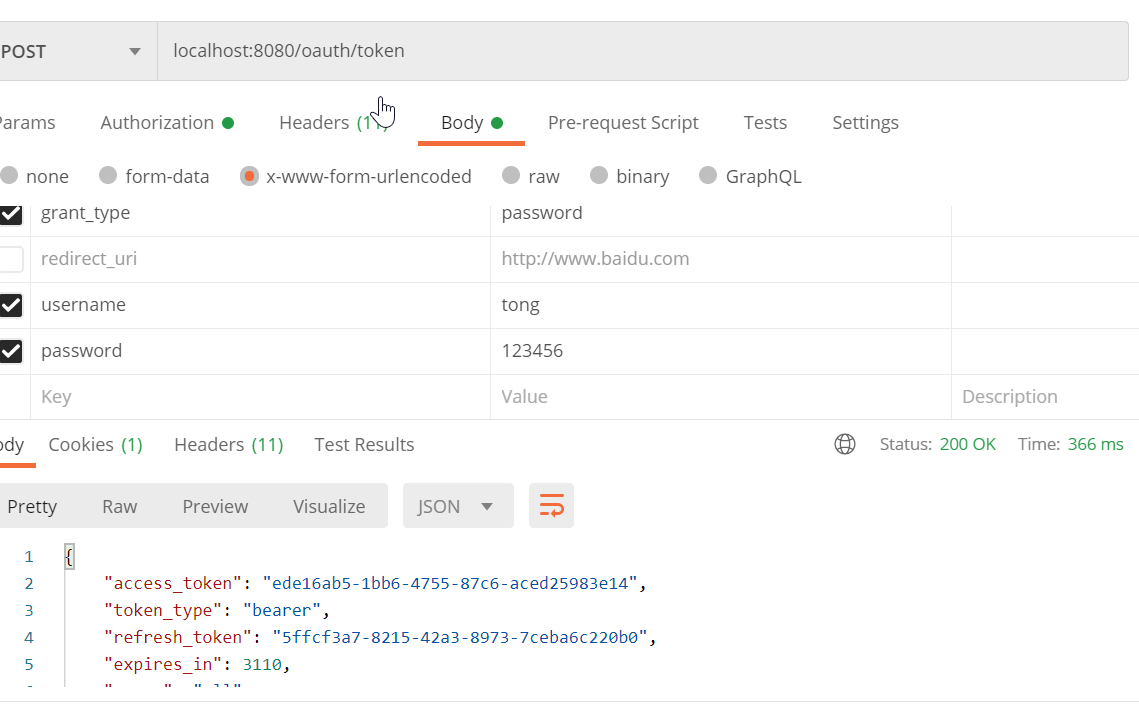
获取令牌
http://localhost:8080/oauth/token?username=tong&password=123456&grant_type=password&client_id=client&client_secret=123123&scope=all 浏览器获取token
通过浏览器测试,需要配置支持get请求和表单认证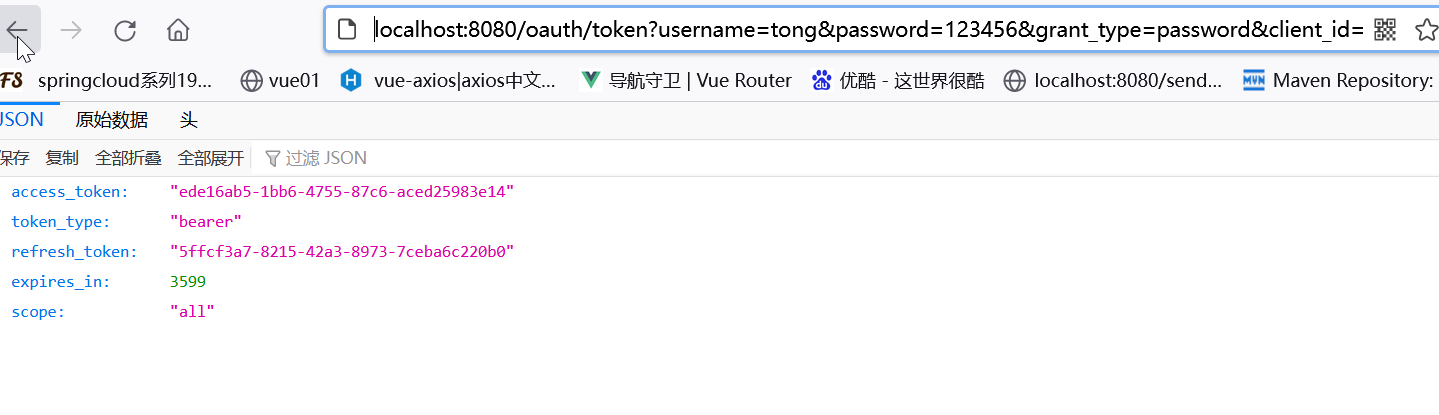
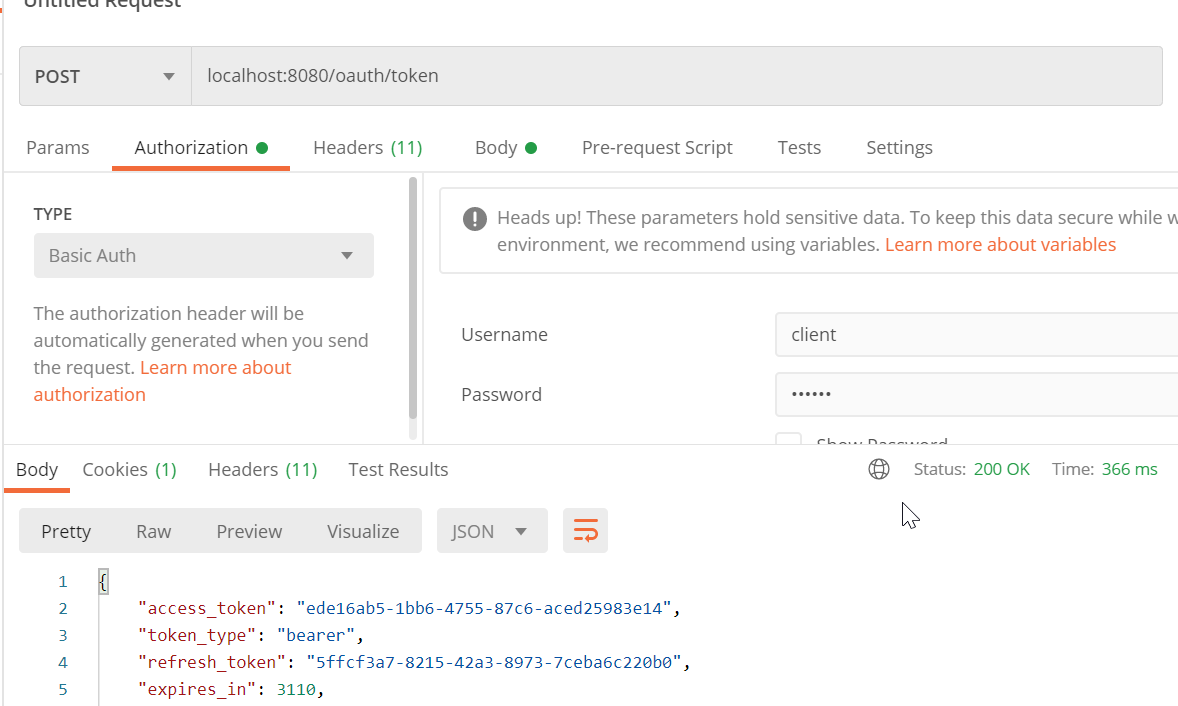
- postman获取token


客户端模式
获取令牌
http://localhost:8080/oauth/token?grant_type=client_credentials&scope=all&client_id=client&client_secret=123123

更新令牌
使用密码模式测试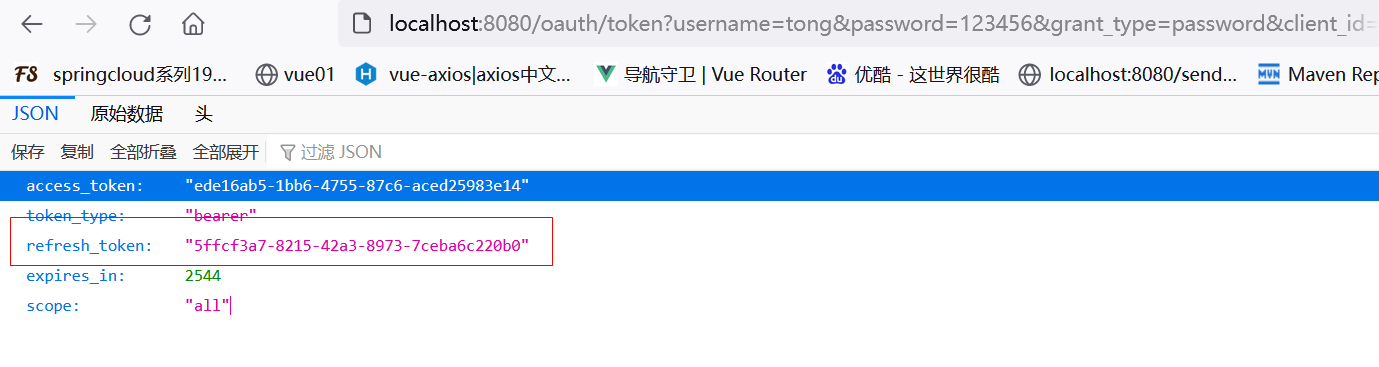
刷新
http://localhost:8080/oauth/token?grant_type=refresh_token&client_id=client&client_secret=123123&refresh_token=5ffcf3a7-8215-42a3-8973-7ceba6c220b0
基于redis存储token
引入pom
        <dependency>
            <groupId>org.springframework.boot</groupId>
            <artifactId>spring-boot-starter-data-redis</artifactId>
        </dependency>
        <dependency>
            <groupId>org.apache.commons</groupId>
            <artifactId>commons-pool2</artifactId>
        </dependency>
application.yml
spring:
  redis:
    host: 139.198.123.65
    port: 6379
    database: 0
reids配置类
@Configuration
public class RedisConfig {
    @Autowired
    private RedisConnectionFactory redisConnectionFactory;
    @Bean
    public TokenStore tokenStore() {
        return new RedisTokenStore(redisConnectionFactory);
    }
}
授权服务器中配置
    @Override
    public void configure(AuthorizationServerEndpointsConfigurer endpoints) throws Exception {
        endpoints.authenticationManager(authenticationManager)
                .tokenStore(tokenStore)
                //refresh_token是否重复使用
                .reuseRefreshTokens(false)
                //刷新令牌包括对用户信息的检查
                .userDetailsService(userService)
                //支持GET,POST请求
                .allowedTokenEndpointRequestMethods(HttpMethod.GET, HttpMethod.POST);
    }
JWT
JSON Web Token(JWT)是一个开放的行业标准(RFC 7519),它定义了一种简介的、自包含的协议格式,用于在通信双方传递json对象,传递的信息经过数字签名可以被验证和信任。JWT可以使用HMAC算法或使用RSA的公钥/私钥对来签名,防止被篡改。
官网: https://jwt.io/
标准: https://tools.ietf.org/html/rfc7519
JWT组成
- 头:类型(JWT)以及签名用的算法,然后对头进行base64机密
- 荷载:存放有效信息,然后进行base64加密
- 签名:header、payload、secret组合加密

JJWT
pom
 <!--JWT依赖-->
<dependency>
    <groupId>io.jsonwebtoken</groupId>
    <artifactId>jjwt</artifactId>
    <version>0.9.1</version>
</dependency>
创建Token
//创建jwtBuilder
        JwtBuilder jwtBuilder = Jwts.builder()
                //声明标识(jti)
                .setId("888")
                //主体(sub)
                .setSubject("tong")
                //创建日期(iat)
                .setIssuedAt(new Date())
                //过期时间 1分钟
                .setExpiration(new Date(System.currentTimeMillis() + 60 * 1000))
                //传入map
                //.addClaims(map)
                .claim("roles", "admin")
                .claim("log", "xxx.jpg")
                //签名
                .signWith(SignatureAlgorithm.HS256, SECRET_KEY);
        //获取token
        String token = jwtBuilder.compact();
token解析
        //解析token获取载荷中的声明对象
        Claims claims = Jwts.parser()
                .setSigningKey(SECRET_KEY)
                .parseClaimsJws(token)
                .getBody();
Spring Security Oauth2 整合 JWT
引入pom
<dependency>
    <groupId>org.springframework.security</groupId>
    <artifactId>spring-security-jwt</artifactId>
    <version>1.0.9.RELEASE</version>
</dependency>
添加JwtTokenStoreConfig
@Configuration
public class JwtTokenStoreConfig {
    @Bean
    public TokenStore jwtTokenStore() {
        return new JwtTokenStore(jwtAccessTokenConverter());
    }

    @Bean
    public JwtAccessTokenConverter jwtAccessTokenConverter() {
        JwtAccessTokenConverter jwtAccessTokenConverter = new JwtAccessTokenConverter();
        jwtAccessTokenConverter.setSigningKey("123123");
        return jwtAccessTokenConverter;
    }
}
在授权服务器指定jwt
    @Override
    public void configure(AuthorizationServerEndpointsConfigurer endpoints) throws Exception {
        //配置JWT的内容增强器
        TokenEnhancerChain enhancerChain = new TokenEnhancerChain();
        List<TokenEnhancer> delegates = new ArrayList<>();
        delegates.add(jwtTokenEnhancer);
        delegates.add(jwtAccessTokenConverter);
        enhancerChain.setTokenEnhancers(delegates);

        //密码模式配置
        endpoints.authenticationManager(authenticationManager)
                .tokenStore(tokenStore)
                .accessTokenConverter(jwtAccessTokenConverter)
                .tokenEnhancer(enhancerChain)
                //refresh_token是否重复使用
                .reuseRefreshTokens(false)
                //刷新令牌包括对用户信息的检查
                .userDetailsService(userService)
                //支持GET,POST请求
                .allowedTokenEndpointRequestMethods(HttpMethod.GET, HttpMethod.POST);
    }
扩展JWT存储内容
@Component
public class JwtTokenEnhancer implements TokenEnhancer {

    @Override
    public OAuth2AccessToken enhance(OAuth2AccessToken accessToken,
                                     OAuth2Authentication authentication) {
        Map<String, Object> info = new HashMap<>();
        info.put("enhance", "enhance info");
        ((DefaultOAuth2AccessToken) accessToken).setAdditionalInformation(info);
        return accessToken;
    }
}
解析JWT
pom
<!--JWT依赖-->
<dependency>
    <groupId>io.jsonwebtoken</groupId>
    <artifactId>jjwt</artifactId>
    <version>0.9.1</version>
</dependency>
查看
    @RequestMapping("/getCurrentUser")
    public Object getCurrentUser(Authentication authentication, HttpServletRequest request) {
        String header = request.getHeader("Authorization");
        String token = null;
        if (header != null) {
            token = header.substring(header.indexOf("bearer") + 7);
        } else {
            token = request.getParameter("access_token");
        }
        return Jwts.parser()
                .setSigningKey("123123".getBytes(StandardCharsets.UTF_8))
                .parseClaimsJws(token)
                .getBody();
    }

若有收获,就点个赞吧
0 人点赞


