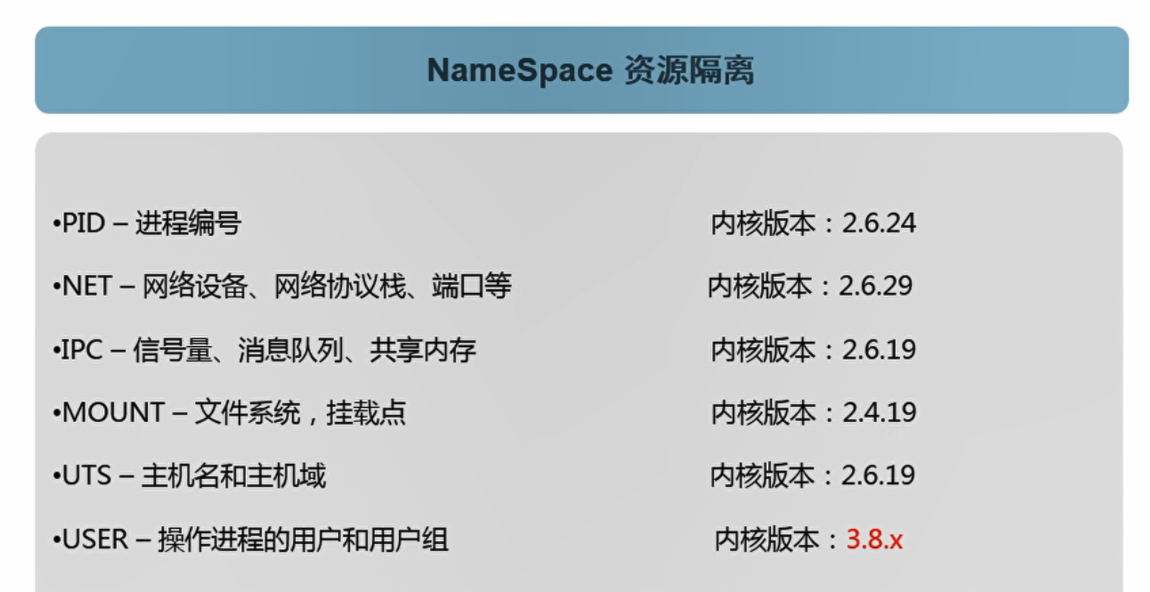
IPC:进程间通信
user隔离是在内核3.8+以上才实现
centos初始化配置docker
uname -acat /etc/redhat-releasegetenforcesystemctl status firewalldsystemctl stop firewalldcat /etc/yum.repos.d/CentOS-Base.repoyum list docker --show-duplicatesyum install yum-utils -yyum-config-manager --add-repo http://mirrors.aliyun.com/docker-ce/linux/centos/docker-ce.repoyum list docker-ce --show-duplicatesyum install docker-ce -ysystemctl enable dockersystemctl start dockerdocker info
[root@huan ~]# vim /etc/docker/daemon.json{"graph": "/data/docker","storage-driver": "overlay2","insecure-registries": ["registry.access.redhat.com","quay.io"],"registry-mirrors": ["https://q2gr04ke.mirror.aliyuncs.com"],"bip": "172.91.245.1/24","exec-opts": ["native.cgroupdriver=systemd"],"live-restore": true}
| 参数 | 作用 |
|---|---|
| graph | 工作目录 |
| storage-driver | 存储驱动 |
| insecure-registries | 私有仓库 |
| registry-mirrors | 镜像源 |
| bip | docker地址网段,中间两位 改成和IP地址后两个 方便排查 |
| exec-opts | 额外的参数,cgroupdriver设置成systemd |
| live-restore | 配置成true 当docker服务挂掉后,docker容器还能存活 不依赖于docker服务本身 |
docker容器、镜像、仓库之间的关系
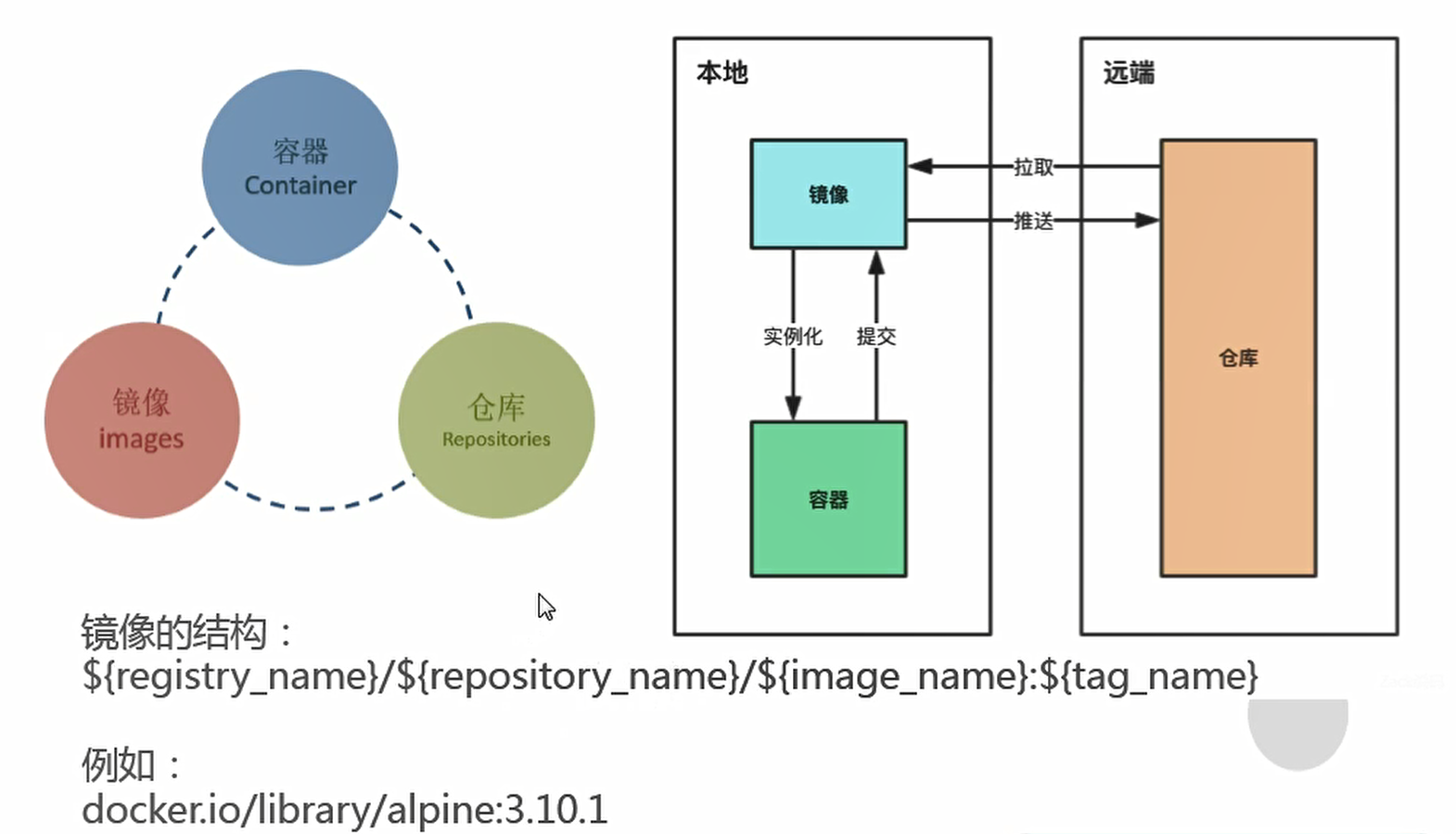
创建hub.docker.com账号
[root@huan ~]# docker login docker.io
[root@huan ~]# docker search alpine[root@huan ~]# docker pull alpine
只是删除标签
[root@huan ~]# docker rmi docker.io/lllllliuhuan/alpine:latestUntagged: lllllliuhuan/alpine:latest
删除镜像需要带上镜像id
docker rmi a24bb4013296Error response from daemon: conflict: unable to delete a24bb4013296 (must be forced) - image is referenced in multiple repositories# 有其他镜像关联到此镜像,加上-f是强制删除docker rmi -f a24bb4013296Untagged: alpine:latestUntagged: alpine@sha256:185518070891758909c9f839cf4ca393ee977ac378609f700f60a771a2dfe321Untagged: liuhuan086/alpine:v3.10.3Untagged: lllllliuhuan/alpine:v3.10.3Untagged: lllllliuhuan/alpine@sha256:a15790640a6690aa1730c38cf0a440e2aa44aaca9b0e8931a9f2b0d7cc90fd65Deleted: sha256:a24bb4013296f61e89ba57005a7b3e52274d8edd3ae2077d04395f806b63d83eDeleted: sha256:50644c29ef5a27c9a40c393a73ece2479de78325cae7d762ef3cdc19bf42dd0a
从自己的镜像仓库下载下来
[root@huan ~]# docker pull docker.io/lllllliuhuan/alpine:latest
docker镜像特性

AUSS
如果base image很大,每次变更的增量部分很小, 1个G那也能接受,镜像绝对大小毫无意义。
启动容器(运行镜像)
[root@huan ~]# docker run [OPTIONS] IMAGE [COMMAND] [ARG...]
OPTIONS选项
-i:表示启动一个可交互的容器,并持续打开标准输入
-t:表示使用终端关联到容器的标准输入上输出
-d:表示将容器放置后台运行
-p:表示容器运行时所需要的端口号
-v:表示需要将容器运行时所需要挂载到宿主机的目录
—rm:退出后即删除容器
—name:给容器自定义一个唯一名称,如果不指定随机生成一个名字
IMAGE:表示要运行的镜像
COMMAND:表示启动容器时要运行的命令
启动
[root@huan ~]# docker run -it lllllliuhuan/alpine/ # cat /etc/issueWelcome to Alpine Linux 3.12Kernel \r on an \m (\l)/ # exit[root@huan ~]# docker psCONTAINER ID IMAGE COMMAND CREATED STATUS PORTS NAMES68376c046405 lllllliuhuan/alpine "/bin/sh" 33 seconds ago Up 33 seconds intelligent_leakey[root@huan ~]# docker ps -aCONTAINER ID IMAGE COMMAND CREATED STATUS PORTS NAMES68376c046405 lllllliuhuan/alpine "/bin/sh" 2 minutes ago Exited (0) 5 seconds ago intelligent_leakey
[root@huan ~]# docker run --rm lllllliuhuan/alpine:latest /bin/echo hellohello# 批量删除已退出的容器[root@huan ~]# for i in `docker ps -a|grep -i exit|awk '{print $1}'`;do docker rm -f $i;done
docker容器有自己的文件系统树,做了文件系统之间的隔离,文件隔离,网络隔离,ipc隔离等等

若有收获,就点个赞吧
0 人点赞


