JVM中的基本线程
main线程
GC线程
Java中多线程的实现方式
继承Thread类
- 自定义线程类并继承Thread类
- 重写run()方法,编写线程执行体
- 创建线程对象,调用start()方法启动线程
简单示例
下面是一个简单的例子:
public class TestThread01 extends Thread{/*** run方法线程体*/@Overridepublic void run() {for (int i = 0; i < 20; i++) {System.out.println("information--"+i);}}// main线程public static void main(String[] args) {// 创建线程对象TestThread01 thread01 = new TestThread01();// 调用start方法thread01.start();for (int i = 0; i < 20; i++) {System.out.println("我在学习多线程"+i);}}}
输出:
我在学习多线程0我在学习多线程1我在学习多线程2我在学习多线程3我在学习多线程4我在学习多线程5我在学习多线程6我在学习多线程7我在学习多线程8我在学习多线程9我在学习多线程10information--0我在学习多线程11我在学习多线程12我在学习多线程13information--1我在学习多线程14information--2information--3information--4information--5information--6information--7information--8information--9information--10我在学习多线程15information--11我在学习多线程16information--12我在学习多线程17information--13我在学习多线程18我在学习多线程19information--14information--15information--16information--17information--18information--19
多线程图片下载器
下面是一个简单的多线程实现的网络图片下载器:
/*** 多线程实现同步图片下载*/public class TestThread02 extends Thread{private String url; // 图片地址private String name; // 保存地址public TestThread02(String url, String name) {this.url = url;this.name = name;}@Overridepublic void run() {// 实例化网络下载器进行下载WebDownloader downloader = new WebDownloader();downloader.downloader(url, name);System.out.println("下载执行完毕:" + name);}public static void main(String[] args) {String url1 = "https://i0.hdslb.com/bfs/archive/e10a58ac1f802126bc56d709350365e5a13d0f57.jpg"; // 图片地址String url2 = "https://i2.hdslb.com/bfs/archive/8b3c6c5e975dfe5cd0cfe98af82710242412f2d8.jpg";String url3 = "https://i0.hdslb.com/bfs/archive/e8c0ac051bbd998967fbd8df397c174afbaf5e4b.jpg";// 实例化线程类TestThread02 thread02 = new TestThread02(url1, "img/1.jpg");TestThread02 thread03 = new TestThread02(url2, "img/2.jpg");TestThread02 thread04 = new TestThread02(url3, "img/3.jpg");// 启动下载thread02.start();thread03.start();thread04.start();}}class WebDownloader {public void downloader(String url, String name) {try {FileUtils.copyURLToFile(new URL(url), new File(name));} catch (IOException e) {e.printStackTrace();System.out.println("IO异常,downloader方法出现问题");}}}
其中FileUtils的依赖为:
<dependency><groupId>commons-io</groupId><artifactId>commons-io</artifactId><version>2.2</version></dependency>
输出结果:
下载执行完毕:img/3.jpg下载执行完毕:img/2.jpg下载执行完毕:img/1.jpgProcess finished with exit code 0
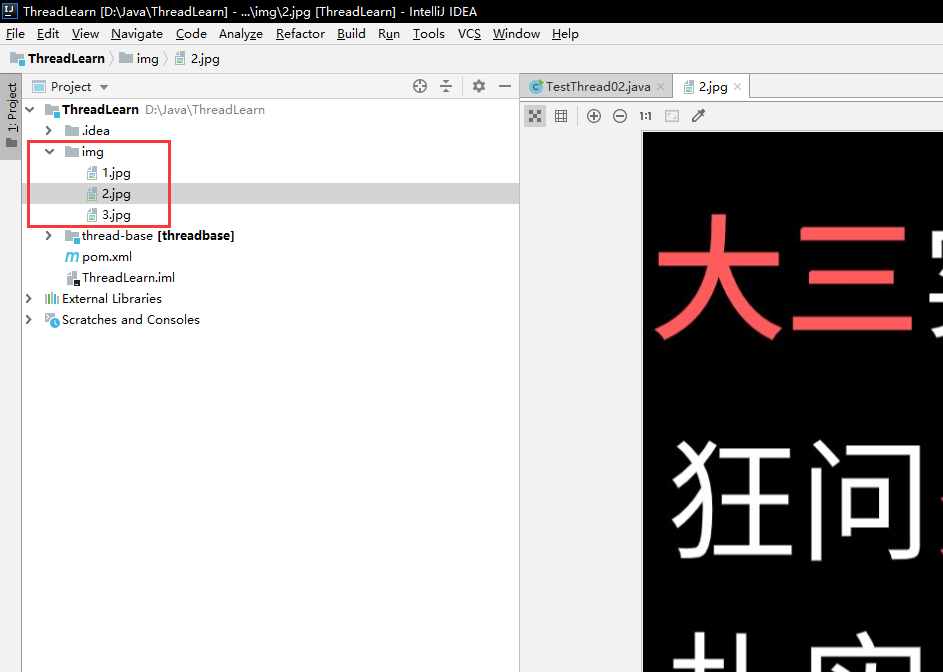
实现Runnable接口
- 自定义类实现Runnable接口的run方法
- 实例化Thread类并将自定义类(实现了Runnable接口)作为构造器参数传入
- 调用Thread实例的start方法启动线程
注意:该种实现方式使用了静态代理,Thread类也实现了该接口
改造图片下载器
/*** 改为使用Runnable接口实现图片下载*/class TestThread02Runnable implements Runnable{private String url; // 图片地址private String name; // 保存地址public TestThread02Runnable(String url, String name) {this.url = url;this.name = name;}@Overridepublic void run() {WebDownloader downloader = new WebDownloader();downloader.downloader(url, name);System.out.println("下载执行完毕:" + name);}public static void main(String[] args) {String url1 = "https://i0.hdslb.com/bfs/archive/e10a58ac1f802126bc56d709350365e5a13d0f57.jpg"; // 图片地址String url2 = "https://i2.hdslb.com/bfs/archive/8b3c6c5e975dfe5cd0cfe98af82710242412f2d8.jpg";String url3 = "https://i0.hdslb.com/bfs/archive/e8c0ac051bbd998967fbd8df397c174afbaf5e4b.jpg";// 实现Runnable接口TestThread02Runnable thread02 = new TestThread02Runnable(url1, "img/1.jpg");TestThread02Runnable thread03 = new TestThread02Runnable(url2, "img/2.jpg");TestThread02Runnable thread04 = new TestThread02Runnable(url3, "img/3.jpg");// 实例化线程并启动线程new Thread(thread02).start();new Thread(thread03).start();new Thread(thread04).start();}}class WebDownloader {public void downloader(String url, String name) {try {FileUtils.copyURLToFile(new URL(url), new File(name));} catch (IOException e) {e.printStackTrace();System.out.println("IO异常,downloader方法出现问题");}}}
输出没有变化,这里就不再赘述。

若有收获,就点个赞吧
0 人点赞


