SpringMVC_day01.docx
绑定简单参数
ModelAndView
置顶写个更离谱 ,在项目中一直找不到mapper的一个方法, 什么地方都试了, 最后面发现id名字多加了空格。我真的傻逼。不知道是怎么做到能加一个空格的。我真的是吐了。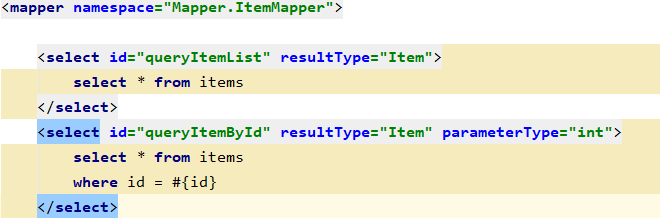
就他妈的离谱。如果在注解配置中,如果controller一直找不到要注入的service,一定是service的扫描没开启
2020/9/10 更新一下 如果service和controller放到一个包下,直接扫描那个包就好了,应该mvc或application都可以 离谱。
<?xml version="1.0" encoding="UTF-8"?><beans xmlns="http://www.springframework.org/schema/beans"xmlns:context="http://www.springframework.org/schema/context" xmlns:p="http://www.springframework.org/schema/p"xmlns:aop="http://www.springframework.org/schema/aop" xmlns:tx="http://www.springframework.org/schema/tx"xmlns:xsi="http://www.w3.org/2001/XMLSchema-instance"xsi:schemaLocation="http://www.springframework.org/schema/beans http://www.springframework.org/schema/beans/spring-beans-4.0.xsdhttp://www.springframework.org/schema/context http://www.springframework.org/schema/context/spring-context-4.0.xsdhttp://www.springframework.org/schema/aop http://www.springframework.org/schema/aop/spring-aop-4.0.xsd http://www.springframework.org/schema/tx http://www.springframework.org/schema/tx/spring-tx-4.0.xsdhttp://www.springframework.org/schema/util http://www.springframework.org/schema/util/spring-util-4.0.xsd"><context:property-placeholder location="classpath:db.properties"/><!-- 数据库连接池 --><bean id="dataSource" class="org.apache.commons.dbcp.BasicDataSource"destroy-method="close"><property name="driverClassName" value="${jdbc.driver}" /><property name="url" value="${jdbc.url}" /><property name="username" value="${jdbc.username}" /><property name="password" value="${jdbc.password}" /><property name="maxActive" value="10" /><property name="maxIdle" value="5" /><!-- 配置service扫描--></bean><context:component-scan base-package="Service" /><!-- Mybatis的工厂 --><bean id="sqlSessionFactoryBean" class="org.mybatis.spring.SqlSessionFactoryBean"><property name="dataSource" ref="dataSource"/><!-- 核心配置文件的位置 --><property name="configLocation" value="classpath:SqlMapConfig.xml"/></bean><!-- Mapper动态代理开发 扫描 --><bean class="org.mybatis.spring.mapper.MapperScannerConfigurer"><!-- 基本包 --><property name="basePackage" value="Mapper"/></bean><!-- 注解事务 --><bean id="transactionManager" class="org.springframework.jdbc.datasource.DataSourceTransactionManager"><property name="dataSource" ref="dataSource"/></bean><!-- 开启注解 --><tx:annotation-driven transaction-manager="transactionManager"/></beans>
applicationContext.xml
我发现Controller的扫描在SpringMvc里面,但是service的扫描是在application里面,不知道都放到application能不能用。感觉理论上不行。果然不行,如果把Controller放到了applicationContext里面 就直接404了,因为没有没有找到处理器吧?应该是这样的
但是如果把Service的扫描放到了SpringMvc.xml 里面倒是可以运行,真是有点恼火,有点不太懂。
<?xml version="1.0" encoding="UTF-8"?>
<beans xmlns="http://www.springframework.org/schema/beans"
       xmlns:xsi="http://www.w3.org/2001/XMLSchema-instance" xmlns:p="http://www.springframework.org/schema/p"
       xmlns:context="http://www.springframework.org/schema/context"
       xmlns:mvc="http://www.springframework.org/schema/mvc"
       xsi:schemaLocation="http://www.springframework.org/schema/beans http://www.springframework.org/schema/beans/spring-beans-4.0.xsd
        http://www.springframework.org/schema/mvc http://www.springframework.org/schema/mvc/spring-mvc-4.0.xsd
        http://www.springframework.org/schema/context http://www.springframework.org/schema/context/spring-context-4.0.xsd">

    <!-- 配置controller扫描包 -->
    <context:component-scan base-package="Controller" />
    <!-- 配置处理器映射器 -->
    <bean class="org.springframework.web.servlet.mvc.method.annotation.RequestMappingHandlerMapping" />
    <!-- 配置处理器适配器 -->
    <bean class="org.springframework.web.servlet.mvc.method.annotation.RequestMappingHandlerAdapter" />
    <!-- 注解驱动 -->
    <mvc:annotation-driven />
    <!-- 配置视图解析器 -->
    <bean class="org.springframework.web.servlet.view.InternalResourceViewResolver">
        <!-- 配置逻辑视图的前缀 -->
        <property name="prefix" value="/WEB-INF/jsp/" />
        <!-- 配置逻辑视图的后缀 -->
        <property name="suffix" value=".jsp" />
    </bean>

</beans>
SpringMvc.xml
Model
除了ModelAndView以外,还可以使用Model来向页面传递数据,Model是一个接口,在参数里直接声明model即可。如果使用Model则可以不使用ModelAndView对象,Model对象可以向页面传递数据,View对象则可以使用String返回值替代。
不管是Model还是ModelAndView,其本质都是使用Request对象向jsp传递数据。
    @RequestMapping("/itemEdit")
    public String EditItemList(HttpServletRequest request, Model model) {
        String strId = request.getParameter("id");
        Integer id = Integer.valueOf(strId);
        // 获取商品数据
        Item item = this.itemService.queryItemById(id);
//        ModelAndView modelAndView = new ModelAndView();
//        modelAndView.addObject("item", item);
//        modelAndView.setViewName("editItem");
        model.addAttribute(item);
        return "editItem";
    }
事实上,也可以使用ModelMap,是Model接口的实现类。效果是一样的,如果使用model,springMvc是自动实例化为modelMap.
绑定简单类型
参数类型推荐使用包装数据类型,因为基础数据类型不可以为null
整形:Integer、int
字符串:String
单精度:Float、float
双精度:Double、double
布尔型:Boolean、boolean
说明:对于布尔类型的参数,请求的参数值为true或false。或者1或0
请求url:
http://localhost:8080/xxx.action?id=2&status=false
处理器方法:
public String editItem(Model model,Integer id,Boolean status)
使用@RequestParam常用于处理简单类型的绑定。
value:参数名字,即入参的请求参数名字,如value=“itemId”表示请求的参数区中的名字为itemId的参数的值将传入
required:是否必须,默认是true,表示请求中一定要有相应的参数,否则将报错
TTP Status 400 - Required Integer parameter ‘XXXX’ is not present
defaultValue:默认值,表示如果请求中没有同名参数时的默认值
    @RequestMapping("/itemEdit")
    public String EditItemList(@RequestParam(defaultValue ="1",value ="id",required = true)Integer id, Model model) {
        // 获取商品数据
        Item item = this.itemService.queryItemById(id);
        model.addAttribute(item);
        return "editItem";
    }
绑定polo类型
真神奇,感觉和strtus2 一样可以 直接封装,但是功能更方便,直接填polo 类型就好了
@RequestMapping("/updateItem")
    public String updateItem(Item item){
        this.itemService.updateItem(item);
        return "success";
    }
<update id="updateItem" parameterType="Item">
        UPDATE items SET
         name = #{name},
         price = #{price},
         detail = #{detail}
         WHERE id = #{id}
    </update>
在这里还不能写date提交的表单中不要有日期类型的数据,否则会报400错误。如果想提交日期类型的数据需要用到后面的自定义参数绑定的内容。
解决乱码问题

在web.xml 设置
    <filter>
        <filter-name>encoding</filter-name>
        <filter-class>org.springframework.web.filter.CharacterEncodingFilter</filter-class>
        <!-- 设置编码参是UTF8 -->
        <init-param>
            <param-name>encoding</param-name>
            <param-value>UTF-8</param-value>
        </init-param>
    </filter>
    <filter-mapping>
        <filter-name>encoding</filter-name>
        <url-pattern>/*</url-pattern>
    </filter-mapping>
绑定包装polo
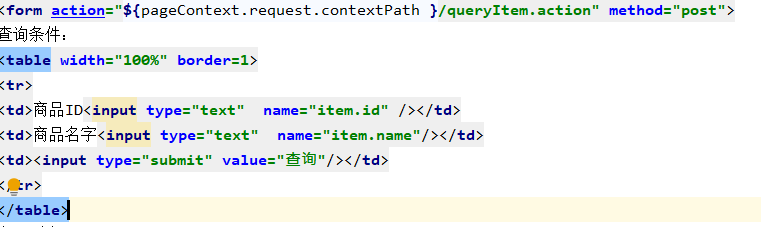
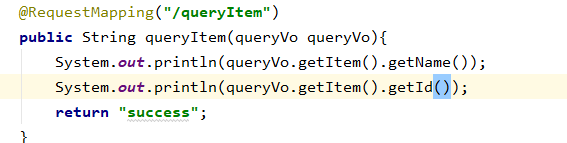

 挺好玩的 hhhh
自定义参数绑定
由于日期数据有很多种格式,springmvc没办法把字符串转换成日期类型。所以需要自定义参数绑定。
前端控制器接收到请求后,找到注解形式的处理器适配器,对RequestMapping标记的方法进行适配,并对方法中的形参进行参数绑定。可以在springmvc处理器适配器上自定义转换器Converter进行参数绑定。
一般使用
就他妈挺离谱的,mvc不是有三个组件嘛 分别是映射器、处理器、还有视图解析器
如果在springmvc.xml 里面加了
HandlerMapping的实现类的作用
实现类RequestMappingHandlerMapping,它会处理@RequestMapping 注解,并将其注册到请求映射表中。
HandlerAdapter的实现类的作用
实现类RequestMappingHandlerAdapter,则是处理请求的适配器,确定调用哪个类的哪个方法,并且构造方法参数,返回值。
最离谱的地方来了,如果要转换,应该在springmvc.xml 里面配置转换器,其实这个功能是适配器来处理的。
我一开始把配置文件放到了视图解析器的下面,然后一直不执行,报400的错误,说语法有问题,就是上面提到的 springmvc不能将string类型转换成date 。血泪,注意一定要把 转换器放到视图解析器之前
2020-09-10
太离谱了,今天测试的时候一直出问题,原来写的这个日期格式转换器根本就没有执行。是实体里面的注解执行的…….真的太离谱了
我现在好像弄明白了,
现在解决方法就是直接 加
  <!-- 配置controller扫描包 -->
    <context:component-scan base-package="Controller" />
    <!-- 注解驱动 -->
    <mvc:annotation-driven />
    <!-- 转换器配置 -->
    <bean id="conversionService" class="org.springframework.format.support.FormattingConversionServiceFactoryBean">
        <property name="converters">
            <list>
                <bean class="Converter.DateConverter" />
            </list>
        </property>
    </bean>
    <!-- 配置视图解析器 -->
    <bean class="org.springframework.web.servlet.view.InternalResourceViewResolver">
        <!-- 配置逻辑视图的前缀 -->
        <property name="prefix" value="/WEB-INF/jsp/" />
        <!-- 配置逻辑视图的后缀 -->
        <property name="suffix" value=".jsp" />
    </bean>
springMvc.xml
//Converter<S, T>
//S:source,需要转换的源的类型
//T:target,需要转换的目标类型
public class DateConverter implements Converter<String, Date> {

    @Override
    public Date convert(String source) {
        try {
            // 把字符串转换为日期类型
            SimpleDateFormat simpleDateFormat = new SimpleDateFormat("yyyy-MM-dd");
            Date date = (Date) simpleDateFormat.parse(source);
            return date;
        } catch (ParseException e) {
            // TODO Auto-generated catch block
            e.printStackTrace();
        }
        // 如果转换异常则返回空
        return null;
    }
}
mvc和struts2的不同
1、 springmvc的入口是一个servlet即前端控制器,而struts2入口是一个filter过滤器。
2、 springmvc是基于方法开发(一个url对应一个方法),请求参数传递到方法的形参,可以设计为单例或多例(建议单例),struts2是基于类开发,传递参数是通过类的属性,只能设计为多例。
3、 Struts采用值栈存储请求和响应的数据,通过OGNL存取数据,springmvc通过参数解析器是将request请求内容解析,并给方法形参赋值,将数据和视图封装成ModelAndView对象,最后又将ModelAndView中的模型数据通过request域传输到页面。Jsp视图解析器默认使用jstl。
绑定数组
可以直接接收,或者pojo的属性接收,穿过来为空的时候好像必须把 @RequestParam(required=false)打开,不然不报400的错误。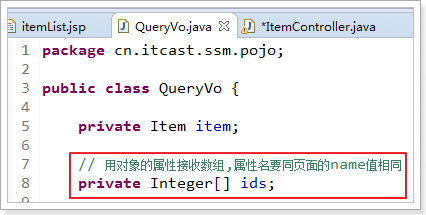
/**
 * 包装类型 绑定数组类型,可以使用两种方式,pojo的属性接收,和直接接收
 *
 * @param queryVo
 * @return
 */
@RequestMapping("queryItem")
public String queryItem(QueryVo queryVo, Integer[] ids) {

    System.out.println(queryVo.getItem().getId());
    System.out.println(queryVo.getItem().getName());

    System.out.println(queryVo.getIds().length);
    System.out.println(ids.length);

    return "success"
绑定List
注意:接收List类型的数据必须是pojo的属性,如果方法的形参为ArrayList类型无法正确接收到数据。
<c:forEach items="${itemList }" var="item" varStatus="s">
<tr>
    <td><input type="checkbox" name="ids" value="${item.id}"/></td>
    <td>
        <input type="hidden" name="itemList[${s.index}].id" value="${item.id }"/>
        <input type="text" name="itemList[${s.index}].name" value="${item.name }"/>
    </td>
    <td><input type="text" name="itemList[${s.index}].price" value="${item.price }"/></td>
    <td><input type="text" name="itemList[${s.index}].createtime" value="<fmt:formatDate value="${item.createtime}" pattern="yyyy-MM-dd HH:mm:ss"/>"/></td>
    <td><input type="text" name="itemList[${s.index}].detail" value="${item.detail }"/></td>
    <td><a href="${pageContext.request.contextPath }/itemEdit.action?id=${item.id}">修改</a></td>
</tr>
</c:forEach>
${current} 当前这次迭代的(集合中的项
${status.first} 判断当前项是否为集合中的第一项,返回值为true或false
${status.last} 判断当前项是否为集合中的最
varStatus属性常用参数总结下:
${status.index} 输出行号,从0开始。
${status.count} 输出行号,从1开始。
${status.后一项,返回值为true或false
begin、end、step分别表示:起始序号,结束序号,跳跃步伐。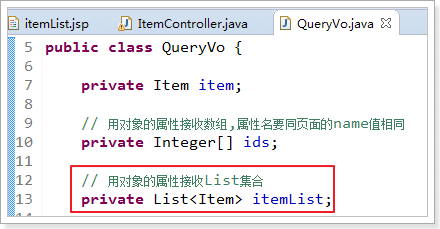
不知道为什么,如果什么都不填的话,就会报错400,难道vo对象里面的全部属性都要不为空吗,是不是要设置默认值,这样就不会报错了。先不想了,等遇到了这个问题再来想吧。有点想不明白。
@RequestMapping()
1.1. URL路径映射
@RequestMapping(value=”item”)或@RequestMapping(“/item”)
value的值是数组,可以将多个url映射到同一个方法
/**
 * 查询商品列表
 * @return
 */
@RequestMapping(value = { "itemList", "itemListAll" })
public ModelAndView queryItemList() {
    // 查询商品数据
    List<Item>list = this.itemService.queryItemList();

    // 创建ModelAndView,设置逻辑视图名
    ModelAndViewmv = new ModelAndView("itemList");

    // 把商品数据放到模型中
    mv.addObject("itemList", list);
    return mv;
}
1.2. 添加在类上面
在class上添加@RequestMapping(url)指定通用请求前缀,限制此类下的所有方法请求url必须以请求前缀开头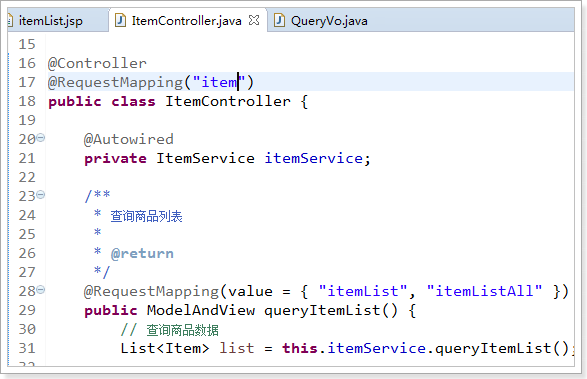
有种分类的感觉了。有那味了!我直呼内行。
此时需要进入queryItemList()方法的请求url为:
http://127.0.0.1:8080/springmvc-web2/item/itemList.action
或者
http://127.0.0.1:8080/springmvc-web2/item/itemListAll.action
1.3. 请求方法限定
除了可以对url进行设置,还可以限定请求进来的方法
限定GET方法
@RequestMapping(method = RequestMethod.GET)
如果通过POST访问则报错:
HTTP Status 405 - Request method ‘POST’ not supported
例如:
@RequestMapping(value = “itemList”,method = RequestMethod.POST)
限定POST方法
@RequestMapping(method = RequestMethod.POST)
如果通过GET访问则报错:
HTTP Status 405 - Request method ‘GET’ not supported
u GET和POST都可以
@RequestMapping(method = {RequestMethod.GET,RequestMethod.POST})
cotroller方法值返回,附件写的蛮好的,不写上来了
就跳转的方法,顺便传值
异常处理器
系统中异常包括两类:预期异常和运行时异常RuntimeException,前者通过捕获异常从而获取异常信息,后者主要通过规范代码开发、测试通过手段减少运行时异常的发生。
系统的dao、service、controller出现都通过throws Exception向上抛出,最后由springmvc前端控制器交由异常处理器进行异常处理,如下图: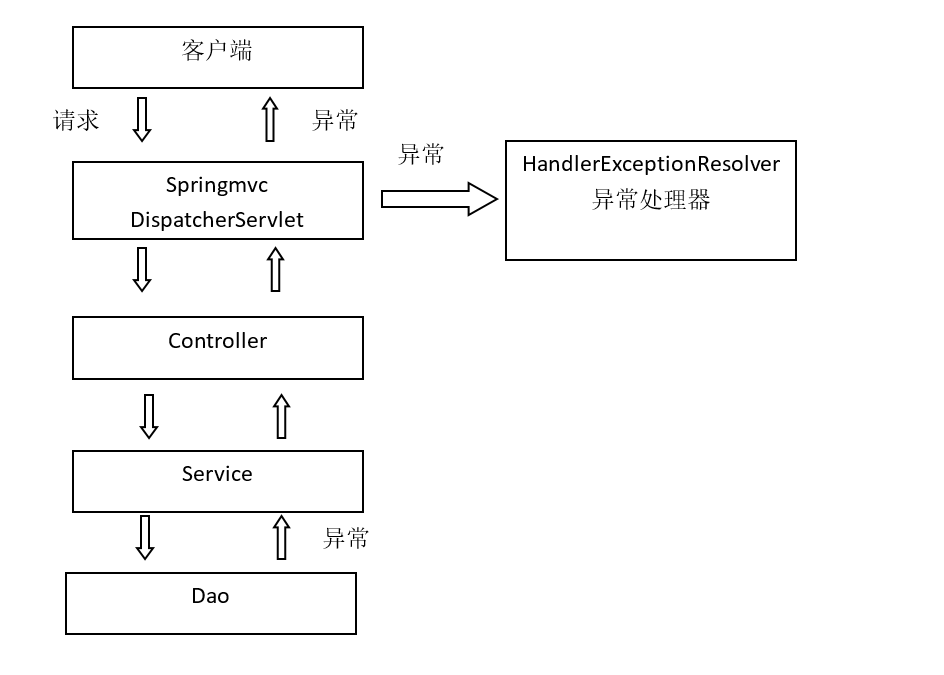
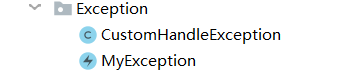
package Exception;

import org.springframework.web.servlet.HandlerExceptionResolver;
import org.springframework.web.servlet.ModelAndView;

import javax.servlet.http.HttpServletRequest;
import javax.servlet.http.HttpServletResponse;
import java.io.PrintWriter;
import java.io.StringWriter;
import java.io.Writer;

public class CustomHandleException implements HandlerExceptionResolver {
    @Override
    public ModelAndView resolveException(HttpServletRequest httpServletRequest, HttpServletResponse httpServletResponse, Object o, Exception e) {
        // 定义异常信息
        String msg;

        // 判断异常类型
        if (e instanceof MyException) {
            // 如果是自定义异常,读取异常信息
            msg = e.getMessage();
        } else {
            // 如果是运行时异常,则取错误堆栈,从堆栈中获取异常信息
            Writer out = new StringWriter();
            PrintWriter s = new PrintWriter(out);
            e.printStackTrace(s);
            msg = out.toString();

        }
        // 把错误信息发给相关人员,邮件,短信等方式
        // TODO

        // 返回错误页面,给用户友好页面显示错误信息
        ModelAndView modelAndView = new ModelAndView();
        modelAndView.addObject("msg", msg);
        modelAndView.setViewName("error");
        return modelAndView;
    }
}
package Exception;

public class MyException extends Exception {
    private String message;
    public MyException() {
        super();
    }
    public MyException(String message) {
        super();
        this.message = message;
    }
    public String getMessage() {
        return message;
    }
    public void setMessage(String message) {
        this.message = message;
    }
}
<%@ page language="java" contentType="text/html; charset=UTF-8"
         pageEncoding="UTF-8"%>
<!DOCTYPE html PUBLIC "-//W3C//DTD HTML 4.01 Transitional//EN" "http://www.w3.org/TR/html4/loose.dtd">
<html>
<head>
    <meta http-equiv="Content-Type" content="text/html; charset=UTF-8">
    <title>Insert title here</title>
</head>
<body>
<h1>系统发生异常了!</h1>
<br />
<h1>异常信息</h1>
<br />
<h2>${msg }</h2>
</body>
</html>
最后在springmvc.cml里面注册
不管是是自定义错误还是运行错误都会被异常处理器抓住。 就不展示了,就和error
上传图片
首先创建虚拟目录
虽然教程是eclipse的,但是根据我的聪明才智,我直接就找到了idea的配置
直接添加一个就好了,然后就可以通过http://localhost:8080/pic/xxx.jpg 来访问图片了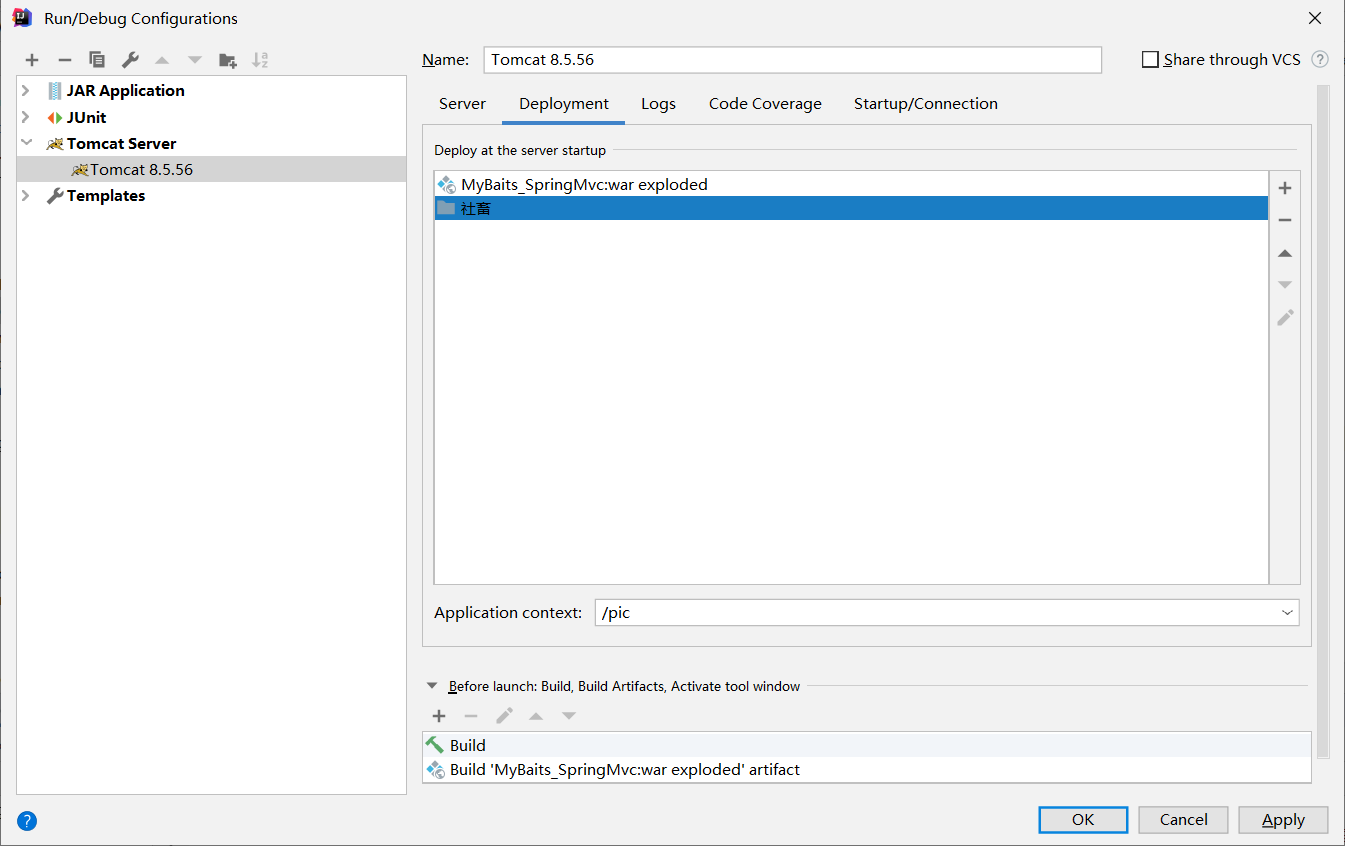
加入jar包
实现图片上传需要加入的jar包,如下图: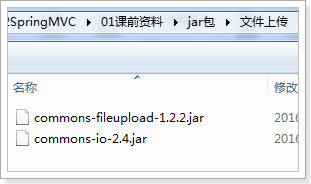
把两个jar包放到工程的lib文件夹中
配置上传解析器
在springmvc.xml中配置文件上传解析器
<!-- 文件上传,id必须设置为multipartResolver -->
<bean id="multipartResolver"
    class="org.springframework.web.multipart.commons.CommonsMultipartResolver">
    <!-- 设置文件上传大小 -->
    <property name="maxUploadSize" value="5000000" />
</bean>
在jsp文件修改
注意一下: 的目录是localhost:8080 而不是项目的目录。
            <tr>
                <td>商品图片</td>
                <td>
                    <c:if test="${item.pic!=null}">
                        <img src="/pic/${item.pic}" width=100 height=100/>
                        <br/>
                    </c:if>
                    <input type="file"  name="pictureFile"/>
                </td>
            </tr>
在表单提交的时候,必须把enctype改成下面的那个。
<form id="itemForm"    action="${pageContext.request.contextPath }/updateItem.action" method="post"
          enctype="multipart/form-data">
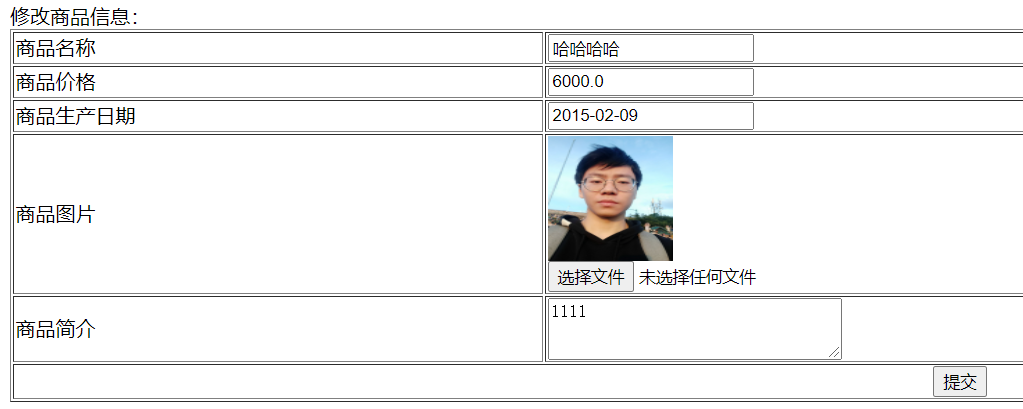
看直接可以上传上来了。 就是上传的时候有点离谱,因为我的电脑名字取名 有空格。注意要切割开来。还要记得加一个/ 不然存的位置就在上一层。
请求Json格式
在这里前端将json格式的文件发到后台来,这时候需要导入三个个关于json解析的jar包
jackson-annotations-2.4.0.jarjackson-core-2.4.2.jarjackson-databind-2.4.2.jar
将其导入项目中,然后就是配置xml文件,如果一开始配置了注解驱动的话,(
这里就不需要配置了。上文中 自定义参数绑定 那里有,如果不知道可以去看看
一开始我直接用的之前的polo类,有个什么什么date 估计不太行,或者是我自己json格式写错了。一直报400的错误,把我搞得好烦。后面我重写了一个polo类,
public class ItemNoTime {
    private int id;
    private String name;
    private double price;
    private String pic;
然后controller里面是这样的:
    //测试返回接受和返回json
    @RequestMapping("/testJson")
    public @ResponseBody ItemNoTime testJson(@RequestBody ItemNoTime itemNoTime) {
        System.out.println(itemNoTime);
        return itemNoTime;
    }
我用谷歌的插件向服务器发送数据 看看效果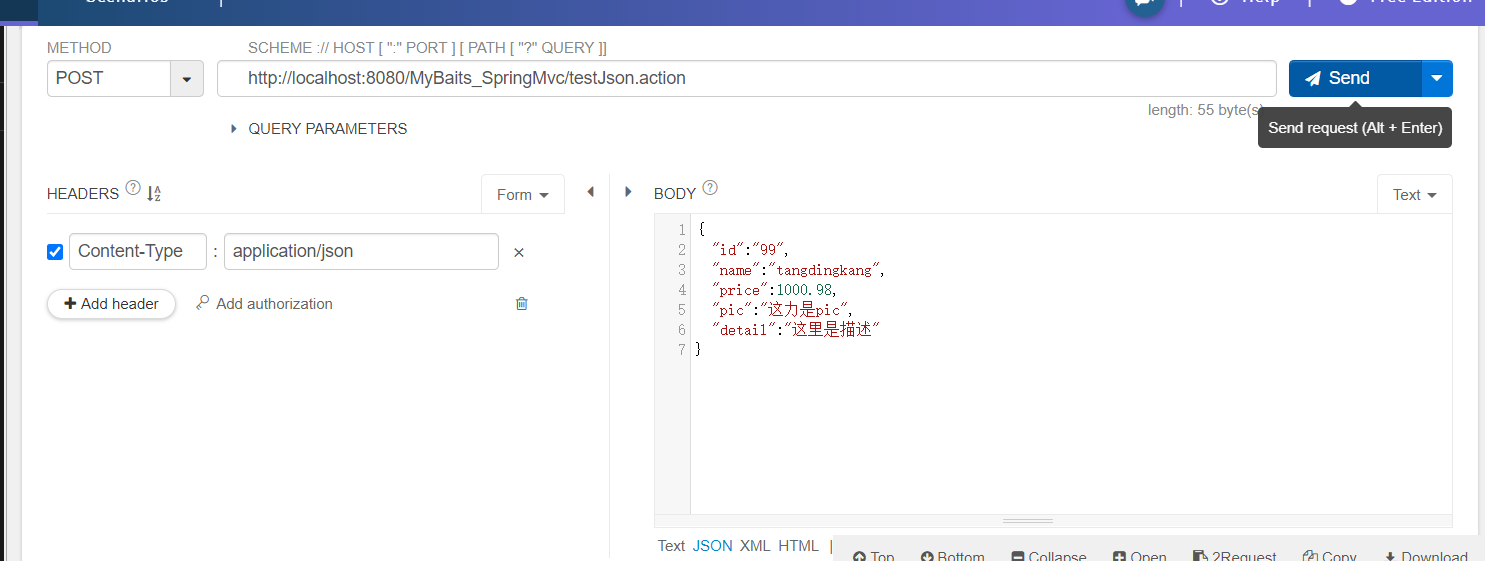

返回的时候我都不知道有多开心。唉,现在我试试将date数据看是不是能调用日期转换器转换。
还有就是这个东西是不是和polo里面的顺序一样啊,如果不一致,它就会报400错误,而且好像不能调用哪个转换器。估计都只能换成string类型。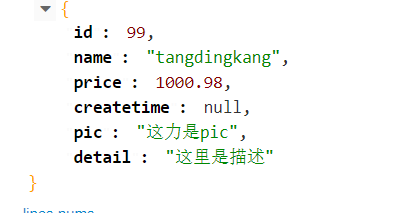
1. RESTful支持
1.1. 什么是restful?
Restful就是一个资源定位及资源操作的风格。不是标准也不是协议,只是一种风格。基于这个风格设计的软件可以更简洁,更有层次,更易于实现缓存等机制。
资源:互联网所有的事物都可以被抽象为资源
资源操作:使用POST、DELETE、PUT、GET,使用不同方法对资源进行操作。
分别对应添加、 删除、修改、查询。
传统方式操作资源
http://127.0.0.1/item/queryItem.action?id=1 查询,GET
http://127.0.0.1/item/saveItem.action 新增,POST
http://127.0.0.1/item/updateItem.action 更新,POST
http://127.0.0.1/item/deleteItem.action?id=1 删除,GET或POST
使用RESTful操作资源
http://127.0.0.1/item/1 查询,GET
http://127.0.0.1/item 新增,POST
http://127.0.0.1/item 更新,PUT
http://127.0.0.1/item/1 删除,DELETE
1.2. 需求
1.3. 从URL上获取参数
使用RESTful风格开发的接口,根据id查询商品,接口地址是:
http://127.0.0.1/item/1
我们需要从url上获取商品id,步骤如下:
1. 使用注解@RequestMapping(“item/{id}”)声明请求的url
{xxx}叫做占位符,请求的URL可以是“item /1”或“item/2”
2. 使用(@PathVariable() Integer id)获取url上的数据
/**
 * 使用RESTful风格开发接口,实现根据id查询商品
 *
 * @param id
 * @return
 */
@RequestMapping("item/{id}")
@ResponseBody
public Item queryItemById(@PathVariable() Integer id) {
    Itemitem = this.itemService.queryItemById(id);
    return item;
}
如果@RequestMapping中表示为”item/{id}”,id和形参名称一致,@PathVariable不用指定名称。如果不一致,例如”item/{ItemId}”则需要指定名称@PathVariable(“itemId”)。
http://127.0.0.1/item/123?id=1
注意两个区别
1. @PathVariable是获取url上数据的。@RequestParam获取请求参数的(包括post表单提交)
2. 如果加上@ResponseBody注解,就不会走视图解析器,不会返回页面,目前返回的json数据。如果不加,就走视图解析器,返回页面
记得加上.action 不然web.xml 可不会拦截进入springmvc。
拦截器
1.1. 正常流程测试
浏览器访问地址
http://127.0.0.1:8080/springmvc-web2/itemList.action
1.1.1. 运行流程
控制台打印:
HandlerInterceptor1..preHandle..
HandlerInterceptor2..preHandle..
HandlerInterceptor2..postHandle..
HandlerInterceptor1..postHandle..
HandlerInterceptor2..afterCompletion..
HandlerInterceptor1..afterCompletion..
1.2. 中断流程测试
浏览器访问地址
http://127.0.0.1:8080/springmvc-web2/itemList.action
1.2.1. 运行流程
HandlerInterceptor1的preHandler方法返回false,HandlerInterceptor2返回true,运行流程如下:
HandlerInterceptor1..preHandle..
从日志看出第一个拦截器的preHandler方法返回false后第一个拦截器只执行了preHandler方法,其它两个方法没有执行,第二个拦截器的所有方法不执行,且Controller也不执行了。
HandlerInterceptor1的preHandler方法返回true,HandlerInterceptor2返回false,运行流程如下:
HandlerInterceptor1..preHandle..
HandlerInterceptor2..preHandle..
HandlerInterceptor1..afterCompletion..
从日志看出第二个拦截器的preHandler方法返回false后第一个拦截器的postHandler没有执行,第二个拦截器的postHandler和afterCompletion没有执行,且controller也不执行了。
总结:
preHandle按拦截器定义顺序调用
postHandler按拦截器定义逆序调用
afterCompletion按拦截器定义逆序调用
postHandler在拦截器链内所有拦截器返成功调用
afterCompletion只有preHandle返回true才调用
拦截器应用
1、有一个登录页面,需要写一个Controller访问登录页面
2、登录页面有一提交表单的动作。需要在Controller中处理。
a) 判断用户名密码是否正确(在控制台打印)
b) 如果正确,向session中写入用户信息(写入用户名username)
c) 跳转到商品列表
3、拦截器。
a) 拦截用户请求,判断用户是否登录(登录请求不能拦截)
b) 如果用户已经登录。放行
c) 如果用户未登录,跳转到登录页面。
1.1.1. 编写登录jsp
<%@ page language="java" contentType="text/html; charset=UTF-8"
    pageEncoding="UTF-8"%>
<!DOCTYPE html PUBLIC "-//W3C//DTD HTML 4.01 Transitional//EN" "http://www.w3.org/TR/html4/loose.dtd">
<html>
<head>
<meta http-equiv="Content-Type"content="text/html; charset=UTF-8">
<title>Insert title here</title>
</head>
<body>

<form action="${pageContext.request.contextPath }/user/login.action">
<label>用户名:</label>
<br>
<input type="text"name="username">
<br>
<label>密码:</label>
<br>
<input type="password"name="password">
<br>
<input type="submit">
</form>
</body>
</html>
1.1.2. 用户登陆Controller
@Controller
@RequestMapping("user")
public class UserController {

    /**
     * 跳转到登录页面
     *
     * @return
     */
    @RequestMapping("toLogin")
    public String toLogin() {
       return "login";
    }

    /**
     * 用户登录
     *
     * @param username
     * @param password
     * @param session
     * @return
     */
    @RequestMapping("login")
    public String login(String username, String password, HttpSession session) {
       // 校验用户登录
       System.out.println(username);
       System.out.println(password);

       // 把用户名放到session中
       session.setAttribute("username", username);

       return "redirect:/item/itemList.action";
    }

}
1.1.3. 编写拦截器
@Override
public boolean preHandle(HttpServletRequest request, HttpServletResponse response, Object arg2) throws Exception {
    // 从request中获取session
    HttpSessionsession = request.getSession();
    // 从session中获取username
    Objectusername = session.getAttribute("username");
    // 判断username是否为null
    if (username != null) {
       // 如果不为空则放行
       return true;
    }else {
       // 如果为空则跳转到登录页面
       response.sendRedirect(request.getContextPath() + "/user/toLogin.action");
    }

    return false;
}
1.1.4. 配置拦截器
只能拦截商品的url,所以需要修改ItemController,让所有的请求都必须以item开头,如下图:
在springmvc.xml配置拦截器
如果不配置这个,就一直跳转。hhhh很好玩,估计浏览器都累了
<mvc:interceptor>
    <!-- 配置商品被拦截器拦截 -->
    <mvc:mappingpath="/item/**"/>
    <!-- 配置具体的拦截器 -->
    <bean class="cn.itcast.ssm.interceptor.LoginHandlerInterceptor"/>
</mvc:interceptor>

若有收获,就点个赞吧
0 人点赞


