1、基本概念
1、运行时字段仅在查询检索数据时生效,不会占用存储,结合fields配置,可在检索结果中返回;其增加获取数据的灵活能力,但是速度会慢(由runtime script决定性能影响)。 2、运行时字段能干什么:
- 在不重新索引数据的情况下向现有文档添加字段
- 在不了解数据结构的情况下开始处理数据
- 在查询时覆盖从索引字段返回的值
- 为特定用途定义字段而不修改底层架构
2、定义运行时字段
2.1 Mapping定义
1、在mapping下,使用“runtime”定义运行时字段;JSON结构
- <_field_> 运行时字段名
- type 字段类型
- script 运行时字段取值脚本,参照【专题研究】下的【8、Script脚本】;官网参照
2、备注:
- mapping的dynamic=“runtime”,则新加的字段,会自动作为运行时字段添加到索引中
- type取值:boolean、composite、date、double、geo_point、ip、keyword、long、lookup
- script为空时,检索数据时会自动去_source中取同名字段值;取不到则忽略
- 详细可参照:https://www.elastic.co/guide/en/elasticsearch/reference/8.2/runtime-mapping-fields.html
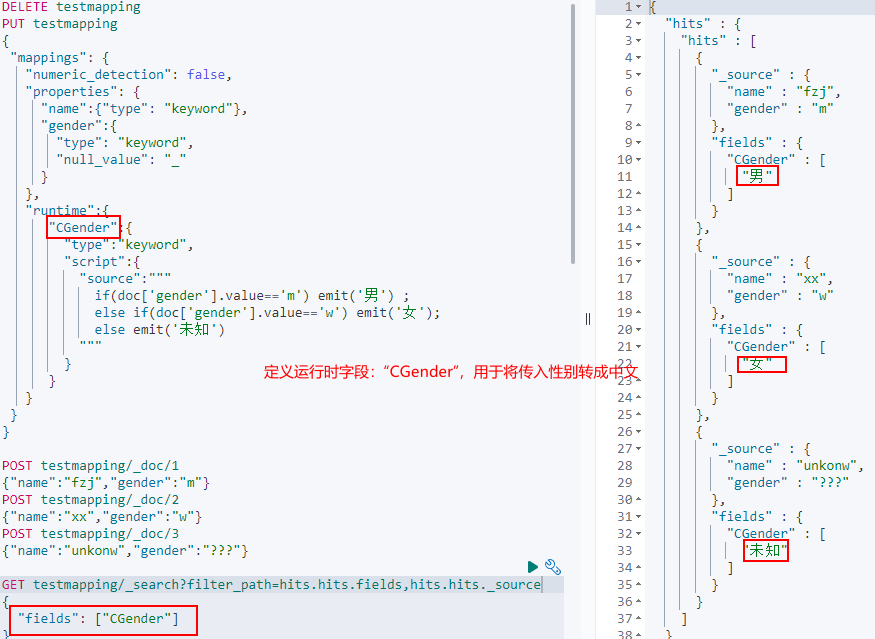
DELETE testmappingPUT testmapping{"mappings": {"numeric_detection": false,"properties": {"name":{"type": "keyword"},"gender":{"type": "keyword","null_value": "_"}},"runtime":{"CGender":{"type":"keyword","script":{"source":"""if(doc['gender'].value=='m') emit('男') ;else if(doc['gender'].value=='w') emit('女');else emit('未知')"""}}}}}POST testmapping/_doc/1{"name":"fzj","gender":"m"}POST testmapping/_doc/2{"name":"xx","gender":"w"}POST testmapping/_doc/3{"name":"unkonw","gender":"???"}GET testmapping/_search?filter_path=hits.hits.fields,hits.hits._source{"fields": ["CGender"]}
2.2 Search定义
1、_search中使用“runtime_mappings ”,和Mapping中定义格式一样 2、搜索时可基于其他运行时字段重新定义新的运行时字段;具体看官网 3、详细参照:https://www.elastic.co/guide/en/elasticsearch/reference/8.2/runtime-search-request.html
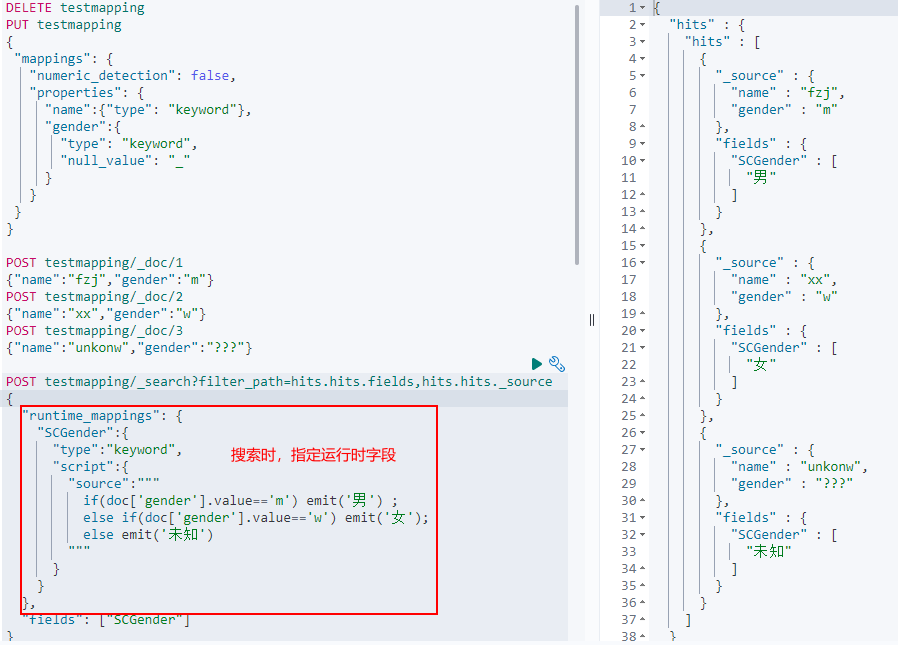
DELETE testmapping
PUT testmapping
{
 "mappings": {
   "numeric_detection": false,
   "properties": {
     "name":{"type": "keyword"},
     "gender":{
       "type": "keyword",
       "null_value": "_"
     }
   }
 }
}

POST testmapping/_doc/1
{"name":"fzj","gender":"m"}
POST testmapping/_doc/2
{"name":"xx","gender":"w"}
POST testmapping/_doc/3
{"name":"unkonw","gender":"???"}

POST testmapping/_search?filter_path=hits.hits.fields,hits.hits._source
{
  "runtime_mappings": {
    "SCGender":{
      "type":"keyword",
      "script":{
        "source":"""
          if(doc['gender'].value=='m') emit('男') ;
          else if(doc['gender'].value=='w') emit('女');
          else emit('未知')
        """
      }
    }
  },
  "fields": ["SCGender"]
}
3、查询时覆盖字段值
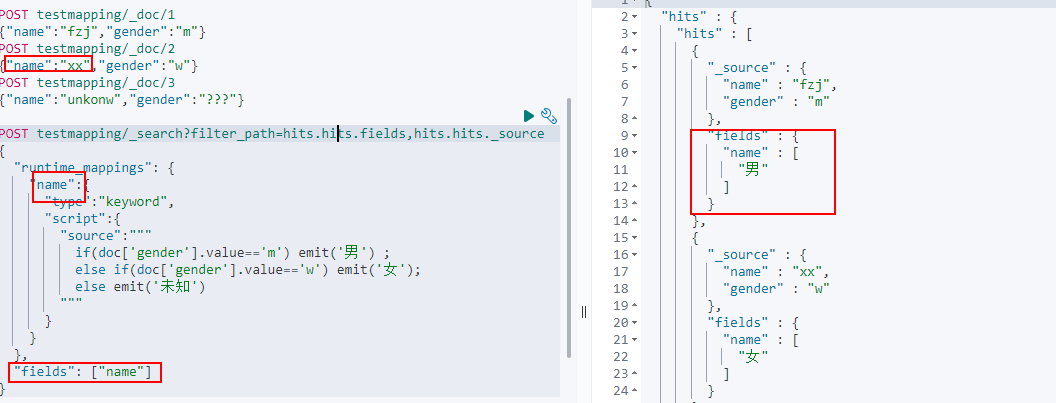
1、覆盖是个伪命题;将mapping中定义的普通字段值重新计算得到新值返回,返回结果使用fields 2、和Search定义运行时字段一样,只是定义的字段名和_source已有字段名一致; https://www.elastic.co/guide/en/elasticsearch/reference/8.2/runtime-override-values.html
4、获取运行时字段值
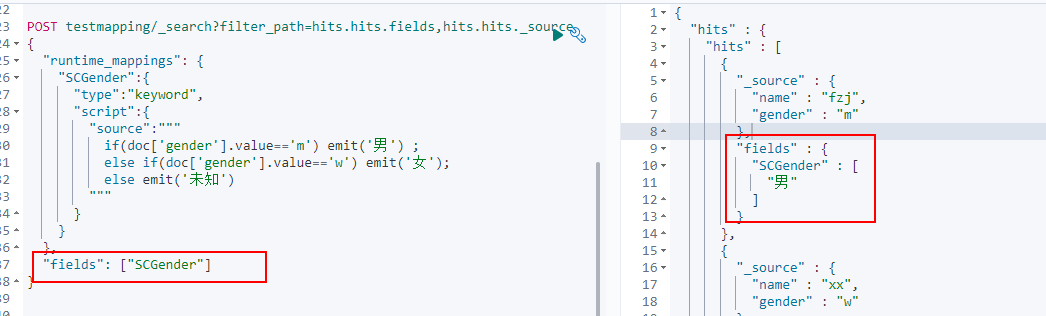
1、运行时字段,不会在_source中出现,若想在查询结果中,有此字段,需要将字段加入 fields中 2、具体上面示例中已演示,这里不赘述 https://www.elastic.co/guide/en/elasticsearch/reference/8.2/runtime-retrieving-fields.html
5、查询运行时字段
1、运行时和Mapping映射定义的运行时字段,都可参与query查询;
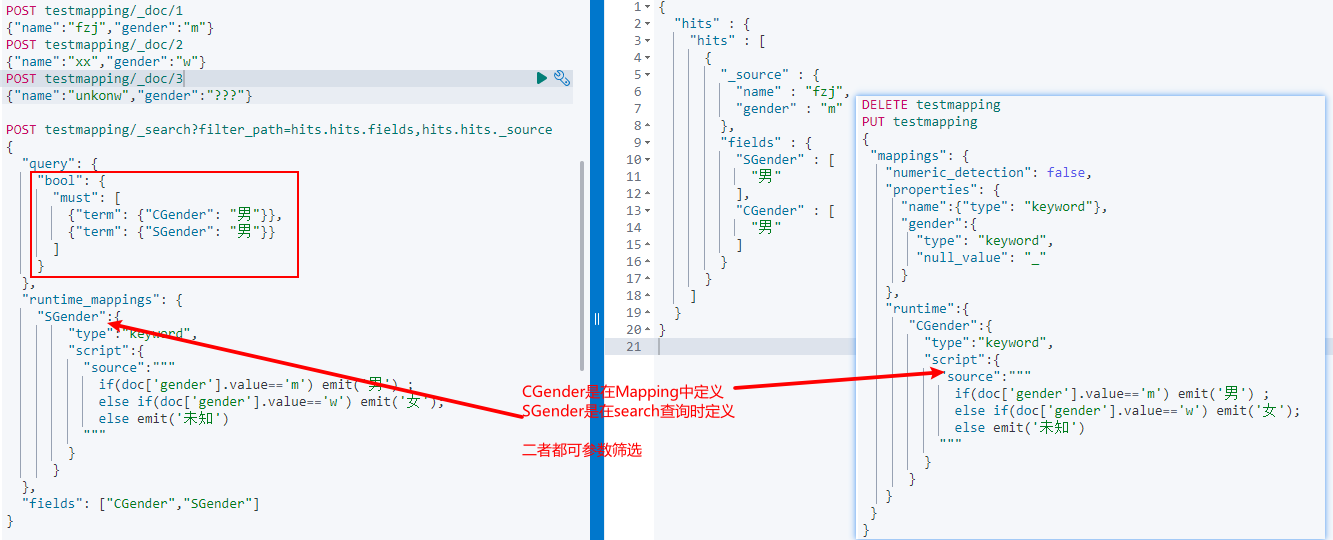
DELETE testmapping
PUT testmapping
{
 "mappings": {
   "numeric_detection": false,
   "properties": {
     "name":{"type": "keyword"},
     "gender":{
       "type": "keyword",
       "null_value": "_"
     }
   },
   "runtime":{
      "CGender":{
        "type":"keyword",
        "script":{
          "source":"""
            if(doc['gender'].value=='m') emit('男') ;
            else if(doc['gender'].value=='w') emit('女');
            else emit('未知')
          """
        }
      }
   }
 }
}

POST testmapping/_doc/1
{"name":"fzj","gender":"m"}
POST testmapping/_doc/2
{"name":"xx","gender":"w"}
POST testmapping/_doc/3
{"name":"unkonw","gender":"???"}

POST testmapping/_search?filter_path=hits.hits.fields,hits.hits._source
{
  "query": {
    "bool": {
      "must": [
        {"term": {"CGender": "男"}},
        {"term": {"SGender": "男"}}
      ]
    }
  },
  "runtime_mappings": {
    "SGender":{
        "type":"keyword",
        "script":{
          "source":"""
            if(doc['gender'].value=='m') emit('男') ;
            else if(doc['gender'].value=='w') emit('女');
            else emit('未知')
          """
        }
      }
  },
  "fields": ["CGender","SGender"]
}
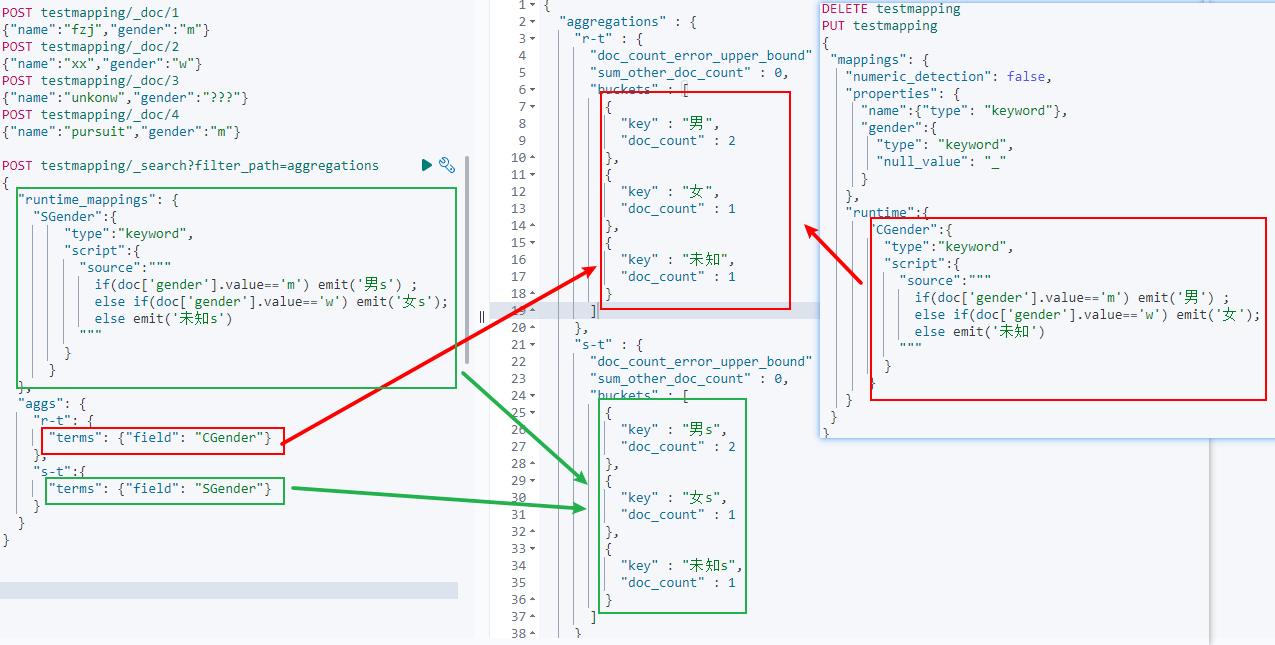
6、聚合运行时字段
和普通字段支持聚合操作一样
DELETE testmapping
PUT testmapping
{
 "mappings": {
   "numeric_detection": false,
   "properties": {
     "name":{"type": "keyword"},
     "gender":{
       "type": "keyword",
       "null_value": "_"
     }
   },
   "runtime":{
      "CGender":{
        "type":"keyword",
        "script":{
          "source":"""
            if(doc['gender'].value=='m') emit('男') ;
            else if(doc['gender'].value=='w') emit('女');
            else emit('未知')
          """
        }
      }
   }
 }
}

POST testmapping/_doc/1
{"name":"fzj","gender":"m"}
POST testmapping/_doc/2
{"name":"xx","gender":"w"}
POST testmapping/_doc/3
{"name":"unkonw","gender":"???"}
POST testmapping/_doc/4
{"name":"pursuit","gender":"m"}

POST testmapping/_search?filter_path=aggregations
{
  "runtime_mappings": {
    "SGender":{
        "type":"keyword",
        "script":{
          "source":"""
            if(doc['gender'].value=='m') emit('男s') ;
            else if(doc['gender'].value=='w') emit('女s');
            else emit('未知s')
          """
        }
      }
  },
  "aggs": {
    "r-t": {
      "terms": {"field": "CGender"}
    },
    "s-t":{
      "terms": {"field": "SGender"}
    }
  }
}
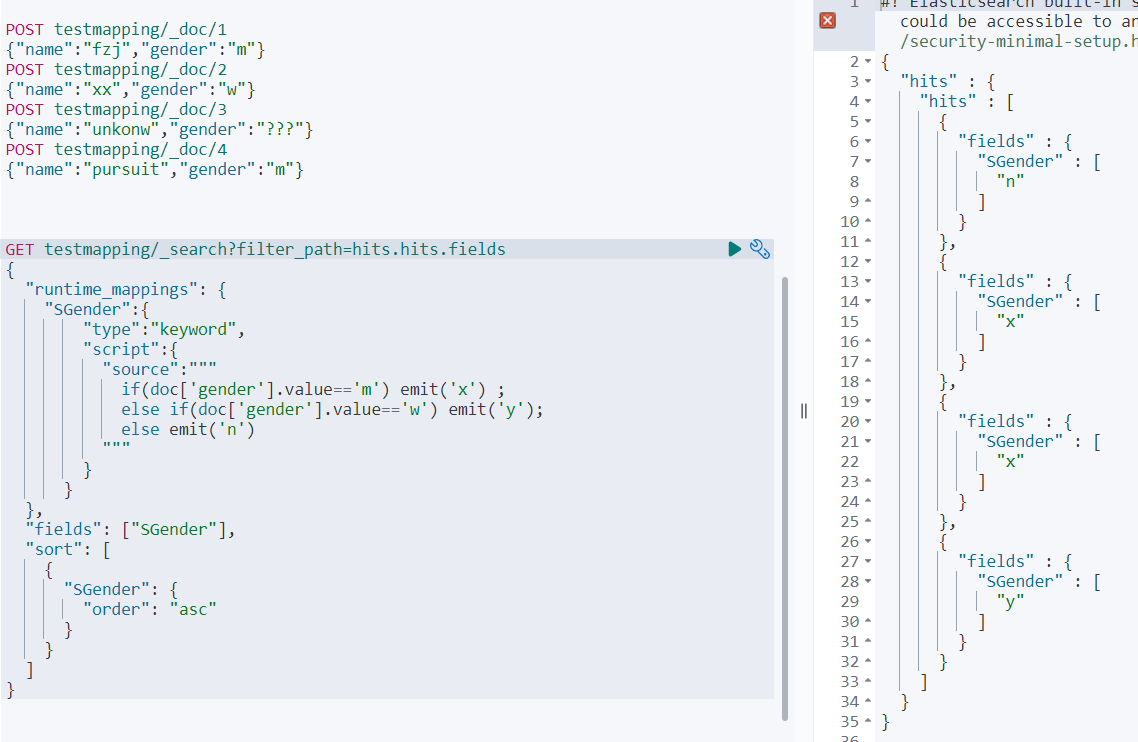
7、基于运行时字段排序
DELETE testmapping
PUT testmapping
{
 "mappings": {
   "numeric_detection": false,
   "properties": {
     "name":{"type": "keyword"},
     "gender":{
       "type": "keyword",
       "null_value": "_"
     }
   },
   "runtime":{
      "CGender":{
        "type":"keyword",
        "script":{
          "source":"""
            if(doc['gender'].value=='m') emit('男') ;
            else if(doc['gender'].value=='w') emit('女');
            else emit('未知')
          """
        }
      }
   }
 }
}

POST testmapping/_doc/1
{"name":"fzj","gender":"m"}
POST testmapping/_doc/2
{"name":"xx","gender":"w"}
POST testmapping/_doc/3
{"name":"unkonw","gender":"???"}
POST testmapping/_doc/4
{"name":"pursuit","gender":"m"}


GET testmapping/_search?filter_path=hits.hits.fields
{
  "runtime_mappings": {
    "SGender":{
        "type":"keyword",
        "script":{
          "source":"""
            if(doc['gender'].value=='m') emit('x') ;
            else if(doc['gender'].value=='w') emit('y');
            else emit('n')
          """
        }
      }
  },
  "fields": ["SGender"],
  "sort": [
    {
      "SGender": {
        "order": "asc"
      }
    }
  ]
}
8、基于运行时字段浏览数据
1、使用script脚本,在运行时字段中,对文档数据做一些特殊处理; 2、script 运行时字段取值脚本,参照【专题研究】下的【8、Script脚本】 3、官网文档:https://www.elastic.co/guide/en/elasticsearch/reference/8.2/runtime-examples.html

若有收获,就点个赞吧
0 人点赞


