create a cluster
concept
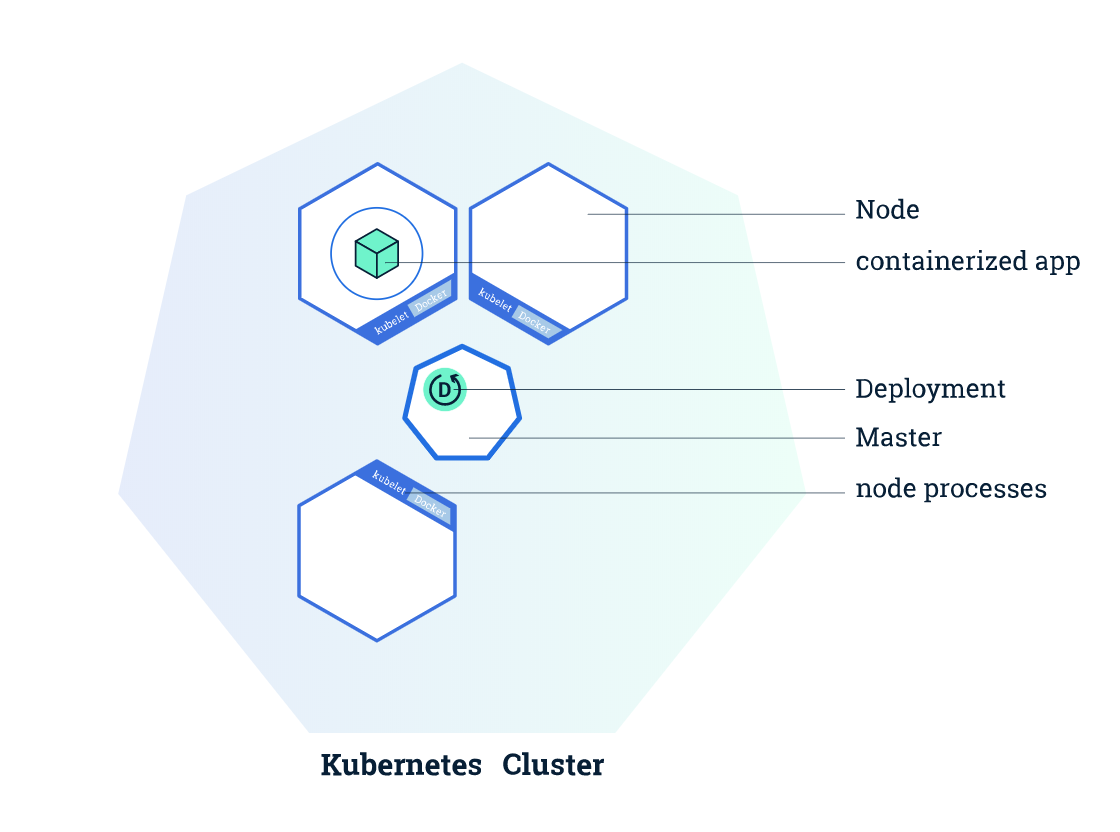
集群图
Kubernetes 是一个生产级的开源平台,用于协调计算机集群内部和跨计算机集群的应用程序容器的分发(调度)和运行。?这句话不是很明白
K8s集群由两种资源组成:
- 一个master是集群的调度节点
- Nodes 是应用程序实际运行的工作节点
interactive learning
使用minikube创建集群minikube version minikube start
使用minikube 启动vm,并让k8s集群在vm上运行
kubectl version 查看集群版本
client version is the kubectl version
server version is the Kubernetes installed on the master
Client Version: version.Info{Major:"1", Minor:"15", GitVersion:"v1.15.2",GitCommit:"f6278300bebbb750328ac16ee6dd3aa7d3549568",GitTreeState:"clean", BuildDate:"2019-08-05T09:23:26Z",GoVersion:"go1.12.5", Compiler:"gc", Platform:"linux/amd64"}Server Version: version.Info{Major:"1", Minor:"15", GitVersion:"v1.15.0",GitCommit:"e8462b5b5dc2584fdcd18e6bcfe9f1e4d970a529",GitTreeState:"clean", BuildDate:"2019-06-19T16:32:14Z",GoVersion:"go1.12.5", Compiler:"gc", Platform:"linux/amd64"}
kubectl cluster-info to view the cluster detailskubectl get nodes
NAME STATUS ROLES AGE VERSIONminikube Ready master 10m v1.15.0
show all nodes that can be used to host our applications
create a deployment
A Deployment is responsible for creating and updating instances of your application `·
kubectl run edgar --image=edgar --port=80
kubectl run deploymentName ImageAddress accessablePort
kubectl run ... performed few things:
- searched for a suitable node where an instance of the application could be run (we have only 1 available node)
- scheduled the application to run on that Node
- configured the cluster to reschedule the instance on a new Node when needed
interactive learning
explore your app
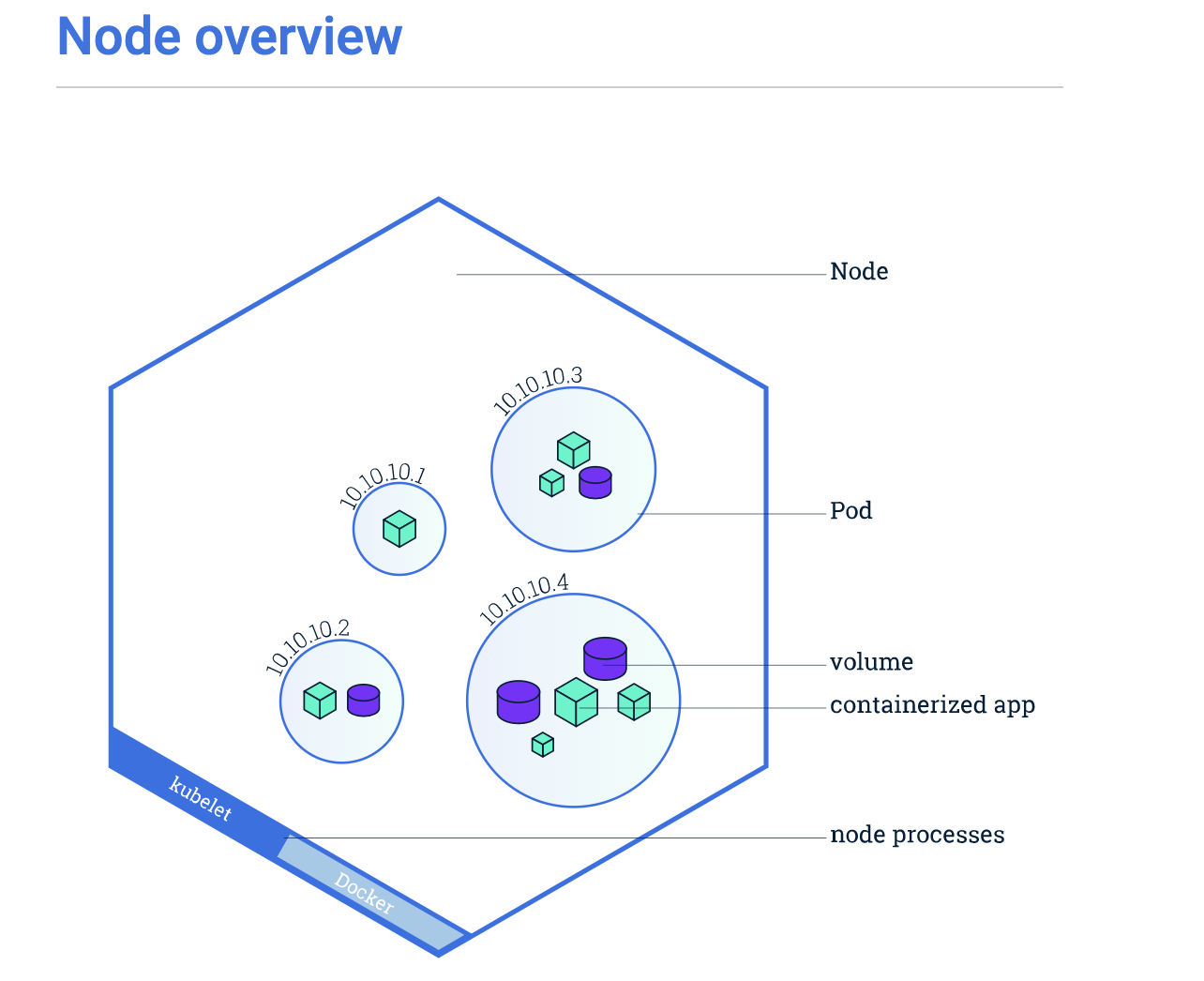
pods、nodes
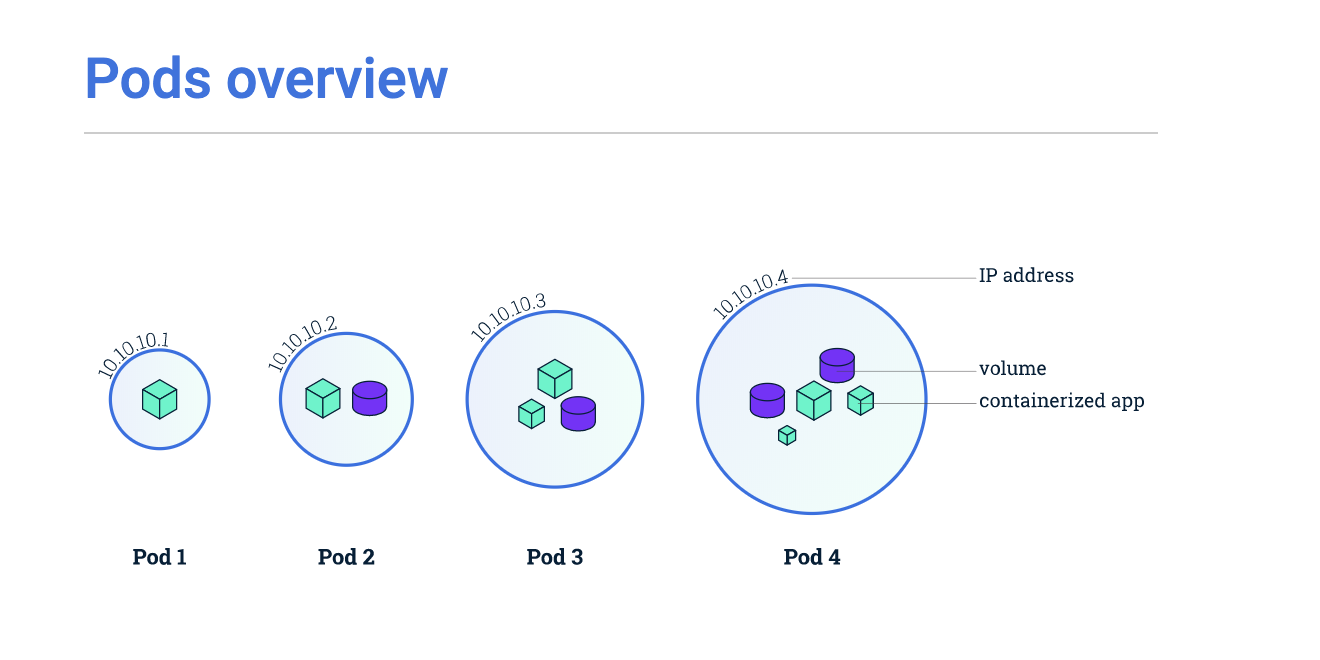
A Pod is a group of one or more application containers (such as Docker or rkt) and includes shared storage (volumes), IP address and information about how to run them.
_
troubleshootingkubectl get kubectl describ kubectl logs kubectl exec
interactive learning
show the app in the terminal
pods are running in an isolated, private network.
- open a new terminal and run the proxy.
kubectl proxy - tab to the first terminal and then will et the Pod name and query.
export POD_NAME=$(kubectl get pods -o go-template --template '{{range .items}}{{.metadata.name}}{{"\n"}}{{end}}') echo Name of the Pod: $POD_NAME
output: Name of the Pod: kubernetes-bootcamp-5b48cfdcbd-rpg65
- to visit application
curl http://localhost:8001/api/v1/namespaces/default/pods/$POD_NAME/proxy/
view the container logskubectl logs $POD_NAME
executing command on the container
list the environments variableskubectl exec $POD_NAME env
start a bash session in the Pod’s containerkubectl exec -ti $POD_NAME bash
check the application is upcurl localhost:8080
to close your container connection type **exit**
using a service to expose your app
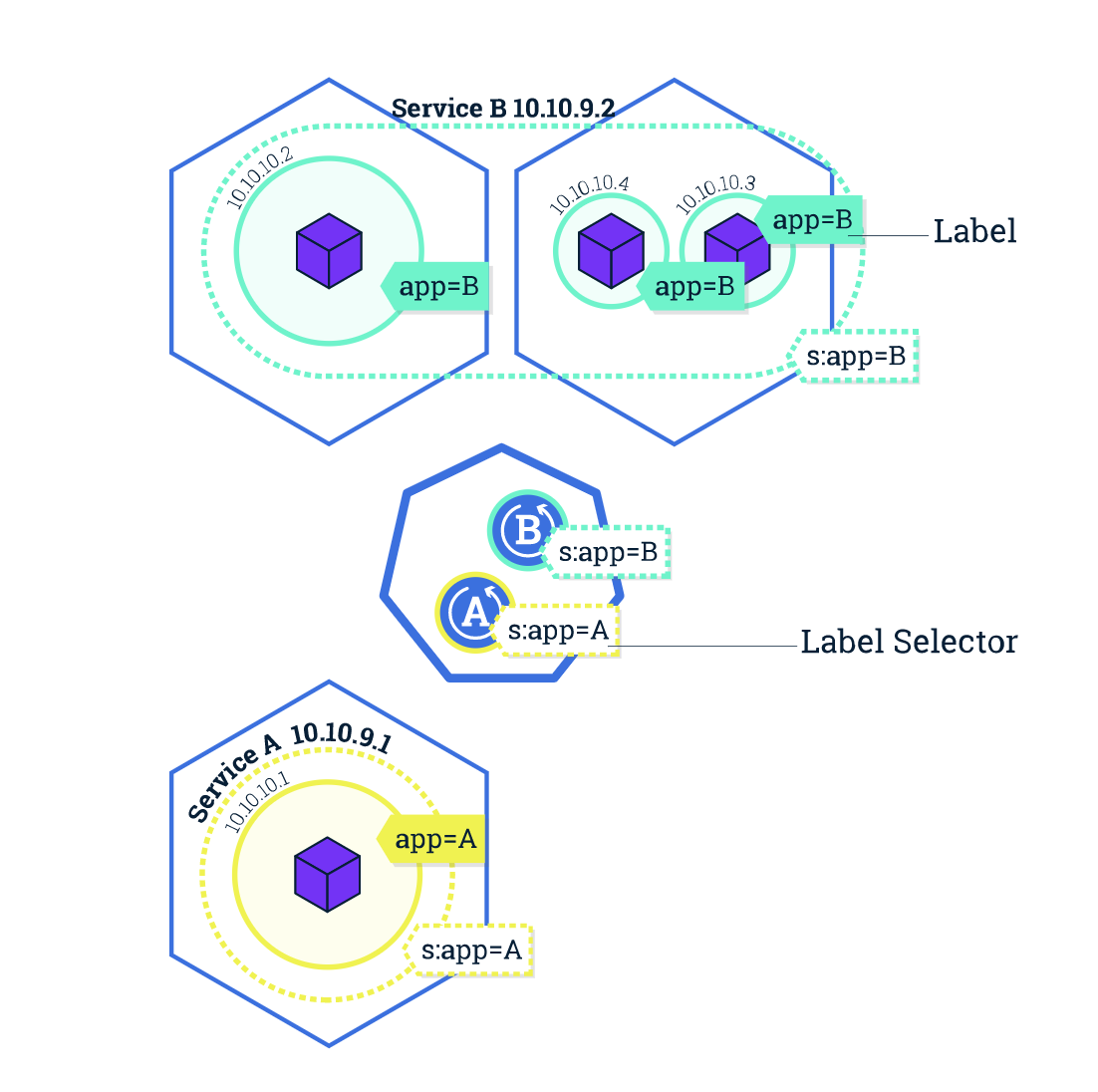
- Service
- Understand how labels and LabelSelector objects relate to a Service
Expose an application outside a Kubernetes cluster using a Service
concept
Services can be exposed in different ways by specifying a
typein the ServiceSpecClusterIP (default)
- _NodePort. _Superset of ClusterIP.
- _LoadBalancer. _Superset of NodePort
- _ExternalName. _No proxy is used

Labels are key/value pairs attached to objects and can be used in any number of ways:
- Designate objects for development, test, and production
- Embed version tags
- Classify an object using tags
interactive learning
create a new service
list current services from the clusterkubectl get services
to create a service and expose it to external traffickubectl expose deployment/kubernetes-bootcamp --type="NodePort" --port 8080
to get $NODE_PORTexport NODE_PORT=$(kubectl get services/kubernetes-bootcamp -o go-template='{{(index .spec.ports 0).nodePort}}')
test that the app is exposed outside of the cluster using curlcurl $(minikube ip):$NODE_PORT
using labels
to find the name of the labelkubectl describe deployment
labels: run=kubernetes-bootcamp
using label to query the Podkubectl get pods -l run=kubernetes-bootcamp
to apply a new label
label = key value
1 export POD_NAME=$(kubectl get pods -o go-template --template '{{range .items}}{{.metadata.name}}{{"\n"}}{{end}}')
2 kubectl label pod $POD_NAME app=v1
deleting a service
delete a service by target labelkubectl delete service -l run=kubernetes-bootcamp
confirm that the service is gonekubectl get services
confirm that route is not exposed anymorecurl $(minikube ip):$NODE_PORT
confirm that the app is still running inside the podkubectl exec -ti $POD_NAME curl localhost:8080 suceess
We see here that the application is up. This is because the Deployment is managing the application. To shut down the application, you would need to delete the Deployment as well.
scale your app
Scaling a Deployment
before: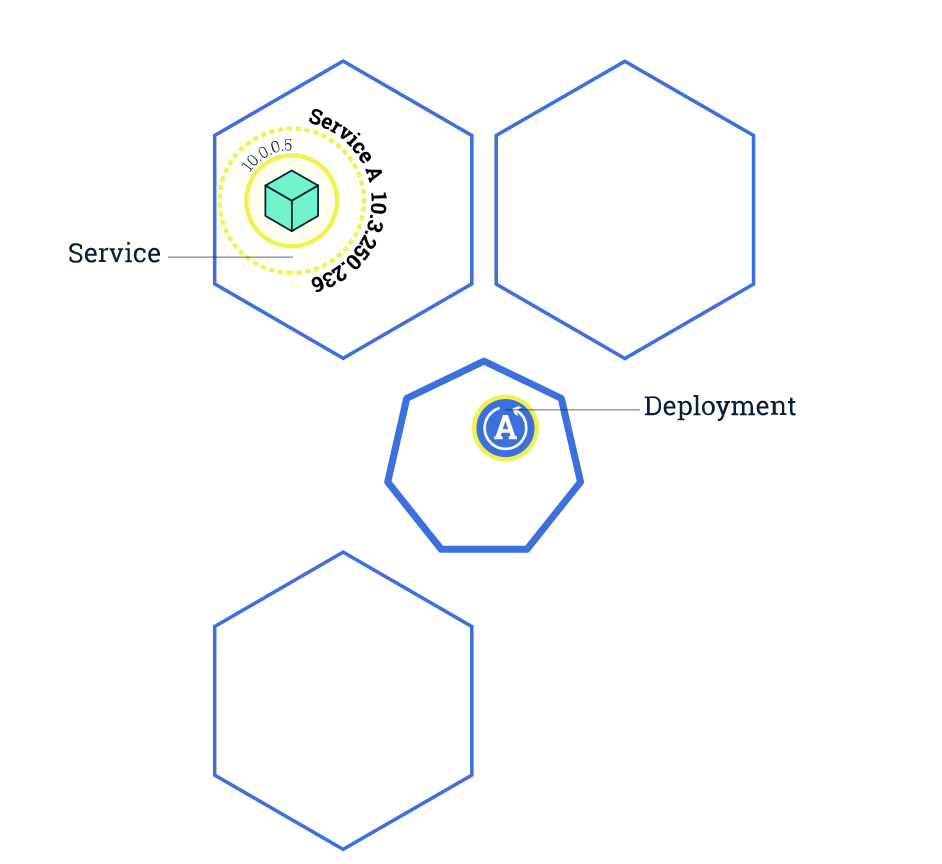
after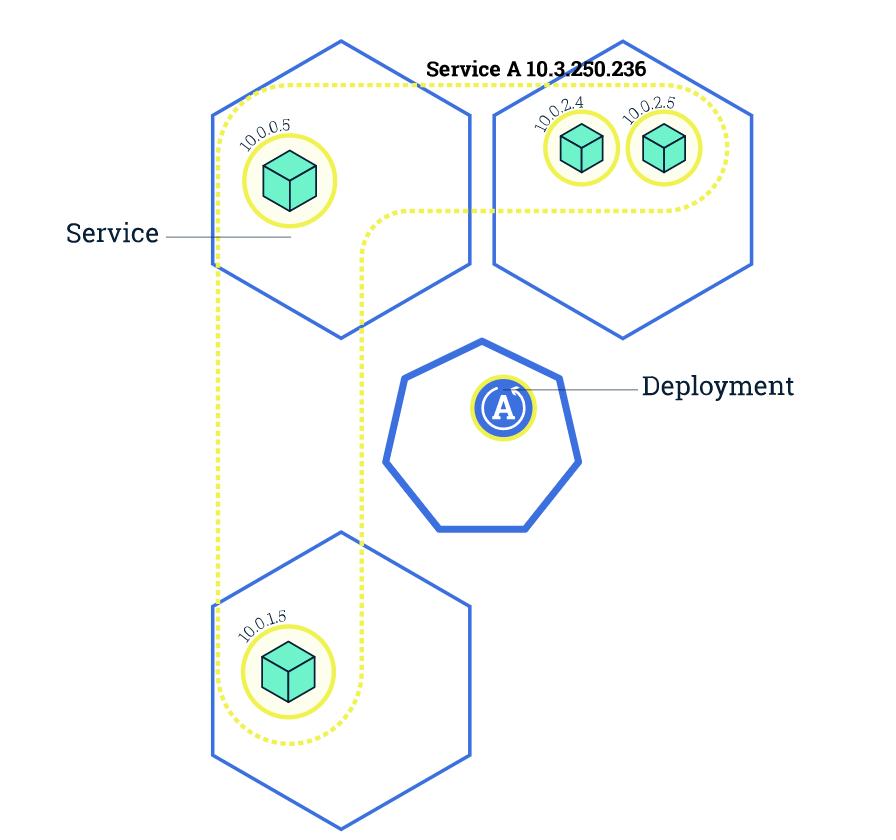
interactive learning
scalekubectl scale deployments/kubernetes-bootcamp --replicas=2
load balancingexport NODE_PORT=$(kubectl get services/kubernetes-bootcamp -o go-template='{{(index .spec.ports 0).nodePort}}')
Execute the command multiple times. We hit a different Pod with every requestcurl $(minikube ip):$NODE_PORT
update your app
- update
kubectl set image deploymentName newImage kubectl set image deployments/kubernetes-bootcamp kubernetes-bootcamp=jocatalin/kubernetes-bootcamp:v2
- verify an update
way 1curl $(minikube ip):$NODE_PORT
way 2kubectl rollout status deployments/kubernetes-bootcamp
- rollback an update
kubectl rollout undo deployments/kubernetes-bootcamp
executing result as same as git revert

若有收获,就点个赞吧
0 人点赞


