资源管理
kubernetes中,所有的内容都抽象为资源,用户通过操作资源来管理kubernetes。
kubernetes 的本质就是一个集群系统,用户可以在集群中部署各种服务,所谓的部署服务,其实就是在kubernetes集群中运行一个一个的容器,并将指定的程序跑在容器里。kubernetes 的最小管理单元是Pod而不是容器,所以,只能将容器放到Pod中。kubernetes一般也不会直接管理Pod,而是通过PodController来管理Pod的。Pod正常运行后,就要考虑如何访问Pod中的服务。kubernetes提供了service来实现这个功能。当然,如果Pod中程序的数据需要持久化,kubernetes还需要提供各种存储系统。
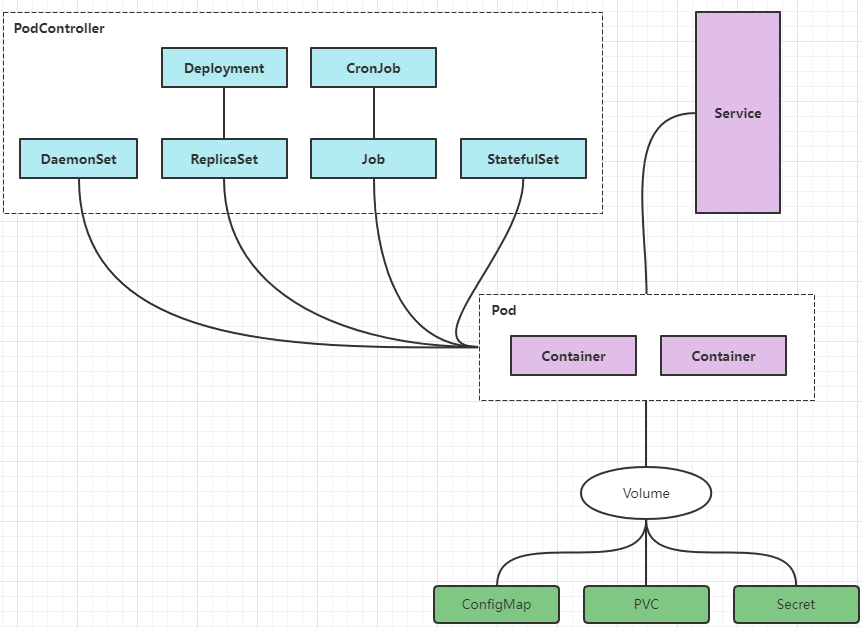
学习kubernetes的核心,就是要学习如何在集群上对pod、podController、service、存储等各种资源进行操作
YAML语法
以数据为中心的标记语言。
- 大小写敏感
- : 号后面一定要有一个空格
- 使用缩进表示层级关系
- 缩进不允许用Tab,只能是空格
- 缩进的空格数量不重要,重要的是同级必须对齐
- ‘#’表示注释
- 多个yaml放到一个文件,要是用
---来分割
YAML支持的数据类型
- 纯量:单个的、不可再分割的值
- 对象:键值对的集合、又称为映射(mapping)/哈希(hash)/字典(dictionary)
- 数组:一组按顺序排列的值
纯量
# 纯量
name: zhangan
age: 10
isDog: true
pai: 3.14
date: 2021-09-11
# ~表示null
kong: ~
# 换行  表示:hello zhangsan
text: hello
      zhangsan
对象
# 对象
user:
  name: zhangsan
  age: 20
数组
# 数组
user:
  name: zhangbo
  age: 20
  school:
    - 北京大学
    - 清华大学
资源管理方式
命令式对象管理
直接调用命令去操作kubernetes资源
# 创建一个Pod
[root@master ~]# kubectl run nginx-pod --image=nginx:1.17.1 --port=80
pod/nginx-pod created
命令式对象配置
通过命令参数和配置文件操作kubernetes资源
kubectl create/patch -f nginx-pod.yaml
声明式对象配置
命令式对象管理
纯命令管理资源,可以实现一切操作。但是,这种方式难以记忆、没有记录。
kubectl
kubectl命令是kubernetes集群的命令行管理工具。通过他能够对集群本身进行管理,也可以在集群上进行容器应用的部署和管理。语法如下:
kubectl [command] [type] [name] [flags]

# command 指定要对资源执行的操作,如:get、create、delete、apply、patch
# type 指定资源类型,如:pod、deployment、service
# name 指定资源名称
# flags 指定额外的参数
可以通过 kubectl [command] --help 命令来查看具体如何使用,如:
kubectl —help
[root@master ~]# kubectl --help
kubectl controls the Kubernetes cluster manager.

 Find more information at: https://kubernetes.io/docs/reference/kubectl/overview/

Basic Commands (Beginner):
  create        Create a resource from a file or from stdin
  expose        Take a replication controller, service, deployment or pod and expose it as a new Kubernetes service
  run           在集群中运行一个指定的镜像
  set           为 objects 设置一个指定的特征

Basic Commands (Intermediate):
  explain       Get documentation for a resource
  get           显示一个或更多 resources
  edit          在服务器上编辑一个资源
  delete        Delete resources by file names, stdin, resources and names, or by resources and label selector

Deploy Commands:
  rollout       Manage the rollout of a resource
  scale         Set a new size for a deployment, replica set, or replication controller
  autoscale     Auto-scale a deployment, replica set, stateful set, or replication controller

Cluster Management Commands:
  certificate   修改 certificate 资源.
  cluster-info  Display cluster information
  top           Display resource (CPU/memory) usage
  cordon        标记 node 为 unschedulable
  uncordon      标记 node 为 schedulable
  drain         Drain node in preparation for maintenance
  taint         更新一个或者多个 node 上的 taints

Troubleshooting and Debugging Commands:
  describe      显示一个指定 resource 或者 group 的 resources 详情
  logs          输出容器在 pod 中的日志
  attach        Attach 到一个运行中的 container
  exec          在一个 container 中执行一个命令
  port-forward  Forward one or more local ports to a pod
  proxy         运行一个 proxy 到 Kubernetes API server
  cp            Copy files and directories to and from containers
  auth          Inspect authorization
  debug         Create debugging sessions for troubleshooting workloads and nodes

Advanced Commands:
  diff          Diff the live version against a would-be applied version
  apply         Apply a configuration to a resource by file name or stdin
  patch         Update fields of a resource
  replace       Replace a resource by file name or stdin
  wait          Experimental: Wait for a specific condition on one or many resources
  kustomize     Build a kustomization target from a directory or URL.

Settings Commands:
  label         更新在这个资源上的 labels
  annotate      更新一个资源的注解
  completion    Output shell completion code for the specified shell (bash, zsh or fish)

Other Commands:
  alpha         Commands for features in alpha
  api-resources Print the supported API resources on the server
  api-versions  Print the supported API versions on the server, in the form of "group/version"
  config        修改 kubeconfig 文件
  plugin        Provides utilities for interacting with plugins
  version       输出 client 和 server 的版本信息

Usage:
  kubectl [flags] [options]

Use "kubectl <command> --help" for more information about a given command.
Use "kubectl options" for a list of global command-line options (applies to all commands).
kubectl create --help
[root@master ~]# kubectl create --help
Create a resource from a file or from stdin.

 JSON and YAML formats are accepted.

Examples:
  # Create a pod using the data in pod.json
  kubectl create -f ./pod.json

  # Create a pod based on the JSON passed into stdin
  cat pod.json | kubectl create -f -

  # Edit the data in docker-registry.yaml in JSON then create the resource using the edited data
  kubectl create -f docker-registry.yaml --edit -o json

Available Commands:
  clusterrole         Create a cluster role
  clusterrolebinding  Create a cluster role binding for a particular cluster role
  configmap           Create a config map from a local file, directory or literal value
  cronjob             Create a cron job with the specified name
  deployment          Create a deployment with the specified name
  ingress             Create an ingress with the specified name
  job                 Create a job with the specified name
  namespace           创建一个指定名称的 namespace
  poddisruptionbudget Create a pod disruption budget with the specified name
  priorityclass       Create a priority class with the specified name
  quota               Create a quota with the specified name
  role                Create a role with single rule
  rolebinding         Create a role binding for a particular role or cluster role
  secret              使用指定的 subcommand 创建一个 secret
  service             Create a service using a specified subcommand
  serviceaccount      创建一个指定名称的 service account

Options:
      --allow-missing-template-keys=true: If true, ignore any errors in templates when a field or map key is missing in
the template. Only applies to golang and jsonpath output formats.
      --dry-run='none': Must be "none", "server", or "client". If client strategy, only print the object that would be
sent, without sending it. If server strategy, submit server-side request without persisting the resource.
      --edit=false: Edit the API resource before creating
      --field-manager='kubectl-create': Name of the manager used to track field ownership.
  -f, --filename=[]: Filename, directory, or URL to files to use to create the resource
  -k, --kustomize='': Process the kustomization directory. This flag can't be used together with -f or -R.
  -o, --output='': Output format. One of:
json|yaml|name|go-template|go-template-file|template|templatefile|jsonpath|jsonpath-as-json|jsonpath-file.
      --raw='': Raw URI to POST to the server.  Uses the transport specified by the kubeconfig file.
  -R, --recursive=false: Process the directory used in -f, --filename recursively. Useful when you want to manage
related manifests organized within the same directory.
      --save-config=false: If true, the configuration of current object will be saved in its annotation. Otherwise, the
annotation will be unchanged. This flag is useful when you want to perform kubectl apply on this object in the future.
  -l, --selector='': Selector (label query) to filter on, supports '=', '==', and '!='.(e.g. -l key1=value1,key2=value2)
      --show-managed-fields=false: If true, keep the managedFields when printing objects in JSON or YAML format.
      --template='': Template string or path to template file to use when -o=go-template, -o=go-template-file. The
template format is golang templates [http://golang.org/pkg/text/template/#pkg-overview].
      --validate=true: If true, use a schema to validate the input before sending it
      --windows-line-endings=false: Only relevant if --edit=true. Defaults to the line ending native to your platform.

Usage:
  kubectl create -f FILENAME [options]

Use "kubectl <command> --help" for more information about a given command.
Use "kubectl options" for a list of global command-line options (applies to all commands).
kubectl apply --help
[root@master ~]# kubectl apply --help
Apply a configuration to a resource by file name or stdin. The resource name must be specified. This resource will be
created if it doesn't exist yet. To use 'apply', always create the resource initially with either 'apply' or 'create
--save-config'.

 JSON and YAML formats are accepted.

 Alpha Disclaimer: the --prune functionality is not yet complete. Do not use unless you are aware of what the current
state is. See https://issues.k8s.io/34274.

Examples:
  # Apply the configuration in pod.json to a pod
  kubectl apply -f ./pod.json

  # Apply resources from a directory containing kustomization.yaml - e.g. dir/kustomization.yaml
  kubectl apply -k dir/

  # Apply the JSON passed into stdin to a pod
  cat pod.json | kubectl apply -f -

  # Note: --prune is still in Alpha
  # Apply the configuration in manifest.yaml that matches label app=nginx and delete all other resources that are not in
the file and match label app=nginx
  kubectl apply --prune -f manifest.yaml -l app=nginx

  # Apply the configuration in manifest.yaml and delete all the other config maps that are not in the file
  kubectl apply --prune -f manifest.yaml --all --prune-whitelist=core/v1/ConfigMap

Available Commands:
  edit-last-applied Edit latest last-applied-configuration annotations of a resource/object
  set-last-applied  Set the last-applied-configuration annotation on a live object to match the contents of a file
  view-last-applied View the latest last-applied-configuration annotations of a resource/object

Options:
      --all=false: Select all resources in the namespace of the specified resource types.
      --allow-missing-template-keys=true: If true, ignore any errors in templates when a field or map key is missing in
the template. Only applies to golang and jsonpath output formats.
      --cascade='background': Must be "background", "orphan", or "foreground". Selects the deletion cascading strategy
for the dependents (e.g. Pods created by a ReplicationController). Defaults to background.
      --dry-run='none': Must be "none", "server", or "client". If client strategy, only print the object that would be
sent, without sending it. If server strategy, submit server-side request without persisting the resource.
      --field-manager='kubectl-client-side-apply': Name of the manager used to track field ownership.
  -f, --filename=[]: that contains the configuration to apply
      --force=false: If true, immediately remove resources from API and bypass graceful deletion. Note that immediate
deletion of some resources may result in inconsistency or data loss and requires confirmation.
      --force-conflicts=false: If true, server-side apply will force the changes against conflicts.
      --grace-period=-1: Period of time in seconds given to the resource to terminate gracefully. Ignored if negative.
Set to 1 for immediate shutdown. Can only be set to 0 when --force is true (force deletion).
  -k, --kustomize='': Process a kustomization directory. This flag can't be used together with -f or -R.
      --openapi-patch=true: If true, use openapi to calculate diff when the openapi presents and the resource can be
found in the openapi spec. Otherwise, fall back to use baked-in types.
  -o, --output='': Output format. One of:
json|yaml|name|go-template|go-template-file|template|templatefile|jsonpath|jsonpath-as-json|jsonpath-file.
      --overwrite=true: Automatically resolve conflicts between the modified and live configuration by using values from
the modified configuration
      --prune=false: Automatically delete resource objects, that do not appear in the configs and are created by either
apply or create --save-config. Should be used with either -l or --all.
      --prune-whitelist=[]: Overwrite the default whitelist with <group/version/kind> for --prune
  -R, --recursive=false: Process the directory used in -f, --filename recursively. Useful when you want to manage
related manifests organized within the same directory.
  -l, --selector='': Selector (label query) to filter on, supports '=', '==', and '!='.(e.g. -l key1=value1,key2=value2)
      --server-side=false: If true, apply runs in the server instead of the client.
      --show-managed-fields=false: If true, keep the managedFields when printing objects in JSON or YAML format.
      --template='': Template string or path to template file to use when -o=go-template, -o=go-template-file. The
template format is golang templates [http://golang.org/pkg/text/template/#pkg-overview].
      --timeout=0s: The length of time to wait before giving up on a delete, zero means determine a timeout from the
size of the object
      --validate=true: If true, use a schema to validate the input before sending it
      --wait=false: If true, wait for resources to be gone before returning. This waits for finalizers.

Usage:
  kubectl apply (-f FILENAME | -k DIRECTORY) [options]

Use "kubectl <command> --help" for more information about a given command.
Use "kubectl options" for a list of global command-line options (applies to all commands).
命令实战
# 获取默认名称攻坚的所有pod
[root@master ~]# kubectl get pods
NAME        READY   STATUS    RESTARTS   AGE
nginx-pod   1/1     Running   0          19m

# 获取dev名称空间的所有pod
[root@master ~]# kubectl get pods -n dev
NAME    READY   STATUS    RESTARTS   AGE
nginx   1/1     Running   0          11h

# 获取dev名称空间中,名称是nginx的pod
[root@master ~]# kubectl get pod nginx -n dev
NAME    READY   STATUS    RESTARTS   AGE
nginx   1/1     Running   0          11h

# 获取dev名称空间中,名称是nginx的pod,但是显示的信息更多点
[root@master ~]# kubectl get pod nginx -n dev -o wide
NAME    READY   STATUS    RESTARTS   AGE   IP           NODE    NOMINATED NODE   READINESS GATES
nginx   1/1     Running   0          11h   10.244.1.5   node1   <none>           <none>

# 获取dev名称空间中,名称是nginx的pod,以yaml的形式显示
[root@master ~]# kubectl get pod nginx -n dev -o yaml
# 获取dev名称空间中,名称是nginx的pod,以json的形式显示
[root@master ~]# kubectl get pod nginx -n dev -o json
资源类型
[root@master ~]# kubectl api-resources
NAME                              SHORTNAMES   APIVERSION                             NAMESPACED   KIND
bindings                                       v1                                     true         Binding
componentstatuses                 cs           v1                                     false        ComponentStatus
configmaps                        cm           v1                                     true         ConfigMap
endpoints                         ep           v1                                     true         Endpoints
events                            ev           v1                                     true         Event
limitranges                       limits       v1                                     true         LimitRange
namespaces                        ns           v1                                     false        Namespace
nodes                             no           v1                                     false        Node
persistentvolumeclaims            pvc          v1                                     true         PersistentVolumeClaim
persistentvolumes                 pv           v1                                     false        PersistentVolume
pods                              po           v1                                     true         Pod
podtemplates                                   v1                                     true         PodTemplate
replicationcontrollers            rc           v1                                     true         ReplicationController
resourcequotas                    quota        v1                                     true         ResourceQuota
secrets                                        v1                                     true         Secret
serviceaccounts                   sa           v1                                     true         ServiceAccount
services                          svc          v1                                     true         Service
mutatingwebhookconfigurations                  admissionregistration.k8s.io/v1        false        MutatingWebhookConfiguration
validatingwebhookconfigurations                admissionregistration.k8s.io/v1        false        ValidatingWebhookConfiguration
customresourcedefinitions         crd,crds     apiextensions.k8s.io/v1                false        CustomResourceDefinition
apiservices                                    apiregistration.k8s.io/v1              false        APIService
controllerrevisions                            apps/v1                                true         ControllerRevision
daemonsets                        ds           apps/v1                                true         DaemonSet
deployments                       deploy       apps/v1                                true         Deployment
replicasets                       rs           apps/v1                                true         ReplicaSet
statefulsets                      sts          apps/v1                                true         StatefulSet
tokenreviews                                   authentication.k8s.io/v1               false        TokenReview
localsubjectaccessreviews                      authorization.k8s.io/v1                true         LocalSubjectAccessReview
selfsubjectaccessreviews                       authorization.k8s.io/v1                false        SelfSubjectAccessReview
selfsubjectrulesreviews                        authorization.k8s.io/v1                false        SelfSubjectRulesReview
subjectaccessreviews                           authorization.k8s.io/v1                false        SubjectAccessReview
horizontalpodautoscalers          hpa          autoscaling/v2                         true         HorizontalPodAutoscaler
cronjobs                          cj           batch/v1                               true         CronJob
jobs                                           batch/v1                               true         Job
certificatesigningrequests        csr          certificates.k8s.io/v1                 false        CertificateSigningRequest
leases                                         coordination.k8s.io/v1                 true         Lease
endpointslices                                 discovery.k8s.io/v1                    true         EndpointSlice
events                            ev           events.k8s.io/v1                       true         Event
flowschemas                                    flowcontrol.apiserver.k8s.io/v1beta2   false        FlowSchema
prioritylevelconfigurations                    flowcontrol.apiserver.k8s.io/v1beta2   false        PriorityLevelConfiguration
ingressclasses                                 networking.k8s.io/v1                   false        IngressClass
ingresses                         ing          networking.k8s.io/v1                   true         Ingress
networkpolicies                   netpol       networking.k8s.io/v1                   true         NetworkPolicy
runtimeclasses                                 node.k8s.io/v1                         false        RuntimeClass
poddisruptionbudgets              pdb          policy/v1                              true         PodDisruptionBudget
podsecuritypolicies               psp          policy/v1beta1                         false        PodSecurityPolicy
clusterrolebindings                            rbac.authorization.k8s.io/v1           false        ClusterRoleBinding
clusterroles                                   rbac.authorization.k8s.io/v1           false        ClusterRole
rolebindings                                   rbac.authorization.k8s.io/v1           true         RoleBinding
roles                                          rbac.authorization.k8s.io/v1           true         Role
priorityclasses                   pc           scheduling.k8s.io/v1                   false        PriorityClass
csidrivers                                     storage.k8s.io/v1                      false        CSIDriver
csinodes                                       storage.k8s.io/v1                      false        CSINode
csistoragecapacities                           storage.k8s.io/v1beta1                 true         CSIStorageCapacity
storageclasses                    sc           storage.k8s.io/v1                      false        StorageClass
volumeattachments                              storage.k8s.io/v1                      false        VolumeAttachment
上面列出了kubernetes中所有的资源及简写,如:
- namespaces 简写 ns
- deployments 简写 deploy
- pods 简写 po
注意:在kubernetes中,全写的单词复数和单数效果一样,但是简写不能写成复数,如:
- 复数:namespaces namespace
- 复数:deployments deployments
- 复数:pods pod
具体体现在如: kubectl get pod kubectl get pods kubectl get po 以上三个命令,都是获取默认空间下得所有pod。 错误示范: kubectl get pos 这个意思是获取默认空间下得所有pod,但是使用的是简写po的复数,就是加了个s,这个是错误的。
命令式对象配置
命令式对象配置,就是使用命令结合配置文件,一起来操作kubernetes资源。
这种方式,可以用来创建、修改、删除资源。
- 创建一个nginxpod.yaml,内容如下: ```yaml apiVersion: v1 kind: Namespace metadata: name: dev
apiVersion: v1 kind: Pod metadata: name: nginxpod namespace: dev spec: containers:
- name: nginx-container image: nginx:1.17.1 ```
执行命令
[root@master ~]# kubectl create -f nginxpod.yaml
namespace/dev created
pod/nginxpod created
注意:
- 命令式杜对象配置,不用写操作那种资源,如:pod,service等,因为配置文件里已经写了。
常见错误: Error from server (AlreadyExists): error when creating “nginxpod.yaml”: namespaces “dev” already exists 是因为dev名称空间已经存在,删了就行了。
查询信息 ```shell
获取所有pod
[root@master ~]# kubectl get pod -n dev -o wide NAME READY STATUS RESTARTS AGE IP NODE NOMINATED NODE READINESS GATES nginxpod 1/1 Running 0 31m 10.244.1.7 node1
获取namespace
[root@master ~]# kubectl get ns NAME STATUS AGE default Active 7d10h dev Active 33m kube-node-lease Active 7d10h kube-public Active 7d10h kube-system Active 7d10h
4. 删除资源
```shell
[root@master ~]# kubectl delete -f nginxpod.yaml
声明式对象管理
声明式对象管理和命令式对象管理很相似,但是只有一个命令apply。
# 首次执行,会创建配置文件中的资源
[root@master ~]# kubectl apply -f nginxpod.yaml
namespace/dev created
pod/nginxpod created

# 再次执行,就会修改配置文件中的资源,但是下面是未修改,因为配置文件没有改变
[root@master ~]# kubectl apply -f nginxpod.yaml
namespace/dev unchanged
pod/nginxpod unchanged
修改 nginxpod.yaml 的nginx版本,再次执行
# 将nginx的版本修改为 1.17.2
[root@master ~]# vi nginxpod.yaml
apiVersion: v1
kind: Namespace
metadata:
  name: dev
---
apiVersion: v1
kind: Pod
metadata:
  name: nginxpod
  namespace: dev
spec:
  containers:
  - name: nginx-container
    image: nginx:1.17.2
# 修改后,再次执行,发现nginxpod容器是重新配置了
[root@master ~]# kubectl apply -f nginxpod.yaml
namespace/dev unchanged
pod/nginxpod configured
查看资源详情-describe
[root@master ~]# kubectl describe pod nginxpod -n dev

Events:
  Type    Reason     Age                  From               Message
  ----    ------     ----                 ----               -------
  Normal  Pulled     11m                  kubelet            Container image "nginx:1.17.1" already present on machine
  Normal  Scheduled  11m                  default-scheduler  Successfully assigned dev/nginxpod to node2
  Normal  Killing    4m28s                kubelet            Container nginx-container definition changed, will be restarted
  Normal  Pulling    4m28s                kubelet            Pulling image "nginx:1.17.2"
  Normal  Created    4m (x2 over 11m)     kubelet            Created container nginx-container
  Normal  Pulled     4m                   kubelet            Successfully pulled image "nginx:1.17.2" in 27.683205296s
  Normal  Started    3m59s (x2 over 11m)  kubelet            Started container nginx-container
第6行:镜像nginx:1.17.1在机器中已经存在 第7行:成功的吧dev/nginxpod 分配到了node2节点 第8行:容器创建成功 第9行:拉取镜像nginx:1.17.2 第10行:创建容器 第11行:拉取容器nginx1.17.2成功 第12行:容器创建成功
实战入门
Namespace
namespace是kubernetes中的一种非常重要的资源,它的主要作用是实现多套环境的资源隔离或者多租户的资源隔离。
默认情况下,kubernetes中的所有Pod都是可以相互访问的。但是实际应用中,可能不想让两个Pod之间进行相互访问,那此时就可以将两个Pod划分到不同的namespace下。kubernetes通过将集群内的资源分配到不同namespace中,可以形成逻辑上得“组”,以便不同组的资源进行隔离使用和管理。
可以通过kubernetes的授权机制,将不同的namespace交给不同的租户进行管理,这样就实现了多租户的资源隔离。此时还能结合kubernetes的资源配额机制,限定不同租户能占用的资源,例如:CPU使用量、内存使用量等等,来实现租户资源管理。
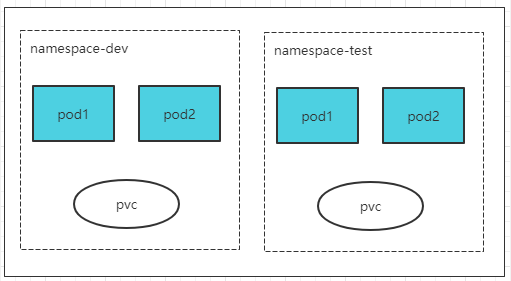
实战
# 查询所有名称空间
[root@master ~]# kubectl get ns
NAME              STATUS   AGE
default           Active   7d11h
dev               Active   44m
kube-node-lease   Active   7d11h
kube-public       Active   7d11h
kube-system       Active   7d11h

# 查询dev名称空间
[root@master ~]# kubectl get ns dev
NAME   STATUS   AGE
dev    Active   51m

# 查看dev名称空间的详细信息
[root@master ~]# kubectl describe ns dev
Name:         dev
Labels:       kubernetes.io/metadata.name=dev
Annotations:  <none>
Status:       Active  # Active名称空间正在使用中。Terminating 正在删除名称空间。

No resource quota.

No LimitRange resource.

# 删除名称空间
[root@master ~]# kubectl delete ns dev
namespace "dev" deleted
在操作资源的时候,如果不指定namespace,就会操作的就是default名称空间,如: kubectl run nginx-pod —image=1.17.1 kubectl get pod
Pod
Pod是kubernetes集群进行管理的最小单元,程序要运行必须部署到容器中,而容器必须在Pod中。
Pod可以认为是容器的封装,一个Pod可以存在一个或多个Pod。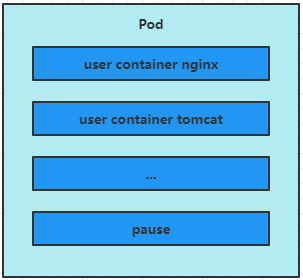
kubenetes集群启动后,各个组件也都是以Pod的形式运行的。可以通过以下命令查看:
[root@master ~]# kubectl get pod -n kube-system
NAME                             READY   STATUS    RESTARTS      AGE
coredns-6d8c4cb4d-2842d          1/1     Running   3 (15h ago)   7d11h
coredns-6d8c4cb4d-t7s47          1/1     Running   3 (15h ago)   7d11h
etcd-master                      1/1     Running   4 (15h ago)   7d11h
kube-apiserver-master            1/1     Running   4 (15h ago)   7d11h
kube-controller-manager-master   1/1     Running   4 (15h ago)   7d11h
kube-flannel-ds-hhs8r            1/1     Running   4 (15h ago)   6d9h
kube-flannel-ds-ns4nq            1/1     Running   3 (15h ago)   6d9h
kube-flannel-ds-x5884            1/1     Running   4 (15h ago)   6d9h
kube-proxy-hbtb2                 1/1     Running   4 (15h ago)   7d11h
kube-proxy-r9qzr                 1/1     Running   4 (15h ago)   7d11h
kube-proxy-wbmd4                 1/1     Running   4 (15h ago)   7d11h
kube-scheduler-master            1/1     Running   4 (15h ago)   7d11h
实战
# 在default名称空间,创建名称为nginx的pod,镜像版本为1.17.1,pod内部端口是80
[root@master ~]# kubectl run nginx --image=nginx:1.17.1 --port=80
pod/nginx created

# 查看default名称空间中所有pod
[root@master ~]# kubectl get pod
NAME        READY   STATUS             RESTARTS   AGE
nginx       1/1     Running            0          2m
nginx-pod   0/1     ImagePullBackOff   0          17m

# 查看default名称空间中,名称为nginx的pod
[root@master ~]# kubectl get pod nginx
NAME    READY   STATUS    RESTARTS   AGE
nginx   1/1     Running   0          73s

# 查看default名称空间中,名称为nginx的pod
[root@master ~]# kubectl get pod nginx -o wide
NAME    READY   STATUS    RESTARTS   AGE   IP            NODE    NOMINATED NODE   READINESS GATES
nginx   1/1     Running   0          61s   10.244.2.10   node2   <none>           <none>

# 访问pod
[root@master ~]# curl http://10.244.2.10
<!DOCTYPE html>
<html>
<head>
<title>Welcome to nginx!</title>
<style>
    body {
        width: 35em;
        margin: 0 auto;
        font-family: Tahoma, Verdana, Arial, sans-serif;
    }
</style>
</head>
<body>
<h1>Welcome to nginx!</h1>
<p>If you see this page, the nginx web server is successfully installed and
working. Further configuration is required.</p>

<p>For online documentation and support please refer to
<a href="http://nginx.org/">nginx.org</a>.<br/>
Commercial support is available at
<a href="http://nginx.com/">nginx.com</a>.</p>

<p><em>Thank you for using nginx.</em></p>
</body>
</html>

# 查看default名称空间中,名称为nginx的pod的详情信息
[root@master ~]# kubectl describe pod nginx

Events:
  Type    Reason     Age    From               Message
  ----    ------     ----   ----               -------
  Normal  Pulled     3m33s  kubelet            Container image "nginx:1.17.1" already present on machine
  Normal  Created    3m33s  kubelet            Created container nginx
  Normal  Started    3m33s  kubelet            Started container nginx
  Normal  Scheduled  3m13s  default-scheduler  Successfully assigned default/nginx to node2

# 删除Pod
[root@master ~]# kubectl delete pod nginx
pod "nginx" deleted
Label
label是kubernetes中的一个重要概念,它的作用就是在资源上添加标签,用来区分和筛选。
label的特点:
- 一个label会以key/vale键值对的形式附加到各种对象上。如:Node、Pod、Service等等。
- 一个资源对象可以定义任意数量的label,同一个label也可被添加到任意数量的资源对象上
- label通常在资源对象定义的时候确定,当然也可以在对象创建后动态调整。
可以通过label实现资源的多维度分组,以便灵活、方便的筛选资源进行分配、调度、配置部署等管理工作。
一些常用的label示例如下:
- 版本标签:version:1.0.0
- 环境标签:env:dev
标签筛选
- 等式
- version=1.0.0
- env!=dev
- 集合
查看dev命名空间下的,名称为nginxpod的pod的标签
[root@master ~]# kubectl get pod nginxpod -n dev —show-labels NAME READY STATUS RESTARTS AGE LABELS nginxpod 1/1 Running 0 3m38s version=1.0.0
修改标签
[root@master ~]# kubectl label pod nginxpod -n dev —overwrite version=1.0.0 evn=dev pod/nginxpod labeled
再次查看dev命名空间下的,名称为nginxpod的pod的标签
[root@master ~]# kubectl get pod nginxpod -n dev —show-labels NAME READY STATUS RESTARTS AGE LABELS nginxpod 1/1 Running 0 7m18s evn=dev,version=1.0.0
筛选dev命名空间下的,标签evn=dev的pod
1.先看下dev下都有什么容器,标签是什么
[root@master ~]# kubectl get pods -n dev —show-labels NAME READY STATUS RESTARTS AGE LABELS nginxpod 1/1 Running 0 10m evn=dev,version=1.0.0
2.查看标签evn=dev的pod
[root@master ~]# kubectl get pods -n dev -l evn=dev —show-labels NAME READY STATUS RESTARTS AGE LABELS nginxpod 1/1 Running 0 20m evn=dev,version=1.0.0
删除标签
发现evn写错了,应该是env
删除和添加基本一样,只是给属性后面加个-号
[root@master ~]# kubectl label pod nginxpod -n dev evn- pod/nginxpod unlabeled
再查看下标签情况,就剩下version了
[root@master ~]# kubectl get pod nginxpod -n dev —show-labels NAME READY STATUS RESTARTS AGE LABELS nginxpod 1/1 Running 0 23m version=1.0.0
添加env=dev
[root@master ~]# kubectl label pod nginxpod -n dev env=dev pod/nginxpod labeled
查看标签
[root@master ~]# kubectl get pods -n dev —show-labels NAME READY STATUS RESTARTS AGE LABELS nginxpod 1/1 Running 0 26m env=dev,version=1.0.0
<a name="ZqUxI"></a>
## Deployment Controller
<a name="uaXWR"></a>
# Pod详解
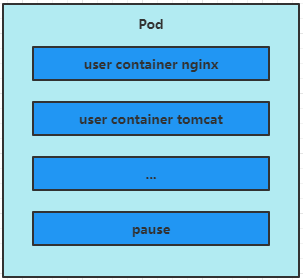<br />每个pod都可以包含一个或者多个容器,这些容器可以分为两类:
- 用户容器,用户程序所在的容器
- Pause容器,这是每个Pod都会有的**根容器**,它的作用是:
- 评估整个Pod的健康状态
- 可以在根容器上设置IP(Pod IP),其他容器共享此IP,以实现Pod内部网络通讯
` 这里说的是Pod内部的通讯,Pod之间的通讯采用虚拟二层网络技术来实现,我们当前环境使用的是Flannel`
<a name="Fj2um"></a>
## Pod定义
下面是Pod的资源清单
```yaml
# 必选,版本号,例如:v1
apiVersion: v1
# 必选,资源类型,例如:Pod
kind: Pod
# 必选,元数据
metadata:
# 必选,Pod名称
name: string
# Pod所属的命名空间
namespace: string
# 自定义标签列表
labels:
- name: string
# 必选,Pod容器的详细定义
spec:
# 必选,Pod容器列表
containers:
# 必选,容器的名称
- name: string
# 必选,容器的镜像名称
image: string
# 拉去镜像的策略:总是、本地、如果不存在就远程拉去
imagePullPolicy: [Always|Never|IfNotPresent]
# 容器的启动命令,如果不指定,使用打包时使用的启动命令
command: [string]
# 容器的启动命令参数列表
args: [string]
# 容器的工作目录
workingDir: string
explain
这个命令可以查看那些资源可以配置那些属性,例如:
kubectl explain pod:查看pod都可以配置那些属性。kubectl explain pod.metadata:查看pod下的metadata可以配置那些属性。kubectl explain pod.metadata.containers:查看pod下的metadata下的containers都可以配置那些资源。
以此类推,想知道那个资源/属性下能配置那些属性,就是用这个命令查询。
注意,如果资源类型是Object才可以
下面是几个简单的例子:
[root@master ~]# kubectl explain pod
KIND:     Pod
VERSION:  v1

DESCRIPTION:
     Pod is a collection of containers that can run on a host. This resource is
     created by clients and scheduled onto hosts.

FIELDS:
   apiVersion   <string>
     APIVersion defines the versioned schema of this representation of an
     object. Servers should convert recognized schemas to the latest internal
     value, and may reject unrecognized values. More info:
     https://git.k8s.io/community/contributors/devel/sig-architecture/api-conventions.md#resources

   kind <string>
     Kind is a string value representing the REST resource this object
     represents. Servers may infer this from the endpoint the client submits
     requests to. Cannot be updated. In CamelCase. More info:
     https://git.k8s.io/community/contributors/devel/sig-architecture/api-conventions.md#types-kinds

   metadata     <Object>
     Standard object's metadata. More info:
     https://git.k8s.io/community/contributors/devel/sig-architecture/api-conventions.md#metadata

   spec <Object>
     Specification of the desired behavior of the pod. More info:
     https://git.k8s.io/community/contributors/devel/sig-architecture/api-conventions.md#spec-and-status

   status       <Object>
     Most recently observed status of the pod. This data may not be up to date.
     Populated by the system. Read-only. More info:
     https://git.k8s.io/community/contributors/devel/sig-architecture/api-conventions.md#spec-and-status
[root@master ~]# kubectl explain pod.spec.containers
KIND:     Pod
VERSION:  v1

RESOURCE: containers <[]Object>

DESCRIPTION:
     List of containers belonging to the pod. Containers cannot currently be
     added or removed. There must be at least one container in a Pod. Cannot be
     updated.

     A single application container that you want to run within a pod.

FIELDS:
   args <[]string>
     Arguments to the entrypoint. The docker image's CMD is used if this is not
     provided. Variable references $(VAR_NAME) are expanded using the
     container's environment. If a variable cannot be resolved, the reference in
     the input string will be unchanged. Double $$ are reduced to a single $,
     which allows for escaping the $(VAR_NAME) syntax: i.e. "$$(VAR_NAME)" will
     produce the string literal "$(VAR_NAME)". Escaped references will never be
     expanded, regardless of whether the variable exists or not. Cannot be
     updated. More info:
     https://kubernetes.io/docs/tasks/inject-data-application/define-command-argument-container/#running-a-command-in-a-shell

   command      <[]string>
     Entrypoint array. Not executed within a shell. The docker image's
     ENTRYPOINT is used if this is not provided. Variable references $(VAR_NAME)
     are expanded using the container's environment. If a variable cannot be
     resolved, the reference in the input string will be unchanged. Double $$
     are reduced to a single $, which allows for escaping the $(VAR_NAME)
     syntax: i.e. "$$(VAR_NAME)" will produce the string literal "$(VAR_NAME)".
     Escaped references will never be expanded, regardless of whether the
     variable exists or not. Cannot be updated. More info:
     https://kubernetes.io/docs/tasks/inject-data-application/define-command-argument-container/#running-a-command-in-a-shell

   env  <[]Object>
     List of environment variables to set in the container. Cannot be updated.

   envFrom      <[]Object>
     List of sources to populate environment variables in the container. The
     keys defined within a source must be a C_IDENTIFIER. All invalid keys will
     be reported as an event when the container is starting. When a key exists
     in multiple sources, the value associated with the last source will take
     precedence. Values defined by an Env with a duplicate key will take
     precedence. Cannot be updated.

   image        <string>
     Docker image name. More info:
     https://kubernetes.io/docs/concepts/containers/images This field is
     optional to allow higher level config management to default or override
     container images in workload controllers like Deployments and StatefulSets.

   imagePullPolicy      <string>
     Image pull policy. One of Always, Never, IfNotPresent. Defaults to Always
     if :latest tag is specified, or IfNotPresent otherwise. Cannot be updated.
     More info:
     https://kubernetes.io/docs/concepts/containers/images#updating-images


   lifecycle    <Object>
     Actions that the management system should take in response to container
     lifecycle events. Cannot be updated.

   livenessProbe        <Object>
     Periodic probe of container liveness. Container will be restarted if the
     probe fails. Cannot be updated. More info:
     https://kubernetes.io/docs/concepts/workloads/pods/pod-lifecycle#container-probes

   name <string> -required-
     Name of the container specified as a DNS_LABEL. Each container in a pod
     must have a unique name (DNS_LABEL). Cannot be updated.

   ports        <[]Object>
     List of ports to expose from the container. Exposing a port here gives the
     system additional information about the network connections a container
     uses, but is primarily informational. Not specifying a port here DOES NOT
     prevent that port from being exposed. Any port which is listening on the
     default "0.0.0.0" address inside a container will be accessible from the
     network. Cannot be updated.

   readinessProbe       <Object>
     Periodic probe of container service readiness. Container will be removed
     from service endpoints if the probe fails. Cannot be updated. More info:
     https://kubernetes.io/docs/concepts/workloads/pods/pod-lifecycle#container-probes

   resources    <Object>
     Compute Resources required by this container. Cannot be updated. More info:
     https://kubernetes.io/docs/concepts/configuration/manage-resources-containers/

   securityContext      <Object>
     SecurityContext defines the security options the container should be run
     with. If set, the fields of SecurityContext override the equivalent fields
     of PodSecurityContext. More info:
     https://kubernetes.io/docs/tasks/configure-pod-container/security-context/

   startupProbe <Object>
     StartupProbe indicates that the Pod has successfully initialized. If
     specified, no other probes are executed until this completes successfully.
     If this probe fails, the Pod will be restarted, just as if the
     livenessProbe failed. This can be used to provide different probe
     parameters at the beginning of a Pod's lifecycle, when it might take a long
     time to load data or warm a cache, than during steady-state operation. This
     cannot be updated. More info:
     https://kubernetes.io/docs/concepts/workloads/pods/pod-lifecycle#container-probes

   stdin        <boolean>
     Whether this container should allocate a buffer for stdin in the container
     runtime. If this is not set, reads from stdin in the container will always
     result in EOF. Default is false.

   stdinOnce    <boolean>
     Whether the container runtime should close the stdin channel after it has
     been opened by a single attach. When stdin is true the stdin stream will
     remain open across multiple attach sessions. If stdinOnce is set to true,
     stdin is opened on container start, is empty until the first client
     attaches to stdin, and then remains open and accepts data until the client
     disconnects, at which time stdin is closed and remains closed until the
     container is restarted. If this flag is false, a container processes that
     reads from stdin will never receive an EOF. Default is false

   terminationMessagePath       <string>
     Optional: Path at which the file to which the container's termination
     message will be written is mounted into the container's filesystem. Message
     written is intended to be brief final status, such as an assertion failure
     message. Will be truncated by the node if greater than 4096 bytes. The
     total message length across all containers will be limited to 12kb.
     Defaults to /dev/termination-log. Cannot be updated.

   terminationMessagePolicy     <string>
     Indicate how the termination message should be populated. File will use the
     contents of terminationMessagePath to populate the container status message
     on both success and failure. FallbackToLogsOnError will use the last chunk
     of container log output if the termination message file is empty and the
     container exited with an error. The log output is limited to 2048 bytes or
     80 lines, whichever is smaller. Defaults to File. Cannot be updated.


   tty  <boolean>
     Whether this container should allocate a TTY for itself, also requires
     'stdin' to be true. Default is false.

   volumeDevices        <[]Object>
     volumeDevices is the list of block devices to be used by the container.

   volumeMounts <[]Object>
     Pod volumes to mount into the container's filesystem. Cannot be updated.

   workingDir   <string>
     Container's working directory. If not specified, the container runtime's
     default will be used, which might be configured in the container image.
     Cannot be updated.
在kubernetes中,基本所有的资源,一级属性都是一样的,主要包含一下5个:
- apiVersion
版本,由kubernetes内部定义,版本号必须可以用kubectl api-versions 查询到,当然,使用explain也行。 - kind
类型,由kubernetes内部定义,版本号必须可以用kubectl api-versions 查询到,当然,使用explain也行。 - metadata

若有收获,就点个赞吧
0 人点赞


