
1.安装git
yum install gitgit --version //可以查看是否安装成功

2.配置用户名和邮箱
git config --global user.name "chengbenchao"git config --global user.email "xx"git config --global --list

3.在吗云中新建仓库
复制仓库 网站然后再 git clone 到自己的文件夹$ git clone https://gitee.com/squirrel-acc-mandarin-fish/double.git
4.在文件夹中写node
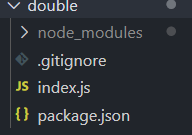
.gitignore 中写不上传的文件
index.jsconst koa = require("koa");const app = new koa();const router = require("koa-router")();router.get("/",async ctx=>{ctx.body="hello world"})app.use(router.routes());app.listen(8080)//本地接口
5.将马云推送


6.进入home新建文件夹mayun

再$ git clone https://gitee.com/squirrel-acc-mandarin-fish/double.git进入double输入yarn就可以将所有依赖安装


7.将接口放到公网
打开8080端口




若有收获,就点个赞吧
0 人点赞


