JSON.parse() 和 JSON.stringify() 用法
JSON.stringify()
JSON.stringify(p1, p2, p3) 可以接受三个参数:
- p1:需要序列化的数据
- p2:可传入一个数组、过滤函数或 null
- 传入数组:只有包含在这个数组中的属性名才会被序列化到最终的 JSON 字符串中
- 传入过滤函数:被序列化的值的每个属性都会经过该函数的转换和处理,即可以控制输出 ```javascript var data = { name:”niuzai”, job: ‘coder’, age: 99, info:{ age:18, sex:”male” } };
JSON.stringify(data, function(key, val){ if (key !== ‘age’) return val }); “{“name”:”niuzai”,”job”:”coder”,”info”:{“sex”:”male”}}”
3. null:不做任何处理3. p3:控制结果字符串里面的间距,即缩进**JSON.parse()**<br />使用 JSON.parse() 需要注意非法数据导致的程序异常,要做错误捕获1. 使用 try/catch```javascriptvar str = 'yang'try {const r = JSON.parse(str)console.log('===> r', r)} catch (error) {console.log('===>', error)}
- 使用 promise
var str = 'yang'function parseStr (s) {return new Promise(resolve => {let r = JSON.parse(s)resolve(r)})}parseStr(str).then(r => {console.log('=== r', r)}).catch(e => {console.log('===> e', e)})
请求头
If-Modified-Since 与 Last-Modified
- Last-Modified:由服务器发送给客户端的 HTTP 请求头标签,标记文件在服务期端最后被修改的时间
- If-Modified-Since:客户端下次请求时通过 If-Modified-Since 或者 If-Unmodified-Since 带上 Last-Modified,服务端检查该时间是否与服务器的最后修改时间一致
Cache-Control 缓存头
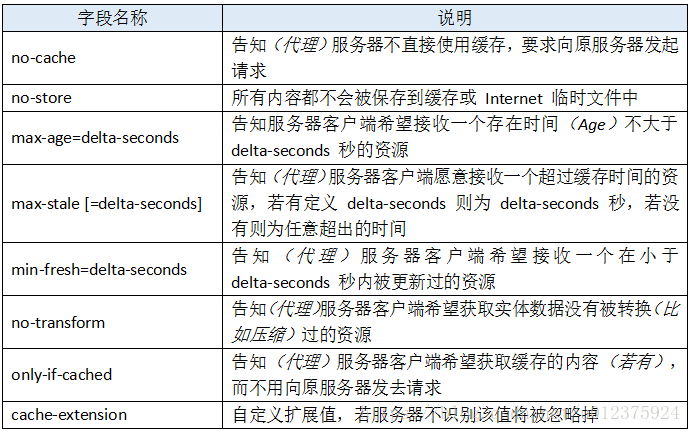
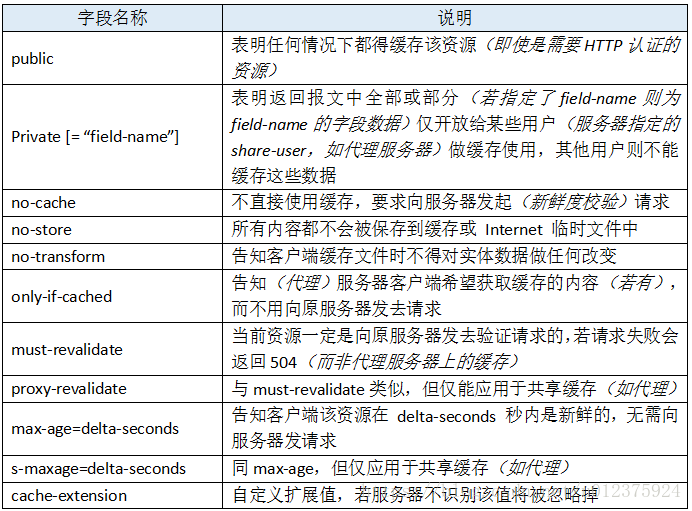
Cache-Control除了在响应中使用,在请求中也可以使用,指明哪些地方可以缓存返回的数据
- 在请求中使用Cache-Control 时,它可选的值有
- 在响应中使用Cache-Control 时,它可选的值有
HTTP的请求头标签 If-Modified-Since与Last-Modified 缓存头 Cache-Control 的含义和使用 浅谈http中的Cache-Control 缓存Cache-Control

若有收获,就点个赞吧
0 人点赞


