文档https://panjiachen.github.io/vue-element-admin-site/zh/guide/#%E5%8A%9F%E8%83%BD
分析https://juejin.cn/post/6844903476661583880#heading-8
克隆安装
git克隆项目
git clone https://github.com/PanJiaChen/vue-element-admin.git
安装依赖
mpn i
遇到报错:tui-editor里面引用了tui-chart tui-chart依赖Raphael是GitHub链接,删除tui-editor后安装依赖正常
- 给谷歌安装一些插件来加速下载github的项目
- 参考链接https://github.com/PanJiaChen/vue-element-admin/issues/3491
- 执行git ls-remote -h -t https://github.com.cnpmjs.org/nhn/raphael.git再下载依赖
- 给谷歌安装一些插件来加速下载github的项目
- 2.实际上的解决办法
- 参考链接https://www.thinbug.com/q/46305961
- 在cmd中运行start-ssh-agent 输入密码就可以安装了
完整路由
```javascript import Vue from ‘vue’ import Router from ‘vue-router’
Vue.use(Router)
/ Layout / import Layout from ‘@/layout’
/ Router Modules / import componentsRouter from ‘./modules/components’ import chartsRouter from ‘./modules/charts’ import tableRouter from ‘./modules/table’ import nestedRouter from ‘./modules/nested’
/**
- Note: sub-menu only appear when route children.length >= 1
- Detail see: https://panjiachen.github.io/vue-element-admin-site/guide/essentials/router-and-nav.html *
- hidden: true if set true, item will not show in the sidebar(default is false)
- alwaysShow: true if set true, will always show the root menu
- if not set alwaysShow, when item has more than one children route,
- it will becomes nested mode, otherwise not show the root menu
- redirect: noRedirect if set noRedirect will no redirect in the breadcrumb
- name:’router-name’ the name is used by
(must set!!!) - meta : { roles: [‘admin’,’editor’] control the page roles (you can set multiple roles) title: ‘title’ the name show in sidebar and breadcrumb (recommend set) icon: ‘svg-name’/‘el-icon-x’ the icon show in the sidebar noCache: true if set true, the page will no be cached(default is false) affix: true if set true, the tag will affix in the tags-view breadcrumb: false if set false, the item will hidden in breadcrumb(default is true) activeMenu: ‘/example/list’ if set path, the sidebar will highlight the path you set } */
/**
- constantRoutes
- a base page that does not have permission requirements
- all roles can be accessed
*/
export const constantRoutes = [
{
path: ‘/profile’,
component: Layout,
redirect: ‘/profile/index’,
hidden: true,
children: [
{
} ] }, { path: ‘/404’, component: () => import(‘@/views/error-page/404’), hidden: true }, { path: ‘/401’, component: () => import(‘@/views/error-page/401’), hidden: true }, 省略省略省略省略省略省略省略省略省略省略 ]path: 'index',component: () => import('@/views/profile/index'),name: 'Profile',meta: { title: 'Profile', icon: 'user', noCache: true }
/**
- asyncRoutes
- the routes that need to be dynamically loaded based on user roles
*/
export const asyncRoutes = [
省略省略省略省略省略省略省略省略省略省略省略
{
path: ‘external-link’,
component: Layout,
children: [
{
} ] }, 最后最后最后最后最后最后最后最后最后最后最后最后最后 // 404 page must be placed at the end !!! { path: ‘*’, redirect: ‘/404’, hidden: true } ]path: 'https://github.com/PanJiaChen/vue-element-admin',meta: { title: 'External Link', icon: 'link' }
const createRouter = () => new Router({ // mode: ‘history’, // require service support scrollBehavior: () => ({ y: 0 }), routes: constantRoutes })
const router = createRouter()
// Detail see: https://github.com/vuejs/vue-router/issues/1234#issuecomment-357941465 export function resetRouter() { const newRouter = createRouter() router.matcher = newRouter.matcher // reset router }
export default router
**注意事项**<br />**如果这里有一个需要非常注意的地方就是 404 页面一定要最后加载,如果放在 constantRoutes 一同声明了 404 ,后面的所有页面都会被拦截到404**- 注册路由操作```javascript• const createRouter = () => new Router({// mode: 'history', // require service supportscrollBehavior: () => ({ y: 0 }),routes: constantRoutes})const router = createRouter()类似与const route = newRouter({})
- 为什么只注册constantRoutes没有注册asyncRoutes 目前不清楚?? ```javascript export function resetRouter() { const newRouter = createRouter() router.matcher = newRouter.matcher // reset router }
**路由划分**<br />这里的路由分为两种,`constantRoutes` 和 `asyncRoutes`。<br />**constantRoutes:** 代表那些不需要动态判断权限的路由,如登录页、404、等通用页面。<br />**asyncRoutes:** 代表那些需求动态判断权限并通过 `addRoutes` 动态添加的页面。<a name="FGAJ0"></a>### 示例<a name="Ox9oj"></a>## constantRoutes- 需要侧边栏Layout的都使用路由嵌套,不使用的配置 `hidden: false`- @是配置的,@是src绝对路径- ` component: () => import('@/views/redirect/index')`路由懒加载,不使用不引入- **:path(.*)??**是什么,貌似是占位```javascriptexport const constantRoutes = [{path: '/redirect',component: Layout,hidden: true,children: [{path: '/redirect/:path(.*)',component: () => import('@/views/redirect/index')}]},{path: '/login',component: () => import('@/views/login/index'),hidden: true},{path: '/auth-redirect',component: () => import('@/views/login/auth-redirect'),hidden: true},{path: '/404',component: () => import('@/views/error-page/404'),hidden: true},{path: '/401',component: () => import('@/views/error-page/401'),hidden: true},{path: '/',component: Layout,redirect: '/dashboard',children: [{path: 'dashboard',component: () => import('@/views/dashboard/index'),name: 'Dashboard',meta: { title: 'Dashboard', icon: 'dashboard', affix: true }}]},
asyncRoutes
- 需要侧边栏Layout的都使用路由嵌套,不使用的配置
hidden: false - @是配置的,@是src绝对路径
component: () => import('@/views/redirect/index')路由懒加载,不使用不引入- 比较长复杂的路由,可以划分出来,再单独引入
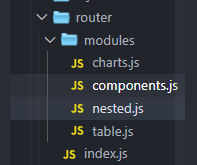
划分出去的其中一个
/** When your routing table is too long, you can split it into small modules **/import Layout from '@/layout'const nestedRouter = {path: '/nested',component: Layout,redirect: '/nested/menu1/menu1-1',name: 'Nested',meta: {title: 'Nested Routes',icon: 'nested'},children: [{path: 'menu1',component: () => import('@/views/nested/menu1/index'), // Parent router-viewname: 'Menu1',meta: { title: 'Menu 1' },redirect: '/nested/menu1/menu1-1',children: [{path: 'menu1-1',component: () => import('@/views/nested/menu1/menu1-1'),name: 'Menu1-1',meta: { title: 'Menu 1-1' }},{path: 'menu1-2',component: () => import('@/views/nested/menu1/menu1-2'),name: 'Menu1-2',redirect: '/nested/menu1/menu1-2/menu1-2-1',meta: { title: 'Menu 1-2' },children: [{path: 'menu1-2-1',component: () => import('@/views/nested/menu1/menu1-2/menu1-2-1'),name: 'Menu1-2-1',meta: { title: 'Menu 1-2-1' }},{path: 'menu1-2-2',component: () => import('@/views/nested/menu1/menu1-2/menu1-2-2'),name: 'Menu1-2-2',meta: { title: 'Menu 1-2-2' }}]},{path: 'menu1-3',component: () => import('@/views/nested/menu1/menu1-3'),name: 'Menu1-3',meta: { title: 'Menu 1-3' }}]},{path: 'menu2',name: 'Menu2',component: () => import('@/views/nested/menu2/index'),meta: { title: 'Menu 2' }}]}export default nestedRouter
完整示例
import componentsRouter from './modules/components'import chartsRouter from './modules/charts'export const asyncRoutes = [{path: '/permission',component: Layout,redirect: '/permission/page',alwaysShow: true, // will always show the root menuname: 'Permission',meta: {title: 'Permission',icon: 'lock',roles: ['admin', 'editor'] // you can set roles in root nav},children: [{path: 'page',component: () => import('@/views/permission/page'),name: 'PagePermission',meta: {title: 'Page Permission',roles: ['admin'] // or you can only set roles in sub nav}},{path: 'directive',component: () => import('@/views/permission/directive'),name: 'DirectivePermission',meta: {title: 'Directive Permission'// if do not set roles, means: this page does not require permission}},{path: 'role',component: () => import('@/views/permission/role'),name: 'RolePermission',meta: {title: 'Role Permission',roles: ['admin']}}]},{path: '/icon',component: Layout,children: [{path: 'index',component: () => import('@/views/icons/index'),name: 'Icons',meta: { title: 'Icons', icon: 'icon', noCache: true }}]},/** when your routing map is too long, you can split it into small modules **/componentsRouter,chartsRouter,

若有收获,就点个赞吧
0 人点赞


