一、仓库、镜像、容器的关系
官网图片
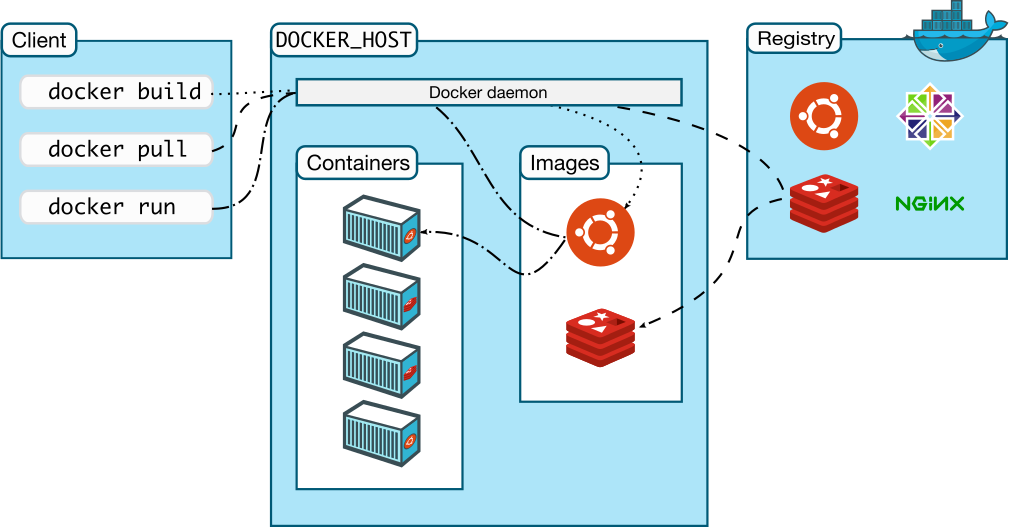
二、Docker镜像
1. 拉取Demo并查看
拉取Hello world镜像
root@ubuntu:/home/jinhua# docker pull hello-world:latestlatest: Pulling from library/hello-worldDigest: sha256:393b81f0ea5a98a7335d7ad44be96fe76ca8eb2eaa76950eb8c989ebf2b78ec0Status: Image is up to date for hello-world:latestdocker.io/library/hello-world:latest
查看本地的库
root@ubuntu:/home/jinhua# docker imagesREPOSITORY TAG IMAGE ID CREATED SIZEhello-world latest feb5d9fea6a5 2 days ago 13.3kB
运行hello world
root@ubuntu:/home/jinhua# docker run hello-worldHello from Docker!This message shows that your installation appears to be working correctly.To generate this message, Docker took the following steps:1. The Docker client contacted the Docker daemon.2. The Docker daemon pulled the "hello-world" image from the Docker Hub.(amd64)3. The Docker daemon created a new container from that image which runs theexecutable that produces the output you are currently reading.4. The Docker daemon streamed that output to the Docker client, which sent itto your terminal.To try something more ambitious, you can run an Ubuntu container with:$ docker run -it ubuntu bashShare images, automate workflows, and more with a free Docker ID:https://hub.docker.com/For more examples and ideas, visit:https://docs.docker.com/get-started/
命令的含义:
- docker:应用名
- run:运行命令
- hello-world:镜像名
2. 其他运行方式
1. 运行ubuntu镜像的hello-world
root@ubuntu:~# docker run ubuntu:latest /bin/echo "Hello World"Hello World
同上,其中【/bin/echo “Hello World”】是在容器内部执行的命令
2. 运行交互式的容器
docker 的两个参数 -i -t,让 docker 运行的容器实现”对话”的能力
- -i:允许对容器内的标准输入(STDIN)进行交互。
- -t:在容器内指定一个伪终端或终端。
此时通过exit命令或Ctrl + D命令退出容器。root@ubuntu:~# docker run -it ubuntu:latestroot@974549fe0e32:/# exitexit
3. 运行容器至后台
需要-d命令,使得容器运行至后台。
docker run -d ubuntu:latest /bin/sh -c "while true; do echo hello world; sleep 1; done"cd804a28ba2725b2832d283fd1b9d5488f96de20398d613dfc2fafe2d6bcae15
此时输出的并不是预期hello world,而是容器的ID。
通过docker ps命令查看运行的容器,发现有了ubuntu:latest的容器。
root@ubuntu:~# docker psCONTAINER ID IMAGE COMMAND CREATED STATUS PORTS NAMEScd804a28ba27 ubuntu:latest "/bin/sh -c 'while t…" 2 minutes ago Up 2 minutes amazing_wu
输出详情介绍:
- CONTAINER ID: 容器 ID。
- IMAGE: 使用的镜像。
- COMMAND: 启动容器时运行的命令。
- CREATED: 容器的创建时间。
- STATUS: 容器状态(状态有7种)。
- created(已创建)
- restarting(重启中)
- running(运行中)
- removing(迁移中)
- paused(暂停)
- exited(停止)
- dead(死亡)
- PORTS: 容器的端口信息和使用的连接类型(tcp\udp)。
- NAMES: 自动分配的容器名称。
通过docker logs 【容器ID】命令,可以查看到容器真正输出的日志
root@ubuntu:~# docker logs -f cd80hello worldhello worldhello worldhello worldhello worldhello worldhello worldhello worldhello worldhello worldhello worldhello world
通过docker stop 【容器ID】命令,停止容器。
root@ubuntu:~# docker stop cd80cd80
3. 镜像查找
1. 本地镜像——docker images
root@ubuntu:~# docker imagesREPOSITORY TAG IMAGE ID CREATED SIZEhello-world latest feb5d9fea6a5 3 days ago 13.3kBubuntu latest fb52e22af1b0 3 weeks ago 72.8MB
| 字段 | 含义 | | —- | —- | | Repository | 仓库源 | | tag | 镜像标签 | | Image ID | 镜像ID | | Created | 创建时间 | | Size | 镜像大小 |
2. 镜像搜索——docker search
root@ubuntu:~# docker search mysqlNAME DESCRIPTION STARS OFFICIAL AUTOMATEDmysql MySQL is a widely used, open-source relation… 11473 [OK]mariadb MariaDB Server is a high performing open sou… 4356 [OK]mysql/mysql-server Optimized MySQL Server Docker images. Create… 848 [OK]centos/mysql-57-centos7 MySQL 5.7 SQL database server 91mysql/mysql-cluster Experimental MySQL Cluster Docker images. Cr… 88centurylink/mysql Image containing mysql. Optimized to be link… 59 [OK]databack/mysql-backup Back up mysql databases to... anywhere! 51prom/mysqld-exporter 42 [OK]deitch/mysql-backup REPLACED! Please use http://hub.docker.com/r… 41 [OK]tutum/mysql Base docker image to run a MySQL database se… 35schickling/mysql-backup-s3 Backup MySQL to S3 (supports periodic backup… 31 [OK]linuxserver/mysql A Mysql container, brought to you by LinuxSe… 31mysql/mysql-router MySQL Router provides transparent routing be… 22centos/mysql-56-centos7 MySQL 5.6 SQL database server 20arey/mysql-client Run a MySQL client from a docker container 18 [OK]fradelg/mysql-cron-backup MySQL/MariaDB database backup using cron tas… 16 [OK]yloeffler/mysql-backup This image runs mysqldump to backup data usi… 7 [OK]genschsa/mysql-employees MySQL Employee Sample Database 7 [OK]openshift/mysql-55-centos7 DEPRECATED: A Centos7 based MySQL v5.5 image… 6devilbox/mysql Retagged MySQL, MariaDB and PerconaDB offici… 3jelastic/mysql An image of the MySQL database server mainta… 2ansibleplaybookbundle/mysql-apb An APB which deploys RHSCL MySQL 2 [OK]widdpim/mysql-client Dockerized MySQL Client (5.7) including Curl… 1 [OK]centos/mysql-80-centos7 MySQL 8.0 SQL database server 1monasca/mysql-init A minimal decoupled init container for mysql 0
- NAME: 镜像仓库源的名称
- DESCRIPTION: 镜像的描述
- OFFICIAL: 是否 docker 官方发布
- STARS: 类似 Github 里面的 star,表示点赞、喜欢的意思。
- AUTOMATED: 自动构建。
3. 镜像拉取——docker pull
完成后,即可通过 docker images看到拉取到的镜像。
root@ubuntu:~# docker pull centos/mysql-80-centos7Using default tag: latestlatest: Pulling from centos/mysql-80-centos7b2cc5146c9c7: Pull complete782ee99b4ec9: Pull complete28c6947581d3: Pull completef622eee2e866: Pull complete6aaf4d2a1be7: Downloading [==> ] 3.775MB/75.56MB7882d73b48db: Download completed3a44e420f48: Download complete162c95bdfea5: Download complete528c4d56b4cc: Downloading [==============> ] 5.475MB/18.41MB
4. 镜像删除——docker rmi 【镜像ID】
不可以删除【被正在运行容器依赖】的镜像。需要先删除容器docker rm 【容器ID】。
5. 更新镜像

若有收获,就点个赞吧
0 人点赞


