背景
在开发过程中你是否有遇到过这样的苦恼?产品发来一个需求,没做过,但是看完需求感觉应该处理起来很简单,然后找到对应的业务代码,发现代码像打乱的毛线一样理不清楚,各种逻辑嵌套,各种特殊判断处理,想要拓展维护个内容却无从下手,一边看着代码,一边用手拨动着本就为数不多的秀发,然后口吐芬芳 。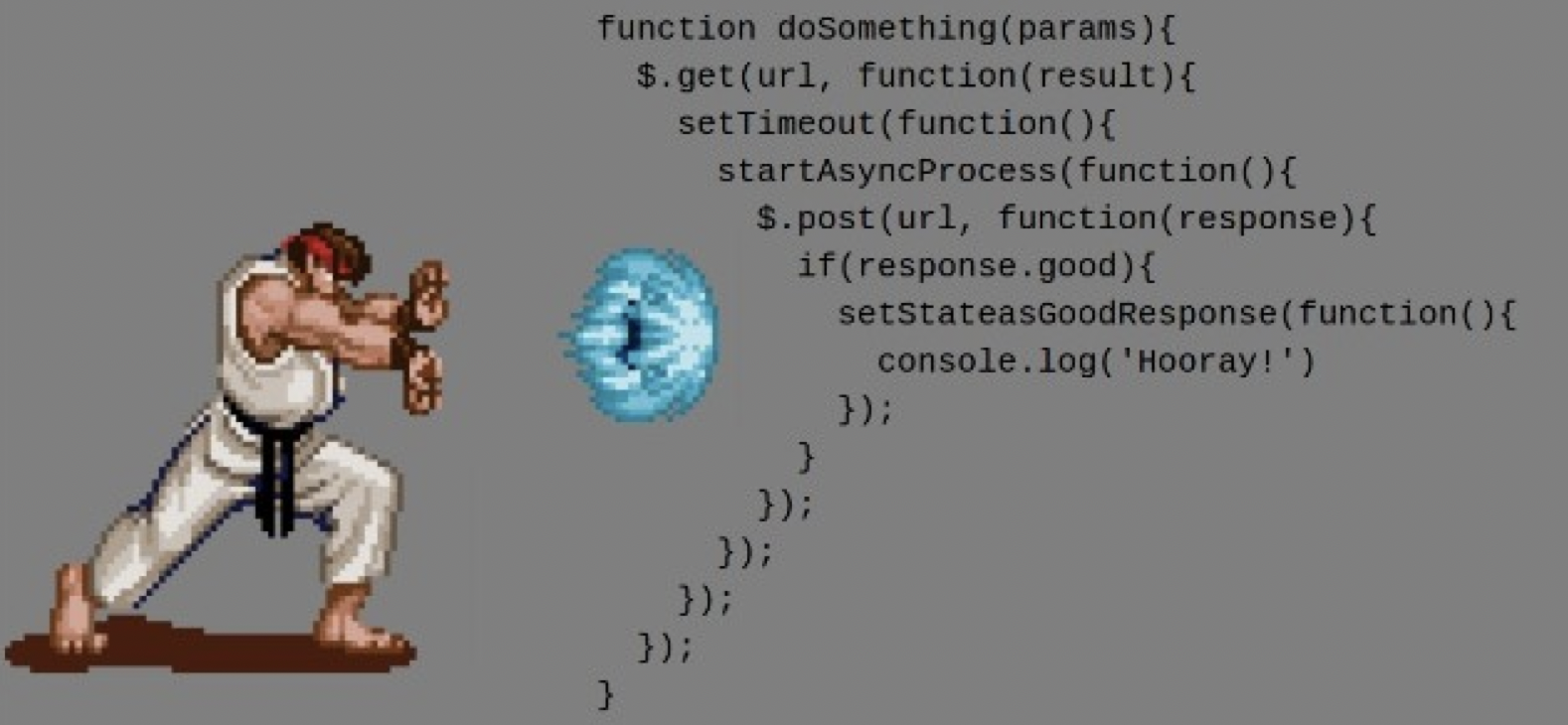
有没发现一个问题,为什么业务不复杂,但是随着产品迭代,经过不断拓展和维护,慢慢的代码就越做越乱,你可以说产品想法天马星空,人员流动大,多人参与慢慢的就被做乱了,这可能是个不错的借口,但是其中本质的问题还是前期思考的太少,没有进行合理的抽象设计,没有去前瞻性的去预埋一些未来可拓展性的内容,所以最终导致了后来的局面。
经常听到有经验的开发者说开发前多思考,不要一拿到需求就习惯性的一顿操作,反手就定义一个function根据需求逻辑一条龙写到底。
所以面对相对复杂的需求我们需要进行抽象思考,尽可能做到设计出来的东西是解决一类问题,而不是单单解决当前问题,然后在代码实现上也要面向抽象开发,这样才能做到真正的高质量代码,可维护性和可拓展性高,才能沉淀出可复用,健壮性强的系统。
那么我们要如何去抽象呢?面对需求的抽象思维这个需要平时多锻炼,拿到需求多想多思考,不要急于求成,主要围绕着这几大要素:可维护性、可拓展性、可复用性,安全性去设计解决方案,至于代码上的抽象就可以使用下面的方式。
不卖关子了,是时候请出今天的主角:《设计模式》,简单的说设计模式就是开发者们的经验沉淀,通过学习设计模式并在业务开发过程中加以使用,可以让代码的实现更容易拓展和维护,提高整体代码质量,也可以作为开发之间沟通的专业术语,提到某个模式,可以马上get到代码设计,减少沟通的成本。
这里就不一一介绍23种设计模式和设计模式的6个原则,可以google回顾下
推荐:学习设计模式地址
下面就将结合当前项目的bad case,手把手的使用设计模式进行重构,其中会用到多种设计模式的使用,并且体现了设计模式的中的几个原则,做好准备,发车了。
举例
需求背景概要:
APP首页功能,用模块化的方式去管理配置,后台可以配置模块标识和模块排序,展示条件等,首页API接口获取当前用户的模块列表,并构造模块数据展示。
API Response Data
伪响应数据,忽略掉不重要或者重复的数据
{"code": 0,"data": {"tools": {// -- 模块信息 --"id": 744,"icon": "","name": "","sub_title": "","module": "lm_tools","sort": 1,"is_lock": true,"is_show": true,"more_text": "","more_uri": "xxx:///tools/more","list": [// -- 模块展示数据 --]},"my_baby": {// ... ...},"knowledge_parenting": {// ... ...},"early_due": {// ... ...},// ... ..."message": ""}
Before Code
伪代码,忽略掉一些不重要的code
func (hm *HomeModule) GetHomeData() map[string]interface{} {result := make(map[string]interface{})// ... ...// 获取模块列表module := lm.GetHomeSortData()// ... ...// 构造每个模块的数据for _, module := range moduleList {// ... ...switch module.Module {case "my_baby":// ... ...result["my_baby"] = datacase "lm_tools":// ... ...result["lm_tools"] = datacase "weight":// ... ...result["weight"] = datacase "diagnose":result["diagnose"] = datacase "weather":// ... ...result["weather"] = datacase "early_edu":// ... ...result["early_edu"] = datacase "today_knowledge":// ... ...data["tips"]=list// ... ...data["life_video"]=lifeVideo// ... ...result["today_knowledge"] = datadefault:result[module.Module] = module}// ... ...return result}
看完这个代码,是否有一种要坏起来的味道,随着模块不断增加,case会越来越多,而且每个case里面又有一些针对版本、针对AB、一些特殊处理等,让代码变得又臭又长,越来越难去拓展和维护,并且每次维护或者拓展都可能在GetHomeData() 方法里在不断往里面添油加醋,不小心就会对整个接口产生影响。
那么我们要如何去重构呢,这就要抽象起来,这个业务本身就已经有模块相关抽象设计,这里就不进行调整,主要是针对代码上的抽象,结合设计模式进行改造。
以下就是重构的过程。
刚开始的时候,看到这种case 判断,然后做模块数据的聚合,我第一反应是,能否可以使用工厂模式,定义一个 interface,每个模块定义一个struct 实现接口ExportData() 方法,通过工厂方法去根据模块标识创建对象,然后调用导出数据方法进行数据上的聚合 。
但是在评估的过程中,发现有些模块数据里又聚合了多个不同业务知识内容的数据,单纯的工厂模式又不太合适,最后决定使用组合模式,结构型设计模式,可以将对象进行组合,实现一个类似层级对象关系,如:
# 首页模块home- my_baby- weight- early_edu- today_knowledge- tips- life_video- weather- ... ...
这里我重新定义了下名词,后台配置的是模块,在代码实现上我把每个模块里展示的数据定义成 组件,组件又可以分成 单一组件 和 复合组件,复合组件就是使用了多个单一组件组成。
UML结构图:
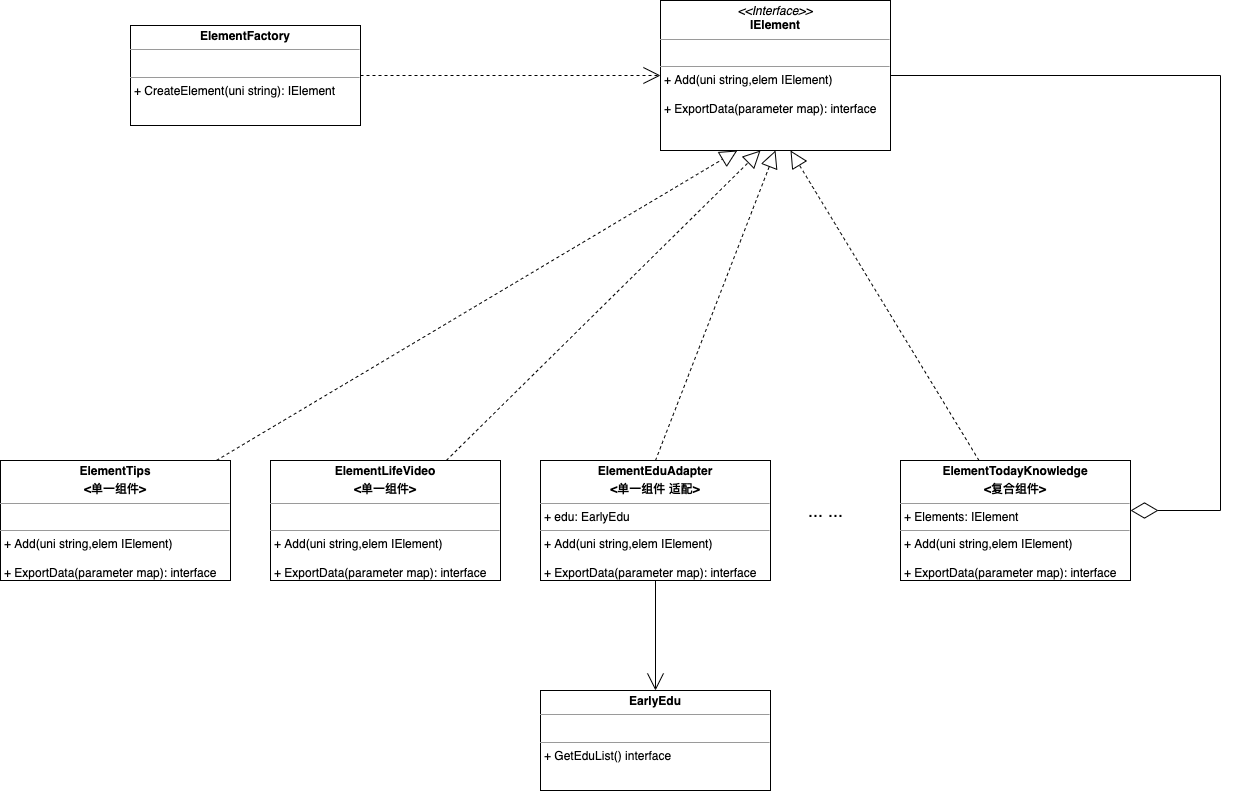
Refactor After Code:
定义组件接口 IElement :
// IElement 组件接口type IElement interface {// Add 添加组件,单一组件,可以不用实现具体方法内容Add(compUni string, compo IElement)// ExportData 输出组件数据ExportData(parameter map[string]interface{}) (interface{}, error)}
定义组件类型枚举
// EElement 组件类型type EElement stringconst (EElementTips EElement = "tips" // 贴士EElementLifeVideo EElement = "life_video" // 生命一千天EElementEarlyEdu EElement = "early_edu" // 早教EElementBaby EElement = "baby" // 宝宝ECompositeTodayKnowledge EElement = "today_knowledge" // 今日知识// ....)func (ec EElement) ToStr() string {return string(ec)}
单一组件的实现
// ElemTips 贴士组件type ElemTips struct {}func NewCompoTips() *ElementTips {return &ElementTips{}}func (c *ElementTips) Add(compoUni string, comp IElement) {}func (c ElementTips) ExportData(parameter map[string]interface{}) (interface{}, error) {tips := []map[string]interface{}{{"id": 1,"title": "贴士1",},{"id": 2,"title": "贴士2",},{"id": 3,"title": "贴士3",},{"id": 4,"title": "贴士4",},}return tips, nil}// ElemLifeVideo 生命一千天组件type ElemLifeVideo struct {}func NewCompoLifeVideo() *ElementLifeVideo {return &ElementLifeVideo{}}func (c ElementLifeVideo) Add(compoUni string, comp IElement) {}func (c ElementLifeVideo) ExportData(parameter map[string]interface{}) (interface{}, error) {lifeVideos := []map[string]interface{}{{"id": 1,"title": "生命一千天1",},{"id": 2,"title": "生命一千天2",},{"id": 3,"title": "生命一千天3",},{"id": 4,"title": "生命一千天4",},}return lifeVideos, nil}// ... ...
复合组件:
// 今日知识,组合多个dan'yi组件type ElemTodayKnowledge struct {Composite map[string]IElement}func NewCompoTodayKnowledge() *ElemTodayKnowledge {factory := NewElementFactory()c := new(ElemTodayKnowledge)c.Add(EElementTips.ToStr(), factory.CreateElement(EElementTips.ToStr()))c.Add(EElementEarlyEdu.ToStr(), factory.CreateElement(EElementEarlyEdu.ToStr()))return c}func (c *ElemTodayKnowledge) Add(compoUni string, comp IElement) {if c.Composite == nil {c.Composite = map[string]IElement{}}c.Composite[compoUni] = comp}func (c ElemTodayKnowledge) ExportData(parameter map[string]interface{}) (interface{}, error) {data := map[string]interface{}{}for uni, compo := range c.Composite {data[uni], _ = compo.ExportData(parameter)}return data, nil}
因为有些知识数据的内容已经有相关实现,并且可以构造对象进行调用,我们需要做的是根据组件需求适配成组件需要的数据结构进行输出,这里又引入了适配器模式,可以使用适配器模式,将其适配成当前组件需要的数据结构输出。
// ElemEarlyDduAdapter 早教组件 - 适配type ElemEarlyDduAdapter struct {edu earlyEdu.ThemeManager}func NewElementLifeVideoAdapter(edu earlyEdu.ThemeManager) *ElemEarlyDduAdapter {return &ElemEarlyDduAdapter{edu: edu}}func (c ElemEarlyDduAdapter) Add(compoUni string, comp IElement) {}func (c ElemEarlyDduAdapter) ExportData(parameter map[string]interface{}) (interface{}, error) {age, ok := parameter["age"].(uint32)if !ok {return nil, errors.New("缺少age")}birthday, ok := parameter["birthday"].(string)if !ok {return nil, errors.New("缺少birthday")}list := c.edu.GetList(age, birthday)return list, nil}
对象的创建需要进行统一管理,便于后续的拓展和替换,这里引入工厂模式,封装组件的对象创建,通过工厂方法去创建组件对象。
// ElemFactory 组件工厂type ElemFactory struct {}func NewElementFactory() *ElemFactory {return &ElemFactory{}}// CreateElement 内容组件对象工厂func (e ElemFactory) CreateElement(compType string) IElement {switch compType {case EElementBaby.ToStr():return NewCompoBaby()case EElementEarlyEdu.ToStr():return NewElementLifeVideoAdapter(earlyEdu.ThemeManager{})case EElementLifeVideo.ToStr():return NewCompoLifeVideo()case EElementTips.ToStr():return NewCompoTips()case ECompositeTodayKnowledge.ToStr():return NewCompoTodayKnowledge()default:return nil}}
辣妈首页模块数据聚合:
type HomeModule struct {GCtx *gin.Context}func NewHomeModule(ctx *gin.Context) *HomeModule {// 构建模块对象lh := &HomeModule{GCtx: ctx,}return lh}func (lh HomeModule) GetHomeModules() interface{} {// 请request context 上文获取请求参数parameter := map[string]interface{}{"baby_id": 22000025,"birthday": "2021-12-11","age": uint32(10),// ... ...}// 从db获取模块列表compos := []string{"early_edu","baby","tips","today_knowledge",}// 组装组件elements := map[string]element.IElement{}elementFactory := element.NewElementFactory()for _, compoUni := range compos {comp := elementFactory.CreateElement(compoUni)if comp == nil {continue}elements[compoUni] = comp}// 聚合数据data := map[string]interface{}{}for uni, compo := range elements {data[uni], _ = compo.ExportData(parameter)}return data}
改造相关内容,over ~
经过改造,后续再拓展或者维护首页模块数据的时候,基本不需要动到获取数据的方法:GetHomeModules() ,拓展的时候只需要去拓展一个组件枚举类型,然后定义组件 struct 实现 组件接口 IElement 方法,在组件工厂 ElemFactory 中拓展对象创建,维护组件的时候也只需要对ExportData() 修改。
这次的重构方案中体现了设计模式的几个原则,我们抽象了组件接口,针对接口编程,不针对实现编程,满足接口隔离原则,并且对修改关闭,对拓展开放,满足了开闭原则。
总结:
最后,为了减少重复的代码开发,避免做添油加醋的事情,为了项目的可维护性,可拓展性,也避免成为后人口吐芬芳的对象,我们需要设计起来,实现可以应对变化,有弹性的系统。

若有收获,就点个赞吧
0 人点赞


