简介
update-notifier用于检查包的当前版本是否是最新版本,如果不是,则提示更新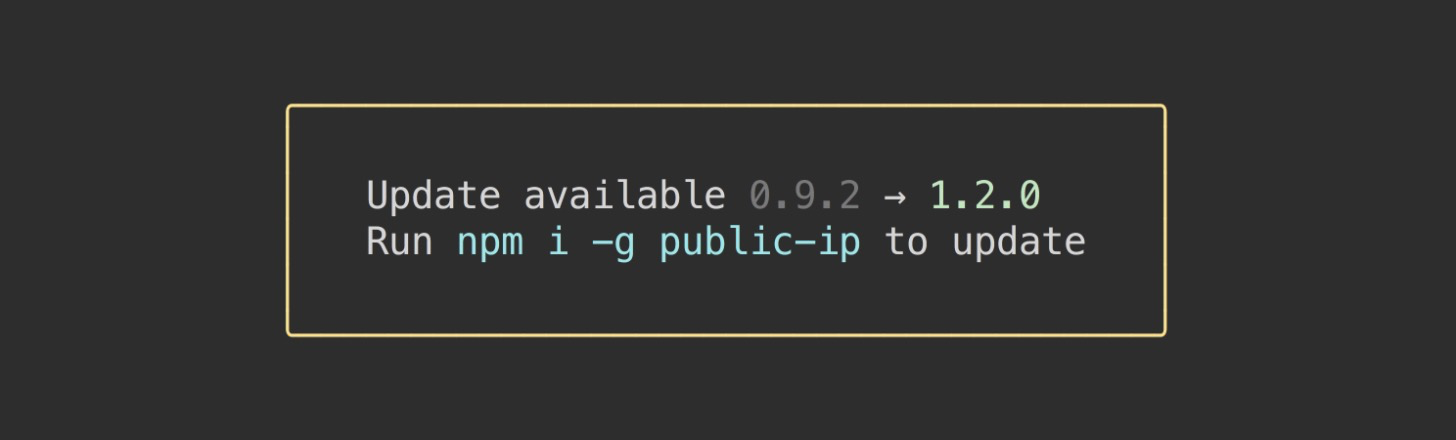
用法
const updateNotifier = require('update-notifier');const pkg = require('./package.json');updateNotifier({pkg}).notify();
源码分析
package.json
{..."dependencies": {"boxen": "^5.0.0","chalk": "^4.1.0","configstore": "^5.0.1","has-yarn": "^2.1.0","import-lazy": "^2.1.0","is-ci": "^2.0.0","is-installed-globally": "^0.4.0","is-npm": "^5.0.0","is-yarn-global": "^0.3.0","latest-version": "^5.1.0","pupa": "^2.1.1","semver": "^7.3.4","semver-diff": "^3.1.1","xdg-basedir": "^4.0.0"},"devDependencies": {"ava": "^2.4.0","clear-module": "^4.1.1","fixture-stdout": "^0.2.1","mock-require": "^3.0.3","strip-ansi": "^6.0.0","xo": "^0.37.1"}...}
从以上代码中,可以看出,dependencies中有一些依赖包:
boxen
此包主要用于在终端创建盒,例如:
import boxen from 'boxen';console.log(boxen('unicorn', {padding: 1}));/*┌─────────────┐│ ││ unicorn ││ │└─────────────┘*/console.log(boxen('unicorn', {padding: 1, margin: 1, borderStyle: 'double'}));/*╔═════════════╗║ ║║ unicorn ║║ ║╚═════════════╝*/console.log(boxen('unicorns love rainbows', {title: 'magical', titleAlignment: 'center'}));/*┌────── magical ───────┐│unicorns love rainbows│└──────────────────────┘*/
chalk
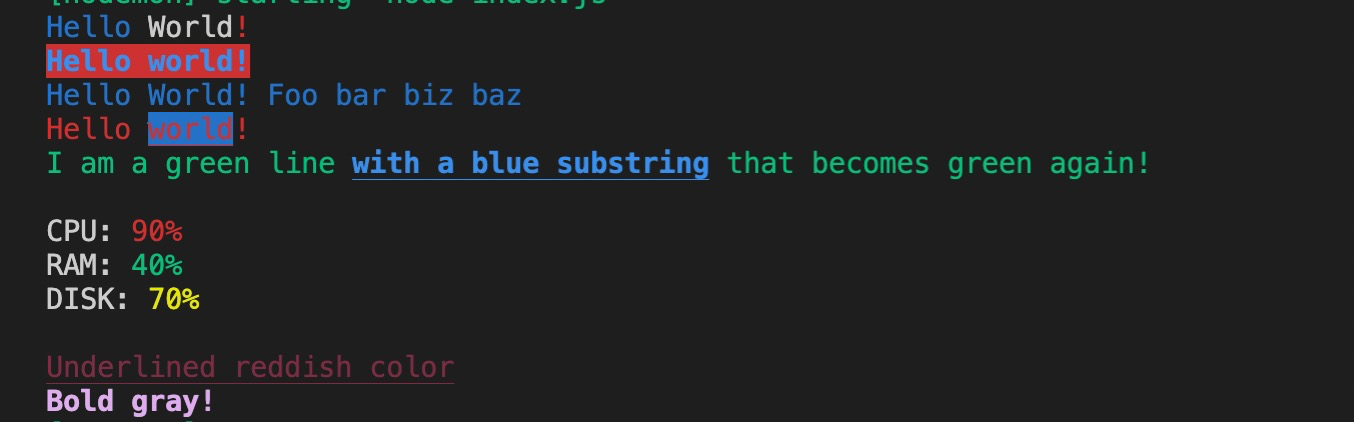
此包可以用来控制终端中输入的字符串的颜色、背景等
import chalk from 'chalk';const log = console.log;// Combine styled and normal stringslog(chalk.blue('Hello') + ' World' + chalk.red('!'));// Compose multiple styles using the chainable APIlog(chalk.blue.bgRed.bold('Hello world!'));// Pass in multiple argumentslog(chalk.blue('Hello', 'World!', 'Foo', 'bar', 'biz', 'baz'));// Nest styleslog(chalk.red('Hello', chalk.underline.bgBlue('world') + '!'));// Nest styles of the same type even (color, underline, background)log(chalk.green('I am a green line ' +chalk.blue.underline.bold('with a blue substring') +' that becomes green again!'));// ES2015 template literallog(`CPU: ${chalk.red('90%')}RAM: ${chalk.green('40%')}DISK: ${chalk.yellow('70%')}`);// Use RGB colors in terminal emulators that support it.log(chalk.rgb(123, 45, 67).underline('Underlined reddish color'));log(chalk.hex('#DEADED').bold('Bold gray!'));
configstore
此包通过既定文件命名规则,在当前系统中创建文件,用于存储用户的配置数据。再通过文件读写,实现配置的修改和保存。
import Configstore from 'configstore';const packageJson = JSON.parse(fs.readFileSync('./package.json', 'utf8'));// Create a Configstore instance.const config = new Configstore(packageJson.name, {foo: 'bar'});console.log(config.get('foo'));//=> 'bar'config.set('awesome', true);console.log(config.get('awesome'));//=> true// Use dot-notation to access nested properties.config.set('bar.baz', true);console.log(config.get('bar'));//=> {baz: true}config.delete('awesome');console.log(config.get('awesome'));//=> undefined
has-yarn
此包用于来检测项目中是否有yarn,主要是通过检测工作目录中是否有yarn.lock的文件
.├── foo│ └── package.json└── bar├── package.json└── yarn.lock
import hasYarn from 'has-yarn';hasYarn('foo');//=> falsehasYarn('bar');//=> true
import-lazy
此包主要是懒加载模块
// Pass in `require` or a custom import functionconst importLazy = require('import-lazy')(require);const _ = importLazy('lodash');// Instead of referring to its exported properties directly…_.isNumber(2);// …it's cached on consecutive calls_.isNumber('unicorn');// Works out of the box for functions and regular propertiesconst stuff = importLazy('./math-lib');console.log(stuff.sum(1, 2)); // => 3console.log(stuff.PHI); // => 1.618033
is-ci:判断当前环境是否是持续集成的服务
is-installed-globally:检测是否安装了全局的包
is-npm:检测当前代码是否是npm或yarn运行的
is-yarn-global:检测是否全局安装了yarn
latest-version:获取npm包的最新版
pupa
此包是一个简便的宏模版
import pupa from 'pupa';pupa('The mobile number of {name} is {phone.mobile}', {name: 'Sindre',phone: {mobile: '609 24 363'}});//=> 'The mobile number of Sindre is 609 24 363'pupa('I like {0} and {1}', ['🦄', '🐮']);//=> 'I like 🦄 and 🐮'// Double braces encodes the HTML entities to avoid code injection.pupa('I like {{0}} and {{1}}', ['<br>🦄</br>', '<i>🐮</i>']);//=> 'I like <br>🦄</br> and <i>🐮</i>'
semver:Node的语义化版本
semver-diff:获取两个semver版本的diff类型
xdg-basedir
此包主要应用于Linux平台,基于xdg获取文件路径。
import {xdgData, xdgConfig, xdgDataDirectories} from 'xdg-basedir';console.log(xdgData);//=> '/home/sindresorhus/.local/share'console.log(xdgConfig);//=> '/home/sindresorhus/.config'console.log(xdgDataDirectories);//=> ['/home/sindresorhus/.local/share', '/usr/local/share/', '/usr/share/']
devDependencies
ava和xo主要用来进行进行
clear-module:清除模块缓存
fixture-stdout:
mock-require:简单、直观地模拟Node模块
strip-ansi:从字符串中去掉ANSI转译码
import stripAnsi from 'strip-ansi';stripAnsi('\u001B[4mUnicorn\u001B[0m');//=> 'Unicorn'stripAnsi('\u001B]8;;https://github.com\u0007Click\u001B]8;;\u0007');//=> 'Click'
index.js
'use strict';const {spawn} = require('child_process');const path = require('path');const {format} = require('util');const importLazy = require('import-lazy')(require);const configstore = importLazy('configstore');const chalk = importLazy('chalk');const semver = importLazy('semver');const semverDiff = importLazy('semver-diff');const latestVersion = importLazy('latest-version');const isNpm = importLazy('is-npm');const isInstalledGlobally = importLazy('is-installed-globally');const isYarnGlobal = importLazy('is-yarn-global');const hasYarn = importLazy('has-yarn');const boxen = importLazy('boxen');const xdgBasedir = importLazy('xdg-basedir');const isCi = importLazy('is-ci');const pupa = importLazy('pupa');const ONE_DAY = 1000 * 60 * 60 * 24;
定义的变量,具体用法可以参照上面package.json的包的解释
代码部分就直接贴一个运行的流程图了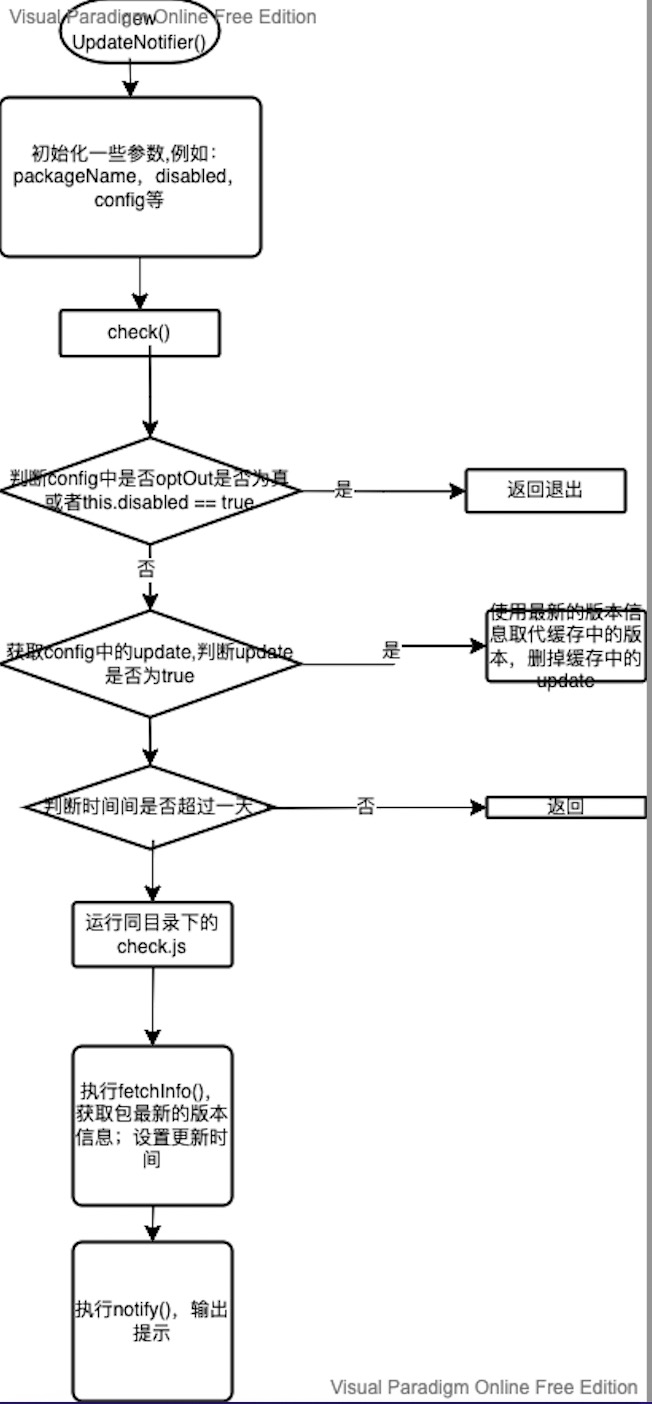

若有收获,就点个赞吧
0 人点赞


