简单查询都是单表查询,而本文我们要学习的则是多表查询操作,主要从以下几个方面进行讲解。
1 多表关系
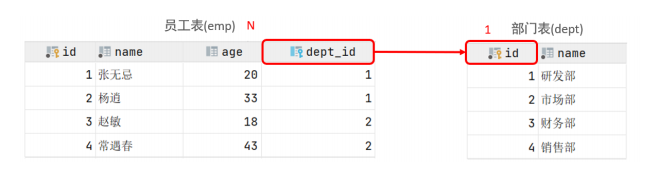
项目开发中,在进行数据库表结构设计时,会根据业务需求及业务模块之间的关系,分析并设计表结构,由于业务之间相互关联,所以各个表结构之间也存在着各种联系,基本上分为三种:
1.2 多对多
- 案例: 学生 与 课程的关系
- 关系: 一个学生可以选修多门课程,一门课程也可以供多个学生选择
- 实现: 建立第三张中间表,中间表至少包含两个外键,分别关联两方主键

-- 创建学生表并插入数据create table student(id int auto_increment primary key comment '主键ID',name varchar(10) comment '姓名',no varchar(10) comment '学号') comment '学生表';insert into studentvalues (null, '黛绮丝', '2000100101'),(null, '谢逊', '2000100102'),(null, '殷天正', '2000100103'),(null, '韦一笑', '2000100104');-- 创建课程表并插入数据create table course(id int auto_increment primary key comment '主键ID',name varchar(10) comment '课程名称') comment '课程表';insert into coursevalues (null, 'Java'),(null, 'PHP'),(null, 'MySQL'),(null, 'Hadoop');-- 创建学生课程中间表并插入数据create table student_course(id int auto_increment comment '主键' primary key,studentid int not null comment '学生ID',courseid int not null comment '课程ID',constraint fk_courseid foreign key (courseid) references course (id),constraint fk_studentid foreign key (studentid) references student (id)) comment '学生课程中间表';insert into student_coursevalues (null, 1, 1),(null, 1, 2),(null, 1, 3),(null, 2, 2),(null, 2, 3),(null, 3, 4);
1.3 一对一
- 案例: 用户 与 用户详情的关系
- 关系: 一对一关系,多用于单表拆分,将一张表的基础字段放在一张表中,其他详情字段放在另一张表中,以提升操作效率
- 实现: 在任意一方加入外键,关联另外一方的主键,并且设置外键为唯一的(UNIQUE)

create table tb_user(id int auto_increment primary key comment '主键ID',name varchar(10) comment '姓名',age int comment '年龄',gender char(1) comment '1: 男 , 2: 女',phone char(11) comment '手机号') comment '用户基本信息表';create table tb_user_edu(id int auto_increment primary key comment '主键ID',degree varchar(20) comment '学历',major varchar(50) comment '专业',primaryschool varchar(50) comment '小学',middleschool varchar(50) comment '中学',university varchar(50) comment '大学',userid int unique comment '用户ID',constraint fk_userid foreign key (userid) references tb_user (id)) comment '用户教育信息表';insert into tb_user(id, name, age, gender, phone)values (null, '黄渤', 45, '1', '18800001111'),(null, '冰冰', 35, '2', '18800002222'),(null, '码云', 55, '1', '18800008888'),(null, '李彦宏', 50, '1', '18800009999');insert into tb_user_edu(id, degree, major, primaryschool, middleschool, university, userid)values (null, '本科', '舞蹈', '静安区第一小学', '静安区第一中学', '北京舞蹈学院', 1),(null, '硕士', '表演', '朝阳区第一小学', '朝阳区第一中学', '北京电影学院', 2),(null, '本科', '英语', '杭州市第一小学', '杭州市第一中学', '杭州师范大学', 3),(null, '本科', '应用数学', '阳泉第一小学', '阳泉区第一中学', '清华大学', 4);
2 多表查询概述
2.1 数据准备
1)删除之前的emp,dept表的测试数据
2)执行如下脚本,创建emp表与dept表并插入测试数据
-- 创建dept表,并插入数据drop table emp;drop table dept;create table dept(id int auto_increment comment 'ID' primary key,name varchar(50) not null comment '部门名称') comment '部门表';INSERT INTO dept (id, name)VALUES (1, '研发部'),(2, '市场部'),(3, '财务部'),(4, '销售部'),(5, '总经办'),(6, '人事部');-- 创建emp表,并插入数据create table emp(id int auto_increment comment 'ID' primary key,name varchar(50) not null comment '姓名',age int comment '年龄',job varchar(20) comment '职位',salary int comment '薪资',entrydate date comment '入职时间',managerid int comment '直属领导ID',dept_id int comment '部门ID') comment '员工表';-- 添加外键alter table empadd constraint fk_emp_dept_id foreign key (dept_id) references dept (id);INSERT INTO emp (id, name, age, job, salary, entrydate, managerid, dept_id)VALUES (1, '金庸', 66, '总裁', 20000, '2000-01-01', null, 5),(2, '张无忌', 20, '项目经理', 12500, '2005-12-05', 1, 1),(3, '杨逍', 33, '开发', 8400, '2000-11-03', 2, 1),(4, '韦一笑', 48, '开发', 11000, '2002-02-05', 2, 1),(5, '常遇春', 43, '开发', 10500, '2004-09-07', 3, 1),(6, '小昭', 19, '程序员鼓励师', 6600, '2004-10-12', 2, 1),(7, '灭绝', 60, '财务总监', 8500, '2002-09-12', 1, 3),(8, '周芷若', 19, '会计', 48000, '2006-06-02', 7, 3),(9, '丁敏君', 23, '出纳', 5250, '2009-05-13', 7, 3),(10, '赵敏', 20, '市场部总监', 12500, '2004-10-12', 1, 2),(11, '鹿杖客', 56, '职员', 3750, '2006-10-03', 10, 2),(12, '鹤笔翁', 19, '职员', 3750, '2007-05-09', 10, 2),(13, '方东白', 19, '职员', 5500, '2009-02-12', 10, 2),(14, '张三丰', 88, '销售总监', 14000, '2004-10-12', 1, 4),(15, '俞莲舟', 38, '销售', 4600, '2004-10-12', 14, 4),(16, '宋远桥', 40, '销售', 4600, '2004-10-12', 14, 4),(17, '陈友谅', 42, null, 2000, '2011-10-12', 1, null);
dept表共6条记录,emp表共17条记录。
2.2 概述
多表查询就是指从多张表中查询数据。原来查询单表数据,执行的SQL形式为:select * from emp; 那么我们要执行多表查询,就只需要使用逗号分隔多张表即可,如:select * from emp, dept; 具体的执行结果如下: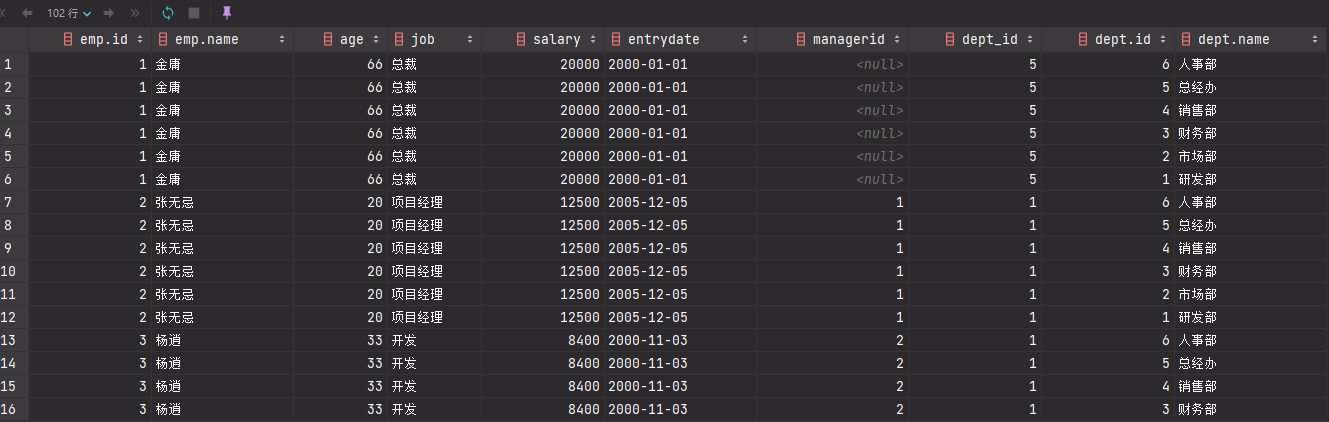
此时,我们看到查询结果中包含了大量的结果集,总共102条记录,而这其实就是员工表emp所有的记录 (17) 与 部门表dept所有记录(6) 的所有组合情况,这种现象称之为笛卡尔积。接下来,就来简单介绍下笛卡尔积。
- 笛卡尔积:
笛卡尔乘积是指在数学中,两个集合A集合 和 B集合的所有组合情况。
而在多表查询中,我们是需要消除无效的笛卡尔积的,只保留两张表关联部分的数据。
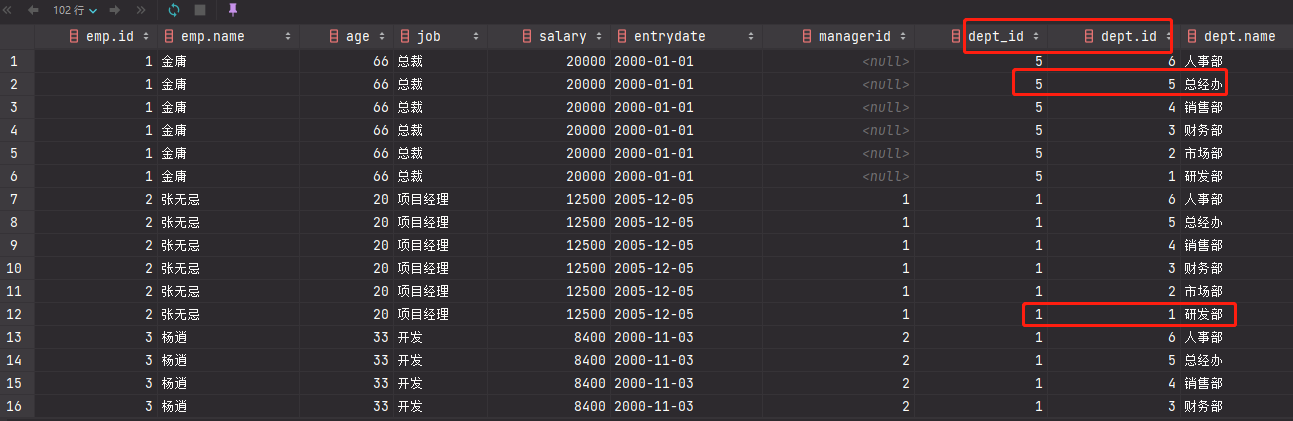
在SQL语句中,如何来去除无效的笛卡尔积呢? 我们可以给多表查询加上连接查询的条件即可。
select * from emp , dept where emp.dept_id = dept.id;

2.3 分类
- 连接查询
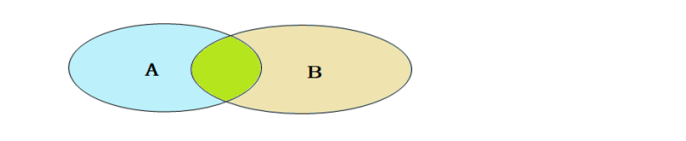
- 内连接:相当于查询A、B交集部分数据
- 外连接:
- 左外连接:查询左表所有数据,以及两张表交集部分数据
- 右外连接:查询右表所有数据,以及两张表交集部分数据
- 自连接:当前表与自身的连接查询,自连接必须使用表别名
- 子查询
3 内连接
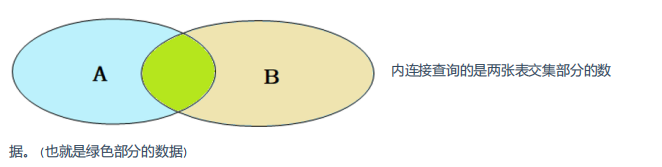
内连接的语法分为两种: 隐式内连接、显式内连接。先来学习一下具体的语法结构
1)隐式内连接
SELECT 字段列表 FROM 表1 , 表2 WHERE 条件 ... ;
2)显示内连接
SELECT 字段列表 FROM 表1 [ INNER ] JOIN 表2 ON 连接条件 ... ;
案例:
- 查询每一个员工的姓名 , 及关联的部门的名称 (隐式内连接实现)
表结构: emp ,dept
连接条件: emp.dept_id = dept.id
select emp.name , dept.name from emp , dept where emp.dept_id = dept.id ;

-- 为每一张表起别名,简化SQL编写
select e.name,d.name from emp e , dept d where e.dept_id = d.id;
- 查询每一个员工的姓名 , 及关联的部门的名称 (显式内连接实现) —- INNER JOIN … ON …
表结构: emp , dept
连接条件: emp.dept_id = dept.id
select e.name, d.name from emp e inner join dept d on e.dept_id = d.id;

-- 为每一张表起别名,简化SQL编写
select e.name, d.name from emp e join dept d on e.dept_id = d.id;
4 外连接
外连接分为两种,分别是:左外连接 和 右外连接。具体的语法结构为:
1)左外连接
SELECT 字段列表 FROM 表1 LEFT [ OUTER ] JOIN 表2 ON 条件 ... ;
左外连接相当于查询表1(左表)的所有数据,当然也包含表1和表2交集部分的数据。
2)右外连接
SELECT 字段列表 FROM 表1 RIGHT [ OUTER ] JOIN 表2 ON 条件 ... ;
右外连接相当于查询表2(右表)的所有数据,当然也包含表1和表2交集部分的数据。
案例:
- 查询emp表的所有数据, 和对应的部门信息
- 由于需求中提到,要查询
emp的所有数据,所以是不能内连接查询的,需要考虑使用外连接查询。 - 表结构:
emp,dept - 连接条件:
emp.dept_id = dept.id```sql select e.*, d.name from emp e left outer join dept d on e.dept_id = d.id;
- 由于需求中提到,要查询
select e.*, d.name from emp e left join dept d on e.dept_id = d.id;
2. 查询dept表的所有数据, 和对应的员工信息(右外连接)
   1. 由于需求中提到,要查询`dept`表的所有数据,所以是不能内连接查询的,需要考虑使用外连接查询。
   1. 表结构: `emp, dept`
   1. 连接条件: `emp.dept_id = dept.id`
```sql
select d.*, e.* from emp e right outer join dept d on e.dept_id = d.id;

select d.*, e.* from dept d left outer join emp e on e.dept_id = d.id;
注意事项: 左外连接和右外连接是可以相互替换的,只需要调整在连接查询时SQL中,表结构的先后顺序就可以了。而我们在日常开发使用时,更偏向于左外连接。
5 自连接
5.1 自连接查询
自连接查询,顾名思义,就是自己连接自己,也就是把一张表连接查询多次。我们先来学习一下自连接的查询语法:
SELECT 字段列表 FROM 表A 别名A JOIN 表A 别名B ON 条件 ... ;
而对于自连接查询,可以是内连接查询,也可以是外连接查询。
案例:
查询员工 及其 所属领导的名字
- 表结构:
empselect a.name , b.name from emp a , emp b where a.managerid = b.id;
- 表结构:
查询所有员工
emp及其领导的名字emp, 如果员工没有领导, 也需要查询出来- 表结构:
emp a,emp bselect a.name '员工', b.name '领导' from emp a left join emp b on a.managerid = b.id;
- 表结构:
注意事项: 在自连接查询中,必须要为表起别名,要不然我们不清楚所指定的条件、返回的字段,到底 是哪一张表的字段。
5.2 联合查询
对于union查询,就是把多次查询的结果合并起来,形成一个新的查询结果集。
SELECT 字段列表 FROM 表A ...
UNION [ ALL ]
SELECT 字段列表 FROM 表B ....;
- 对于联合查询的多张表的列数必须保持一致,字段类型也需要保持一致。
- union all 会将全部的数据直接合并在一起,union 会对合并之后的数据去重。
案例:
- 将薪资低于 5000 的员工 , 和 年龄大于 50 岁的员工全部查询出来.
当前对于这个需求,我们可以直接使用多条件查询,使用逻辑运算符 or 连接即可。 那这里呢,我们也可以通过union/union all来联合查询.
select * from emp where salary < 5000
union all
select * from emp where age >50;

union all查询出来的结果,仅仅进行简单的合并,并未去重。
select * from emp where salary < 5000
union
select * from emp where age > 50;
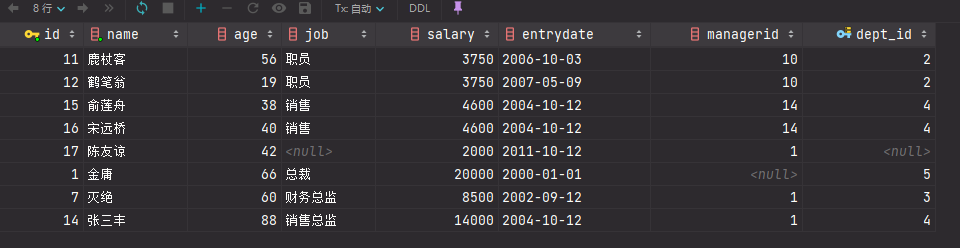
union 联合查询,会对查询出来的结果进行去重处理。
6 子查询
6.1 概述
1)概念
SQL语句中嵌套SELECT语句,称为嵌套查询,又称子查询。
SELECT * FROM t1 WHERE column1 = ( SELECT column1 FROM t2 );
根据子查询结果不同,分为:
- 标量子查询(子查询结果为单个值)
- 列子查询(子查询结果为一列)
- 行子查询(子查询结果为一行)
- 表子查询(子查询结果为多行多列)
根据子查询位置,分为:
- 查询 “销售部” 的所有员工信息
完成这个需求时,我们可以将需求分解为两步:
① 查询 “销售部” 部门ID
select id from dept where name = '销售部';
②. 根据 “销售部” 部门ID, 查询员工信息
select * from emp where dept_id = (select id from dept where name = '销售部');
- 查询在 “方东白” 入职之后的员工信息
完成这个需求时,我们可以将需求分解为两步:
①. 查询 方东白 的入职日期
select entrydate from emp where name = '方东白';
②. 查询指定入职日期之后入职的员工信息
select * from emp where entrydate > (select entrydate from emp where name = '方东白');
6.3 列子查询
子查询返回的结果是一列(可以是多行),这种子查询称为列子查询。 常用的操作符:IN 、NOT IN 、 ANY 、SOME 、 ALL
- 查询比 财务部 所有人工资都高的员工信息
分解为以下两步:
① 查询所有 财务部 人员工资
select id from dept where name = '财务部';

select salary from emp where dept_id = (select id from dept where name = '财务部');
②. 比 财务部 所有人工资都高的员工信息
select * from emp where salary > all ( select salary from emp where dept_id =
                                      (select id from dept where name = '财务部') );
- 查询比研发部其中任意一人工资高的员工信息
分解为以下两步:
①. 查询研发部所有人工资
select salary from emp where dept_id = (select id from dept where name = '研发部');
②. 比研发部其中任意一人工资高的员工信息
select * from emp where salary > any ( select salary from emp where dept_id =
                                      (select id from dept where name = '研发部') );
6.4 行子查询
子查询返回的结果是一行(可以是多列),这种子查询称为行子查询。
常用的操作符:= 、<> 、IN 、NOT IN
案例:
- 查询与 “张无忌” 的薪资及直属领导相同的员工信息 ;
这个需求同样可以拆解为两步进行:
①. 查询 “张无忌” 的薪资及直属领导
select salary, managerid from emp where name = '张无忌';
②. 查询与 “张无忌” 的薪资及直属领导相同的员工信息 ;
select * from emp where (salary,managerid) = (select salary, managerid from emp
                                              where name = '张无忌');
6.5 表子查询
子查询返回的结果是多行多列,这种子查询称为表子查询。
常用的操作符:IN
案例:
- 查询与 “鹿杖客” , “宋远桥” 的职位和薪资相同的员工信息
分解为两步执行:
①. 查询 “鹿杖客” , “宋远桥” 的职位和薪资
select job, salary from emp where name = '鹿杖客' or name = '宋远桥';
②. 查询与 “鹿杖客” , “宋远桥” 的职位和薪资相同的员工信息
- 查询入职日期是 “2006-01-01” 之后的员工信息 , 及其部门信息
分解为两步执行:
①. 入职日期是 “2006-01-01” 之后的员工信息
select * from emp where entrydate > '2006-01-01';
②. 查询这部分员工, 对应的部门信息;
select e.*, d.* from (select * from emp where entrydate > '2006-01-01') e
left join dept d on e.dept_id = d.id
7 多表查询案例
数据环境准备:
create table salgrade
(
    grade int,
    losal int,
    hisal int
) comment '薪资等级表';

insert into salgrade
values (1, 0, 3000);
insert into salgrade
values (2, 3001, 5000);
insert into salgrade
values (3, 5001, 8000);
insert into salgrade
values (4, 8001, 10000);
insert into salgrade
values (5, 10001, 15000);
insert into salgrade
values (6, 15001, 20000);
insert into salgrade
values (7, 20001, 25000);
insert into salgrade
values (8, 25001, 30000);
在这个案例中,我们主要运用上面所讲解的多表查询的语法,完成以下的12个需求即可,而这里主要涉及到的表就三张:emp员工表、dept部门表、salgrade薪资等级表 。
【未完待续】

若有收获,就点个赞吧
0 人点赞


