使用说明
1、 下载附件 ugis3dmap20220318.txt
2、 修改附件扩展名为zip,并解压文件包;
3、 备份ugis/static/dist/js/ugis3dmap,删除或重命名ugis/static/dist/js/ugis3dmap。(产品中的文件)
4、 拷贝【ugis3dmap.zip】到ugis/static/dist/js/ugis3dmap并解压。
5、 创建UGIS 3D场景,拷贝【地图场景代码注入.js】内容,覆盖场景代码注入,根据需要修改S3M服务url及其他参数,保存代码注入,预览场景。
6、修改地图场景代码注入.js
/*** @description 3D场景代码注入**/function onSceneRender(){return {// 场景初始化之前"beforeLoad" : function(options) {},// 场景初始化完成"loaded": function(mapInstance){const viewer = mapInstance.viewer, scene = viewer.scene;const s3mUrl = 'http://www.supermapol.com/realspace/services/3D-suofeiya_church/rest/realspace';scene.open(s3mUrl, undefined, {autoSetView: true // 是否自动定位});}};}
修改: const s3mUrl = ‘http://www.supermapol.com/realspace/services/3D-suofeiya_church/rest/realspace’;
为客户现场正式URL地址;
PS:
1、 关闭ugis入场动画,s3m的自动缩放和场景初始相机动画冲突,会导致无法正常加载倾斜摄影数据。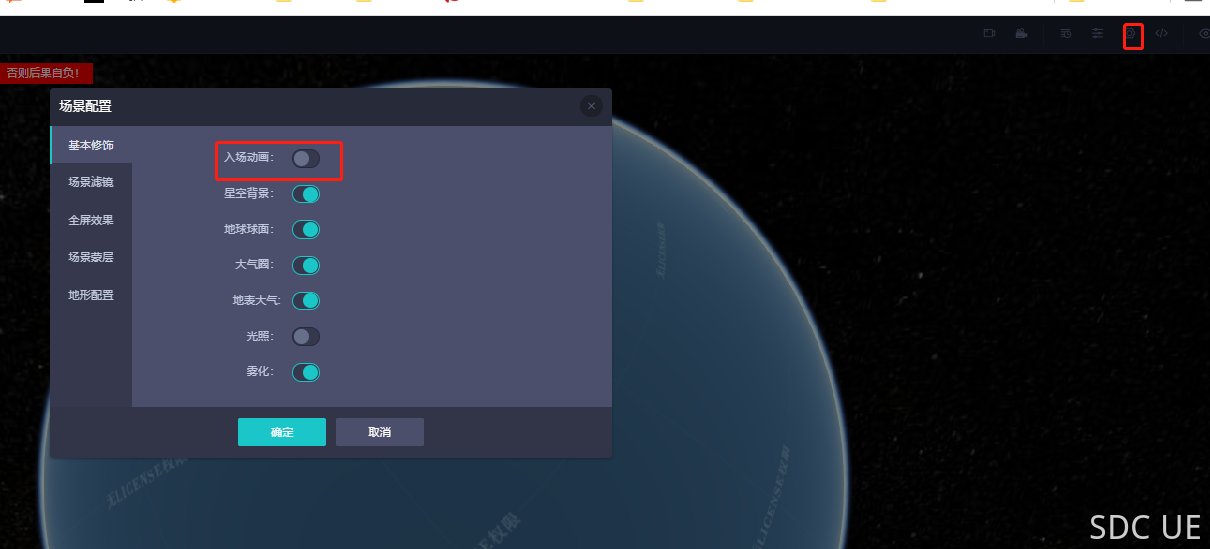
2、3D场景在s3mUrl 的最后是以 rest/realspace 结尾; 

若有收获,就点个赞吧
0 人点赞


