0. 参考资料
点击查看【bilibili】
韩顺平_循序渐进学Java零基础【完整笔记】.pdf
1.概述
- JDBC为访问不同的数据库提供了统一的接口, 为使用者屏蔽了细节问题
- Java程序员使用JDBC, 可以连接任何提供了JDBC驱动的数据库, 从而完成CRUD操作
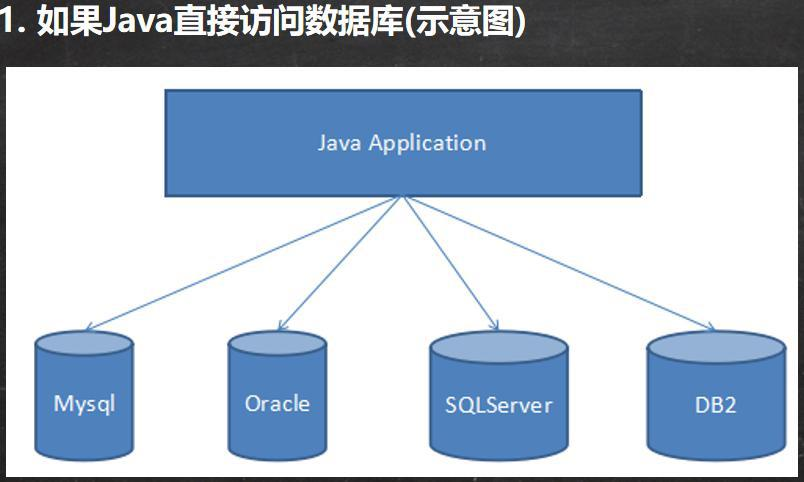
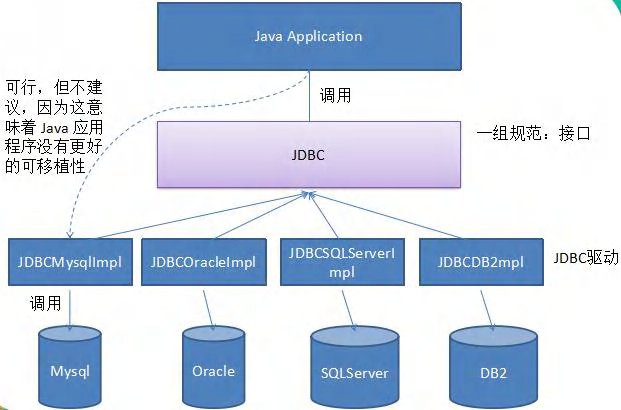

实现原理

2.快速入门
基本步骤
注册驱动&获取连接
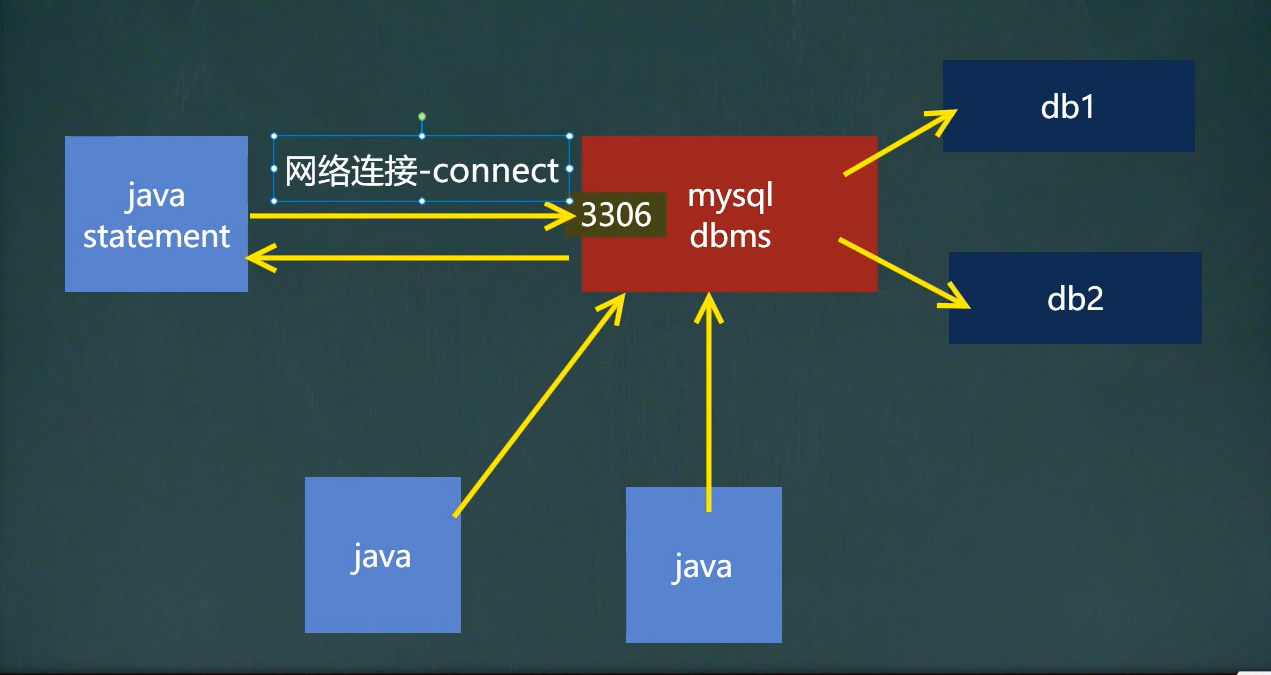
注册驱动获取连接的五种方式
- 代码
public class TestGetConnection {static String url = "jdbc:mysql://localhost:3306/myjdbc";static String userKey = "user";static String userValue = "root";static String passwordKey = "password";static String passwordValue = "0000";static String driverClassName = "com.mysql.jdbc.Driver";static Properties properties = new Properties();static {properties.setProperty(userKey, userValue);properties.setProperty(passwordKey, passwordValue);}@Testpublic void test1() throws SQLException {//1.注册驱动-创建driver对象Driver driver = new Driver();//2.获取连接-将用户名和密码放入到Properties 对象, 并作入参Connection connect = driver.connect(url, properties);System.out.println(connect);}/*** @description: 使用反射加载Driver类 ,* 动态加载,更加的灵活,减少依赖性*/@Testpublic void test2() throws ClassNotFoundException, IllegalAccessException, InstantiationException, SQLException {Class<?> aClass = Class.forName(driverClassName);Driver driver = (Driver) aClass.newInstance();Connection connect = driver.connect(url, properties);System.out.println(connect);}/*** @description: 使用DriverManager注册Driver,* 以替代 Driver 进行统一管理*/@Testpublic void test3() throws ClassNotFoundException, IllegalAccessException, InstantiationException, SQLException {Class<?> aClass = Class.forName(driverClassName);Driver driver = (Driver) aClass.newInstance();DriverManager.registerDriver(driver);Connection connect = driver.connect(url, properties);System.out.println(connect);}/*** @description: 使用Class.forName 自动完成注册驱动,简化代码* //这种方式获取连接是使用的最多,推荐使用* 使用反射加载了 Driver类* 在加载 Driver类时,完成注册* 源码://// Register ourselves with the DriverManager// 在DriverManager中自动注册(Driver)//static {try {java.sql.DriverManager.registerDriver(new Driver());} catch (SQLException E) {throw new RuntimeException("Can't register driver!");}}* 1. 静态代码块,在类加载时,会执行一次.* 2. DriverManager.registerDriver(new Driver());* 3. 因此注册driver的工作已经完成*/@Testpublic void test4() throws ClassNotFoundException, SQLException {// com.mysql.jdbc.Driver 初始化时:自动注册// DriverManager.registerDriver(new Driver());Class.forName(driverClassName);Connection connection = DriverManager.getConnection(url, properties);System.out.println(connection);}/*** @description: 在方式4的基础上改进,增加配置文件,让连接mysql更加灵活*/@Testpublic void test5() throws IOException, SQLException, ClassNotFoundException {Properties properties = new Properties();// 使用类加载器的流操作会NPE, 未找到bug.可能和 单元测试/main方法 的相对资源路径有关(当前是子Module下新建resources包)// InputStream inputStream = this.getClass().getClassLoader().getResourceAsStream("resources/MyJDBC.properties");// properties.load(inputStream);//通过Properties对象获取配置文件的信息properties.load(new FileInputStream("resources/MyJDBC.properties"));//正常情况不写也自动注册. 建议写上, 防止自动配置的文件出问题Class.forName(driverClassName);Connection connection = DriverManager.getConnection(properties.getProperty("url"),properties.getProperty("user"),properties.getProperty("password"));System.out.println(connection);}}
- 简单的select执行- // 使用Statement
@Testpublic void testStatement() throws SQLException, ClassNotFoundException, IOException {// 1.注册驱动Class.forName("com.mysql.jdbc.Driver");// 2.获取连接Properties properties = new Properties();properties.load(new FileReader("resources/MyJDBC.properties"));Connection connection = DriverManager.getConnection(properties.getProperty("url"),properties);// Statement演示// 3.1 获取StatementStatement statement = connection.createStatement();// 3.2 创建并执行sql(返回ResultSet结果集)String selectSql = "select * from user";ResultSet resultSet = statement.executeQuery(selectSql);// 3.3 取出Result数据while (resultSet.next()){int id = resultSet.getInt(1);String name = resultSet.getString(2);String sex = resultSet.getString(3);System.out.println(id + "\t" + name + "\t" + sex);}// 4. 关闭连接resultSet.close();statement.close();connection.close();}
- // 使用预编译PreparedStatement, 防止sql注入. (并有批处理功能)
// preparedStatement演示// 3.2 创建sqlString selectSql = "select * from user where id = ? and `name` = ?";// 3.1 获取preparedStatementPreparedStatement preparedStatement = connection.prepareStatement(selectSql);// 3.3 给占位符赋值preparedStatement.setInt(1,1); // 占位符从1开始preparedStatement.setString(2, "饶政");// 3.4 执行sql,并获取ResultSet; (获取预编译Statement时已传入sql,并占位赋值. 之后的执行语句再传参sql会覆盖)ResultSet resultSet = preparedStatement.executeQuery();// 3.5 取出Result数据while (resultSet.next()){int id = resultSet.getInt(1);String name = resultSet.getString(2);String sex = resultSet.getString(3);System.out.println(id + "\t" + name + "\t" + sex);}
- <br />- 表与结果(Statement)- 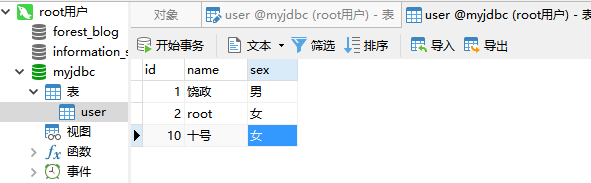
1 饶政 男2 root 女10 十号 女
- ResultSet结果集源码- ArrayList[ byte[][] ]- 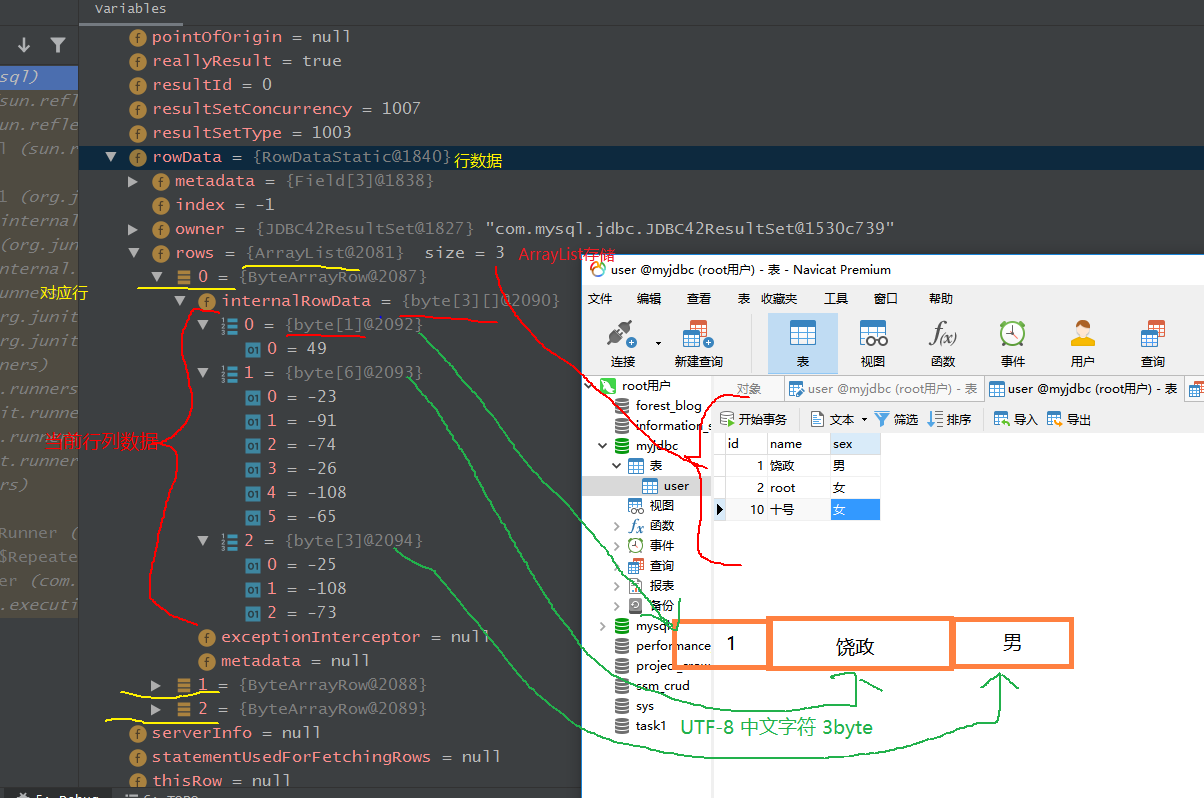- DML语句删改查操作
@Testpublic void testPreparedStatementDML() throws SQLException, ClassNotFoundException, IOException {// 1.注册驱动Class.forName("com.mysql.jdbc.Driver");// 2.获取连接Properties properties = new Properties();properties.load(new FileReader("resources/MyJDBC.properties"));Connection connection = DriverManager.getConnection(properties.getProperty("url"),properties);// 生成预编译命令对象, 并执行响应execute/Query语句.// String sql = "insert into user values (?,?,?)";// String sql = "update user set name = ? where id = ?";String sql = "delete from user where id = ? and name = ?";PreparedStatement preparedStatement = connection.prepareStatement(sql);// preparedStatement.setInt(1,11);// preparedStatement.setString(2,"rz");// preparedStatement.setString(3,"男");//// preparedStatement.setString(1,"ryze");// preparedStatement.setInt(2,11);//preparedStatement.setInt(1,11);preparedStatement.setString(2,"ryze");boolean execute = preparedStatement.execute();System.out.println(execute);// 4. 关闭连接preparedStatement.close();connection.close();}
3.JDBC API
类结构
![Y3]G3MOMQLI%8UKLZ1KYH~P.jpg](/uploads/projects/ryze_java@javase/5c48643543837605adda31abe1382aa2.jpeg)
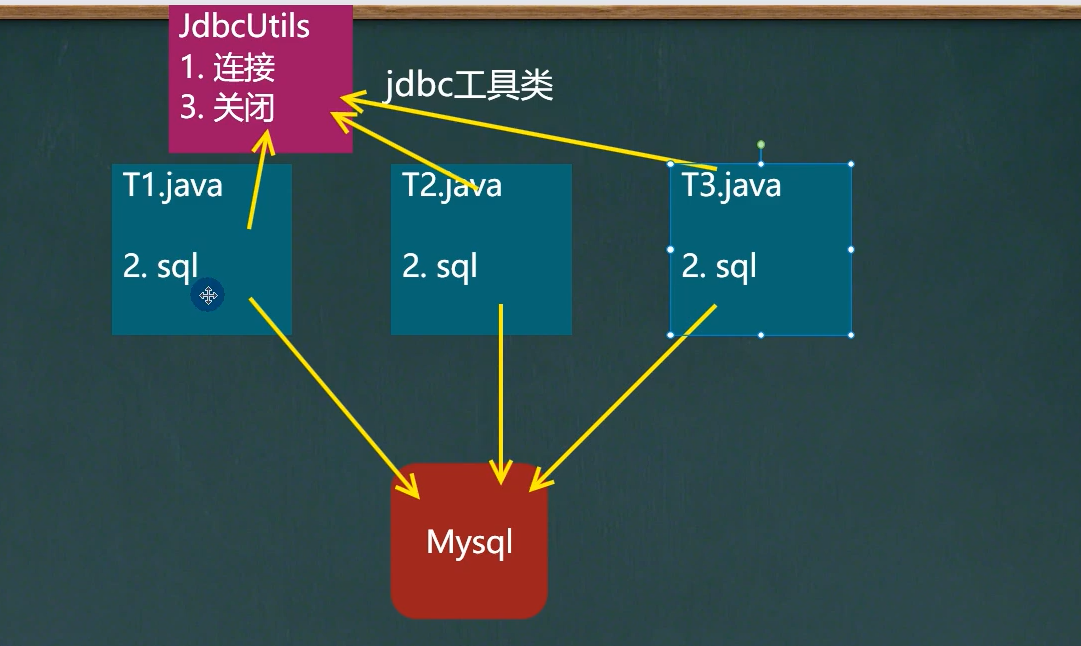
public class JdbcUtils {
private static String driver; //驱动名private static String url; // urlprivate static String user; //用户名private static String password; //密码private static Properties properties; //配置文件static {properties = new Properties();try {properties.load(new FileReader("MyJDBC/resources/MyJDBC.properties"));} catch (IOException e) {// 将编译异常向上抛成运行异常, 选择性处理. 下同throw new RuntimeException(e);}driver = properties.getProperty("driver");url = properties.getProperty("url");user = properties.getProperty("user");password = properties.getProperty("password");}/*** @description: 获取连接* @param:* @return: java.sql.Connection* @date: 2021/7/11 16:58*/public static Connection getConnection(){Connection connection = null;try {connection = DriverManager.getConnection(url, user, password);} catch (SQLException e) {throw new RuntimeException(e);}System.out.println("-----------------------JdbcUtils类-Connection连接-已获取: " + connection);return connection;}/*** @description: 关闭资源* @param: resultSet
statement connection
* @return: void* @date: 2021/7/11 16:57*/public static void closeResources(ResultSet resultSet, Statement statement, Connection connection){try {if (resultSet != null){resultSet.close();System.out.println("-----------------------JdbcUtils类-ResultSet:" + resultSet.getCursorName() + "-已关闭-" + resultSet);}if (statement != null){statement.close();System.out.println("-----------------------JdbcUtils类-Statement命令语句:" + "-已关闭-" + statement);}if (connection != null){connection.close();System.out.println("-----------------------JdbcUtils类-Connection连接:" + "-已关闭-" + connection);}} catch (SQLException e) {throw new RuntimeException(e);}}
}
- DML语句测试//(Connection连接关闭后, 对象依然有内存地址. 若继续对其操作,则 MySQLNonTransientConnectionException:连接关闭后,不允许进行任何操作)```java/*** @description: DML语句测试Util的获取/关闭连接*/public static void main(String[] args) {// 1.获取连接Connection connection = JdbcUtils.getConnection();PreparedStatement preparedStatement = null;ResultSet resultSet = null;try {// 2.操作sqlpreparedStatement = connection.prepareStatement("select * from user");resultSet = preparedStatement.executeQuery();while (resultSet.next()){int id = resultSet.getInt(1);String name = resultSet.getString(2);String sex = resultSet.getString(3);System.out.println(id + "\t" + name + "\t" + sex);}} catch (SQLException e) {e.printStackTrace();} finally {// 3.关闭连接// close后 Connection依然有内存地址JdbcUtils.closeResources(resultSet,preparedStatement, connection);System.out.println("资源关闭结束");}// 其它测试: 尝试在关闭连接后操作连接try {PreparedStatement testPreparedStatement1;// 出现异常 MySQLNonTransientConnectionException:连接关闭后,不允许进行任何操作testPreparedStatement1 = connection.prepareStatement("select * from user");} catch (SQLException e) {e.printStackTrace();}}
- 结果- // 异常栈起始上文中35行 " connection.prepareStatement()"方法调用
-----------------------JdbcUtils类-Connection连接-已获取: com.mysql.jdbc.JDBC4Connection@5f2108b51 饶政 12 root 女10 十号 女11 rz 男-----------------------JdbcUtils类-ResultSet:-已关闭-com.mysql.jdbc.JDBC42ResultSet@13805618-----------------------JdbcUtils类-Statement:-已关闭-com.mysql.jdbc.JDBC42PreparedStatement@56ef9176: select * from user-----------------------JdbcUtils类-Connection连接:-已关闭-com.mysql.jdbc.JDBC4Connection@5f2108b5资源关闭结束com.mysql.jdbc.exceptions.jdbc4.MySQLNonTransientConnectionException: No operations allowed after connection closed.at sun.reflect.NativeConstructorAccessorImpl.newInstance0(Native Method)at sun.reflect.NativeConstructorAccessorImpl.newInstance(NativeConstructorAccessorImpl.java:62)at sun.reflect.DelegatingConstructorAccessorImpl.newInstance(DelegatingConstructorAccessorImpl.java:45)at java.lang.reflect.Constructor.newInstance(Constructor.java:423)at com.mysql.jdbc.Util.handleNewInstance(Util.java:425)at com.mysql.jdbc.Util.getInstance(Util.java:408)at com.mysql.jdbc.SQLError.createSQLException(SQLError.java:919)at com.mysql.jdbc.SQLError.createSQLException(SQLError.java:898)at com.mysql.jdbc.SQLError.createSQLException(SQLError.java:887)at com.mysql.jdbc.SQLError.createSQLException(SQLError.java:861)at com.mysql.jdbc.ConnectionImpl.throwConnectionClosedException(ConnectionImpl.java:1182)at com.mysql.jdbc.ConnectionImpl.checkClosed(ConnectionImpl.java:1177)at com.mysql.jdbc.ConnectionImpl.prepareStatement(ConnectionImpl.java:4037)at com.mysql.jdbc.ConnectionImpl.prepareStatement(ConnectionImpl.java:4006)at com.ryze.myJdbcUtils.JdbcUtils.main(JdbcUtils.java:118)
5.数据源中的: 数据库连接池 DataSource
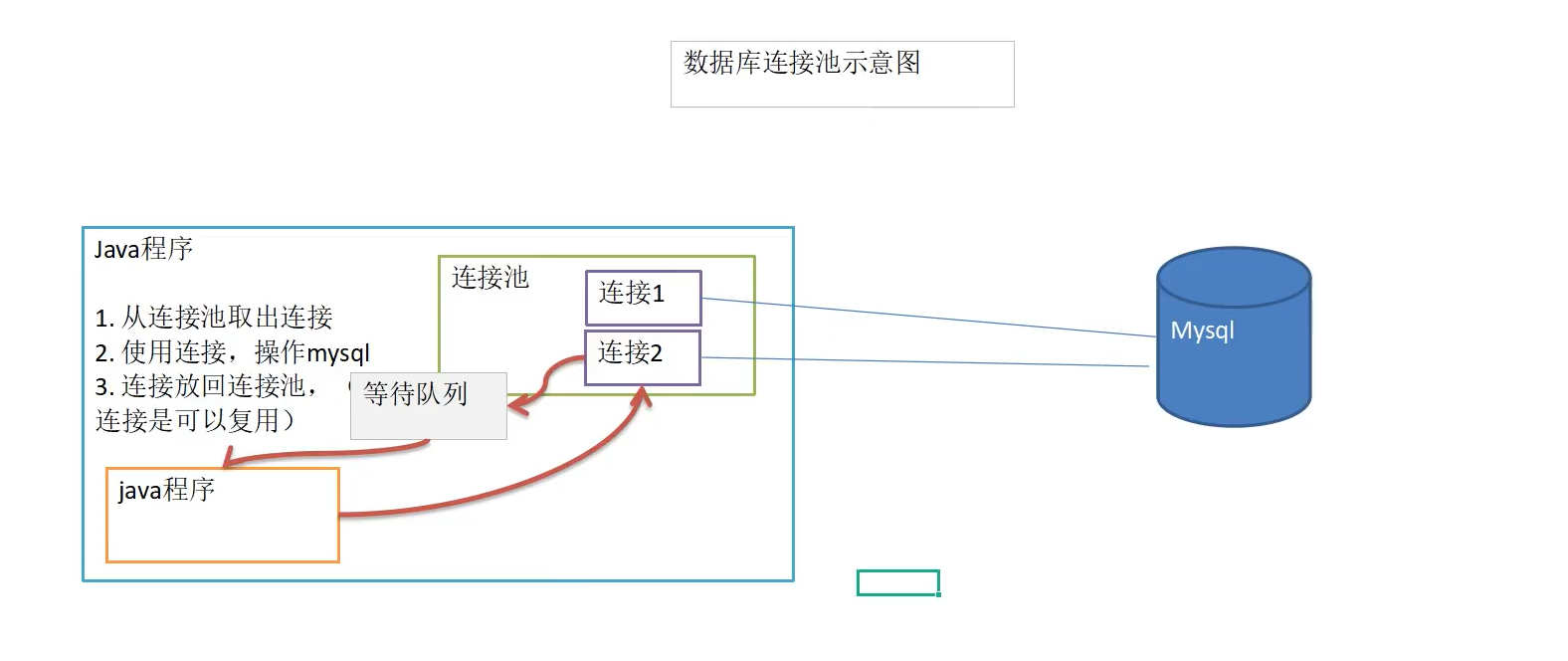
示意图
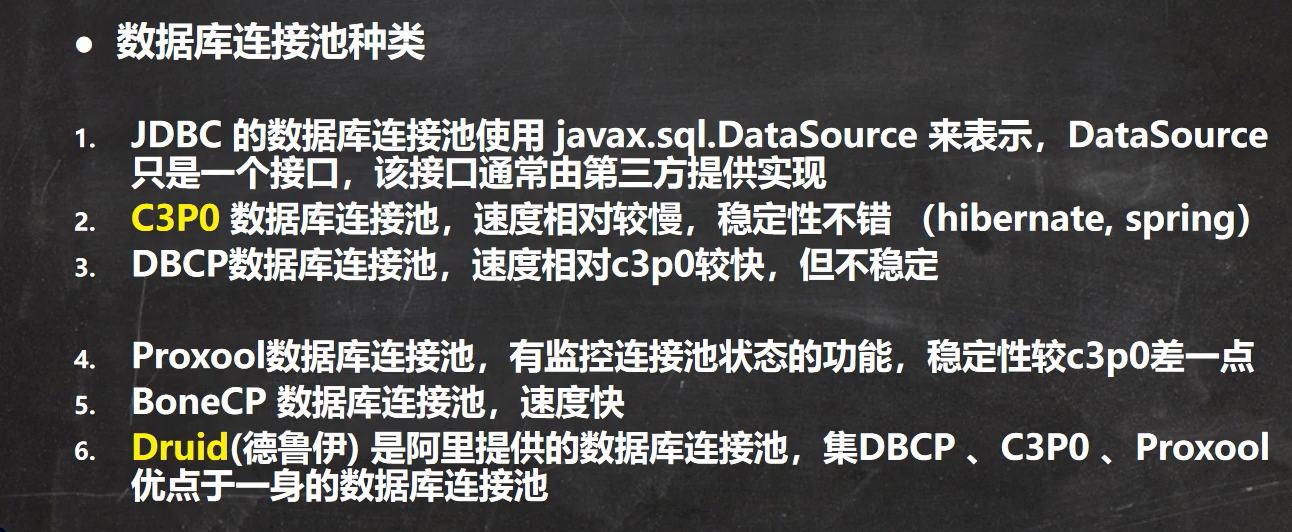
种类
代码
- 获取一个简单的druid连接池连接
public static void main(String[] args) throws Exception {//1. 加入 Druid jar 包// <dependency>// <groupId>com.alibaba</groupId>// <artifactId>druid</artifactId>// <version>1.2.6</version>// <type>pom</type>// </dependency>// 2. 加入 配置文件 druid.properties// 3. 创建 Properties 对象, 读取配置文件Properties druidProperties = new Properties();druidProperties.load(StartSystemTest.class.getClassLoader().getResourceAsStream("druid.properties"));//4. 创建一个指定参数的数据库连接池, Druid 连接池DataSource dataSource = DruidDataSourceFactory.createDataSource(druidProperties);// 5.获取连接Connection connection = dataSource.getConnection();System.out.println(connection);// 6.回收连接connection.close();}
- druid.properties
#驱动加载driverClassName=com.mysql.jdbc.Driver#url地址url=jdbc:mysql://localhost:3306/myProject01_supermarketManagement#连接数据库的用户名username=root#连接数据库的密码password=0000#属性类型的字符串,通过别名的方式配置扩展插件, 监控统计用的stat 日志用log4j 防御sql注入:wallfilters=stat#初始化时池中建立的物理连接个数。initialSize=2#最大的可活跃的连接池数量maxActive=300#获取连接时最大等待时间,单位毫秒,超过连接就会失效。配置了maxWait之后,缺省启用公平锁,并发效率会有所下降, 如果需要可以通过配置useUnfairLock属性为true使用非公平锁。maxWait=60000#连接回收器的运行周期时间,时间到了清理池中空闲的连接,testWhileIdle根据这个判断timeBetweenEvictionRunsMillis=60000minEvictableIdleTimeMillis=300000#用来检测连接是否有效的sql,要求是一个查询语句。validationQuery=SELECT 1#建议配置为true,不影响性能,并且保证安全性。 申请连接的时候检测,如果空闲时间大于timeBetweenEvictionRunsMillis, 执行validationQuery检测连接是否有效。testWhileIdle=true#申请连接时执行validationQuery检测连接是否有效,做了这个配置会降低性能。设置为falsetestOnBorrow=false#归还连接时执行validationQuery检测连接是否有效,做了这个配置会降低性能,设置为flasetestOnReturn=false#是否缓存preparedStatement,也就是PSCache。poolPreparedStatements=false#池中能够缓冲的preparedStatements语句数量maxPoolPreparedStatementPerConnectionSize=200
6.Apache DBUtils
引入
- 解决返回到Java程序的ResultSet结果集中的数据复用等问题<br /> 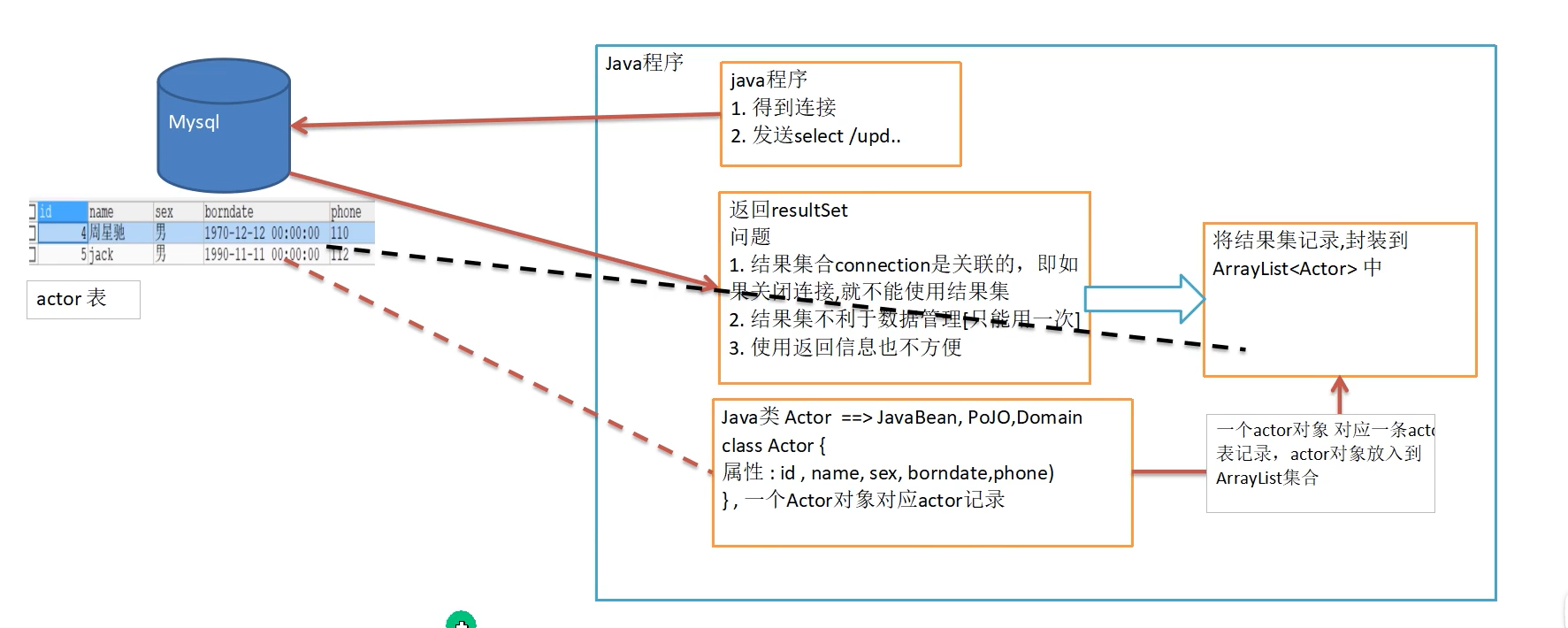
概述
- commons-dbutils 是 Apache的一个开源JDBC工具库, 它是对JDBC的简单封装. 极大简化jdbc编码的工作量
7.DbUtils类
QueryRunner类:
ResultSetHandler接口:
用于处理 Java.lang.ResultSet, 将数据通过对应Handler转换成另一种形式
- ArrayHandler:把结果集中的第一行数据转成对象数组。- ArrayListHandler:把结果集中的每一行数据都转成一个数组,再存放到List中。- BeanHandler:将结果集中的第一行数据封装到一个对应的JavaBean实例中。- BeanListHandler:将结果集中的每一行数据都封装到一个对应的JavaBean实例中,存放到List里。- ColumnListHandler:将结果集中某一列的数据存放到List中。- KeyedHandler(name):将结果集中的每一行数据都封装到一个Map里,再把这些map再存到一个map里,其key为指定的key。- MapHandler:将结果集中的第一行数据封装到一个Map里,key是列名,value就是对应的值。- MapListHandler:将结果集中的每一行数据都封装到一个Map里,然后再存放到List- ScalarHandler:查询单个值对象(标量对象)
DBUtils + Druid
DQL简单使用示例:
//使用 apache-DBUtils 工具类 + druid 完成对表的 crud 操作public static void main(String[] args) throws Exception {//1. 通过德鲁伊连接池获取连接Properties properties = new Properties();properties.load(StartSystemTest.class.getClassLoader().getResourceAsStream("druid.properties"));DataSource dataSource = DruidDataSourceFactory.createDataSource(properties);Connection connection = dataSource.getConnection();System.out.println(connection);// 使用 DBUtils 类和接口 , 先引入 DBUtils 相关的 jar , 加入到本 Project//2.创建 QueryRunnerQueryRunner queryRunner = new QueryRunner();//3. 执行相关的方法,返回 ArrayList 结果集String sql = "select * from test where id <= ?";List<Object[]> list = queryRunner.query(connection, sql, new ArrayListHandler(),10);for (Object[] arr : list) {for (Object object : arr) {System.out.print(object + "\t");}System.out.println();}//老韩解读// (1) query 方法就是执行 sql 语句,得到 resultset ---封装到 --> ArrayList 集合中// (2) 返回集合// 参数说明// (3) connection: 连接// (4) sql : 执行的 sql 语句// (5) new ArrayListHandler() : 返回ArrayList, 元素为数组// 常用Handler: new BeanListHandler<>(Actor.class): 在将 resultset -> Actor 对象 -> 封装到 ArrayList// 底层使用反射机制 去获取 Actor 类的属性,然后进行封装// (6) 10: 占位符赋值,可以有多个值: 可变参数 Object... params// (7) 底层得到的 ResultSet ,会在 query 关闭, 关闭 PreparedStatement//释放资源(将德鲁伊连接返回连接池. 其它连接由DBUtils内部自动释放)System.out.println(connection); // com.alibaba.druid.proxy.jdbc.ConnectionProxyImpl@25618e91// 有德鲁伊连接池管理. 其close 返回连接池connection.close();}
queryRunner.query( Connection conn, String sql, ResultSetHandler
public <T> T query(Connection conn, String sql, ResultSetHandler<T> rsh, Object... params) throws SQLException {return this.<T>query(conn, false, sql, rsh, params);}// 调用如下的重载 query(...)/**param: closeConn 连接是否关闭*/private <T> T query(Connection conn, boolean closeConn, String sql, ResultSetHandler<T> rsh, Object... params) throws SQLException {if (conn == null) {throw new SQLException("Null connection");}if (sql == null) {if (closeConn) {close(conn);}throw new SQLException("Null SQL statement");}if (rsh == null) {if (closeConn) {close(conn);}throw new SQLException("Null ResultSetHandler");}PreparedStatement stmt = null;ResultSet rs = null;T result = null;try {stmt = this.prepareStatement(conn, sql);this.fillStatement(stmt, params);rs = this.wrap(stmt.executeQuery());result = rsh.handle(rs);} catch (SQLException e) {this.rethrow(e, sql, params);} finally {try {close(rs);} finally {close(stmt);if (closeConn) {close(conn);}}}return result;}
7.BasicDao
引出
- DBUtils + 数据库连接池 简化了JDBC开发, 但仍有不足:1. 通用性: 通过传参进行动态sql1. 扩展性: 添加泛型动态确定JavaBean类型
BasicDao(同BaseDao) - BeanDaoImpl - JavaBean - 数据库表中的设计关联
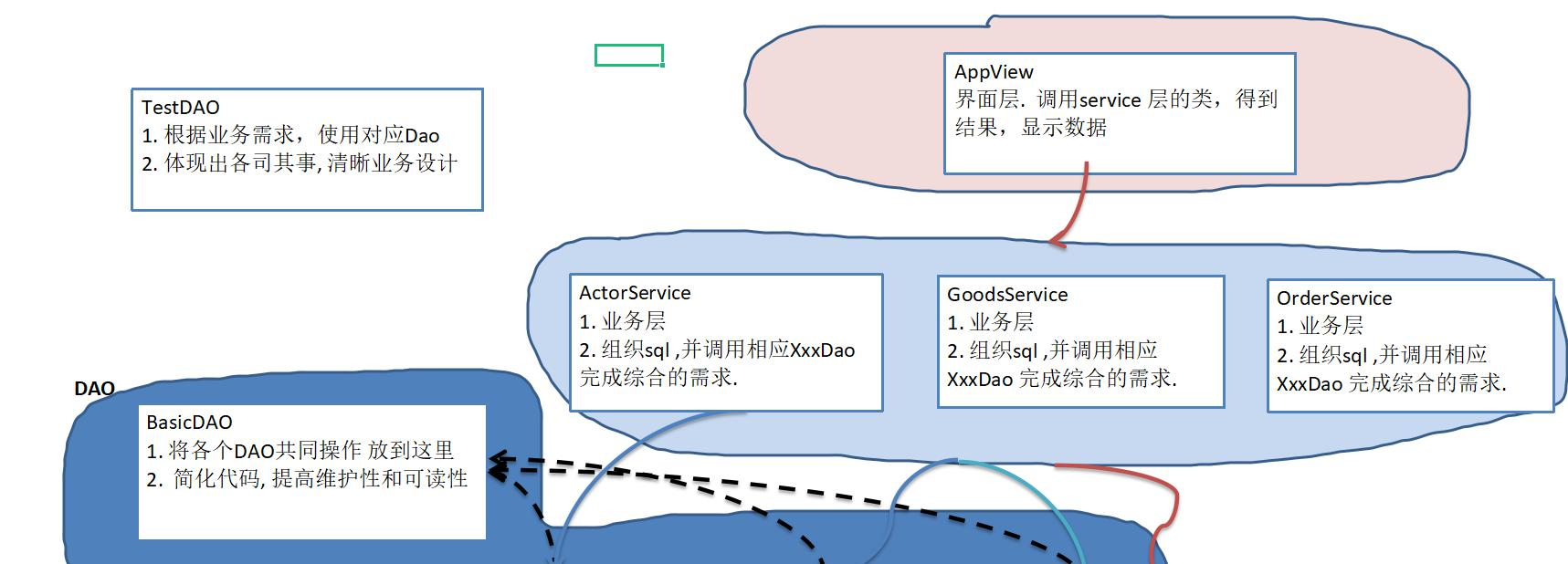
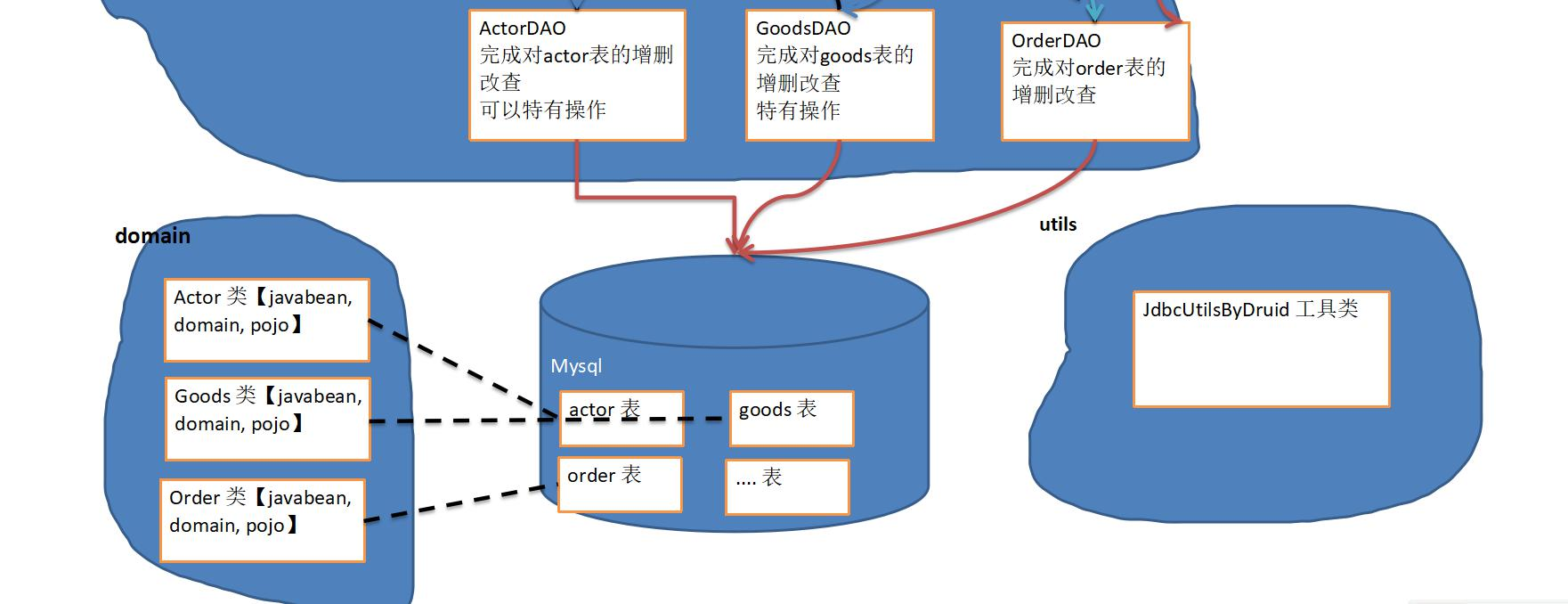
基本说明
DAO: Data Access Object - 数据访问对象
1. 这样的通用类(抽象), 可作为 BasicDao, 专与数据库交互, 即完成对数据(表)的CRUD等操作2. 在BasicDao的基础上, 实现一张表和对应表的DAO, 更好地完成功能.
附: MySQL与JavaBean类型对应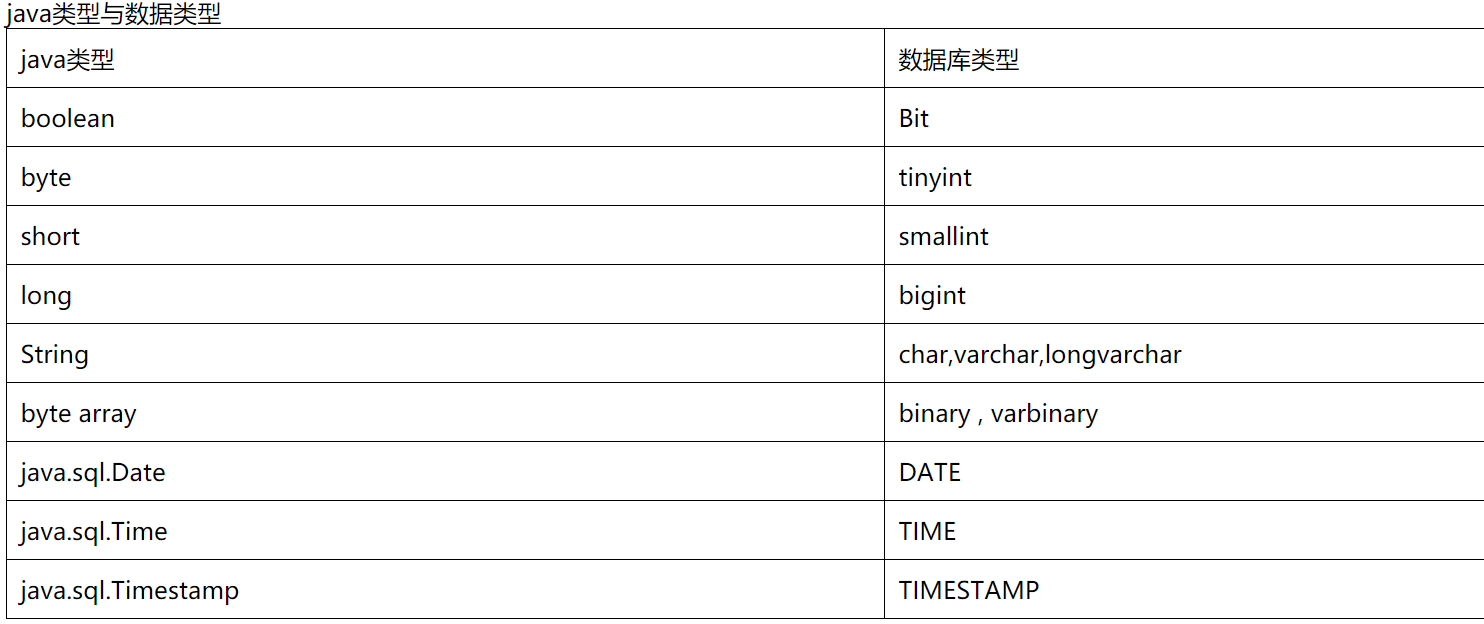

若有收获,就点个赞吧
0 人点赞


