背景
由于公司又要开发一款新的设备,新的设备是基于老设备进行改造,新增加了一部分功能,因此就在老版本代码上延伸出来一个分支进行改造,当时为了赶进度,所以代码也是走马观花看了一遍,最终还是经过不懈的努力,将这个项目给做了出来。现在觉得抽空可以好好研究一下这一块的代码,首当其冲的是MEF框架。
MEF框架介绍
刚开始看这块代码的时候,本人也是不太了解这一块代码的作用,因此也存在了很多困惑
困惑一:对程序员而言,自定义对象必须构建对象后才能使用,但是代码中没有构建实例即可使用
困惑二:代码当中使用了很多特性,例如InheritedExport,Export等诸多特性
带着这些困惑,我打算去揭开这段代码的神秘面纱,通过网上相关资料查阅,才知道这是引入了MEF框架,官方文档给的解释是:托管可扩展框架,对于这些概念性的东西还是很含糊,所以决定自己动手做一个案例,通过案例去分析这段代码的作用
案例:
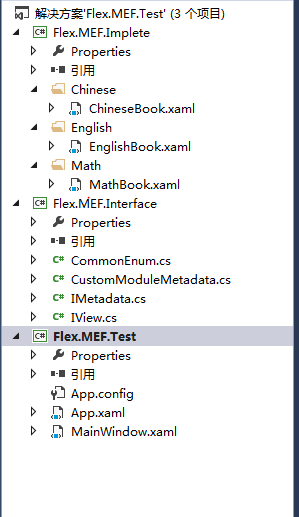
这是项目主体框架,下面我会介绍各个类库之间的关系
Flex.MEF.Interface
using System;using System.Collections.Generic;using System.ComponentModel.Composition;using System.Linq;using System.Text;using System.Threading.Tasks;namespace Flex.MEF.Interface{[InheritedExport]public interface IView{}}
Flex.MEF.Implete
<UserControl x:Class="Flex.MEF.Implete.Chinese.ChineseBook"xmlns="http://schemas.microsoft.com/winfx/2006/xaml/presentation"xmlns:x="http://schemas.microsoft.com/winfx/2006/xaml"xmlns:mc="http://schemas.openxmlformats.org/markup-compatibility/2006"xmlns:d="http://schemas.microsoft.com/expression/blend/2008"mc:Ignorable="d"d:DesignHeight="300" d:DesignWidth="300"><Grid><Label Content="Hello,我是语文书" FontSize="20" Foreground="Red" HorizontalAlignment="Center" VerticalAlignment="Center"/></Grid></UserControl>using Flex.MEF.Interface;using System;using System.Collections.Generic;using System.ComponentModel.Composition;using System.Linq;using System.Reflection;using System.Text;using System.Threading.Tasks;using System.Windows;using System.Windows.Controls;using System.Windows.Data;using System.Windows.Documents;using System.Windows.Input;using System.Windows.Media;using System.Windows.Media.Imaging;using System.Windows.Navigation;using System.Windows.Shapes;namespace Flex.MEF.Implete.Chinese{/// <summary>/// ChineseBook.xaml 的交互逻辑/// </summary>[Export(typeof(IView))][CustomModuleMetadata(ModuleName.Chinese)]public partial class ChineseBook : UserControl, IView{public ChineseBook(){InitializeComponent();}}}
<UserControl x:Class="Flex.MEF.Implete.English.EnglishBook"xmlns="http://schemas.microsoft.com/winfx/2006/xaml/presentation"xmlns:x="http://schemas.microsoft.com/winfx/2006/xaml"xmlns:mc="http://schemas.openxmlformats.org/markup-compatibility/2006"xmlns:d="http://schemas.microsoft.com/expression/blend/2008"mc:Ignorable="d"d:DesignHeight="300" d:DesignWidth="300"><Grid><Label Content="Hello,我是英语书" FontSize="20" Foreground="Red" HorizontalAlignment="Center" VerticalAlignment="Center"/></Grid></UserControl>using Flex.MEF.Interface;using System;using System.Collections.Generic;using System.ComponentModel.Composition;using System.Linq;using System.Text;using System.Threading.Tasks;using System.Windows;using System.Windows.Controls;using System.Windows.Data;using System.Windows.Documents;using System.Windows.Input;using System.Windows.Media;using System.Windows.Media.Imaging;using System.Windows.Navigation;using System.Windows.Shapes;namespace Flex.MEF.Implete.English{/// <summary>/// EnglishBook.xaml 的交互逻辑/// </summary>[Export(typeof(IView))][CustomModuleMetadata(ModuleName.English)]public partial class EnglishBook : UserControl, IView{public EnglishBook(){InitializeComponent();}}}
<UserControl x:Class="Flex.MEF.Implete.Math.MathBook"xmlns="http://schemas.microsoft.com/winfx/2006/xaml/presentation"xmlns:x="http://schemas.microsoft.com/winfx/2006/xaml"xmlns:mc="http://schemas.openxmlformats.org/markup-compatibility/2006"xmlns:d="http://schemas.microsoft.com/expression/blend/2008"mc:Ignorable="d"d:DesignHeight="300" d:DesignWidth="300"><Grid><Label Content="Hello,我是数学书" FontSize="20" Foreground="Red" HorizontalAlignment="Center" VerticalAlignment="Center"/></Grid></UserControl>using Flex.MEF.Interface;using System;using System.Collections.Generic;using System.ComponentModel.Composition;using System.Linq;using System.Text;using System.Threading.Tasks;using System.Windows;using System.Windows.Controls;using System.Windows.Data;using System.Windows.Documents;using System.Windows.Input;using System.Windows.Media;using System.Windows.Media.Imaging;using System.Windows.Navigation;using System.Windows.Shapes;namespace Flex.MEF.Implete.Math{/// <summary>/// MathBoos.xaml 的交互逻辑/// </summary>[Export(typeof(IView))][CustomModuleMetadata(ModuleName.Math)]public partial class MathBook : UserControl, IView{public MathBook(){InitializeComponent();}}}
启动项
<Window x:Class="Flex.MEF.Test.MainWindow"xmlns="http://schemas.microsoft.com/winfx/2006/xaml/presentation"xmlns:x="http://schemas.microsoft.com/winfx/2006/xaml"Title="MainWindow" Height="350" Width="525"><Grid x:Name="MyGrid"><Grid.RowDefinitions><RowDefinition Height="80"></RowDefinition><RowDefinition></RowDefinition></Grid.RowDefinitions><StackPanel Orientation="Horizontal" HorizontalAlignment="Center"><Button Content="语文书" x:Name="ChineseBook" Width="120" Height="40" Margin="10,0" Click="ChineseBook_Click"></Button><Button Content="数学书" x:Name="MathBook" Width="120" Height="40" Margin="10,0" Click="MathBook_Click"></Button><Button Content="英语书" x:Name="EnglishBook" Width="120" Height="40" Margin="10,0" Click="EnglishBook_Click"></Button></StackPanel><Grid x:Name="WorkPanel" Grid.Row="1"></Grid></Grid></Window>using Flex.MEF.Interface;using System;using System.Collections.Generic;using System.ComponentModel.Composition;using System.ComponentModel.Composition.Hosting;using System.IO;using System.Linq;using System.Text;using System.Threading.Tasks;using System.Windows;using System.Windows.Controls;using System.Windows.Data;using System.Windows.Documents;using System.Windows.Input;using System.Windows.Media;using System.Windows.Media.Imaging;using System.Windows.Navigation;using System.Windows.Shapes;namespace Flex.MEF.Test{/// <summary>/// MainWindow.xaml 的交互逻辑/// </summary>public partial class MainWindow : Window{[ImportMany(typeof(IView))]public Lazy<IView, IMetadata>[] Services { get; set; }public UserControl MyUserControl { get; set; }public MainWindow(){InitializeComponent();Load();}private void LoadView(ModuleName moduleName){if (Services != null){this.WorkPanel.Children.Clear();foreach (var item in Services){if (item.Metadata.ModuleName == moduleName){MyUserControl = (UserControl)item.Value;break;}}this.WorkPanel.Children.Add(MyUserControl);}}private void Load(){var dir = new DirectoryInfo(AppDomain.CurrentDomain.BaseDirectory);if (dir.Exists){var catalog = new AggregateCatalog();catalog.Catalogs.Add(new DirectoryCatalog(dir.FullName));var container = new CompositionContainer(catalog);try{container.ComposeParts(this);}catch (CompositionException ex){throw new Exception(ex.Message);}}}private void ChineseBook_Click(object sender, RoutedEventArgs e){LoadView(ModuleName.Chinese);}private void MathBook_Click(object sender, RoutedEventArgs e){LoadView(ModuleName.Math);}private void EnglishBook_Click(object sender, RoutedEventArgs e){LoadView(ModuleName.English);}}}
总结
通过上面例子,我们可以看到ChineseBook,EnglishBook,MathBook三者都是实现了IView接口,并且通过添加特性标签Export将这个页面导出为IView类型,然后启动项使用特性标签ImportMany导出来一个列表,最核心的部分为Load方法,它会去启动项Debug目录加载dll,这样我们就可以将导出类型为IView类型的页面注入到标记为ImportMany的属性中,其中我添加了一个ModuleName的特性,主要是用来区分页面
效果图
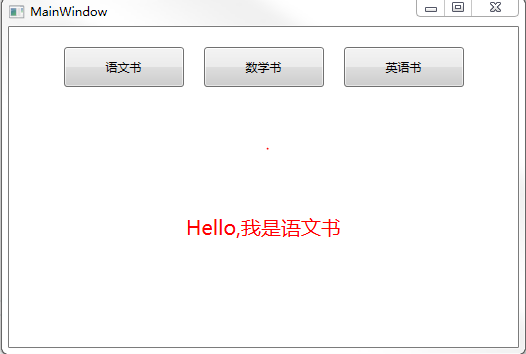
点击页面上的按钮,就可以进行页面进行切换

若有收获,就点个赞吧
0 人点赞


