1. 安装idea
这里一定要安装idea ultra 版本,community没有spring boot框架
创建项目时选择spring initialize…
实现项目:
启动程序demoApplication
package com.example.demo;import org.springframework.boot.SpringApplication;import org.springframework.boot.autoconfigure.SpringBootApplication;@SpringBootApplicationpublic class DemoApplication {public static void main(String[] args) {SpringApplication.run(DemoApplication.class, args);}}
服务程序HelloController
package com.example.demo;import org.springframework.web.bind.annotation.PostMapping;import org.springframework.web.bind.annotation.RequestMapping;import org.springframework.web.bind.annotation.RestController;import org.springframework.web.multipart.MultipartFile;/*** 测试控制器** @author: @肖朋伟CSDN* @create: 2018-11-18*/@RestControllerpublic class HelloController {static {System.load("/root/IdeaProjects/hw/src/libMYRELOC.so");}@RequestMapping("/hello")public String hello() {return "Simple test!";}@PostMapping("/what")public String what(MultipartFile file, String username){System.out.println(username);System.out.println(file.getSize());System.out.println(file.getName());System.out.println(file.getOriginalFilename());//do something to fileHelloWorld hw = new HelloWorld();int[] dir = hw.getCoordI();return Integer.toString(dir[0]);}}
2. 用maven打包项目
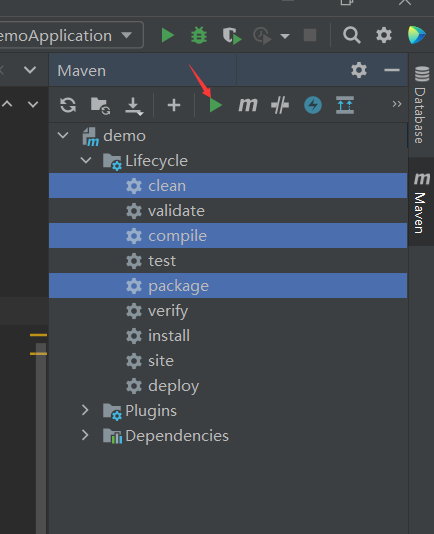
选中clean compile package三项,点击绿色的三角形,等待打包完成
完成后生成jar包,根据提示信息找到位置
3. 在服务器运行jar包
将生成的jar包上传到服务器
先生成一个日志文件存放输出信息touch log.txt
使用nohup命令让服务器挂在后台一直运行nohup java -jar ARserver-0.0.1-SNAPSHOT.jar > log.txt 2>&1 &
4. 完成
效果如下

若有收获,就点个赞吧
0 人点赞


