首先最基础的就是需要准备好node环境,包管理工具。
安装typescript和新建项目
//使用命令行在系统全局安装typescriptnpm install typescript -g | yarn add typescript//创建typescript文件夹mkdir typescript-democd typescript-demo//创建src文件夹mkdir src//在src文件夹中创建index.ts文件touch src/index.ts//目录初始化(package.json文件)npm init//ts初始化(生成tsconfig.json文件)tsc --init
接下来就是配置我们的tsconfig.json文件,文件中已生成默认的配置,可以自己配置,我的配置如下:
{"compilerOptions": {/* Visit https://aka.ms/tsconfig to read more about this file *//* Projects */// "incremental": true, /* Save .tsbuildinfo files to allow for incremental compilation of projects. */// "composite": true, /* Enable constraints that allow a TypeScript project to be used with project references. */// "tsBuildInfoFile": "./.tsbuildinfo", /* Specify the path to .tsbuildinfo incremental compilation file. */// "disableSourceOfProjectReferenceRedirect": true, /* Disable preferring source files instead of declaration files when referencing composite projects. */// "disableSolutionSearching": true, /* Opt a project out of multi-project reference checking when editing. */// "disableReferencedProjectLoad": true, /* Reduce the number of projects loaded automatically by TypeScript. *//* Language and Environment */"target": "es5", /* 制定ECMAScript版本为es5 */"lib": ["es6", "dom"], /* 指定要包含在编译库的文件*/// "jsx": "preserve", /* Specify what JSX code is generated. */"experimentalDecorators": true, /* 启用实验性es装饰器 */// "emitDecoratorMetadata": true, /* Emit design-type metadata for decorated declarations in source files. */// "jsxFactory": "", /* Specify the JSX factory function used when targeting React JSX emit, e.g. 'React.createElement' or 'h'. */// "jsxFragmentFactory": "", /* Specify the JSX Fragment reference used for fragments when targeting React JSX emit e.g. 'React.Fragment' or 'Fragment'. */// "jsxImportSource": "", /* Specify module specifier used to import the JSX factory functions when using 'jsx: react-jsx*'. */// "reactNamespace": "", /* Specify the object invoked for 'createElement'. This only applies when targeting 'react' JSX emit. */// "noLib": true, /* Disable including any library files, including the default lib.d.ts. */// "useDefineForClassFields": true, /* Emit ECMAScript-standard-compliant class fields. */// "moduleDetection": "auto", /* Control what method is used to detect module-format JS files. *//* Modules */"module": "commonjs", /* 指定使用commonjs,amd,system,umd ,es2015 */"rootDir": "./", /* 主路径 */"moduleResolution": "node", /* 选择模块解析策略 */// "baseUrl": "./", /* Specify the base directory to resolve non-relative module names. */// "paths": {}, /* Specify a set of entries that re-map imports to additional lookup locations. */// "rootDirs": [], /* Allow multiple folders to be treated as one when resolving modules. */"typeRoots": ["node_modules/@types"], /* Specify multiple folders that act like './node_modules/@types'. */// "types": [], /* Specify type package names to be included without being referenced in a source file. */// "allowUmdGlobalAccess": true, /* Allow accessing UMD globals from modules. */// "moduleSuffixes": [], /* List of file name suffixes to search when resolving a module. */// "resolveJsonModule": true, /* Enable importing .json files. */// "noResolve": true, /* Disallow 'import's, 'require's or '<reference>'s from expanding the number of files TypeScript should add to a project. *//* JavaScript Support */// "allowJs": true, /* Allow JavaScript files to be a part of your program. Use the 'checkJS' option to get errors from these files. */// "checkJs": true, /* Enable error reporting in type-checked JavaScript files. */// "maxNodeModuleJsDepth": 1, /* Specify the maximum folder depth used for checking JavaScript files from 'node_modules'. Only applicable with 'allowJs'. *//* Emit */"declaration": true, /* 生成相应的.d.ts文件 */// "declarationMap": true, /* Create sourcemaps for d.ts files. */// "emitDeclarationOnly": true, /* Only output d.ts files and not JavaScript files. */"sourceMap": true, /* 把ts编译成js的时候默认生成map文件 */// "outFile": "./", /* Specify a file that bundles all outputs into one JavaScript file. If 'declaration' is true, also designates a file that bundles all .d.ts output. */"outDir": "./", /* 导出文件夹 */"removeComments": true, /*删除编译后的所有注释 */// "noEmit": true, /* Disable emitting files from a compilation. */"importHelpers": true, /* 从tslib导入辅助工具函数 */// "importsNotUsedAsValues": "remove", /* Specify emit/checking behavior for imports that are only used for types. */// "downlevelIteration": true, /* Emit more compliant, but verbose and less performant JavaScript for iteration. */// "sourceRoot": "", /* Specify the root path for debuggers to find the reference source code. */// "mapRoot": "", /* Specify the location where debugger should locate map files instead of generated locations. */// "inlineSourceMap": true, /* Include sourcemap files inside the emitted JavaScript. */// "inlineSources": true, /* Include source code in the sourcemaps inside the emitted JavaScript. */// "emitBOM": true, /* Emit a UTF-8 Byte Order Mark (BOM) in the beginning of output files. */// "newLine": "crlf", /* Set the newline character for emitting files. */// "stripInternal": true, /* Disable emitting declarations that have '@internal' in their JSDoc comments. */// "noEmitHelpers": true, /* Disable generating custom helper functions like '__extends' in compiled output. */// "noEmitOnError": true, /* Disable emitting files if any type checking errors are reported. */// "preserveConstEnums": true, /* Disable erasing 'const enum' declarations in generated code. */// "declarationDir": "./", /* Specify the output directory for generated declaration files. */// "preserveValueImports": true, /* Preserve unused imported values in the JavaScript output that would otherwise be removed. *//* Interop Constraints */// "isolatedModules": true, /* Ensure that each file can be safely transpiled without relying on other imports. */"allowSyntheticDefaultImports": true, /* 允许从没有设置默认导出的模块默认导入 */"esModuleInterop": true, /* Emit additional JavaScript to ease support for importing CommonJS modules. This enables 'allowSyntheticDefaultImports' for type compatibility. */// "preserveSymlinks": true, /* Disable resolving symlinks to their realpath. This correlates to the same flag in node. */"forceConsistentCasingInFileNames": true, /* Ensure that casing is correct in imports. *//* Type Checking */"strict": true, /* 启用所有严格类型检查选项 */"noImplicitAny": true, /* 在表达式和声明上有隐含any类型时报错 */// "strictNullChecks": true, /* When type checking, take into account 'null' and 'undefined'. */// "strictFunctionTypes": true, /* When assigning functions, check to ensure parameters and the return values are subtype-compatible. */// "strictBindCallApply": true, /* Check that the arguments for 'bind', 'call', and 'apply' methods match the original function. */// "strictPropertyInitialization": true, /* Check for class properties that are declared but not set in the constructor. */// "noImplicitThis": true, /* Enable error reporting when 'this' is given the type 'any'. */// "useUnknownInCatchVariables": true, /* Default catch clause variables as 'unknown' instead of 'any'. */"alwaysStrict": true, /* 以严格模式检查模块,并在每个文件加入'use strict' */// "noUnusedLocals": true, /* Enable error reporting when local variables aren't read. */// "noUnusedParameters": true, /* Raise an error when a function parameter isn't read. */// "exactOptionalPropertyTypes": true, /* Interpret optional property types as written, rather than adding 'undefined'. */"noImplicitReturns": true, /* 不是函数所有返回路径都有返回值时报错 */// "noFallthroughCasesInSwitch": true, /* Enable error reporting for fallthrough cases in switch statements. */// "noUncheckedIndexedAccess": true, /* Add 'undefined' to a type when accessed using an index. */// "noImplicitOverride": true, /* Ensure overriding members in derived classes are marked with an override modifier. */// "noPropertyAccessFromIndexSignature": true, /* Enforces using indexed accessors for keys declared using an indexed type. */// "allowUnusedLabels": true, /* Disable error reporting for unused labels. */// "allowUnreachableCode": true, /* Disable error reporting for unreachable code. *//* Completeness */// "skipDefaultLibCheck": true, /* Skip type checking .d.ts files that are included with TypeScript. */"skipLibCheck": true /* Skip type checking all .d.ts files. */},"include": [ // 需要编译的ts文件一个*表示文件匹配**表示忽略文件的深度问题"./src/**/*.ts"],"exclude": [ //排除不需要打包的文件"node_modules","dist","**/*.test.ts",]}
里面我用到的都做了中文标注,其他暂时没有翻译成中文,大家自行理解。
然后我们接着在package.json文件中加入我们自己的命令:
{"name": "ts-study","version": "1.0.0","description": "","main": "src/index.ts",//这里是加入的命令"scripts": {"build": "tsc","build:w": "tsc -w"},"author": "","license": "ISC","devDependencies": {"typescript ": "^3.6.4"},//以下是我配置自己的eslint使用的相关插件,大家不一定需要下载,后面会逐渐整理关于eslint配置文章"dependencies": {"@typescript-eslint/eslint-plugin": "^5.28.0","@typescript-eslint/parser": "^5.28.0","eslint": "^8.17.0","eslint-config-standard": "^17.0.0","eslint-plugin-import": "^2.26.0","eslint-plugin-node": "^11.1.0","eslint-plugin-promise": "^6.0.0"}}
开始尝试吧!
function statementTest(value) {return value;}const greet = 'Hello World';/*由下图可见,当我们在tsconfig.json文件中配置了开启严格模式之后,有隐含的any类型是会报错的,当然也可以不开启,但是若ts中any类型泛滥,typescript也就变成了anyscript,失去了我们使用ts的初衷。*/
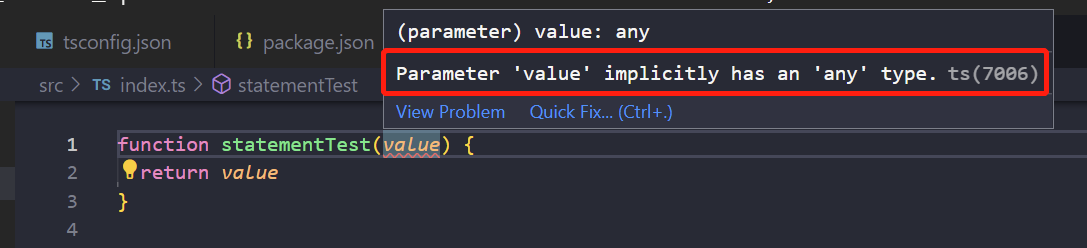
我们在上面代码的基础上,做以下修改:
function statementTest(value:number) {return value;}const greet = 'Hello World';/*加上类型声明,完美解决,可以看到ts自动推导出了函数返回值为number*/

至此为止,我们完成了ts的第一行代码编写。

若有收获,就点个赞吧
0 人点赞


