操作符概览
- 操作符(Operator)也译为“运算符”
操作符是用来操作数据的,被操作符操作的数据称为操作数(Operand)
操作符的本质
操作符的本质是函数(即算法)的“简记法”
操作符不能脱离与它关联的数据类型
operator + 重载“+”运算符
可以将运算符进行重载,当在某个对象里面创建了运算符重载,就可以将此对象像数据一样进行操作。
操作符的优先级
可以使用圆括号提高被括起来表达式的优先级
- 可以嵌套
- 只能说圆括号,中括号和大括号有其他用途
- C#同优先级运算规则
- 常规从左到右进行运算
- 赋值功能从右往左运算
- 没有“结合律”

f(x) 方法调用操作符
C# 里方法调用都要用到()。
Action 是委托,委托在创建时只需要知道方法的名称,不调用方法,所以只会用到方法名(不加())。当然最终myAction();也用到了方法调用操作符()。
namespace OperatorsExample{class Program{static void Main(string[] args){var c = new Calculator();double x = c.Add(3.0, 4.6);Console.WriteLine(x);Action myAction = new Action(c.PrintHello); //声明一个委托,然后将方法加进委托myAction(); //当我们调用委托时就会自动调用对象的方法}}class Calculator{public double Add(double a,double b){return a + b;}public void PrintHello(){Console.WriteLine("Hello");}}}
a[x] 元素访问操作符
访问数组元素:
int[] myIntArray = new int[] { 1, 2, 3, 4, 5 };Console.WriteLine(myIntArray[0]);Console.WriteLine(myIntArray[myIntArray.Length - 1]);
索引字典中的元素:索引并不一定是整数
class Program{static void Main(string[] args){Dictionary<string, Student> stuDic = new Dictionary<string, Student>();for (int i = 0; i < 100; i++){var stu = new Student(){Name = "s_" + i.ToString(),Score = 100 - i};stuDic.Add(stu.Name, stu);}Console.WriteLine(stuDic["s_6"].Score);}}class Student{public string Name;public int Score;}
typeof 操作符
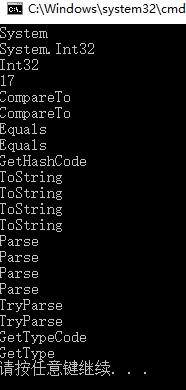
检测类型元数据(Metadata)。
using System;using System.Collections.Generic;// Metadatavar t = typeof(int);Console.WriteLine(t.Namespace);Console.WriteLine(t.FullName);Console.WriteLine(t.Name);int c = t.GetMethods().Length;Console.WriteLine(c);foreach (var m in t.GetMethods()){Console.WriteLine(m.Name);}
default 操作符
namespace OperatorsExample{class Program{static void Main(string[] args){// 值类型内存块都刷成 0,值就是 0。int x = default(int);Console.WriteLine(x);// 引用类型内存块刷成 0,没有引用,default 是 null。Form myForm = default(Form);Console.WriteLine(myForm == null);// 枚举类型映射到整型上,默认枚举值是对应值为 0 的那个,可能是你手动指定的,也可能是系统默认赋值的。// 这就牵扯到我们使用枚举时,要注意枚举中是否有对应 0 的;创建枚举类型时,最好有一个对应 0 的,以免他人查找我们枚举的 default 值时报错。Level level = default(Level);Console.WriteLine(level);}}enum Level{Low = 1,Mid = 2,High = 0}}
new
- new操作符
- var操作符,隐式类型。必须在声明时利用初始化器给定某个确定的类型。
- new:获取对象(实例)的地址,这时对象虽说没有赋值给某个变量,但此时依旧可以用点(.)操作符进行成员访问 ```csharp using System; using System.Windows.Forms;
namespace OperatorsExample3 { class Program { static void Main(string[] args) { new Form() //一会会被垃圾处理器销毁,一个失去控制的指针 { Text = “Hello” //访问对象的属性,修改窗口的文本 }.ShowDialog(); //访问对象的方法,打印窗口 } } }
- 语法糖衣:```csharpusing System;using System.Windows.Forms;namespace OperatorsExample3{class Program{static void Main(string[] args){int[] myArray = new int[10]; //利用new操作符实例化对象int[] MyArray; //使用语法糖衣声明对象}}}
匿名类型
// new 为匿名类型创建对象,并且用隐式类型变量(var)来引用这个实例var person = new { Name = "Mr.Okay", Age = true,Dob=true };Console.WriteLine(person.Name);Console.WriteLine(person.Age);Console.WriteLine(person.GetType().Name);

new关键字 ```csharp namespace OperatorsExample3 { class Program {
static void Main(string[] args){Student stu = new Student();stu.Report();CsStudent csStu = new CsStudent();csStu.Report();}
}
class Student {
public void Report(){Console.WriteLine("Im a student");}
}
class CsStudent : Student {
new public void Report() //new关键字,隐藏父类的同名方法{Console.WriteLine("Im Cs Student");}
} }
<a name="571415bd"></a>### `checked` & `unchecked` 操作符- checked:检测溢出异常- 可以在单个语句内检测- 也可以检测一段语句- **concert**:将一种类型转化成另一种类型(例如:十进制转二进制)目的:检查一个值在内存中是否有溢出1. 未 check 时,`x+1`直接就溢出变成 0 了。```csharpuint x = uint.MaxValue;Console.WriteLine(x);var binStr = Convert.ToString(x, 2);Console.WriteLine(binStr);uint y = x + 1;Console.WriteLine(y);

2.单语句checked时
uint x = uint.MaxValue;Console.WriteLine(x);var binStr = Convert.ToString(x, 2);Console.WriteLine(binStr);try{uint y = checked(x + 1);Console.WriteLine(y);}catch (OverflowException ex){Console.WriteLine("There's overflow!");}

3.unchecked,检测溢出不生效时
try{// C# 默认采用的就是 unchecked 模式uint y = unchecked(x + 1);Console.WriteLine(y);}catch (OverflowException ex){Console.WriteLine("There's overflow!");}
4.checked 与 unchecked 的另一种用法,范围检测溢出。
uint x = uint.MaxValue;Console.WriteLine(x);var binStr = Convert.ToString(x, 2);Console.WriteLine(binStr);//uncheckedchecked{try{uint y = x + 1;Console.WriteLine(y);}catch (OverflowException ex){Console.WriteLine("There's overflow!");}}
匿名方法(注册事件)
delegate声明匿名方法,注册点击事件
public MainWindow(){InitializeComponent();this.myButton.Click += delegate(object sender, RoutedEventArgs e){this.myTextBox.Text = "Hello World!";};}
Lamba表达式 声明匿名方法(New Get)
public MainWindow(){InitializeComponent();this.myButton.Click += (sender,e)=>{this.myTextBox.Text = "Hello World!";};}
sizeof 操作符
sizeof 用于获取对象在内存中所占字节数。
注意:
- 默认情况下 sizeof 只能获取结构体类型的实例在内存中的字节数
- int、uint、double 可以
- string、object 不行
- int、uint、double 可以
- 非默认情况下,可以使用 sizeof 获取自定义结构体类型的大小,但需要把它放在不安全的上下文中
需要在“项目属性”里面开启“允许不安全代码”。
class Program{static void Main(string[] args){var x = sizeof(int);Console.WriteLine(x);unsafe{int y = sizeof(Student);Console.WriteLine(y);}}}struct Student{int ID;long Score;}

注:int 字节数为 4,long 字节数为 8。但 sizeof(Student) 结果是 16。这涉及到了 .NET 对内存的管理,超出了现在所学内容。
-> 操作符
-> 操作符也必须放在不安全的上下文中才能使用。
C# 中指针操作、取地址操作、用指针访问成员的操作,只能用来操作结构体类型,不能用来操作引用类型。
class Program{static void Main(string[] args){unsafe{Student stu;stu.ID = 1;// 用 . 直接访问stu.Score = 99;Student* pStu = &stu;// 用 -> 间接访问pStu->Score = 100;Console.WriteLine(stu.Score);}}}struct Student{public int ID;public long Score;}
检测空字符参数异常(取反字符)
class Program{static void Main(string[] args){var stu = new Student(null); //将null传入类字符参数,常规情况下应避免这种情况Console.WriteLine(stu.Name);}}class Student{public Student(string initName){if (!string.IsNullOrEmpty(initName)) //检则这个参数是否是null,是就返回true,不是返回false{this.Name = initName;}else{throw new ArgumentException("initName cannot be null or empty.");} //异常显示函数,可以在运行中显示出哪里出的异常}public string Name;}
类型转换
- 不丢失精度的转换
- 隐式数值转换为:
- 从 sbyte 到 short、int、long、float、double 或 decimal。
- 从 byte 到 short、ushort、int、uint、long、ulong、float、double 或 decimal。
- 从 short 到 int、long、float、double 或 decimal。
- 从 ushort 到 int、uint、long、ulong、float、double 或 decimal。
- 从 int 到 long、float、double 或 decimal。
- 从 uint 到 long、ulong、float、double 或 decimal。
- 从 long 到 float、double 或 decimal。
- 从 ulong 到 float、double 或 decimal。
- 从 char 到 ushort、int、uint、long、ulong、float、double 或 decimal。
- 从 float 到 double。
- 隐式数值转换为:
从 int、uint、long 或 ulong 到 float 的转换以及从 long 或 ulong 到 double 的转换可能导致精度损失,但决不会影响数值大小。其他的隐式数值转换决不会丢失任何信息。
不存在向 char 类型的隐式转换,因此其他整型的值不会自动转换为 char 类型。
- 子类向父类的转换
所有真正面向对象的语言都支持子类向父类转换。后面会讲到面向对象编程的一个核心概念 —— “多态”(polymorphism),多态就基于面向对象语言支持子类向父类的隐式转换。
- 装箱
- 可能丢失精度的转换
- 可能丢失精度的转换
- 显式(explicit)类型转换,即cast(铸造)
显式数值转换是指从一个 numeric-type 到另一个 numeric-type 的转换,此转换不能用已知的隐式数值转换(第 6.1.2 节)实现,它包括:
- 从 sbyte 到 byte、ushort、uint、ulong 或 char。<br />- 从 byte 到 sbyte 和 char。<br />- 从 short 到 sbyte、byte、ushort、uint、ulong 或 char。<br />- 从 ushort 到 sbyte、byte、short 或 char。<br />- 从 int 到 sbyte、byte、short、ushort、uint、ulong 或 char。<br />- 从 uint 到 sbyte、byte、short、ushort、int 或 char。<br />- 从 long 到 sbyte、byte、short、ushort、int、uint、ulong 或 char。<br />- 从 ulong 到 sbyte、byte、short、ushort、int、uint、long 或 char。<br />- 从 char 到 sbyte、byte 或 short。<br />- 从 float 到 sbyte、byte、short、ushort、int、uint、long、ulong、char 或 decimal。<br />- 从 double 到 sbyte、byte、short、ushort、int、uint、long、ulong、char、float 或 decimal。<br />- 从 decimal 到 sbyte、byte、short、ushort、int、uint、long、ulong、char、float 或 double。<br />
显示类型转换还要特别注意有符号类型数据与无符号类型数据间的转换。有符号类型的最高位为符号位,如果其为负数(最高位为 1 ),将其转为无符号类型时必需注意。
Tostring方法与各数据类型的Parse/TryParse
Parse 只能解析格式正确的字符串数据类型。
- 不正确的字符串类型:例如字母不能转换成数字,所以字母字符不能解析成数字
double x = double.Parse(tb1.Text); //将tb1的text解析成double类型
- 不正确的字符串类型:例如字母不能转换成数字,所以字母字符不能解析成数字
TryParse 判断字符是否可以解析
- 如果可以解析就是将输出结果解析给out参数。
使用Convert类
double x;if (double.TryParse(tb1.Text,out x)) //使用TryParse解析字符串{double y = Convert.ToDouble(tb2.Text); //使用Convert工具类进行类型转换double result = x + y;tb3.Text = result.ToString();}
拆箱
- 自定义类型转换操作符
**
示例:让石头类支持显式转换为猴子。
class Program{static void Main(string[] args){Stone stone = new Stone();stone.Age = 5000;Monkey wukongSun = (Monkey)stone; //使用显式类型转换//Monkey wukongSun = stone; //使用隐式类型转换Console.WriteLine(wukongSun.Age);}}class Stone{public int Age;// 转换器写在被转换类型里面public static explicit operator Monkey(Stone stone) //声明显示类型转换//public static implicit operator Monkey(Stone stone) //声明隐式类型转换{Monkey m = new Monkey();m.Age = stone.Age / 500;return m;}}class Monkey{public int Age;}
is 操作符
- 判断一个引用类型的变量的 是不是 某个引用类型
Teacher t = new Teacher();// 检测 t 所引用的实例是否为 Teachervar result = t is Teacher;Console.WriteLine(result.GetType().FullName);Console.WriteLine(result);Console.WriteLine(t is Animal);Car car = new Car();Console.WriteLine(car is Animal);Console.WriteLine(car is object);Human h = new Human();Console.WriteLine(h is Teacher);

as 操作符
object o = new Teacher();//if(o is Teacher)//{// var t = (Teacher)o;// t.Teach();//}Teacher t = o as Teacher; //判断o想不想teacher,如果否就返回null,如果真就返回oif (t != null){t.Teach();}
?? null 合并操作符
//Nullable<int> x = null;int? x = null;Console.WriteLine(x.HasValue);// x 如果为 null,就拿 1 来代替。int y = x ?? 1;Console.WriteLine(y);
?: 条件操作符
唯一一个三元操作符,本质上就是 if else 的简写。
int x = 80;// 使用 () 将条件括起来,提高可读性。string str = (x >= 60) ? "Pass" : "Failed"; //x大于等于60吗,如果大于返回pass,如果不大于,返回FailedConsole.WriteLine(str);

若有收获,就点个赞吧
0 人点赞


