参考链接
《WPF编程宝典》3.3.1
《深入浅出WPF》5.4.6
实践
官方实践
<Page xmlns="http://schemas.microsoft.com/winfx/2006/xaml/presentation" WindowTitle="WrapPanel Sample"><Border HorizontalAlignment="Left" VerticalAlignment="Top" BorderBrush="Black" BorderThickness="2"><WrapPanel Background="LightBlue" Width="200" Height="100"><Button Width="200">Button 1</Button><Button>Button 2</Button><Button>Button 3</Button><Button>Button 4</Button></WrapPanel></Border></Page>
// Create the application's main windowmainWindow = new System.Windows.Window();mainWindow.Title = "WrapPanel Sample";// Instantiate a new WrapPanel and set propertiesmyWrapPanel = new WrapPanel();myWrapPanel.Background = System.Windows.Media.Brushes.Azure;myWrapPanel.Orientation = Orientation.Horizontal;myWrapPanel.Width = 200;myWrapPanel.HorizontalAlignment = HorizontalAlignment.Left;myWrapPanel.VerticalAlignment = VerticalAlignment.Top;// Define 3 button elements. The last three buttons are sized at width// of 75, so the forth button wraps to the next line.btn1 = new Button();btn1.Content = "Button 1";btn1.Width = 200;btn2 = new Button();btn2.Content = "Button 2";btn2.Width = 75;btn3 = new Button();btn3.Content = "Button 3";btn3.Width = 75;btn4 = new Button();btn4.Content = "Button 4";btn4.Width = 75;// Add the buttons to the parent WrapPanel using the Children.Add method.myWrapPanel.Children.Add(btn1);myWrapPanel.Children.Add(btn2);myWrapPanel.Children.Add(btn3);myWrapPanel.Children.Add(btn4);// Add the WrapPanel to the MainWindow as ContentmainWindow.Content = myWrapPanel;mainWindow.Show();
已编译的应用程序将生成如下所示的新 UI。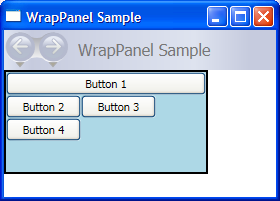

若有收获,就点个赞吧
0 人点赞


