Iterator
迭代器模式:提供一个对象来顺序访问聚合对象中的一系列数据,而不暴露聚合对象的内部表示。
迭代器在平时编码中使用得非常多,只要我们涉及到集合的便利操作的时候,比如foreach这些,基本都会使用迭代器,我们感觉不到使用了迭代器,是因为框架都将迭代器逻辑封装好了。其对应的UML如下: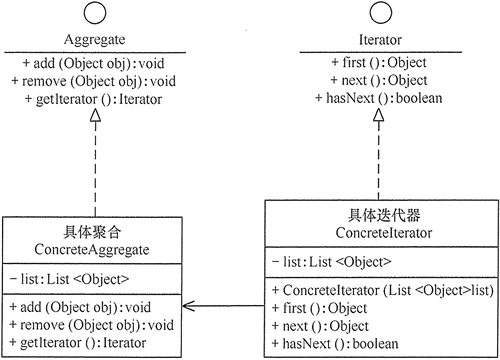
- 抽象聚合(Aggregate)角色:定义存储、添加、删除聚合对象以及创建迭代器对象的接口。
- 具体聚合(ConcreteAggregate)角色:实现抽象聚合类,返回一个具体迭代器的实例。
- 抽象迭代器(Iterator)角色:定义访问和遍历聚合元素的接口,通常包含 hasNext()、first()、next() 等方法。
具体迭代器(Concretelterator)角色:实现抽象迭代器接口中所定义的方法,完成对聚合对象的遍历,记录遍历的当前位置。
1、场景描述
先不谈框架,按照上面的UML,下面来实现一个书本的迭代器:有一个书架类,需要遍历书架上面的书籍信息。
2、实现
```csharp ///
/// 迭代器抽象 /// public interface Iterator{ /// /// 第一个 /// ///public T First(); /// /// 返回当前项数据,指向下一项数据 /// ///public T Next(); /// /// 是否还有下一项 /// ///public bool HasNext(); } /// /// 具体迭代器 /// 这里使用了结构体,是因为结构体是值类型,性能上更优 /// public struct ConcreteIterator: Iterator { private int _pos; private readonly List _datas; public ConcreteIterator(List datas) { if (datas == null || datas.Count == 0)throw new ArgumentNullException();_datas = datas;_pos = -1;
} public T First() {
return _datas[0];} public bool HasNext() {
  if (_pos < _datas.Count - 1)
      return true;
  return false;
}
public T Next() {
  T val = default(T);
  if (HasNext())
      val = _datas[++_pos];
  return val;
} }
///
public void Add(T data)
{
    books.Add(data);
}
public void Remove(T data)
{
    books.Remove(data);
}
public Iterator<T> GetIterator()
{
    return new ConcreteIterator<T>(books);
}
}
<a name="snKvw"></a>
## 3、优缺点
优点:

- 访问一个聚合对象的内容而无须暴露它的内部表示。
- 遍历任务交由迭代器完成,这简化了聚合类。
- 它支持以不同方式遍历一个聚合,甚至可以自定义迭代器的子类以支持新的遍历。
- 增加新的聚合类和迭代器类都很方便,无须修改原有代码。
- 封装性良好,为遍历不同的聚合结构提供一个统一的接口。

缺点:

- 增加了类的个数(其实我觉得也不是缺点,哪有又要马儿跑,又要马儿不吃草的)
<a name="JgZG0"></a>
## 4、应用场景

- 系统需要访问一个聚合对象的内容而无需暴露它的内部表示
- 系统需要支持对聚合对象的多种遍历
- 系统需要为不同的聚合结构提供一个统一的接口
<a name="k43l1"></a>
## 5、C#中的迭代器
我们在使用比如list等集合的时候, 可以直接使用foreach进行循环遍历, 那么可以直接使用的原因呢, 是因为list实现了IEnumerable接口, 该接口的声明如下:
```csharp
public interface IEnumerable
{
    IEnumerator GetEnumerator();
}
我们通过GetEnumerator方法会获取一个枚举器。这个枚举器是通过实现 IEnumerator 来得到的, IEnumerator的声明如下:
public interface IEnumerator
{
    //
    // 摘要:
    //     Gets the element in the collection at the current position of the enumerator.
    //
    // 返回结果:
    //     The element in the collection at the current position of the enumerator.
    object Current
    {
        get;
    }
    //
    // 摘要:
    //     Advances the enumerator to the next element of the collection.
    //
    // 返回结果:
    //     true if the enumerator was successfully advanced to the next element; false if
    //     the enumerator has passed the end of the collection.
    //
    // 异常:
    //   T:System.InvalidOperationException:
    //     The collection was modified after the enumerator was created.
    bool MoveNext();

    //
    // 摘要:
    //     Sets the enumerator to its initial position, which is before the first element
    //     in the collection.
    //
    // 异常:
    //   T:System.InvalidOperationException:
    //     The collection was modified after the enumerator was created.
    void Reset();
}
该接口定义了三个方法:
- current :获取当前位置元素
- MoveNext() :把枚举器位置前进到下一项,返回bool,表示位置是否有效(如果没有下一项返回false)
- Reset() :把位置重置为原始状态的位置(有索引是一般为-1)
所以在C#中为了可迭代遍历,直接让需要迭代的对象实现IEnumerator接口,实现该接口的GetEnumerator方法,然后再创建对应的枚举器即可,举例如下:
遍历一个包含多颜色的对象
/// <summary>
/// 颜色对象集合
/// </summary>
public class ColorAggregate : IEnumerable
{
    private List<string> colors = new();

    public void Add(string color)
    {
        this.colors.Add(color);
    }
    public void Remove(string color)
    {
        this.colors.Remove(color);
    }
    public IEnumerator GetEnumerator()
    {
        return new ColorEnumerator(colors);
    }

    // 枚举器
    public struct ColorEnumerator : IEnumerator
    {
        private List<string> _datas;
        private int _position;

        public ColorEnumerator(List<string> datas)
        {
            _datas = datas;
            _position = -1;
        }
        public object Current => _position > _datas.Count ? null : _datas[_position];

        public bool MoveNext()
        {
            if (_position < _datas.Count - 1)
            {
                _position++;
                return true;
            }
            return false;
        }

        public void Reset()
        {
            _position = -1;
        }
    }
}
// 客户端调用
ColorAggregate color = new ColorAggregate();
color.Add("red");
color.Add("green");
color.Add("yellow");
foreach (var item in color)
{
    Console.WriteLine(item);
}
上面代码运行结果:
现在我们在C#中也不用这样去创建一个迭代器, 得益于编译器的帮助, 我们可以直接像下面例子一样使用:
/// <summary>
/// 姓名集合
/// </summary>
public class NameAggregate: IEnumerable
{
    private List<string> names = new();
    public void Add(string color)
    {
        this.names.Add(color);
    }
    public void Remove(string color)
    {
        this.names.Remove(color);
    }
    /// <summary>
    /// 编译器会自动帮我们生成IEnumerator内部的Current,MoveNext和Reset方法
    /// </summary>
    /// <returns></returns>
    public IEnumerator GetEnumerator()
    {
        for (int i = 0; i < names.Count; i++)
            yield return names[i];
    }
}

// 遍历方式一样
NameAggregate name = new NameAggregate();
name.Add("red1");
name.Add("green1");
name.Add("yellow1");
foreach (var item in name)
{
    Console.WriteLine(item);
}

若有收获,就点个赞吧
0 人点赞


