集合
集合是Java 中提供的一种容器,可以用来存储多个数据
集合和数组的区别
- 数组的长度是固定的,集合的长度是可变的,
- 数组中可以存储基本数据类型值,也可以存储对象,而集合中只能存储对象
集合主要分为两大系列
- Collection 和 Map
- Collection 表示一组对象,Map 表示一组映射关系或键值对
Collection
- Collection 是集合层次结构中的根接口
- Collection 表示一组对象,这些对象也称为 Collection 的元素
- 一些 Collection 允许有重复的元素,而另一些则不允许
- 一些 Collection 是有序的,而另一些则是无序的
- JDK 不提供此接口的任何直接实现,它提供更具体的子接口(如 Set 和 List、Queue)实现
- 此接口通常用来传递 Collection,并在需要最大普遍性的地方操作这些 Collection
- Collection 是所有单列集合的父接口,因此在 Collection 中定义了单列集合(List 和 Set)通用的一些方法,这些方法可用于操作所有的单列集合
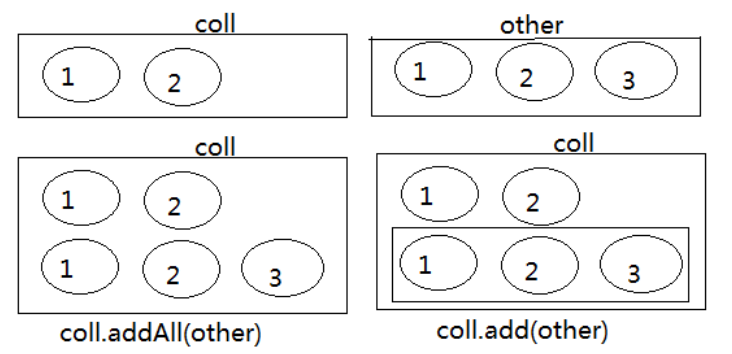
添加元素add(E obj):添加元素对象到当前集合中addAll(Collection<? extends E> other):添加 other 集合中的所有元素对象到当前集合中,即this = this ∪ other(并集)
删除元素boolean remove(Object obj):从当前集合中删除第一个找到的与 obj 对象 equals bing 返回 true 的元素boolean removeAll(Collection<?> coll):从当前集合中删除所有与 coll 集合中相同的元素,即this = this - this ∩ coll
判断boolean isEmpty():判断当前集合是否为空集合boolean contains(Object obj):判断当前集合中是否存在一个与 obj 对象 equals 返回 true 的元素boolean containsAll(Collection<?> c):判断 c 集合中的元素是否在当前集合中都存在,即 c 集合是否是当前集合的“子集”
获取元素个数int size():获取当前集合中实际存储的元素个数
交集boolean retainAll(Collection<?> coll):当前集合仅保留与 c 集合中的元素相同的元素,即当前集合中仅保留两个集合的交集,即 this = this ∩ coll;
转为数组Object[] toArray():返回包含当前集合中所有元素的数组
实际代码
import java.util.ArrayList;import java.util.Collection;public class Demo1Collection {public static void main(String[] args) {// 创建集合对象// 使用多态形式Collection<String> coll = new ArrayList<String>();// 使用方法// 添加功能 boolean add(String s)coll.add("小李广");coll.add("扫地僧");coll.add("石破天");System.out.println(coll);// boolean contains(E e) 判断o是否在集合中存在System.out.println("判断 扫地僧 是否在集合中"+coll.contains("扫地僧"));//boolean remove(E e) 删除在集合中的o元素System.out.println("删除石破天:"+coll.remove("石破天"));System.out.println("操作之后集合中元素:"+coll);// size() 集合中有几个元素System.out.println("集合中有"+coll.size()+"个元素");// Object[] toArray()转换成一个Object数组Object[] objects = coll.toArray();// 遍历数组for (int i = 0; i < objects.length; i++) {System.out.println(objects[i]);}// void clear() 清空集合coll.clear();System.out.println("集合中内容为:"+coll);// boolean isEmpty() 判断是否为空System.out.println(coll.isEmpty());}}
    @Test
    public void test2(){
        Collection coll = new ArrayList();
        coll.add(1);
        coll.add(2);

        System.out.println("coll集合元素的个数:" + coll.size());

        Collection other = new ArrayList();
        other.add(1);
        other.add(2);
        other.add(3);

        coll.addAll(other);
//        coll.add(other);
        System.out.println("coll集合元素的个数:" + coll.size());
    }
注意:coll.addAll(other);与coll.add(other);
    @Test
    public void test5(){
        Collection coll = new ArrayList();
        coll.add(1);
        coll.add(2);
        coll.add(3);
        coll.add(4);
        coll.add(5);
        System.out.println("coll集合元素的个数:" + coll.size());//5

        Collection other = new ArrayList();
        other.add(1);
        other.add(2);
        other.add(8);

        coll.retainAll(other);//保留交集
        System.out.println("coll集合元素的个数:" + coll.size());//2
    }

若有收获,就点个赞吧
0 人点赞


