给自己拍张照
from time import sleepfrom picamera import PiCameracamera=PiCamera()camera.resolution=(320,240)camera.start_preview()sleep(2)camera.capture('photo.jpg')
这里考虑到树莓派的计算能力,分辨率选择320,240
如果对于速度要求不高,可以选择更高分辨率,需要对后面的代码进行相应修改
把自己添加到识别队列中
# This is a demo of running face recognition on a Raspberry Pi.# This program will print out the names of anyone it recognizes to the console.# To run this, you need a Raspberry Pi 2 (or greater) with face_recognition and# the picamera[array] module installed.# You can follow this installation instructions to get your RPi set up:# https://gist.github.com/ageitgey/1ac8dbe8572f3f533df6269dab35df65import face_recognitionimport picameraimport numpy as np# Get a reference to the Raspberry Pi camera.# If this fails, make sure you have a camera connected to the RPi and that you# enabled your camera in raspi-config and rebooted first.camera = picamera.PiCamera()camera.resolution = (320, 240)output = np.empty((240, 320, 3), dtype=np.uint8)# Load a sample picture and learn how to recognize it.print("Loading known face image(s)")obama_image = face_recognition.load_image_file("obama_small.jpg")obama_face_encoding = face_recognition.face_encodings(obama_image)[0]lingxiao_image = face_recognition.load_image_file("LingxiaoWang.jpg")lingxiao_face_encoding = face_recognition.face_encodings(lingxiao_image)[0]# Initialize some variablesface_locations = []face_encodings = []while True:print("Capturing image.")# Grab a single frame of video from the RPi camera as a numpy arraycamera.capture(output, format="rgb")# Find all the faces and face encodings in the current frame of videoface_locations = face_recognition.face_locations(output)print("Found {} faces in image.".format(len(face_locations)))face_encodings = face_recognition.face_encodings(output, face_locations)# Loop over each face found in the frame to see if it's someone we know.for face_encoding in face_encodings:# See if the face is a match for the known face(s)match = face_recognition.compare_faces([obama_face_encoding,lingxiao_face_encoding], face_encoding)name = "<Unknown Person>"if match[0]:name = "Barack Obama"if match[1]:name = "Lingxiao Wang"print("I see someone named {}!".format(name))
这样树莓派便可以识别出我和奥巴马两个人了 :)
利用opencv进行显示
进一步修改代码,利用opencv把自己圈出来
# This is a demo of running face recognition on a Raspberry Pi.# This program will print out the names of anyone it recognizes to the console.# To run this, you need a Raspberry Pi 2 (or greater) with face_recognition and# the picamera[array] module installed.# You can follow this installation instructions to get your RPi set up:# https://gist.github.com/ageitgey/1ac8dbe8572f3f533df6269dab35df65import face_recognitionimport picameraimport numpy as npimport cv2# Get a reference to the Raspberry Pi camera.# If this fails, make sure you have a camera connected to the RPi and that you# enabled your camera in raspi-config and rebooted first.camera = picamera.PiCamera()camera.resolution = (320, 240)frame = np.empty((240, 320, 3), dtype=np.uint8)output = np.empty((240, 320, 3), dtype=np.uint8)# Load a sample picture and learn how to recognize it.print("Loading known face image(s)")obama_image = face_recognition.load_image_file("obama_small.jpg")obama_face_encoding = face_recognition.face_encodings(obama_image)[0]lingxiao_image = face_recognition.load_image_file("LingxiaoWang.jpg")lingxiao_face_encoding = face_recognition.face_encodings(lingxiao_image)[0]# Initialize some variablesface_locations = []face_encodings = []while True:face_names=[]print("Capturing image.")# Grab a single frame of video from the RPi camera as a numpy arraycamera.capture(frame, format="bgr")#这里需要注意的是,opencv使用的是bgr格式的图像,要转换成rgb格式才能用来识别frame=frame.reshape((240,320,3))output=frame[:,:,::-1]# Find all the faces and face encodings in the current frame of videoface_locations = face_recognition.face_locations(output)print("Found {} faces in image.".format(len(face_locations)))face_encodings = face_recognition.face_encodings(output, face_locations)# Loop over each face found in the frame to see if it's someone we know.for face_encoding in face_encodings:# See if the face is a match for the known face(s)match = face_recognition.compare_faces([obama_face_encoding,lingxiao_face_encoding], face_encoding)name = "<Unknown Person>"if match[0]:name = "Barack Obama"if match[1]:name = "Lingxiao Wang"print("I see someone named {}!".format(name))face_names.append(name)# Display the resultsfor (top, right, bottom, left), name in zip(face_locations, face_names):# Draw a box around the facecv2.rectangle(frame, (left, top), (right, bottom), (0, 0, 255), 2)# Draw a label with a name below the facecv2.rectangle(frame, (left, bottom - 35), (right, bottom), (0, 0, 255), cv2.FILLED)font = cv2.FONT_HERSHEY_DUPLEXcv2.putText(frame, name, (left + 6, bottom - 6), font, 1.0, (255, 255, 255), 1)# Display the resulting imagecv2.imshow('Video', frame)if cv2.waitKey(1) & 0xFF == ord('q'):breakcv2.destroyAllWindows()
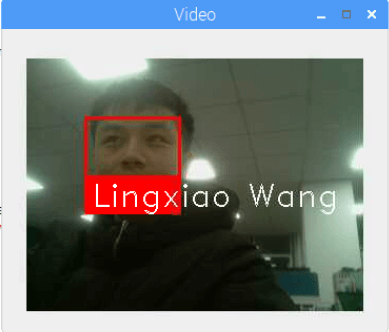 我自己
我自己 我和奥巴马(手动滑稽)
 帅到模糊的学长
另外,此模型对于亚洲人脸识别准确率有待提高,可能会出现张冠李戴的情况。
opencv的玄学
安装opencv是个玄学,碰到问题自行百度,安装相应的库即可
注意默认pip版本,默认python版本

若有收获,就点个赞吧
0 人点赞


